

EgoMind
Collection
2 items • Updated






Zhenghao Chen1,2, Huiqun Wang1,2, Di Huang1,2✉
1State Key Laboratory of Complex and Critical Software Environment, Beihang University
2School of Computer Science and Engineering, Beihang University
EgoMind is a Chain-of-Thought (CoT) framework that enables geometry-free spatial reasoning through two key components:
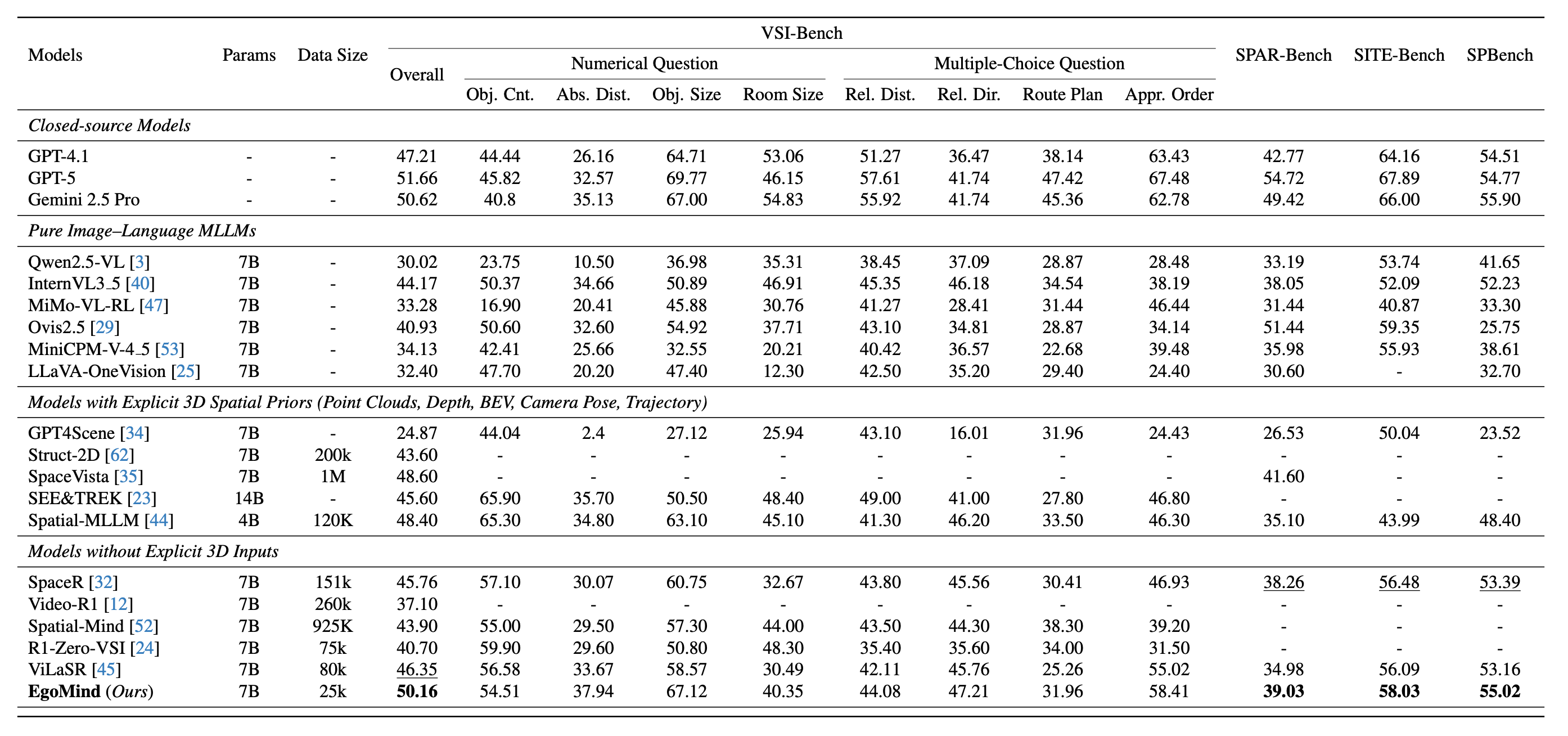
With only 5K auto-generated SFT samples and 20K RL samples, EgoMind achieves competitive results on VSI-Bench, SPAR-Bench, SITE-Bench, and SPBench, demonstrating the potential of linguistic reasoning for spatial cognition.

EgoMind achieves competitive performance among open-source MLLMs across four spatial reasoning benchmarks, using only 25K training samples (5K CoT-supervised + 20K RL) without any explicit 3D priors.
# Create and activate a Conda environment (Python 3.11)
conda create -n egomind python=3.11 -y
conda activate egomind

# Install uv, PyTorch, and project dependencies
pip install uv
uv pip install torch==2.6.0 torchvision==0.21.0 torchaudio==2.6.0 --index-url https://download.pytorch.org/whl/cu124
uv pip install -r requirements.txt
Download the model weights into the repo’s models/ directory (from the EgoMind repository root). Requires Hugging Face CLI (pip install huggingface_hub).
huggingface-cli download Hyggge/EgoMind-7B --resume-download --local-dir ./models/EgoMind-7B
After this, point --model_path to models/EgoMind-7B for local inference, or keep using Hyggge/EgoMind-7B to load from the Hub.
Download the benchmark data and place them under evaluation/datasets/. See evaluation/datasets/README.md for detailed instructions.
The expected directory structure:
evaluation/datasets/
├── VSI-Bench/
│   ├── qa_processed.jsonl
│   └── data/                  # arkitscenes/, scannet/, scannetpp/
├── SPAR-Bench/
│   ├── qa_processed.jsonl
│   └── data/                  # images/
├── SITE-Bench/
│   ├── qa_processed.jsonl
│   └── data/                  # ActivityNet/, MLVU/, MVBench/, ...
└── SPBench/
    ├── qa_processed.jsonl
    └── data/                  # SPBench-MV-images/, SPBench-SI-images/
All benchmarks share the same entry point evaluation/run_eval.py. Below are the commands for each benchmark.
VSI-Bench
python evaluation/run_eval.py \
    --model_path models/EgoMind-7B \
    --output_path outputs/vsibench.jsonl \
    --benchmark vsibench
SPAR-Bench
python evaluation/run_eval.py \
    --model_path models/EgoMind-7B \
    --output_path outputs/sparbench.jsonl \
    --benchmark sparbench
SITE-Bench
python evaluation/run_eval.py \
    --model_path models/EgoMind-7B \
    --output_path outputs/sitebench.jsonl \
    --benchmark sitebench
SPBench
python evaluation/run_eval.py \
    --model_path models/EgoMind-7B \
    --output_path outputs/spbench.jsonl \
    --benchmark spbench
Calculate the metric using existing outputs only (skip inference):
python evaluation/run_eval.py \
    --output_path outputs/vsibench.jsonl \
    --benchmark vsibench \
    --only_eval
If you find our work helpful, please consider citing our paper:
@misc{chen2026egomind,
      title={EgoMind: Activating Spatial Cognition through Linguistic Reasoning in MLLMs},
      author={Zhenghao Chen and Huiqun Wang and Di Huang},
      year={2026},
      eprint={2604.03318},
      archivePrefix={arXiv},
      primaryClass={cs.CV},
      url={https://arxiv.org/abs/2604.03318},
}