
Instructions to use LINs-lab/DynMoE-StableLM-1.6B with libraries, inference providers, notebooks, and local apps. Follow these links to get started.
- Libraries
- Transformers
How to use LINs-lab/DynMoE-StableLM-1.6B with Transformers:
# Use a pipeline as a high-level helper from transformers import pipeline pipe = pipeline("text-generation", model="LINs-lab/DynMoE-StableLM-1.6B", trust_remote_code=True)# Load model directly from transformers import AutoModelForCausalLM model = AutoModelForCausalLM.from_pretrained("LINs-lab/DynMoE-StableLM-1.6B", trust_remote_code=True, dtype="auto") - Notebooks

- Google Colab
- Kaggle
- Local Apps
- vLLM
How to use LINs-lab/DynMoE-StableLM-1.6B with vLLM:
Install from pip and serve model
# Install vLLM from pip: pip install vllm # Start the vLLM server: vllm serve "LINs-lab/DynMoE-StableLM-1.6B" # Call the server using curl (OpenAI-compatible API): curl -X POST "http://localhost:8000/v1/completions" \ -H "Content-Type: application/json" \ --data '{ "model": "LINs-lab/DynMoE-StableLM-1.6B", "prompt": "Once upon a time,", "max_tokens": 512, "temperature": 0.5 }'Use Docker
docker model run hf.co/LINs-lab/DynMoE-StableLM-1.6B
- SGLang
How to use LINs-lab/DynMoE-StableLM-1.6B with SGLang:
Install from pip and serve model
# Install SGLang from pip: pip install sglang # Start the SGLang server: python3 -m sglang.launch_server \ --model-path "LINs-lab/DynMoE-StableLM-1.6B" \ --host 0.0.0.0 \ --port 30000 # Call the server using curl (OpenAI-compatible API): curl -X POST "http://localhost:30000/v1/completions" \ -H "Content-Type: application/json" \ --data '{ "model": "LINs-lab/DynMoE-StableLM-1.6B", "prompt": "Once upon a time,", "max_tokens": 512, "temperature": 0.5 }'Use Docker images
docker run --gpus all \ --shm-size 32g \ -p 30000:30000 \ -v ~/.cache/huggingface:/root/.cache/huggingface \ --env "HF_TOKEN=<secret>" \ --ipc=host \ lmsysorg/sglang:latest \ python3 -m sglang.launch_server \ --model-path "LINs-lab/DynMoE-StableLM-1.6B" \ --host 0.0.0.0 \ --port 30000 # Call the server using curl (OpenAI-compatible API): curl -X POST "http://localhost:30000/v1/completions" \ -H "Content-Type: application/json" \ --data '{ "model": "LINs-lab/DynMoE-StableLM-1.6B", "prompt": "Once upon a time,", "max_tokens": 512, "temperature": 0.5 }' - Docker Model Runner
How to use LINs-lab/DynMoE-StableLM-1.6B with Docker Model Runner:
docker model run hf.co/LINs-lab/DynMoE-StableLM-1.6B
# Load model directly
from transformers import AutoModelForCausalLM
model = AutoModelForCausalLM.from_pretrained("LINs-lab/DynMoE-StableLM-1.6B", trust_remote_code=True, dtype="auto")Dynamic Mixture of Experts: An Auto-Tuning Approach for Efficient Transformer Models
If our project helps you, please give us a star ⭐ on GitHub and cite our paper!
News
- [2025.01.23]: 🎉 Our paper is accepted to ICLR 2025!
- [2024.05.25] Our checkpoints are available now!
- [2024.05.23] Our paper is released!
Why Do We Need DynMoE?
Sparse MoE (SMoE) has an unavoidable drawback: the performance of SMoE heavily relies on the choice of hyper-parameters, such as the number of activated experts per token (top-k) and the number of experts.
Also, identifying the optimal hyper-parameter without a sufficient number of ablation studies is challenging. As the size of the models continues to grow, this limitation could result in a significant waste of computational resources, and in turn, could hinder the efficiency of training MoE-based models in practice.
Now, our DynMoE addresses these challenges through the two components introduced in Dynamic Mixture of Experts (DynMoE).
Dynamic Mixture of Experts (DynMoE)
Top-Any Gating
We first introduce a novel gating method that enables each token to automatically determine the number of experts to activate.
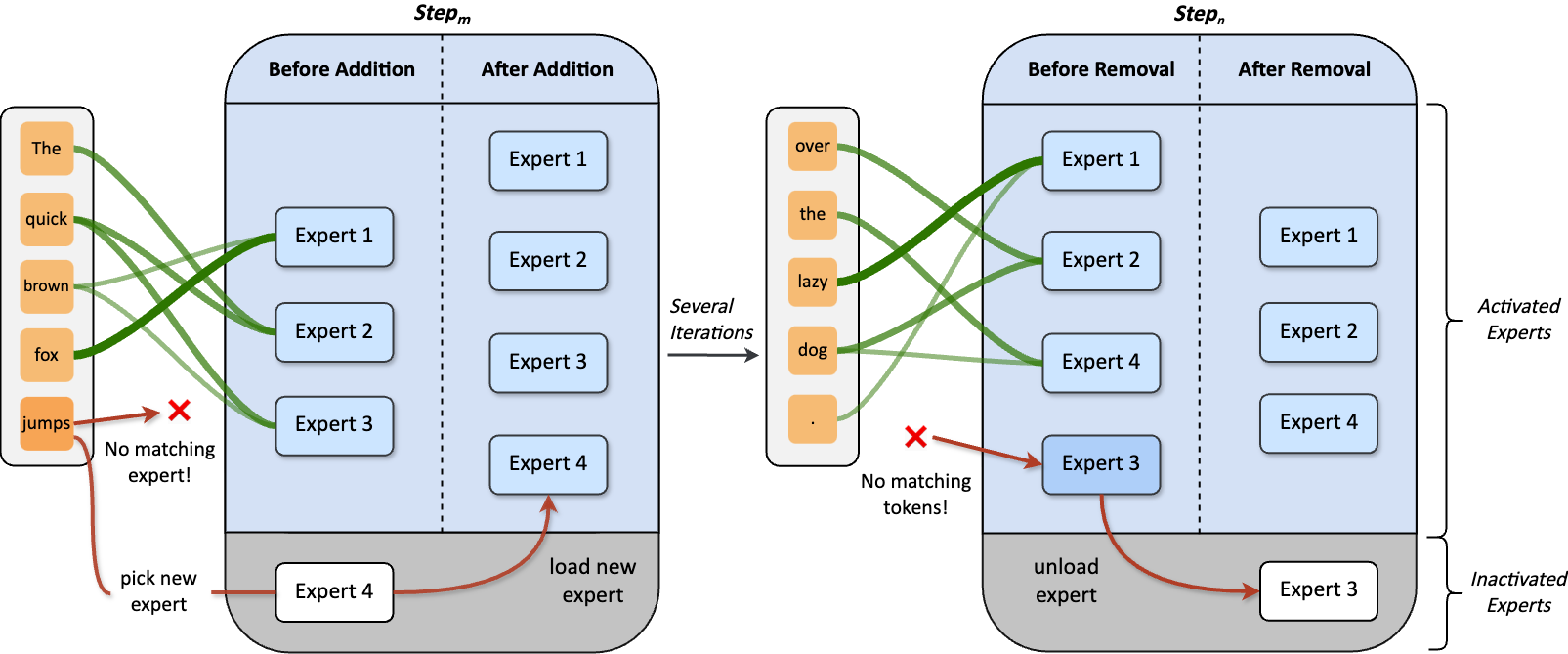
Adaptive Training Process
Our method also includes an adaptive process automatically adjusts the number of experts during training.
Can We Trust DynMoE? Yes!
- On language tasks, DynMoE surpasses the average performance among various MoE settings.
- Effectiveness of DynMoE remains consistent in both Vision and Vision-Language tasks.
- Although sparsity is not enforced in DynMoE, it maintains efficiency by activating even less parameters!
Model Zoo
| Model | Activated Params / Total Params | Transformers(HF) |
|---|---|---|
| DynMoE-StableLM-1.6B | 1.8B / 2.9B | LINs-lab/DynMoE-StableLM-1.6B |
| DynMoE-Qwen-1.8B | 2.2B / 3.1B | LINs-lab/DynMoE-Qwen-1.8B |
| DynMoE-Phi-2-2.7B | 3.4B / 5.3B | LINs-lab/DynMoE-Phi-2-2.7B |
Directory Specification
Experiment Code
EMoE/contains experiments on language and vision tasks, which uses tutel-based DynMoE.MoE-LLaVA/contains experiments on language-vision tasks, which uses deepspeed-0.9.5-based DynMoE.
DynMoE Implementations
Deepspeed/provides DynMoE-Deepspeed implementation. (Recommend)EMoE/tutel/provides DynMoE-Tutel implementation.
Environment Setup
Please refer to instructions under EMoE/ and MoE-LLaVA/.
Usage
Tutel Examples
Please refer to EMoE/Language/README.md and EMoE/Language/Vision.md.
DeepSpeed Examples (Recommend)
We give a minimal example to train DynMoE-ViT on ImageNet-1K from scratch at Examples/DeepSpeed-MoE.
- Check
Examples/DeepSpeed-MoE/dynmoe_vit.pyfor how to use DynMoE in model implementation. - Check
Examples/DeepSpeed-MoE/train.pyfor how to train model with DynMoE.
Acknowledgement
We are grateful for the following awesome projects:
Citation
If you find this project helpful, please consider citing our work:
@article{guo2024dynamic,
title={Dynamic Mixture of Experts: An Auto-Tuning Approach for Efficient Transformer Models},
author={Guo, Yongxin and Cheng, Zhenglin and Tang, Xiaoying and Lin, Tao},
journal={arXiv preprint arXiv:2405.14297},
year={2024}
}
Star History
- Downloads last month
- 23


# Use a pipeline as a high-level helper from transformers import pipeline pipe = pipeline("text-generation", model="LINs-lab/DynMoE-StableLM-1.6B", trust_remote_code=True)