

Install from WinGet (Windows)
winget install llama.cpp
# Start a local OpenAI-compatible server with a web UI:
llama serve -hf LoneStriker/code-millenials-34b-GGUF:# Run inference directly in the terminal:
llama cli -hf LoneStriker/code-millenials-34b-GGUF:Use pre-built binary
# Download pre-built binary from:
# https://github.com/ggerganov/llama.cpp/releases# Start a local OpenAI-compatible server with a web UI:
./llama-server -hf LoneStriker/code-millenials-34b-GGUF:# Run inference directly in the terminal:
./llama-cli -hf LoneStriker/code-millenials-34b-GGUF:Build from source code
git clone https://github.com/ggerganov/llama.cpp.git
cd llama.cpp
cmake -B build
cmake --build build -j --target llama-server llama-cli# Start a local OpenAI-compatible server with a web UI:
./build/bin/llama-server -hf LoneStriker/code-millenials-34b-GGUF:# Run inference directly in the terminal:
./build/bin/llama-cli -hf LoneStriker/code-millenials-34b-GGUF:Use Docker
docker model run hf.co/LoneStriker/code-millenials-34b-GGUF:Bud Code Millenials 34B
Welcome to our Code Model repository! Our model is specifically fine-tuned for code generation tasks. Bud Millenial Code Gen open-source models are currently the State of the Art (SOTA) for code generation, beating all the existing models of all sizes. We have achieved a HumanEval value of 80.48 @ Pass 1, beating proprietary models like Gemini Ultra, Claude, GPT-3.5 etc. by a large margin, and on par with GPT-4 (HumanEval ~ 82. Ref. WizardCoder). Our proprietary model (Bud Code Jr) beats GPT-4 as well with a HumanEval value of 88.2 & a context size of 168K, we will be releasing an API for Researchers, Enterprises, and potential Partners by January 2024 end. If interested, please reach out to jithinvg@bud.studio
News 🔥🔥🔥
- [2024/01/09] We released Code Millenials 3B , which achieves the 56.09 pass@1 on the HumanEval Benchmarks.
- [2024/01/09] We released Code Millenials 1B , which achieves the 51.82 pass@1 on the HumanEval Benchmarks.
- [2024/01/03] We released Code Millenials 34B , which achieves the 80.48 pass@1 on the HumanEval Benchmarks.
- [2024/01/02] We released Code Millenials 13B , which achieves the 76.21 pass@1 on the HumanEval Benchmarks.
HumanEval
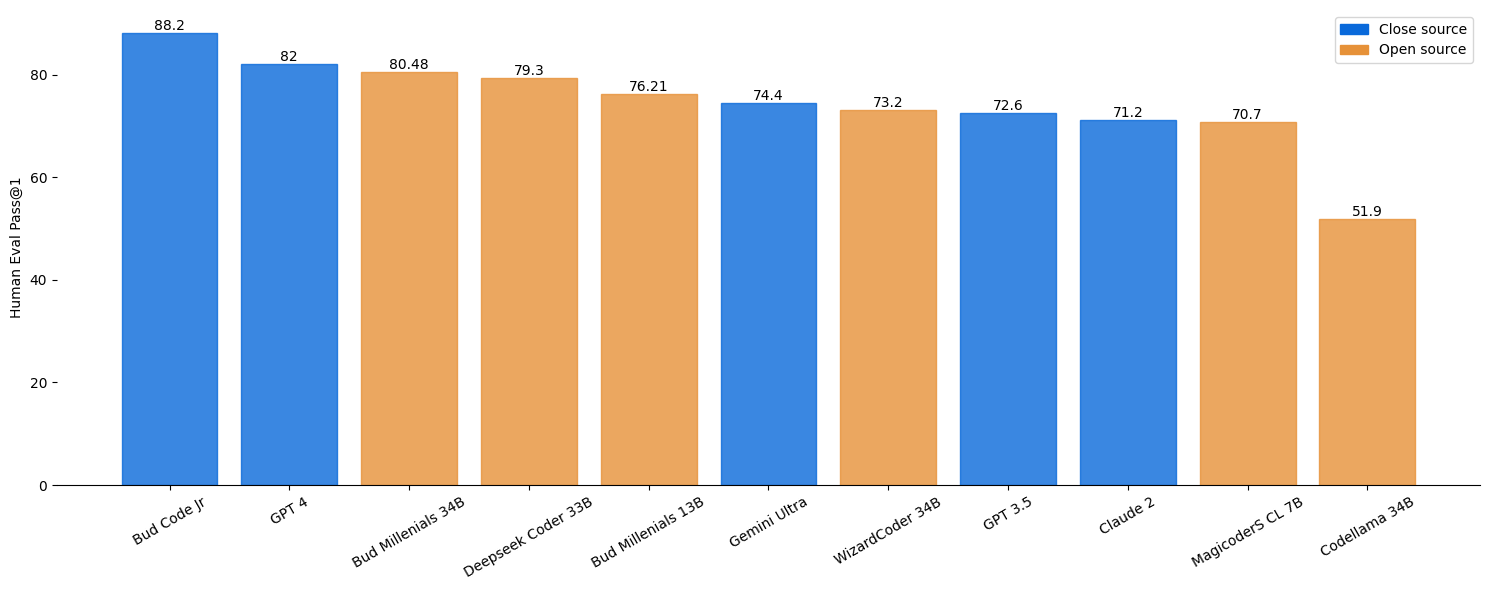
For the millenial models, the eval script in the github repo is used for the above result.
Note: The humaneval values of other models are taken from the official repos of WizardCoder, DeepseekCoder, Gemini etc.
Models
| Model | Checkpoint | HumanEval (+) | MBPP (+) |
|---|---|---|---|
| Code Millenials 34B | HF Link | 80.48 (75) | 74.68 (62.9) |
| Code Millenials 13B | HF Link | 76.21 (69.5) | 70.17 (57.6) |
| Code Millenials 3B | HF Link | 56.09 (52.43) | 55.13 (47.11) |
| Code Millenials 1B | HF Link | 51.82 (48.17) | 53.13 (44.61) |
🚀 Quick Start
Inference code using the pre-trained model from the Hugging Face model hub
import torch
from transformers import AutoTokenizer, AutoModelForCausalLM

tokenizer = AutoTokenizer.from_pretrained("budecosystem/code-millenials-34b")
model = AutoModelForCausalLM.from_pretrained("budecosystem/code-millenials-34b")

template = """A chat between a curious user and an artificial intelligence assistant. The assistant gives helpful, detailed, and polite answers to the user's questions.

### Instruction: {instruction}

### Response:"""

instruction = <Your code instruction here>

prompt = template.format(instruction=instruction)

inputs = tokenizer(prompt, return_tensors="pt")
sample = model.generate(**inputs, max_length=128)
print(tokenizer.decode(sample[0]))
Training details
The model is trained of 16 A100 80GB for approximately 50hrs.
| Hyperparameters | Value |
|---|---|
| per_device_train_batch_size | 16 |
| gradient_accumulation_steps | 1 |
| epoch | 3 |
| steps | 2157 |
| learning_rate | 2e-5 |
| lr schedular type | cosine |
| warmup ratio | 0.1 |
| optimizer | adamw |
| fp16 | True |
| GPU | 16 A100 80GB |
Important Note
- Bias, Risks, and Limitations: Model may sometimes make errors, produce misleading contents, or struggle to manage tasks that are not related to coding.
- Downloads last month
- 4
3-bit
4-bit
5-bit
6-bit
8-bit
Evaluation results
- pass@1 on HumanEvalself-reported0.805
Install (macOS, Linux)
# Start a local OpenAI-compatible server with a web UI: llama serve -hf LoneStriker/code-millenials-34b-GGUF:# Run inference directly in the terminal: llama cli -hf LoneStriker/code-millenials-34b-GGUF: