


| # Model Overview | |
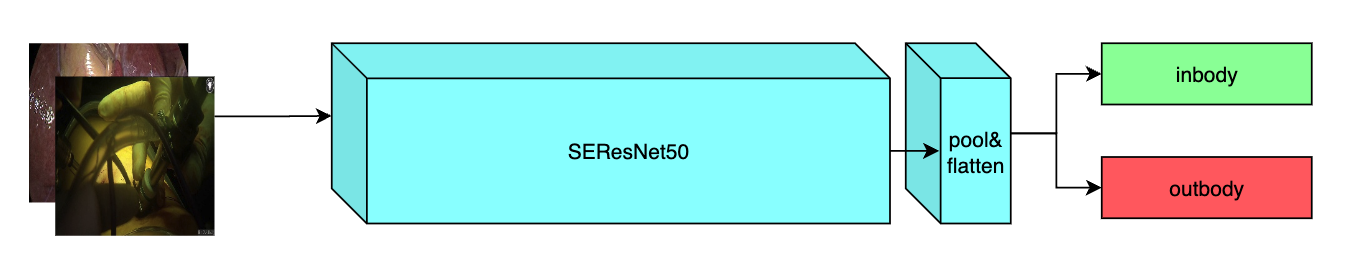
| A pre-trained model for the endoscopic inbody classification task and trained using the SEResNet50 structure, whose details can be found in [1]. All datasets are from private samples of [Activ Surgical](https://www.activsurgical.com/). Samples in training and validation dataset are from the same 4 videos, while test samples are from different two videos. | |
| The [PyTorch model](https://drive.google.com/file/d/14CS-s1uv2q6WedYQGeFbZeEWIkoyNa-x/view?usp=sharing) and [torchscript model](https://drive.google.com/file/d/1fOoJ4n5DWKHrt9QXTZ2sXwr9C-YvVGCM/view?usp=sharing) are shared in google drive. Modify the `bundle_root` parameter specified in `configs/train.json` and `configs/inference.json` to reflect where models are downloaded. Expected directory path to place downloaded models is `models/` under `bundle_root`. | |
|  | |
| ## Data | |
| The datasets used in this work were provided by [Activ Surgical](https://www.activsurgical.com/). | |
| Since datasets are private, we provide a [link](https://github.com/Project-MONAI/MONAI-extra-test-data/releases/download/0.8.1/inbody_outbody_samples.zip) of 20 samples (10 in-body and 10 out-body) to show what they look like. | |
| ### Preprocessing | |
| After downloading this dataset, python script in `scripts` folder named `data_process` can be used to generate label json files by running the command below and modifying `datapath` to path of unziped downloaded data. Generated label json files will be stored in `label` folder under the bundle path. | |
| ``` | |
| python scripts/data_process.py --datapath /path/to/data/root | |
| ``` | |
| By default, label path parameter in `train.json` and `inference.json` of this bundle is point to the generated `label` folder under bundle path. If you move these generated label files to another place, please modify the `train_json`, `val_json` and `test_json` parameters specified in `configs/train.json` and `configs/inference.json` to where these label files are. | |
| The input label json should be a list made up by dicts which includes `image` and `label` keys. An example format is shown below. | |
| ``` | |
| [ | |
| { | |
| "image":"/path/to/image/image_name0.jpg", | |
| "label": 0 | |
| }, | |
| { | |
| "image":"/path/to/image/image_name1.jpg", | |
| "label": 0 | |
| }, | |
| { | |
| "image":"/path/to/image/image_name2.jpg", | |
| "label": 1 | |
| }, | |
| .... | |
| { | |
| "image":"/path/to/image/image_namek.jpg", | |
| "label": 0 | |
| }, | |
| ] | |
| ``` | |
| ## Training configuration | |
| The training as performed with the following: | |
| - GPU: At least 12GB of GPU memory | |
| - Actual Model Input: 256 x 256 x 3 | |
| - Optimizer: Adam | |
| - Learning Rate: 1e-3 | |
| ### Input | |
| A three channel video frame | |
| ### Output | |
| Two Channels | |
| - Label 0: in body | |
| - Label 1: out body | |
| ## Performance | |
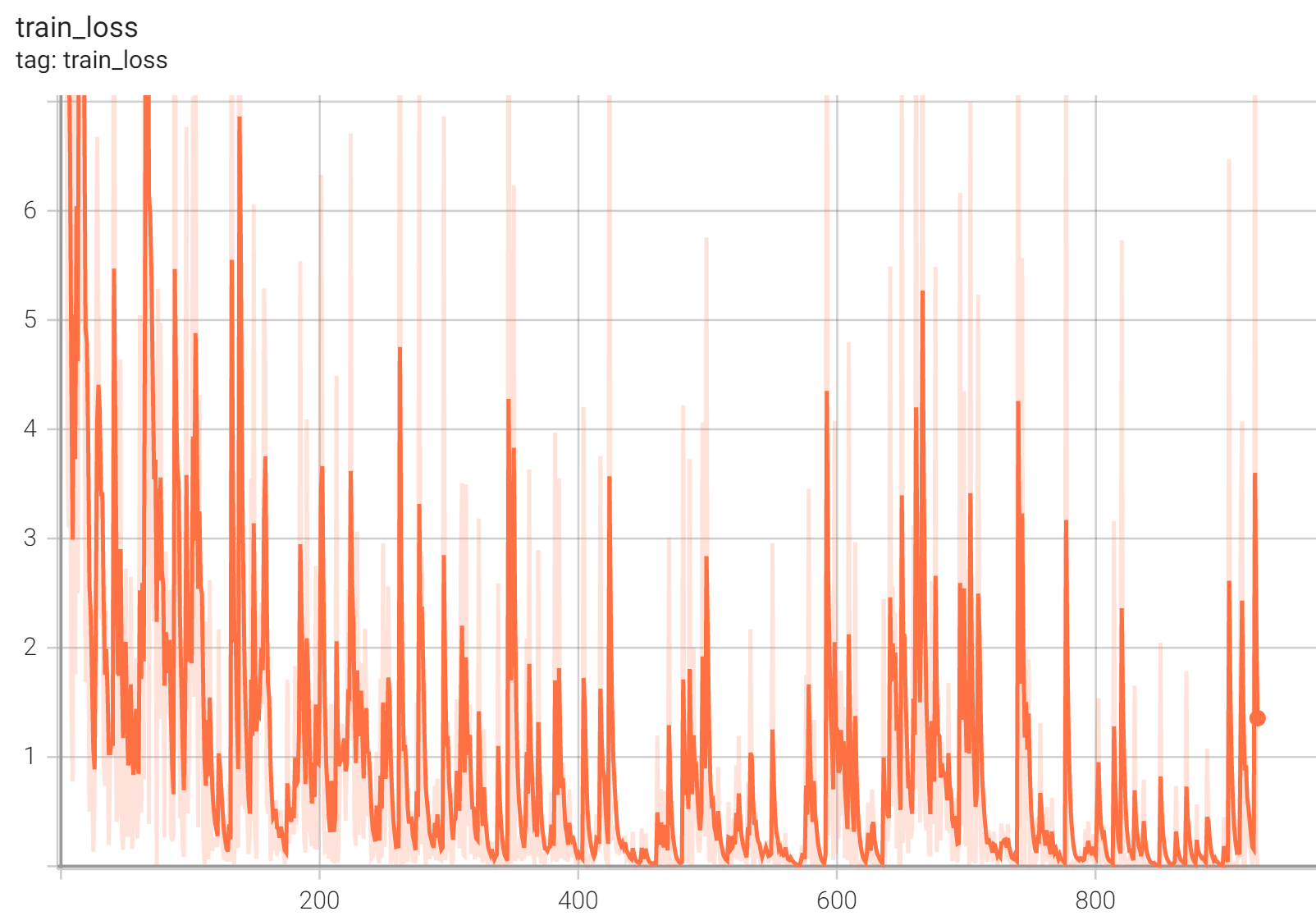
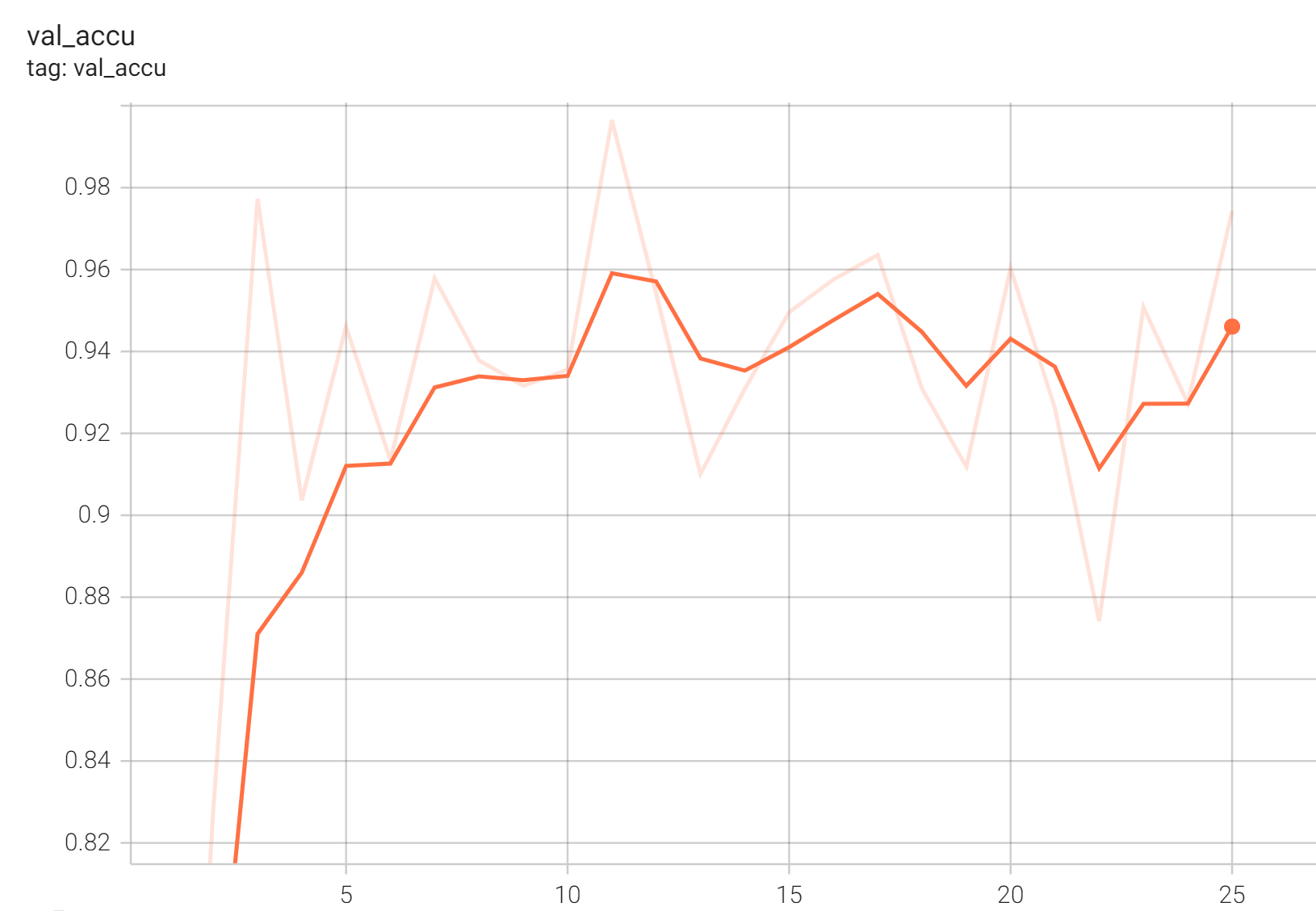
| Accuracy was used for evaluating the performance of the model. This model achieves an accuracy score of 0.99 | |
| #### Training Loss | |
|  | |
| #### Validation Accuracy | |
|  | |
| #### TensorRT speedup | |
| The `endoscopic_inbody_classification` bundle supports acceleration with TensorRT through the ONNX-TensorRT method. The table below displays the speedup ratios observed on an A100 80G GPU. | |
| | method | torch_fp32(ms) | torch_amp(ms) | trt_fp32(ms) | trt_fp16(ms) | speedup amp | speedup fp32 | speedup fp16 | amp vs fp16| | |
| | :---: | :---: | :---: | :---: | :---: | :---: | :---: | :---: | :---: | | |
| | model computation | 6.50 | 9.23 | 2.78 | 2.31 | 0.70 | 2.34 | 2.81 | 4.00 | | |
| | end2end | 23.54 | 23.78 | 7.37 | 7.14 | 0.99 | 3.19 | 3.30 | 3.33 | | |
| Where: | |
| - `model computation` means the speedup ratio of model's inference with a random input without preprocessing and postprocessing | |
| - `end2end` means run the bundle end-to-end with the TensorRT based model. | |
| - `torch_fp32` and `torch_amp` are for the PyTorch models with or without `amp` mode. | |
| - `trt_fp32` and `trt_fp16` are for the TensorRT based models converted in corresponding precision. | |
| - `speedup amp`, `speedup fp32` and `speedup fp16` are the speedup ratios of corresponding models versus the PyTorch float32 model | |
| - `amp vs fp16` is the speedup ratio between the PyTorch amp model and the TensorRT float16 based model. | |
| Currently, the only available method to accelerate this model is through ONNX-TensorRT. However, the Torch-TensorRT method is under development and will be available in the near future. | |
| This result is benchmarked under: | |
| - TensorRT: 8.5.3+cuda11.8 | |
| - Torch-TensorRT Version: 1.4.0 | |
| - CPU Architecture: x86-64 | |
| - OS: ubuntu 20.04 | |
| - Python version:3.8.10 | |
| - CUDA version: 12.0 | |
| - GPU models and configuration: A100 80G | |
| ## MONAI Bundle Commands | |
| In addition to the Pythonic APIs, a few command line interfaces (CLI) are provided to interact with the bundle. The CLI supports flexible use cases, such as overriding configs at runtime and predefining arguments in a file. | |
| For more details usage instructions, visit the [MONAI Bundle Configuration Page](https://docs.monai.io/en/latest/config_syntax.html). | |
| #### Execute training: | |
| ``` | |
| python -m monai.bundle run --config_file configs/train.json | |
| ``` | |
| Please note that if the default dataset path is not modified with the actual path in the bundle config files, you can also override it by using `--dataset_dir`: | |
| ``` | |
| python -m monai.bundle run --config_file configs/train.json --dataset_dir <actual dataset path> | |
| ``` | |
| #### Override the `train` config to execute multi-GPU training: | |
| ``` | |
| torchrun --standalone --nnodes=1 --nproc_per_node=2 -m monai.bundle run \ | |
| --config_file "['configs/train.json','configs/multi_gpu_train.json']" | |
| ``` | |
| Please note that the distributed training-related options depend on the actual running environment; thus, users may need to remove `--standalone`, modify `--nnodes`, or do some other necessary changes according to the machine used. For more details, please refer to [pytorch's official tutorial](https://pytorch.org/tutorials/intermediate/ddp_tutorial.html). | |
| In addition, if using the 20 samples example dataset, the preprocessing script will divide the samples to 16 training samples, 2 validation samples and 2 test samples. However, pytorch multi-gpu training requires number of samples in dataloader larger than gpu numbers. Therefore, please use no more than 2 gpus to run this bundle if using the 20 samples example dataset. | |
| #### Override the `train` config to execute evaluation with the trained model: | |
| ``` | |
| python -m monai.bundle run --config_file "['configs/train.json','configs/evaluate.json']" | |
| ``` | |
| #### Execute inference: | |
| ``` | |
| python -m monai.bundle run --config_file configs/inference.json | |
| ``` | |
| The classification result of every images in `test.json` will be printed to the screen. | |
| #### Export checkpoint to TorchScript file: | |
| ``` | |
| python -m monai.bundle ckpt_export network_def --filepath models/model.ts --ckpt_file models/model.pt --meta_file configs/metadata.json --config_file configs/inference.json | |
| ``` | |
| #### Export checkpoint to TensorRT based models with fp32 or fp16 precision: | |
| ```bash | |
| python -m monai.bundle trt_export --net_id network_def \ | |
| --filepath models/model_trt.ts --ckpt_file models/model.pt \ | |
| --meta_file configs/metadata.json --config_file configs/inference.json \ | |
| --precision <fp32/fp16> --use_onnx "True" --use_trace "True" | |
| ``` | |
| #### Execute inference with the TensorRT model: | |
| ``` | |
| python -m monai.bundle run --config_file "['configs/inference.json', 'configs/inference_trt.json']" | |
| ``` | |
| # References | |
| [1] J. Hu, L. Shen and G. Sun, Squeeze-and-Excitation Networks, 2018 IEEE/CVF Conference on Computer Vision and Pattern Recognition, 2018, pp. 7132-7141. https://arxiv.org/pdf/1709.01507.pdf | |
| # License | |
| Copyright (c) MONAI Consortium | |
| Licensed under the Apache License, Version 2.0 (the "License"); | |
| you may not use this file except in compliance with the License. | |
| You may obtain a copy of the License at | |
| http://www.apache.org/licenses/LICENSE-2.0 | |
| Unless required by applicable law or agreed to in writing, software | |
| distributed under the License is distributed on an "AS IS" BASIS, | |
| WITHOUT WARRANTIES OR CONDITIONS OF ANY KIND, either express or implied. | |
| See the License for the specific language governing permissions and | |
| limitations under the License. | |