UI-Voyager: A Self-Evolving GUI Agent Learning via Failed Experience
Paper • 2603.24533 • Published • 47
How to use MarsXL/UI-Voyager with Transformers:
# Use a pipeline as a high-level helper
from transformers import pipeline
pipe = pipeline("image-text-to-text", model="MarsXL/UI-Voyager")
messages = [
{
"role": "user",
"content": [
{"type": "image", "url": "https://huggingface.co/datasets/huggingface/documentation-images/resolve/main/p-blog/candy.JPG"},
{"type": "text", "text": "What animal is on the candy?"}
]
},
]
pipe(text=messages) # Load model directly
from transformers import AutoProcessor, AutoModelForImageTextToText
processor = AutoProcessor.from_pretrained("MarsXL/UI-Voyager")
model = AutoModelForImageTextToText.from_pretrained("MarsXL/UI-Voyager")
messages = [
{
"role": "user",
"content": [
{"type": "image", "url": "https://huggingface.co/datasets/huggingface/documentation-images/resolve/main/p-blog/candy.JPG"},
{"type": "text", "text": "What animal is on the candy?"}
]
},
]
inputs = processor.apply_chat_template(
messages,
add_generation_prompt=True,
tokenize=True,
return_dict=True,
return_tensors="pt",
).to(model.device)
outputs = model.generate(**inputs, max_new_tokens=40)
print(processor.decode(outputs[0][inputs["input_ids"].shape[-1]:]))How to use MarsXL/UI-Voyager with vLLM:
# Install vLLM from pip:
pip install vllm
# Start the vLLM server:
vllm serve "MarsXL/UI-Voyager"
# Call the server using curl (OpenAI-compatible API):
curl -X POST "http://localhost:8000/v1/chat/completions" \
-H "Content-Type: application/json" \
--data '{
"model": "MarsXL/UI-Voyager",
"messages": [
{
"role": "user",
"content": [
{
"type": "text",
"text": "Describe this image in one sentence."
},
{
"type": "image_url",
"image_url": {
"url": "https://cdn.britannica.com/61/93061-050-99147DCE/Statue-of-Liberty-Island-New-York-Bay.jpg"
}
}
]
}
]
}'docker model run hf.co/MarsXL/UI-Voyager
How to use MarsXL/UI-Voyager with SGLang:
# Install SGLang from pip:
pip install sglang
# Start the SGLang server:
python3 -m sglang.launch_server \
--model-path "MarsXL/UI-Voyager" \
--host 0.0.0.0 \
--port 30000
# Call the server using curl (OpenAI-compatible API):
curl -X POST "http://localhost:30000/v1/chat/completions" \
-H "Content-Type: application/json" \
--data '{
"model": "MarsXL/UI-Voyager",
"messages": [
{
"role": "user",
"content": [
{
"type": "text",
"text": "Describe this image in one sentence."
},
{
"type": "image_url",
"image_url": {
"url": "https://cdn.britannica.com/61/93061-050-99147DCE/Statue-of-Liberty-Island-New-York-Bay.jpg"
}
}
]
}
]
}'docker run --gpus all \
--shm-size 32g \
-p 30000:30000 \
-v ~/.cache/huggingface:/root/.cache/huggingface \
--env "HF_TOKEN=<secret>" \
--ipc=host \
lmsysorg/sglang:latest \
python3 -m sglang.launch_server \
--model-path "MarsXL/UI-Voyager" \
--host 0.0.0.0 \
--port 30000
# Call the server using curl (OpenAI-compatible API):
curl -X POST "http://localhost:30000/v1/chat/completions" \
-H "Content-Type: application/json" \
--data '{
"model": "MarsXL/UI-Voyager",
"messages": [
{
"role": "user",
"content": [
{
"type": "text",
"text": "Describe this image in one sentence."
},
{
"type": "image_url",
"image_url": {
"url": "https://cdn.britannica.com/61/93061-050-99147DCE/Statue-of-Liberty-Island-New-York-Bay.jpg"
}
}
]
}
]
}'How to use MarsXL/UI-Voyager with Docker Model Runner:
docker model run hf.co/MarsXL/UI-Voyager
# Load model directly
from transformers import AutoProcessor, AutoModelForImageTextToText
processor = AutoProcessor.from_pretrained("MarsXL/UI-Voyager")
model = AutoModelForImageTextToText.from_pretrained("MarsXL/UI-Voyager")
messages = [
{
"role": "user",
"content": [
{"type": "image", "url": "https://huggingface.co/datasets/huggingface/documentation-images/resolve/main/p-blog/candy.JPG"},
{"type": "text", "text": "What animal is on the candy?"}
]
},
]
inputs = processor.apply_chat_template(
messages,
add_generation_prompt=True,
tokenize=True,
return_dict=True,
return_tensors="pt",
).to(model.device)
outputs = model.generate(**inputs, max_new_tokens=40)
print(processor.decode(outputs[0][inputs["input_ids"].shape[-1]:]))UI-Voyager is a novel two-stage self-evolving mobile GUI agent fine-tuned from Qwen3-VL-4B-Instruct. Our 4B model achieves a 81.0% success rate on the AndroidWorld benchmark, outperforming numerous recent baselines and exceeding human-level performance.
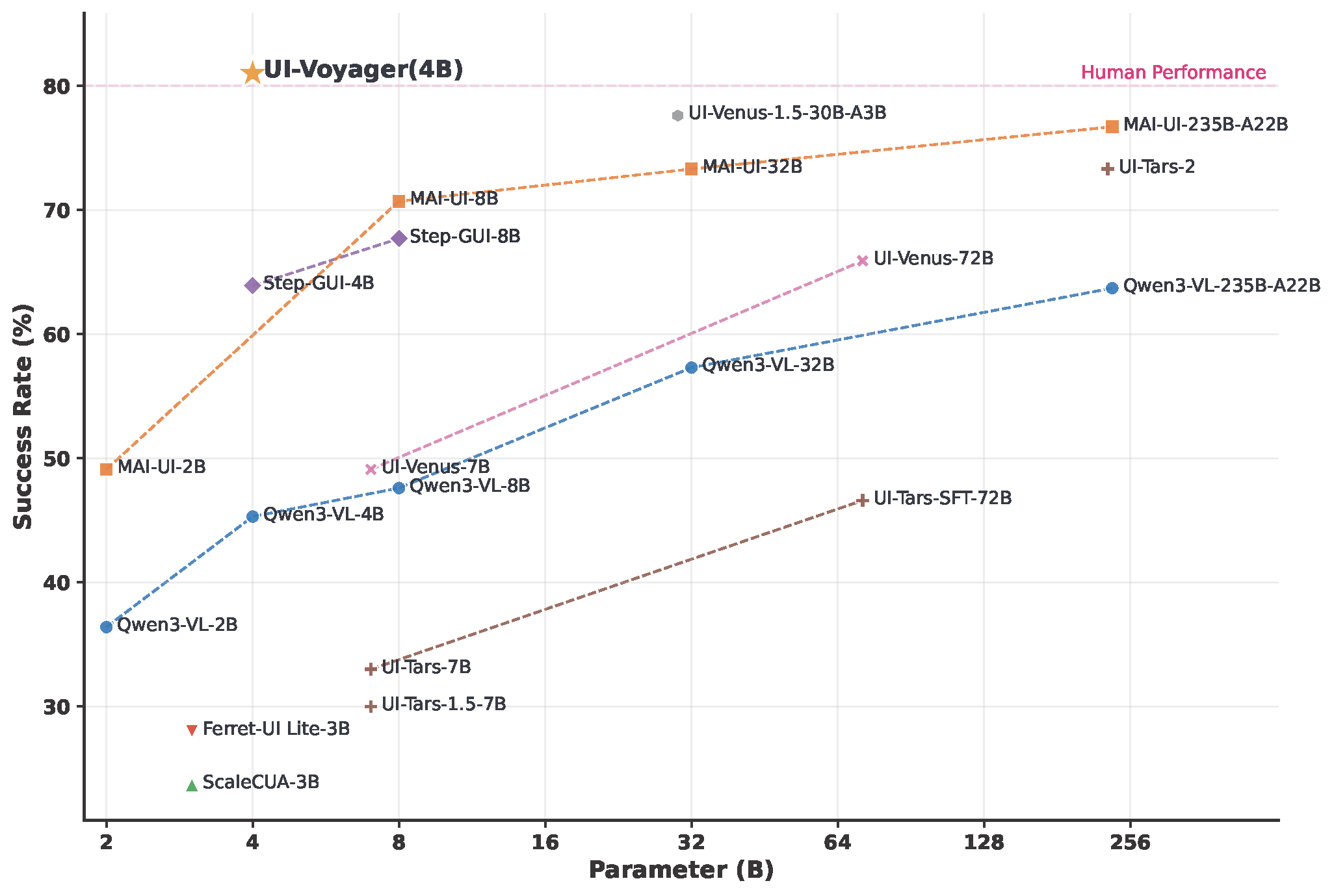
Overview of UI-Voyager performance on AndroidWorld
| Attribute | Detail |
|---|---|
| Base Model | Qwen3-VL-4B-Instruct |
| Parameters | ~4B |
| License | MIT |
| Task | Mobile GUI Agent / Image-Text-to-Text |
| Benchmark | AndroidWorld |
| Success Rate | 81.0% |
For full evaluation instructions using AndroidWorld with parallel emulators, please refer to our GitHub repository.
# Start parallel evaluation (4 emulators)
NUM_WORKERS=4 CONFIG_NAME=UI-Voyager MODEL_NAME=UI-Voyager ./run_android_world.sh
If you find this work useful, please consider giving a star ⭐ and citation:
@misc{lin2026uivoyager,
title={UI-Voyager: A Self-Evolving GUI Agent Learning via Failed Experience},
author={Zichuan Lin and Feiyu Liu and Yijun Yang and Jiafei Lyu and Yiming Gao and Yicheng Liu and Zhicong Lu and Yangbin Yu and Mingyu Yang and Junyou Li and Deheng Ye and Jie Jiang},
year={2026},
eprint={2603.24533},
archivePrefix={arXiv},
primaryClass={cs.LG},
url={https://arxiv.org/abs/2603.24533},
}
# Use a pipeline as a high-level helper from transformers import pipeline pipe = pipeline("image-text-to-text", model="MarsXL/UI-Voyager") messages = [ { "role": "user", "content": [ {"type": "image", "url": "https://huggingface.co/datasets/huggingface/documentation-images/resolve/main/p-blog/candy.JPG"}, {"type": "text", "text": "What animal is on the candy?"} ] }, ] pipe(text=messages)

