Instructions to use MuyaoYuan/LoCo-7B with libraries, inference providers, notebooks, and local apps. Follow these links to get started.
- Libraries
- Transformers
How to use MuyaoYuan/LoCo-7B with Transformers:
# Use a pipeline as a high-level helper from transformers import pipeline pipe = pipeline("text-generation", model="MuyaoYuan/LoCo-7B") messages = [ {"role": "user", "content": "Who are you?"}, ] pipe(messages)# pip install -U transformers accelerate # Load model directly from transformers import AutoTokenizer, AutoModelForCausalLM tokenizer = AutoTokenizer.from_pretrained("MuyaoYuan/LoCo-7B") model = AutoModelForCausalLM.from_pretrained("MuyaoYuan/LoCo-7B", device_map="auto") messages = [ {"role": "user", "content": "Who are you?"}, ] inputs = tokenizer.apply_chat_template( messages, add_generation_prompt=True, tokenize=True, return_dict=True, return_tensors="pt", ).to(model.device) outputs = model.generate(**inputs, max_new_tokens=256) print(tokenizer.decode(outputs[0][inputs["input_ids"].shape[-1]:])) - Notebooks
- Google Colab
- Kaggle
- Local Apps Settings
- vLLM
How to use MuyaoYuan/LoCo-7B with vLLM:
Install from pip and serve model
# Install vLLM from pip: pip install vllm # Start the vLLM server: vllm serve "MuyaoYuan/LoCo-7B" # Call the server using curl (OpenAI-compatible API): curl -X POST "http://localhost:8000/v1/chat/completions" \ -H "Content-Type: application/json" \ --data '{ "model": "MuyaoYuan/LoCo-7B", "messages": [ { "role": "user", "content": "What is the capital of France?" } ] }'Use Docker
docker model run hf.co/MuyaoYuan/LoCo-7B
- SGLang
How to use MuyaoYuan/LoCo-7B with SGLang:
Install from pip and serve model
# Install SGLang from pip: pip install sglang # Start the SGLang server: python3 -m sglang.launch_server \ --model-path "MuyaoYuan/LoCo-7B" \ --host 0.0.0.0 \ --port 30000 # Call the server using curl (OpenAI-compatible API): curl -X POST "http://localhost:30000/v1/chat/completions" \ -H "Content-Type: application/json" \ --data '{ "model": "MuyaoYuan/LoCo-7B", "messages": [ { "role": "user", "content": "What is the capital of France?" } ] }'Use Docker images
docker run --gpus all \ --shm-size 32g \ -p 30000:30000 \ -v ~/.cache/huggingface:/root/.cache/huggingface \ --env "HF_TOKEN=<secret>" \ --ipc=host \ lmsysorg/sglang:latest \ python3 -m sglang.launch_server \ --model-path "MuyaoYuan/LoCo-7B" \ --host 0.0.0.0 \ --port 30000 # Call the server using curl (OpenAI-compatible API): curl -X POST "http://localhost:30000/v1/chat/completions" \ -H "Content-Type: application/json" \ --data '{ "model": "MuyaoYuan/LoCo-7B", "messages": [ { "role": "user", "content": "What is the capital of France?" } ] }' - Docker Model Runner
How to use MuyaoYuan/LoCo-7B with Docker Model Runner:
docker model run hf.co/MuyaoYuan/LoCo-7B
LoCo-7B: Think Less, Locally
TL;DR: LoCo compresses a reasoning model's chain of thought using its own traces. It locally detects overthinking states, pairs them with shorter verified continuations regenerated from the same states, and applies DPO to these state conditioned pairs to teach the model when to stop thinking.
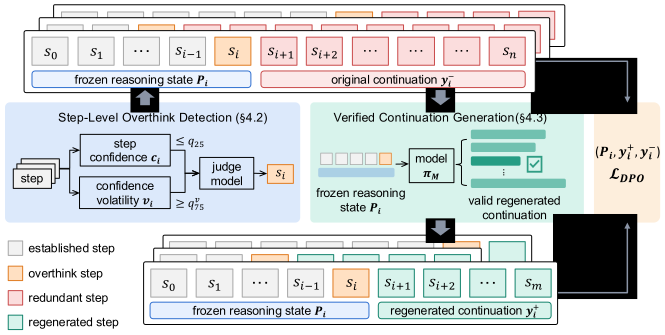
LoCo-7B is a reasoning-compressed version of DeepSeek-R1-Distill-Qwen-7B. Completion length is reduced by 41.7–45.4% on mathematics and 23.4–36.3% on code, while accuracy is maintained or improved.
Usage
from vllm import LLM, SamplingParams
model = LLM(model="MuyaoYuan/LoCo-7B", max_model_len=36864, dtype="bfloat16")
tok = model.get_tokenizer()
prompt = tok.apply_chat_template(
[{"role": "user", "content": "Your math problem here. Please reason step by step, and put your final answer within \\boxed{}."}],
tokenize=False,
add_generation_prompt=True,
)
output = model.generate([prompt], SamplingParams(temperature=0.6, top_p=0.95, max_tokens=32768))
print(output[0].outputs[0].text)
The full code for data construction, training, and evaluation is available on GitHub.
License
MIT
- Downloads last month
- 26
Model tree for MuyaoYuan/LoCo-7B
Base model
deepseek-ai/DeepSeek-R1-Distill-Qwen-7B
