| --- |
| license: creativeml-openrail-m |
| tags: |
| - text-to-video |
| - stable-diffusion |
| - animatediff |
| library_name: diffusers |
| inference: false |
| --- |
| # AnimateDiff-Lightning |
|
|
| <video src='https://huggingface.co/ByteDance/AnimateDiff-Lightning/resolve/main/animatediff_lightning_samples_t2v.mp4' width="100%" autoplay muted loop playsinline style='margin:0'></video> |
| <video src='https://huggingface.co/ByteDance/AnimateDiff-Lightning/resolve/main/animatediff_lightning_samples_v2v.mp4' width="100%" autoplay muted loop playsinline style='margin:0'></video> |
|
|
| AnimateDiff-Lightning is a lightning-fast text-to-video generation model. It can generate videos more than ten times faster than the original AnimateDiff. For more information, please refer to our research paper: [AnimateDiff-Lightning: Cross-Model Diffusion Distillation](https://arxiv.org/abs/2403.12706). We release the model as part of the research. |
|
|
| Our models are distilled from [AnimateDiff SD1.5 v2](https://huggingface.co/guoyww/animatediff). This repository contains checkpoints for 1-step, 2-step, 4-step, and 8-step distilled models. The generation quality of our 2-step, 4-step, and 8-step model is great. Our 1-step model is only provided for research purposes. |
|
|
|
|
| ## Demo |
|
|
| Try AnimateDiff-Lightning using our text-to-video generation [demo](https://huggingface.co/spaces/ByteDance/AnimateDiff-Lightning). |
|
|
|
|
| ## Recommendation |
|
|
| AnimateDiff-Lightning produces the best results when used with stylized base models. We recommend using the following base models: |
|
|
| Realistic |
| - [epiCRealism](https://civitai.com/models/25694) |
| - [Realistic Vision](https://civitai.com/models/4201) |
| - [DreamShaper](https://civitai.com/models/4384) |
| - [AbsoluteReality](https://civitai.com/models/81458) |
| - [MajicMix Realistic](https://civitai.com/models/43331) |
|
|
| Anime & Cartoon |
| - [ToonYou](https://civitai.com/models/30240) |
| - [IMP](https://civitai.com/models/56680) |
| - [Mistoon Anime](https://civitai.com/models/24149) |
| - [DynaVision](https://civitai.com/models/75549) |
| - [RCNZ Cartoon 3d](https://civitai.com/models/66347) |
| - [MajicMix Reverie](https://civitai.com/models/65055) |
|
|
| Additionally, feel free to explore different settings. We find using 3 inference steps on the 2-step model produces great results. We find certain base models produces better results with CFG. We also recommend using [Motion LoRAs](https://huggingface.co/guoyww/animatediff/tree/main) as they produce stronger motion. We use Motion LoRAs with strength 0.7~0.8 to avoid watermark. |
|
|
| ## Diffusers Usage |
|
|
| ```python |
| import torch |
| from diffusers import AnimateDiffPipeline, MotionAdapter, EulerDiscreteScheduler |
| from diffusers.utils import export_to_gif |
| from huggingface_hub import hf_hub_download |
| from safetensors.torch import load_file |
| |
| device = "cuda" |
| dtype = torch.float16 |
| |
| step = 4 # Options: [1,2,4,8] |
| repo = "ByteDance/AnimateDiff-Lightning" |
| ckpt = f"animatediff_lightning_{step}step_diffusers.safetensors" |
| base = "emilianJR/epiCRealism" # Choose to your favorite base model. |
| |
| adapter = MotionAdapter().to(device, dtype) |
| adapter.load_state_dict(load_file(hf_hub_download(repo ,ckpt), device=device)) |
| pipe = AnimateDiffPipeline.from_pretrained(base, motion_adapter=adapter, torch_dtype=dtype).to(device) |
| pipe.scheduler = EulerDiscreteScheduler.from_config(pipe.scheduler.config, timestep_spacing="trailing", beta_schedule="linear") |
| |
| output = pipe(prompt="A girl smiling", guidance_scale=1.0, num_inference_steps=step) |
| export_to_gif(output.frames[0], "animation.gif") |
| ``` |
|
|
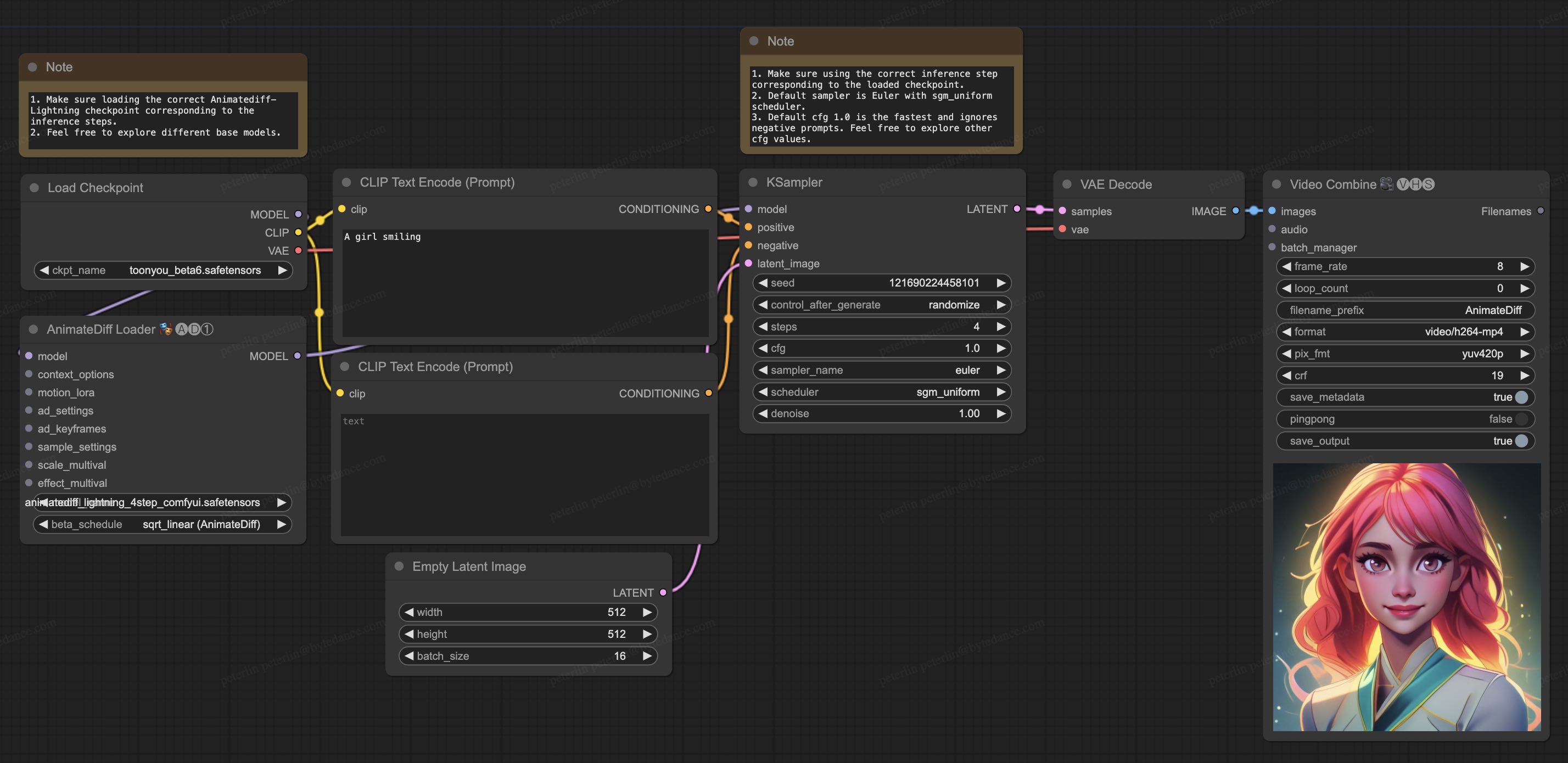
| ## ComfyUI Usage |
|
|
| 1. Download [animatediff_lightning_workflow.json](https://huggingface.co/ByteDance/AnimateDiff-Lightning/raw/main/comfyui/animatediff_lightning_workflow.json) and import it in ComfyUI. |
| 1. Install nodes. You can install them manually or use [ComfyUI-Manager](https://github.com/ltdrdata/ComfyUI-Manager). |
| * [ComfyUI-AnimateDiff-Evolved](https://github.com/Kosinkadink/ComfyUI-AnimateDiff-Evolved) |
| * [ComfyUI-VideoHelperSuite](https://github.com/Kosinkadink/ComfyUI-VideoHelperSuite) |
| 1. Download your favorite base model checkpoint and put them under `/models/checkpoints/` |
| 1. Download AnimateDiff-Lightning checkpoint `animatediff_lightning_Nstep_comfyui.safetensors` and put them under `/custom_nodes/ComfyUI-AnimateDiff-Evolved/models/` |
|
|
|
|
|  |
|
|
|
|
| ## Video-to-Video Generation |
|
|
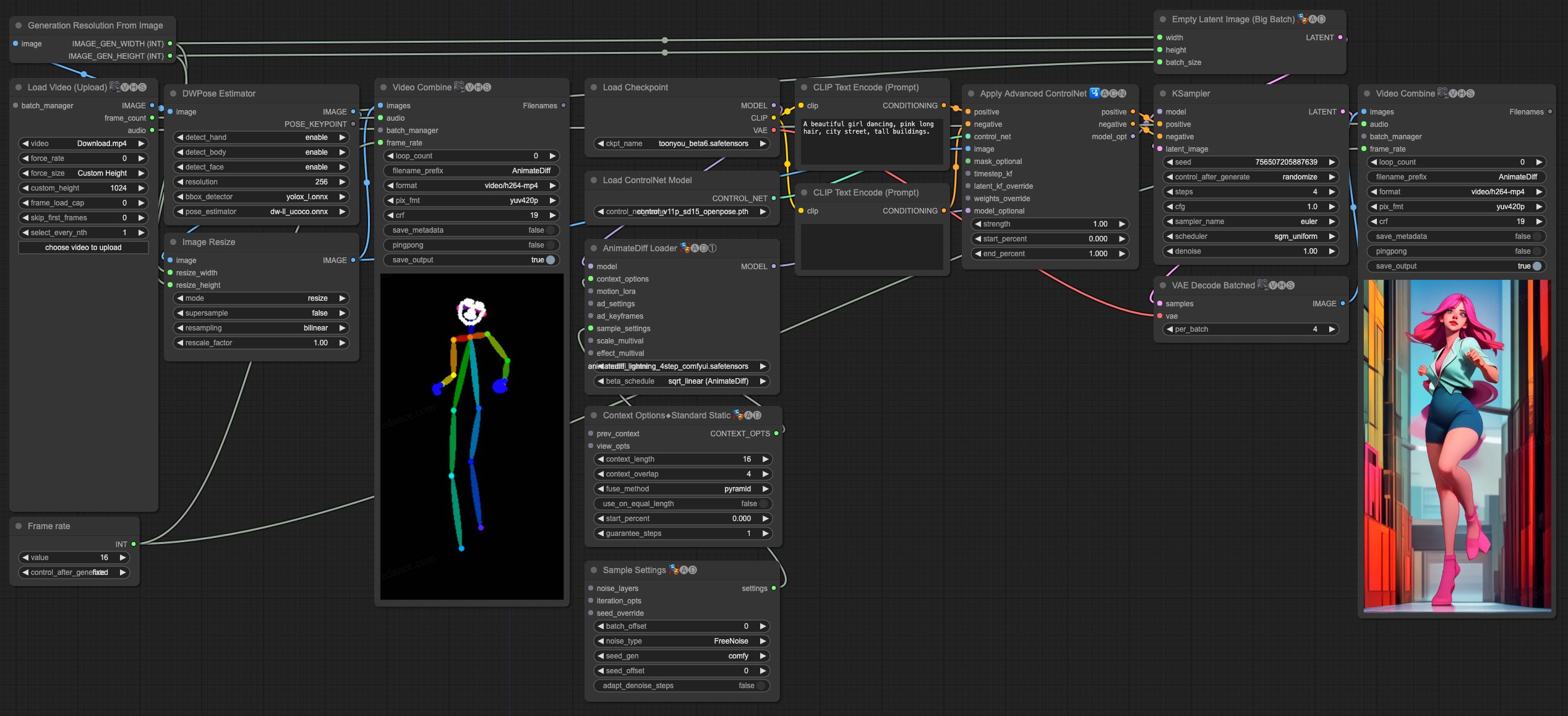
| AnimateDiff-Lightning is great for video-to-video generation. We provide the simplist comfyui workflow using ControlNet. |
|
|
| 1. Download [animatediff_lightning_v2v_openpose_workflow.json](https://huggingface.co/ByteDance/AnimateDiff-Lightning/raw/main/comfyui/animatediff_lightning_v2v_openpose_workflow.json) and import it in ComfyUI. |
| 1. Install nodes. You can install them manually or use [ComfyUI-Manager](https://github.com/ltdrdata/ComfyUI-Manager). |
| * [ComfyUI-AnimateDiff-Evolved](https://github.com/Kosinkadink/ComfyUI-AnimateDiff-Evolved) |
| * [ComfyUI-VideoHelperSuite](https://github.com/Kosinkadink/ComfyUI-VideoHelperSuite) |
| * [ComfyUI-Advanced-ControlNet](https://github.com/Kosinkadink/ComfyUI-Advanced-ControlNet) |
| * [comfyui_controlnet_aux](https://github.com/Fannovel16/comfyui_controlnet_aux) |
| 1. Download your favorite base model checkpoint and put them under `/models/checkpoints/` |
| 1. Download AnimateDiff-Lightning checkpoint `animatediff_lightning_Nstep_comfyui.safetensors` and put them under `/custom_nodes/ComfyUI-AnimateDiff-Evolved/models/` |
| 1. Download [ControlNet OpenPose](https://huggingface.co/lllyasviel/ControlNet-v1-1/tree/main) `control_v11p_sd15_openpose.pth` checkpoint to `/models/controlnet/` |
| 1. Upload your video and run the pipeline. |
|
|
| Additional notes: |
|
|
| 1. Video shouldn't be too long or too high resolution. We used 576x1024 8 second 30fps videos for testing. |
| 1. Set the frame rate to match your input video. This allows audio to match with the output video. |
| 1. DWPose will download checkpoint itself on its first run. |
| 1. DWPose may get stuck in UI, but the pipeline is actually still running in the background. Check ComfyUI log and your output folder. |
|
|
|  |
|
|
| # Cite Our Work |
| ``` |
| @misc{lin2024animatedifflightning, |
| title={AnimateDiff-Lightning: Cross-Model Diffusion Distillation}, |
| author={Shanchuan Lin and Xiao Yang}, |
| year={2024}, |
| eprint={2403.12706}, |
| archivePrefix={arXiv}, |
| primaryClass={cs.CV} |
| } |
| ``` |