
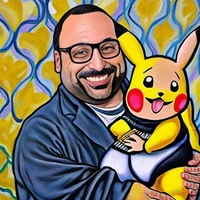
PokIRL [SDXL]

- Prompt
- A PokIRL creepy creature peeping through your bathroom window

- Prompt
- PokIRL wonderwoman

- Prompt
- A PokIRL bee drinking honey

- Prompt
- American PokIRL gothic

- Prompt
- A worm PokIRL peeping out of an apple

- Prompt
- A PokIRL girl with a pearl earring

- Prompt
- A PokIRL monster hiding under the bed
(CivitAI)
Model description
PokIRL (Pokemon In-Real-Life) is inspired by Pokemon GO's "AR" mode where you can take picture of Pokemon in your "Real life" environment.
If you want to make a Pokemon version of a known person or artwork, use LoRA weight scale of >1 (e.g. 1.4), otherwise a LoRA weight scale of 1.0 works kind of fine.
Trigger words
You should use PokIRL to trigger the image generation.
Download model
Weights for this model are available in Safetensors format.
Download them in the Files & versions tab.
Use it with the 🧨 diffusers library
from diffusers import AutoPipelineForText2Image
import torch

pipeline = AutoPipelineForText2Image.from_pretrained('stabilityai/stable-diffusion-xl-base-1.0', torch_dtype=torch.float16).to('cuda')
pipeline.load_lora_weights('Norod78/pokirl-sdxl', weight_name='PokIRL_SDXL-000009.safetensors')
image = pipeline('`PokIRL`').images[0]
For more details, including weighting, merging and fusing LoRAs, check the documentation on loading LoRAs in diffusers
- Downloads last month
- 32
Model tree for Norod78/pokirl-sdxl
Base model
stabilityai/stable-diffusion-xl-base-1.0