comments: true
Layout Detection Module Tutorial
1. Overview
The core task of structure analysis is to parse and segment the content of input document images. By identifying different elements in the image (such as text, charts, images, etc.), they are classified into predefined categories (e.g., pure text area, title area, table area, image area, list area, etc.), and the position and size of these regions in the document are determined.
2. Supported Model List
The inference time only includes the model inference time and does not include the time for pre- or post-processing. The "Normal Mode" values correspond to the local
paddle_staticinference engine.
The layout detection model includes 20 common categories: document title, paragraph title, text, page number, abstract, table, references, footnotes, header, footer, algorithm, formula, formula number, image, table, seal, figure_table title, chart, and sidebar text and lists of references
Model Model Download Link mAP(0.5) (%) GPU Inference Time (ms)
[Normal Mode / High-Performance Mode]CPU Inference Time (ms)
[Normal Mode / High-Performance Mode]Model Storage Size (MB) Introduction PP-DocLayout_plus-L Inference Model/Training Model 83.2 53.03 / 17.23 634.62 / 378.32 126.01 A higher-precision layout area localization model trained on a self-built dataset containing Chinese and English papers, PPT, multi-layout magazines, contracts, books, exams, ancient books and research reports using RT-DETR-L The layout detection model includes 1 category: Block:
Model Model Download Link mAP(0.5) (%) GPU Inference Time (ms)
[Normal Mode / High-Performance Mode]CPU Inference Time (ms)
[Normal Mode / High-Performance Mode]Model Storage Size (MB) Introduction PP-DocBlockLayout Inference Model/Training Model 95.9 34.60 / 28.54 506.43 / 256.83 123.92 A layout block localization model trained on a self-built dataset containing Chinese and English papers, PPT, multi-layout magazines, contracts, books, exams, ancient books and research reports using RT-DETR-L The layout detection model includes 23 common categories: document title, paragraph title, text, page number, abstract, table of contents, references, footnotes, header, footer, algorithm, formula, formula number, image, figure caption, table, table caption, seal, figure title, figure, header image, footer image, and sidebar text
Model Model Download Link mAP(0.5) (%) GPU Inference Time (ms)
[Normal Mode / High-Performance Mode]CPU Inference Time (ms)
[Normal Mode / High-Performance Mode]Model Storage Size (MB) Introduction PP-DocLayout-L Inference Model/Training Model 90.4 33.59 / 33.59 503.01 / 251.08 123.76 A high-precision layout area localization model trained on a self-built dataset containing Chinese and English papers, magazines, contracts, books, exams, and research reports using RT-DETR-L. PP-DocLayout-M Inference Model/Training Model 75.2 13.03 / 4.72 43.39 / 24.44 22.578 A layout area localization model with balanced precision and efficiency, trained on a self-built dataset containing Chinese and English papers, magazines, contracts, books, exams, and research reports using PicoDet-L. PP-DocLayout-S Inference Model/Training Model 70.9 11.54 / 3.86 18.53 / 6.29 4.834 A high-efficiency layout area localization model trained on a self-built dataset containing Chinese and English papers, magazines, contracts, books, exams, and research reports using PicoDet-S.
❗ The above list includes the 4 core models that are key supported by the text recognition module. The module actually supports a total of 12 full models, including several predefined models with different categories. The complete model list is as follows:
👉 Details of Model List
Table Layout Detection Model
Model Model Download Link mAP(0.5) (%) GPU Inference Time (ms)
[Normal Mode / High-Performance Mode]CPU Inference Time (ms)
[Normal Mode / High-Performance Mode]Model Storage Size (MB) Introduction PicoDet_layout_1x_table Inference Model/Training Model 97.5 9.57 / 6.63 27.66 / 16.75 7.4 A high-efficiency layout area localization model trained on a self-built dataset using PicoDet-1x, capable of detecting table regions. 3-Class Layout Detection Model, including Table, Image, and Stamp
Model Model Download Link mAP(0.5) (%) GPU Inference Time (ms)
[Normal Mode / High-Performance Mode]CPU Inference Time (ms)
[Normal Mode / High-Performance Mode]Model Storage Size (MB) Introduction PicoDet-S_layout_3cls Inference Model/Training Model 88.2 8.43 / 3.44 17.60 / 6.51 4.8 A high-efficiency layout area localization model trained on a self-built dataset of Chinese and English papers, magazines, and research reports using PicoDet-S. PicoDet-L_layout_3cls Inference Model/Training Model 89.0 12.80 / 9.57 45.04 / 23.86 22.6 A balanced efficiency and precision layout area localization model trained on a self-built dataset of Chinese and English papers, magazines, and research reports using PicoDet-L. RT-DETR-H_layout_3cls Inference Model/Training Model 95.8 114.80 / 25.65 924.38 / 924.38 470.1 A high-precision layout area localization model trained on a self-built dataset of Chinese and English papers, magazines, and research reports using RT-DETR-H. 5-Class English Document Area Detection Model, including Text, Title, Table, Image, and List
Model Model Download Link mAP(0.5) (%) GPU Inference Time (ms)
[Normal Mode / High-Performance Mode]CPU Inference Time (ms)
[Normal Mode / High-Performance Mode]Model Storage Size (MB) Introduction PicoDet_layout_1x Inference Model/Training Model 97.8 9.62 / 6.75 26.96 / 12.77 7.4 A high-efficiency English document layout area localization model trained on the PubLayNet dataset using PicoDet-1x. 17-Class Area Detection Model, including 17 common layout categories: Paragraph Title, Image, Text, Number, Abstract, Content, Figure Caption, Formula, Table, Table Caption, References, Document Title, Footnote, Header, Algorithm, Footer, and Stamp
Model Model Download Link mAP(0.5) (%) GPU Inference Time (ms)
[Normal Mode / High-Performance Mode]CPU Inference Time (ms)
[Normal Mode / High-Performance Mode]Model Storage Size (MB) Introduction PicoDet-S_layout_17cls Inference Model/Training Model 87.4 8.80 / 3.62 17.51 / 6.35 4.8 A high-efficiency layout area localization model trained on a self-built dataset of Chinese and English papers, magazines, and research reports using PicoDet-S. PicoDet-L_layout_17cls Inference Model/Training Model 89.0 12.60 / 10.27 43.70 / 24.42 22.6 A balanced efficiency and precision layout area localization model trained on a self-built dataset of Chinese and English papers, magazines, and research reports using PicoDet-L. RT-DETR-H_layout_17cls Inference Model/Training Model 98.3 115.29 / 101.18 964.75 / 964.75 470.2 A high-precision layout area localization model trained on a self-built dataset of Chinese and English papers, magazines, and research reports using RT-DETR-H.
Test Environment Description:
- Performance Test Environment
- Test Dataset:
- 20 types of layout detection models: PaddleOCR's self built layout area detection dataset, including Chinese and English papers, magazines, newspapers, research papers PPT、 1300 images of document types such as test papers and textbooks.
- Type 1 version face region detection model: PaddleOCR's self built version face region detection dataset, including Chinese and English papers, magazines, newspapers, research reports PPT、 1000 document type images such as test papers and textbooks.
- 23 categories Layout Detection Model: A self-built layout area detection dataset by PaddleOCR, containing 500 common document type images such as Chinese and English papers, magazines, contracts, books, exam papers, and research reports.
- Table Layout Detection Model: A self-built table area detection dataset by PaddleOCR, including 7,835 Chinese and English paper document type images with tables.
- 3-Class Layout Detection Model: A self-built layout area detection dataset by PaddleOCR, comprising 1,154 common document type images such as Chinese and English papers, magazines, and research reports.
- 5-Class English Document Area Detection Model: The evaluation dataset of PubLayNet, containing 11,245 images of English documents.
- 17-Class Area Detection Model: A self-built layout area detection dataset by PaddleOCR, including 892 common document type images such as Chinese and English papers, magazines, and research reports.
- Hardware Configuration:
- GPU: NVIDIA Tesla T4
- CPU: Intel Xeon Gold 6271C @ 2.60GHz
- Software Environment:
- Ubuntu 20.04 / CUDA 11.8 / cuDNN 8.9 / TensorRT 8.6.1.6
- paddlepaddle-gpu 3.0.0 / paddleocr 3.0.3
- Test Dataset:
- Inference Mode Description
| Mode | GPU Configuration | CPU Configuration | Acceleration Technology Combination |
|---|---|---|---|
| Normal Mode | FP32 Precision / No TRT Acceleration | FP32 Precision / 8 Threads | PaddleInference |
| High-Performance Mode | Optimal combination of pre-selected precision types and acceleration strategies | FP32 Precision / 8 Threads | Pre-selected optimal backend (Paddle/OpenVINO/TRT, etc.) |
3. Quick Integration
❗ Before quick integration, please install the PaddleOCR wheel package. For detailed instructions, refer to PaddleOCR Local Installation Tutorial。
Quickly experience with just one command:
paddleocr layout_detection -i https://paddle-model-ecology.bj.bcebos.com/paddlex/imgs/demo_image/layout.jpg
The example above uses the paddle_static inference engine by default. To run it, first install PaddlePaddle by following PaddlePaddle Framework Installation.
If you choose transformers as the inference engine, make sure the Transformers environment is configured, and then run the following command:
# Use the transformers engine for inference
paddleocr layout_detection -i https://paddle-model-ecology.bj.bcebos.com/paddlex/imgs/demo_image/layout.jpg \
    --engine transformers
If you choose onnxruntime as the inference engine, make sure the ONNX Runtime environment is configured, and then run the following command:
# Use the onnxruntime engine for inference
paddleocr layout_detection -i https://paddle-model-ecology.bj.bcebos.com/paddlex/imgs/demo_image/layout.jpg \
    --engine onnxruntime
In most scenarios, the default paddle_static inference engine delivers better inference performance and is the recommended first choice.
Note: The official models would be download from HuggingFace by default. If can't access to HuggingFace, please set the environment variable PADDLE_PDX_MODEL_SOURCE="BOS" to change the model source to BOS. In the future, more model sources will be supported.
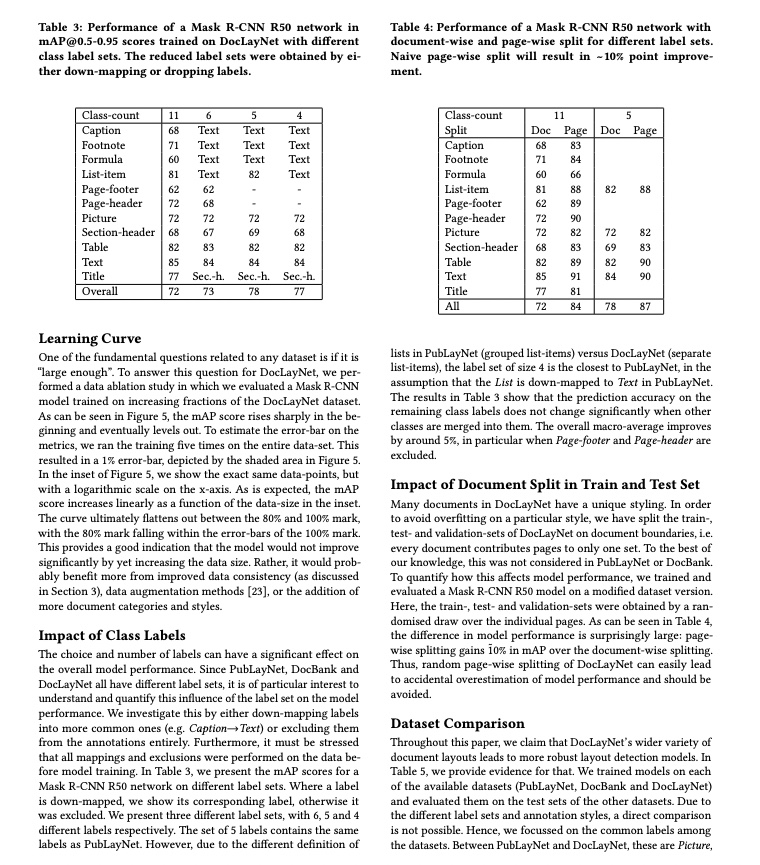
You can also integrate the model inference from the layout area detection module into your project. Before running the following code, please download Example Image Go to the local area.
from paddleocr import LayoutDetection

model = LayoutDetection(model_name="PP-DocLayout_plus-L")
output = model.predict("layout.jpg", batch_size=1, layout_nms=True)
for res in output:
    res.print()
    res.save_to_img(save_path="./output/")
    res.save_to_json(save_path="./output/res.json")
The example above uses the paddle_static inference engine by default. To run it, first install PaddlePaddle by following PaddlePaddle Framework Installation.
If you choose transformers as the inference engine, make sure the Transformers environment is configured, and then run the following code:
from paddleocr import LayoutDetection

model = LayoutDetection(
    model_name="PP-DocLayout_plus-L",
    engine="transformers",
)
output = model.predict("layout.jpg", batch_size=1, layout_nms=True)
for res in output:
    res.print()
    res.save_to_img(save_path="./output/")
    res.save_to_json(save_path="./output/res.json")
If you choose onnxruntime as the inference engine, make sure the ONNX Runtime environment is configured, and then run the following code:
from paddleocr import LayoutDetection

model = LayoutDetection(
    model_name="PP-DocLayout_plus-L",
    engine="onnxruntime",
)
output = model.predict("layout.jpg", batch_size=1, layout_nms=True)
for res in output:
    res.print()
    res.save_to_img(save_path="./output/")
    res.save_to_json(save_path="./output/res.json")
In most scenarios, the default paddle_static inference engine delivers better inference performance and is the recommended first choice.
If you want to use the trained model with the paddle_dynamic or transformers engine, refer to the Weight Conversion section in the Inference Engine section below to convert the model from the pdparams format to the safetensors format using PaddleX.
After running, the result obtained is:
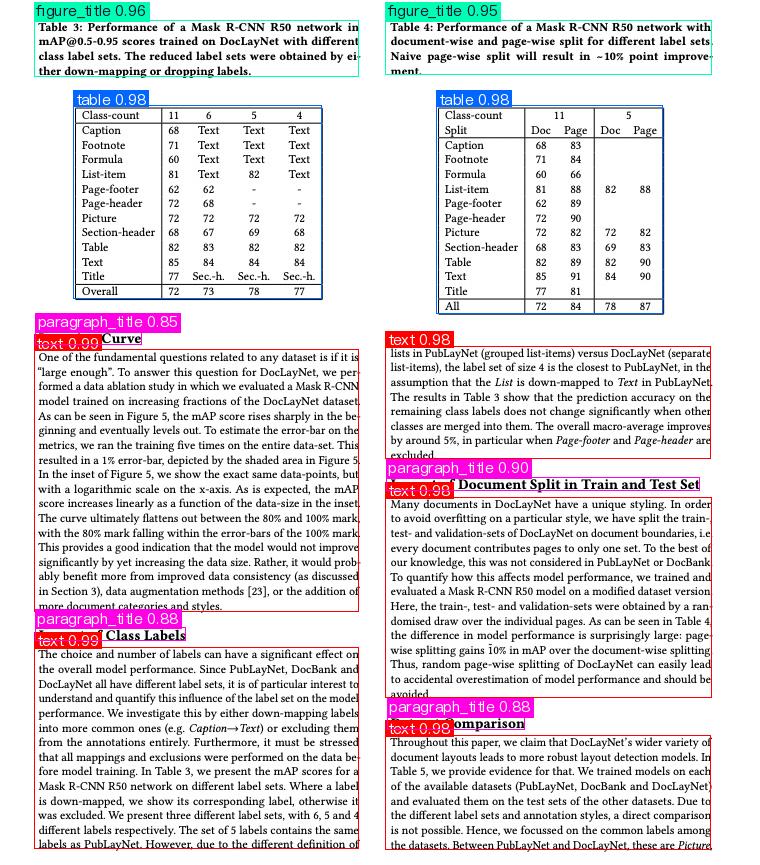
{'res': {'input_path': 'layout.jpg', 'page_index': None, 'boxes': [{'cls_id': 2, 'label': 'text', 'score': 0.9870226979255676, 'coordinate': [34.101906, 349.85275, 358.59213, 611.0772]}, {'cls_id': 2, 'label': 'text', 'score': 0.9866003394126892, 'coordinate': [34.500324, 647.1585, 358.29367, 848.66797]}, {'cls_id': 2, 'label': 'text', 'score': 0.9846674203872681, 'coordinate': [385.71445, 497.40973, 711.2261, 697.84265]}, {'cls_id': 8, 'label': 'table', 'score': 0.984126091003418, 'coordinate': [73.76879, 105.94899, 321.95303, 298.84888]}, {'cls_id': 8, 'label': 'table', 'score': 0.9834211468696594, 'coordinate': [436.95642, 105.81531, 662.7168, 313.48462]}, {'cls_id': 2, 'label': 'text', 'score': 0.9832247495651245, 'coordinate': [385.62787, 346.2288, 710.10095, 458.77127]}, {'cls_id': 2, 'label': 'text', 'score': 0.9816061854362488, 'coordinate': [385.7802, 735.1931, 710.56134, 849.9764]}, {'cls_id': 6, 'label': 'figure_title', 'score': 0.9577341079711914, 'coordinate': [34.421448, 20.055151, 358.71283, 76.53663]}, {'cls_id': 6, 'label': 'figure_title', 'score': 0.9505634307861328, 'coordinate': [385.72278, 20.053688, 711.29333, 74.92744]}, {'cls_id': 0, 'label': 'paragraph_title', 'score': 0.9001723527908325, 'coordinate': [386.46344, 477.03488, 699.4023, 490.07474]}, {'cls_id': 0, 'label': 'paragraph_title', 'score': 0.8845751285552979, 'coordinate': [35.413048, 627.73596, 185.58383, 640.52264]}, {'cls_id': 0, 'label': 'paragraph_title', 'score': 0.8837394118309021, 'coordinate': [387.17603, 716.3423, 524.7841, 729.258]}, {'cls_id': 0, 'label': 'paragraph_title', 'score': 0.8508939743041992, 'coordinate': [35.50064, 331.18445, 141.6444, 344.81097]}]}}
The meanings of the parameters are as follows:
input_path:The path to the input image for prediction.page_index:If the input is a PDF file, it indicates which page of the PDF it is; otherwise, it isNone.boxes:Information about the predicted bounding boxes, a list of dictionaries. Each dictionary represents a detected object and contains the following information:cls_id:Class ID, an integer.label:Class label, a string.score:Confidence score of the bounding box, a float.coordinate:Coordinates of the bounding box, a list of floats in the format[xmin, ymin, xmax, ymax].
The visualized image is as follows:
Relevant methods, parameters, and explanations are as follows:
LayoutDetectioninstantiates a target detection model (here,PP-DocLayout_plus-Lis used as an example). The detailed explanation is as follows:Parameter Description Type Default model_nameMeaning: Model name.
Description: If set toNone,PP-DocLayout-Lwill be used.str|NoneNonemodel_dirMeaning:Model storage path. str|NoneNonedeviceMeaning:Device for inference.
Description: For example:"cpu","gpu","npu","gpu:0","gpu:0,1".
If multiple devices are specified, parallel inference will be performed.
By default, GPU 0 is used if available; otherwise, CPU is used.str|NoneNoneengineMeaning: Inference engine.
Description: SupportsNone(the default),paddle,paddle_static,paddle_dynamic,transformers, andonnxruntime. When left asNone, local inference uses thepaddle_staticengine by default. For detailed descriptions, supported values, compatibility rules, and examples, see Inference Engine and Configuration.str|NoneNoneengine_configMeaning: Inference-engine configuration.
Description: Recommended together withengine. For supported fields, compatibility rules, and examples, see Inference Engine and Configuration.dict|NoneNoneenable_hpiMeaning:Whether to enable high-performance inference. boolFalseuse_tensorrtMeaning:Whether to use the Paddle Inference TensorRT subgraph engine.
Description: If the model does not support acceleration through TensorRT, setting this flag will not enable acceleration.
For Paddle with CUDA version 11.8, the compatible TensorRT version is 8.x (x>=6), and it is recommended to install TensorRT 8.6.1.6.
boolFalseprecisionMeaning:Computation precision when using the TensorRT subgraph engine in Paddle Inference.
Description: Options:"fp32","fp16".str"fp32"enable_mkldnnMeaning:Whether to enable MKL-DNN acceleration for inference.
Description: If MKL-DNN is unavailable or the model does not support it, acceleration will not be used even if this flag is set.boolTruemkldnn_cache_capacityMeaning:MKL-DNN cache capacity. int10cpu_threadsMeaning:Number of threads to use for inference on CPUs. int10img_sizeMeaning:Input image size.
Description:- int: e.g.
640, resizes input image to 640x640. - list: e.g.
[640, 512], resizes input image to width 640 and height 512.
int|list|NoneNonethresholdMeaning:Threshold for filtering low-confidence predictions.
Description:- float: e.g.
0.2, filters out all boxes with confidence below 0.2. - dict: The key is
int(class id), the value isfloat(threshold). For example,{0: 0.45, 2: 0.48, 7: 0.4}means class 0 uses threshold 0.45, class 2 uses 0.48, class 7 uses 0.4. - None: uses the model's default configuration.
float|dict|NoneNonelayout_nmsMeaning:Whether to use NMS post-processing to filter overlapping boxes.
Description:- bool: whether to use NMS for post-processing to filter overlapping boxes.
- None: uses the model's default configuration.
bool|NoneNonelayout_unclip_ratioMeaning:Scaling factor for the side length of the detection box.
Description:- float: A float greater than 0, e.g.
1.1, expands width and height by 1.1 times. - list: e.g.
[1.2, 1.5], expands width by 1.2x and height by 1.5x. - dict: The key is
int(class id), the value istupleof two floats (width ratio, height ratio). For example,{0: (1.1, 2.0)}means for class 0, width is expanded by 1.1x and height by 2.0x. - None: uses the model's default configuration.
float|list|dict|NoneNonelayout_merge_bboxes_modeMeaning:Merge mode for model output bounding boxes.
Description:- "large": Only keep the largest outer box among overlapping boxes, remove inner boxes.
- "small": Only keep the smallest inner box among overlapping boxes, remove outer boxes.
- "union": Keep all boxes, no filtering.
- dict: The key is
int(class id), the value isstr(mode). For example,{0: "large", 2: "small"}means class 0 uses "large" mode, class 2 uses "small" mode. - None: Use the model's default configuration.
str|dict|NoneNone- The
predict()method of the target detection model is called for inference prediction. The parameters of thepredict()method areinput,batch_size, andthreshold, which are explained as follows:
Parameter Description Type Default inputMeaning:Input data to be predicted. Required.
Description: Supports multiple input types:- Python Var: e.g.,
numpy.ndarrayrepresenting image data - str:
- Local image or PDF file path:
/root/data/img.jpg; - URL of image or PDF file: e.g., example;
- Local directory: directory containing images for prediction, e.g.,
/root/data/(Note: directories containing PDF files are not supported; PDFs must be specified by exact file path)
- Local image or PDF file path:
- list: Elements must be of the above types, e.g.,
[numpy.ndarray, numpy.ndarray],["/root/data/img1.jpg", "/root/data/img2.jpg"],["/root/data1", "/root/data2"]
Python Var|str|listbatch_sizeMeaning:Batch size.
Description: positive integer.int1 thresholdMeaning:Same meaning as the instantiation parameters.
Description: If set toNone, the instantiation value is used; otherwise, this parameter takes precedence.float|dict|NoneNone layout_nmsMeaning:Same meaning as the instantiation parameters.
Description: If set toNone, the instantiation value is used; otherwise, this parameter takes precedence.bool|NoneNone layout_unclip_ratioMeaning:Same meaning as the instantiation parameters.
Description: If set toNone, the instantiation value is used; otherwise, this parameter takes precedence.float|list|dict|NoneNone layout_merge_bboxes_modeMeaning:Same meaning as the instantiation parameters.
Description: If set toNone, the instantiation value is used; otherwise, this parameter takes precedence.str|dict|NoneNone - Process the prediction results, with each sample's prediction result being the corresponding Result object, and supporting operations such as printing, saving as an image, and saving as a
jsonfile:
Method Method Description Parameters Parameter type Parameter Description Default value print()Print the result to the terminal format_jsonboolDo you want to use JSONindentation formatting for the output contentTrueindentintSpecify the indentation level to enhance the readability of the JSONdata output, only valid whenformat_jsonisTrue4 ensure_asciiboolControl whether to escape non ASCII characters to Unicode characters. When set to True, all non ASCII characters will be escaped;Falsepreserves the original characters and is only valid whenformat_jsonisTrueFalsesave_to_json()Save the result as a JSON format file save_pathstrThe saved file path, when it is a directory, the name of the saved file is consistent with the name of the input file type None indentintSpecify the indentation level to enhance the readability of the JSONdata output, only valid whenformat_jsonisTrue4 ensure_asciiboolControl whether to escape non ASCII characters to Unicode characters. When set to True, all nonASCIIcharacters will be escaped;Falsepreserves the original characters and is only valid whenformat_jsonisTrueFalsesave_to_img()Save the results as an image format file save_pathstrThe saved file path, when it is a directory, the name of the saved file is consistent with the name of the input file type None - Additionally, it also supports obtaining the visualized image with results and the prediction results via attributes, as follows:
Attribute Description jsonGet the prediction result in jsonformatimgGet the visualized image in dictformat4. Custom Development
Since PaddleOCR does not directly provide training for the layout detection module, if you need to train the layout area detection model, you can refer to PaddleX Layout Detection Module Secondary DevelopmentPartially conduct training. The trained model can be seamlessly integrated into PaddleOCR's API for inference.
If you want to use the
paddle_dynamicortransformersengine with the trained model, please refer to the Weight Conversion section in Inference Engine later in this document to convert the model from thepdparamsformat to thesafetensorsformat using PaddleX.5. Inference Engine
For detailed descriptions, values, compatibility rules, and examples of the inference engine, please refer to Inference Engine and Configuration Description.
5.1 Speed Data
model engine Preprocessing (ms) Inference (ms) PostProcessing (ms) End-to-End (ms) PP-DocLayout_plus-L paddle_static 10.92 26.11 0.16 37.38 paddle_dynamic 11.09 72.91 0.16 85.10 transformers 12.65 37.91 0.75 52.24 onnxruntime 9.14 12.35 0.14 21.81 PP-DocBlockLayout paddle_static 9.51 27.59 0.08 37.41 paddle_dynamic 8.94 70.77 0.07 80.73 transformers 11.37 37.95 0.75 50.96 onnxruntime 7.53 9.22 0.06 16.97 Test Environment Description:
- Test Data: Sample Image
- Hardware Configuration:
- GPU: NVIDIA A100 40G
- CPU: Intel(R) Xeon(R) Gold 6248 CPU @ 2.50GHz
- Software Environment:
- Ubuntu 22.04 / CUDA 12.6 / cuDNN 9.5
- paddlepaddle-gpu 3.2.1 / paddleocr 3.5 / transformers 5.4.0 / torch 2.10 / onnxruntime-gpu 1.23.2
5.2 Weight Conversion
When using the inference engine, the system will automatically download the official pre-trained model. If you need to use a self-trained model with the
paddle_dynamicortransformersengine, please refer to the PaddleX Layout Detection Module Weight Conversion section to convert the model from thepdparamsformat to thesafetensorsformat using PaddleX. This allows seamless integration into the PaddleOCR API for inference. If you need to use a self-trained model with theonnxruntimeengine, refer to PaddleX Obtain ONNX Models to obtain the ONNX model, so it can be seamlessly integrated into the PaddleOCR API for inference.6. FAQ
- int: e.g.