

YAML Metadata Warning: empty or missing yaml metadata in repo card
Check out the documentation for more information.
OmniCustom: Sync Audio-Video Customization Via Joint Audio-Video Generation Model


🔥 Latest News!
- Feb 12, 2026: We proposed OmniCustom, a novel framework to deal with sync audio-video customization. For more video demos, please visit the project page.
- Feb 14, 2026: The inference code and the model checkpoint are publicly available.
🎥 Video
📖 Overview
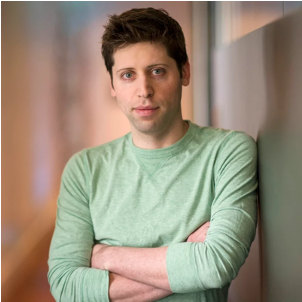
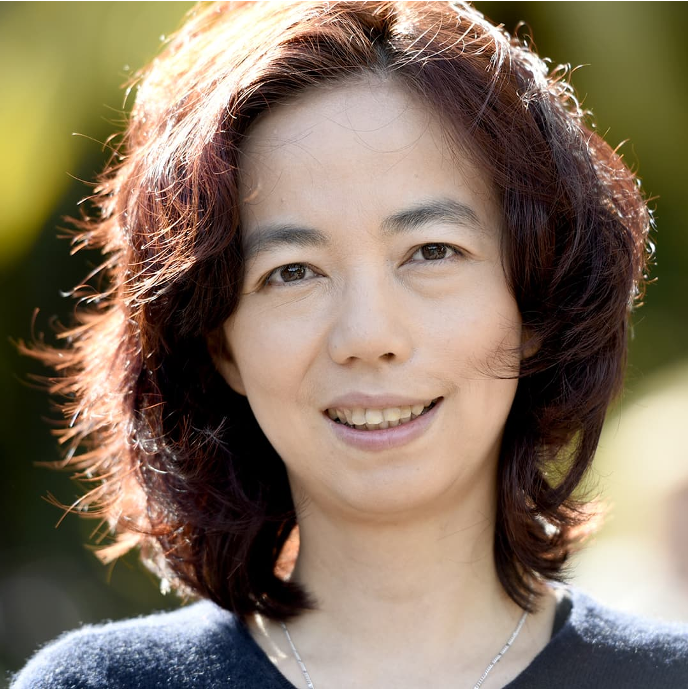
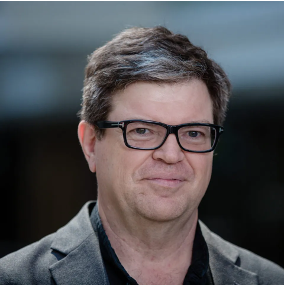
Given a reference image Ir and a reference audio Ar, our OmniCustom framework synchronously generates a video that preserves the visual identity from Ir and an audio track that mimics the timbre of Ar. Here, the speech content can be freely specified through a textual prompt.

⚡️ Quickstart
Installation
1.Clone the repo:
git clone https://github.com/OmniCustom-project/OmniCustom.git
cd OmniCustom
2. Create Environment:
conda create -n omnicustom python=3.10
conda activate omnicustom
pip install -r requirements.txt
3. Install Flash Attention :
pip install flash-attn --no-build-isolation
Model Download
First, you need to download the original model of OVI, Wan2.2-TI2V-5B, and MMAudio. You can download them using download_weights.py, and put them into ckpts:
python3 download_weights.py --output-dir ./ckpts
| Models | Download Link | Notes |
|---|---|---|
| OmniCustom models | 🤗 Huggingface | 1.9G |
| Naturalspeech 3 | 🤗 Huggingface | timbre embedding extractor |
| InsightFace | 🤗 Huggingface | face embedding extractor |
| LivePortrait | 🤗 Huggingface | crop reference image |
Then, please download the model of our OmniCustom, Naturalspeech 3, InsightFace, and LivePortrait from Huggingface, and put them into ckpts. Here, we provide a unified download command to download these four models from Huggingface.
pip install "huggingface_hub[cli]"
huggingface-cli download Omni1307/OmniCustom \
  --include "ckpts/**" \
  --local-dir ./ \
  --local-dir-use-symlinks False
The final structure of the ckpts directory should be:
# OmniCustom/ckpts
ckpts/
├── InsightFace/
├── LivePortrait/
├── MMAudio/
├── naturalspeech3_facodec/
├── Ovi/
├── step-92000.safetensors
└── Wan2.2-TI2V-5B/
⚙️ Configure OmniCustom
The configure file of OmniCustom OmniCustom/configs/inference/inference_fusion.yaml can be modified. The following parameters control generation quality, video resolution, and how text, image, and audio inputs are balanced:
ckpt_name: Ovi/model.safetensors  #base model
lora_path: ./ckpts/step-92000.safetensors #the checkpoint of our OmniCustom
self_lora: true
# face embedder
face_embedder_ckpt_dir: ./ckpts/InsightFace
face_ip_emb_dim: 512
# audio embedder
audio_embedder_ckpt_dir: ./ckpts/naturalspeech3_facodec
audio_ip_emb_dim: 256
# output
output_dir: ./outputs/
sample_steps: 50  # number of denoising steps. Lower (30-40) = faster generation
solver_name: unipc  # sampling algorithm for denoising process
shift: 5.0    #timestep shift factor for sampling scheduler
sp_size: 1
audio_guidance_scale: 3.0
video_guidance_scale: 4.0
mode: "id2v"                                                  # ["id2v", "t2v", "i2v", "t2i2v"] all comes with audio
fp8: False                        # load fp8 version of model, will have quality degradation and will not have speed
cpu_offload: False
seed: 102                    # random seed for reproducible results
crop_face: true        # crop face region from the reference image
video_negative_prompt: "jitter, bad hands, blur, distortion, two people, two persons, aerial view, overexposed, low quality, deformation, a poor composition, bad hands, bad teeth, bad eyes, bad limbs, distortion, blurring, text, subtitles, static, picture, black border"
audio_negative_prompt: "robotic, muffled, echo, distorted"    # avoid artifacts in audio
video_frame_height_width: [576, 992] #[512, 992]                         # only useful if mode = t2v or t2i2v, recommended values: [512, 992], [992, 512], [960, 512], [512, 960], [720, 720], [448, 1120]
text_prompt: ./example_prompts/benchmark_example.csv  #group generation
slg_layer: 11
each_example_n_times: 1
🔑 Inference
Single GPU
bash ./inference.sh
Or run:
CUDA_VISIBLE_DEVICES=0 infer.py --config-file ./configs/inference/inference_fusion.yaml
💡Note:
text_promptinconfigs/inference/inference_fusion.yamlcan change examples for sync audio-video customization.text_promptsupports a CSV file, which contains text_prompt, ip_image_path, and ip_audio_path.- Those results without any customization and those with only identity customization will be saved to the result folder.
- When the generated video is unsatisfactory, the most straightforward solution is to try changing the
seedinconfigs/inference/inference_fusion.yaml.- The Peak VRAM Required is 80 GB in a single GPU.
More Results
| Reference Images | Reference Audios | Text prompts | Generated Videos |
|---|---|---|---|
|

|
A man stands at the podium in OpenAI's luxurious conference room, behind him a massive electronic screen displays the company's glowing profit data. He grips the microphone firmly, gazes across the audience below, and announces in a steady tone: <S>The board wants to sell OpenAI to Zuckerberg, which is unacceptable.<E>
|

|
|

|
A woman stands before the iconic Rockefeller Center Christmas Tree, its thousands of lights reflecting in her eyes as snow begins to fall gently around her. Wearing a tartan scarf and holding a cup of steaming cocoa, she brings her mittened hands together and speaks softly into the frosty air: <S>May the spirit of Christmas fill your heart throughout the coming year.<E>
|

|
|

|
A man stands on a bustling street in Shanghai, the air thick with the festive atmosphere of Chinese Lunar New Year, with numerous red lanterns hanging in clusters overhead. He blends seamlessly into the vibrant surroundings, then clasps his hands together in a traditional gesture of greeting and says warmly: <S>Wishing everyone a Happy New Year and joy every single day.<E>
|

|
📑 Todo List
- Inference Codes and Checkpoint of OmniCustom
- Open Source Evaluation Benchmark
- Open Source OmniCustom-1M dataset
- Training Codes of OmniCustom
🙏 Acknowledgements
We would like to thank the following projects:
OVI: Our OmniCustom is finetuned over OVI for ID and timbre customization.
Naturalspeech 3: 256-D timbre embeddings are extracted using Naturalspeech 3.
InsightFace: 512-D face embeddings are extracted using InsightFace.
LivePortrait: Crop reference image for better ID Customization.
MMAudio: Audio VAE is provided by MMAudio.
Wan2.2: The video branch is initialized from the Wan2.2 repository.
⭐
If OmniCustom is helpful, please help to ⭐ the repo.
📚 Citation
We will link the paper soon.