


PaddleOCR-VL-1.5
Collection
Towards a Multi-Task 0.9B VLM for Robust In-the-Wild Document Parsing
•
4 items
•
Updated
•
1
PaddleOCR-VL-1.5: Towards a Multi-Task 0.9B VLM for Robust In-the-Wild Document Parsing




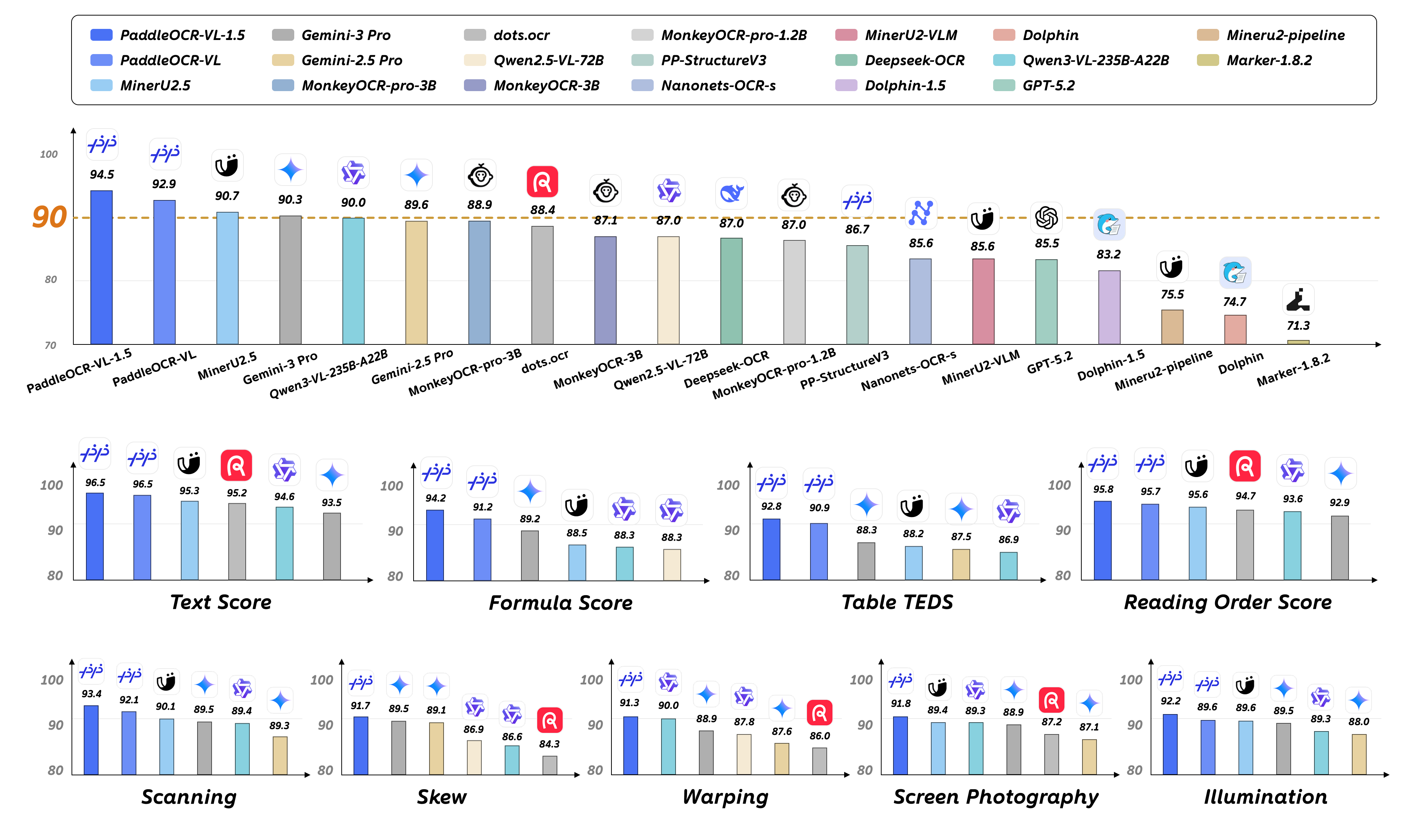
PaddleOCR-VL-1.5 is an advanced next-generation model of PaddleOCR-VL, achieving a new state-of-the-art accuracy of 94.5% on OmniDocBench v1.5. To rigorously evaluate robustness against real-world physical distortions—including scanning artifacts, skew, warping, screen photography, and illumination—we propose the Real5-OmniDocBench benchmark. Experimental results demonstrate that this enhanced model attains SOTA performance on the newly curated benchmark. Furthermore, we extend the model’s capabilities by incorporating seal recognition and text spotting tasks, while remaining a 0.9B ultra-compact VLM with high efficiency.
With a parameter size of 0.9B, PaddleOCR-VL-1.5 achieves 94.5% accuracy on OmniDocBench v1.5, surpassing the previous SOTA model PaddleOCR-VL. Significant improvements are observed in table, formula, and text recognition.
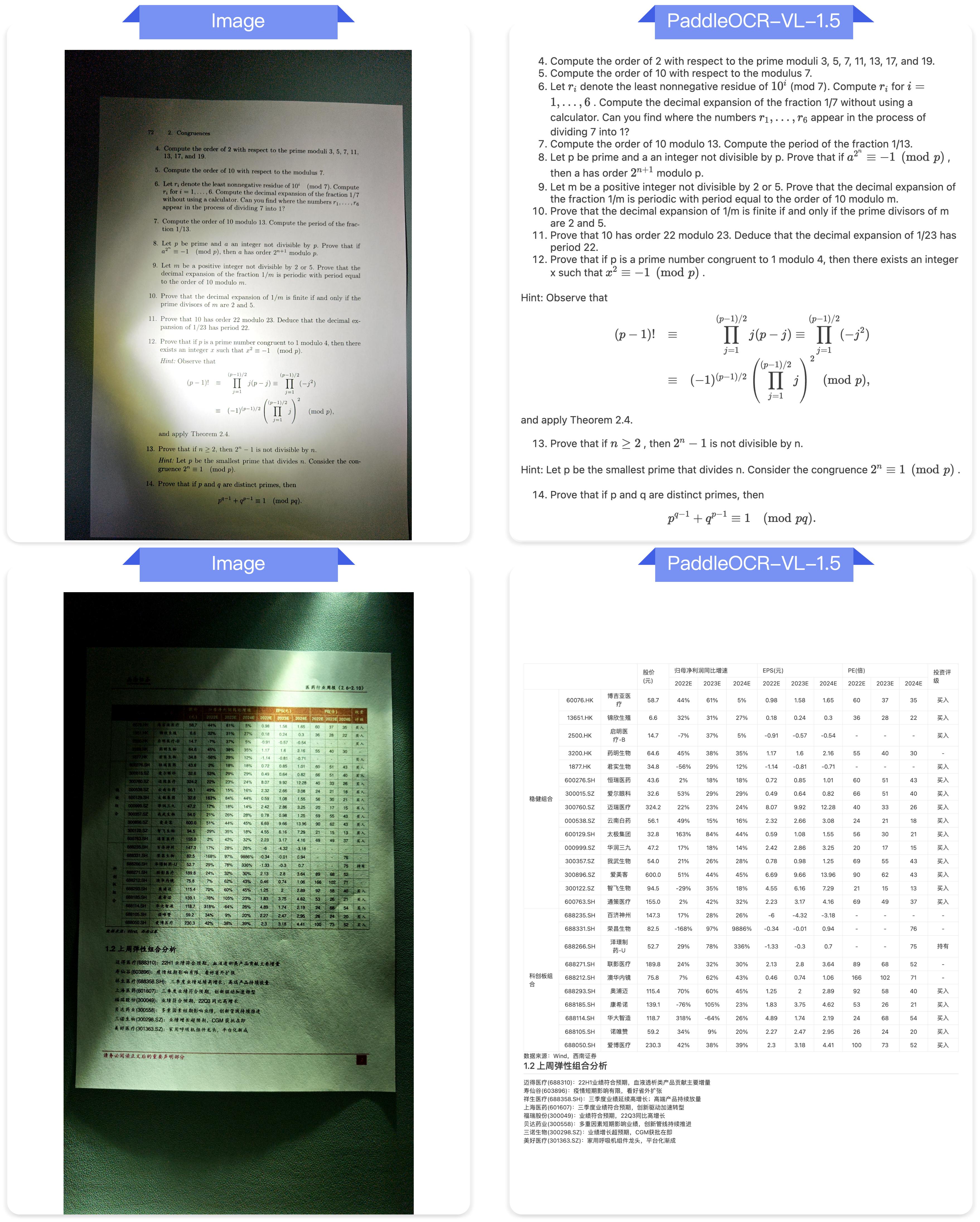
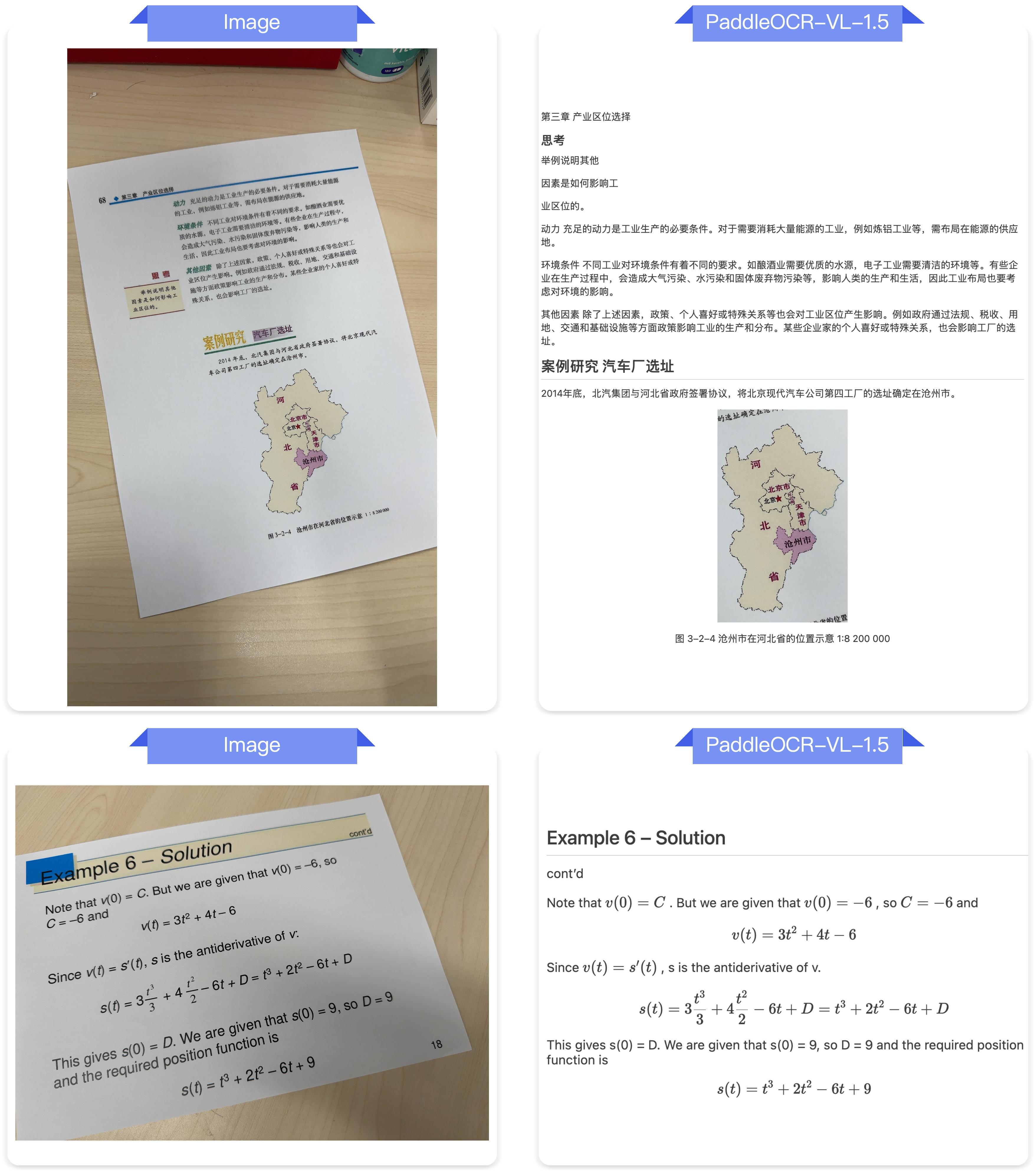
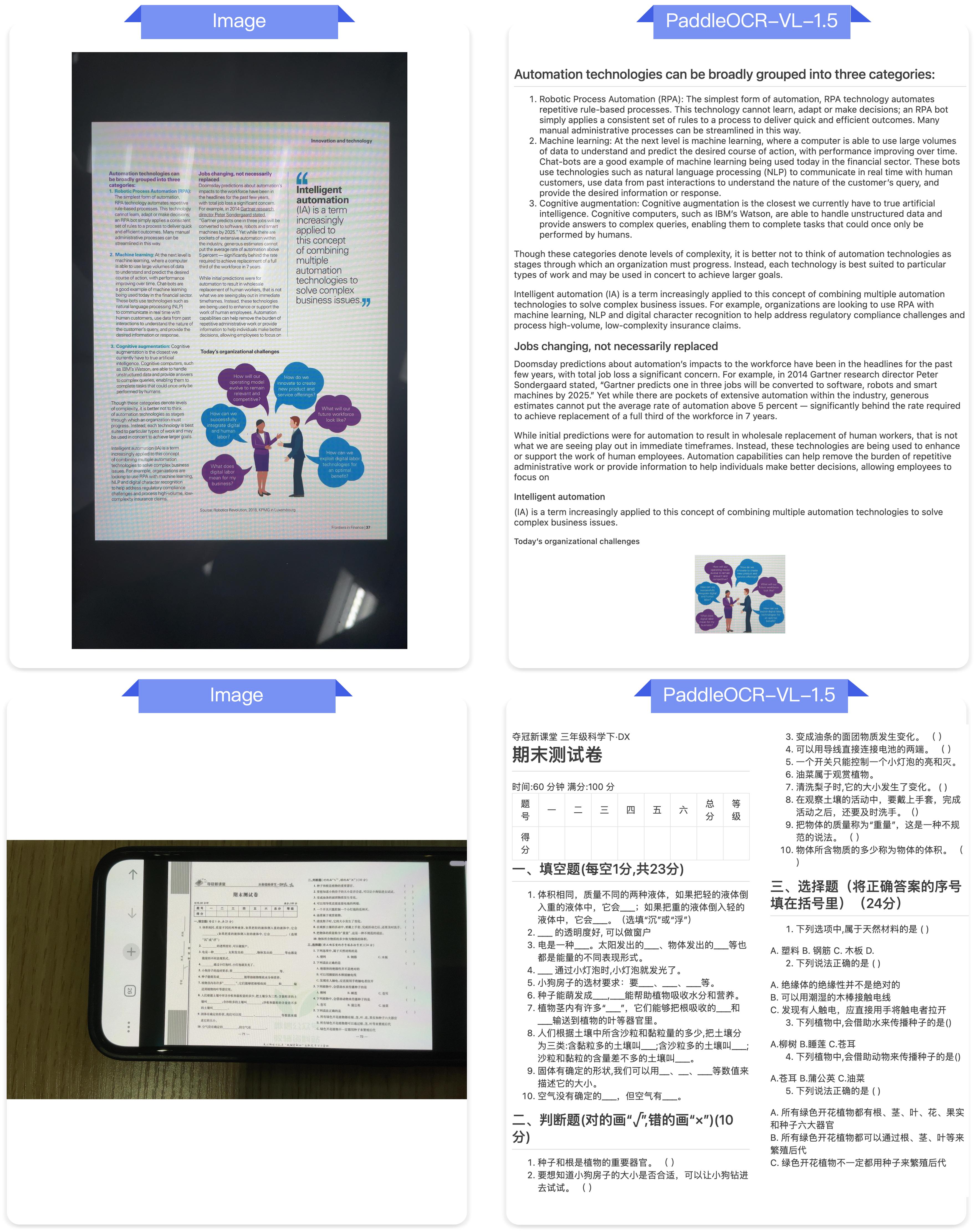
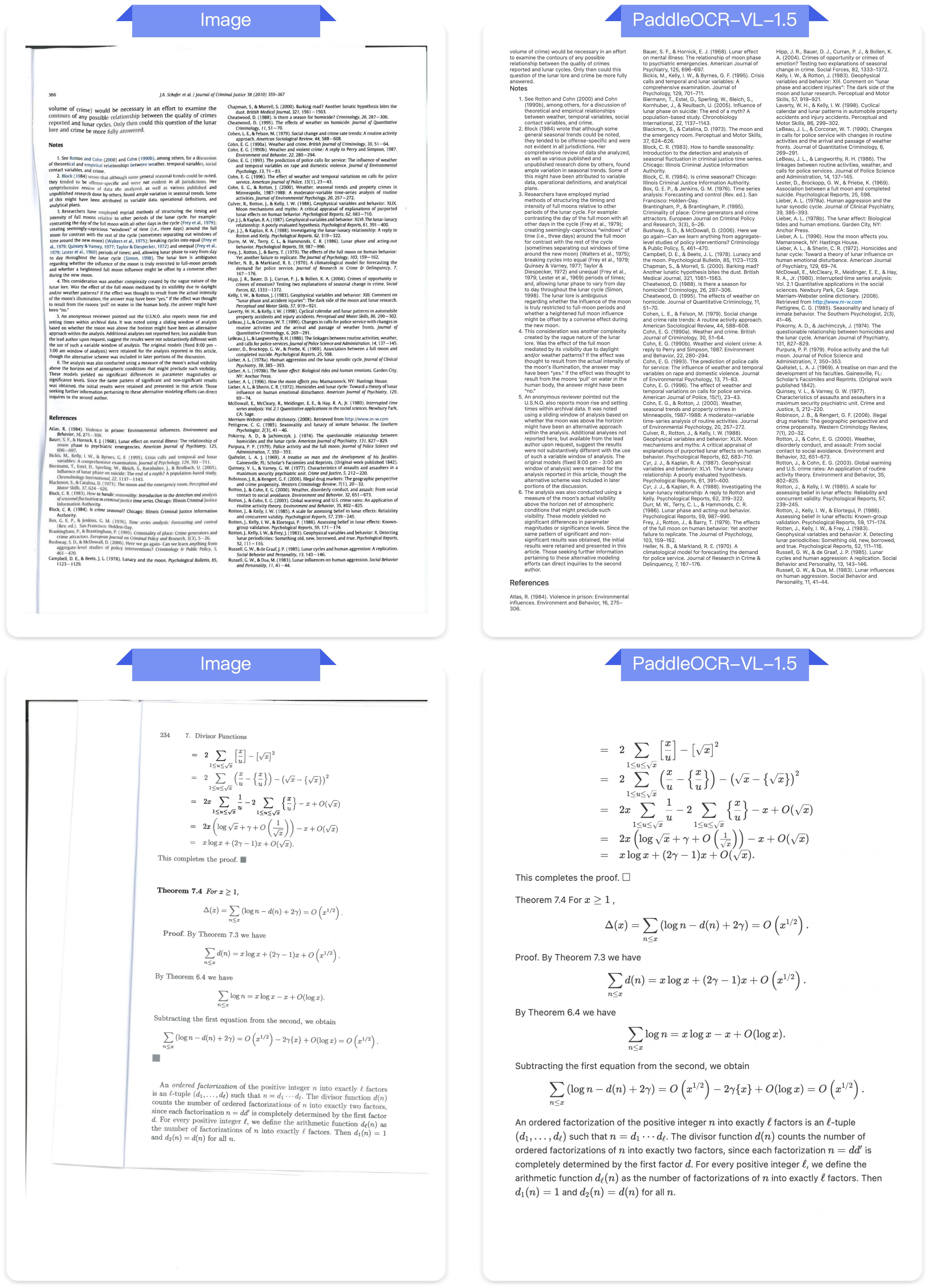
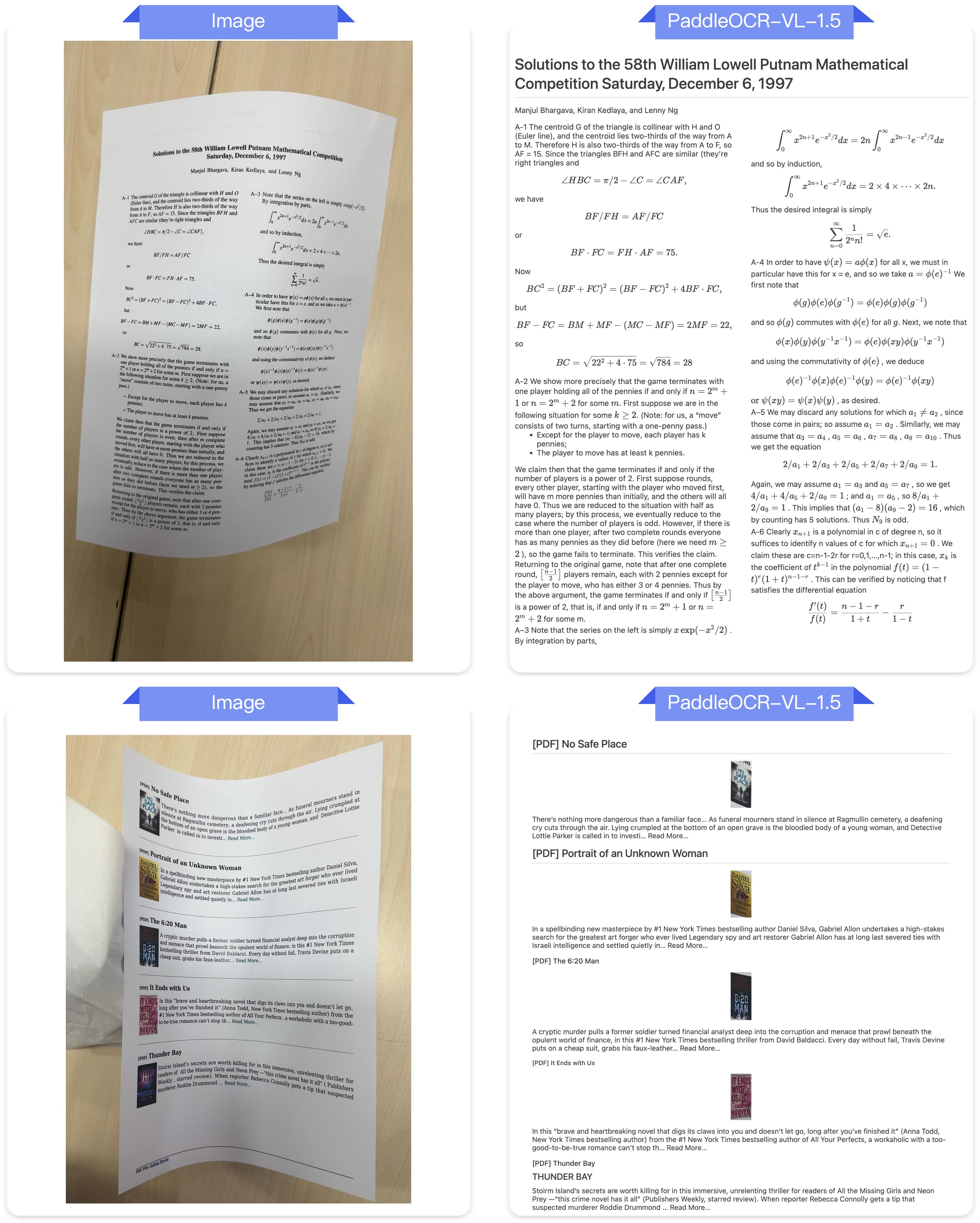
It introduces an innovative approach to document parsing by supporting irregular-shaped localization, enabling accurate polygonal detection under skewed and warped document conditions. Evaluations across five real-world scenarios—scanning, skew, warping, screen-photography, and illumination—demonstrate superior performance over mainstream open-source and proprietary models.
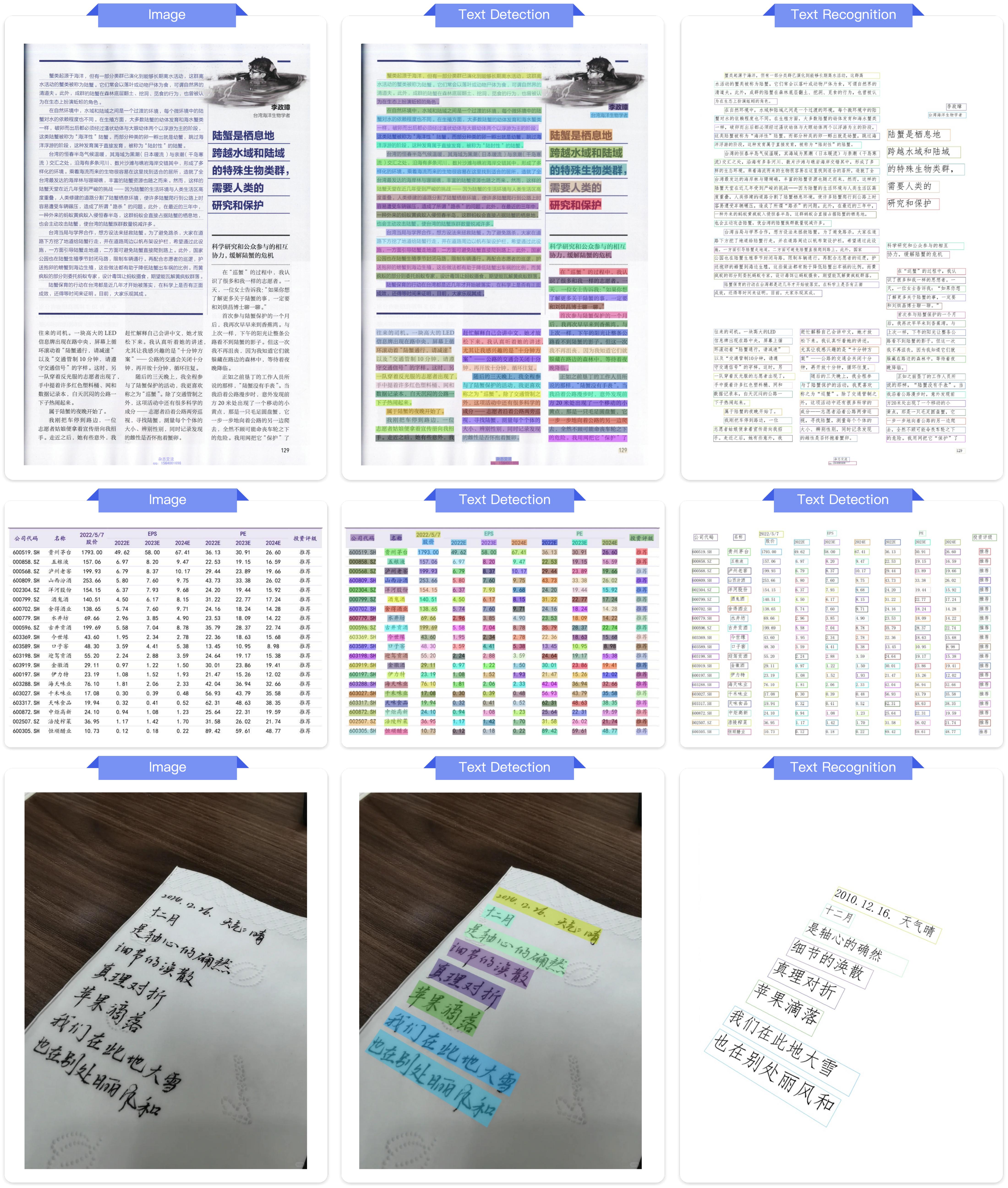
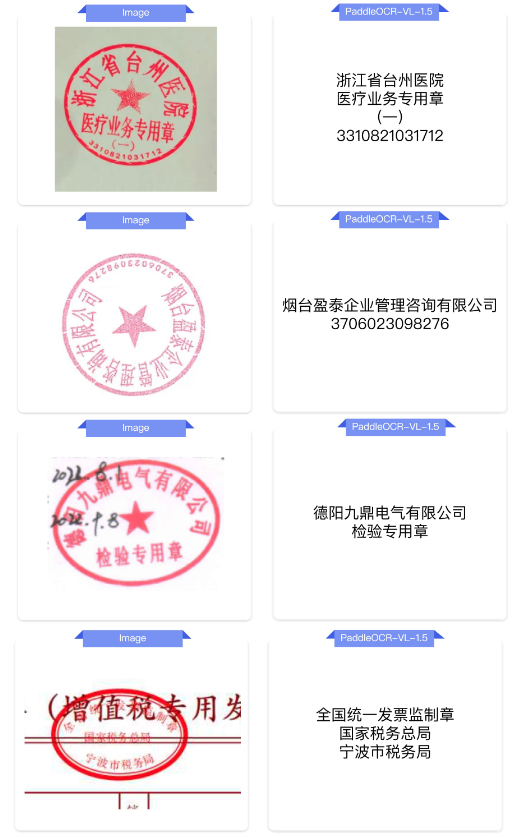
The model introduces text spotting (text-line localization and recognition), along with seal recognition, with all corresponding metrics setting new SOTA results in their respective tasks.
PaddleOCR-VL-1.5 further strengthens its capability in specialized scenarios and multilingual recognition. Recognition performance is improved for rare characters, ancient texts, multilingual tables, underlines, and checkboxes, and language coverage is extended to include China's Tibetan script and Bengali.
The model supports automatic cross-page table merging and cross-page paragraph heading recognition, effectively mitigating content fragmentation issues in long-document parsing.
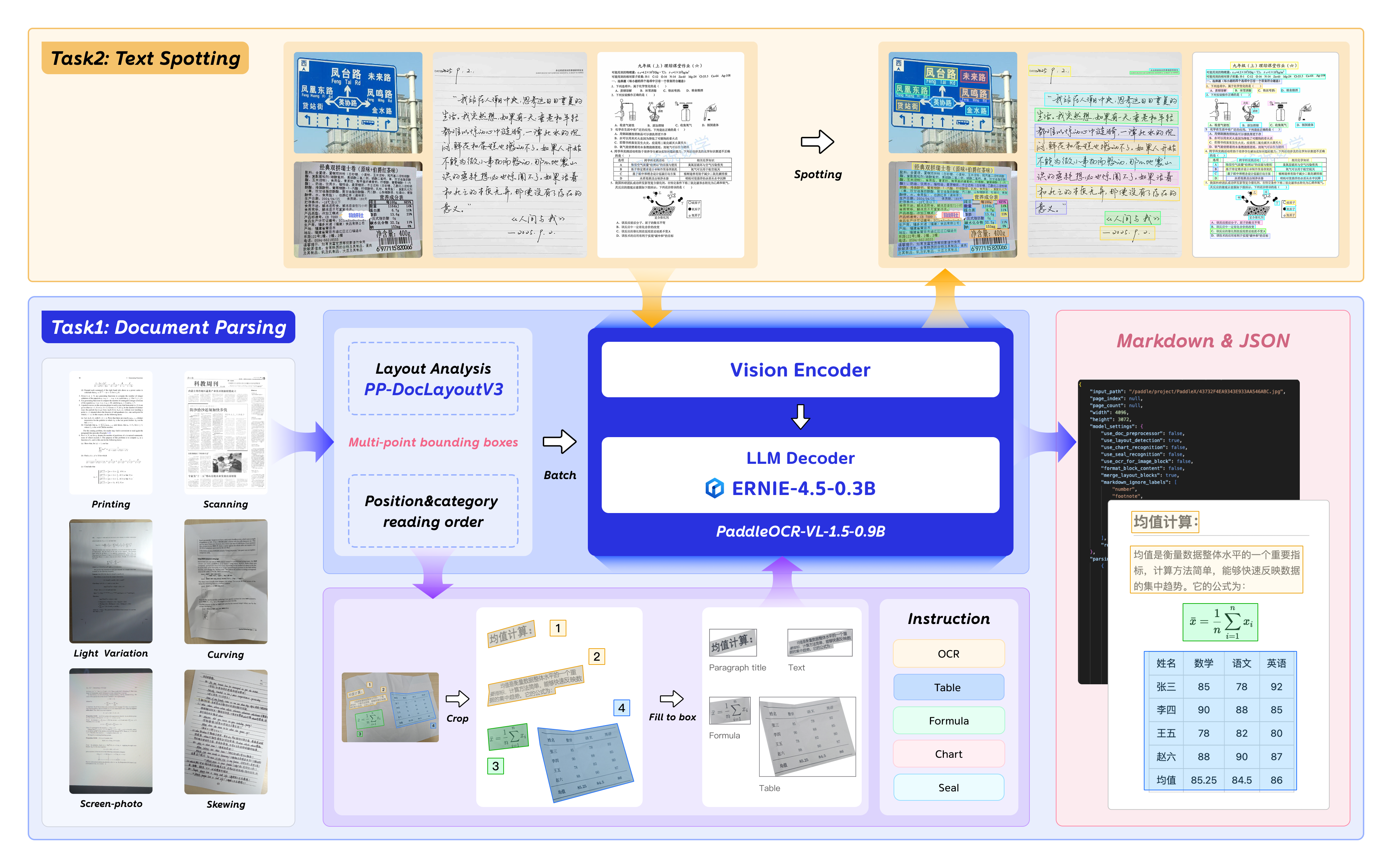
2026.01.29 🚀 We release PaddleOCR-VL-1.5, —a Multi-Task 0.9B VLM for Robust In-the-Wild Document Parsing.Install PaddlePaddle and PaddleOCR:
# The following command installs the PaddlePaddle version for CUDA 12.6. For other CUDA versions and the CPU version, please refer to https://www.paddlepaddle.org.cn/en/install/quick?docurl=/documentation/docs/en/develop/install/pip/linux-pip_en.html
python -m pip install paddlepaddle-gpu==3.2.1 -i https://www.paddlepaddle.org.cn/packages/stable/cu126/
python -m pip install -U "paddleocr[doc-parser]"
Please ensure that you install PaddlePaddle framework version 3.2.1 or above, along with the special version of safetensors. For macOS users, please use Docker to set up the environment.
CLI usage:
paddleocr doc_parser -i https://paddle-model-ecology.bj.bcebos.com/paddlex/imgs/demo_image/paddleocr_vl_demo.png
Python API usage:
from paddleocr import PaddleOCRVL
pipeline = PaddleOCRVL()
output = pipeline.predict("https://paddle-model-ecology.bj.bcebos.com/paddlex/imgs/demo_image/paddleocr_vl_demo.png")
for res in output:
    res.print()
    res.save_to_json(save_path="output")
    res.save_to_markdown(save_path="output")
Start the VLM inference server:
You can start the vLLM inference service using one of two methods:
Method 1: PaddleOCR method
docker run \
    --rm \
    --gpus all \
    --network host \
    ccr-2vdh3abv-pub.cnc.bj.baidubce.com/paddlepaddle/paddleocr-genai-vllm-server:latest-nvidia-gpu \
    paddleocr genai_server --model_name PaddleOCR-VL-1.5-0.9B --host 0.0.0.0 --port 8080 --backend vllm
Method 2: vLLM method
Call the PaddleOCR CLI or Python API:
paddleocr doc_parser \
    -i https://paddle-model-ecology.bj.bcebos.com/paddlex/imgs/demo_image/paddleocr_vl_demo.png \
    --vl_rec_backend vllm-server \
    --vl_rec_server_url http://127.0.0.1:8080/v1
from paddleocr import PaddleOCRVL
pipeline = PaddleOCRVL(vl_rec_backend="vllm-server", vl_rec_server_url="http://127.0.0.1:8080/v1")
output = pipeline.predict("https://paddle-model-ecology.bj.bcebos.com/paddlex/imgs/demo_image/paddleocr_vl_demo.png")
for res in output:
    res.print()
    res.save_to_json(save_path="output")
    res.save_to_markdown(save_path="output")
For more usage details and parameter explanations, see the documentation.
Currently, the PaddleOCR-VL-1.5-0.9B model facilitates seamless inference via the transformers library, supporting comprehensive text spotting and the recognition of complex elements including formulas, tables, charts, and seals. Below is a simple script we provide to support inference using the PaddleOCR-VL-1.5-0.9B model with transformers.
Note: We currently recommend using the official method for inference, as it is faster and supports page-level document parsing. The example code below only supports element-level recognition and text spotting.
# ensure the transformers v5 is installed
python -m pip install "transformers>=5.0.0"
from PIL import Image
import torch
from transformers import AutoProcessor, AutoModelForImageTextToText

# ---- Settings ----
model_path = "PaddlePaddle/PaddleOCR-VL-1.5"
image_path = "test.png"
task = "ocr" # Options: 'ocr' | 'table' | 'chart' | 'formula' | 'spotting' | 'seal'
# ------------------

# ---- Image Preprocessing For Spotting ----
image = Image.open(image_path).convert("RGB")
orig_w, orig_h = image.size
spotting_upscale_threshold = 1500

if task == "spotting" and orig_w < spotting_upscale_threshold and orig_h < spotting_upscale_threshold:
    process_w, process_h = orig_w * 2, orig_h * 2
    try:
        resample_filter = Image.Resampling.LANCZOS
    except AttributeError:
        resample_filter = Image.LANCZOS
    image = image.resize((process_w, process_h), resample_filter)

# Set max_pixels: use 1605632 for spotting, otherwise use default ~1M pixels
max_pixels = 2048 * 28 * 28 if task == "spotting" else 1280 * 28 * 28
# ---------------------------

# -------- Inference --------
DEVICE = "cuda" if torch.cuda.is_available() else "cpu"
PROMPTS = {
    "ocr": "OCR:",
    "table": "Table Recognition:",
    "formula": "Formula Recognition:",
    "chart": "Chart Recognition:",
    "spotting": "Spotting:",
    "seal": "Seal Recognition:",
}

model = AutoModelForImageTextToText.from_pretrained(model_path, torch_dtype=torch.bfloat16).to(DEVICE).eval()
processor = AutoProcessor.from_pretrained(model_path)

messages = [
    {
        "role": "user",
        "content": [
            {"type": "image", "image": image},
            {"type": "text", "text": PROMPTS[task]},
        ]
    }
]
inputs = processor.apply_chat_template(
    messages,
    add_generation_prompt=True,
    tokenize=True,
    return_dict=True,
    return_tensors="pt",
    images_kwargs={"size": {"shortest_edge": processor.image_processor.min_pixels, "longest_edge": max_pixels}},
).to(model.device)

outputs = model.generate(**inputs, max_new_tokens=512)
result = processor.decode(outputs[0][inputs["input_ids"].shape[-1]:-1])
print(result)
# ---------------------------
# ensure the flash-attn2 is installed
pip install flash-attn --no-build-isolation
model = AutoModelForImageTextToText.from_pretrained(model_path, torch_dtype=torch.bfloat16, attn_implementation="flash_attention_2").to(DEVICE).eval()
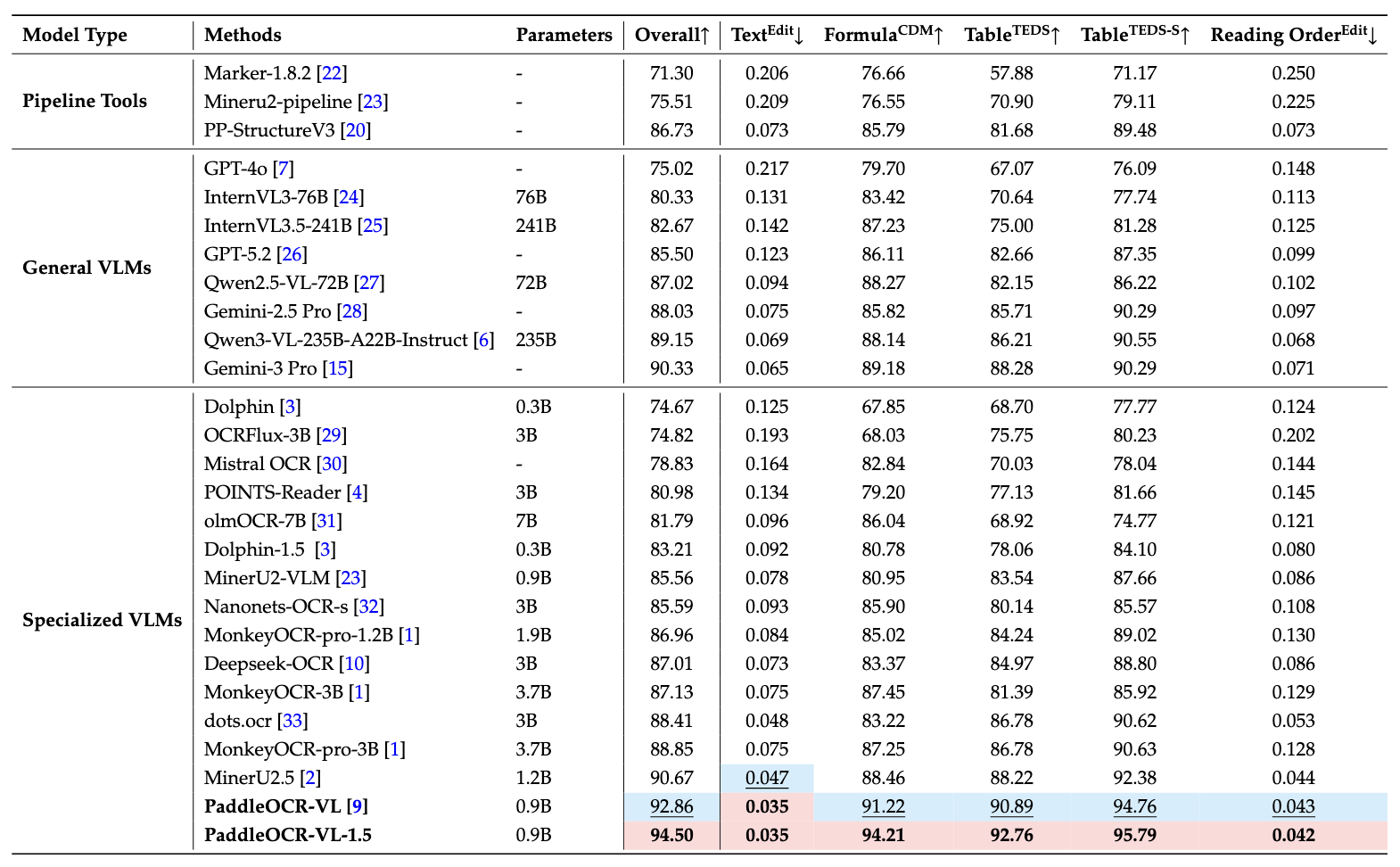
Notes:
- Performance metrics are cited from the OmniDocBench official leaderboard, except for Gemini-3 Pro, Qwen3-VL-235B-A22B-Instruct and our model, which were evaluated independently.
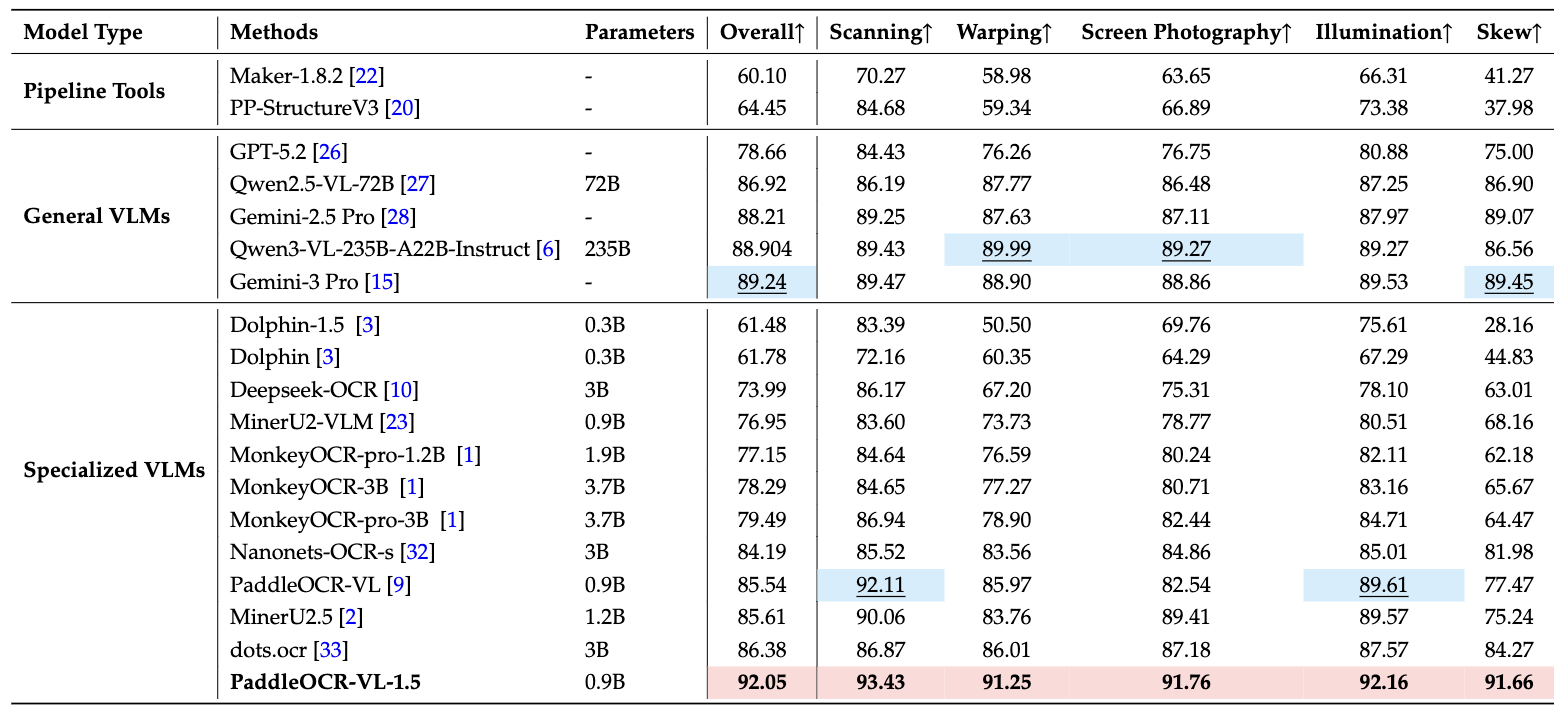
Notes:
- Real5-OmniDocBench is a brand-new benchmark oriented toward real-world scenarios, which we constructed based on the OmniDocBench v1.5 dataset. The dataset comprises five distinct scenarios: Scanning, Warping, Screen-photography, Illumination, and Skew. For further details, please refer to Real5-OmniDocBench.
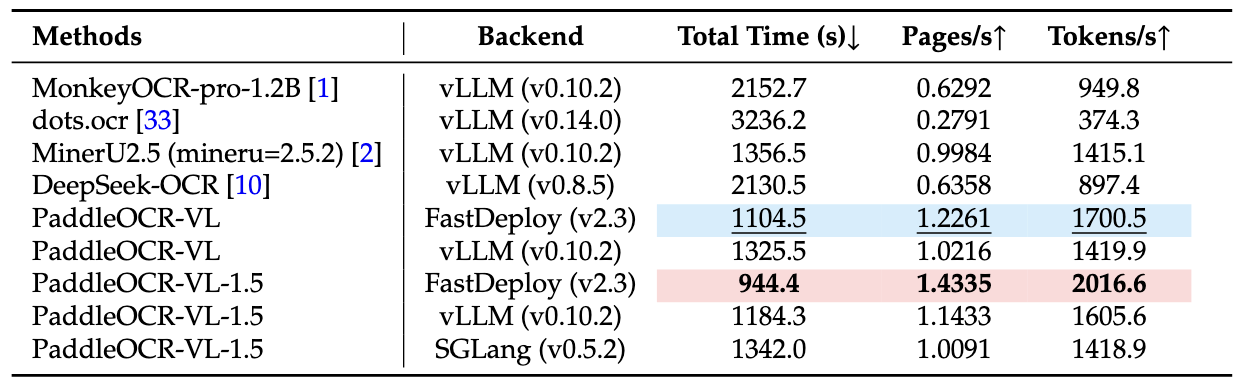
Notes:
- End-to-End Inference Performance Comparison on OmniDocBench v1.5. PDF documents were processed in batches of 512 on a single NVIDIA A100 GPU. The reported end-to-end runtime includes both PDF rendering and Markdown generation. All methods rely on their built-in PDF parsing modules and default DPI settings to reflect out-of-the-box performance.
We would like to thank PaddleFormers, Keye, MinerU, OmniDocBench for providing valuable code, model weights and benchmarks. We also appreciate everyone's contribution to this open-source project!
If you find PaddleOCR-VL-1.5 helpful, feel free to give us a star and citation.
comming soon
Base model
baidu/ERNIE-4.5-0.3B-Paddle