


PaddleOCR-VL-1.6
Collection
Expanding the Frontier of Document Parsing with Under-Optimized Region Refinement and Progressive Post-Training • 5 items • Updated • 3
PaddleOCR-VL-1.6: Expanding the Frontier of Document Parsing with Under-Optimized Region Refinement and Progressive Post-Training




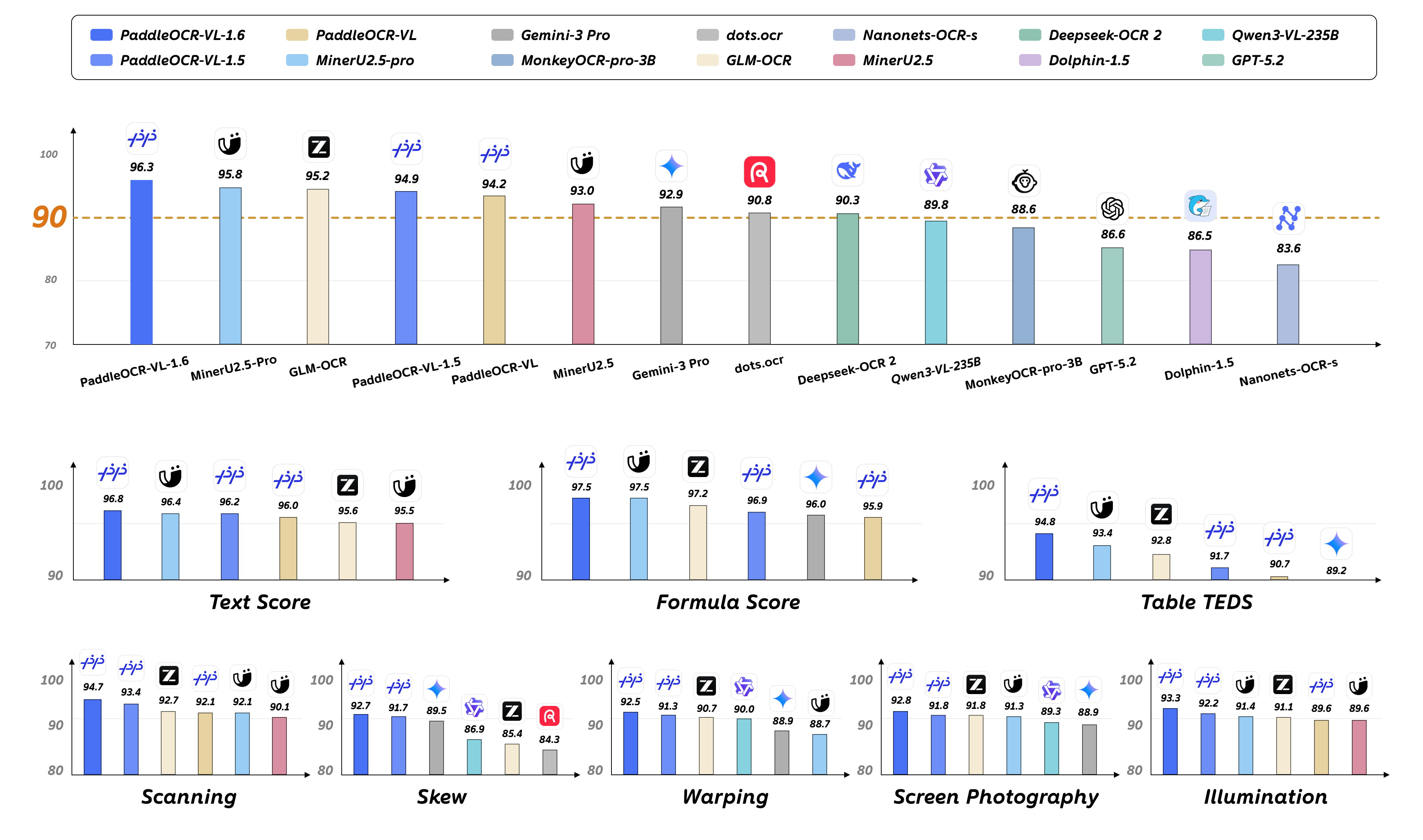
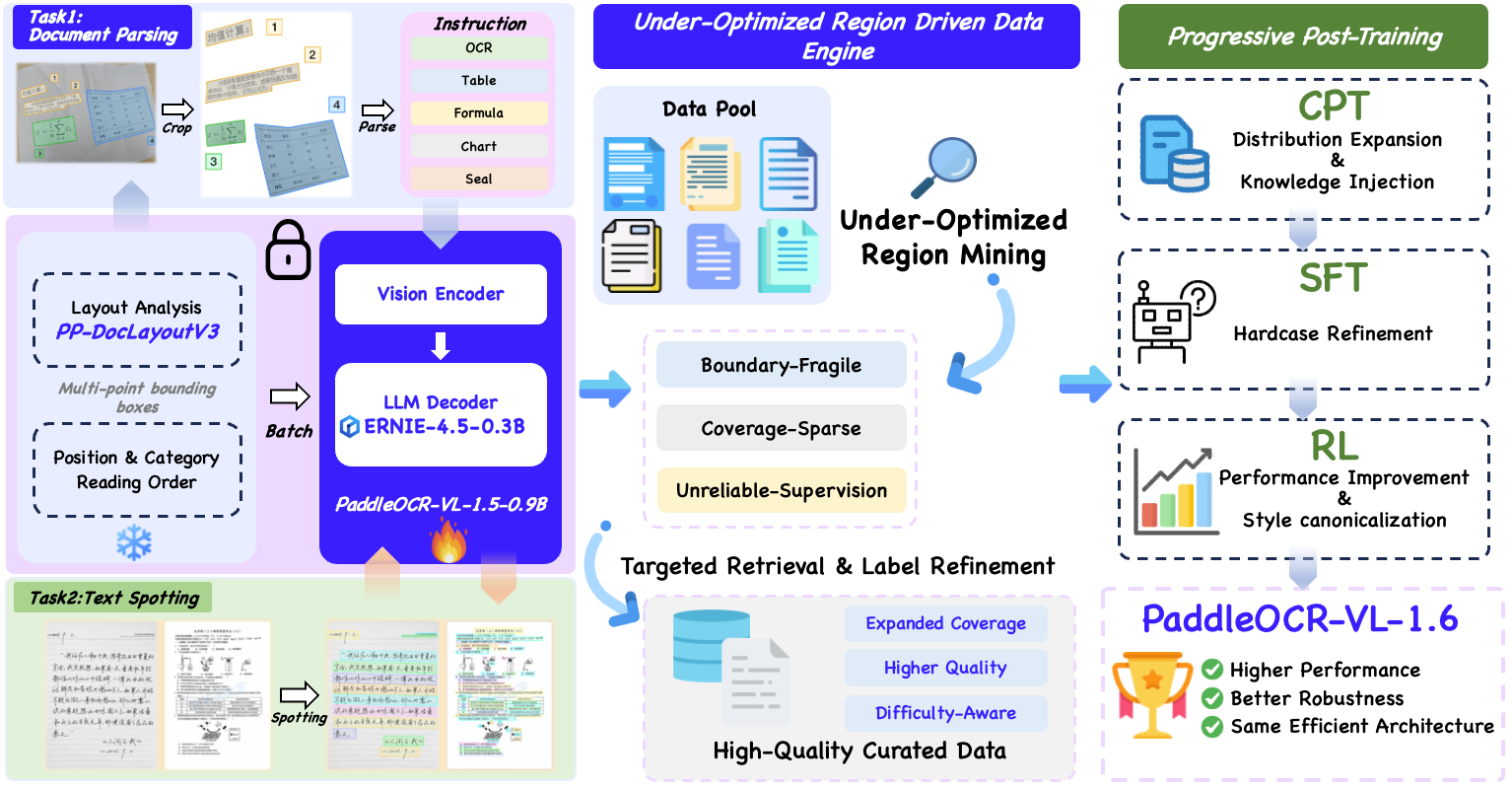
We introduce PaddleOCR-VL-1.6, an upgraded compact document parsing model built upon PaddleOCR-VL-1.5. PaddleOCR-VL-1.6 introduces a region-aware data optimization framework that identifies weak regions from the previous model, applies targeted enhancement to those regions, and improves the reliability of supervision signals. It further adopts a progressive post-training recipe based on curated data selection and reinforcement learning, pushing model performance to a higher level through staged optimization. PaddleOCR-VL-1.6 achieves a new state-of-the-art score of 96.33% on OmniDocBench v1.6, sets new records on OmniDocBench v1.5 and Real5-OmniDocBench as well, and demonstrates strong competitiveness against top-tier VLMs. The model architecture is fully compatible with PaddleOCR-VL-1.5, enabling zero-cost plug-and-play migration.
Install PaddlePaddle and PaddleOCR:
# The following command installs the PaddlePaddle version for CUDA 12.6. For other CUDA versions and the CPU version, please refer to https://www.paddlepaddle.org.cn/en/install/quick?docurl=/documentation/docs/en/develop/install/pip/linux-pip_en.html
python -m pip install paddlepaddle-gpu==3.2.1 -i https://www.paddlepaddle.org.cn/packages/stable/cu126/
python -m pip install -U "paddleocr[doc-parser]>=3.6.0"
Please ensure that you install PaddlePaddle framework version 3.2.1 or above, along with the special version of safetensors. For macOS users, please use Docker to set up the environment.
Start the VLM inference server:
llama-server \
    -m /path/to/PaddleOCR-VL-1.6-GGUF.gguf \
    --mmproj /path/to/PaddleOCR-VL-1.6-GGUF-mmproj.gguf  \
    --port 8080  \
    --host 0.0.0.0 \
    --temp 0
Call the PaddleOCR CLI or Python API:
paddleocr doc_parser \
    -i https://paddle-model-ecology.bj.bcebos.com/paddlex/imgs/demo_image/paddleocr_vl_demo.png \
    --pipeline_version v1.6 \
    --vl_rec_backend llama-cpp-server \
    --vl_rec_server_url http://127.0.0.1:8080/v1
from paddleocr import PaddleOCRVL
pipeline = PaddleOCRVL(pipeline_version="v1.6", vl_rec_backend="llama-cpp-server", vl_rec_server_url="http://127.0.0.1:8080/v1")
output = pipeline.predict("https://paddle-model-ecology.bj.bcebos.com/paddlex/imgs/demo_image/paddleocr_vl_demo.png")
for res in output:
    res.print()
    res.save_to_json(save_path="output")
    res.save_to_markdown(save_path="output")
For more usage details and parameter explanations, see the documentation.
Currently, the PaddleOCR-VL-1.6-0.9B model facilitates seamless inference via the transformers library, supporting comprehensive text spotting and the recognition of complex elements including formulas, tables, charts, and seals. Below is a simple script we provide to support inference using the PaddleOCR-VL-1.6-0.9B model with llama.cpp.
We have six types of element-level recognition:
Text recognition, indicated by the prompt OCR:.
Formula recognition, indicated by the prompt Formula Recognition:.
Table recognition, indicated by the prompt Table Recognition:.
Chart recognition, indicated by the prompt Chart Recognition:.
Seal recognition, indicated by the prompt Seal Recognition:.
Spotting, indicated by the prompt Spotting:, and need to set image_max_pixels to 1605632:
git clone https://github.com/ggml-org/llama.cpp.git
cd llama.cpp
python -m pip install gguf
python ./gguf-py/gguf/scripts/gguf_set_metadata.py /path/to/PaddleOCR-VL-1.6-GGUF/PaddleOCR-VL-1.6-mmproj.gguf clip.vision.image_max_pixels 1605632 --force

# back to default value (1003520):
# python ./gguf-py/gguf/scripts/gguf_set_metadata.py /path/to/PaddleOCR-VL-1.6-GGUF/PaddleOCR-VL-1.6-mmproj.gguf clip.vision.image_max_pixels 1003520 --force
llama-cli \
    -m /path/to/PaddleOCR-VL-1.6-GGUF/PaddleOCR-VL-1.6.gguf \
    --mmproj /path/to/PaddleOCR-VL-1.6-GGUF/PaddleOCR-VL-1.6-mmproj.gguf \
    -p 'OCR:' \
    --image 'test_image.jpg'
llama-server -m /path/to/PaddleOCR-VL-1.6.gguf --mmproj /path/to/PaddleOCR-VL-1.6-GGUF/PaddleOCR-VL-1.6-mmproj.gguf --temp 0
We extend our gratitude to @megemini for their significant pull request, which adds support for PaddleOCR-VL-1.5-0.9B and PaddleOCR-VL-0.9B models to llama.cpp.
We're not able to determine the quantization variants.