

llm.create_chat_completion(
	messages = "No input example has been defined for this model task."
)
QuantFactory/SauerkrautLM-Nemo-12b-Instruct-GGUF
This is quantized version of VAGOsolutions/SauerkrautLM-Nemo-12b-Instruct created using llama.cpp
Original Model Card
VAGO solutions SauerkrautLM-Nemo-12b-Instruct
Fine-tuned Model - to showcase the potential of resource-efficient Fine-Tuning of Large Language Models using Spectrum Fine-Tuning
Introducing SauerkrautLM-Nemo-12b-Instruct – our Sauerkraut version of the powerful mistralai/Mistral-Nemo-Instruct-2407!
- Fine-tuning on German-English data with Spectrum Fine-Tuning targeting 25% of the layers.
- Utilized unique German-English Sauerkraut Mix v2
- Implemented bespoke, precision-engineered fine-tuning approach
Table of Contents
- Overview of all SauerkrautLM-Nemo-12b-Instruct
- Model Details
- Evaluation
- Disclaimer
- Contact
- Collaborations
- Acknowledgement
All SauerkrautLM-Nemo-12b-Instruct
| Model | HF | EXL2 | GGUF | AWQ |
|---|---|---|---|---|
| SauerkrautLM-Nemo-12b-Instruct | Link | coming soon | coming soon | coming soon |
Model Details
SauerkrautLM-Nemo-12b-Instruct
- Model Type: SauerkrautLM-Nemo-12b-Instruct is a fine-tuned Model based on mistralai/Mistral-Nemo-Instruct-2407
- Language(s): German, English
- License: Apache 2.0
- Contact: VAGO solutions
Training Procedure
This model showcases the potential of resource-efficient fine-tuning of large language models using Spectrum Fine-Tuning. Here's a brief on the procedure:
Fine-tuning on German-English Data:
- Utilized Spectrum Fine-Tuning, targeting 25% of the model's layers
- Introduced the model to a unique German-English Sauerkraut Mix v2
- Implemented a bespoke, precision-engineered fine-tuning approach
Sauerkraut Mix v2:
- Premium Dataset for Language Models, focusing on German and English
- Meticulously selected, high-quality dataset combinations
- Cutting-edge synthetic datasets created using proprietary, high-precision generation techniques
Objective and Results
The primary goal of this training was to demonstrate that with Spectrum Fine-Tuning targeting 25% of the layers, a 12 billion parameter model can significantly enhance the capabilities while using a fraction of the resources of the classic fine-tuning approach.
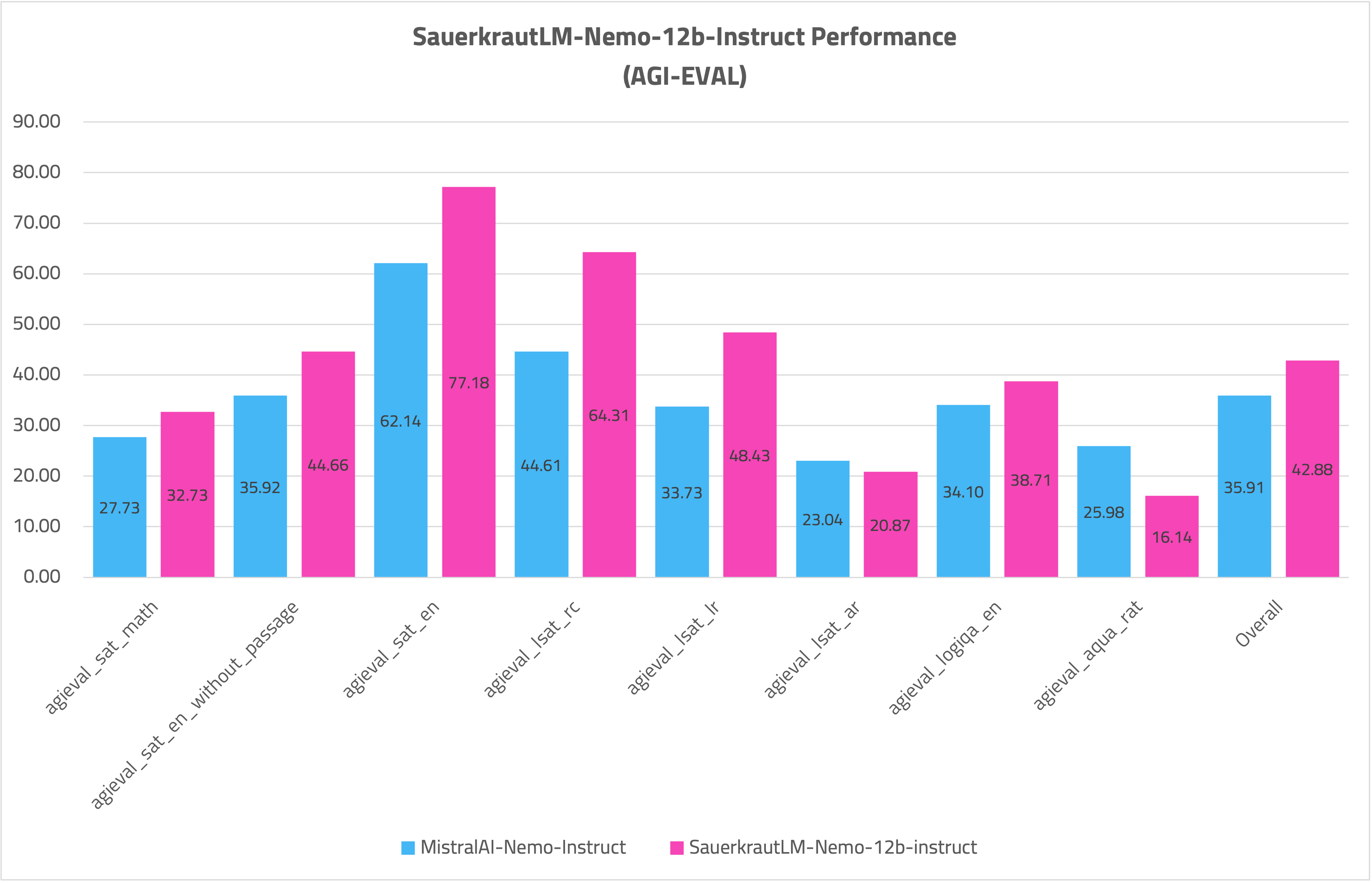
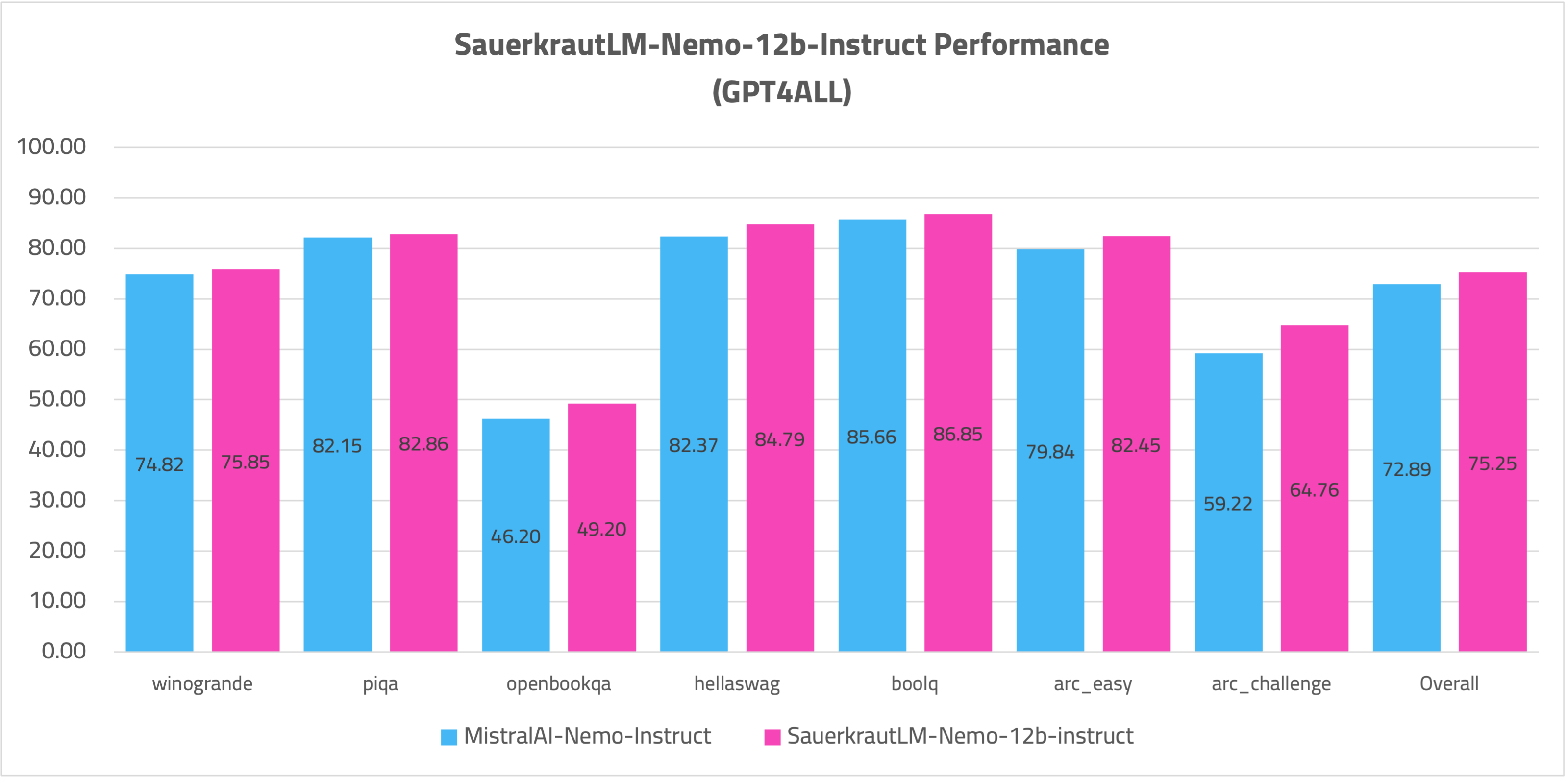
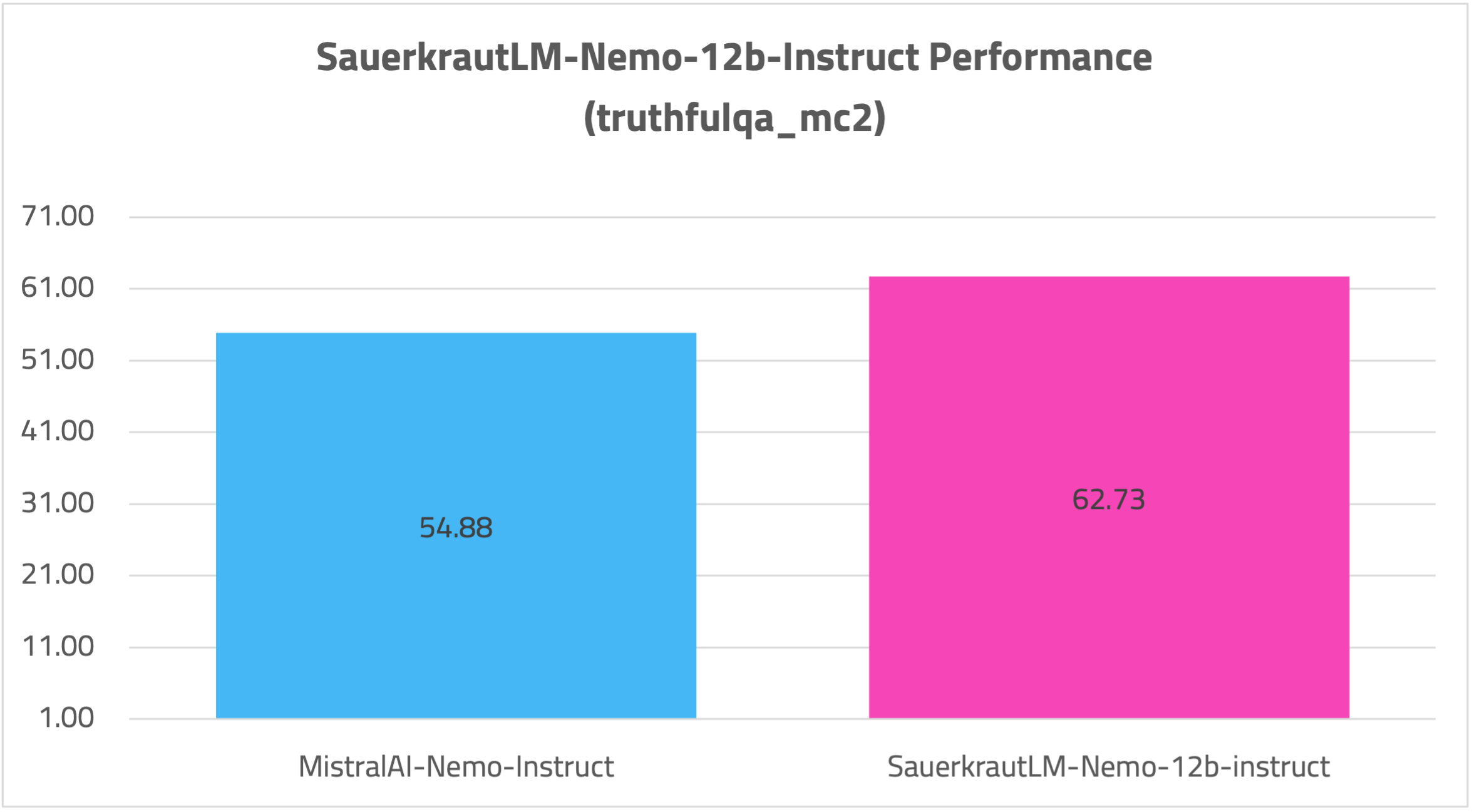
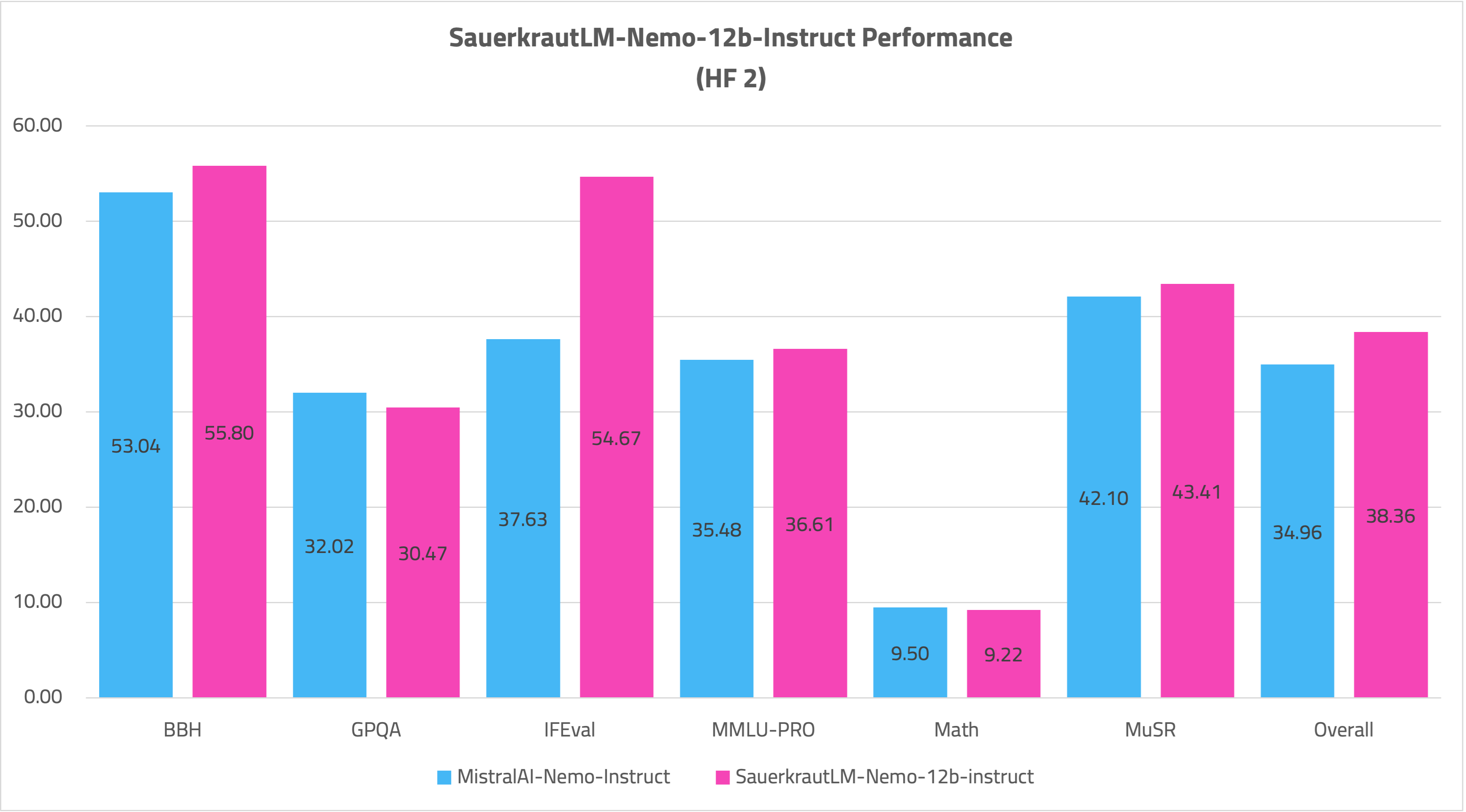
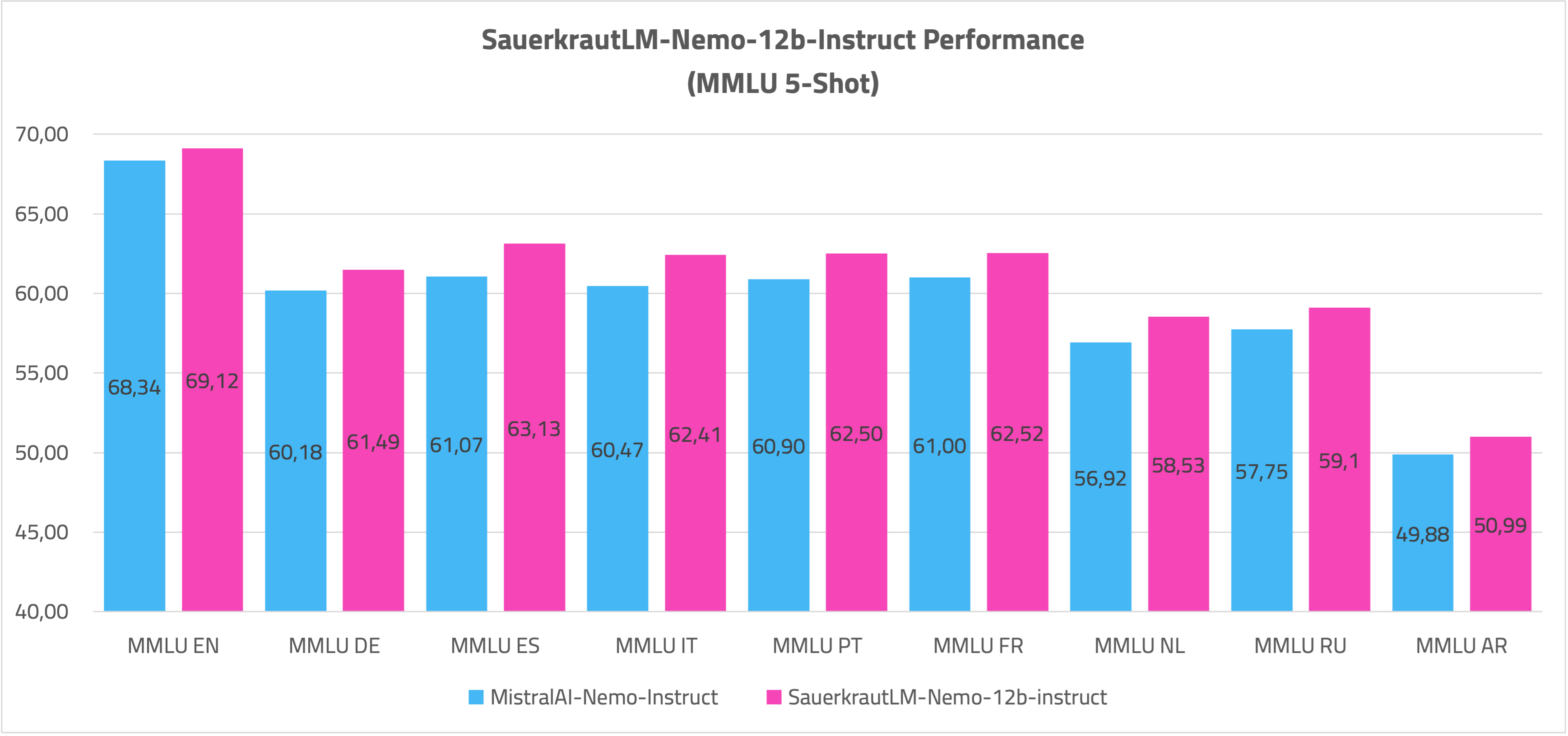
The model has substantially improved skills in German and English, as demonstrated by impressive benchmarks on the new Hugging Face leaderboard. At the same time, our fine-tuning improved skills in all other languages that Nemo can speak, showing inter-language effects in LLM performance.
Spectrum Fine-Tuning can efficiently enhance a large language model's capabilities in multiple languages while preserving the majority of its previously acquired knowledge.
Evaluation
AGIEVAL
GPT4ALL
TRUTHFULQA
OPENLEADERBOARD 2
MMLU 5-Shot
Disclaimer
We must inform users that despite our best efforts in data cleansing, the possibility of uncensored content slipping through cannot be entirely ruled out. However, we cannot guarantee consistently appropriate behavior. Therefore, if you encounter any issues or come across inappropriate content, we kindly request that you inform us through the contact information provided. Additionally, it is essential to understand that the licensing of these models does not constitute legal advice. We are not held responsible for the actions of third parties who utilize our models.
Contact
If you are interested in customized LLMs for business applications, please get in contact with us via our website. We are also grateful for your feedback and suggestions.
Collaborations
We are also keenly seeking support and investment for our startup, VAGO solutions where we continuously advance the development of robust language models designed to address a diverse range of purposes and requirements. If the prospect of collaboratively navigating future challenges excites you, we warmly invite you to reach out to us at VAGO solutions
Acknowledgement
Many thanks to Mistral AI for providing such a valuable model to the Open-Source community.
- Downloads last month
- 178
2-bit
3-bit
4-bit
5-bit
6-bit
8-bit
# !pip install llama-cpp-python from llama_cpp import Llama llm = Llama.from_pretrained( repo_id="QuantFactory/SauerkrautLM-Nemo-12b-Instruct-GGUF", filename="", )