

Instructions to use QuantFactory/Yi-Coder-9B-GGUF with libraries, inference providers, notebooks, and local apps. Follow these links to get started.
- Libraries
- llama-cpp-python
How to use QuantFactory/Yi-Coder-9B-GGUF with llama-cpp-python:
# !pip install llama-cpp-python from llama_cpp import Llama llm = Llama.from_pretrained( repo_id="QuantFactory/Yi-Coder-9B-GGUF", filename="Yi-Coder-9B.Q2_K.gguf", )
output = llm( "Once upon a time,", max_tokens=512, echo=True ) print(output)
- Notebooks
- Google Colab
- Kaggle
- Local Apps
- llama.cpp
How to use QuantFactory/Yi-Coder-9B-GGUF with llama.cpp:
Install from brew
brew install llama.cpp # Start a local OpenAI-compatible server with a web UI: llama-server -hf QuantFactory/Yi-Coder-9B-GGUF:Q4_K_M # Run inference directly in the terminal: llama-cli -hf QuantFactory/Yi-Coder-9B-GGUF:Q4_K_M
Install from WinGet (Windows)
winget install llama.cpp # Start a local OpenAI-compatible server with a web UI: llama-server -hf QuantFactory/Yi-Coder-9B-GGUF:Q4_K_M # Run inference directly in the terminal: llama-cli -hf QuantFactory/Yi-Coder-9B-GGUF:Q4_K_M
Use pre-built binary
# Download pre-built binary from: # https://github.com/ggerganov/llama.cpp/releases # Start a local OpenAI-compatible server with a web UI: ./llama-server -hf QuantFactory/Yi-Coder-9B-GGUF:Q4_K_M # Run inference directly in the terminal: ./llama-cli -hf QuantFactory/Yi-Coder-9B-GGUF:Q4_K_M
Build from source code
git clone https://github.com/ggerganov/llama.cpp.git cd llama.cpp cmake -B build cmake --build build -j --target llama-server llama-cli # Start a local OpenAI-compatible server with a web UI: ./build/bin/llama-server -hf QuantFactory/Yi-Coder-9B-GGUF:Q4_K_M # Run inference directly in the terminal: ./build/bin/llama-cli -hf QuantFactory/Yi-Coder-9B-GGUF:Q4_K_M
Use Docker
docker model run hf.co/QuantFactory/Yi-Coder-9B-GGUF:Q4_K_M
- LM Studio
- Jan
- Ollama
How to use QuantFactory/Yi-Coder-9B-GGUF with Ollama:
ollama run hf.co/QuantFactory/Yi-Coder-9B-GGUF:Q4_K_M
- Unsloth Studio new
How to use QuantFactory/Yi-Coder-9B-GGUF with Unsloth Studio:
Install Unsloth Studio (macOS, Linux, WSL)
curl -fsSL https://unsloth.ai/install.sh | sh # Run unsloth studio unsloth studio -H 0.0.0.0 -p 8888 # Then open http://localhost:8888 in your browser # Search for QuantFactory/Yi-Coder-9B-GGUF to start chatting
Install Unsloth Studio (Windows)
irm https://unsloth.ai/install.ps1 | iex # Run unsloth studio unsloth studio -H 0.0.0.0 -p 8888 # Then open http://localhost:8888 in your browser # Search for QuantFactory/Yi-Coder-9B-GGUF to start chatting
Using HuggingFace Spaces for Unsloth
# No setup required # Open https://huggingface.co/spaces/unsloth/studio in your browser # Search for QuantFactory/Yi-Coder-9B-GGUF to start chatting
- Docker Model Runner
How to use QuantFactory/Yi-Coder-9B-GGUF with Docker Model Runner:
docker model run hf.co/QuantFactory/Yi-Coder-9B-GGUF:Q4_K_M
- Lemonade
How to use QuantFactory/Yi-Coder-9B-GGUF with Lemonade:
Pull the model
# Download Lemonade from https://lemonade-server.ai/ lemonade pull QuantFactory/Yi-Coder-9B-GGUF:Q4_K_M
Run and chat with the model
lemonade run user.Yi-Coder-9B-GGUF-Q4_K_M
List all available models
lemonade list
output = llm(
"Once upon a time,",
max_tokens=512,
echo=True
)
print(output)QuantFactory/Yi-Coder-9B-GGUF
This is quantized version of 01-ai/Yi-Coder-9B created using llama.cpp

Original Model Card
π GitHub β’
πΎ Discord β’
π€ Twitter β’
π¬ WeChat
π Paper β’
πͺ Tech Blog β’
π FAQ β’
π Learning Hub
Intro
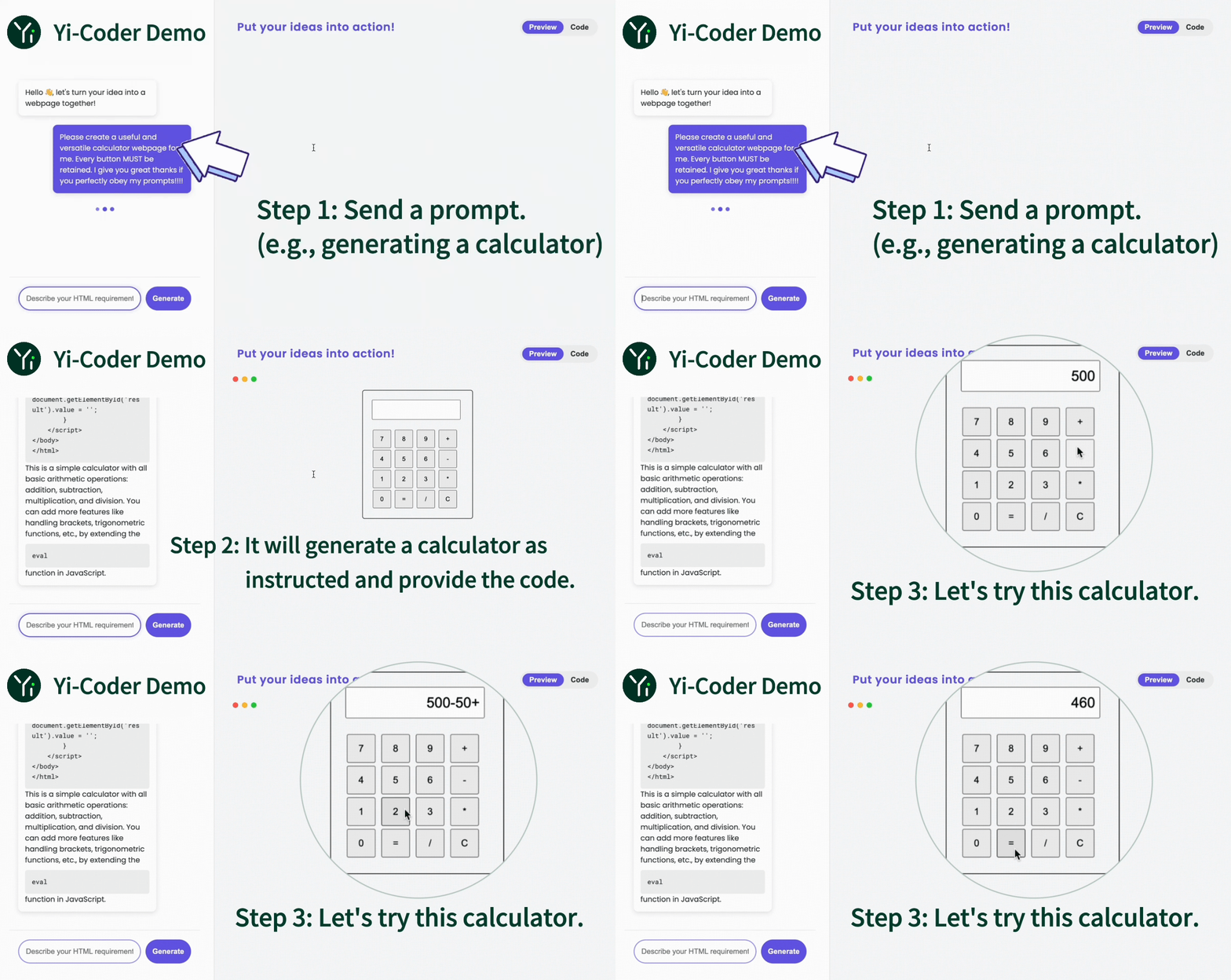
Yi-Coder is a series of open-source code language models that delivers state-of-the-art coding performance with fewer than 10 billion parameters.
Key features:
- Excelling in long-context understanding with a maximum context length of 128K tokens.
- Supporting 52 major programming languages:
'java', 'markdown', 'python', 'php', 'javascript', 'c++', 'c#', 'c', 'typescript', 'html', 'go', 'java_server_pages', 'dart', 'objective-c', 'kotlin', 'tex', 'swift', 'ruby', 'sql', 'rust', 'css', 'yaml', 'matlab', 'lua', 'json', 'shell', 'visual_basic', 'scala', 'rmarkdown', 'pascal', 'fortran', 'haskell', 'assembly', 'perl', 'julia', 'cmake', 'groovy', 'ocaml', 'powershell', 'elixir', 'clojure', 'makefile', 'coffeescript', 'erlang', 'lisp', 'toml', 'batchfile', 'cobol', 'dockerfile', 'r', 'prolog', 'verilog'
For model details and benchmarks, see Yi-Coder blog and Yi-Coder README.
Models
| Name | Type | Length | Download |
|---|---|---|---|
| Yi-Coder-9B-Chat | Chat | 128K | π€ Hugging Face β’ π€ ModelScope β’ π£ wisemodel |
| Yi-Coder-1.5B-Chat | Chat | 128K | π€ Hugging Face β’ π€ ModelScope β’ π£ wisemodel |
| Yi-Coder-9B | Base | 128K | π€ Hugging Face β’ π€ ModelScope β’ π£ wisemodel |
| Yi-Coder-1.5B | Base | 128K | π€ Hugging Face β’ π€ ModelScope β’ π£ wisemodel |
Benchmarks
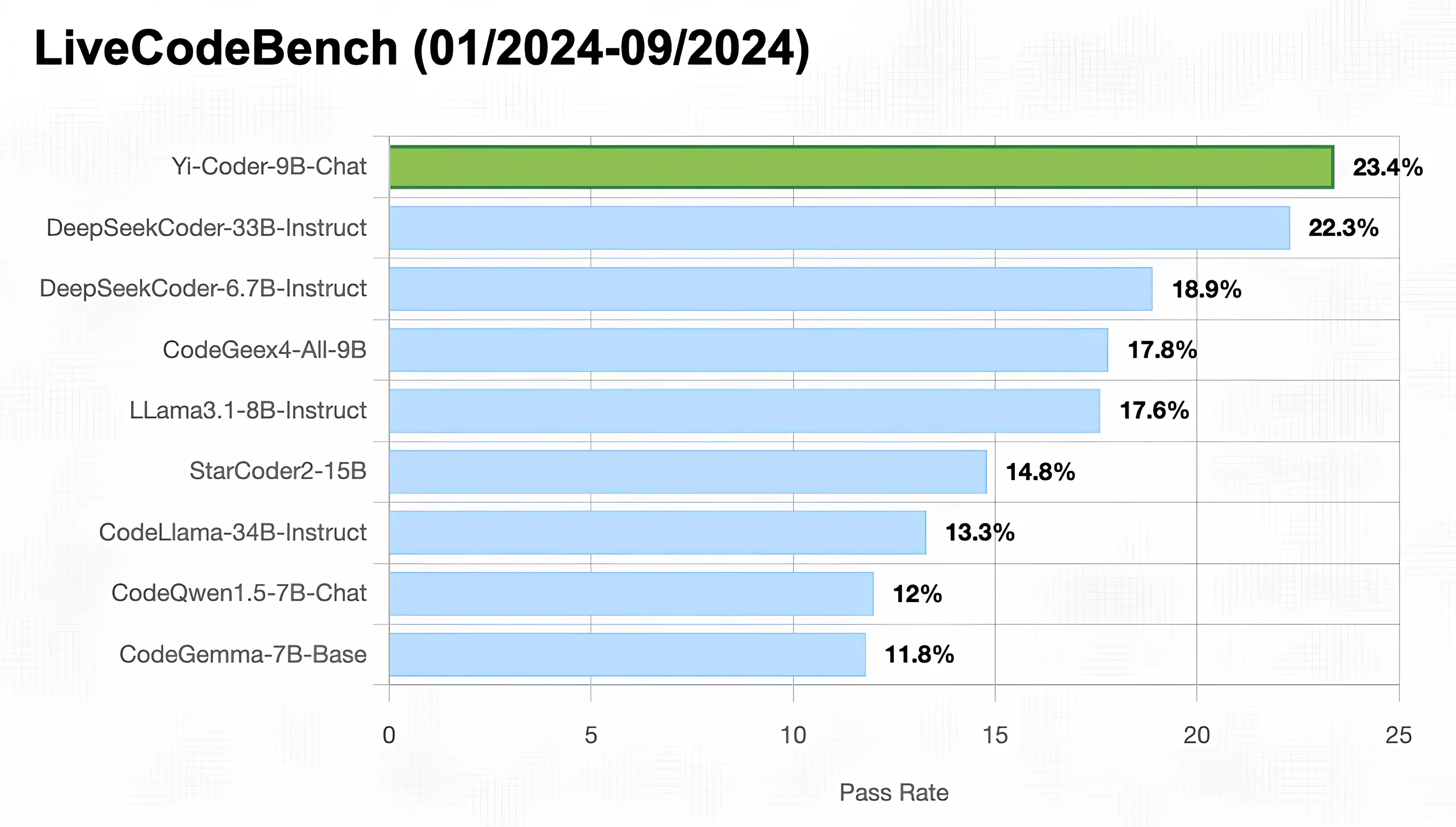
As illustrated in the figure below, Yi-Coder-9B-Chat achieved an impressive 23% pass rate in LiveCodeBench, making it the only model with under 10B parameters to surpass 20%. It also outperforms DeepSeekCoder-33B-Ins at 22.3%, CodeGeex4-9B-all at 17.8%, CodeLLama-34B-Ins at 13.3%, and CodeQwen1.5-7B-Chat at 12%.
Quick Start
You can use transformers to run inference with Yi-Coder models (both chat and base versions) as follows:
from transformers import AutoTokenizer, AutoModelForCausalLM
device = "cuda" # the device to load the model onto
model_path = "01-ai/Yi-Coder-9B-Chat"
tokenizer = AutoTokenizer.from_pretrained(model_path)
model = AutoModelForCausalLM.from_pretrained(model_path, device_map="auto").eval()
prompt = "Write a quick sort algorithm."
messages = [
{"role": "system", "content": "You are a helpful assistant."},
{"role": "user", "content": prompt}
]
text = tokenizer.apply_chat_template(
messages,
tokenize=False,
add_generation_prompt=True
)
model_inputs = tokenizer([text], return_tensors="pt").to(device)
generated_ids = model.generate(
model_inputs.input_ids,
max_new_tokens=1024,
eos_token_id=tokenizer.eos_token_id
)
generated_ids = [
output_ids[len(input_ids):] for input_ids, output_ids in zip(model_inputs.input_ids, generated_ids)
]
response = tokenizer.batch_decode(generated_ids, skip_special_tokens=True)[0]
print(response)
For getting up and running with Yi-Coder series models quickly, see Yi-Coder README.
- Downloads last month
- 2,894
2-bit
3-bit
4-bit
5-bit
6-bit
8-bit
# !pip install llama-cpp-python from llama_cpp import Llama llm = Llama.from_pretrained( repo_id="QuantFactory/Yi-Coder-9B-GGUF", filename="", )