| --- |
| license: apache-2.0 |
| pipeline_tag: text-to-video |
| library_name: open-sora |
| --- |
| |
| ## Open-Sora: Democratizing Efficient Video Production for All |
|
|
| We design and implement **Open-Sora**, an initiative dedicated to **efficiently** producing high-quality video. We hope to make the model, |
| tools and all details accessible to all. By embracing **open-source** principles, |
| Open-Sora not only democratizes access to advanced video generation techniques, but also offers a |
| streamlined and user-friendly platform that simplifies the complexities of video generation. |
| With Open-Sora, our goal is to foster innovation, creativity, and inclusivity within the field of content creation. |
|
|
| [Paper](https://huggingface.co/papers/2503.09642) |
|
|
| Github: https://github.com/hpcaitech/Open-Sora |
|
|
| ## 🔆 Reports |
|
|
| - **[Tech Report of Open-Sora 2.0](https://github.com/hpcaitech/Open-Sora-Demo/blob/main/paper/Open_Sora_2_tech_report.pdf)** |
| - **[Step by step to train or finetune your own model](docs/train.md)** |
| - **[Step by step to train and evaluate an video autoencoder](docs/ae.md)** |
| - **[Visit the high compression video autoencoder](docs/hcae.md)** |
| - Reports of previous version (better see in according branch): |
| - [Open-Sora 1.3](docs/report_04.md): shift-window attention, unified spatial-temporal VAE, etc. |
| - [Open-Sora 1.2](docs/report_03.md), [Tech Report](https://arxiv.org/abs/2412.20404): rectified flow, 3d-VAE, score condition, evaluation, etc. |
| - [Open-Sora 1.1](docs/report_02.md): multi-resolution/length/aspect-ratio, image/video conditioning/editing, data preprocessing, etc. |
| - [Open-Sora 1.0](docs/report_01.md): architecture, captioning, etc. |
|
|
| 📍 Since Open-Sora is under active development, we remain different branchs for different versions. The latest version is [main](https://github.com/hpcaitech/Open-Sora). Old versions include: [v1.0](https://github.com/hpcaitech/Open-Sora/tree/opensora/v1.0), [v1.1](https://github.com/hpcaitech/Open-Sora/tree/opensora/v1.1), [v1.2](https://github.com/hpcaitech/Open-Sora/tree/opensora/v1.2), [v1.3](https://github.com/hpcaitech/Open-Sora/tree/opensora/v1.3). |
|
|
| ## Quickstart |
|
|
| ### Installation |
|
|
| ```bash |
| # create a virtual env and activate (conda as an example) |
| conda create -n opensora python=3.10 |
| conda activate opensora |
| |
| # download the repo |
| git clone https://github.com/hpcaitech/Open-Sora |
| cd Open-Sora |
| |
| # Ensure torch >= 2.4.0 |
| pip install -v . # for development mode, `pip install -v -e .` |
| pip install xformers==0.0.27.post2 --index-url https://download.pytorch.org/whl/cu121 # install xformers according to your cuda version |
| pip install flash-attn --no-build-isolation |
| ``` |
|
|
| Optionally, you can install flash attention 3 for faster speed. |
|
|
| ```bash |
| git clone https://github.com/Dao-AILab/flash-attention # 4f0640d5 |
| cd flash-attention/hopper |
| python setup.py install |
| ``` |
|
|
| ### Model Download |
|
|
| Our 11B model supports 256px and 768px resolution. Both T2V and I2V are supported by one model. 🤗 [Huggingface](https://huggingface.co/hpcai-tech/Open-Sora-v2) 🤖 [ModelScope](https://modelscope.cn/models/luchentech/Open-Sora-v2). |
|
|
| Download from huggingface: |
|
|
| ```bash |
| pip install "huggingface_hub[cli]" |
| huggingface-cli download hpcai-tech/Open-Sora-v2 --local-dir ./ckpts |
| ``` |
|
|
| Download from ModelScope: |
|
|
| ```bash |
| pip install modelscope |
| modelscope download hpcai-tech/Open-Sora-v2 --local_dir ./ckpts |
| ``` |
|
|
| ### Text-to-Video Generation |
|
|
| Our model is optimized for image-to-video generation, but it can also be used for text-to-video generation. To generate high quality videos, with the help of flux text-to-image model, we build a text-to-image-to-video pipeline. For 256x256 resolution: |
|
|
| ```bash |
| # Generate one given prompt |
| torchrun --nproc_per_node 1 --standalone scripts/diffusion/inference.py configs/diffusion/inference/t2i2v_256px.py --save-dir samples --prompt "raining, sea" |
| |
| # Generation with csv |
| torchrun --nproc_per_node 1 --standalone scripts/diffusion/inference.py configs/diffusion/inference/t2i2v_256px.py --save-dir samples --dataset.data-path assets/texts/example.csv |
| ``` |
|
|
| For 768x768 resolution: |
|
|
| ```bash |
| # One GPU |
| torchrun --nproc_per_node 1 --standalone scripts/diffusion/inference.py configs/diffusion/inference/t2i2v_768px.py --save-dir samples --prompt "raining, sea" |
| |
| # Multi-GPU with colossalai sp |
| torchrun --nproc_per_node 8 --standalone scripts/diffusion/inference.py configs/diffusion/inference/t2i2v_768px.py --save-dir samples --prompt "raining, sea" |
| ``` |
|
|
| You can adjust the generation aspect ratio by `--aspect_ratio` and the generation length by `--num_frames`. Candidate values for aspect_ratio includes `16:9`, `9:16`, `1:1`, `2.39:1`. Candidate values for num_frames should be `4k+1` and less than 129. |
|
|
| You can also run direct text-to-video by: |
|
|
| ```bash |
| # One GPU for 256px |
| torchrun --nproc_per_node 1 --standalone scripts/diffusion/inference.py configs/diffusion/inference/256px.py --prompt "raining, sea" |
| # Multi-GPU for 768px |
| torchrun --nproc_per_node 8 --standalone scripts/diffusion/inference.py configs/diffusion/inference/768px.py --prompt "raining, sea" |
| ``` |
|
|
| ### Image-to-Video Generation |
|
|
| Given a prompt and a reference image, you can generate a video with the following command: |
|
|
| ```bash |
| # 256px |
| torchrun --nproc_per_node 1 --standalone scripts/diffusion/inference.py configs/diffusion/inference/256px.py --cond_type i2v_head --prompt "A plump pig wallows in a muddy pond on a rustic farm, its pink snout poking out as it snorts contentedly. The camera captures the pig's playful splashes, sending ripples through the water under the midday sun. Wooden fences and a red barn stand in the background, framed by rolling green hills. The pig's muddy coat glistens in the sunlight, showcasing the simple pleasures of its carefree life." --ref assets/texts/i2v.png |
| |
| # 256px with csv |
| torchrun --nproc_per_node 1 --standalone scripts/diffusion/inference.py configs/diffusion/inference/256px.py --cond_type i2v_head --dataset.data-path assets/texts/i2v.csv |
| |
| # Multi-GPU 768px |
| torchrun --nproc_per_node 8 --standalone scripts/diffusion/inference.py configs/diffusion/inference/768px.py --cond_type i2v_head --dataset.data-path assets/texts/i2v.csv |
| ``` |
|
|
| ## Advanced Usage |
|
|
| ### Motion Score |
|
|
| During training, we provide motion score into the text prompt. During inference, you can use the following command to generate videos with motion score (the default score is 4): |
|
|
| ```bash |
| torchrun --nproc_per_node 1 --standalone scripts/diffusion/inference.py configs/diffusion/inference/t2i2v_256px.py --save-dir samples --prompt "raining, sea" --motion-score 4 |
| ``` |
|
|
| We also provide a dynamic motion score evaluator. After setting your OpenAI API key, you can use the following command to evaluate the motion score of a video: |
|
|
| ```bash |
| torchrun --nproc_per_node 1 --standalone scripts/diffusion/inference.py configs/diffusion/inference/t2i2v_256px.py --save-dir samples --prompt "raining, sea" --motion-score dynamic |
| ``` |
|
|
| | Score | 1 | 4 | 7 | |
| | ----- | ------------------------------------------------------------------------------------------------------- | ------------------------------------------------------------------------------------------------------- | ------------------------------------------------------------------------------------------------------- | |
| | | <img src="https://github.com/hpcaitech/Open-Sora-Demo/blob/main/demo/v2.0/motion_score_1.gif" width=""> | <img src="https://github.com/hpcaitech/Open-Sora-Demo/blob/main/demo/v2.0/motion_score_4.gif" width=""> | <img src="https://github.com/hpcaitech/Open-Sora-Demo/blob/main/demo/v2.0/motion_score_7.gif" width=""> | |
|
|
| ### Prompt Refine |
|
|
| We take advantage of ChatGPT to refine the prompt. You can use the following command to refine the prompt. The function is available for both text-to-video and image-to-video generation. |
|
|
| ```bash |
| export OPENAI_API_KEY=sk-xxxx |
| torchrun --nproc_per_node 1 --standalone scripts/diffusion/inference.py configs/diffusion/inference/t2i2v_256px.py --save-dir samples --prompt "raining, sea" --refine-prompt True |
| ``` |
|
|
| ### Reproductivity |
|
|
| To make the results reproducible, you can set the random seed by: |
|
|
| ```bash |
| torchrun --nproc_per_node 1 --standalone scripts/diffusion/inference.py configs/diffusion/inference/t2i2v_256px.py --save-dir samples --prompt "raining, sea" --sampling_option.seed 42 --seed 42 |
| ``` |
|
|
| Use `--num-sample k` to generate `k` samples for each prompt. |
|
|
| ## Computational Efficiency |
|
|
| We test the computational efficiency of text-to-video on H100/H800 GPU. For 256x256, we use colossalai's tensor parallelism. For 768x768, we use colossalai's sequence parallelism. All use number of steps 50. The results are presented in the format: $\color{blue}{\text{Total time (s)}}/\color{red}{\text{peak GPU memory (GB)}}$ |
|
|
| | Resolution | 1x GPU | 2x GPUs | 4x GPUs | 8x GPUs | |
| | ---------- | -------------------------------------- | ------------------------------------- | ------------------------------------- | ------------------------------------- | |
| | 256x256 | $\color{blue}{60}/\color{red}{52.5}$ | $\color{blue}{40}/\color{red}{44.3}$ | $\color{blue}{34}/\color{red}{44.3}$ | | |
| | 768x768 | $\color{blue}{1656}/\color{red}{60.3}$ | $\color{blue}{863}/\color{red}{48.3}$ | $\color{blue}{466}/\color{red}{44.3}$ | $\color{blue}{276}/\color{red}{44.3}$ | |
|
|
| ## Evaluation |
|
|
| On [VBench](https://huggingface.co/spaces/Vchitect/VBench_Leaderboard), Open-Sora 2.0 significantly narrows the gap with OpenAI’s Sora, reducing it from 4.52% → 0.69% compared to Open-Sora 1.2. |
|
|
|  |
|
|
| Human preference results show our model is on par with HunyuanVideo 14B and Step-Video 30B. |
|
|
|  |
|
|
| ## Contribution |
|
|
| Thanks goes to these wonderful contributors: |
|
|
| <a href="https://github.com/hpcaitech/Open-Sora/graphs/contributors"> |
| <img src="https://contrib.rocks/image?repo=hpcaitech/Open-Sora" /> |
| </a> |
|
|
| If you wish to contribute to this project, please refer to the [Contribution Guideline](./CONTRIBUTING.md). |
|
|
| ## Acknowledgement |
|
|
| Here we only list a few of the projects. For other works and datasets, please refer to our report. |
|
|
| - [ColossalAI](https://github.com/hpcaitech/ColossalAI): A powerful large model parallel acceleration and optimization |
| system. |
| - [DiT](https://github.com/facebookresearch/DiT): Scalable Diffusion Models with Transformers. |
| - [OpenDiT](https://github.com/NUS-HPC-AI-Lab/OpenDiT): An acceleration for DiT training. We adopt valuable acceleration |
| strategies for training progress from OpenDiT. |
| - [PixArt](https://github.com/PixArt-alpha/PixArt-alpha): An open-source DiT-based text-to-image model. |
| - [Flux](https://github.com/black-forest-labs/flux): A powerful text-to-image generation model. |
| - [Latte](https://github.com/Vchitect/Latte): An attempt to efficiently train DiT for video. |
| - [HunyuanVideo](https://github.com/Tencent/HunyuanVideo/tree/main?tab=readme-ov-file): Open-Source text-to-video model. |
| - [StabilityAI VAE](https://huggingface.co/stabilityai/sd-vae-ft-mse-original): A powerful image VAE model. |
| - [DC-AE](https://github.com/mit-han-lab/efficientvit): Deep Compression AutoEncoder for image compression. |
| - [CLIP](https://github.com/openai/CLIP): A powerful text-image embedding model. |
| - [T5](https://github.com/google-research/text-to-text-transfer-transformer): A powerful text encoder. |
| - [LLaVA](https://github.com/haotian-liu/LLaVA): A powerful image captioning model based on [Mistral-7B](https://huggingface.co/mistralai/Mistral-7B-v0.1) and [Yi-34B](https://huggingface.co/01-ai/Yi-34B). |
| - [PLLaVA](https://github.com/magic-research/PLLaVA): A powerful video captioning model. |
| - [MiraData](https://github.com/mira-space/MiraData): A large-scale video dataset with long durations and structured caption. |
|
|
| ## Citation |
|
|
| ```bibtex |
| @software{opensora, |
| author = {Zangwei Zheng and Xiangyu Peng and Tianji Yang and Chenhui Shen and Shenggui Li and Hongxin Liu and Yukun Zhou and Tianyi Li and Yang You}, |
| title = {Open-Sora: Democratizing Efficient Video Production for All}, |
| month = {March}, |
| year = {2024}, |
| url = {https://github.com/hpcaitech/Open-Sora} |
| } |
| ``` |
|
|
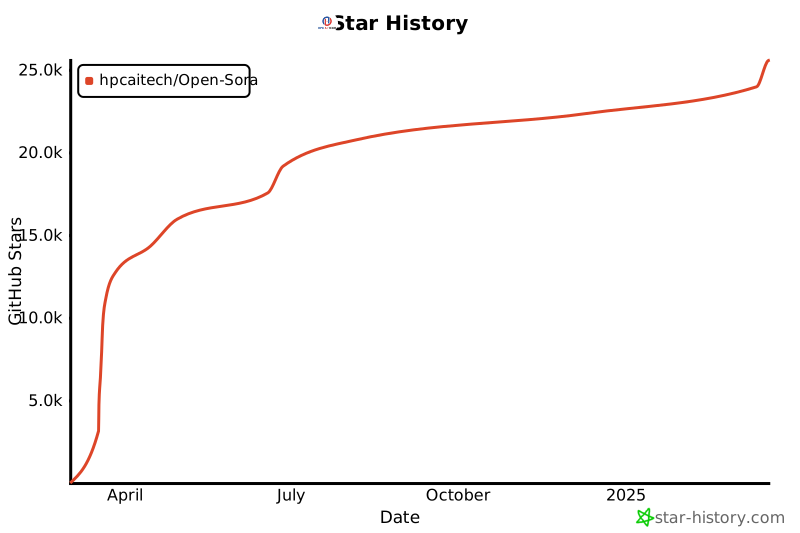
| ## Star History |
|
|
| [](https://star-history.com/#hpcaitech/Open-Sora&Date) |