

简体中文 | English
Key Points Detection Annotation Tool
Concents
LabelMe
Instruction
Installation
Please refer to The github of LabelMe for installation details.
Ubuntu
sudo apt-get install labelme

# or
sudo pip3 install labelme

# or install standalone executable from:
# https://github.com/wkentaro/labelme/releases
macOS
brew install pyqt  # maybe pyqt5
pip install labelme

# or
brew install wkentaro/labelme/labelme  # command line interface
# brew install --cask wkentaro/labelme/labelme  # app

# or install standalone executable/app from:
# https://github.com/wkentaro/labelme/releases
We recommend installing by Anoncanda.
conda create –name=labelme python=3
conda activate labelme
pip install pyqt5
pip install labelme
Notes of Key Points Data
COCO dataset needs to collect 17 key points.
keypoint indexes:
        0: 'nose',
        1: 'left_eye',
        2: 'right_eye',
        3: 'left_ear',
        4: 'right_ear',
        5: 'left_shoulder',
        6: 'right_shoulder',
        7: 'left_elbow',
        8: 'right_elbow',
        9: 'left_wrist',
        10: 'right_wrist',
        11: 'left_hip',
        12: 'right_hip',
        13: 'left_knee',
        14: 'right_knee',
        15: 'left_ankle',
        16: 'right_ankle'
Annotation of LabelMe
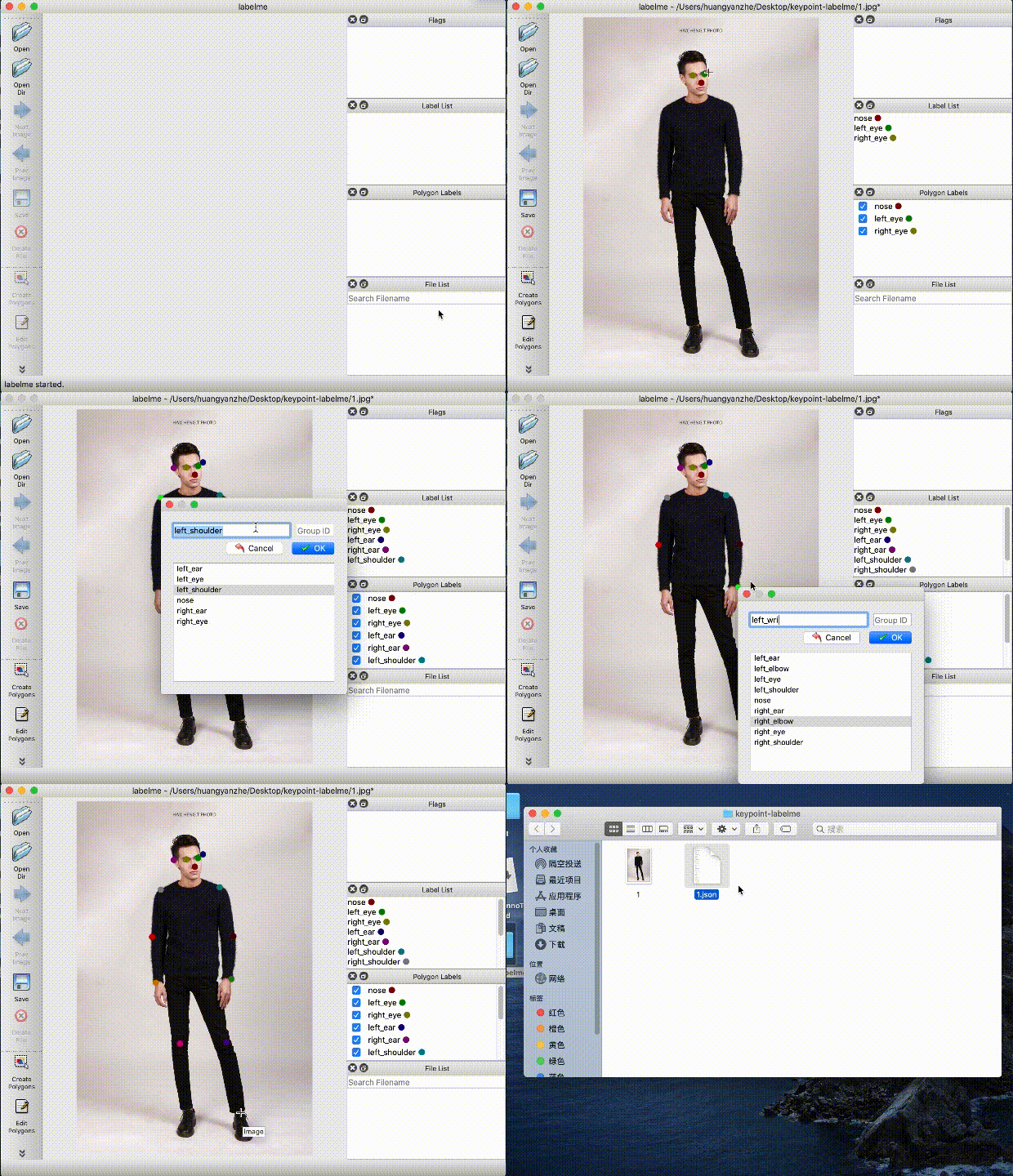
After starting labelme, select an image or an folder with images.
Select create polygons in the formula bar. Draw an annotation area as shown in the following GIF. You can right-click on the image to select different shape. When finished, press the Enter/Return key, then fill the corresponding label in the popup box, such as, people.
Click the save button in the formula bar,it will generate an annotation file in json.
Annotation Format
Data Export Format
#generate an annotation file
png/jpeg/jpg-->labelme-->json
Summary of Format Conversion
#convert annotation file to COCO dataset format
json-->labelme2coco.py-->COCO dataset
Annotation file(json)—>COCO Dataset
Convert the data annotated by LabelMe to COCO dataset by this script x2coco.py.
python tools/x2coco.py \
                --dataset_type labelme \
                --json_input_dir ./labelme_annos/ \
                --image_input_dir ./labelme_imgs/ \
                --output_dir ./cocome/ \
                --train_proportion 0.8 \
                --val_proportion 0.2 \
                --test_proportion 0.0
After the user dataset is converted to COCO data, the directory structure is as follows (note that the path name and file name in the dataset should not use Chinese as far as possible to avoid errors caused by Chinese coding problems):
dataset/xxx/
├── annotations
│   ├── train.json  # Annotation file of coco data
│   ├── valid.json  # Annotation file of coco data
├── images
│   ├── xxx1.jpg
│   ├── xxx2.jpg
│   ├── xxx3.jpg
│   |   ...
...