Instructions to use SicariusSicariiStuff/Zion_Alpha with libraries, inference providers, notebooks, and local apps. Follow these links to get started.
- Libraries
- Transformers
How to use SicariusSicariiStuff/Zion_Alpha with Transformers:
# Use a pipeline as a high-level helper from transformers import pipeline pipe = pipeline("text-generation", model="SicariusSicariiStuff/Zion_Alpha")# Load model directly from transformers import AutoTokenizer, AutoModelForCausalLM tokenizer = AutoTokenizer.from_pretrained("SicariusSicariiStuff/Zion_Alpha") model = AutoModelForCausalLM.from_pretrained("SicariusSicariiStuff/Zion_Alpha") - llama-cpp-python
How to use SicariusSicariiStuff/Zion_Alpha with llama-cpp-python:
# !pip install llama-cpp-python from llama_cpp import Llama llm = Llama.from_pretrained( repo_id="SicariusSicariiStuff/Zion_Alpha", filename="Zion_Alpha-Q3_K_M.gguf", )
output = llm( "Once upon a time,", max_tokens=512, echo=True ) print(output)
- Inference
- Notebooks
- Google Colab
- Kaggle
- Local Apps
- llama.cpp
How to use SicariusSicariiStuff/Zion_Alpha with llama.cpp:
Install from brew
brew install llama.cpp # Start a local OpenAI-compatible server with a web UI: llama-server -hf SicariusSicariiStuff/Zion_Alpha:Q3_K_M # Run inference directly in the terminal: llama-cli -hf SicariusSicariiStuff/Zion_Alpha:Q3_K_M
Install from WinGet (Windows)
winget install llama.cpp # Start a local OpenAI-compatible server with a web UI: llama-server -hf SicariusSicariiStuff/Zion_Alpha:Q3_K_M # Run inference directly in the terminal: llama-cli -hf SicariusSicariiStuff/Zion_Alpha:Q3_K_M
Use pre-built binary
# Download pre-built binary from: # https://github.com/ggerganov/llama.cpp/releases # Start a local OpenAI-compatible server with a web UI: ./llama-server -hf SicariusSicariiStuff/Zion_Alpha:Q3_K_M # Run inference directly in the terminal: ./llama-cli -hf SicariusSicariiStuff/Zion_Alpha:Q3_K_M
Build from source code
git clone https://github.com/ggerganov/llama.cpp.git cd llama.cpp cmake -B build cmake --build build -j --target llama-server llama-cli # Start a local OpenAI-compatible server with a web UI: ./build/bin/llama-server -hf SicariusSicariiStuff/Zion_Alpha:Q3_K_M # Run inference directly in the terminal: ./build/bin/llama-cli -hf SicariusSicariiStuff/Zion_Alpha:Q3_K_M
Use Docker
docker model run hf.co/SicariusSicariiStuff/Zion_Alpha:Q3_K_M
- LM Studio
- Jan
- vLLM
How to use SicariusSicariiStuff/Zion_Alpha with vLLM:
Install from pip and serve model
# Install vLLM from pip: pip install vllm # Start the vLLM server: vllm serve "SicariusSicariiStuff/Zion_Alpha" # Call the server using curl (OpenAI-compatible API): curl -X POST "http://localhost:8000/v1/completions" \ -H "Content-Type: application/json" \ --data '{ "model": "SicariusSicariiStuff/Zion_Alpha", "prompt": "Once upon a time,", "max_tokens": 512, "temperature": 0.5 }'Use Docker
docker model run hf.co/SicariusSicariiStuff/Zion_Alpha:Q3_K_M
- SGLang
How to use SicariusSicariiStuff/Zion_Alpha with SGLang:
Install from pip and serve model
# Install SGLang from pip: pip install sglang # Start the SGLang server: python3 -m sglang.launch_server \ --model-path "SicariusSicariiStuff/Zion_Alpha" \ --host 0.0.0.0 \ --port 30000 # Call the server using curl (OpenAI-compatible API): curl -X POST "http://localhost:30000/v1/completions" \ -H "Content-Type: application/json" \ --data '{ "model": "SicariusSicariiStuff/Zion_Alpha", "prompt": "Once upon a time,", "max_tokens": 512, "temperature": 0.5 }'Use Docker images
docker run --gpus all \ --shm-size 32g \ -p 30000:30000 \ -v ~/.cache/huggingface:/root/.cache/huggingface \ --env "HF_TOKEN=<secret>" \ --ipc=host \ lmsysorg/sglang:latest \ python3 -m sglang.launch_server \ --model-path "SicariusSicariiStuff/Zion_Alpha" \ --host 0.0.0.0 \ --port 30000 # Call the server using curl (OpenAI-compatible API): curl -X POST "http://localhost:30000/v1/completions" \ -H "Content-Type: application/json" \ --data '{ "model": "SicariusSicariiStuff/Zion_Alpha", "prompt": "Once upon a time,", "max_tokens": 512, "temperature": 0.5 }' - Ollama
How to use SicariusSicariiStuff/Zion_Alpha with Ollama:
ollama run hf.co/SicariusSicariiStuff/Zion_Alpha:Q3_K_M
- Unsloth Studio new
How to use SicariusSicariiStuff/Zion_Alpha with Unsloth Studio:
Install Unsloth Studio (macOS, Linux, WSL)
curl -fsSL https://unsloth.ai/install.sh | sh # Run unsloth studio unsloth studio -H 0.0.0.0 -p 8888 # Then open http://localhost:8888 in your browser # Search for SicariusSicariiStuff/Zion_Alpha to start chatting
Install Unsloth Studio (Windows)
irm https://unsloth.ai/install.ps1 | iex # Run unsloth studio unsloth studio -H 0.0.0.0 -p 8888 # Then open http://localhost:8888 in your browser # Search for SicariusSicariiStuff/Zion_Alpha to start chatting
Using HuggingFace Spaces for Unsloth
# No setup required # Open https://huggingface.co/spaces/unsloth/studio in your browser # Search for SicariusSicariiStuff/Zion_Alpha to start chatting
- Docker Model Runner
How to use SicariusSicariiStuff/Zion_Alpha with Docker Model Runner:
docker model run hf.co/SicariusSicariiStuff/Zion_Alpha:Q3_K_M
- Lemonade
How to use SicariusSicariiStuff/Zion_Alpha with Lemonade:
Pull the model
# Download Lemonade from https://lemonade-server.ai/ lemonade pull SicariusSicariiStuff/Zion_Alpha:Q3_K_M
Run and chat with the model
lemonade run user.Zion_Alpha-Q3_K_M
List all available models
lemonade list
Model Details
Zion_Alpha is the first REAL Hebrew model in the world. It wasn't finetuned for any tasks yet, but it actually understands and comprehends Hebrew. It can even do some decent translation. I've tested GPT4 vs Zion_Alpha, and out of the box, Zion_Alpha did a better job translating. I did the finetune using SOTA techniques and using my insights from years of underwater basket weaving. If you wanna offer me a job, just add me on Facebook.
Future Plans
I plan to perform a SLERP merge with one of my other fine-tuned models, which has a bit more knowledge about Israeli topics. Additionally, I might create a larger model using MergeKit, but we'll see how it goes.
Looking for Sponsors
Since all my work is done on-premises, I am constrained by my current hardware. I would greatly appreciate any support in acquiring an A6000, which would enable me to train significantly larger models much faster.
Papers?
Maybe. We'll see. No promises here π€
Contact Details
I'm not great at self-marketing (to say the least) and don't have any social media accounts. If you'd like to reach out to me, you can email me at sicariussicariistuff@gmail.com. Please note that this email might receive more messages than I can handle, so I apologize in advance if I can't respond to everyone.
Versions and QUANTS
Model architecture
Based on Mistral 7B. I didn't even bother to alter the tokenizer.
The recommended prompt setting is Debug-deterministic:
temperature: 1
top_p: 1
top_k: 1
typical_p: 1
min_p: 1
repetition_penalty: 1
The recommended instruction template is Mistral:
{%- for message in messages %}
{%- if message['role'] == 'system' -%}
{{- message['content'] -}}
{%- else -%}
{%- if message['role'] == 'user' -%}
{{-'[INST] ' + message['content'].rstrip() + ' [/INST]'-}}
{%- else -%}
{{-'' + message['content'] + '</s>' -}}
{%- endif -%}
{%- endif -%}
{%- endfor -%}
{%- if add_generation_prompt -%}
{{-''-}}
{%- endif -%}
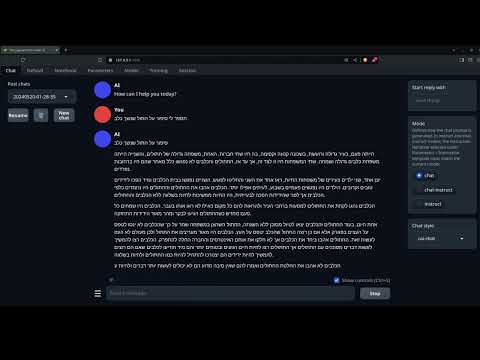
English to hebrew example:
History
The model was originally trained about 2 month after Mistral (v0.1) was released. As of 04 June 2024, Zion_Alpha got the Highest SNLI score in the world among open source models in Hebrew, surpassing most of the models by a huge margin. (84.05 score)
Citation Information
@llm{Zion_Alpha,
author = {SicariusSicariiStuff},
title = {Zion_Alpha},
year = {2024},
publisher = {Hugging Face},
url = {https://huggingface.co/SicariusSicariiStuff/Zion_Alpha}
}
Benchmarks
| Metric | Value |
|---|---|
| Avg. | 19.11 |
| IFEval (0-Shot) | 33.24 |
| BBH (3-Shot) | 29.16 |
| MATH Lvl 5 (4-Shot) | 4.76 |
| GPQA (0-shot) | 5.37 |
| MuSR (0-shot) | 18.45 |
| MMLU-PRO (5-shot) | 23.68 |
Support
- My Ko-fi page ALL donations will go for research resources and compute, every bit counts ππ»
- My Patreon ALL donations will go for research resources and compute, every bit counts ππ»
- Downloads last month
- 1,426