

国内首个从数据集到训练方式到模型权重完全开源的中医大模型.
在2张A800-80G上,
基于SylvanL/ChatTCM-7B-Pretrain, 在llamafactory框架上,
使用SylvanL/Traditional-Chinese-Medicine-Dataset-SFT进行了2个epoch的全参数量有监督微调(full Supervised Fine-tuning).
在不出现明显指令丢失或灾难性遗忘的前提下,使模型具备以下能力:
- 具有将文言文/古文翻译为现代文的能力, 以加强对于中医典籍的理解与使用.
- 具有向主流派别执业医生靠拢的临床诊断逻辑与推方能力, 可以理解输入的患者情况并进行判断与分析.
- 具有良好的中医知识问答能力, 可以针对中医领域的知识点进行全面且可靠的解答.
- 加强模型面向中医术语的基础nlp能力, 可以更好的赋能如中医命名实体识别, 关系抽取, 关联性分析, 同义实体消岐, 拼写检查与纠错等通用功能.
P.S.: 模型并没有进行任何identify的植入
可选Instruction:
将输入的古文翻译成现代文。
请为输入的现代文找到其对应的古文原文与出处。
基于输入的患者医案记录,直接给出你的证型诊断,无需给出原因。
基于输入的患者医案记录,直接给出你的疾病诊断,无需给出原因。
基于输入的患者医案记录,直接给出你认为的方剂中药组成。
基于输入的患者医案记录,直接给出你认为的【治疗方案】{可多选}∈["中药", "成药", "方剂"],和【诊断】{可多选}∈["证型", "治法", "西医诊断", "中医诊断"]:
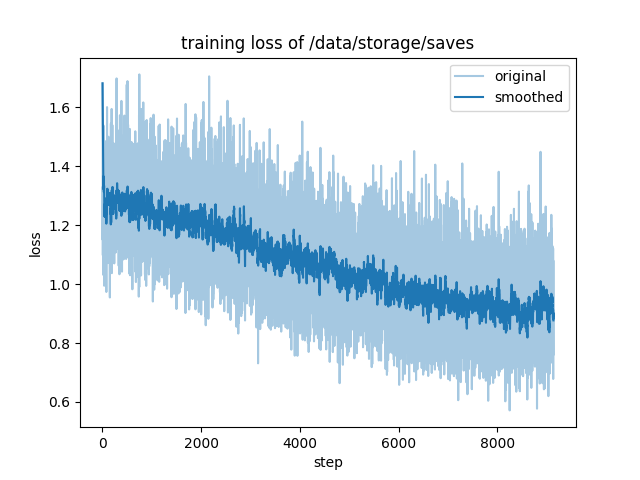
epoch 1:
    "num_input_tokens_seen": 1649269888,
    "total_flos": 3298213988794368.0,
    "train_loss": 1.0691444667014194,
    "train_runtime": 587389.2072,
    "train_samples_per_second": 3.483,
    "train_steps_per_second": 0.016

epoch 2:
    "num_input_tokens_seen": 1649269888,
    "total_flos": 3298213988794368.0,
    "train_loss": 0.7717254485568724,
    "train_runtime": 600800.1758,
    "train_samples_per_second": 3.406,
    "train_steps_per_second": 0.015

llamafactory-cli train \
    --stage sft \
    --do_train True \
    --model_name_or_path {SylvanL/ChatTCM-7B-Pretrain} \
    --preprocessing_num_workers 16 \
    --finetuning_type full \
    --template default \
    --flash_attn auto \
    --dataset_dir {dataset_dir} \
    --dataset SFT_medicalKnowledge_source1_548404,SFT_medicalKnowledge_source2_99334,SFT_medicalKnowledge_source3_556540,SFT_nlpDiseaseDiagnosed_61486,SFT_nlpSyndromeDiagnosed_48665,SFT_structGeneral_310860,SFT_structPrescription_92896,_SFT_traditionalTrans_1959542.json,{BAAI/COIG},{m-a-p/COIG-CQIA} \
    --cutoff_len 1024 \
    --learning_rate 5e-05 \
    --num_train_epochs 2.0 \
    --max_samples 1000000 \
    --per_device_train_batch_size 28 \
    --gradient_accumulation_steps 4 \
    --lr_scheduler_type cosine \
    --max_grad_norm 1.0 \
    --logging_steps 1 \
    --save_steps 1000 \
    --warmup_steps 0 \
    --optim adamw_torch \
    --packing False \
    --report_to none \
    --output_dir {output_dir} \
    --bf16 True \
    --plot_loss True \
    --ddp_timeout 180000000 \
    --include_num_input_tokens_seen True \
    --deepspeed cache/ds_z3_offload_config.json
- Downloads last month
- 39