Image-Text-to-Text
Transformers
Safetensors
English
qwen3_vl
chart-understanding
visual-question-answering
tool-use
agent
conversational
Instructions to use TonyZhan/ChartAdept with libraries, inference providers, notebooks, and local apps. Follow these links to get started.
- Libraries
- Transformers
How to use TonyZhan/ChartAdept with Transformers:
# Use a pipeline as a high-level helper from transformers import pipeline pipe = pipeline("image-text-to-text", model="TonyZhan/ChartAdept") messages = [ { "role": "user", "content": [ {"type": "image", "url": "https://huggingface.co/datasets/huggingface/documentation-images/resolve/main/p-blog/candy.JPG"}, {"type": "text", "text": "What animal is on the candy?"} ] }, ] pipe(text=messages)# pip install -U transformers accelerate # Load model directly from transformers import AutoProcessor, AutoModelForMultimodalLM processor = AutoProcessor.from_pretrained("TonyZhan/ChartAdept") model = AutoModelForMultimodalLM.from_pretrained("TonyZhan/ChartAdept", device_map="auto") messages = [ { "role": "user", "content": [ {"type": "image", "url": "https://huggingface.co/datasets/huggingface/documentation-images/resolve/main/p-blog/candy.JPG"}, {"type": "text", "text": "What animal is on the candy?"} ] }, ] inputs = processor.apply_chat_template( messages, add_generation_prompt=True, tokenize=True, return_dict=True, return_tensors="pt", ).to(model.device) outputs = model.generate(**inputs, max_new_tokens=256) print(processor.decode(outputs[0][inputs["input_ids"].shape[-1]:])) - Notebooks
- Google Colab
- Kaggle
- Local Apps Settings
- vLLM
How to use TonyZhan/ChartAdept with vLLM:
Install from pip and serve model
# Install vLLM from pip: pip install vllm # Start the vLLM server: vllm serve "TonyZhan/ChartAdept" # Call the server using curl (OpenAI-compatible API): curl -X POST "http://localhost:8000/v1/chat/completions" \ -H "Content-Type: application/json" \ --data '{ "model": "TonyZhan/ChartAdept", "messages": [ { "role": "user", "content": [ { "type": "text", "text": "Describe this image in one sentence." }, { "type": "image_url", "image_url": { "url": "https://cdn.britannica.com/61/93061-050-99147DCE/Statue-of-Liberty-Island-New-York-Bay.jpg" } } ] } ] }'Use Docker
docker model run hf.co/TonyZhan/ChartAdept
- SGLang
How to use TonyZhan/ChartAdept with SGLang:
Install from pip and serve model
# Install SGLang from pip: pip install sglang # Start the SGLang server: python3 -m sglang.launch_server \ --model-path "TonyZhan/ChartAdept" \ --host 0.0.0.0 \ --port 30000 # Call the server using curl (OpenAI-compatible API): curl -X POST "http://localhost:30000/v1/chat/completions" \ -H "Content-Type: application/json" \ --data '{ "model": "TonyZhan/ChartAdept", "messages": [ { "role": "user", "content": [ { "type": "text", "text": "Describe this image in one sentence." }, { "type": "image_url", "image_url": { "url": "https://cdn.britannica.com/61/93061-050-99147DCE/Statue-of-Liberty-Island-New-York-Bay.jpg" } } ] } ] }'Use Docker images
docker run --gpus all \ --shm-size 32g \ -p 30000:30000 \ -v ~/.cache/huggingface:/root/.cache/huggingface \ --env "HF_TOKEN=<secret>" \ --ipc=host \ lmsysorg/sglang:latest \ python3 -m sglang.launch_server \ --model-path "TonyZhan/ChartAdept" \ --host 0.0.0.0 \ --port 30000 # Call the server using curl (OpenAI-compatible API): curl -X POST "http://localhost:30000/v1/chat/completions" \ -H "Content-Type: application/json" \ --data '{ "model": "TonyZhan/ChartAdept", "messages": [ { "role": "user", "content": [ { "type": "text", "text": "Describe this image in one sentence." }, { "type": "image_url", "image_url": { "url": "https://cdn.britannica.com/61/93061-050-99147DCE/Statue-of-Liberty-Island-New-York-Bay.jpg" } } ] } ] }' - Docker Model Runner
How to use TonyZhan/ChartAdept with Docker Model Runner:
docker model run hf.co/TonyZhan/ChartAdept
|
Download README.md from TonyZhan/ChartAdept: direct link, hf CLI and curl.
- Browser
- Download file 4.08 kB
-
https://huggingface.co/TonyZhan/ChartAdept/resolve/main/README.md
- Command line
-
hf download hf://TonyZhan/ChartAdept/README.md
-
curl -L -o README.md https://huggingface.co/TonyZhan/ChartAdept/resolve/main/README.md
4.08 kB
| language: | |
| - en | |
| license: apache-2.0 | |
| base_model: Qwen/Qwen3-VL-4B-Instruct | |
| library_name: transformers | |
| pipeline_tag: image-text-to-text | |
| tags: | |
| - chart-understanding | |
| - visual-question-answering | |
| - tool-use | |
| - agent | |
| # ChartAdept | |
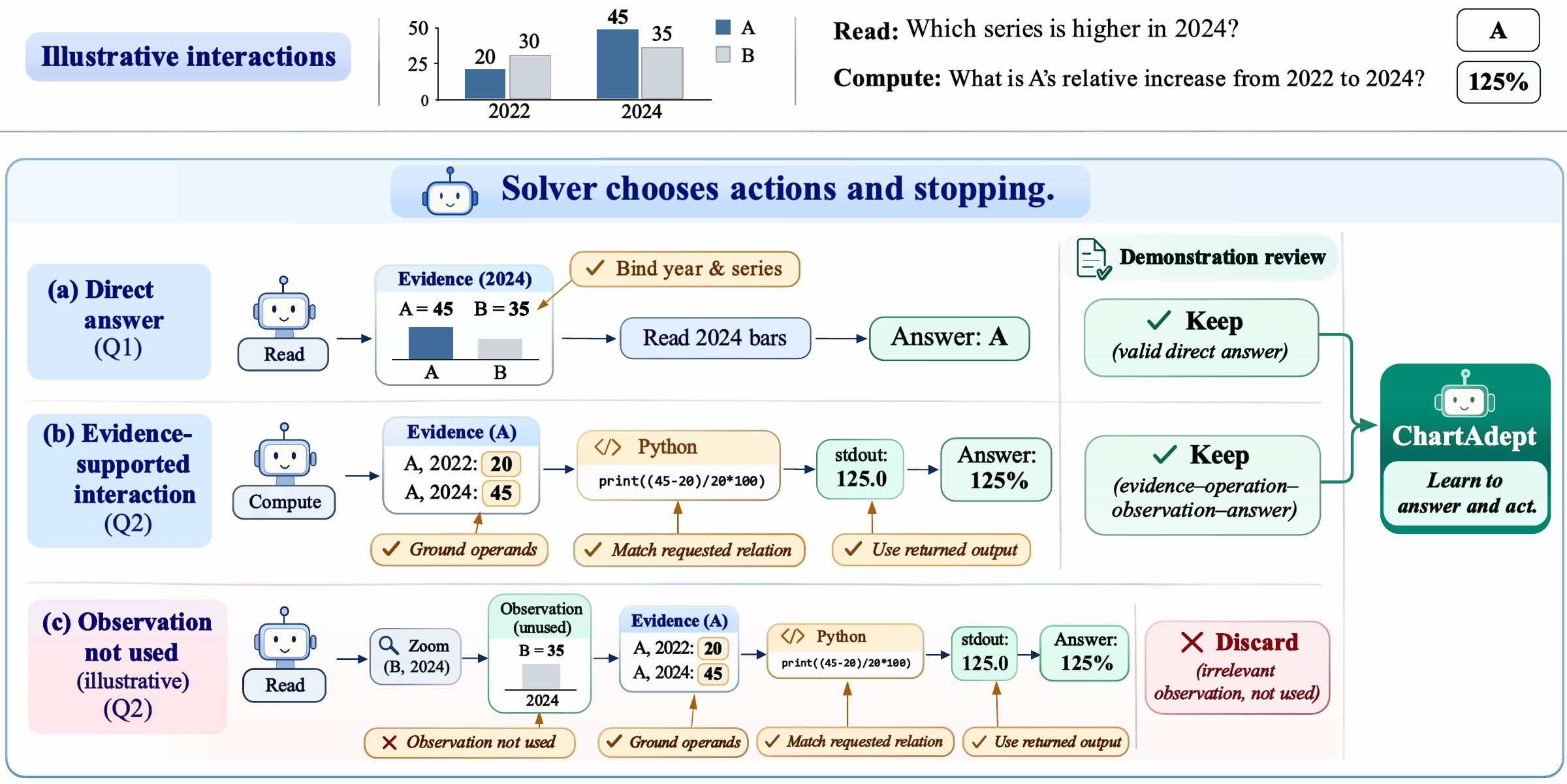
| ChartAdept is a Qwen3-VL-4B-Instruct-based policy for scientific-chart question answering with optional Zoom and Python tool calls. This is the final GSPO step-162 export accompanying *ChartAdept: Learning to Answer and Act with Verified Chart Trajectories*. | |
| Code and runtime: https://github.com/TonyZhan10/ChartAdept | |
| [](https://github.com/TonyZhan10/ChartAdept/blob/main/docs/assets/paper-overview.pdf) | |
| See the [visual examples](https://github.com/TonyZhan10/ChartAdept#examples) and [reported benchmark comparison](https://github.com/TonyZhan10/ChartAdept#results) in the code repository. | |
| ## Files and use | |
| This directory contains the original four safetensors shards, model configuration, tokenizer, processor, and chat template. The export stores float32 tensors (approximately 19.3 GB). The provided inference server loads weights in BF16. No optimizer state is included. | |
| The checkpoint's tokenizer is preserved unchanged. Transformers 4.57.x can emit a Mistral-regex warning for locally saved Qwen tokenizers; this behavior is documented in [the upstream issue](https://github.com/huggingface/transformers/issues/44031). | |
| After downloading this folder locally, use the ChartAdept code repository: | |
| ```bash | |
| python -m chartadept.serve --model /path/to/ChartAdept --port 8237 --max-sequences 1 | |
| python -m chartadept.infer --server http://127.0.0.1:8237 \ | |
| --image /path/to/chart.png --question "Your chart question" \ | |
| --output /path/to/inference-output | |
| ``` | |
| The runtime executes real tools and returns their observations to the model. It retains the original chart throughout the conversation. Use its supplied prompt, tool schemas, image processing limits, and budget presets for the paper interface. Tool-generated Python is executed in a child process, so use an isolated working environment. | |
| ## Training and release scope | |
| The model uses two SFT stages followed by outcome-reward GSPO. The paper describes 90,474 accepted trajectories over 90,473 distinct questions and 71,104 chart groups. The final policy is GSPO step 162 (648 Adam updates). | |
| The model weights, training and inference implementations, evaluation code, and qualitative examples are provided. The training corpus and data construction and verification pipeline are not released. The training code supports user-provided prepared data. | |
| ## Reported evaluation | |
| The following values are the manuscript's reported accuracies, not a new evaluation performed during packaging. There are 32,500 questions across seven benchmarks and ten metrics. Most use a 16K greedy agent protocol; ChartMuseum uses 32K at temperature 0.7 with a conditional answer reserve. See the code repository for complete-response Compass scoring and configuration details. | |
| | Metric | Accuracy (%) | | |
| |---|---:| | |
| | CharXiv-RQ | 61.00 | | |
| | CharXiv-DQ | 88.30 | | |
| | ChartQA | 83.96 | | |
| | ChartQAPro | 58.01 | | |
| | ChartBench-NQA | 54.33 | | |
| | ChartBench-Binary | 85.20 | | |
| | ChartX | 65.36 | | |
| | ReachQA-Reas | 50.20 | | |
| | ReachQA-Recog | 69.50 | | |
| | ChartMuseum | 45.60 | | |
| | Ten-metric average | 66.15 | | |
| ## Intended use and limitations | |
| The model is intended for research on chart understanding and visually grounded tool use. A correct Python execution does not ensure that the read values or question interpretation are correct. Performance was studied on one 4B backbone and two tools. The three qualitative examples illustrate individual saved trajectories and are not an additional benchmark. | |
| ## License | |
| The base model is Qwen3-VL-4B-Instruct, whose model card specifies Apache 2.0. This checkpoint is distributed under Apache 2.0; see LICENSE and NOTICE. Benchmark assets and other third-party components retain their own terms. | |