Instructions to use Userb1az/Qwen3-Coder-30B-A3B-Instruct-GGUF with libraries, inference providers, notebooks, and local apps. Follow these links to get started.
- Libraries
- Transformers
How to use Userb1az/Qwen3-Coder-30B-A3B-Instruct-GGUF with Transformers:
# Use a pipeline as a high-level helper from transformers import pipeline pipe = pipeline("text-generation", model="Userb1az/Qwen3-Coder-30B-A3B-Instruct-GGUF") messages = [ {"role": "user", "content": "Who are you?"}, ] pipe(messages)# Load model directly from transformers import AutoModel model = AutoModel.from_pretrained("Userb1az/Qwen3-Coder-30B-A3B-Instruct-GGUF", dtype="auto") - llama-cpp-python
How to use Userb1az/Qwen3-Coder-30B-A3B-Instruct-GGUF with llama-cpp-python:
# !pip install llama-cpp-python from llama_cpp import Llama llm = Llama.from_pretrained( repo_id="Userb1az/Qwen3-Coder-30B-A3B-Instruct-GGUF", filename="BF16/Qwen3-Coder-30B-A3B-Instruct-BF16-00001.gguf", )
llm.create_chat_completion( messages = [ { "role": "user", "content": "What is the capital of France?" } ] ) - Notebooks
- Google Colab
- Kaggle
- Local Apps
- llama.cpp
How to use Userb1az/Qwen3-Coder-30B-A3B-Instruct-GGUF with llama.cpp:
Install from brew
brew install llama.cpp # Start a local OpenAI-compatible server with a web UI: llama-server -hf Userb1az/Qwen3-Coder-30B-A3B-Instruct-GGUF:Q4_K_M # Run inference directly in the terminal: llama-cli -hf Userb1az/Qwen3-Coder-30B-A3B-Instruct-GGUF:Q4_K_M
Install from WinGet (Windows)
winget install llama.cpp # Start a local OpenAI-compatible server with a web UI: llama-server -hf Userb1az/Qwen3-Coder-30B-A3B-Instruct-GGUF:Q4_K_M # Run inference directly in the terminal: llama-cli -hf Userb1az/Qwen3-Coder-30B-A3B-Instruct-GGUF:Q4_K_M
Use pre-built binary
# Download pre-built binary from: # https://github.com/ggerganov/llama.cpp/releases # Start a local OpenAI-compatible server with a web UI: ./llama-server -hf Userb1az/Qwen3-Coder-30B-A3B-Instruct-GGUF:Q4_K_M # Run inference directly in the terminal: ./llama-cli -hf Userb1az/Qwen3-Coder-30B-A3B-Instruct-GGUF:Q4_K_M
Build from source code
git clone https://github.com/ggerganov/llama.cpp.git cd llama.cpp cmake -B build cmake --build build -j --target llama-server llama-cli # Start a local OpenAI-compatible server with a web UI: ./build/bin/llama-server -hf Userb1az/Qwen3-Coder-30B-A3B-Instruct-GGUF:Q4_K_M # Run inference directly in the terminal: ./build/bin/llama-cli -hf Userb1az/Qwen3-Coder-30B-A3B-Instruct-GGUF:Q4_K_M
Use Docker
docker model run hf.co/Userb1az/Qwen3-Coder-30B-A3B-Instruct-GGUF:Q4_K_M
- LM Studio
- Jan
- vLLM
How to use Userb1az/Qwen3-Coder-30B-A3B-Instruct-GGUF with vLLM:
Install from pip and serve model
# Install vLLM from pip: pip install vllm # Start the vLLM server: vllm serve "Userb1az/Qwen3-Coder-30B-A3B-Instruct-GGUF" # Call the server using curl (OpenAI-compatible API): curl -X POST "http://localhost:8000/v1/chat/completions" \ -H "Content-Type: application/json" \ --data '{ "model": "Userb1az/Qwen3-Coder-30B-A3B-Instruct-GGUF", "messages": [ { "role": "user", "content": "What is the capital of France?" } ] }'Use Docker
docker model run hf.co/Userb1az/Qwen3-Coder-30B-A3B-Instruct-GGUF:Q4_K_M
- SGLang
How to use Userb1az/Qwen3-Coder-30B-A3B-Instruct-GGUF with SGLang:
Install from pip and serve model
# Install SGLang from pip: pip install sglang # Start the SGLang server: python3 -m sglang.launch_server \ --model-path "Userb1az/Qwen3-Coder-30B-A3B-Instruct-GGUF" \ --host 0.0.0.0 \ --port 30000 # Call the server using curl (OpenAI-compatible API): curl -X POST "http://localhost:30000/v1/chat/completions" \ -H "Content-Type: application/json" \ --data '{ "model": "Userb1az/Qwen3-Coder-30B-A3B-Instruct-GGUF", "messages": [ { "role": "user", "content": "What is the capital of France?" } ] }'Use Docker images
docker run --gpus all \ --shm-size 32g \ -p 30000:30000 \ -v ~/.cache/huggingface:/root/.cache/huggingface \ --env "HF_TOKEN=<secret>" \ --ipc=host \ lmsysorg/sglang:latest \ python3 -m sglang.launch_server \ --model-path "Userb1az/Qwen3-Coder-30B-A3B-Instruct-GGUF" \ --host 0.0.0.0 \ --port 30000 # Call the server using curl (OpenAI-compatible API): curl -X POST "http://localhost:30000/v1/chat/completions" \ -H "Content-Type: application/json" \ --data '{ "model": "Userb1az/Qwen3-Coder-30B-A3B-Instruct-GGUF", "messages": [ { "role": "user", "content": "What is the capital of France?" } ] }' - Ollama
How to use Userb1az/Qwen3-Coder-30B-A3B-Instruct-GGUF with Ollama:
ollama run hf.co/Userb1az/Qwen3-Coder-30B-A3B-Instruct-GGUF:Q4_K_M
- Unsloth Studio new
How to use Userb1az/Qwen3-Coder-30B-A3B-Instruct-GGUF with Unsloth Studio:
Install Unsloth Studio (macOS, Linux, WSL)
curl -fsSL https://unsloth.ai/install.sh | sh # Run unsloth studio unsloth studio -H 0.0.0.0 -p 8888 # Then open http://localhost:8888 in your browser # Search for Userb1az/Qwen3-Coder-30B-A3B-Instruct-GGUF to start chatting
Install Unsloth Studio (Windows)
irm https://unsloth.ai/install.ps1 | iex # Run unsloth studio unsloth studio -H 0.0.0.0 -p 8888 # Then open http://localhost:8888 in your browser # Search for Userb1az/Qwen3-Coder-30B-A3B-Instruct-GGUF to start chatting
Using HuggingFace Spaces for Unsloth
# No setup required # Open https://huggingface.co/spaces/unsloth/studio in your browser # Search for Userb1az/Qwen3-Coder-30B-A3B-Instruct-GGUF to start chatting
- Pi new
How to use Userb1az/Qwen3-Coder-30B-A3B-Instruct-GGUF with Pi:
Start the llama.cpp server
# Install llama.cpp: brew install llama.cpp # Start a local OpenAI-compatible server: llama-server -hf Userb1az/Qwen3-Coder-30B-A3B-Instruct-GGUF:Q4_K_M
Configure the model in Pi
# Install Pi: npm install -g @mariozechner/pi-coding-agent # Add to ~/.pi/agent/models.json: { "providers": { "llama-cpp": { "baseUrl": "http://localhost:8080/v1", "api": "openai-completions", "apiKey": "none", "models": [ { "id": "Userb1az/Qwen3-Coder-30B-A3B-Instruct-GGUF:Q4_K_M" } ] } } }Run Pi
# Start Pi in your project directory: pi
- Hermes Agent new
How to use Userb1az/Qwen3-Coder-30B-A3B-Instruct-GGUF with Hermes Agent:
Start the llama.cpp server
# Install llama.cpp: brew install llama.cpp # Start a local OpenAI-compatible server: llama-server -hf Userb1az/Qwen3-Coder-30B-A3B-Instruct-GGUF:Q4_K_M
Configure Hermes
# Install Hermes: curl -fsSL https://hermes-agent.nousresearch.com/install.sh | bash hermes setup # Point Hermes at the local server: hermes config set model.provider custom hermes config set model.base_url http://127.0.0.1:8080/v1 hermes config set model.default Userb1az/Qwen3-Coder-30B-A3B-Instruct-GGUF:Q4_K_M
Run Hermes
hermes
- Docker Model Runner
How to use Userb1az/Qwen3-Coder-30B-A3B-Instruct-GGUF with Docker Model Runner:
docker model run hf.co/Userb1az/Qwen3-Coder-30B-A3B-Instruct-GGUF:Q4_K_M
- Lemonade
How to use Userb1az/Qwen3-Coder-30B-A3B-Instruct-GGUF with Lemonade:
Pull the model
# Download Lemonade from https://lemonade-server.ai/ lemonade pull Userb1az/Qwen3-Coder-30B-A3B-Instruct-GGUF:Q4_K_M
Run and chat with the model
lemonade run user.Qwen3-Coder-30B-A3B-Instruct-GGUF-Q4_K_M
List all available models
lemonade list
Qwen3-Coder-30B-A3B-Instruct
Highlights
Qwen3-Coder is available in multiple sizes. Today, we're excited to introduce Qwen3-Coder-30B-A3B-Instruct. This streamlined model maintains impressive performance and efficiency, featuring the following key enhancements:
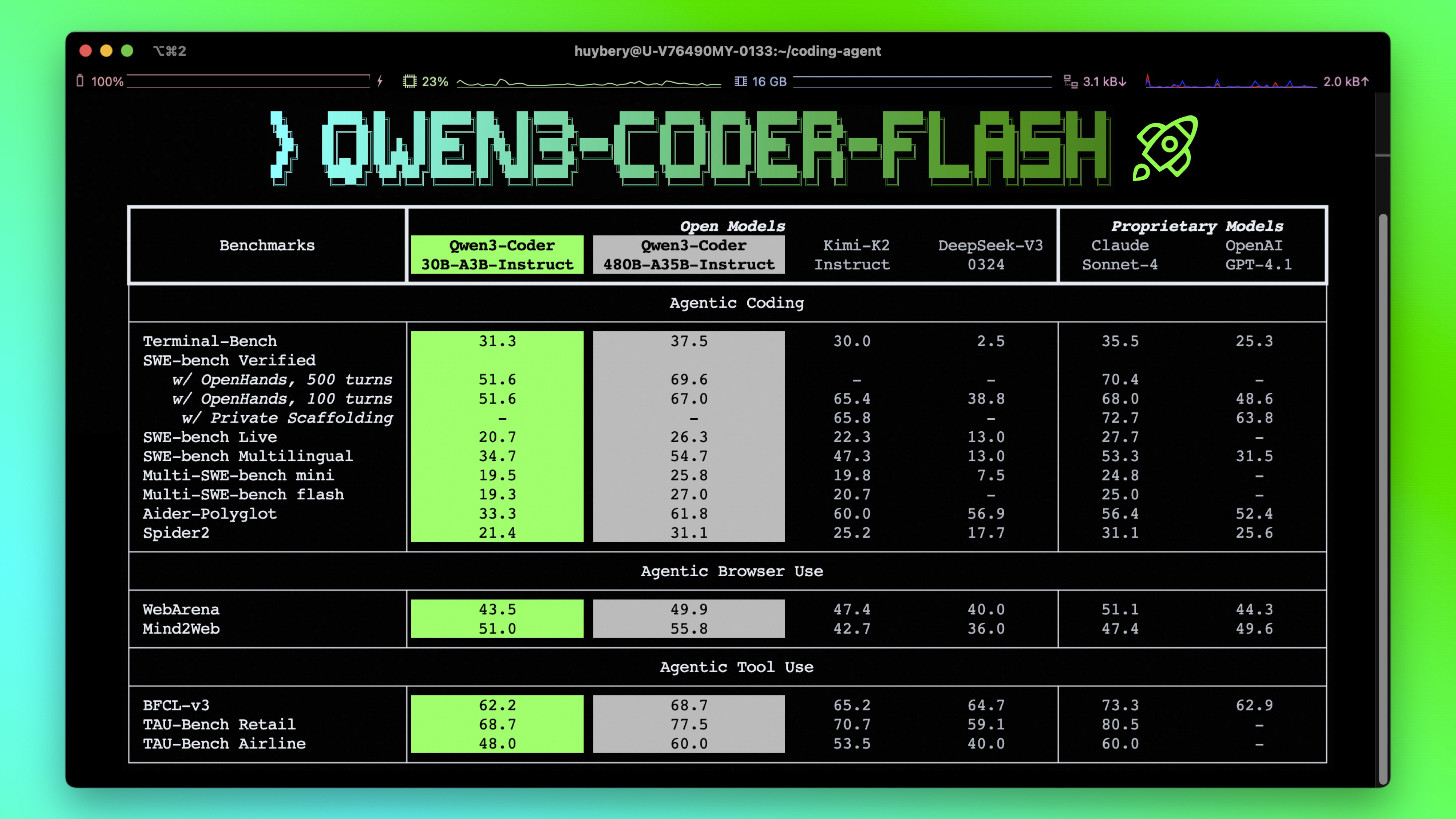
- Significant Performance among open models on Agentic Coding, Agentic Browser-Use, and other foundational coding tasks.
- Long-context Capabilities with native support for 256K tokens, extendable up to 1M tokens using Yarn, optimized for repository-scale understanding.
- Agentic Coding supporting for most platform such as Qwen Code, CLINE, featuring a specially designed function call format.
Model Overview
Qwen3-Coder-30B-A3B-Instruct has the following features:
- Type: Causal Language Models
- Training Stage: Pretraining & Post-training
- Number of Parameters: 30.5B in total and 3.3B activated
- Number of Layers: 48
- Number of Attention Heads (GQA): 32 for Q and 4 for KV
- Number of Experts: 128
- Number of Activated Experts: 8
- Context Length: 262,144 natively.
NOTE: This model supports only non-thinking mode and does not generate <think></think> blocks in its output. Meanwhile, specifying enable_thinking=False is no longer required.
For more details, including benchmark evaluation, hardware requirements, and inference performance, please refer to our blog, GitHub, and Documentation.
Quickstart
We advise you to use the latest version of transformers.
With transformers<4.51.0, you will encounter the following error:
KeyError: 'qwen3_moe'
The following contains a code snippet illustrating how to use the model generate content based on given inputs.
from transformers import AutoModelForCausalLM, AutoTokenizer
model_name = "Qwen/Qwen3-Coder-30B-A3B-Instruct"
# load the tokenizer and the model
tokenizer = AutoTokenizer.from_pretrained(model_name)
model = AutoModelForCausalLM.from_pretrained(
model_name,
torch_dtype="auto",
device_map="auto"
)
# prepare the model input
prompt = "Write a quick sort algorithm."
messages = [
{"role": "user", "content": prompt}
]
text = tokenizer.apply_chat_template(
messages,
tokenize=False,
add_generation_prompt=True,
)
model_inputs = tokenizer([text], return_tensors="pt").to(model.device)
# conduct text completion
generated_ids = model.generate(
**model_inputs,
max_new_tokens=65536
)
output_ids = generated_ids[0][len(model_inputs.input_ids[0]):].tolist()
content = tokenizer.decode(output_ids, skip_special_tokens=True)
print("content:", content)
Note: If you encounter out-of-memory (OOM) issues, consider reducing the context length to a shorter value, such as 32,768.
For local use, applications such as Ollama, LMStudio, MLX-LM, llama.cpp, and KTransformers have also supported Qwen3.
Agentic Coding
Qwen3-Coder excels in tool calling capabilities.
You can simply define or use any tools as following example.
# Your tool implementation
def square_the_number(num: float) -> dict:
return num ** 2
# Define Tools
tools=[
{
"type":"function",
"function":{
"name": "square_the_number",
"description": "output the square of the number.",
"parameters": {
"type": "object",
"required": ["input_num"],
"properties": {
'input_num': {
'type': 'number',
'description': 'input_num is a number that will be squared'
}
},
}
}
}
]
import OpenAI
# Define LLM
client = OpenAI(
# Use a custom endpoint compatible with OpenAI API
base_url='http://localhost:8000/v1', # api_base
api_key="EMPTY"
)
messages = [{'role': 'user', 'content': 'square the number 1024'}]
completion = client.chat.completions.create(
messages=messages,
model="Qwen3-Coder-30B-A3B-Instruct",
max_tokens=65536,
tools=tools,
)
print(completion.choice[0])
Best Practices
To achieve optimal performance, we recommend the following settings:
Sampling Parameters:
- We suggest using
temperature=0.7,top_p=0.8,top_k=20,repetition_penalty=1.05.
- We suggest using
Adequate Output Length: We recommend using an output length of 65,536 tokens for most queries, which is adequate for instruct models.
Citation
If you find our work helpful, feel free to give us a cite.
@misc{qwen3technicalreport,
title={Qwen3 Technical Report},
author={Qwen Team},
year={2025},
eprint={2505.09388},
archivePrefix={arXiv},
primaryClass={cs.CL},
url={https://arxiv.org/abs/2505.09388},
}
- Downloads last month
- 145
4-bit
5-bit
6-bit
8-bit
16-bit
32-bit
