


| # WeShop-UI | |
| Welcome to Weshop_UI_1.0.0! This software is an open-source solution derived from [WeShop.AI](https://weshop.ai), which specialize in generating images using AI. We've extracted some business/professional functionalities, removed proprietary elements, and are gradually releasing parts of our services to the public. Our goal is to foster innovation and collaboration in AI-powered image creation while maintaining our core business offerings. WeShop UI features multi-task management, and a simple and user-friendly interface, perfect for beginners. | |
| # Introduction | |
| Weshop_UI_1.0.0 is an open-source solution that brings some functionalities of weshop.ai to your local operation. Weshop_UI_1.0.0 leverages Stable Diffusion Webui as its core inference engine, enabling you to deploy [WeShop.AI](https://weshop.ai) functionalities locally and generate high-quality AI images without internet or cloud reliance. | |
| # News | |
| * 2024.07 We officially launched WeShop UI | |
| # Open-source Plan | |
| Currently, we've open sourced web and Electron frontend, changes made for Automatic1111 Stable Diffusion Webui. Our plan regarding key functionalities is listed below: | |
| - [x] Keep upgrading Webui with the latest one on https://github.com/AUTOMATIC1111/stable-diffusion-webui | |
| - [x] Open source the front end part of this project | |
| - [ ] Refactor and open source the backend part of this project. This project uses compiled executables currently. | |
| - [ ] Support ComfyUI simultaneously. | |
| - [ ] Support multiple-GPU inference scheduling. | |
| - [ ] Gradually adapt workflows/features from [WeShop.AI](https://weshop.ai) | |
| - [ ] More functions to come and feel free to leave you feedbacks! | |
| # Features | |
| 1. Seamlessly integrated SD WebUI functionalities, supporting SDXL model and SDXL's Controlnet | |
| 2. Enable shared graphics card utilization for enhanced performance | |
| 3. Harness the power of robust task management functionalities | |
| 4. Unlock batch task execution, interrupt capabilities, and execute single tasks on a large scale for unparalleled efficiency | |
| # How to use WeShop AI Locally | |
|  | |
| Click the "Start" button on the bottom right to launch the tool. Depending on the computer's specification, it takes some time to launch. | |
|  | |
|  | |
| This website will pop up after the software is launched. Select the type of task desired to be executed. Currently, functionalities include text-to-image (txt2img) and image-to-image (img2img). | |
|  | |
| Select desired parameters for image generations. | |
|  | |
|  | |
| Further refine generations by selecting desired ControlNet and AfterDetailer parameters. Click the "Generate" button on bottom right to start generation process. | |
|  | |
| Resulting images will shortly be displayed after generation process is finished. Click "Edit again" button on the top right to adjust parameters or generate again. | |
| 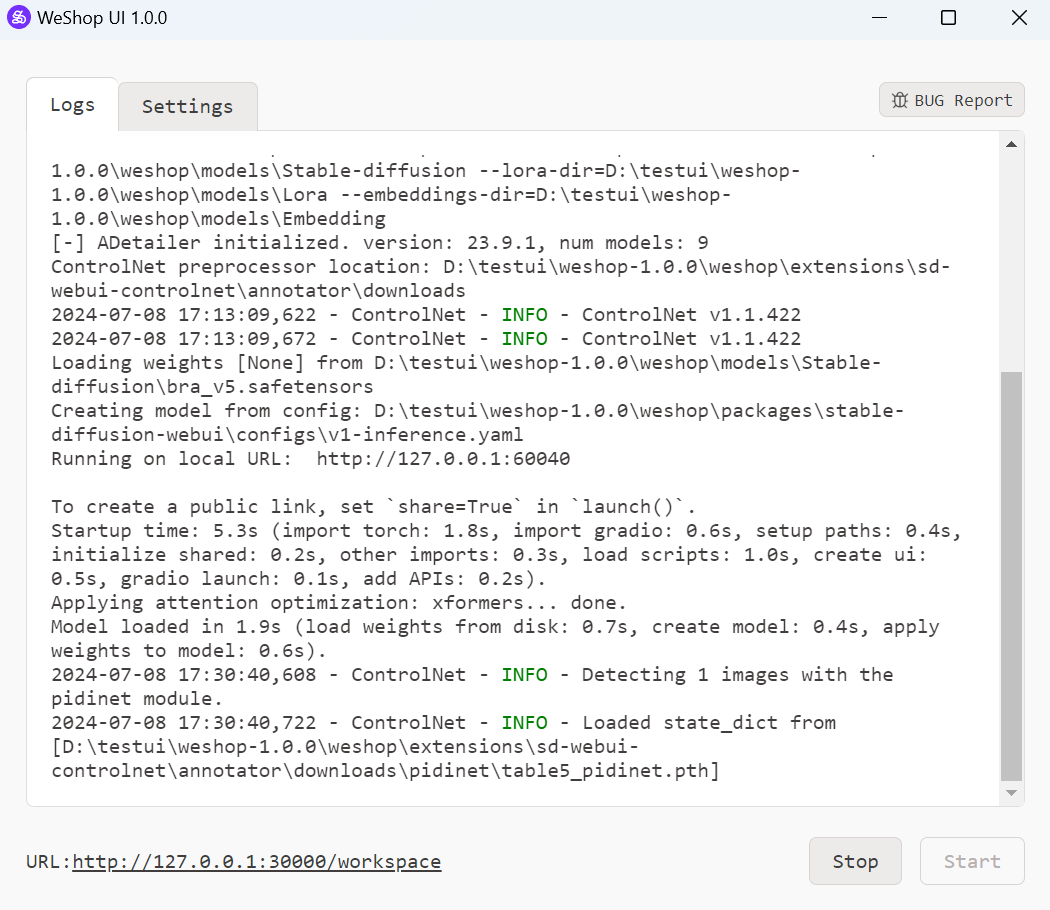 | |
| For any bugs encountered, click the "BUG Report" button, then bug info will be sent. Alternatively, you can send feedback from our Github page <https://github.com/weshopai/WeShop-UI> | |
| # Requirements | |
| - Windows 7 or above system | |
| - 8GB VRAM Nvidia GPU | |
| - 16GB RAM | |
| # Download | |
| You can download WeShop UI 1.0.0 from the following sources: | |
| Huggingface: <https://huggingface.co/WeShopAI/WeShop_UI_1.0.0> | |
| Steam: in progress | |
| # Installation & Usage | |
| Unzip weshop-1.0.0.zip and weshop-model-pack.zip | |
| Replace weshop/models with weshop-model-pack/models | |
| Replace weshop/extensions/sd-webui-controlnet/models with weshop-model-pack/extensions/sd-webui-controlnet/models | |
| Replace weshop/extensions/sd-webui-controlnet/annotator/downloads with weshop-model-pack/extensions/sd-webui-controlnet/annotator/downloads | |
| Click weshop.exe to launch | |
| For Steam users, find Weshop_AI in the market, then directly launch the software from Steam. | |
| # Gallery | |
|  | |
|  | |
|  | |
|  | |
|  | |
| # Acknowledgements | |
| This project makes use of the following open-source projects: | |
| <https://github.com/sgreben/http-file-server>: A file server to store necessary local files created | |
| <https://github.com/pierrre/imageserver>: A file server dedicated to store image files created | |
| <https://github.com/facebookresearch/segment-anything>: Segment uploaded images to create masks | |
| <https://github.com/sczhou/CodeFormer>: Upscale images | |