
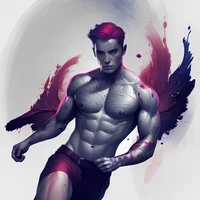
Charlie Bowater (SD15) [LoRA]

- Prompt
- charliebowater_v1,wet ink brush,four color palette,action hero,sketch,subtle inking, flying, (full body:1.2) <lora:charliebowater_v1:0.9>
- Negative Prompt
- copyright name,page number,signature,text,anime
Model description
A lora that tries to mimic the style of Charlie Bowater (https://www.instagram.com/charliebowater) art
Examples were generated with the weights 0.8-1.0 using Reliberate by XpucT and Edge Of Realism
Trigger words
You should use charliebowater_v1 or charliebowater_v2 to trigger the image generation depending on version in use.
Download model
Weights for this model are available in Safetensors format.
Download them in the Files & versions tab.
- Downloads last month
- 17
Model tree for XaflocAI/charliebowater
Base model
stablediffusionapi/deliberate-v3