| | --- |
| | frameworks: |
| | - Pytorch |
| | library_name: videox_fun |
| | license: other |
| | tasks: |
| | - text-to-video-synthesis |
| |
|
| | |
| | |
| | |
| |
|
| | |
| | |
| | |
| |
|
| | |
| | |
| | |
| |
|
| | |
| | |
| | |
| |
|
| | |
| | |
| | |
| |
|
| | |
| | |
| | |
| | --- |
| | # CogVideoX-Fun |
| |
|
| | 😊 Welcome! |
| |
|
| | [](https://huggingface.co/spaces/alibaba-pai/CogVideoX-Fun-5b) |
| |
|
| | [English](./README_en.md) | 简体中文 |
| |
|
| | # 目录 |
| | - [目录](#目录) |
| | - [简介](#简介) |
| | - [快速启动](#快速启动) |
| | - [视频作品](#视频作品) |
| | - [如何使用](#如何使用) |
| | - [模型地址](#模型地址) |
| | - [未来计划](#未来计划) |
| | - [参考文献](#参考文献) |
| | - [许可证](#许可证) |
| |
|
| | # 简介 |
| | CogVideoX-Fun是一个基于CogVideoX结构修改后的的pipeline,是一个生成条件更自由的CogVideoX,可用于生成AI图片与视频、训练Diffusion Transformer的基线模型与Lora模型,我们支持从已经训练好的CogVideoX-Fun模型直接进行预测,生成不同分辨率,6秒左右、fps8的视频(1 ~ 49帧),也支持用户训练自己的基线模型与Lora模型,进行一定的风格变换。 |
| |
|
| | 我们会逐渐支持从不同平台快速启动,请参阅 [快速启动](#快速启动)。 |
| |
|
| | 新特性: |
| | - 重新训练i2v模型,添加Noise,使得视频的运动幅度更大。上传控制模型训练代码与Control模型。[ 2024.09.29 ] |
| | - 创建代码!现在支持 Windows 和 Linux。支持2b与5b最大256x256x49到1024x1024x49的任意分辨率的视频生成。[ 2024.09.18 ] |
| |
|
| | 功能概览: |
| | - [数据预处理](#data-preprocess) |
| | - [训练DiT](#dit-train) |
| | - [模型生成](#video-gen) |
| |
|
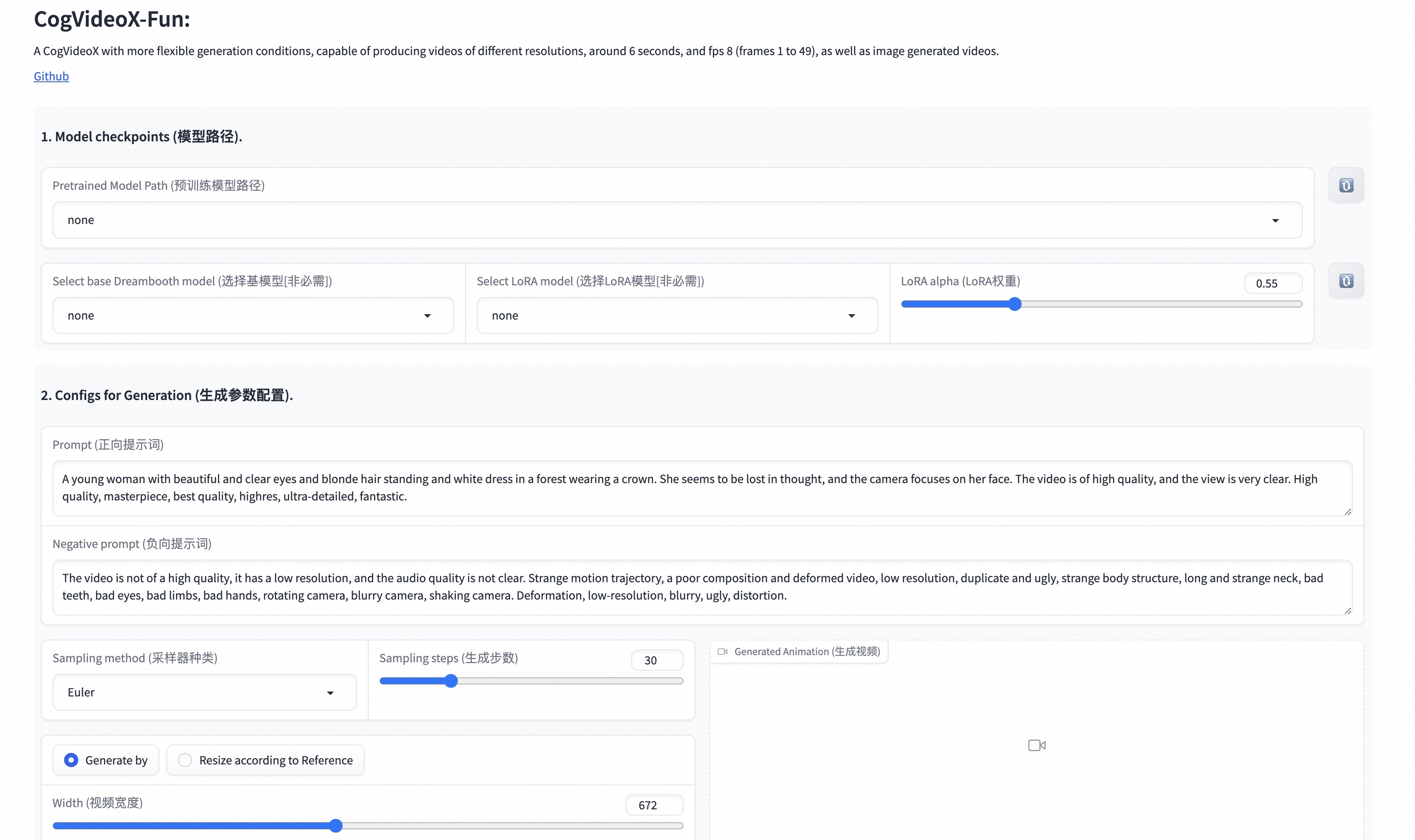
| | 我们的ui界面如下: |
| |  |
| |
|
| | # 快速启动 |
| | ### 1. 云使用: AliyunDSW/Docker |
| | #### a. 通过阿里云 DSW |
| | DSW 有免费 GPU 时间,用户可申请一次,申请后3个月内有效。 |
| |
|
| | 阿里云在[Freetier](https://free.aliyun.com/?product=9602825&crowd=enterprise&spm=5176.28055625.J_5831864660.1.e939154aRgha4e&scm=20140722.M_9974135.P_110.MO_1806-ID_9974135-MID_9974135-CID_30683-ST_8512-V_1)提供免费GPU时间,获取并在阿里云PAI-DSW中使用,5分钟内即可启动CogVideoX-Fun。 |
| |
|
| | [](https://gallery.pai-ml.com/#/preview/deepLearning/cv/cogvideox_fun) |
| |
|
| | #### b. 通过ComfyUI |
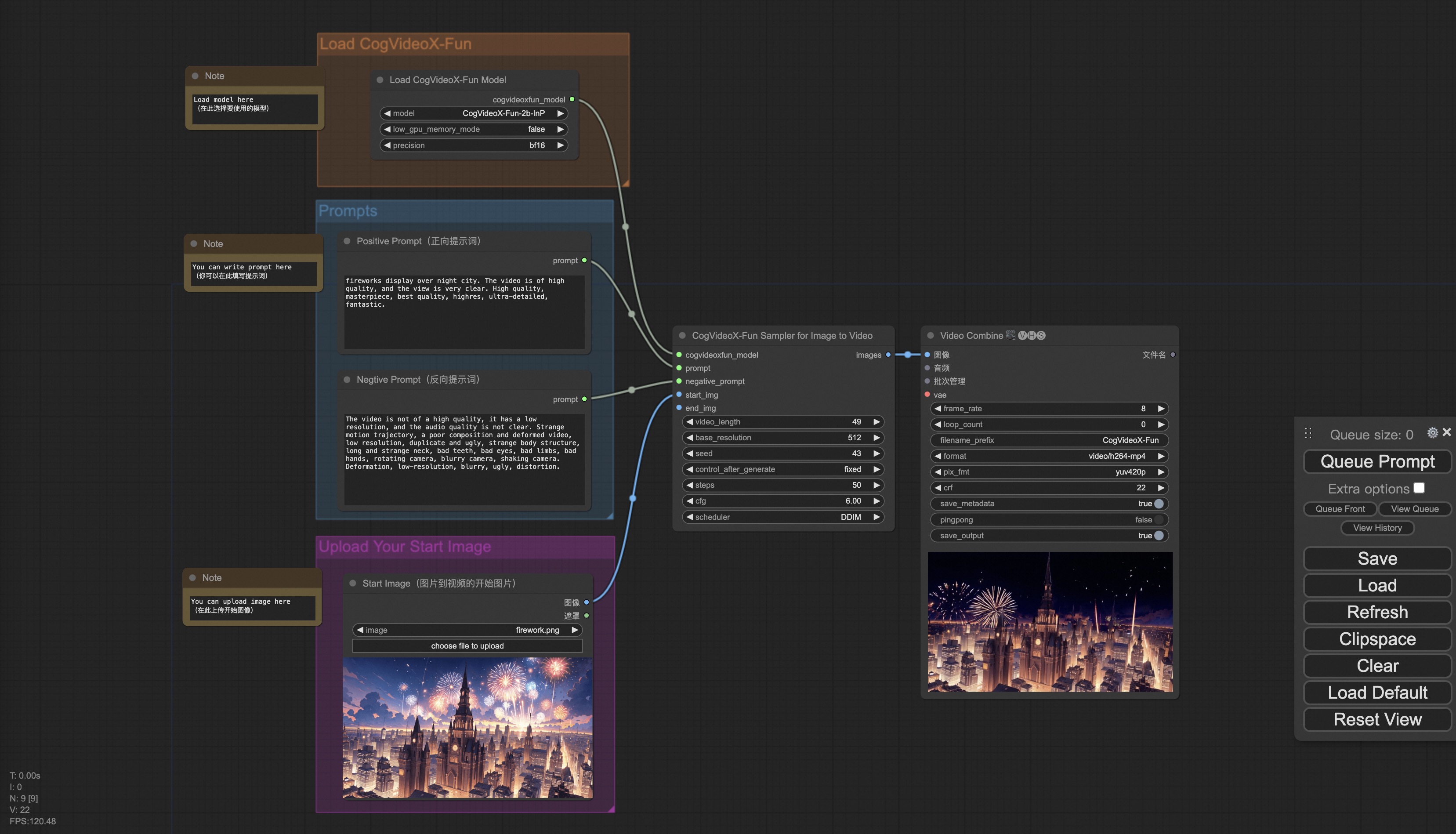
| | 我们的ComfyUI界面如下,具体查看[ComfyUI README](comfyui/README.md)。 |
| |  |
| |
|
| | #### c. 通过docker |
| | 使用docker的情况下,请保证机器中已经正确安装显卡驱动与CUDA环境,然后以此执行以下命令: |
| |
|
| | ``` |
| | # pull image |
| | docker pull mybigpai-public-registry.cn-beijing.cr.aliyuncs.com/easycv/torch_cuda:cogvideox_fun |
| | |
| | # enter image |
| | docker run -it -p 7860:7860 --network host --gpus all --security-opt seccomp:unconfined --shm-size 200g mybigpai-public-registry.cn-beijing.cr.aliyuncs.com/easycv/torch_cuda:cogvideox_fun |
| | |
| | # clone code |
| | git clone https://github.com/aigc-apps/CogVideoX-Fun.git |
| | |
| | # enter CogVideoX-Fun's dir |
| | cd CogVideoX-Fun |
| | |
| | # download weights |
| | mkdir models/Diffusion_Transformer |
| | mkdir models/Personalized_Model |
| | |
| | wget https://pai-aigc-photog.oss-cn-hangzhou.aliyuncs.com/cogvideox_fun/Diffusion_Transformer/CogVideoX-Fun-V1.1-2b-InP.tar.gz -O models/Diffusion_Transformer/CogVideoX-Fun-V1.1-2b-InP.tar.gz |
| | |
| | cd models/Diffusion_Transformer/ |
| | tar -xvf CogVideoX-Fun-V1.1-2b-InP.tar.gz |
| | cd ../../ |
| | ``` |
| |
|
| | ### 2. 本地安装: 环境检查/下载/安装 |
| | #### a. 环境检查 |
| | 我们已验证CogVideoX-Fun可在以下环境中执行: |
| |
|
| | Windows 的详细信息: |
| | - 操作系统 Windows 10 |
| | - python: python3.10 & python3.11 |
| | - pytorch: torch2.2.0 |
| | - CUDA: 11.8 & 12.1 |
| | - CUDNN: 8+ |
| | - GPU: Nvidia-3060 12G & Nvidia-3090 24G |
| |
|
| | Linux 的详细信息: |
| | - 操作系统 Ubuntu 20.04, CentOS |
| | - python: python3.10 & python3.11 |
| | - pytorch: torch2.2.0 |
| | - CUDA: 11.8 & 12.1 |
| | - CUDNN: 8+ |
| | - GPU:Nvidia-V100 16G & Nvidia-A10 24G & Nvidia-A100 40G & Nvidia-A100 80G |
| |
|
| | 我们需要大约 60GB 的可用磁盘空间,请检查! |
| |
|
| | #### b. 权重放置 |
| | 我们最好将[权重](#model-zoo)按照指定路径进行放置: |
| |
|
| | ``` |
| | 📦 models/ |
| | ├── 📂 Diffusion_Transformer/ |
| | │ ├── 📂 CogVideoX-Fun-V1.1-2b-InP/ |
| | │ └── 📂 CogVideoX-Fun-V1.1-5b-InP/ |
| | ├── 📂 Personalized_Model/ |
| | │ └── your trained trainformer model / your trained lora model (for UI load) |
| | ``` |
| |
|
| | # 视频作品 |
| | 所展示的结果都是图生视频获得。 |
| |
|
| | ### CogVideoX-Fun-V1.1-5B |
| |
|
| | Resolution-1024 |
| |
|
| | <table border="0" style="width: 100%; text-align: left; margin-top: 20px;"> |
| | <tr> |
| | <td> |
| | <video src="https://github.com/user-attachments/assets/34e7ec8f-293e-4655-bb14-5e1ee476f788" width="100%" controls autoplay loop></video> |
| | </td> |
| | <td> |
| | <video src="https://github.com/user-attachments/assets/7809c64f-eb8c-48a9-8bdc-ca9261fd5434" width="100%" controls autoplay loop></video> |
| | </td> |
| | <td> |
| | <video src="https://github.com/user-attachments/assets/8e76aaa4-c602-44ac-bcb4-8b24b72c386c" width="100%" controls autoplay loop></video> |
| | </td> |
| | <td> |
| | <video src="https://github.com/user-attachments/assets/19dba894-7c35-4f25-b15c-384167ab3b03" width="100%" controls autoplay loop></video> |
| | </td> |
| | </tr> |
| | </table> |
| | |
| |
|
| | Resolution-768 |
| |
|
| | <table border="0" style="width: 100%; text-align: left; margin-top: 20px;"> |
| | <tr> |
| | <td> |
| | <video src="https://github.com/user-attachments/assets/0bc339b9-455b-44fd-8917-80272d702737" width="100%" controls autoplay loop></video> |
| | </td> |
| | <td> |
| | <video src="https://github.com/user-attachments/assets/70a043b9-6721-4bd9-be47-78b7ec5c27e9" width="100%" controls autoplay loop></video> |
| | </td> |
| | <td> |
| | <video src="https://github.com/user-attachments/assets/d5dd6c09-14f3-40f8-8b6d-91e26519b8ac" width="100%" controls autoplay loop></video> |
| | </td> |
| | <td> |
| | <video src="https://github.com/user-attachments/assets/9327e8bc-4f17-46b0-b50d-38c250a9483a" width="100%" controls autoplay loop></video> |
| | </td> |
| | </tr> |
| | </table> |
| | |
| | Resolution-512 |
| |
|
| | <table border="0" style="width: 100%; text-align: left; margin-top: 20px;"> |
| | <tr> |
| | <td> |
| | <video src="https://github.com/user-attachments/assets/ef407030-8062-454d-aba3-131c21e6b58c" width="100%" controls autoplay loop></video> |
| | </td> |
| | <td> |
| | <video src="https://github.com/user-attachments/assets/7610f49e-38b6-4214-aa48-723ae4d1b07e" width="100%" controls autoplay loop></video> |
| | </td> |
| | <td> |
| | <video src="https://github.com/user-attachments/assets/1fff0567-1e15-415c-941e-53ee8ae2c841" width="100%" controls autoplay loop></video> |
| | </td> |
| | <td> |
| | <video src="https://github.com/user-attachments/assets/bcec48da-b91b-43a0-9d50-cf026e00fa4f" width="100%" controls autoplay loop></video> |
| | </td> |
| | </tr> |
| | </table> |
| | |
| | ### CogVideoX-Fun-V1.1-5B-Pose |
| |
|
| | <table border="0" style="width: 100%; text-align: left; margin-top: 20px;"> |
| | <tr> |
| | <td> |
| | Resolution-512 |
| | </td> |
| | <td> |
| | Resolution-768 |
| | </td> |
| | <td> |
| | Resolution-1024 |
| | </td> |
| | <tr> |
| | <td> |
| | <video src="https://github.com/user-attachments/assets/a746df51-9eb7-4446-bee5-2ee30285c143" width="100%" controls autoplay loop></video> |
| | </td> |
| | <td> |
| | <video src="https://github.com/user-attachments/assets/db295245-e6aa-43be-8c81-32cb411f1473" width="100%" controls autoplay loop></video> |
| | </td> |
| | <td> |
| | <video src="https://github.com/user-attachments/assets/ec9875b2-fde0-48e1-ab7e-490cee51ef40" width="100%" controls autoplay loop></video> |
| | </td> |
| | </tr> |
| | </table> |
| | |
| | ### CogVideoX-Fun-V1.1-2B |
| |
|
| | Resolution-768 |
| |
|
| | <table border="0" style="width: 100%; text-align: left; margin-top: 20px;"> |
| | <tr> |
| | <td> |
| | <video src="https://github.com/user-attachments/assets/03235dea-980e-4fc5-9c41-e40a5bc1b6d0" width="100%" controls autoplay loop></video> |
| | </td> |
| | <td> |
| | <video src="https://github.com/user-attachments/assets/f7302648-5017-47db-bdeb-4d893e620b37" width="100%" controls autoplay loop></video> |
| | </td> |
| | <td> |
| | <video src="https://github.com/user-attachments/assets/cbadf411-28fa-4b87-813d-da63ff481904" width="100%" controls autoplay loop></video> |
| | </td> |
| | <td> |
| | <video src="https://github.com/user-attachments/assets/87cc9d0b-b6fe-4d2d-b447-174513d169ab" width="100%" controls autoplay loop></video> |
| | </td> |
| | </tr> |
| | </table> |
| | |
| | ### CogVideoX-Fun-V1.1-2B-Pose |
| |
|
| | <table border="0" style="width: 100%; text-align: left; margin-top: 20px;"> |
| | <tr> |
| | <td> |
| | Resolution-512 |
| | </td> |
| | <td> |
| | Resolution-768 |
| | </td> |
| | <td> |
| | Resolution-1024 |
| | </td> |
| | <tr> |
| | <td> |
| | <video src="https://github.com/user-attachments/assets/487bcd7b-1b7f-4bb4-95b5-96a6b6548b3e" width="100%" controls autoplay loop></video> |
| | </td> |
| | <td> |
| | <video src="https://github.com/user-attachments/assets/2710fd18-8489-46e4-8086-c237309ae7f6" width="100%" controls autoplay loop></video> |
| | </td> |
| | <td> |
| | <video src="https://github.com/user-attachments/assets/b79513db-7747-4512-b86c-94f9ca447fe2" width="100%" controls autoplay loop></video> |
| | </td> |
| | </tr> |
| | </table> |
| | |
| | # 如何使用 |
| |
|
| | <h3 id="video-gen">1. 生成 </h3> |
| |
|
| | #### a. 视频生成 |
| | ##### i、运行python文件 |
| | - 步骤1:下载对应[权重](#model-zoo)放入models文件夹。 |
| | - 步骤2:在predict_t2v.py文件中修改prompt、neg_prompt、guidance_scale和seed。 |
| | - 步骤3:运行predict_t2v.py文件,等待生成结果,结果保存在samples/cogvideox-fun-videos-t2v文件夹中。 |
| | - 步骤4:如果想结合自己训练的其他backbone与Lora,则看情况修改predict_t2v.py中的predict_t2v.py和lora_path。 |
| | |
| | ##### ii、通过ui界面 |
| | - 步骤1:下载对应[权重](#model-zoo)放入models文件夹。 |
| | - 步骤2:运行app.py文件,进入gradio页面。 |
| | - 步骤3:根据页面选择生成模型,填入prompt、neg_prompt、guidance_scale和seed等,点击生成,等待生成结果,结果保存在sample文件夹中。 |
| | |
| | ##### iii、通过comfyui |
| | 具体查看[ComfyUI README](comfyui/README.md)。 |
| | |
| | ### 2. 模型训练 |
| | 一个完整的CogVideoX-Fun训练链路应该包括数据预处理和Video DiT训练。 |
| | |
| | <h4 id="data-preprocess">a.数据预处理</h4> |
| | 我们给出了一个简单的demo通过图片数据训练lora模型,详情可以查看[wiki](https://github.com/aigc-apps/CogVideoX-Fun/wiki/Training-Lora)。 |
| | |
| | 一个完整的长视频切分、清洗、描述的数据预处理链路可以参考video caption部分的[README](cogvideox/video_caption/README.md)进行。 |
| | |
| | 如果期望训练一个文生图视频的生成模型,您需要以这种格式排列数据集。 |
| | ``` |
| | 📦 project/ |
| | ├── 📂 datasets/ |
| | │ ├── 📂 internal_datasets/ |
| | │ ├── 📂 train/ |
| | │ │ ├── 📄 00000001.mp4 |
| | │ │ ├── 📄 00000002.jpg |
| | │ │ └── 📄 ..... |
| | │ └── 📄 json_of_internal_datasets.json |
| | ``` |
| | |
| | json_of_internal_datasets.json是一个标准的json文件。json中的file_path可以被设置为相对路径,如下所示: |
| | ```json |
| | [ |
| | { |
| | "file_path": "train/00000001.mp4", |
| | "text": "A group of young men in suits and sunglasses are walking down a city street.", |
| | "type": "video" |
| | }, |
| | { |
| | "file_path": "train/00000002.jpg", |
| | "text": "A group of young men in suits and sunglasses are walking down a city street.", |
| | "type": "image" |
| | }, |
| | ..... |
| | ] |
| | ``` |
| | |
| | 你也可以将路径设置为绝对路径: |
| | ```json |
| | [ |
| | { |
| | "file_path": "/mnt/data/videos/00000001.mp4", |
| | "text": "A group of young men in suits and sunglasses are walking down a city street.", |
| | "type": "video" |
| | }, |
| | { |
| | "file_path": "/mnt/data/train/00000001.jpg", |
| | "text": "A group of young men in suits and sunglasses are walking down a city street.", |
| | "type": "image" |
| | }, |
| | ..... |
| | ] |
| | ``` |
| | <h4 id="dit-train">b. Video DiT训练 </h4> |
| |
|
| | 如果数据预处理时,数据的格式为相对路径,则进入scripts/train.sh进行如下设置。 |
| | ``` |
| | export DATASET_NAME="datasets/internal_datasets/" |
| | export DATASET_META_NAME="datasets/internal_datasets/json_of_internal_datasets.json" |
| | |
| | ... |
| | |
| | train_data_format="normal" |
| | ``` |
| |
|
| | 如果数据的格式为绝对路径,则进入scripts/train.sh进行如下设置。 |
| | ``` |
| | export DATASET_NAME="" |
| | export DATASET_META_NAME="/mnt/data/json_of_internal_datasets.json" |
| | ``` |
| |
|
| | 最后运行scripts/train.sh。 |
| | ```sh |
| | sh scripts/train.sh |
| | ``` |
| |
|
| | 关于一些参数的设置细节,可以查看[Readme Train](scripts/README_TRAIN.md)与[Readme Lora](scripts/README_TRAIN_LORA.md) |
| |
|
| | # 模型地址 |
| |
|
| | V1.1: |
| |
|
| | | 名称 | 存储空间 | Hugging Face | Model Scope | 描述 | |
| | |--|--|--|--|--| |
| | | CogVideoX-Fun-V1.1-2b-InP.tar.gz | 解压前 9.7 GB / 解压后 13.0 GB | [🤗Link](https://huggingface.co/alibaba-pai/CogVideoX-Fun-V1.1-2b-InP) | [😄Link](https://modelscope.cn/models/PAI/CogVideoX-Fun-V1.1-2b-InP) | 官方的图生视频权重。添加了Noise,运动幅度相比于V1.0更大。支持多分辨率(512,768,1024,1280)的视频预测,以49帧、每秒8帧进行训练 | |
| | | CogVideoX-Fun-V1.1-5b-InP.tar.gz | 解压前 16.0GB / 解压后 20.0 GB | [🤗Link](https://huggingface.co/alibaba-pai/CogVideoX-Fun-V1.1-5b-InP) | [😄Link](https://modelscope.cn/models/PAI/CogVideoX-Fun-V1.1-5b-InP) | 官方的图生视频权重。添加了Noise,运动幅度相比于V1.0更大。支持多分辨率(512,768,1024,1280)的视频预测,以49帧、每秒8帧进行训练 | |
| | | CogVideoX-Fun-V1.1-2b-Pose.tar.gz | 解压前 9.7 GB / 解压后 13.0 GB | [🤗Link](https://huggingface.co/alibaba-pai/CogVideoX-Fun-V1.1-2b-Pose) | [😄Link](https://modelscope.cn/models/PAI/CogVideoX-Fun-V1.1-2b-Pose) | 官方的姿态控制生视频权重。支持多分辨率(512,768,1024,1280)的视频预测,以49帧、每秒8帧进行训练 | |
| | | CogVideoX-Fun-V1.1-5b-Pose.tar.gz | 解压前 16.0GB / 解压后 20.0 GB | [🤗Link](https://huggingface.co/alibaba-pai/CogVideoX-Fun-V1.1-5b-Pose) | [😄Link](https://modelscope.cn/models/PAI/CogVideoX-Fun-V1.1-5b-Pose) | 官方的姿态控制生视频权重。支持多分辨率(512,768,1024,1280)的视频预测,以49帧、每秒8帧进行训练 | |
| |
|
| | V1.0: |
| |
|
| | | 名称 | 存储空间 | Hugging Face | Model Scope | 描述 | |
| | |--|--|--|--|--| |
| | | CogVideoX-Fun-2b-InP.tar.gz | 解压前 9.7 GB / 解压后 13.0 GB | [🤗Link](https://huggingface.co/alibaba-pai/CogVideoX-Fun-2b-InP) | [😄Link](https://modelscope.cn/models/PAI/CogVideoX-Fun-2b-InP) | 官方的图生视频权重。支持多分辨率(512,768,1024,1280)的视频预测,以49帧、每秒8帧进行训练 | |
| | | CogVideoX-Fun-5b-InP.tar.gz | 解压前 16.0GB / 解压后 20.0 GB | [🤗Link](https://huggingface.co/alibaba-pai/CogVideoX-Fun-5b-InP) | [😄Link](https://modelscope.cn/models/PAI/CogVideoX-Fun-5b-InP) | 官方的图生视频权重。支持多分辨率(512,768,1024,1280)的视频预测,以49帧、每秒8帧进行训练 | |
| |
|
| | # 未来计划 |
| | - 支持中文。 |
| |
|
| | # 参考文献 |
| | - CogVideo: https://github.com/THUDM/CogVideo/ |
| | - EasyAnimate: https://github.com/aigc-apps/EasyAnimate |
| |
|
| | # 许可证 |
| | 本项目采用 [Apache License (Version 2.0)](https://github.com/modelscope/modelscope/blob/master/LICENSE). |
| |
|
| | CogVideoX-2B 模型 (包括其对应的Transformers模块,VAE模块) 根据 [Apache 2.0 协议](LICENSE) 许可证发布。 |
| |
|
| | CogVideoX-5B 模型(Transformer 模块)在[CogVideoX许可证](https://huggingface.co/THUDM/CogVideoX-5b/blob/main/LICENSE)下发布. |
| |
|