
Unexpected Output when testing deployment

Hey there,
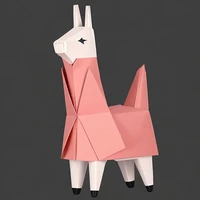
Thank you so much for creating this fork and writing these scripts for deployment. Super easy to follow and clean. I was able to successfully deploy the model however the output does not ever seem related to my image. Im attaching one screenshot with the worst output, but other times it usually identifies a man or something along those lines.
I am wondering if anyone else has encountered this .Thank you :)
Additionally, i did try to deploy the 13b parameter model to try to debug this. Currently getting "RuntimeError: GET was unable to find an engine to execute this computation" when invoking predictions but i will post updates here. Two possible reasons are outdated transformer on sagemaker(does not support 1.31.0) or my chosen instance type is too small (instance_type="ml.g5.xlarge").
Thank you in advance!

@saransha Hi thanks for testing. To get meaningful results, you can try this from deploy_llava.ipynb
from llava.conversation import conv_templates, SeparatorStyle
from llava.constants import (
DEFAULT_IMAGE_TOKEN,
DEFAULT_IM_START_TOKEN,
DEFAULT_IM_END_TOKEN,
)
def get_prompt(raw_prompt):
    conv_mode = "llava_v1"
    conv = conv_templates[conv_mode].copy()
    roles = conv.roles
    inp = f"{roles[0]}: {raw_prompt}"
    inp = (
        DEFAULT_IM_START_TOKEN + DEFAULT_IMAGE_TOKEN + DEFAULT_IM_END_TOKEN + "\n" + inp
    )
    conv.append_message(conv.roles[0], inp)
    conv.append_message(conv.roles[1], None)
    prompt = conv.get_prompt()
    stop_str = conv.sep if conv.sep_style != SeparatorStyle.TWO else conv.sep2
    return prompt, stop_str

raw_prompt = "Describe the image and color details."
prompt, stop_str = get_prompt(raw_prompt)
image_path = "https://raw.githubusercontent.com/haotian-liu/LLaVA/main/images/llava_logo.png"
data = {"image" : image_path, "question" : prompt, "stop_str" : stop_str}
output = predictor.predict(data)
print(output)
# The image features a red toy animal, possibly a horse or a donkey, with a pair of glasses on its face.
This helps processing input raw prompt to llava format. And results looks good to me.
Also 13b model need some larger instance with more GPU memory.
Thank you for the quick reply. Yes the output using this function makes complete sense!!
I will post here if i am able to deploy 13b model. Since its hard to find a bigger single GPU, currently crashing on multiple devices found by cuda errors!
@saransha now get_prompt() inside the predict_fn() when deployment. No need to call get_prompt() when inference.