
Instructions to use axtrioai/Txa1-4B-Tokenizer with libraries, inference providers, notebooks, and local apps. Follow these links to get started.
- Libraries
- Transformers
How to use axtrioai/Txa1-4B-Tokenizer with Transformers:
# Use a pipeline as a high-level helper from transformers import pipeline pipe = pipeline("text-generation", model="axtrioai/Txa1-4B-Tokenizer")# Load model directly from transformers import AutoModel model = AutoModel.from_pretrained("axtrioai/Txa1-4B-Tokenizer", dtype="auto") - Notebooks
- Google Colab
- Kaggle
- Local Apps
- vLLM
How to use axtrioai/Txa1-4B-Tokenizer with vLLM:
Install from pip and serve model
# Install vLLM from pip: pip install vllm # Start the vLLM server: vllm serve "axtrioai/Txa1-4B-Tokenizer" # Call the server using curl (OpenAI-compatible API): curl -X POST "http://localhost:8000/v1/completions" \ -H "Content-Type: application/json" \ --data '{ "model": "axtrioai/Txa1-4B-Tokenizer", "prompt": "Once upon a time,", "max_tokens": 512, "temperature": 0.5 }'Use Docker
docker model run hf.co/axtrioai/Txa1-4B-Tokenizer
- SGLang
How to use axtrioai/Txa1-4B-Tokenizer with SGLang:
Install from pip and serve model
# Install SGLang from pip: pip install sglang # Start the SGLang server: python3 -m sglang.launch_server \ --model-path "axtrioai/Txa1-4B-Tokenizer" \ --host 0.0.0.0 \ --port 30000 # Call the server using curl (OpenAI-compatible API): curl -X POST "http://localhost:30000/v1/completions" \ -H "Content-Type: application/json" \ --data '{ "model": "axtrioai/Txa1-4B-Tokenizer", "prompt": "Once upon a time,", "max_tokens": 512, "temperature": 0.5 }'Use Docker images
docker run --gpus all \ --shm-size 32g \ -p 30000:30000 \ -v ~/.cache/huggingface:/root/.cache/huggingface \ --env "HF_TOKEN=<secret>" \ --ipc=host \ lmsysorg/sglang:latest \ python3 -m sglang.launch_server \ --model-path "axtrioai/Txa1-4B-Tokenizer" \ --host 0.0.0.0 \ --port 30000 # Call the server using curl (OpenAI-compatible API): curl -X POST "http://localhost:30000/v1/completions" \ -H "Content-Type: application/json" \ --data '{ "model": "axtrioai/Txa1-4B-Tokenizer", "prompt": "Once upon a time,", "max_tokens": 512, "temperature": 0.5 }' - Docker Model Runner
How to use axtrioai/Txa1-4B-Tokenizer with Docker Model Runner:
docker model run hf.co/axtrioai/Txa1-4B-Tokenizer
βββββββββββββββββββββββββββββββββββββββββ
Txa 1 Tokenizer: The Foundation of Axtrio AI
βββββββββββββββββββββββββββββββββββββββββ
β‘ Overview
The Txa 1 Tokenizer is a highly efficient, production-ready tokenizer engineered for the Txa 1 (4B MoE) model family. Built upon the battle-tested Mistral v1 foundation, it has been fine-tuned to balance high compression rates with extreme processing speed on H100/H200 hardware.
This tokenizer natively supports ChatML formatting, making it instantly compatible with modern inference engines like vLLM, Ollama, and LM Studio.
Developed by Rx, Founder & CEO of Axtrio AI.
π Benchmark Arena
We pitted the Txa 1 Tokenizer against industry heavyweights in our Tokenizer Arena.
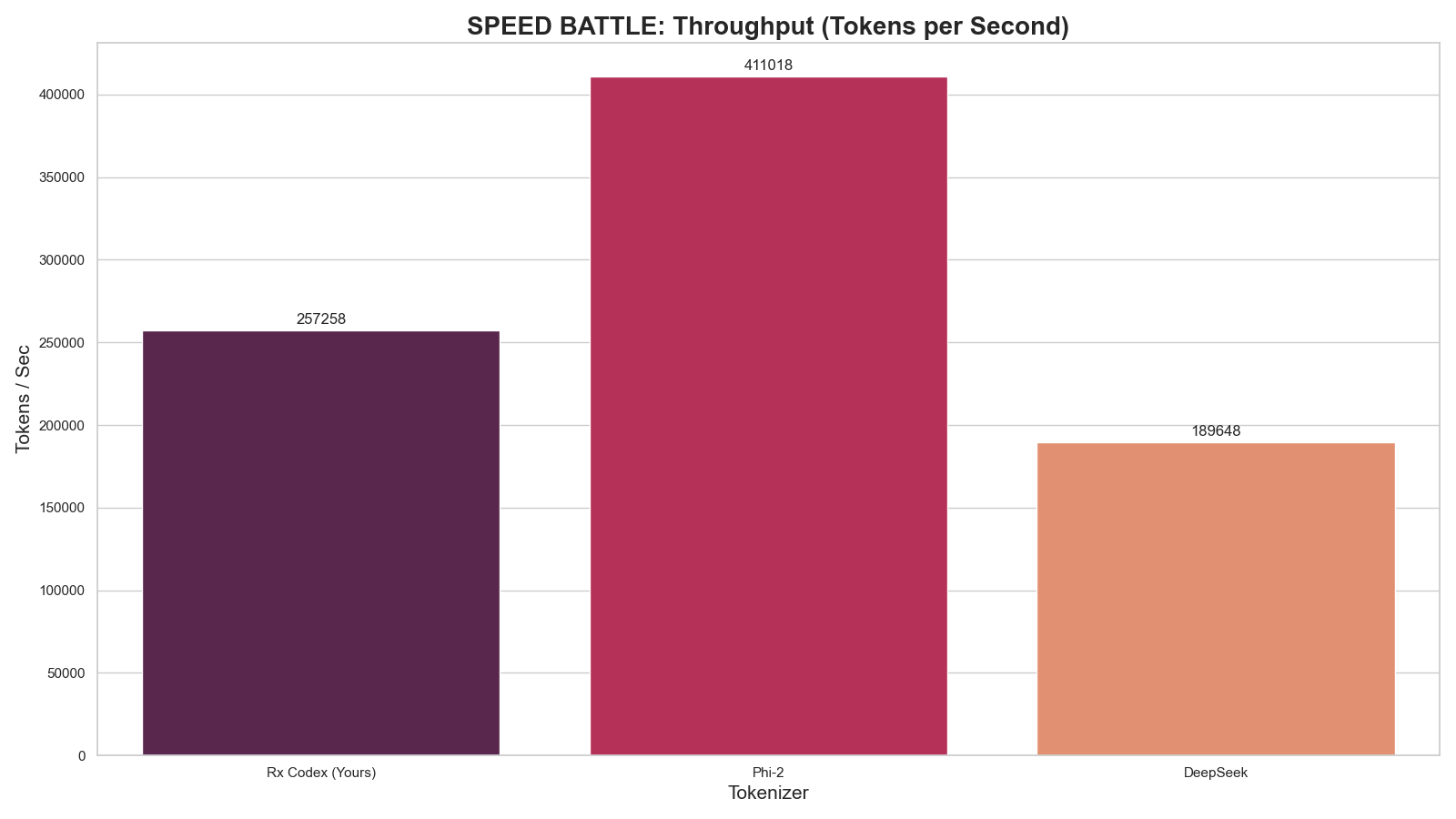
1. Speed Analysis (Throughput)
Higher is better. Measures raw tokenization speed on H100 hardware.
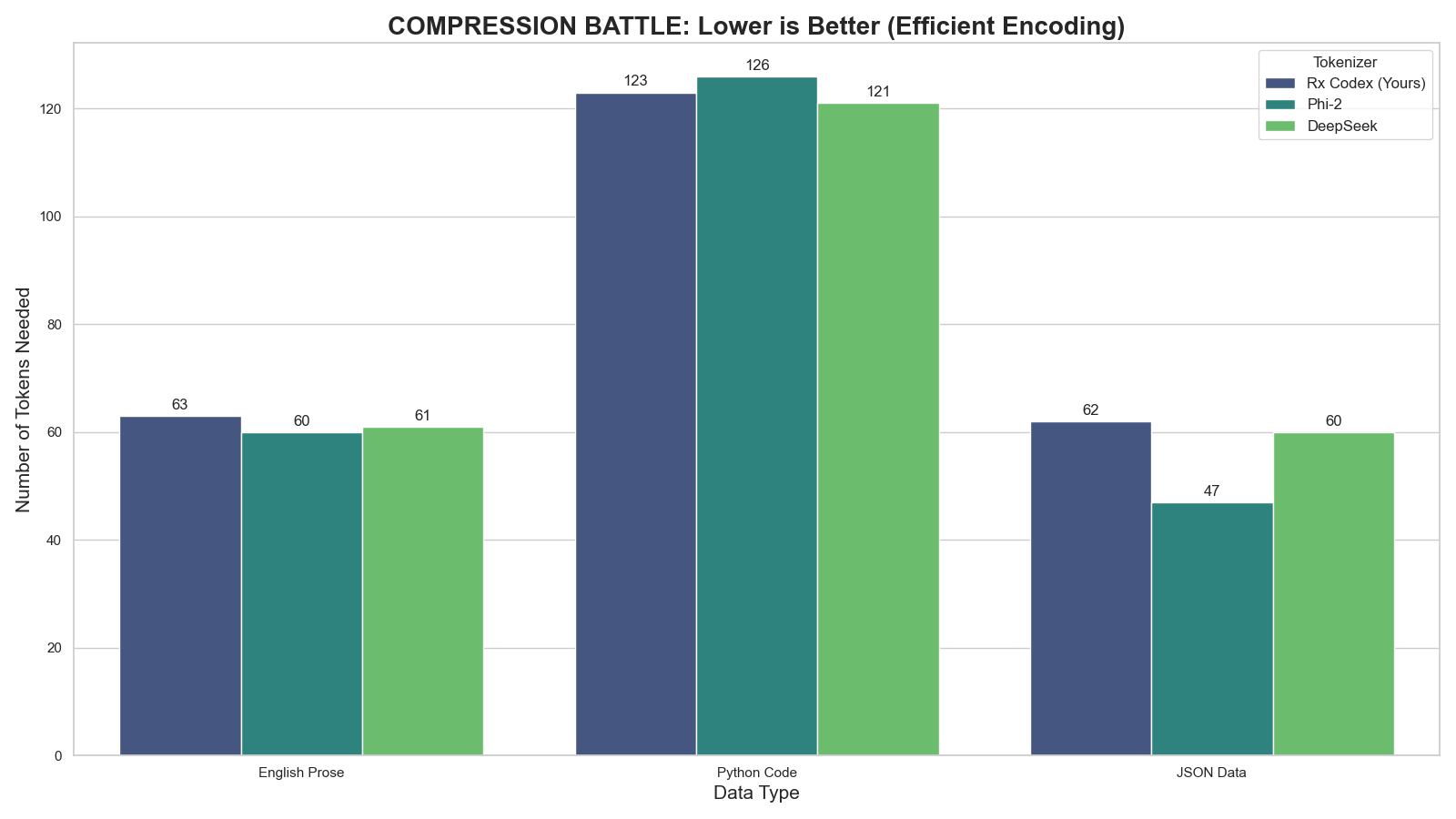
2. Compression Efficiency
Lower is better. Measures how many tokens are needed to represent complex Code & English.
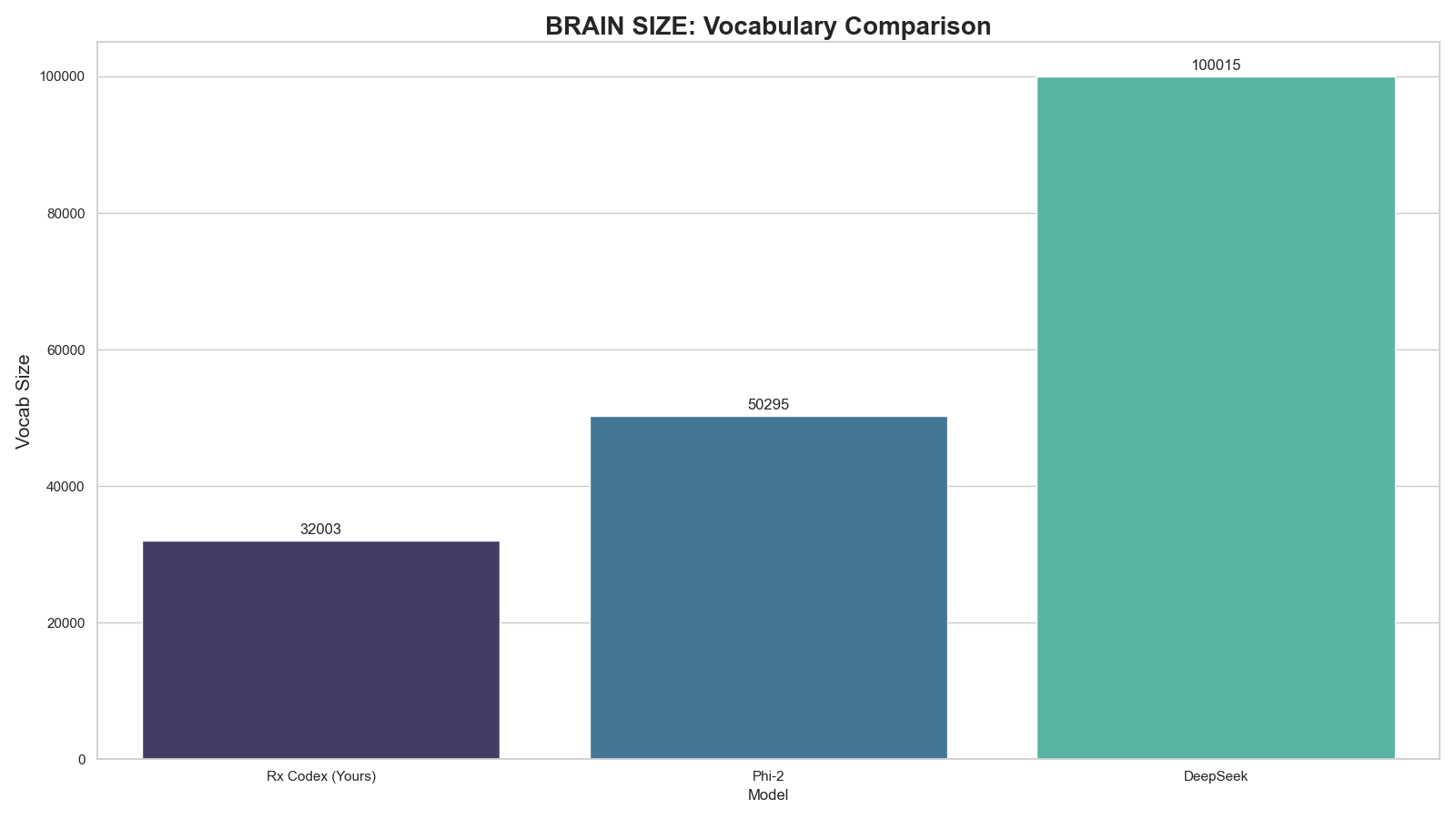
3. Vocabulary Architecture
Comparison of dictionary sizes. Txa 1 stays lean (32k) to maximize VRAM efficiency for the 4B MoE architecture.
π§ Technical Specifications
| Feature | Specification |
|---|---|
| Base Architecture | Byte-Pair Encoding (Mistral v1 Foundation) |
| Vocabulary Size | 32,003 Tokens (Efficient & Lean) |
| Added Special Tokens | `< |
| Optimization | Code & Logic Compression |
| Compatibility | Fully Compatible with LlamaTokenizerFast |
π» Usage
Quick Start
from transformers import AutoTokenizer
# Load the tokenizer
tokenizer = AutoTokenizer.from_pretrained("AxtrioAI/Txa1-4B-Tokenizer")
# Test ChatML Format
chat = [
{"role": "user", "content": "Hello Txa, can you help me debug python?"},
{"role": "assistant", "content": "Certainly! Please paste your code below."}
]
# Apply template
formatted_prompt = tokenizer.apply_chat_template(chat, tokenize=False)
print(formatted_prompt)