
Always-On OpenClaw, On-Demand Inference

That mismatch is the reason for this project. If running OpenClaw means keeping a GPU instance alive 24/7, many individual users will choose GPT, Claude, or Gemini instead. The goal here is to keep the assistant surface online while making GPU spend follow actual inference usage.
The design separates control from inference. OpenClaw Gateway and a wake proxy stay online on a small CPU VM. vLLM runs on a GPU instance only when a chat request needs generation, then pauses after a configurable idle window. The same idea can also map to JarvisLabs serverless, where workers scale to zero.
This post documents the architecture, request flow, idle policy, serverless path, and measured economics. It does not argue that a small open-weight model matches a frontier hosted model. It asks a narrower question: when usage is bursty, how much cost can be removed by not paying for idle GPU time?
Code, deployment scripts, benchmark summaries, and generated artifacts are available in the GitHub repository: https://github.com/deep-diver/openclaw-jarvislabs-wake-proxy
Architecture
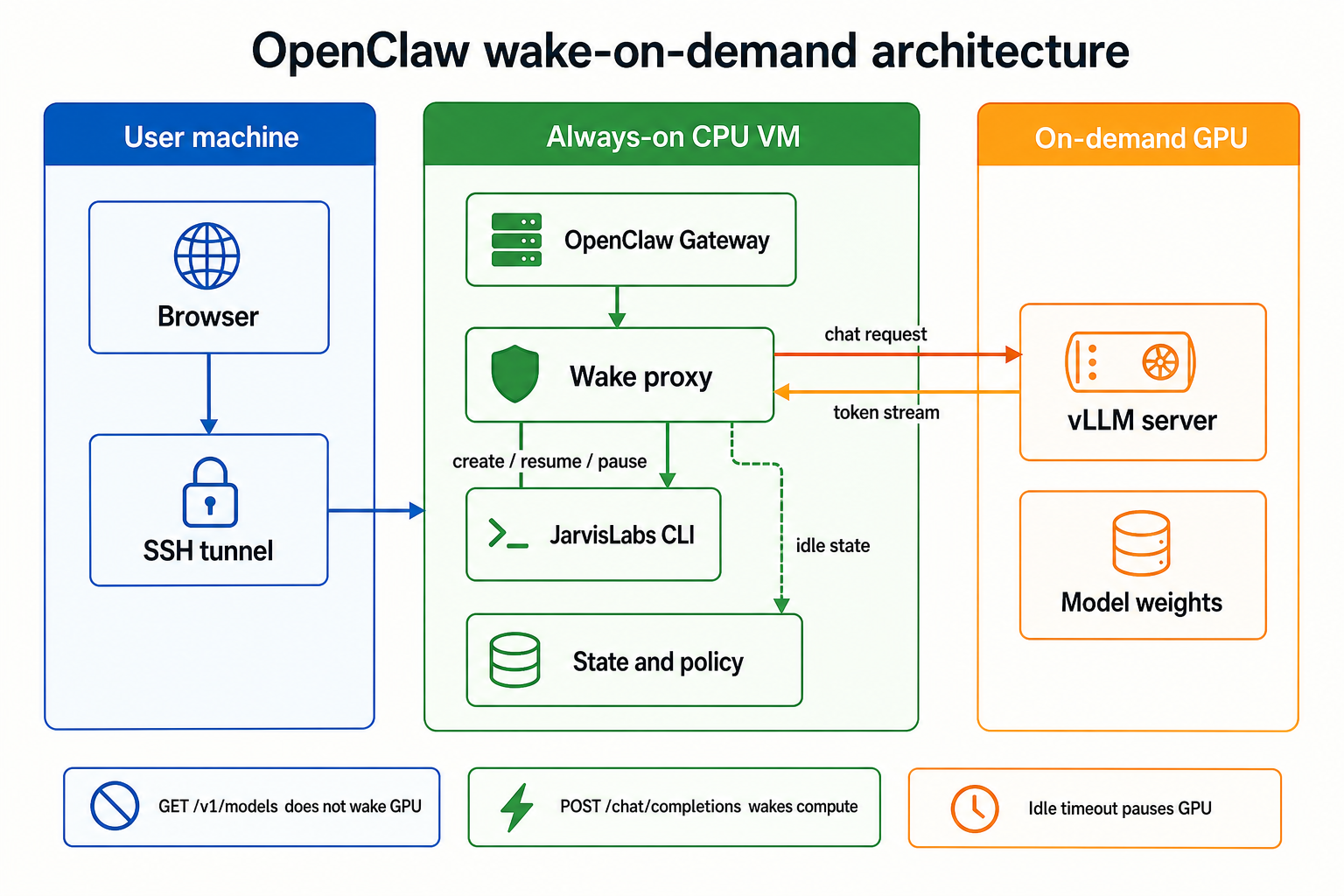
The diagram separates the system into two planes:
| Plane | Runs on | Lifetime | Responsibility |
|---|---|---|---|
| Control plane | CPU VM | Always on | OpenClaw dashboard, provider endpoint, lifecycle orchestration |
| Inference plane | GPU instance | On demand | vLLM, model weights, token generation |
The control plane is the fixed cost. The inference plane is the variable cost, so the GPU should run only for inference.
Model choice affects quality and throughput, but cost is driven by the GPU class and the number of hours it remains active.
The user opens OpenClaw through a local address such as http://127.0.0.1:18789. In this setup that local address is an SSH tunnel into the CPU VM, where OpenClaw Gateway is bound to loopback rather than the public internet.
The CPU VM runs two long-lived services:
- OpenClaw Gateway, which serves the browser dashboard and keeps the OpenClaw session alive.
- Wake proxy, an OpenAI-compatible
/v1provider that owns GPU lifecycle.
OpenClaw is configured against the proxy as an OpenAI-compatible provider. The proxy hides the fact that the upstream provider may be asleep.
Request Flow
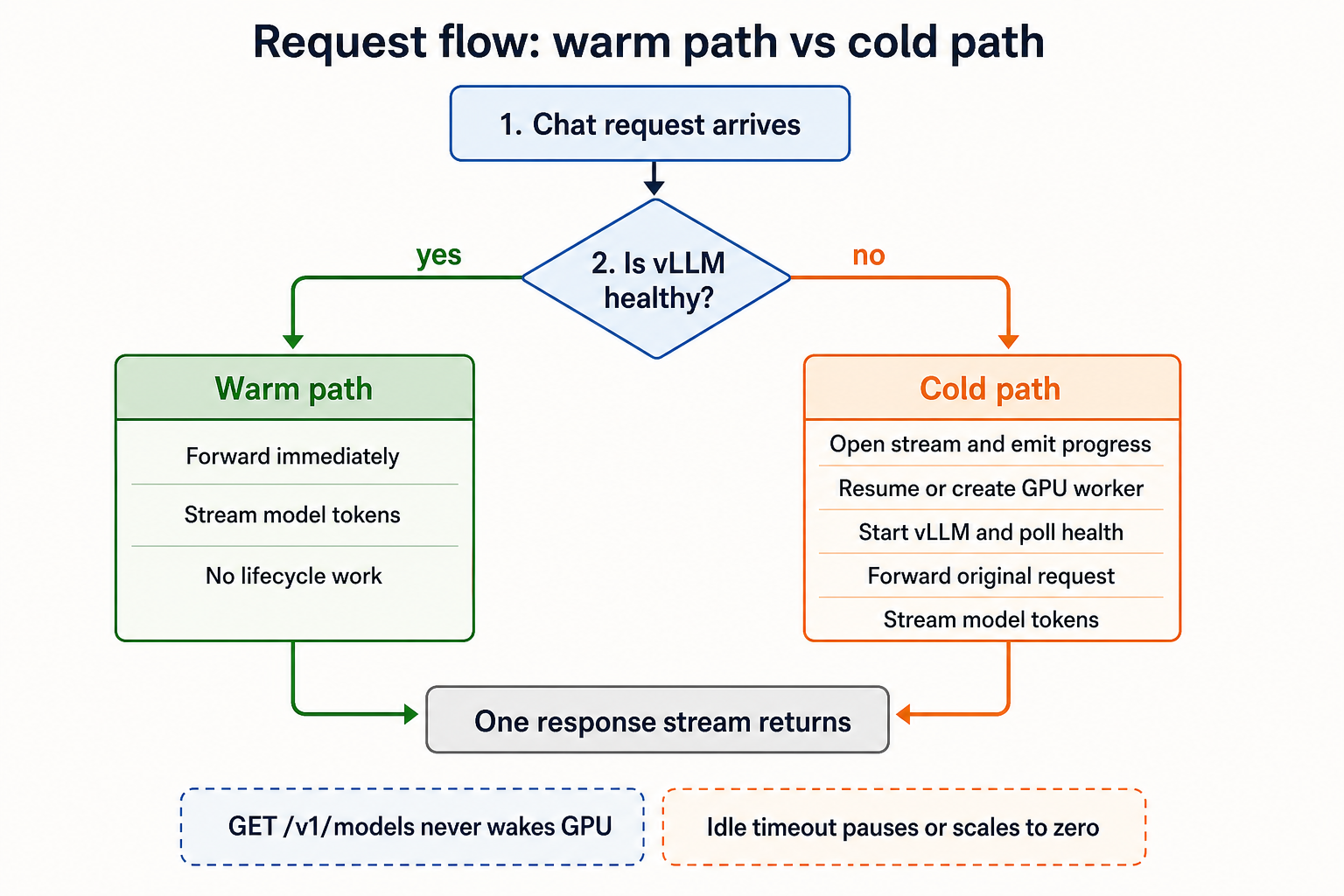
Model discovery must not wake the GPU. Many OpenAI-compatible clients call GET /v1/models during startup, provider validation, or settings refresh. The proxy answers that route from static configuration; only POST /v1/chat/completions can trigger GPU lifecycle work, then return an OpenAI-compatible response stream.
Proxy Responsibilities
The implementation is a FastAPI service with a lifecycle manager and a JarvisLabs CLI wrapper.
| File | Role |
|---|---|
openclaw_vllm_wake_proxy/main.py |
HTTP routes, OpenAI-compatible response shape, admin endpoints |
openclaw_vllm_wake_proxy/lifecycle.py |
GPU create/resume/pause, vLLM startup, health checks, idle loop |
openclaw_vllm_wake_proxy/jarvis.py |
Wrapper around the jl CLI |
openclaw_vllm_wake_proxy/scripts/gpu_start_vllm.sh |
Startup script uploaded to the GPU container |
deploy/openclaw-vllm-wake-proxy.service |
systemd service for the CPU VM |
Idle Pause Policy
The default idle policy is:
WAKE_PROXY_IDLE_SECONDS=900
WAKE_PROXY_IDLE_CHECK_SECONDS=30
After the last in-flight request finishes, the proxy waits 900 seconds, or 15 minutes. If no new request arrives, it pauses the GPU. The idle loop wakes every 30 seconds, so the real pause time is usually between 15 and 15.5 minutes.
That 15-minute tail is a compromise. If the timeout is too short, a user who pauses to think will repeatedly hit cold starts. If it is too long, the GPU keeps billing after the conversation has ended.
The idle timeout is also hot-changeable:
curl -X POST http://127.0.0.1:8080/admin/idle-timeout \
  -H "Authorization: Bearer ${WAKE_PROXY_VLLM_API_KEY}" \
  -H "Content-Type: application/json" \
  -d '{"seconds": 1800}'
The running process applies the new timeout immediately. If the new value is shorter than the current idle duration, the idle loop wakes and can pause the GPU without restarting the proxy.
Request Normalization
Tool-related fields caused one issue. OpenClaw may include:
tools
tool_choice
parallel_tool_calls
If vLLM was not started with the matching tool-call parser flags, a request containing tool_choice: "auto" can fail with HTTP 400.
For this demo, the proxy strips those fields before forwarding to vLLM. That keeps chat working with a minimal vLLM launch. Full tool calling can be added later by starting vLLM with the appropriate auto-tool-choice and parser options for the selected model family.
Using JarvisLabs Serverless
The architecture above manages a JarvisLabs GPU container directly. Use this path when you need SSH access, custom startup scripts, and explicit pause/resume control.
JarvisLabs also offers beta serverless model deployments through the jl CLI (jl 0.2.16, the latest version available when this was written). In serverless mode there is no instance to SSH into and no machine id to persist. You create a deployment, receive an OpenAI-compatible endpoint, send requests to it, and delete the deployment when you are done.
uv tool upgrade jarvislabs
jl --version
jl deploy --help
An L4 vLLM deployment looks like this:
jl deploy create \
  --name openclaw-serverless-vllm \
  --region IN2 \
  --framework vllm \
  --gpu L4 \
  --gpus-per-worker 1 \
  --min-workers 0 \
  --max-workers 1 \
  --idle-timeout 900 \
  --wait-time 300 \
  --storage 50 \
  --model Qwen/Qwen3-0.6B \
  --arg served-model-name=qwen3-0.6b \
  --arg max-model-len=2048 \
  --detach --yes --json
Settings:
min-workers=0allows the deployment to scale to zero. Idle compute cost drops to zero, but the first request can be slow.max-workers=1caps the demo at one GPU worker. Increase this only when you need concurrency.idle-timeoutcontrols how long an idle worker stays warm before it scales back down.wait-timecontrols how long the serverless gateway can hold a request while a worker starts.served-model-nameis the value the client should send in the OpenAImodelfield.
After creation, poll the deployment and fetch the base URL:
export DEPLOYMENT_ID="<deployment_id>"

jl deploy status "$DEPLOYMENT_ID" --region IN2 --json
jl deploy get "$DEPLOYMENT_ID" --region IN2 --json
When the deployment is running, the get response includes an openai_base_url like:
https://serverlessn.jarvislabs.net/openai/<deployment_id>/v1
Use the JarvisLabs API key as the bearer token and the served model name as the model id:
export OPENAI_BASE_URL="https://serverlessn.jarvislabs.net/openai/${DEPLOYMENT_ID}/v1"
export JL_API_KEY="<your JarvisLabs API key>"

curl -s "${OPENAI_BASE_URL}/chat/completions" \
  -H "Authorization: Bearer ${JL_API_KEY}" \
  -H "Content-Type: application/json" \
  -d '{
    "model": "qwen3-0.6b",
    "messages": [{"role": "user", "content": "Say hello in one short sentence."}],
    "max_tokens": 40,
    "temperature": 0
  }'
For OpenClaw, this can be wired in as an OpenAI-compatible provider:
| OpenClaw provider field | Value |
|---|---|
| Base URL | openai_base_url from jl deploy get |
| API key | JarvisLabs API key |
| Model | The served-model-name value, for example qwen3-0.6b |
If the client performs model discovery during configuration, test that path before relying on it. The best smoke test is a real POST /chat/completions call. If a client needs stricter compatibility, the wake proxy can still act as an adapter: answer /v1/models statically and forward chat requests to the serverless base URL.
In a smoke test on June 17, 2026 KST, a small vLLM serverless deployment on L4 reached running, then a first chat request took 91.8s with cold start and model loading included. A second warm request took 1.72s. These numbers are not an SLA. They show the tradeoff: serverless removes instance management, while first-request latency remains.
Clean up explicitly:
jl deploy delete "$DEPLOYMENT_ID" --region IN2 --yes --json
jl deploy list --json
Instance-Hour Cost Model
The first cost model is instance-hour based. It asks how much the bill changes when the CPU VM stays online and the GPU wakes only for usage.
| Resource | Compute price |
|---|---|
| CPU VM, 2 vCPU / 8 GB RAM | $0.0496/hr |
| L4 GPU container, spot | $0.29/hr |
| L4 GPU container, on-demand | $0.44/hr |
| RTX PRO 6000 GPU container, spot | $0.99/hr |
| RTX PRO 6000 GPU container, on-demand | $1.89/hr |
| H100 GPU container, spot | $1.19/hr |
| H100 GPU container, on-demand | $2.69/hr |
The monthly model treats one month as 30 days, or 720 hours:
monthly_cost = cpu_hourly * 720 + gpu_hourly * billed_gpu_hours
GPU hours are approximated as:
billed_gpu_hours = active_chat_hours + session_count * idle_tail_hours
The default idle tail is 15 minutes, or 0.25h, per session.
Five Individual Usage Patterns
The model uses five everyday usage patterns rather than one generic user.
| Pattern | Description | Active chat hours / month | Sessions / month | Idle tail | Billable GPU hours |
|---|---|---|---|---|---|
| Weekend tinkerer | A few focused weekend experiments | 8h | 8 | 2.00h | 10.00h |
| Evening learner | Study and experiments after work | 30h | 20 | 5.00h | 35.00h |
| Daily assistant | Short everyday personal assistant use | 60h | 30 | 7.50h | 67.50h |
| Maker after work | Side-project and development sessions | 100h | 45 | 11.25h | 111.25h |
| Indie power user | Long daily usage, but not truly 24/7 | 180h | 60 | 15.00h | 195.00h |
Active chat hours include conversation, generation, and waiting time while the GPU is running. This is instance-level accounting, not token-level accounting.
Monthly Cost Result
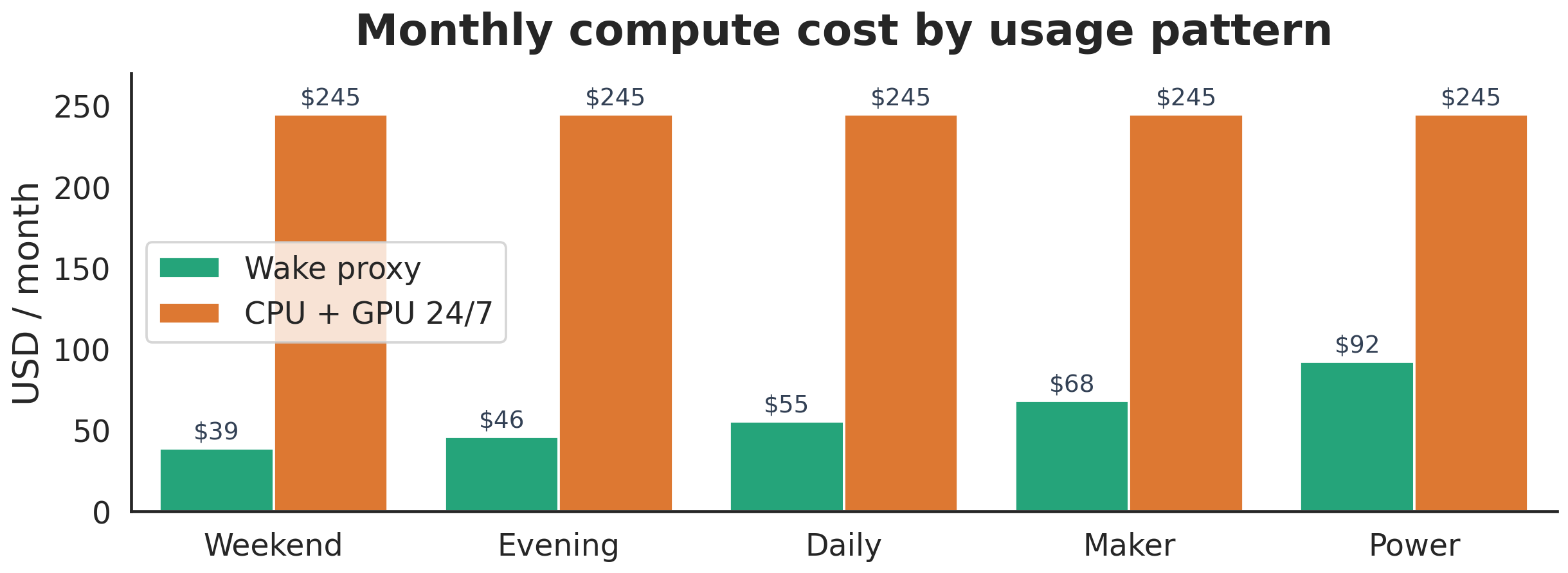
For the demo L4 spot GPU, the wake-proxy pattern changes the monthly bill from a fixed GPU baseline into a usage-proportional bill.
| Pattern | Wake proxy monthly cost | CPU + GPU 24/7 monthly cost | Savings | Savings rate |
|---|---|---|---|---|
| Weekend tinkerer | $38.61 |
$244.51 |
$205.90 |
84.2% |
| Evening learner | $45.86 |
$244.51 |
$198.65 |
81.2% |
| Daily assistant | $55.29 |
$244.51 |
$189.22 |
77.4% |
| Maker after work | $67.97 |
$244.51 |
$176.54 |
72.2% |
| Indie power user | $92.26 |
$244.51 |
$152.25 |
62.3% |
The CPU VM is the fixed cost floor. In this configuration it costs about $35.71/month even if the user barely chats. The GPU is no longer billed for all 720 hours of the month.
Larger GPUs still cost more per hour. The wake proxy makes the bill proportional to use; it does not remove GPU cost. For heavy daily use, GPU choice dominates the bill again.
Token Economics Against GPT API Pricing
A second view is token cost. Commercial AI services are billed per token, so measured open-weight serving throughput can be translated into output-token cost:
open_weight_output_cost_per_1M =
    gpu_hourly_price / (measured_output_tokens_per_second * 3600) * 1,000,000
This comparison uses measured vLLM throughput from Gemma-family benchmark runs on JarvisLabs and current official OpenAI API output-token prices. As of the pricing snapshot used here, the official priced nano and mini GPT tiers are gpt-5.4-nano and gpt-5.4-mini; the flagship comparison uses gpt-5.5.
Sources:
- OpenAI API pricing: https://developers.openai.com/api/docs/pricing
- OpenAI model guide: https://developers.openai.com/api/docs/models
Chart 1: Absolute Output-Token Cost
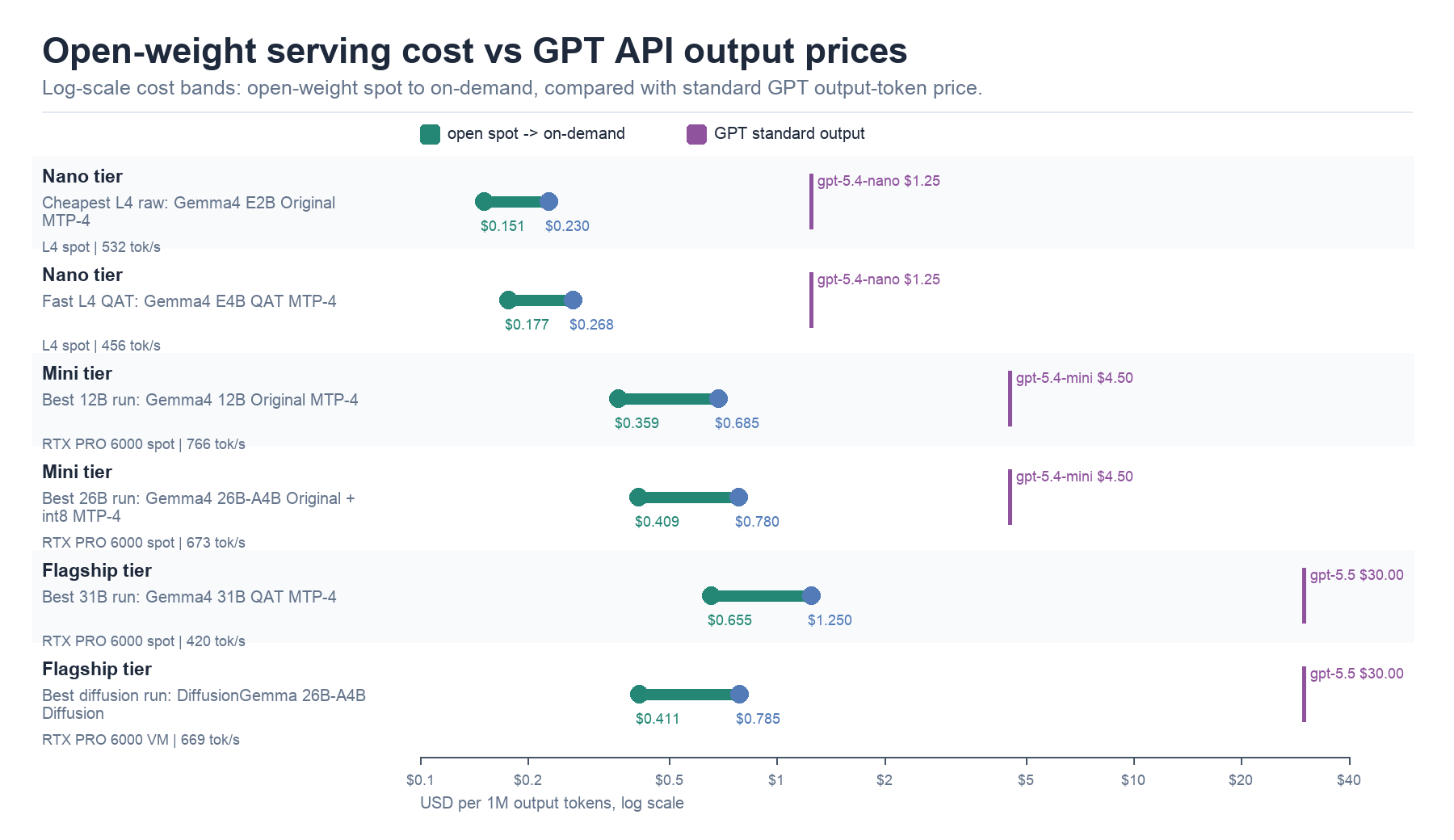
The x-axis is logarithmic because the range is wide. Each open-weight row shows a spot-to-on-demand band from the measured JarvisLabs run. The GPT reference lines show API output-token prices for the selected nano, mini, and flagship tiers. This is steady-state serving math only; it does not include input tokens, cold starts, engineering time, or model quality.
Chart 2: Times Cheaper Than GPT
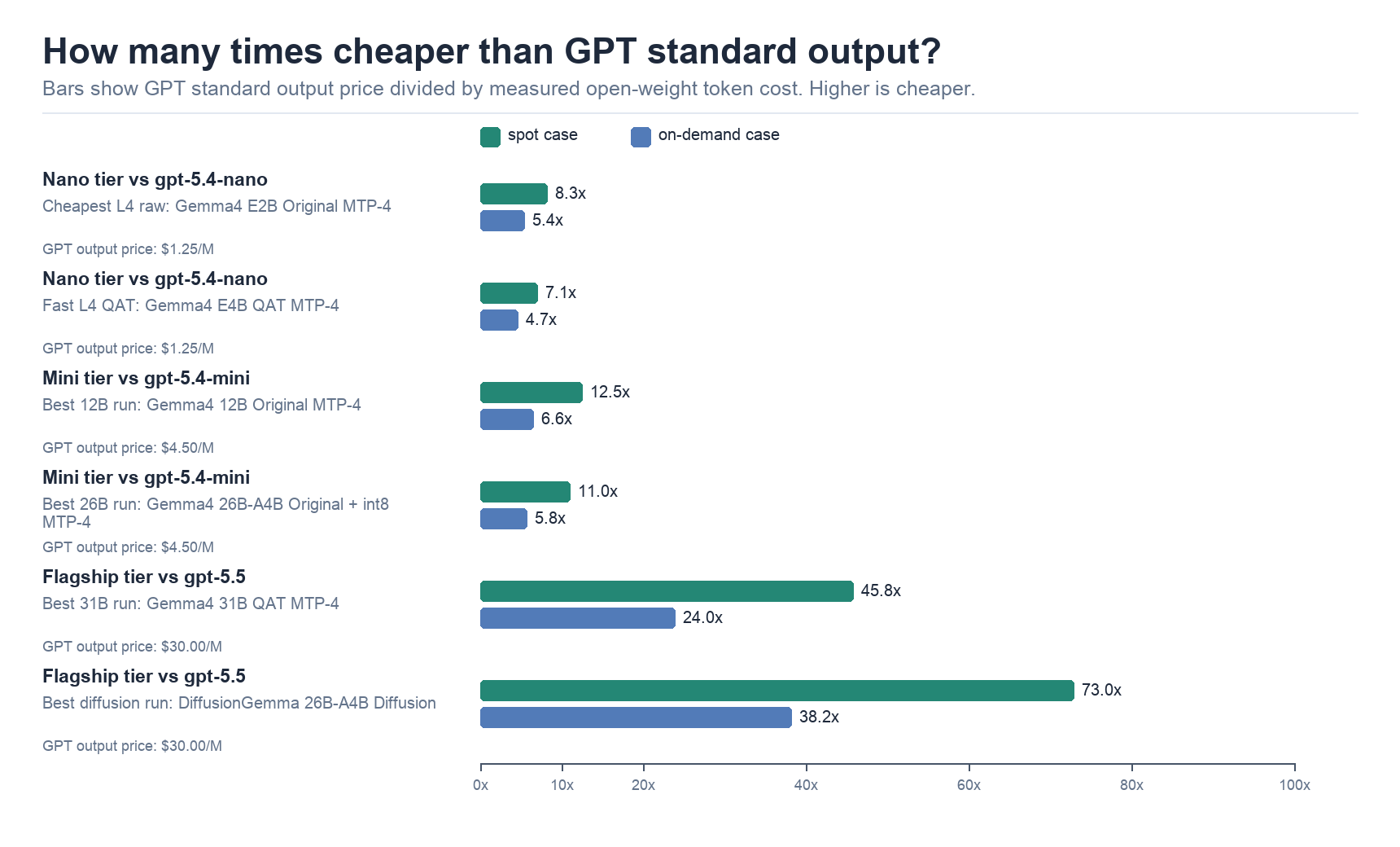
This chart converts the same result into a ratio: GPT output price divided by measured open-weight output cost. The flagship comparison is larger because the GPT flagship output-token price is higher, while the measured RTX PRO 6000 serving cost is still well under a few dollars per million output tokens.
Chart 3: Cost-Performance Frontier
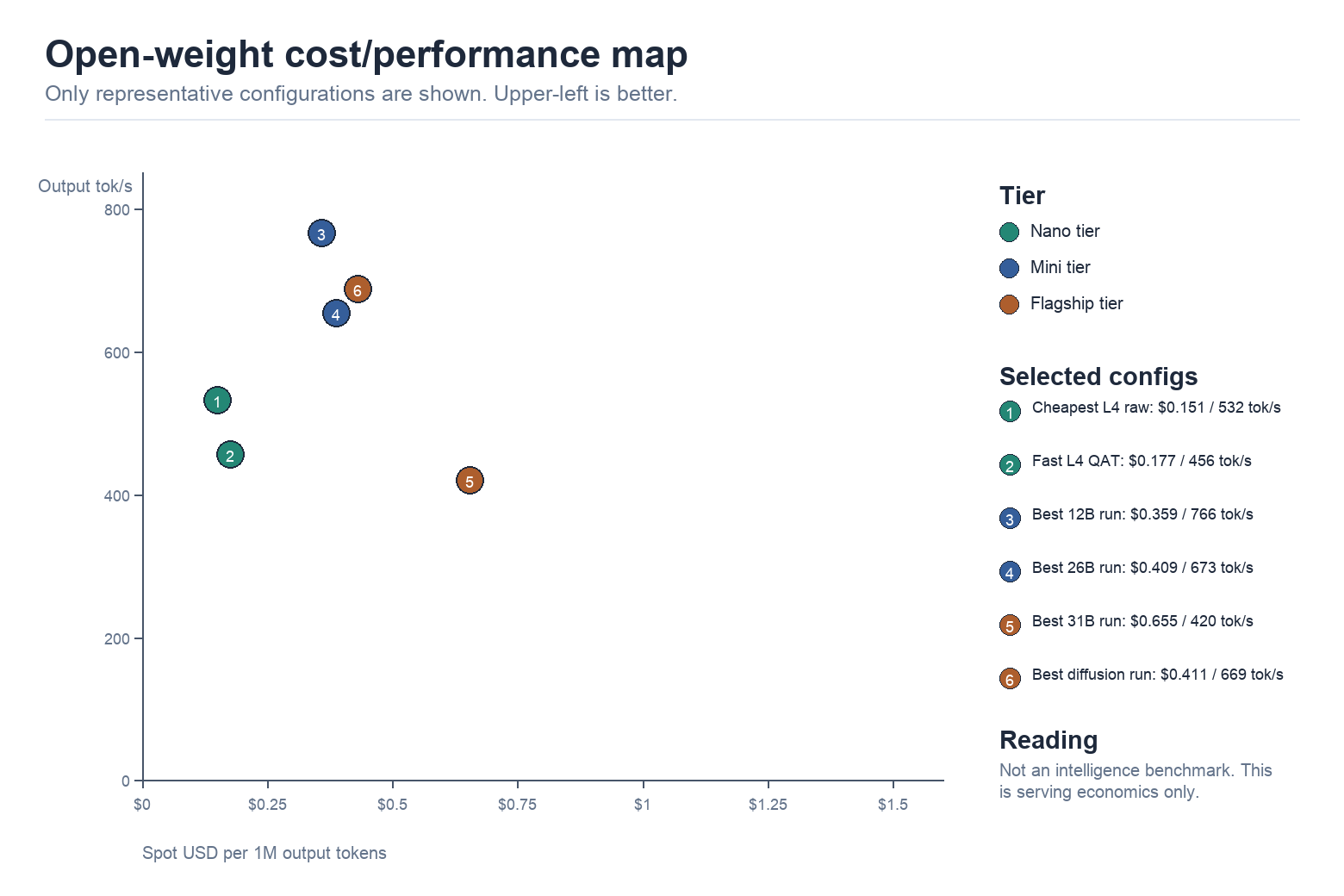
This chart plots spot output-token cost against measured output-token throughput. Upper-left is better: lower cost and higher throughput. DiffusionGemma is a different serving style from autoregressive chat, so quality and UX need separate evaluation.
Chart 4: What MTP Changed
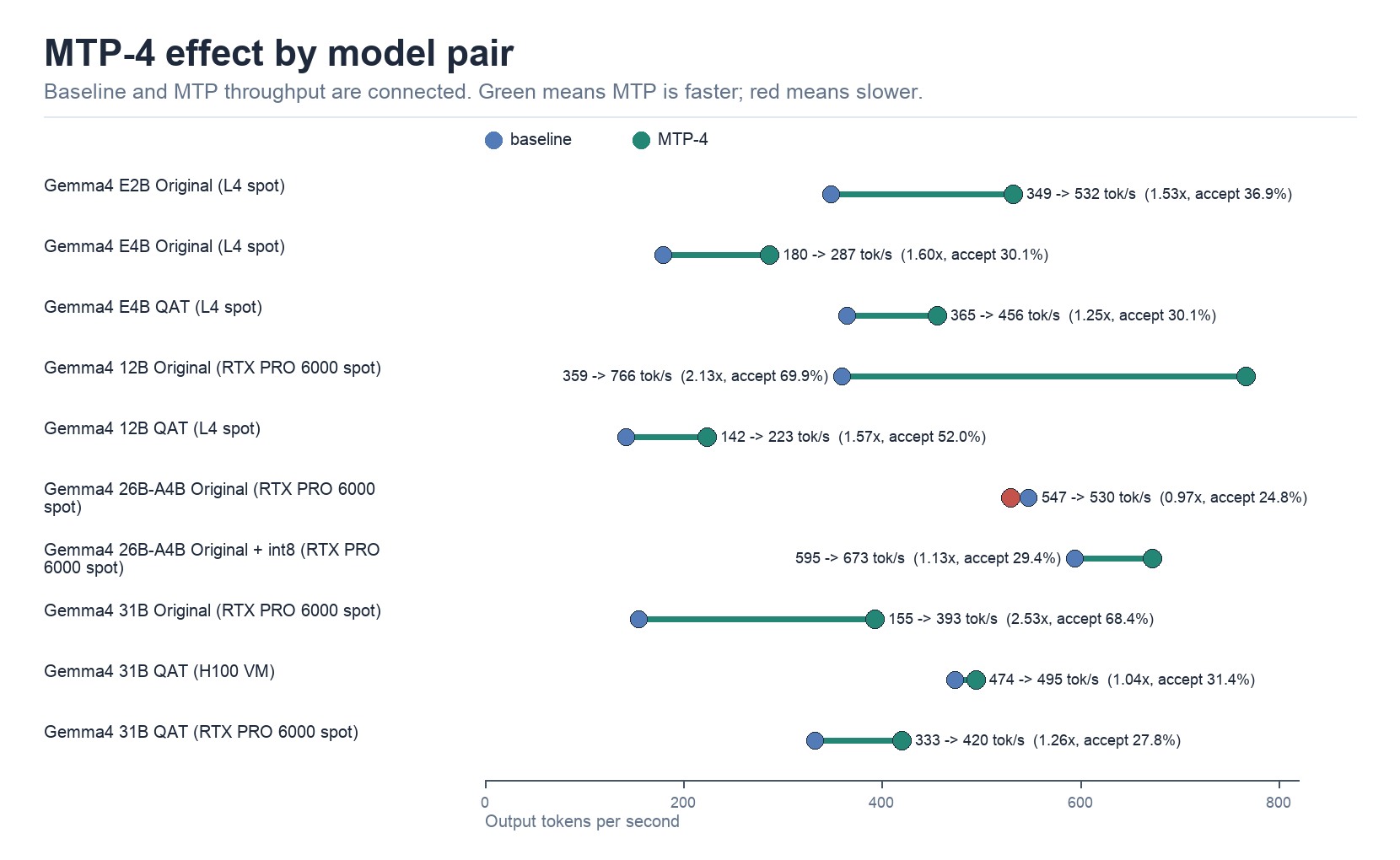
MTP improved output throughput and token economics for several pairs, but not all. Benchmark it with the exact model, quantization variant, GPU class, prompt length, and concurrency pattern you plan to serve.
Representative results:
| Tier | GPT reference | Open-weight representative | Spot result | On-demand result | Throughput |
|---|---|---|---|---|---|
| Nano | gpt-5.4-nano, $1.25/M output |
Gemma4 E2B Original MTP on L4 | $0.151/M, 8.3x cheaper |
$0.230/M, 5.4x cheaper |
532 tok/s |
| Mini | gpt-5.4-mini, $4.50/M output |
Gemma4 12B Original MTP on RTX PRO 6000 | $0.359/M, 12.5x cheaper |
$0.685/M, 6.6x cheaper |
766 tok/s |
| Flagship | gpt-5.5, $30.00/M output |
Gemma4 31B QAT MTP on RTX PRO 6000 | $0.655/M, 45.8x cheaper |
$1.250/M, 24.0x cheaper |
420 tok/s |
This table should not be read as an intelligence comparison. It says that, at the measured throughput levels, self-hosted open-weight serving can produce output tokens below GPT API output-token prices. It does not say the generated answers are equivalent.
Benchmark note: the suffixless Gemma checkpoints are original BF16 variants in these runs. The -qat-w4a16-ct checkpoints are separate QAT variants. Runtime int8 in vLLM is separate from an official QAT checkpoint.
Full benchmark tables and extra charts are kept in output/gemma4_benchmark_summary.csv, output/gemma4_gpt_comparison.csv, output/gemma4_gpt_clean_analysis.md, and output/gemma4_visual_analysis.md.
Actual OpenClaw Run
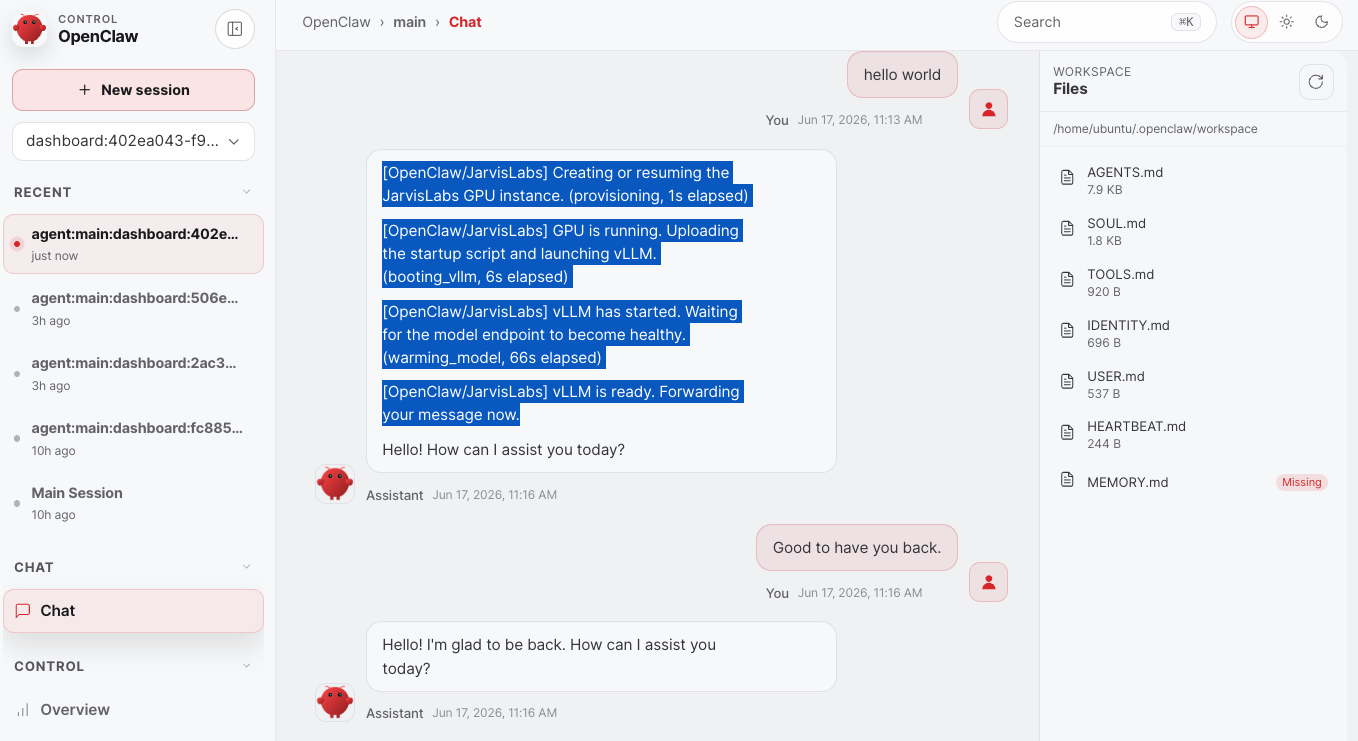
The screenshot shows the proxy's event-level messages inside OpenClaw: GPU provisioning, startup script upload, vLLM launch, health wait, and forwarding the original user message. After vLLM is ready, the next turn follows the normal chat path.
Limits
These numbers compare compute cost and output-token economics. They do not measure model intelligence, latency distribution, spot availability, storage, taxes, input-token billing, cache hit rates, tool-calling readiness, or the human cost of operating the stack.
When This Works Well
This pattern fits session-based individual use, OpenAI-compatible providers, and cases where lower fixed GPU cost matters more than always-low first-token latency.
It is a poor fit for all-day multi-user traffic, strict latency requirements, mandatory tool calling from day one, environments where spot interruption is unacceptable, or cases where even the CPU VM fixed cost needs to disappear.
Operational Notes
- Resumed instances can receive a new machine id, so the proxy persists the latest id in a state file.
- Health checks must target the real vLLM upstream. The proxy's static
/v1/modelsresponse is not proof that the GPU is running. - Secrets should not be passed directly in long command strings. The startup flow writes and sources a small environment file on the GPU container.
- Idle timeout belongs in product settings, not as a hardcoded constant.
Conclusion
OpenClaw Gateway can stay online on a CPU VM while vLLM runs only when inference is needed, either through a managed GPU instance or a JarvisLabs serverless deployment.
Hosted services buy model quality, reliability, low operational burden, and immediate availability. A wake-on-demand or serverless open-weight stack buys control and lower token cost when usage is bursty enough.
