

FIBO
Collection
The FIBO model family (Generation & Edit) • 11 items • Updated • 2
pip install -U diffusers transformers accelerate
import torch
from diffusers import DiffusionPipeline

# switch to "mps" for apple devices
pipe = DiffusionPipeline.from_pretrained("briaai/Fibo-1.5", dtype=torch.bfloat16, device_map="cuda")

prompt = "A man holding a goose while screaming"
image = pipe(prompt).images[0]







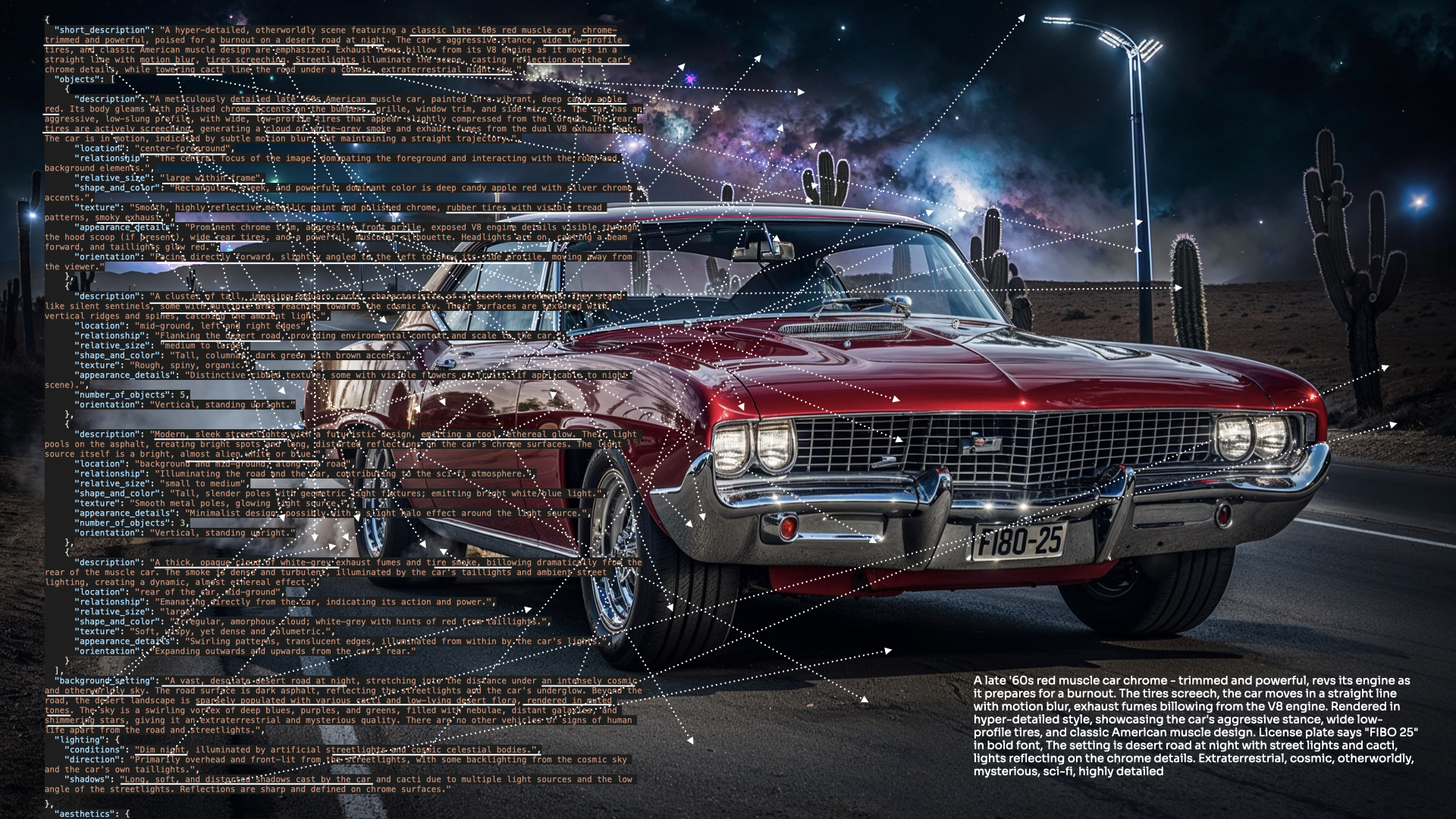
FIBO model family is the first open-source, JSON-native image generation models trained exclusively on long structured captions.
Fibo sets a new standard for controllability, predictability, and disentanglement by implementing the new VGL - Visual GenAI Language paradigm
⚡ Fibo 1.5 — few-step distillation + improved realism and textures for FIBO — produced by DMD + DMD-R distillation of the original FIBO. It generates in 4–6 inference steps with no classifier-free guidance while keeping FIBO's JSON-native structured prompting and control.


Blind pairwise human evaluation across 247 comparisons.

Most text-to-image models excel at imagination—but not control. FIBO is built for professional workflows, not casual use. Trained on structured JSON captions up to 1,000+ words, FIBO enables precise, reproducible control over lighting, composition, color, and camera settings. The structured captions foster native disentanglement, allowing targeted, iterative refinement without prompt drift. With only 8B parameters, FIBO delivers high image quality, strong prompt adherence, and professional-grade control—trained exclusively on licensed data.
FIBO is available everywhere you build, either as source-code and weights, ComfyUI nodes or API endpoints.
API Endpoint:
ComfyUI:
Source-Code & Weights
Install Diffusers from the source code:
pip install git+https://github.com/huggingface/diffusers torch torchvision google-genai boltons ujson sentencepiece accelerate transformers
⚡ Few-step distilled model. This checkpoint is a DMD → DMD-R timestep-distilled version of FIBO, so it samples in very few steps without classifier-free guidance. Usenum_inference_steps=6andguidance_scale=1— the base 50-step / guidance-5 recipe is not needed here. You can experiment with even fewer steps; 4–6 steps gives the best quality/speed trade-off. Since sampling is guidance-free,negative_prompthas no effect and can be omitted. This checkpoint is not intended to be fine-tuned — the distillation process optimizes it specifically for its few-step, no-CFG sampling regime, so the fine-tuning code released for the base model does not apply here. If you need a fine-tuned variant, start from the base FIBO checkpoint instead.
FIBO uses a VLM that transforms short prompts into detailed structured prompts that are used to generate images. You can use the following code to generate images using Gemini via the Google API - requires a GOOGLE_API_KEY , or uncomment the relevant section to run a local VLM instead (FIBO-VLM):
import json
import os
import torch
from diffusers import BriaFiboPipeline
from diffusers.modular_pipelines import ModularPipelineBlocks
# -------------------------------
# Load the VLM pipeline
# -------------------------------
torch.set_grad_enabled(False)
# Using Gemini API, requires GOOGLE_API_KEY environment variable
assert os.getenv("GOOGLE_API_KEY") is not None, "GOOGLE_API_KEY environment variable is not set"
vlm_pipe = ModularPipelineBlocks.from_pretrained("briaai/FIBO-gemini-prompt-to-JSON", trust_remote_code=True)
vlm_pipe = vlm_pipe.init_pipeline()
# Using local VLM, uncomment to run
# vlm_pipe = ModularPipelineBlocks.from_pretrained("briaai/FIBO-VLM-prompt-to-JSON", trust_remote_code=True)
# vlm_pipe = vlm_pipe.init_pipeline()
# Load the FIBO pipeline (distilled few-step / DMD-R weights)
pipe = BriaFiboPipeline.from_pretrained(
"briaai/Fibo-1.5",
torch_dtype=torch.bfloat16,
)
pipe.to("cuda")
# pipe.enable_model_cpu_offload() # uncomment if you're getting CUDA OOM errors
# -------------------------------
# Run Prompt to JSON
# -------------------------------
# Create a prompt to generate an initial image
output = vlm_pipe(
prompt="A hyper-detailed, ultra-fluffy owl sitting in the trees at night, looking directly at the camera with wide, adorable, expressive eyes. Its feathers are soft and voluminous, catching the cool moonlight with subtle silver highlights. The owl's gaze is curious and full of charm, giving it a whimsical, storybook-like personality."
)
json_prompt_generate = output.values["json_prompt"]
# -------------------------------
# Run Image Generation
# -------------------------------
# Generate the image from the structured json prompt
results_generate = pipe(
prompt=json_prompt_generate, num_inference_steps=6, guidance_scale=1
)
results_generate.images[0].save("image_generate.png")
with open("image_generate_json_prompt.json", "w") as f:
f.write(json_prompt_generate)

FIBO supports iterative generation. Given a structured prompt and an instruction, FIBO refines the output.
output = vlm_pipe(
json_prompt=json_prompt_generate, prompt="make the owl brown"
)
json_prompt_refine_from_image = output.values["json_prompt"]
results_refine_from_image = pipe(
prompt=json_prompt_refine_from_image, num_inference_steps=6, guidance_scale=1
)
results_refine_from_image.images[0].save("image_refine_from_image.png")
with open("image_refine_from_image_json_prompt.json", "w") as f:
f.write(json_prompt_refine_from_image)


Start from an image as inspiration and let Fibo regenerate a variation of it or merge your creative intent into the next generation
from PIL import Image
original_astronaut_image = Image.open("<path to original astronaut image>")
output = vlm_pipe(
image=original_astronaut_image, prompt="")
json_prompt_inspire = output.values["json_prompt"]
results_inspire = pipe(
prompt=json_prompt_inspire, num_inference_steps=6, guidance_scale=1
)
results_inspire.images[0].save("image_inspire_no_prompt.png")
with open("image_inspire_json_prompt_no_prompt.json", "w") as f:
f.write(json_prompt_inspire)
output = vlm_pipe(
image=original_astronaut_image, prompt="Make futuristic")
json_prompt_inspire = output.values["json_prompt"]
results_inspire = pipe(
prompt=json_prompt_inspire, num_inference_steps=6, guidance_scale=1
)
results_inspire.images[0].save("image_inspire_with_prompt.png")
with open("image_inspire_json_prompt_with_prompt.json", "w") as f:
f.write(json_prompt_inspire)


FIBO supports any VLM as part of the pipeline. To use Gemini as VLM backbone for FIBO, follow these instructions:
Obtain a Gemini API Key
Sign up for the Google AI Studio (Gemini) and create an API key.
Set the API Key as an Environment Variable
Store your Gemini API key in the GEMINI_API_KEY environment variable:
export GEMINI_API_KEY=your_gemini_api_key
You can add the above line to your .bashrc, .zshrc, or similar shell profile for persistence.
FIBO is an 8B-parameter DiT-based, flow-matching text-to-image model trained exclusively on licensed data and on > long, structured JSON captions (~1,000 words each), enabling strong prompt adherence and professional-grade control. It uses SmolLM3-3B as the text encoder with a novel DimFusion conditioning architecture for efficient long-caption training, and Wan 2.2 as the VAE. The structured supervision promotes native disentanglement for targeted, iterative refinement without prompt drift, while VLM-assisted prompting expands short user intents, fills in missing details, and extracts/edits structured prompts from images using our fine-tuned Qwen-2.5-based VLM or Gemini 2.5 Flash. For reproducibility, we provide the assistant system prompt and the structured-prompt JSON schema across the “Generate,” “Refine,” and “Inspire” modes.
This release is a few-step distilled variant of FIBO. Starting from the base FIBO model, we apply DMD (Distribution Matching Distillation) followed by a DMD-R refinement stage, collapsing the sampler to 4–6 guidance-free steps (no classifier-free guidance). The 8B DiT architecture, SmolLM3-3B text encoder, DimFusion conditioning, Wan 2.2 VAE, and structured-JSON prompting are all unchanged — only the number of inference steps and the removal of CFG differ, so weights layout and control behavior stay identical to base FIBO.
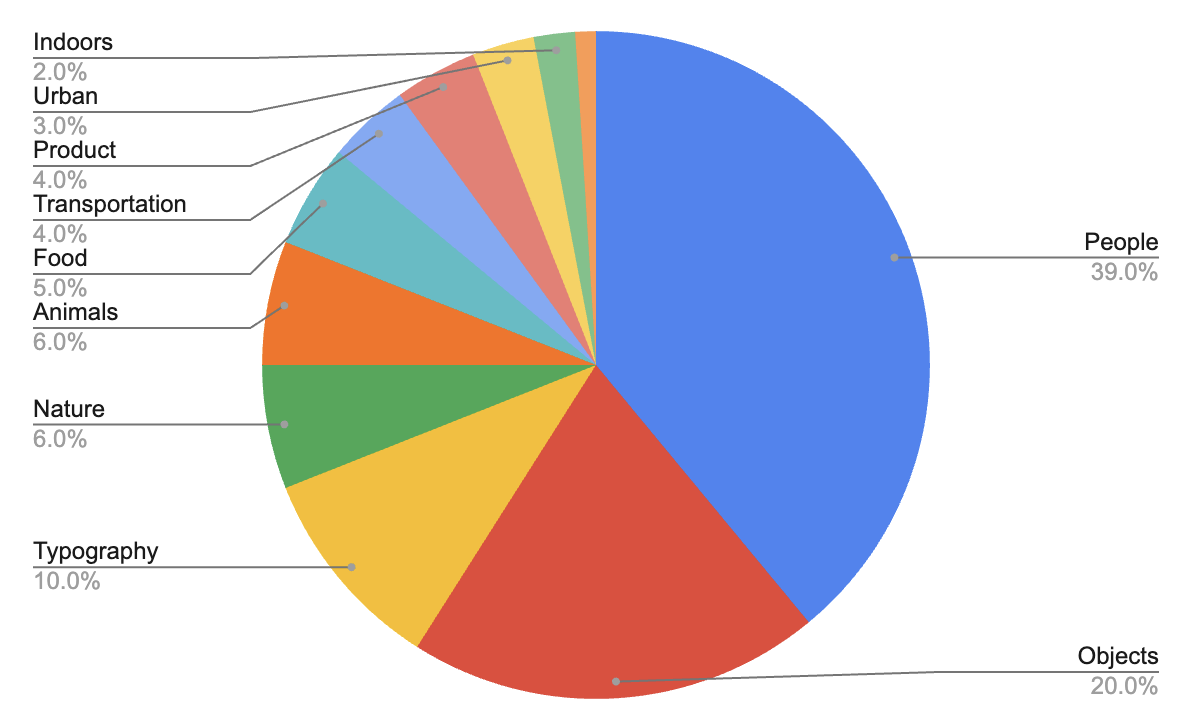
FIBO was trained on curated set of image–caption pairs selected from ~1B image dataset as shown in the dataset distribution. All assets are vetted for commercial use, attribution traceability, and regional compliance under GDPR and the EU AI Act. This broad and balanced dataset ensures FIBO’s ability to generalize across a wide range of visual domains, from realistic human imagery to graphic design and product visualization, while maintaining full licensing compliance.
Generate


Inspire & Refine


FIBO is inspired by the Fibonacci sequence, where math meets beauty through the golden ratio—nature’s and design’s timeless key to harmony.
If you have questions about this repository, feedback to share, or want to contribute directly, we welcome your issues and pull requests on GitHub. Your contributions help make FIBO better for everyone.
If you're passionate about fundamental research, we're hiring full-time employees (FTEs) and research interns. Don't wait - reach out to us at hr@bria.ai
We kindly encourage citation of our work if you find it useful.
@article{gutflaish2025generating,
title={Generating an Image From 1,000 Words: Enhancing Text-to-Image With Structured Captions},
author={Gutflaish, Eyal and Kachlon, Eliran and Zisman, Hezi and Hacham, Tal and Sarid, Nimrod and Visheratin, Alexander and Huberman, Saar and Davidi, Gal and Bukchin, Guy and Goldberg, Kfir and others},
journal={arXiv preprint arXiv:2511.06876},
year={2025}
}
❤️ FIBO model card and ⭐ Star FIBO on GitHub to join the movement for responsible generative AI!
Unable to build the model tree, the base model loops to the model itself. Learn more.
# Gated model: Login with a HF token with gated access permission
hf auth login