

RMBG
Collection
Background Removal models • 8 items • Updated • 3
import torch
from diffusers import DiffusionPipeline

# switch to "mps" for apple devices
pipe = DiffusionPipeline.from_pretrained("briaai/RMBG-3.0", dtype=torch.bfloat16, device_map="cuda")

prompt = "Astronaut in a jungle, cold color palette, muted colors, detailed, 8k"
image = pipe(prompt).images[0]




🏆 #1 in background removal in our head-to-head benchmark against Photoroom, remove.bg (Canva), Ideogram, BiRefNet and RMBG-2.0, on 234 hard images at full resolution.
Background removal, reimagined as image editing. In 4 steps.
RMBG 3.0 is the third generation of Bria's background removal models, and the first one built on a generative foundation. It is Fibo 2.0, fine-tuned and distilled to do one thing very well: turn any photo into a clean, soft alpha matte in just 4 steps.
Because it starts from a model that understands images, not just edges, RMBG 3.0 knows what the subject is. It keeps every person in a group shot, keeps motion-blurred limbs, clears the holes in chain-link and bicycle spokes, and knows that a cast shadow is not part of the product. Like every FIBO model, it is trained exclusively on licensed data.
| 🥇 #1 of 6 vendors and models | Average rank 1.51 across 234 hard images, best or tied-best on 185 of them (79%). |
| ⚔️ Wins every head to head | Preferred 55.1% vs Photoroom, 59.4% vs remove.bg (Canva), 60.9% vs RMBG-2.0, 65.6% vs Ideogram and 75.9% vs BiRefNet. |
| 🎯 Leads 7 of 12 hard categories, top 2 in 10 | #1 on motion blur, multiple subjects, holes & mesh, shadows & reflections, hair & fur, transparent objects and reflective surfaces. |
| 🛍️ Built for e-commerce | #1 on 48 real online-store product shots (avg. rank 1.15 vs Photoroom's 1.83 and remove.bg's 1.94). Product text, logos and badges stay intact. |
| ⚡ 4-step distilled | No classifier-free guidance, about 6 s per image on a single L40S. |
| 🛡️ 100% licensed data | Like every FIBO model: governance, attribution and legal clarity for commercial use. |
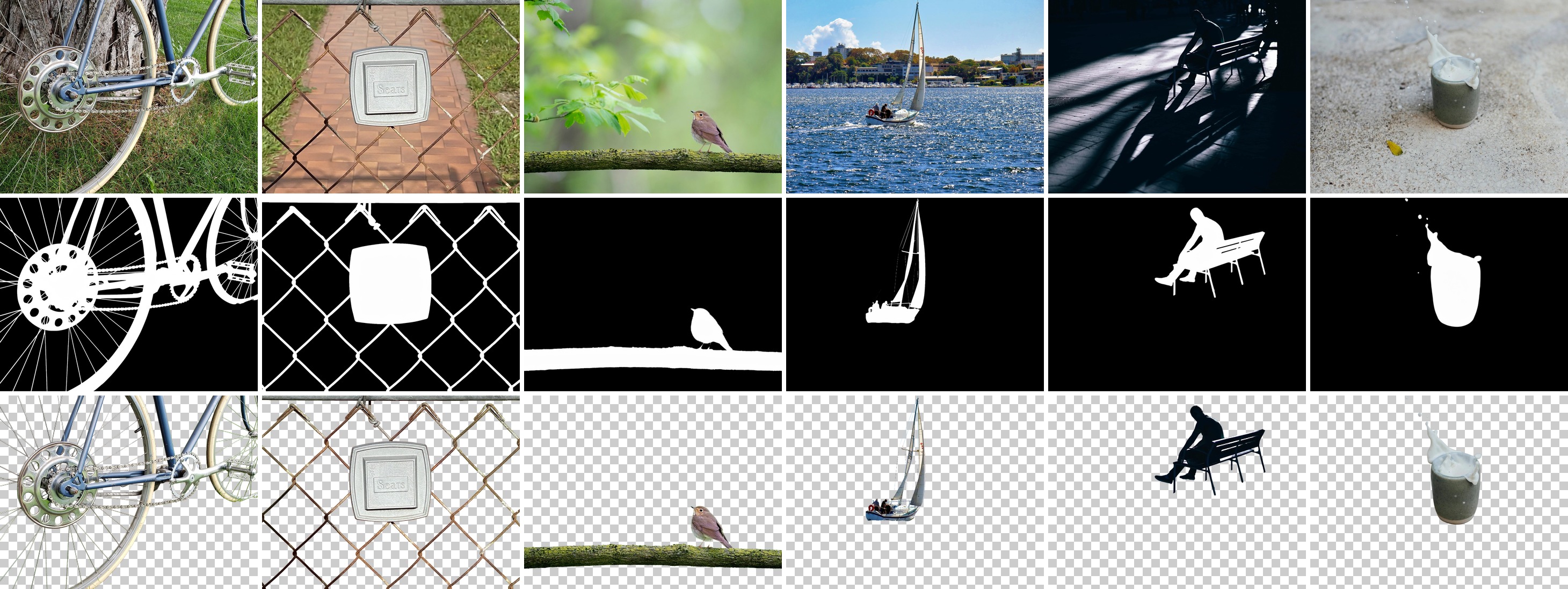
Top: input · Middle: predicted alpha matte · Bottom: cut-out using the matte as alpha.
Spokes, chain-link, a bird on a branch, a sailboat on choppy water, a silhouette with its cast shadow left behind, and a splash frozen mid-air: the matte stays faithful to the subject and drops everything that isn't.
Second image: "Sears Plaque on Chain Link Fence" by Phillip Pessar, CC BY 2.0. Fourth image: yacht on the Swan River off Claremont Yacht Club, Perth, by aussiejeff, CC BY-SA 2.0; its matte and cut-out are shared under the same licence. Other inputs are CC0 or public domain.
Bouquet held against a dense garden: every stem, fern leaf and baby's-breath floret is kept, and the hand stays attached.

Puppy on a patterned kitchen floor: soft fur edges, with the busy tiles and cabinets cleanly removed.

Open-knit cardigan on a busy street: the background shows through every hole in the knit, while the satin dress stays solid.

Left: input, generated with FIBO · Right: RMBG-3.0 cut-out on a checkerboard.
We compared RMBG-3.0 with Photoroom, remove.bg (Canva), Ideogram (via fal), BiRefNet (via fal) and our previous model RMBG-2.0 on 234 deliberately hard images: hair and fur, glass, mesh, clutter, motion blur, product shots, illustrations, and 20 real customer images that were chosen because they are hard to cut out. Every system ran on the original full-resolution images at its default settings, with one output per image. Results combine blind voting by professional and casual users with a VLM side-by-side comparison. Every image was ranked 1–6 (1 = best), with ties allowed; a system that returned no output was ranked last. RMBG-3.0, RMBG-2.0 and BiRefNet are open source, with weights on Hugging Face (RMBG-3.0 for non-commercial use).


Overall ranking
| # | Model | Avg. rank ↓ | Best or tied-best |
|---|---|---|---|
| 1 | RMBG-3.0 (Bria) · 🤗 open source | 1.51 | 185 / 234 |
| 2 | Photoroom | 1.87 | 162 / 234 |
| 3 | RMBG-2.0 (Bria) · 🤗 open source | 2.16 | 140 / 234 |
| 4 | remove.bg (Canva) | 2.22 | 151 / 234 |
| 5 | Ideogram (via fal) | 2.76 | 113 / 234 |
| 6 | BiRefNet (via fal) · 🤗 open source | 3.56 | 78 / 234 |
Head to head (per-image preference, ties count as half a win)
| RMBG-3.0 vs | Preference | Wins | Ties | Losses |
|---|---|---|---|---|
| Photoroom | 55.1% | 63 | 132 | 39 |
| remove.bg (Canva) | 59.4% | 65 | 148 | 21 |
| RMBG-2.0 · 🤗 open source | 60.9% | 76 | 133 | 25 |
| Ideogram | 65.6% | 102 | 103 | 29 |
| BiRefNet · 🤗 open source | 75.9% | 137 | 81 | 16 |
12 hard categories (average rank, lower is better; best in bold)
| Category | RMBG-3.0 | Photoroom | RMBG-2.0 | remove.bg | Ideogram | BiRefNet |
|---|---|---|---|---|---|---|
| Motion blur & depth of field | 1.00 | 2.11 | 1.56 | 3.44 | 2.67 | 2.33 |
| Multiple subjects | 1.20 | 2.90 | 1.90 | 2.80 | 2.30 | 2.40 |
| Holes & mesh | 1.22 | 1.89 | 3.33 | 3.44 | 2.78 | 4.11 |
| Shadows & reflections | 1.57 | 2.29 | 2.43 | 2.57 | 4.00 | 2.00 |
| Hair & fur | 1.60 | 1.70 | 2.50 | 3.10 | 2.50 | 2.80 |
| Transparent objects* | 1.70 | 1.80 | 3.50 | 2.90 | 2.60 | 3.80 |
| Reflective surfaces | 1.30 | 2.50 | 1.40 | 1.50 | 2.80 | 4.40 |
| Thin structures | 2.10 | 1.80 | 2.40 | 3.80 | 4.30 | 3.20 |
| Smoke, fire & splashes | 2.10 | 1.80 | 2.20 | 3.30 | 3.60 | 2.90 |
| Cluttered backgrounds | 2.70 | 2.80 | 3.20 | 1.90 | 3.10 | 4.80 |
| Low contrast (camouflage, white on white) | 2.30 | 1.70 | 1.50 | 2.20 | 3.00 | 3.40 |
| Semi-transparent (veils, tulle, smoke) | 2.67 | 1.89 | 2.71 | 2.00 | 2.78 | 2.89 |
*RMBG-3.0 ranks highest on average, but Photoroom wins 55% of the transparent images head to head, because it renders glass as see-through. Each hard category has 7–10 images, so one image moves a row by about 0.1–0.5.
| 👥 Keeps the whole subject | Gets every person in group shots and keeps motion-blurred limbs. It knows that a cast shadow or a reflection is not the product. |
| 🕸️ Clears the holes | Gaps in chain-link, cages, bicycle spokes, chair rungs and openwork come out clean, where older models fill them in. |
| 📦 Solid products stay solid | No grey, half-transparent patches or punched-out holes inside packaging, white products or dark lids. |
| 🏷️ Text and logos stay intact | Labels, badges and printed text on products survive the cut-out, ready for catalogs. |
| 🌫️ Soft, natural edges | A true 8-bit alpha matte with anti-aliased edges, not a hard binary mask. Threshold it, or use it as-is. |
| 🚀 Try it now | Bria API sandbox · Bria Create · fal.ai · bria/rmbg-3 |
| 🔌 Bria API | docs.bria.ai |
| 🧩 ComfyUI | Bria ComfyUI nodes |
| 🤖 Agents | Bria agent skill |
Commercially licensed, fully managed, no GPU required:
curl -X POST "https://engine.prod.bria-api.com/v2/image/edit/remove_background" \
  -H "api_token: $BRIA_API_TOKEN" \
  -H "Content-Type: application/json" \
  -d '{"image": "https://huggingface.co/briaai/RMBG-3.0/resolve/main/assets/rmbg3_example_input_dog.jpg", "model": "RMBG3"}'
pip install -U "diffusers>=0.42.0" torch torchvision transformers accelerate
This repo holds only the fine-tuned transformer. The rest of the pipeline (text encoder, VAE, fonts) comes from Fibo 2.0 Edit Turbo, so accept its access form first.
import json

import torch
from diffusers import AutoModel, BriaFibo2Pipeline
from huggingface_hub import hf_hub_download
from PIL import Image

BASE = "briaai/Fibo-2.0-edit-turbo"

# The fixed instruction. Use exactly this text for every image.
INSTRUCTION = (
    "Generate a detailed grayscale alpha matte. Map the opaque foreground to white and the "
    "background to black. Produce soft, anti-aliased grayscale gradients at the edges of the "
    "subject to represent fine details and transparency."
)
PROMPT = json.dumps({"edit_instruction": INSTRUCTION})

transformer = AutoModel.from_pretrained(
    "briaai/RMBG-3.0", subfolder="transformer", dtype=torch.bfloat16
)
pipe = BriaFibo2Pipeline.from_pretrained(
    BASE, transformer=transformer, dtype=torch.bfloat16
).to("cuda")
fonts = [hf_hub_download(BASE, n, subfolder="fonts") for n in ("Aileron-Regular.otf", "DejaVuSans.ttf")]

source = Image.open("photo.jpg").convert("RGB")
result = pipe(
    prompt=PROMPT,
    image=source,
    num_inference_steps=4,
    guidance_scale=1.0,
    generator=torch.Generator("cuda").manual_seed(0),
    fonts=fonts,
).images[0]

matte = result.convert("L").resize(source.size, Image.LANCZOS)  # white = keep
cutout = source.copy()
cutout.putalpha(matte)
cutout.save("photo_cutout.png")
| Setting | Value | Why |
|---|---|---|
num_inference_steps |
4 | The model was distilled to finish in 4 steps. |
guidance_scale |
1.0 | No classifier-free guidance, as in Fibo 2.0 Edit Turbo. |
| Prompt | the fixed instruction | The model was trained on this exact text and nothing else. A changed or missing instruction gives a coloured picture instead of a matte. |
| GPU memory | 32 GB or more | Measured peak 28.5 GiB on one L40S, with the whole pipeline in bf16. |
| Speed | about 6 s per image | Measured on one L40S at about 1 megapixel, including text encoding and decoding. |
💡 Output format. The model returns a single-channel 8-bit matte: white is the subject, black is the background, and grey marks partial transparency at hair, fur, glass and motion blur. Use it directly as the alpha channel, or threshold it if you need a binary mask.
Classic background-removal models, including RMBG-2.0, are segmentation networks that learn edges from labelled masks. RMBG 3.0 takes a different route: it treats background removal as an image edit. The input photo goes in as the context image, a fixed instruction asks for an alpha matte, and the model renders the matte.
Starting from a generative model gives RMBG 3.0 a semantic understanding of the scene: what the subject is, where it ends, and what merely belongs to its surroundings (shadows, reflections, props).
| RMBG 3.0 | RMBG 2.0 | |
|---|---|---|
| Approach | Generative, editing-based (Fibo 2.0) | Segmentation (BiRefNet) |
| Parameters | 8B | 0.2B |
| Quality on hard images | 🥇 Best | Good |
| Speed | ~6 s / image (L40S) | Much faster, single forward pass |
| GPU memory | 32 GB+ | Fits on small GPUs |
| Best for | Hard images, product catalogs, quality-first workflows | High-volume, low-latency jobs and edge devices |
We publish where RMBG 3.0 still loses so you can pick the right tool. We are actively working on all of them.
Weights are released under Creative Commons Attribution-NonCommercial 4.0 International (CC BY-NC 4.0), the same terms as the Fibo 2.0 family. The full text is in LICENSE.
Commercial use requires a separate agreement with Bria AI. Get a license here, or use the commercially licensed Bria API and fal endpoint.
| Self-hosted (HF weights) | Bria API / fal | |
|---|---|---|
| Quality | ✅ RMBG 3.0 | ✅ RMBG 3.0 |
| Commercial license | ❌ Requires agreement | ✅ Included |
| GPU infrastructure | ❌ You manage (32 GB+) | ✅ Managed |
| Licensed training data | ✅ Yes | ✅ Yes |
Questions, feedback or ideas? Open a discussion in the Community tab. Follow Bria on Hugging Face for new releases. If you're passionate about fundamental research, we're hiring: see bria.ai/careers.
RMBG 3.0 is built on the FIBO family. If you use it in your research, please cite:
@article{gutflaish2025generating,
  title={Generating an Image From 1,000 Words: Enhancing Text-to-Image With Structured Captions},
  author={Gutflaish, Eyal and Kachlon, Eliran and Zisman, Hezi and Hacham, Tal and Sarid, Nimrod and Visheratin, Alexander and Huberman, Saar and Davidi, Gal and Bukchin, Guy and Goldberg, Kfir and others},
  journal={arXiv preprint arXiv:2511.06876},
  year={2025}
}
Base model
briaai/Fibo-2.0-dev