Instructions to use brittlewis12/OpenCodeInterpreter-DS-6.7B-GGUF with libraries, inference providers, notebooks, and local apps. Follow these links to get started.
- Libraries
- llama-cpp-python
How to use brittlewis12/OpenCodeInterpreter-DS-6.7B-GGUF with llama-cpp-python:
# !pip install llama-cpp-python from llama_cpp import Llama llm = Llama.from_pretrained( repo_id="brittlewis12/OpenCodeInterpreter-DS-6.7B-GGUF", filename="opencodeinterpreter-ds-6.7b.Q2_K.gguf", )
llm.create_chat_completion( messages = [ { "role": "user", "content": "What is the capital of France?" } ] ) - Notebooks
- Google Colab
- Kaggle
- Local Apps
- llama.cpp
How to use brittlewis12/OpenCodeInterpreter-DS-6.7B-GGUF with llama.cpp:
Install from brew
brew install llama.cpp # Start a local OpenAI-compatible server with a web UI: llama-server -hf brittlewis12/OpenCodeInterpreter-DS-6.7B-GGUF:Q4_K_M # Run inference directly in the terminal: llama-cli -hf brittlewis12/OpenCodeInterpreter-DS-6.7B-GGUF:Q4_K_M
Install from WinGet (Windows)
winget install llama.cpp # Start a local OpenAI-compatible server with a web UI: llama-server -hf brittlewis12/OpenCodeInterpreter-DS-6.7B-GGUF:Q4_K_M # Run inference directly in the terminal: llama-cli -hf brittlewis12/OpenCodeInterpreter-DS-6.7B-GGUF:Q4_K_M
Use pre-built binary
# Download pre-built binary from: # https://github.com/ggerganov/llama.cpp/releases # Start a local OpenAI-compatible server with a web UI: ./llama-server -hf brittlewis12/OpenCodeInterpreter-DS-6.7B-GGUF:Q4_K_M # Run inference directly in the terminal: ./llama-cli -hf brittlewis12/OpenCodeInterpreter-DS-6.7B-GGUF:Q4_K_M
Build from source code
git clone https://github.com/ggerganov/llama.cpp.git cd llama.cpp cmake -B build cmake --build build -j --target llama-server llama-cli # Start a local OpenAI-compatible server with a web UI: ./build/bin/llama-server -hf brittlewis12/OpenCodeInterpreter-DS-6.7B-GGUF:Q4_K_M # Run inference directly in the terminal: ./build/bin/llama-cli -hf brittlewis12/OpenCodeInterpreter-DS-6.7B-GGUF:Q4_K_M
Use Docker
docker model run hf.co/brittlewis12/OpenCodeInterpreter-DS-6.7B-GGUF:Q4_K_M
- LM Studio
- Jan
- vLLM
How to use brittlewis12/OpenCodeInterpreter-DS-6.7B-GGUF with vLLM:
Install from pip and serve model
# Install vLLM from pip: pip install vllm # Start the vLLM server: vllm serve "brittlewis12/OpenCodeInterpreter-DS-6.7B-GGUF" # Call the server using curl (OpenAI-compatible API): curl -X POST "http://localhost:8000/v1/chat/completions" \ -H "Content-Type: application/json" \ --data '{ "model": "brittlewis12/OpenCodeInterpreter-DS-6.7B-GGUF", "messages": [ { "role": "user", "content": "What is the capital of France?" } ] }'Use Docker
docker model run hf.co/brittlewis12/OpenCodeInterpreter-DS-6.7B-GGUF:Q4_K_M
- Ollama
How to use brittlewis12/OpenCodeInterpreter-DS-6.7B-GGUF with Ollama:
ollama run hf.co/brittlewis12/OpenCodeInterpreter-DS-6.7B-GGUF:Q4_K_M
- Unsloth Studio new
How to use brittlewis12/OpenCodeInterpreter-DS-6.7B-GGUF with Unsloth Studio:
Install Unsloth Studio (macOS, Linux, WSL)
curl -fsSL https://unsloth.ai/install.sh | sh # Run unsloth studio unsloth studio -H 0.0.0.0 -p 8888 # Then open http://localhost:8888 in your browser # Search for brittlewis12/OpenCodeInterpreter-DS-6.7B-GGUF to start chatting
Install Unsloth Studio (Windows)
irm https://unsloth.ai/install.ps1 | iex # Run unsloth studio unsloth studio -H 0.0.0.0 -p 8888 # Then open http://localhost:8888 in your browser # Search for brittlewis12/OpenCodeInterpreter-DS-6.7B-GGUF to start chatting
Using HuggingFace Spaces for Unsloth
# No setup required # Open https://huggingface.co/spaces/unsloth/studio in your browser # Search for brittlewis12/OpenCodeInterpreter-DS-6.7B-GGUF to start chatting
- Docker Model Runner
How to use brittlewis12/OpenCodeInterpreter-DS-6.7B-GGUF with Docker Model Runner:
docker model run hf.co/brittlewis12/OpenCodeInterpreter-DS-6.7B-GGUF:Q4_K_M
- Lemonade
How to use brittlewis12/OpenCodeInterpreter-DS-6.7B-GGUF with Lemonade:
Pull the model
# Download Lemonade from https://lemonade-server.ai/ lemonade pull brittlewis12/OpenCodeInterpreter-DS-6.7B-GGUF:Q4_K_M
Run and chat with the model
lemonade run user.OpenCodeInterpreter-DS-6.7B-GGUF-Q4_K_M
List all available models
lemonade list
OpenCodeInterpreter-DS-6.7B GGUF
Original model: OpenCodeInterpreter-DS-6.7B
Model creator: Multimodal Art Projection Research Community
This repo contains GGUF format model files for Multimodal Art Projection Research Community (M-A-P)’s OpenCodeInterpreter-DS-6.7B.
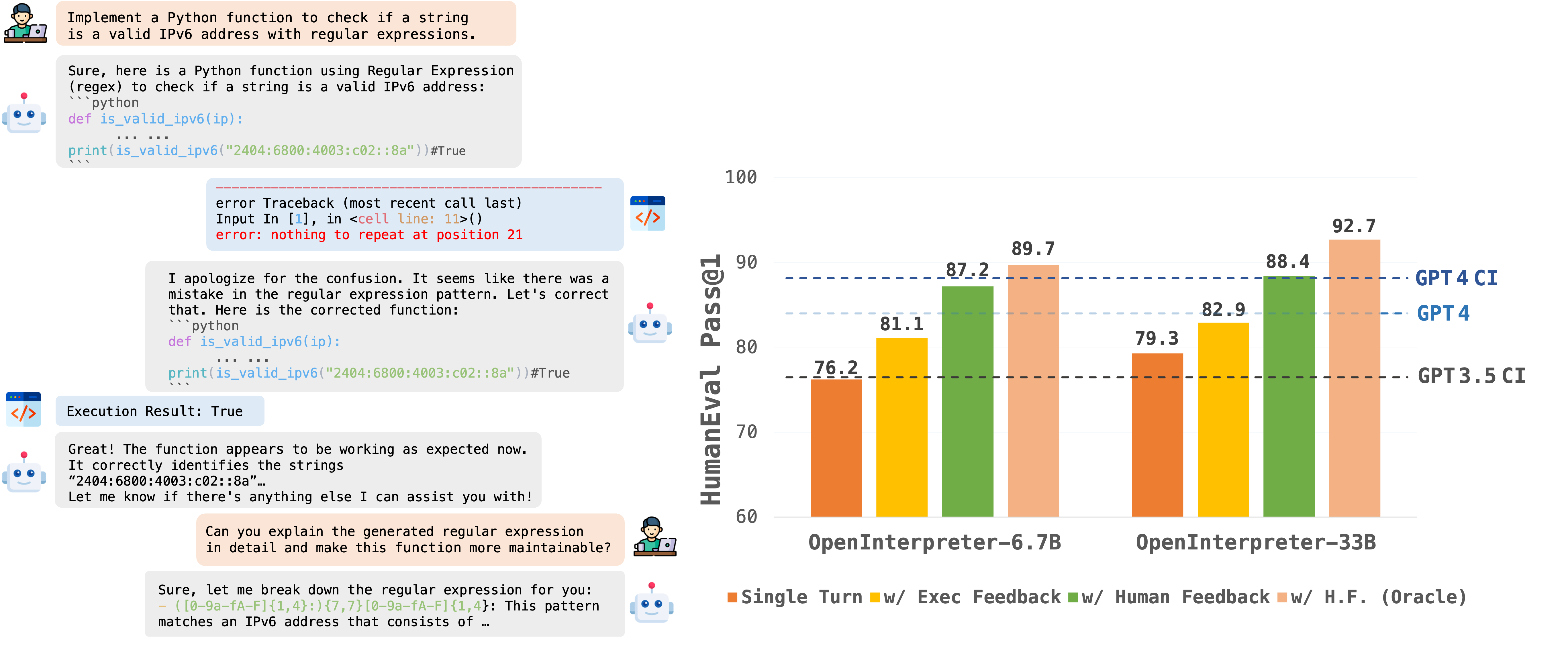
The introduction of large language models has significantly advanced code generation. However, open-source models often lack the execution capabilities and iterative refinement of advanced systems like the GPT-4 Code Interpreter. To address this, we introduce OpenCodeInterpreter, a family of open-source code systems designed for generating, executing, and iteratively refining code. Supported by Code-Feedback, a dataset featuring 68K multi-turn interactions, OpenCodeInterpreter integrates execution and human feedback for dynamic code refinement. Our comprehensive evaluation of OpenCodeInterpreter across key benchmarks such as HumanEval, MBPP, and their enhanced versions from EvalPlus reveals its exceptional performance. Notably, OpenCodeInterpreter-33B achieves an accuracy of 83.2 (76.4) on the average (and plus versions) of HumanEval and MBPP, closely rivaling GPT-4's 84.2 (76.2) and further elevates to 91.6 (84.6) with synthesized human feedback from GPT-4. OpenCodeInterpreter brings the gap between open-source code generation models and proprietary systems like GPT-4 Code Interpreter.
Learn more on M-A-P’s Model page.
What is GGUF?
GGUF is a file format for representing AI models. It is the third version of the format, introduced by the llama.cpp team on August 21st 2023. It is a replacement for GGML, which is no longer supported by llama.cpp. Converted using llama.cpp build 2249 (revision 15499eb)
Prompt template
<|User|>
{{prompt}}
<|Assistant|>
Download & run with cnvrs on iPhone, iPad, and Mac!

cnvrs is the best app for private, local AI on your device:
- create & save Characters with custom system prompts & temperature settings
- download and experiment with any GGUF model you can find on HuggingFace!
- make it your own with custom Theme colors
- powered by Metal ⚡️ & Llama.cpp, with haptics during response streaming!
- try it out yourself today, on Testflight!
- follow cnvrs on twitter to stay up to date
Original Model Evaluation
The study leverages data from the EvalPlus leaderboard, examining OpenCodeInterpreter's performance against benchmarks such as GPT-3.5/4-Turbo, CodeLlama-Python, WizardCoder, Deepseek-Coder, and CodeT5+ across various scales on the HumanEval and MBPP benchmarks and their advanced versions. For multi-turn code generation, the focus shifts to assessing OpenCodeInterpreter's capability in iterative refinement through a two-round limit, considering execution feedback and human feedback scenarios. The experimental setup aims to highlight OpenCodeInterpreter's adaptability and proficiency in code generation, underscored by its achievements in setting new standards in software development tools through iterative feedback and refinement.
For more detail on evaluation process, see main results & eval code README.
| Model | HumanEval (+) | MBPP (+) | Average (+) |
|---|---|---|---|
| OpenCodeInterpreter-DS-6.7B | 76.2 (72.0) | 73.9 (63.7) | 75.1 (67.9) |
| --> with Execution Feedback | 81.1 (78.7) | 82.7 (72.4) | 81.9 (75.6) |
| --> with Synth. Human Feedback | 87.2 (86.6) | 86.2 (74.2) | 86.7 (80.4) |
| --> with Synth. Human Feedback (Oracle) | 89.7 (86.6) | 87.2 (75.2) | 88.5 (80.9) |
| — | — | — | — |
| GPT-4-Turbo | 85.4 (81.7) | 83.0 (70.7) | 84.2 (76.2) |
| --> with Execution Feedback | 88.0 (84.2) | 92.0 (78.2) | 90.0 (81.2) |
| — | — | — | — |
| GPT-3.5-Turbo | 72.6 (65.9) | 81.7 (69.4) | 77.2 (67.7) |
| --> with Execution Feedback | 76.8 (70.7) | 87.0 (73.9) | 81.9 (72.3) |
- Downloads last month
- 154
Model tree for brittlewis12/OpenCodeInterpreter-DS-6.7B-GGUF
Base model
m-a-p/OpenCodeInterpreter-DS-6.7B
