Instructions to use brittlewis12/stable-code-3b-GGUF with libraries, inference providers, notebooks, and local apps. Follow these links to get started.
- Libraries
- llama-cpp-python
How to use brittlewis12/stable-code-3b-GGUF with llama-cpp-python:
# !pip install llama-cpp-python from llama_cpp import Llama llm = Llama.from_pretrained( repo_id="brittlewis12/stable-code-3b-GGUF", filename="stable-code-3b.Q2_K.gguf", )
output = llm( "Once upon a time,", max_tokens=512, echo=True ) print(output)
- Notebooks
- Google Colab
- Kaggle
- Local Apps
- llama.cpp
How to use brittlewis12/stable-code-3b-GGUF with llama.cpp:
Install from brew
brew install llama.cpp # Start a local OpenAI-compatible server with a web UI: llama-server -hf brittlewis12/stable-code-3b-GGUF:Q4_K_M # Run inference directly in the terminal: llama-cli -hf brittlewis12/stable-code-3b-GGUF:Q4_K_M
Install from WinGet (Windows)
winget install llama.cpp # Start a local OpenAI-compatible server with a web UI: llama-server -hf brittlewis12/stable-code-3b-GGUF:Q4_K_M # Run inference directly in the terminal: llama-cli -hf brittlewis12/stable-code-3b-GGUF:Q4_K_M
Use pre-built binary
# Download pre-built binary from: # https://github.com/ggerganov/llama.cpp/releases # Start a local OpenAI-compatible server with a web UI: ./llama-server -hf brittlewis12/stable-code-3b-GGUF:Q4_K_M # Run inference directly in the terminal: ./llama-cli -hf brittlewis12/stable-code-3b-GGUF:Q4_K_M
Build from source code
git clone https://github.com/ggerganov/llama.cpp.git cd llama.cpp cmake -B build cmake --build build -j --target llama-server llama-cli # Start a local OpenAI-compatible server with a web UI: ./build/bin/llama-server -hf brittlewis12/stable-code-3b-GGUF:Q4_K_M # Run inference directly in the terminal: ./build/bin/llama-cli -hf brittlewis12/stable-code-3b-GGUF:Q4_K_M
Use Docker
docker model run hf.co/brittlewis12/stable-code-3b-GGUF:Q4_K_M
- LM Studio
- Jan
- vLLM
How to use brittlewis12/stable-code-3b-GGUF with vLLM:
Install from pip and serve model
# Install vLLM from pip: pip install vllm # Start the vLLM server: vllm serve "brittlewis12/stable-code-3b-GGUF" # Call the server using curl (OpenAI-compatible API): curl -X POST "http://localhost:8000/v1/completions" \ -H "Content-Type: application/json" \ --data '{ "model": "brittlewis12/stable-code-3b-GGUF", "prompt": "Once upon a time,", "max_tokens": 512, "temperature": 0.5 }'Use Docker
docker model run hf.co/brittlewis12/stable-code-3b-GGUF:Q4_K_M
- Ollama
How to use brittlewis12/stable-code-3b-GGUF with Ollama:
ollama run hf.co/brittlewis12/stable-code-3b-GGUF:Q4_K_M
- Unsloth Studio new
How to use brittlewis12/stable-code-3b-GGUF with Unsloth Studio:
Install Unsloth Studio (macOS, Linux, WSL)
curl -fsSL https://unsloth.ai/install.sh | sh # Run unsloth studio unsloth studio -H 0.0.0.0 -p 8888 # Then open http://localhost:8888 in your browser # Search for brittlewis12/stable-code-3b-GGUF to start chatting
Install Unsloth Studio (Windows)
irm https://unsloth.ai/install.ps1 | iex # Run unsloth studio unsloth studio -H 0.0.0.0 -p 8888 # Then open http://localhost:8888 in your browser # Search for brittlewis12/stable-code-3b-GGUF to start chatting
Using HuggingFace Spaces for Unsloth
# No setup required # Open https://huggingface.co/spaces/unsloth/studio in your browser # Search for brittlewis12/stable-code-3b-GGUF to start chatting
- Docker Model Runner
How to use brittlewis12/stable-code-3b-GGUF with Docker Model Runner:
docker model run hf.co/brittlewis12/stable-code-3b-GGUF:Q4_K_M
- Lemonade
How to use brittlewis12/stable-code-3b-GGUF with Lemonade:
Pull the model
# Download Lemonade from https://lemonade-server.ai/ lemonade pull brittlewis12/stable-code-3b-GGUF:Q4_K_M
Run and chat with the model
lemonade run user.stable-code-3b-GGUF-Q4_K_M
List all available models
lemonade list
Install from WinGet (Windows)
winget install llama.cpp
# Start a local OpenAI-compatible server with a web UI:
llama-server -hf brittlewis12/stable-code-3b-GGUF:# Run inference directly in the terminal:
llama-cli -hf brittlewis12/stable-code-3b-GGUF:Use pre-built binary
# Download pre-built binary from:
# https://github.com/ggerganov/llama.cpp/releases# Start a local OpenAI-compatible server with a web UI:
./llama-server -hf brittlewis12/stable-code-3b-GGUF:# Run inference directly in the terminal:
./llama-cli -hf brittlewis12/stable-code-3b-GGUF:Build from source code
git clone https://github.com/ggerganov/llama.cpp.git
cd llama.cpp
cmake -B build
cmake --build build -j --target llama-server llama-cli# Start a local OpenAI-compatible server with a web UI:
./build/bin/llama-server -hf brittlewis12/stable-code-3b-GGUF:# Run inference directly in the terminal:
./build/bin/llama-cli -hf brittlewis12/stable-code-3b-GGUF:Use Docker
docker model run hf.co/brittlewis12/stable-code-3b-GGUF:stable-code-3b GGUF
Original model: stable-code-3b Model creator: StabilityAI
This repo contains GGUF format model files for StabilityAI’s stable-code-3b with 16k context.
stable-code-3b is a 2.7B billion parameter decoder-only language model pre-trained on 1.3 trillion tokens of diverse textual and code datasets. stable-code-3b is trained on 18 programming languages (selected based on the 2023 StackOverflow Developer Survey) and demonstrates state-of-the-art performance (compared to models of similar size) on the MultiPL-E metrics across multiple programming languages tested using BigCode's Evaluation Harness.
What is GGUF?
GGUF is a file format for representing AI models. It is the third version of the format, introduced by the llama.cpp team on August 21st 2023. It is a replacement for GGML, which is no longer supported by llama.cpp. Converted using llama.cpp build 1897 (revision 2b3a665)
Prompt template: Completion or Fill-in-Middle
Completion
{{prompt}}
Fill-in-Middle (FIM)
<fim_prefix>{{prefix code}}<fim_suffix>{{suffix code}}<fim_middle>
Example prompt with special prefix, suffix, and middle tokens in context:
<fim_prefix>def fib(n):
<fim_suffix>
else:
return fib(n - 2) + fib(n - 1)
<fim_middle>
Download & run with cnvrs on iPhone, iPad, and Mac!

cnvrs is the best app for private, local AI on your device:
- create & save Characters with custom system prompts & temperature settings
- download and experiment with any GGUF model you can find on HuggingFace!
- make it your own with custom Theme colors
- powered by Metal ⚡️ & Llama.cpp, with haptics during response streaming!
- try it out yourself today, on Testflight!
- follow cnvrs on twitter to stay up to date
Original Model Evaluation
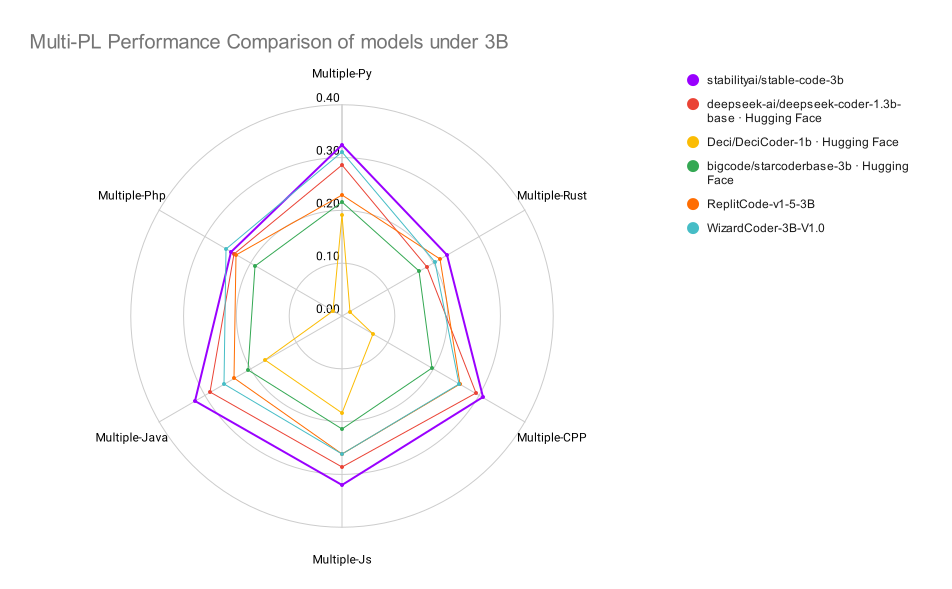
| Model | Size | Python | C++ | Javascript | Java | PHP | Rust |
|---|---|---|---|---|---|---|---|
| Stable Code | 3B | 32.4% | 30.9% | 32.1% | 32.1% | 24.2% | 23.0% |
| CodeLLama | 7B | 30.0% | 28.2% | 32.5% | 31.1% | 25.7% | 26.3% |
| Deepseek Coder | 1.3B | 28.6% | 29.2% | 28.7% | 29.0% | 23.6% | 18.5% |
| Wizard Coder | 3B | 31.6% | 25.6% | 26.2% | 25.8% | 25.3% | 20.4% |
| StarCoder | 3B | 21.6% | 19.8% | 21.5% | 20.5% | 19.0% | 16.9% |
| Replit Code V1.5 | 3B | 23.0% | 25.9% | 26.2% | 23.6% | 23.2% | 21.5% |
| Deci Coder | 1B | 19.1% | 6.8% | 18.4% | 16.7% | 2.1% | 1.7% |
- Downloads last month
- 93
Model tree for brittlewis12/stable-code-3b-GGUF
Base model
stabilityai/stable-code-3b
Install from brew
# Start a local OpenAI-compatible server with a web UI: llama-server -hf brittlewis12/stable-code-3b-GGUF:# Run inference directly in the terminal: llama-cli -hf brittlewis12/stable-code-3b-GGUF: