
Buckets:


| # Building Your First LangGraph | |
| Now that we understand the building blocks, let's put them into practice by building our first functional graph. We'll implement Alfred's email processing system, where he needs to: | |
| 1. Read incoming emails | |
| 2. Classify them as spam or legitimate | |
| 3. Draft a preliminary response for legitimate emails | |
| 4. Send information to Mr. Wayne when legitimate (printing only) | |
| This example demonstrates how to structure a workflow with LangGraph that involves LLM-based decision-making. While this can't be considered an Agent as no tool is involved, this section focuses more on learning the LangGraph framework than Agents. | |
| > [!TIP] | |
| > You can follow the code in this notebook that you can run using Google Colab. | |
| ## Our Workflow | |
| Here's the workflow we'll build: | |
| ## Setting Up Our Environment | |
| First, let's install the required packages: | |
| ```python | |
| %pip install langgraph langchain_openai | |
| ``` | |
| Next, let's import the necessary modules: | |
| ```python | |
| import os | |
| from typing import TypedDict, List, Dict, Any, Optional | |
| from langgraph.graph import StateGraph, START, END | |
| from langchain_openai import ChatOpenAI | |
| from langchain_core.messages import HumanMessage | |
| ``` | |
| ## Step 1: Define Our State | |
| Let's define what information Alfred needs to track during the email processing workflow: | |
| ```python | |
| class EmailState(TypedDict): | |
| # The email being processed | |
| email: Dict[str, Any] # Contains subject, sender, body, etc. | |
| # Category of the email (inquiry, complaint, etc.) | |
| email_category: Optional[str] | |
| # Reason why the email was marked as spam | |
| spam_reason: Optional[str] | |
| # Analysis and decisions | |
| is_spam: Optional[bool] | |
| # Response generation | |
| email_draft: Optional[str] | |
| # Processing metadata | |
| messages: List[Dict[str, Any]] # Track conversation with LLM for analysis | |
| ``` | |
| > 💡 **Tip:** Make your state comprehensive enough to track all the important information, but avoid bloating it with unnecessary details. | |
| ## Step 2: Define Our Nodes | |
| Now, let's create the processing functions that will form our nodes: | |
| ```python | |
| # Initialize our LLM | |
| model = ChatOpenAI(temperature=0) | |
| def read_email(state: EmailState): | |
| """Alfred reads and logs the incoming email""" | |
| email = state["email"] | |
| # Here we might do some initial preprocessing | |
| print(f"Alfred is processing an email from {email['sender']} with subject: {email['subject']}") | |
| # No state changes needed here | |
| return {} | |
| def classify_email(state: EmailState): | |
| """Alfred uses an LLM to determine if the email is spam or legitimate""" | |
| email = state["email"] | |
| # Prepare our prompt for the LLM | |
| prompt = f""" | |
| As Alfred the butler, analyze this email and determine if it is spam or legitimate. | |
| Email: | |
| From: {email['sender']} | |
| Subject: {email['subject']} | |
| Body: {email['body']} | |
| First, determine if this email is spam. If it is spam, explain why. | |
| If it is legitimate, categorize it (inquiry, complaint, thank you, etc.). | |
| """ | |
| # Call the LLM | |
| messages = [HumanMessage(content=prompt)] | |
| response = model.invoke(messages) | |
| # Simple logic to parse the response (in a real app, you'd want more robust parsing) | |
| response_text = response.content.lower() | |
| is_spam = "spam" in response_text and "not spam" not in response_text | |
| # Extract a reason if it's spam | |
| spam_reason = None | |
| if is_spam and "reason:" in response_text: | |
| spam_reason = response_text.split("reason:")[1].strip() | |
| # Determine category if legitimate | |
| email_category = None | |
| if not is_spam: | |
| categories = ["inquiry", "complaint", "thank you", "request", "information"] | |
| for category in categories: | |
| if category in response_text: | |
| email_category = category | |
| break | |
| # Update messages for tracking | |
| new_messages = state.get("messages", []) + [ | |
| {"role": "user", "content": prompt}, | |
| {"role": "assistant", "content": response.content} | |
| ] | |
| # Return state updates | |
| return { | |
| "is_spam": is_spam, | |
| "spam_reason": spam_reason, | |
| "email_category": email_category, | |
| "messages": new_messages | |
| } | |
| def handle_spam(state: EmailState): | |
| """Alfred discards spam email with a note""" | |
| print(f"Alfred has marked the email as spam. Reason: {state['spam_reason']}") | |
| print("The email has been moved to the spam folder.") | |
| # We're done processing this email | |
| return {} | |
| def draft_response(state: EmailState): | |
| """Alfred drafts a preliminary response for legitimate emails""" | |
| email = state["email"] | |
| category = state["email_category"] or "general" | |
| # Prepare our prompt for the LLM | |
| prompt = f""" | |
| As Alfred the butler, draft a polite preliminary response to this email. | |
| Email: | |
| From: {email['sender']} | |
| Subject: {email['subject']} | |
| Body: {email['body']} | |
| This email has been categorized as: {category} | |
| Draft a brief, professional response that Mr. Hugg can review and personalize before sending. | |
| """ | |
| # Call the LLM | |
| messages = [HumanMessage(content=prompt)] | |
| response = model.invoke(messages) | |
| # Update messages for tracking | |
| new_messages = state.get("messages", []) + [ | |
| {"role": "user", "content": prompt}, | |
| {"role": "assistant", "content": response.content} | |
| ] | |
| # Return state updates | |
| return { | |
| "email_draft": response.content, | |
| "messages": new_messages | |
| } | |
| def notify_mr_hugg(state: EmailState): | |
| """Alfred notifies Mr. Hugg about the email and presents the draft response""" | |
| email = state["email"] | |
| print("\n" + "="*50) | |
| print(f"Sir, you've received an email from {email['sender']}.") | |
| print(f"Subject: {email['subject']}") | |
| print(f"Category: {state['email_category']}") | |
| print("\nI've prepared a draft response for your review:") | |
| print("-"*50) | |
| print(state["email_draft"]) | |
| print("="*50 + "\n") | |
| # We're done processing this email | |
| return {} | |
| ``` | |
| ## Step 3: Define Our Routing Logic | |
| We need a function to determine which path to take after classification: | |
| ```python | |
| def route_email(state: EmailState) -> str: | |
| """Determine the next step based on spam classification""" | |
| if state["is_spam"]: | |
| return "spam" | |
| else: | |
| return "legitimate" | |
| ``` | |
| > 💡 **Note:** This routing function is called by LangGraph to determine which edge to follow after the classification node. The return value must match one of the keys in our conditional edges mapping. | |
| ## Step 4: Create the StateGraph and Define Edges | |
| Now we connect everything together: | |
| ```python | |
| # Create the graph | |
| email_graph = StateGraph(EmailState) | |
| # Add nodes | |
| email_graph.add_node("read_email", read_email) | |
| email_graph.add_node("classify_email", classify_email) | |
| email_graph.add_node("handle_spam", handle_spam) | |
| email_graph.add_node("draft_response", draft_response) | |
| email_graph.add_node("notify_mr_hugg", notify_mr_hugg) | |
| # Start the edges | |
| email_graph.add_edge(START, "read_email") | |
| # Add edges - defining the flow | |
| email_graph.add_edge("read_email", "classify_email") | |
| # Add conditional branching from classify_email | |
| email_graph.add_conditional_edges( | |
| "classify_email", | |
| route_email, | |
| { | |
| "spam": "handle_spam", | |
| "legitimate": "draft_response" | |
| } | |
| ) | |
| # Add the final edges | |
| email_graph.add_edge("handle_spam", END) | |
| email_graph.add_edge("draft_response", "notify_mr_hugg") | |
| email_graph.add_edge("notify_mr_hugg", END) | |
| # Compile the graph | |
| compiled_graph = email_graph.compile() | |
| ``` | |
| Notice how we use the special `END` node provided by LangGraph. This indicates terminal states where the workflow completes. | |
| ## Step 5: Run the Application | |
| Let's test our graph with a legitimate email and a spam email: | |
| ```python | |
| # Example legitimate email | |
| legitimate_email = { | |
| "sender": "john.smith@example.com", | |
| "subject": "Question about your services", | |
| "body": "Dear Mr. Hugg, I was referred to you by a colleague and I'm interested in learning more about your consulting services. Could we schedule a call next week? Best regards, John Smith" | |
| } | |
| # Example spam email | |
| spam_email = { | |
| "sender": "winner@lottery-intl.com", | |
| "subject": "YOU HAVE WON $5,000,000!!!", | |
| "body": "CONGRATULATIONS! You have been selected as the winner of our international lottery! To claim your $5,000,000 prize, please send us your bank details and a processing fee of $100." | |
| } | |
| # Process the legitimate email | |
| print("\nProcessing legitimate email...") | |
| legitimate_result = compiled_graph.invoke({ | |
| "email": legitimate_email, | |
| "is_spam": None, | |
| "spam_reason": None, | |
| "email_category": None, | |
| "email_draft": None, | |
| "messages": [] | |
| }) | |
| # Process the spam email | |
| print("\nProcessing spam email...") | |
| spam_result = compiled_graph.invoke({ | |
| "email": spam_email, | |
| "is_spam": None, | |
| "spam_reason": None, | |
| "email_category": None, | |
| "email_draft": None, | |
| "messages": [] | |
| }) | |
| ``` | |
| ## Step 6: Inspecting Our Mail Sorting Agent with Langfuse 📡 | |
| As Alfred fine-tunes the Mail Sorting Agent, he's growing weary of debugging its runs. Agents, by nature, are unpredictable and difficult to inspect. But since he aims to build the ultimate Spam Detection Agent and deploy it in production, he needs robust traceability for future monitoring and analysis. | |
| To do this, Alfred can use an observability tool such as [Langfuse](https://langfuse.com/) to trace and monitor the agent. | |
| First, we pip install Langfuse: | |
| ```python | |
| %pip install -q langfuse | |
| ``` | |
| Second, we pip install Langchain (LangChain is required because we use LangFuse): | |
| ```python | |
| %pip install langchain | |
| ``` | |
| Next, we add the Langfuse API keys and host address as environment variables. You can get your Langfuse credentials by signing up for [Langfuse Cloud](https://cloud.langfuse.com) or [self-host Langfuse](https://langfuse.com/self-hosting). | |
| ```python | |
| import os | |
| # Get keys for your project from the project settings page: https://cloud.langfuse.com | |
| os.environ["LANGFUSE_PUBLIC_KEY"] = "pk-lf-..." | |
| os.environ["LANGFUSE_SECRET_KEY"] = "sk-lf-..." | |
| os.environ["LANGFUSE_HOST"] = "https://cloud.langfuse.com" # 🇪🇺 EU region | |
| # os.environ["LANGFUSE_HOST"] = "https://us.cloud.langfuse.com" # 🇺🇸 US region | |
| ``` | |
| Then, we configure the [Langfuse `callback_handler`](https://langfuse.com/docs/integrations/langchain/tracing#add-langfuse-to-your-langchain-application) and instrument the agent by adding the `langfuse_callback` to the invocation of the graph: `config={"callbacks": [langfuse_handler]}`. | |
| ```python | |
| from langfuse.langchain import CallbackHandler | |
| # Initialize Langfuse CallbackHandler for LangGraph/Langchain (tracing) | |
| langfuse_handler = CallbackHandler() | |
| # Process legitimate email | |
| legitimate_result = compiled_graph.invoke( | |
| input={"email": legitimate_email, "is_spam": None, "spam_reason": None, "email_category": None, "draft_response": None, "messages": []}, | |
| config={"callbacks": [langfuse_handler]} | |
| ) | |
| ``` | |
| Alfred is now connected 🔌! The runs from LangGraph are being logged in Langfuse, giving him full visibility into the agent's behavior. With this setup, he's ready to revisit previous runs and refine his Mail Sorting Agent even further. | |
| 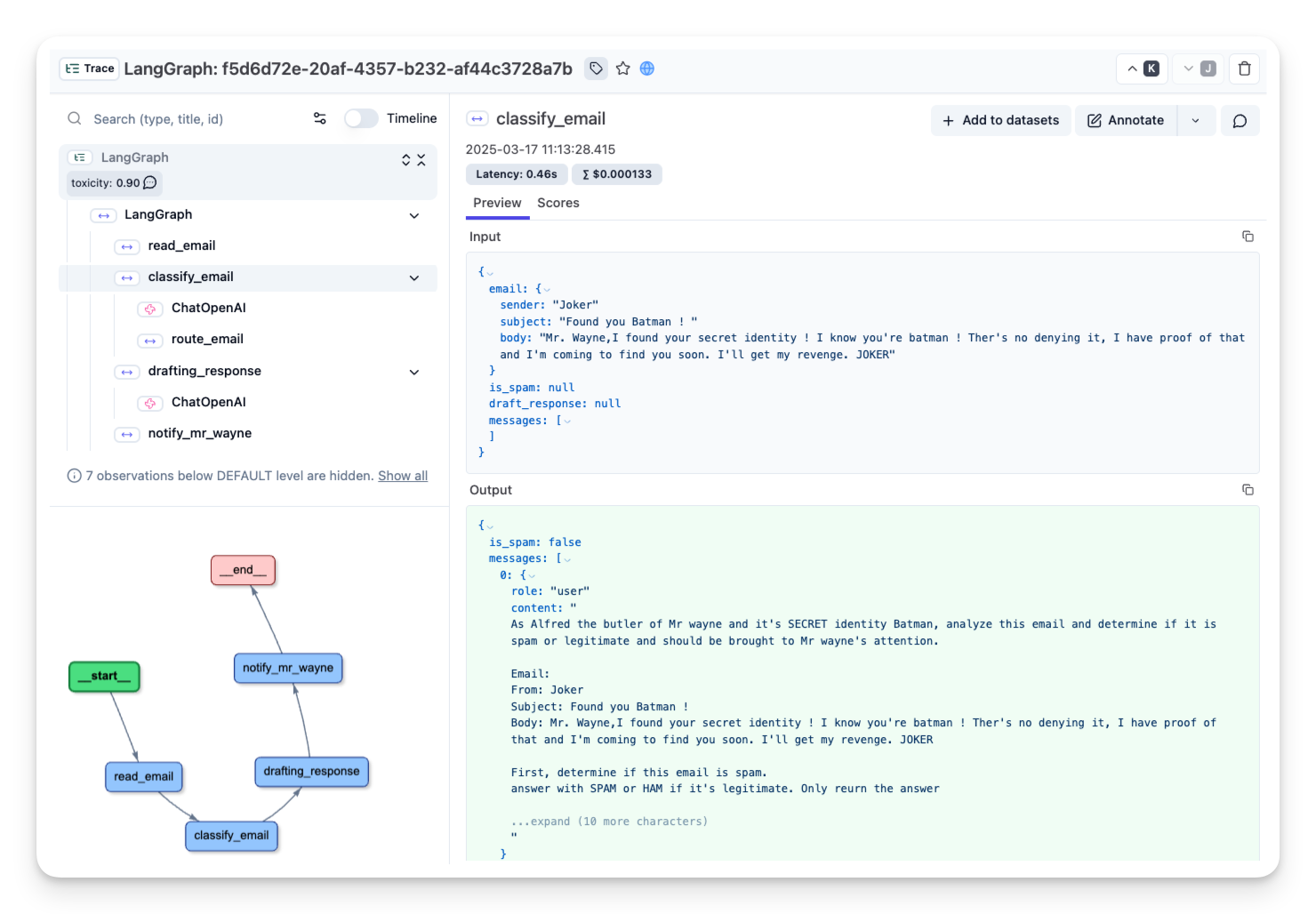 | |
| _[Public link to the trace with the legit email](https://cloud.langfuse.com/project/cloramnkj0002jz088vzn1ja4/traces/f5d6d72e-20af-4357-b232-af44c3728a7b?timestamp=2025-03-17T10%3A13%3A28.413Z&observation=6997ba69-043f-4f77-9445-700a033afba1)_ | |
| ## Visualizing Our Graph | |
| LangGraph allows us to visualize our workflow to better understand and debug its structure: | |
| ```python | |
| compiled_graph.get_graph().draw_mermaid_png() | |
| ``` | |
| This produces a visual representation showing how our nodes are connected and the conditional paths that can be taken. | |
| ## What We've Built | |
| We've created a complete email processing workflow that: | |
| 1. Takes an incoming email | |
| 2. Uses an LLM to classify it as spam or legitimate | |
| 3. Handles spam by discarding it | |
| 4. For legitimate emails, drafts a response and notifies Mr. Hugg | |
| This demonstrates the power of LangGraph to orchestrate complex workflows with LLMs while maintaining a clear, structured flow. | |
| ## Key Takeaways | |
| - **State Management**: We defined comprehensive state to track all aspects of email processing | |
| - **Node Implementation**: We created functional nodes that interact with an LLM | |
| - **Conditional Routing**: We implemented branching logic based on email classification | |
| - **Terminal States**: We used the END node to mark completion points in our workflow | |
| ## What's Next? | |
| In the next section, we'll explore more advanced features of LangGraph, including handling human interaction in the workflow and implementing more complex branching logic based on multiple conditions. | |
Xet Storage Details
- Size:
- 12.9 kB
- Xet hash:
- 66d5e7f1ddbc82853e2b208d10040f69f6b788caf8e4fdf2a77ae6b99fc1fc2b
·
Xet efficiently stores files, intelligently splitting them into unique chunks and accelerating uploads and downloads. More info.