
Buckets:


| # Text Classification & Regression | |
| Training a text classification/regression model with AutoTrain is super-easy! Get your data ready in | |
| proper format and then with just a few clicks, your state-of-the-art model will be ready to | |
| be used in production. | |
| Config file task names: | |
| - `text_classification` | |
| - `text-classification` | |
| - `text_regression` | |
| - `text-regression` | |
| ## Data Format | |
| Text classification/regression supports datasets in both CSV and JSONL formats. | |
| ### CSV Format | |
| Let's train a model for classifying the sentiment of a movie review. The data should be | |
| in the following CSV format: | |
| ```csv | |
| text,target | |
| "this movie is great",positive | |
| "this movie is bad",negative | |
| . | |
| . | |
| . | |
| ``` | |
| As you can see, we have two columns in the CSV file. One column is the text and the other | |
| is the label. The label can be any string. In this example, we have two labels: `positive` | |
| and `negative`. You can have as many labels as you want. | |
| And if you would like to train a model for scoring a movie review on a scale of 1-5. The data can be as follows: | |
| ```csv | |
| text,target | |
| "this movie is great",4.9 | |
| "this movie is bad",1.5 | |
| . | |
| . | |
| . | |
| ``` | |
| ### JSONL Format | |
| Instead of CSV you can also use JSONL format. The JSONL format should be as follows: | |
| ```json | |
| {"text": "this movie is great", "target": "positive"} | |
| {"text": "this movie is bad", "target": "negative"} | |
| . | |
| . | |
| . | |
| ``` | |
| and for regression: | |
| ```json | |
| {"text": "this movie is great", "target": 4.9} | |
| {"text": "this movie is bad", "target": 1.5} | |
| . | |
| . | |
| ``` | |
| ### Column Mapping / Names | |
| Your CSV dataset must have two columns: `text` and `target`. | |
| If your column names are different than `text` and `target`, you can map the dataset column to AutoTrain column names. | |
| ## Training | |
| ### Local Training | |
| To train a text classification/regression model locally, you can use the `autotrain --config config.yaml` command. | |
| Here is an example of a `config.yaml` file for training a text classification model: | |
| ```yaml | |
| task: text_classification # or text_regression | |
| base_model: google-bert/bert-base-uncased | |
| project_name: autotrain-bert-imdb-finetuned | |
| log: tensorboard | |
| backend: local | |
| data: | |
| path: stanfordnlp/imdb | |
| train_split: train | |
| valid_split: test | |
| column_mapping: | |
| text_column: text | |
| target_column: label | |
| params: | |
| max_seq_length: 512 | |
| epochs: 3 | |
| batch_size: 4 | |
| lr: 2e-5 | |
| optimizer: adamw_torch | |
| scheduler: linear | |
| gradient_accumulation: 1 | |
| mixed_precision: fp16 | |
| hub: | |
| username: ${HF_USERNAME} | |
| token: ${HF_TOKEN} | |
| push_to_hub: true | |
| ``` | |
| In this example, we are training a text classification model using the `google-bert/bert-base-uncased` model on the IMDB dataset. | |
| We are using the `stanfordnlp/imdb` dataset, which is already available on Hugging Face Hub. | |
| We are training the model for 3 epochs with a batch size of 4 and a learning rate of `2e-5`. | |
| We are using the `adamw_torch` optimizer and the `linear` scheduler. | |
| We are also using mixed precision training with a gradient accumulation of 1. | |
| If you want to use a local CSV/JSONL dataset, you can change the `data` section to: | |
| ```yaml | |
| data: | |
| path: data/ # this must be the path to the directory containing the train and valid files | |
| train_split: train # this must be either train.csv or train.json | |
| valid_split: valid # this must be either valid.csv or valid.json | |
| column_mapping: | |
| text_column: text # this must be the name of the column containing the text | |
| target_column: label # this must be the name of the column containing the target | |
| ``` | |
| To train the model, run the following command: | |
| ```bash | |
| $ autotrain --config config.yaml | |
| ``` | |
| You can find example config files for text classification and regression in the [here](https://github.com/huggingface/autotrain-advanced/tree/main/configs/text_classification) and [here](https://github.com/huggingface/autotrain-advanced/tree/main/configs/text_regression) respectively. | |
| ### Training on Hugging Face Spaces | |
| The parameters for training on Hugging Face Spaces are the same as for local training. | |
| If you are using your own dataset, select "Local" as dataset source and upload your dataset. | |
| In the following screenshot, we are training a text classification model using the `google-bert/bert-base-uncased` model on the IMDB dataset. | |
| 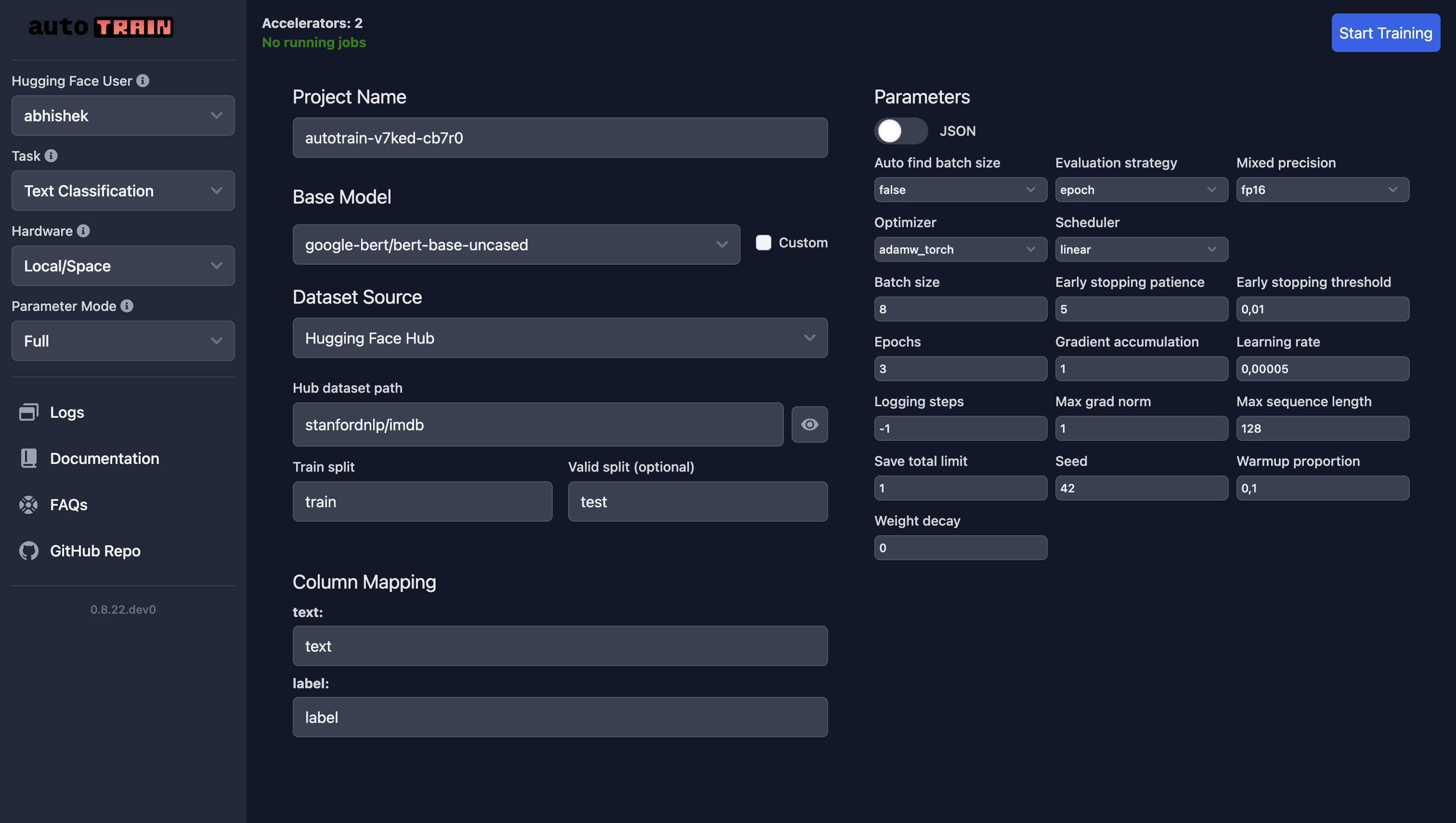 | |
| For text regression, all you need to do is select "Text Regression" as the task and everything else remains the same (except the data, of course). | |
| ## Training Parameters[[autotrain.trainers.text_classification.params.TextClassificationParams]] | |
| Training parameters for text classification and regression are the same. | |
| #### autotrain.trainers.text_classification.params.TextClassificationParams[[autotrain.trainers.text_classification.params.TextClassificationParams]] | |
| [Source](https://github.com/huggingface/autotrain-advanced/blob/vr_962/src/autotrain/trainers/text_classification/params.py#L8) | |
| `TextClassificationParams` is a configuration class for text classification training parameters. | |
| **Parameters:** | |
| data_path (str) : Path to the dataset. | |
| model (str) : Name of the model to use. Default is "bert-base-uncased". | |
| lr (float) : Learning rate. Default is 5e-5. | |
| epochs (int) : Number of training epochs. Default is 3. | |
| max_seq_length (int) : Maximum sequence length. Default is 128. | |
| batch_size (int) : Training batch size. Default is 8. | |
| warmup_ratio (float) : Warmup proportion. Default is 0.1. | |
| gradient_accumulation (int) : Number of gradient accumulation steps. Default is 1. | |
| optimizer (str) : Optimizer to use. Default is "adamw_torch". | |
| scheduler (str) : Scheduler to use. Default is "linear". | |
| weight_decay (float) : Weight decay. Default is 0.0. | |
| max_grad_norm (float) : Maximum gradient norm. Default is 1.0. | |
| seed (int) : Random seed. Default is 42. | |
| train_split (str) : Name of the training split. Default is "train". | |
| valid_split (Optional[str]) : Name of the validation split. Default is None. | |
| text_column (str) : Name of the text column in the dataset. Default is "text". | |
| target_column (str) : Name of the target column in the dataset. Default is "target". | |
| logging_steps (int) : Number of steps between logging. Default is -1. | |
| project_name (str) : Name of the project. Default is "project-name". | |
| auto_find_batch_size (bool) : Whether to automatically find the batch size. Default is False. | |
| mixed_precision (Optional[str]) : Mixed precision setting (fp16, bf16, or None). Default is None. | |
| save_total_limit (int) : Total number of checkpoints to save. Default is 1. | |
| token (Optional[str]) : Hub token for authentication. Default is None. | |
| push_to_hub (bool) : Whether to push the model to the hub. Default is False. | |
| eval_strategy (str) : Evaluation strategy. Default is "epoch". | |
| username (Optional[str]) : Hugging Face username. Default is None. | |
| log (str) : Logging method for experiment tracking. Default is "none". | |
| early_stopping_patience (int) : Number of epochs with no improvement after which training will be stopped. Default is 5. | |
| early_stopping_threshold (float) : Threshold for measuring the new optimum to continue training. Default is 0.01. | |
Xet Storage Details
- Size:
- 7.16 kB
- Xet hash:
- 5eb3fa95f7c8872153df92d2f87e678ac38b0c5b9d76b371d9efa1ee300a52c6
·
Xet efficiently stores files, intelligently splitting them into unique chunks and accelerating uploads and downloads. More info.