
Buckets:


| # Practical Exercise: Fine-tune a model with GRPO | |
| Now that you've seen the theory, let's put it into practice! In this exercise, you'll fine-tune a model with GRPO. | |
| > [!TIP] | |
| > This exercise was written by LLM fine-tuning expert [@mlabonne](https://huggingface.co/mlabonne). | |
| ## Install dependencies | |
| First, let's install the dependencies for this exercise. | |
| ```bash | |
| !pip install -qqq datasets==3.2.0 transformers==4.47.1 trl==0.14.0 peft==0.14.0 accelerate==1.2.1 bitsandbytes==0.45.2 wandb==0.19.7 --progress-bar off | |
| !pip install -qqq flash-attn --no-build-isolation --progress-bar off | |
| ``` | |
| Now we'll import the necessary libraries. | |
| ```python | |
| import torch | |
| from datasets import load_dataset | |
| from peft import LoraConfig, get_peft_model | |
| from transformers import AutoModelForCausalLM, AutoTokenizer | |
| from trl import GRPOConfig, GRPOTrainer | |
| ``` | |
| ## Import and log in to Weights & Biases | |
| Weights & Biases is a tool for logging and monitoring your experiments. We'll use it to log our fine-tuning process. | |
| ```python | |
| import wandb | |
| wandb.login() | |
| ``` | |
| You can do this exercise without logging in to Weights & Biases, but it's recommended to do so to track your experiments and interpret the results. | |
| ## Load the dataset | |
| Now, let's load the dataset. In this case, we'll use the [`mlabonne/smoltldr`](https://huggingface.co/datasets/mlabonne/smoltldr) dataset, which contains a list of short stories. | |
| ```python | |
| dataset = load_dataset("mlabonne/smoltldr") | |
| print(dataset) | |
| ``` | |
| ## Load model | |
| Now, let's load the model. | |
| For this exercise, we'll use the [`SmolLM2-135M`](https://huggingface.co/HuggingFaceTB/SmolLM2-135M) model. | |
| This is a small 135M parameter model that runs on limited hardware. This makes the model ideal for learning, but it's not the most powerful model out there. If you have access to more powerful hardware, you can try to fine-tune a larger model like [`SmolLM2-1.7B`](https://huggingface.co/HuggingFaceTB/SmolLM2-1.7B). | |
| ```python | |
| model_id = "HuggingFaceTB/SmolLM-135M-Instruct" | |
| model = AutoModelForCausalLM.from_pretrained( | |
| model_id, | |
| torch_dtype="auto", | |
| device_map="auto", | |
| attn_implementation="flash_attention_2", | |
| ) | |
| tokenizer = AutoTokenizer.from_pretrained(model_id) | |
| ``` | |
| ## Load LoRA | |
| Now, let's load the LoRA configuration. We'll take advantage of LoRA to reduce the number of trainable parameters, and in turn the memory footprint we need to fine-tune the model. | |
| If you're not familiar with LoRA, you can read more about it in [Chapter 11](https://huggingface.co/learn/course/en/chapter11/3). | |
| ```python | |
| # Load LoRA | |
| lora_config = LoraConfig( | |
| task_type="CAUSAL_LM", | |
| r=16, | |
| lora_alpha=32, | |
| target_modules="all-linear", | |
| ) | |
| model = get_peft_model(model, lora_config) | |
| print(model.print_trainable_parameters()) | |
| ``` | |
| ```sh | |
| Total trainable parameters: 135M | |
| ``` | |
| ## Define the reward function | |
| As mentioned in the previous section, GRPO can use any reward function to improve the model. In this case, we'll use a simple reward function that encourages the model to generate text that is 50 tokens long. | |
| ```python | |
| # Reward function | |
| ideal_length = 50 | |
| def reward_len(completions, **kwargs): | |
| return [-abs(ideal_length - len(completion)) for completion in completions] | |
| ``` | |
| ## Define the training arguments | |
| Now, let's define the training arguments. We'll use the `GRPOConfig` class to define the training arguments in a typical `transformers` style. | |
| If this is the first time you're defining training arguments, you can check the [TrainingArguments](https://huggingface.co/docs/transformers/en/main_classes/trainer#trainingarguments) class for more information, or [Chapter 2](https://huggingface.co/learn/course/en/chapter2/1) for a detailed introduction. | |
| ```python | |
| # Training arguments | |
| training_args = GRPOConfig( | |
| output_dir="GRPO", | |
| learning_rate=2e-5, | |
| per_device_train_batch_size=8, | |
| gradient_accumulation_steps=2, | |
| max_prompt_length=512, | |
| max_completion_length=96, | |
| num_generations=8, | |
| optim="adamw_8bit", | |
| num_train_epochs=1, | |
| bf16=True, | |
| report_to=["wandb"], | |
| remove_unused_columns=False, | |
| logging_steps=1, | |
| ) | |
| ``` | |
| Now, we can initialize the trainer with model, dataset, and training arguments and start training. | |
| ```python | |
| # Trainer | |
| trainer = GRPOTrainer( | |
| model=model, | |
| reward_funcs=[reward_len], | |
| args=training_args, | |
| train_dataset=dataset["train"], | |
| ) | |
| # Train model | |
| wandb.init(project="GRPO") | |
| trainer.train() | |
| ``` | |
| Training takes around 1 hour on a single A10G GPU which is available on Google Colab or via Hugging Face Spaces. | |
| ## Push the model to the Hub during training | |
| If we set the `push_to_hub` argument to `True` and the `model_id` argument to a valid model name, the model will be pushed to the Hugging Face Hub whilst we're training. This is useful if you want to start vibe testing the model straight away! | |
| ## Interpret training results | |
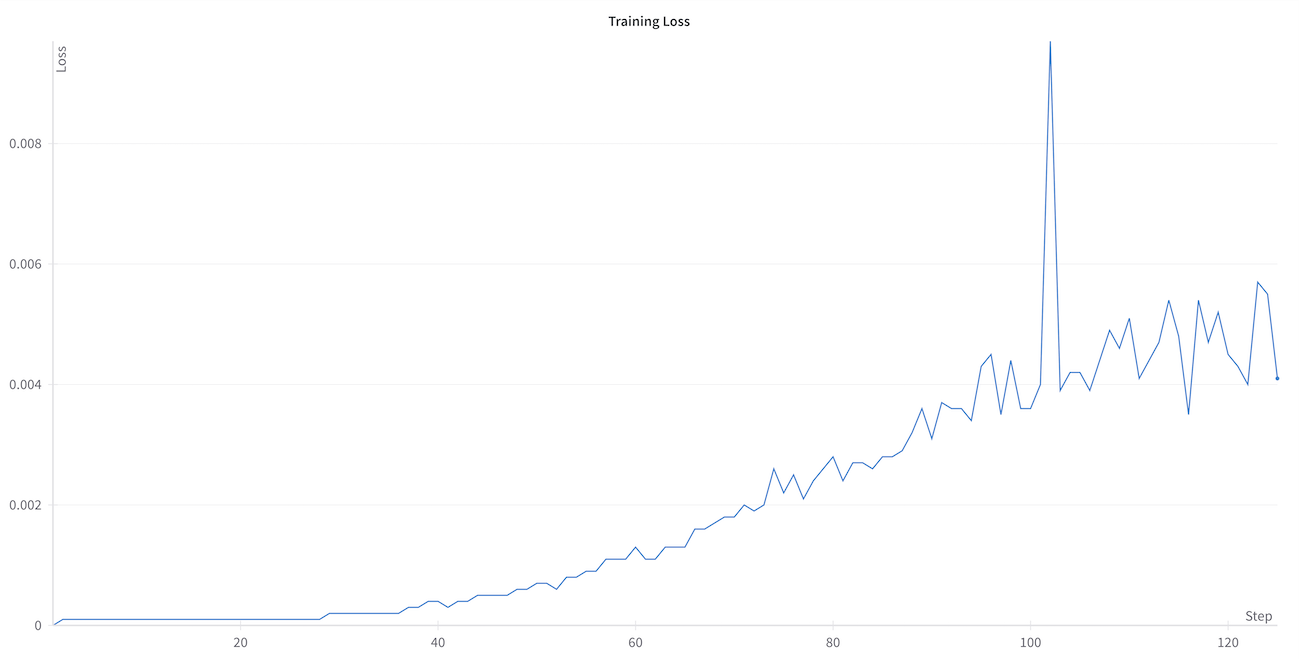
| `GRPOTrainer` logs the reward from your reward function, the loss, and a range of other metrics. | |
| We will focus on the reward from the reward function and the loss. | |
| As you can see, the reward from the reward function moves closer to 0 as the model learns. This is a good sign that the model is learning to generate text of the correct length. | |
|  | |
| You might notice that the loss starts at zero and then increases during training, which may seem counterintuitive. This behavior is expected in GRPO and is directly related to the mathematical formulation of the algorithm. The loss in GRPO is proportional to the KL divergence (the cap relative to original policy) . As training progresses, the model learns to generate text that better matches the reward function, causing it to diverge more from its initial policy. This increasing divergence is reflected in the rising loss value, which actually indicates that the model is successfully adapting to optimize for the reward function. | |
|  | |
| ## Save and publish the model | |
| Let's share the model with the community! | |
| ```python | |
| merged_model = trainer.model.merge_and_unload() | |
| merged_model.push_to_hub( | |
| "SmolGRPO-135M", private=False, tags=["GRPO", "Reasoning-Course"] | |
| ) | |
| ``` | |
| ## Generate text | |
| 🎉 You've successfully fine-tuned a model with GRPO! Now, let's generate some text with the model. | |
| First, we'll define a really long document! | |
| ```python | |
| prompt = """ | |
| # A long document about the Cat | |
| The cat (Felis catus), also referred to as the domestic cat or house cat, is a small | |
| domesticated carnivorous mammal. It is the only domesticated species of the family Felidae. | |
| Advances in archaeology and genetics have shown that the domestication of the cat occurred | |
| in the Near East around 7500 BC. It is commonly kept as a pet and farm cat, but also ranges | |
| freely as a feral cat avoiding human contact. It is valued by humans for companionship and | |
| its ability to kill vermin. Its retractable claws are adapted to killing small prey species | |
| such as mice and rats. It has a strong, flexible body, quick reflexes, and sharp teeth, | |
| and its night vision and sense of smell are well developed. It is a social species, | |
| but a solitary hunter and a crepuscular predator. Cat communication includes | |
| vocalizations—including meowing, purring, trilling, hissing, growling, and grunting—as | |
| well as body language. It can hear sounds too faint or too high in frequency for human ears, | |
| such as those made by small mammals. It secretes and perceives pheromones. | |
| """ | |
| messages = [ | |
| {"role": "user", "content": prompt}, | |
| ] | |
| ``` | |
| Now, we can generate text with the model. | |
| ```python | |
| # Generate text | |
| from transformers import pipeline | |
| generator = pipeline("text-generation", model="SmolGRPO-135M") | |
| ## Or use the model and tokenizer we defined earlier | |
| # generator = pipeline("text-generation", model=model, tokenizer=tokenizer) | |
| generate_kwargs = { | |
| "max_new_tokens": 256, | |
| "do_sample": True, | |
| "temperature": 0.5, | |
| "min_p": 0.1, | |
| } | |
| generated_text = generator(messages, generate_kwargs=generate_kwargs) | |
| print(generated_text) | |
| ``` | |
| # Conclusion | |
| In this chapter, we've seen how to fine-tune a model with GRPO. We've also seen how to interpret the training results and generate text with the model. | |
| <EditOnGithub source="https://github.com/huggingface/course/blob/main/chapters/en/chapter12/5.mdx" /> |
Xet Storage Details
- Size:
- 8.39 kB
- Xet hash:
- 8b56d9791e852acf42617829ada7ea2366c77c167505b0fbad611d57001c091b
·
Xet efficiently stores files, intelligently splitting them into unique chunks and accelerating uploads and downloads. More info.