
Buckets:


Text2Video-Zero
Text2Video-Zero: Text-to-Image Diffusion Models are Zero-Shot Video Generators is by Levon Khachatryan, Andranik Movsisyan, Vahram Tadevosyan, Roberto Henschel, Zhangyang Wang, Shant Navasardyan, Humphrey Shi.
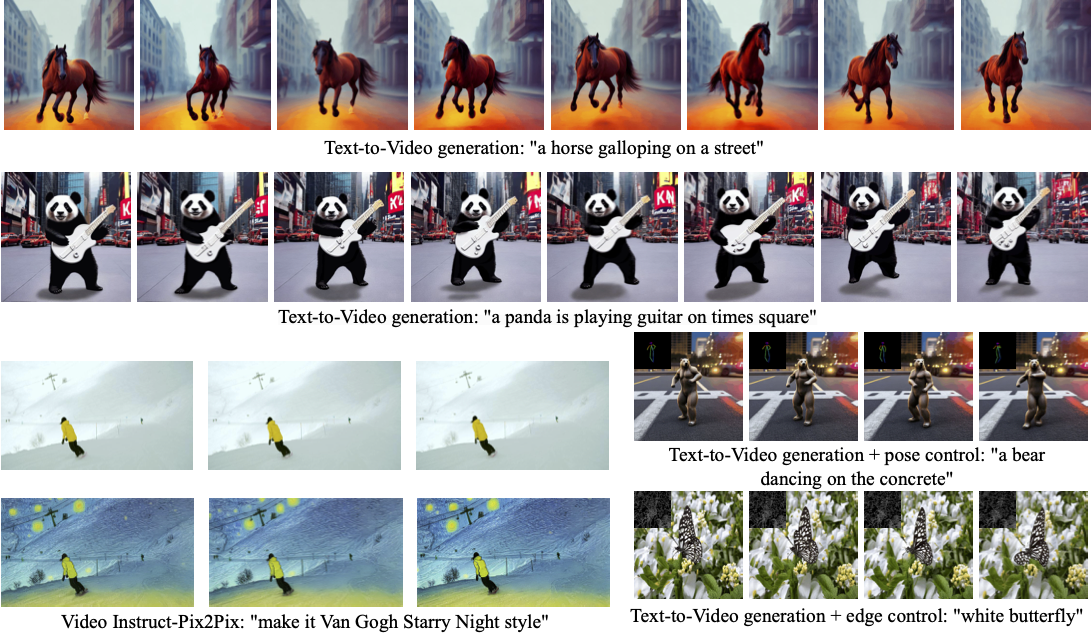
Text2Video-Zero enables zero-shot video generation using either:
- A textual prompt
- A prompt combined with guidance from poses or edges
- Video Instruct-Pix2Pix (instruction-guided video editing)
Results are temporally consistent and closely follow the guidance and textual prompts.
The abstract from the paper is:
Recent text-to-video generation approaches rely on computationally heavy training and require large-scale video datasets. In this paper, we introduce a new task of zero-shot text-to-video generation and propose a low-cost approach (without any training or optimization) by leveraging the power of existing text-to-image synthesis methods (e.g., Stable Diffusion), making them suitable for the video domain. Our key modifications include (i) enriching the latent codes of the generated frames with motion dynamics to keep the global scene and the background time consistent; and (ii) reprogramming frame-level self-attention using a new cross-frame attention of each frame on the first frame, to preserve the context, appearance, and identity of the foreground object. Experiments show that this leads to low overhead, yet high-quality and remarkably consistent video generation. Moreover, our approach is not limited to text-to-video synthesis but is also applicable to other tasks such as conditional and content-specialized video generation, and Video Instruct-Pix2Pix, i.e., instruction-guided video editing. As experiments show, our method performs comparably or sometimes better than recent approaches, despite not being trained on additional video data.
You can find additional information about Text2Video-Zero on the project page, paper, and original codebase.
Usage example
Text-To-Video
To generate a video from prompt, run the following Python code:
import torch
from diffusers import TextToVideoZeroPipeline
import imageio

model_id = "stable-diffusion-v1-5/stable-diffusion-v1-5"
pipe = TextToVideoZeroPipeline.from_pretrained(model_id, torch_dtype=torch.float16).to("cuda")

prompt = "A panda is playing guitar on times square"
result = pipe(prompt=prompt).images
result = [(r * 255).astype("uint8") for r in result]
imageio.mimsave("video.mp4", result, fps=4)
You can change these parameters in the pipeline call:
- Motion field strength (see the paper, Sect. 3.3.1):
motion_field_strength_xandmotion_field_strength_y. Default:motion_field_strength_x=12,motion_field_strength_y=12
TandT'(see the paper, Sect. 3.3.1)t0andt1in the range{0, ..., num_inference_steps}. Default:t0=45,t1=48
- Video length:
video_length, the number of frames video_length to be generated. Default:video_length=8
We can also generate longer videos by doing the processing in a chunk-by-chunk manner:
import torch
from diffusers import TextToVideoZeroPipeline
import numpy as np

model_id = "stable-diffusion-v1-5/stable-diffusion-v1-5"
pipe = TextToVideoZeroPipeline.from_pretrained(model_id, torch_dtype=torch.float16).to("cuda")
seed = 0
video_length = 24  #24 ÷ 4fps = 6 seconds
chunk_size = 8
prompt = "A panda is playing guitar on times square"

# Generate the video chunk-by-chunk
result = []
chunk_ids = np.arange(0, video_length, chunk_size - 1)
generator = torch.Generator(device="cuda")
for i in range(len(chunk_ids)):
    print(f"Processing chunk {i + 1} / {len(chunk_ids)}")
    ch_start = chunk_ids[i]
    ch_end = video_length if i == len(chunk_ids) - 1 else chunk_ids[i + 1]
    # Attach the first frame for Cross Frame Attention
    frame_ids = [0] + list(range(ch_start, ch_end))
    # Fix the seed for the temporal consistency
    generator.manual_seed(seed)
    output = pipe(prompt=prompt, video_length=len(frame_ids), generator=generator, frame_ids=frame_ids)
    result.append(output.images[1:])

# Concatenate chunks and save
result = np.concatenate(result)
result = [(r * 255).astype("uint8") for r in result]
imageio.mimsave("video.mp4", result, fps=4)
In order to use the SDXL model when generating a video from prompt, use the TextToVideoZeroSDXLPipeline pipeline:
import torch
from diffusers import TextToVideoZeroSDXLPipeline

model_id = "stabilityai/stable-diffusion-xl-base-1.0"
pipe = TextToVideoZeroSDXLPipeline.from_pretrained(
    model_id, torch_dtype=torch.float16, variant="fp16", use_safetensors=True
).to("cuda")
Text-To-Video with Pose Control
To generate a video from prompt with additional pose control
Download a demo video
from huggingface_hub import hf_hub_download

filename = "__assets__/poses_skeleton_gifs/dance1_corr.mp4"
repo_id = "PAIR/Text2Video-Zero"
video_path = hf_hub_download(repo_type="space", repo_id=repo_id, filename=filename)
Read video containing extracted pose images
from PIL import Image
import imageio

reader = imageio.get_reader(video_path, "ffmpeg")
frame_count = 8
pose_images = [Image.fromarray(reader.get_data(i)) for i in range(frame_count)]
To extract pose from actual video, read ControlNet documentation.
Run
StableDiffusionControlNetPipelinewith our custom attention processorimport torch from diffusers import StableDiffusionControlNetPipeline, ControlNetModel from diffusers.pipelines.text_to_video_synthesis.pipeline_text_to_video_zero import CrossFrameAttnProcessor model_id = "stable-diffusion-v1-5/stable-diffusion-v1-5" controlnet = ControlNetModel.from_pretrained("lllyasviel/sd-controlnet-openpose", torch_dtype=torch.float16) pipe = StableDiffusionControlNetPipeline.from_pretrained( model_id, controlnet=controlnet, torch_dtype=torch.float16 ).to("cuda") # Set the attention processor pipe.unet.set_attn_processor(CrossFrameAttnProcessor(batch_size=2)) pipe.controlnet.set_attn_processor(CrossFrameAttnProcessor(batch_size=2)) # fix latents for all frames latents = torch.randn((1, 4, 64, 64), device="cuda", dtype=torch.float16).repeat(len(pose_images), 1, 1, 1) prompt = "Darth Vader dancing in a desert" result = pipe(prompt=[prompt] * len(pose_images), image=pose_images, latents=latents).images imageio.mimsave("video.mp4", result, fps=4)
SDXL Support
Since our attention processor also works with SDXL, it can be utilized to generate a video from prompt using ControlNet models powered by SDXL:import torch from diffusers import StableDiffusionXLControlNetPipeline, ControlNetModel from diffusers.pipelines.text_to_video_synthesis.pipeline_text_to_video_zero import CrossFrameAttnProcessor controlnet_model_id = 'thibaud/controlnet-openpose-sdxl-1.0' model_id = 'stabilityai/stable-diffusion-xl-base-1.0' controlnet = ControlNetModel.from_pretrained(controlnet_model_id, torch_dtype=torch.float16) pipe = StableDiffusionControlNetPipeline.from_pretrained( model_id, controlnet=controlnet, torch_dtype=torch.float16 ).to('cuda') # Set the attention processor pipe.unet.set_attn_processor(CrossFrameAttnProcessor(batch_size=2)) pipe.controlnet.set_attn_processor(CrossFrameAttnProcessor(batch_size=2)) # fix latents for all frames latents = torch.randn((1, 4, 128, 128), device="cuda", dtype=torch.float16).repeat(len(pose_images), 1, 1, 1) prompt = "Darth Vader dancing in a desert" result = pipe(prompt=[prompt] * len(pose_images), image=pose_images, latents=latents).images imageio.mimsave("video.mp4", result, fps=4)
Text-To-Video with Edge Control
To generate a video from prompt with additional Canny edge control, follow the same steps described above for pose-guided generation using Canny edge ControlNet model.
Video Instruct-Pix2Pix
To perform text-guided video editing (with InstructPix2Pix):
Download a demo video
from huggingface_hub import hf_hub_download

filename = "__assets__/pix2pix video/camel.mp4"
repo_id = "PAIR/Text2Video-Zero"
video_path = hf_hub_download(repo_type="space", repo_id=repo_id, filename=filename)
Read video from path
from PIL import Image
import imageio

reader = imageio.get_reader(video_path, "ffmpeg")
frame_count = 8
video = [Image.fromarray(reader.get_data(i)) for i in range(frame_count)]
Run
StableDiffusionInstructPix2PixPipelinewith our custom attention processorimport torch from diffusers import StableDiffusionInstructPix2PixPipeline from diffusers.pipelines.text_to_video_synthesis.pipeline_text_to_video_zero import CrossFrameAttnProcessor model_id = "timbrooks/instruct-pix2pix" pipe = StableDiffusionInstructPix2PixPipeline.from_pretrained(model_id, torch_dtype=torch.float16).to("cuda") pipe.unet.set_attn_processor(CrossFrameAttnProcessor(batch_size=3)) prompt = "make it Van Gogh Starry Night style" result = pipe(prompt=[prompt] * len(video), image=video).images imageio.mimsave("edited_video.mp4", result, fps=4)
DreamBooth specialization
Methods Text-To-Video, Text-To-Video with Pose Control and Text-To-Video with Edge Control can run with custom DreamBooth models, as shown below for Canny edge ControlNet model and Avatar style DreamBooth model:
Download a demo video
from huggingface_hub import hf_hub_download

filename = "__assets__/canny_videos_mp4/girl_turning.mp4"
repo_id = "PAIR/Text2Video-Zero"
video_path = hf_hub_download(repo_type="space", repo_id=repo_id, filename=filename)
Read video from path
from PIL import Image
import imageio

reader = imageio.get_reader(video_path, "ffmpeg")
frame_count = 8
canny_edges = [Image.fromarray(reader.get_data(i)) for i in range(frame_count)]
Run
StableDiffusionControlNetPipelinewith custom trained DreamBooth modelimport torch from diffusers import StableDiffusionControlNetPipeline, ControlNetModel from diffusers.pipelines.text_to_video_synthesis.pipeline_text_to_video_zero import CrossFrameAttnProcessor # set model id to custom model model_id = "PAIR/text2video-zero-controlnet-canny-avatar" controlnet = ControlNetModel.from_pretrained("lllyasviel/sd-controlnet-canny", torch_dtype=torch.float16) pipe = StableDiffusionControlNetPipeline.from_pretrained( model_id, controlnet=controlnet, torch_dtype=torch.float16 ).to("cuda") # Set the attention processor pipe.unet.set_attn_processor(CrossFrameAttnProcessor(batch_size=2)) pipe.controlnet.set_attn_processor(CrossFrameAttnProcessor(batch_size=2)) # fix latents for all frames latents = torch.randn((1, 4, 64, 64), device="cuda", dtype=torch.float16).repeat(len(canny_edges), 1, 1, 1) prompt = "oil painting of a beautiful girl avatar style" result = pipe(prompt=[prompt] * len(canny_edges), image=canny_edges, latents=latents).images imageio.mimsave("video.mp4", result, fps=4)
You can filter out some available DreamBooth-trained models with this link.
Make sure to check out the Schedulers guide to learn how to explore the tradeoff between scheduler speed and quality, and see the reuse components across pipelines section to learn how to efficiently load the same components into multiple pipelines.
TextToVideoZeroPipeline[[diffusers.TextToVideoZeroPipeline]]
diffusers.TextToVideoZeroPipeline[[diffusers.TextToVideoZeroPipeline]]
__call__diffusers.TextToVideoZeroPipeline.__call__https://github.com/huggingface/diffusers/blob/vr_13331/src/diffusers/pipelines/text_to_video_synthesis/pipeline_text_to_video_zero.py#L544[{"name": "prompt", "val": ": str | list[str]"}, {"name": "video_length", "val": ": int | None = 8"}, {"name": "height", "val": ": int | None = None"}, {"name": "width", "val": ": int | None = None"}, {"name": "num_inference_steps", "val": ": int = 50"}, {"name": "guidance_scale", "val": ": float = 7.5"}, {"name": "negative_prompt", "val": ": str | list[str] | None = None"}, {"name": "num_videos_per_prompt", "val": ": int | None = 1"}, {"name": "eta", "val": ": float = 0.0"}, {"name": "generator", "val": ": torch._C.Generator | list[torch._C.Generator] | None = None"}, {"name": "latents", "val": ": torch.Tensor | None = None"}, {"name": "motion_field_strength_x", "val": ": float = 12"}, {"name": "motion_field_strength_y", "val": ": float = 12"}, {"name": "output_type", "val": ": str | None = 'tensor'"}, {"name": "return_dict", "val": ": bool = True"}, {"name": "callback", "val": ": typing.Optional[typing.Callable[[int, int, torch.Tensor], NoneType]] = None"}, {"name": "callback_steps", "val": ": int | None = 1"}, {"name": "t0", "val": ": int = 44"}, {"name": "t1", "val": ": int = 47"}, {"name": "frame_ids", "val": ": list[int] | None = None"}]- prompt (str or list[str], optional) --
The prompt or prompts to guide image generation. If not defined, you need to pass prompt_embeds.
- video_length (
int, optional, defaults to 8) -- The number of generated video frames. - height (
int, optional, defaults toself.unet.config.sample_size * self.vae_scale_factor) -- The height in pixels of the generated image. - width (
int, optional, defaults toself.unet.config.sample_size * self.vae_scale_factor) -- The width in pixels of the generated image. - num_inference_steps (
int, optional, defaults to 50) -- The number of denoising steps. More denoising steps usually lead to a higher quality image at the expense of slower inference. - guidance_scale (
float, optional, defaults to 7.5) -- A higher guidance scale value encourages the model to generate images closely linked to the textpromptat the expense of lower image quality. Guidance scale is enabled whenguidance_scale > 1. - negative_prompt (
strorlist[str], optional) -- The prompt or prompts to guide what to not include in video generation. If not defined, you need to passnegative_prompt_embedsinstead. Ignored when not using guidance (guidance_scale 0[TextToVideoPipelineOutput](/docs/diffusers/pr_13331/en/api/pipelines/text_to_video_zero#diffusers.pipelines.text_to_video_synthesis.pipeline_text_to_video_zero.TextToVideoPipelineOutput)The output contains andarrayof the generated video, whenoutput_type!="latent", otherwise a latent code of generated videos and a list ofbool`s indicating whether the corresponding generated video contains "not-safe-for-work" (nsfw) content..
The call function to the pipeline for generation.
Parameters:
prompt (str or list[str], optional) : The prompt or prompts to guide image generation. If not defined, you need to pass prompt_embeds.
video_length (int, optional, defaults to 8) : The number of generated video frames.
height (int, optional, defaults to self.unet.config.sample_size * self.vae_scale_factor) : The height in pixels of the generated image.
width (int, optional, defaults to self.unet.config.sample_size * self.vae_scale_factor) : The width in pixels of the generated image.
num_inference_steps (int, optional, defaults to 50) : The number of denoising steps. More denoising steps usually lead to a higher quality image at the expense of slower inference.
guidance_scale (float, optional, defaults to 7.5) : A higher guidance scale value encourages the model to generate images closely linked to the text prompt at the expense of lower image quality. Guidance scale is enabled when guidance_scale > 1.
negative_prompt (str or list[str], optional) : The prompt or prompts to guide what to not include in video generation. If not defined, you need to pass negative_prompt_embeds instead. Ignored when not using guidance (guidance_scale 1.
callback (Callable, optional) : A function that calls every callback_steps steps during inference. The function is called with the following arguments: callback(step: int, timestep: int, latents: torch.Tensor).
callback_steps (int, optional, defaults to 1) : The frequency at which the callback function is called. If not specified, the callback is called at every step.
extra_step_kwargs : Extra_step_kwargs.
cross_attention_kwargs : A kwargs dictionary that if specified is passed along to the AttentionProcessor as defined in self.processor.
num_warmup_steps : number of warmup steps.
Returns:
latents
Latents of backward process output at time timesteps[-1].
encode_prompt[[diffusers.TextToVideoZeroPipeline.encode_prompt]]
Encodes the prompt into text encoder hidden states.
Parameters:
prompt (str or list[str], optional) : prompt to be encoded
device : (torch.device): torch device
num_images_per_prompt (int) : number of images that should be generated per prompt
do_classifier_free_guidance (bool) : whether to use classifier free guidance or not
negative_prompt (str or list[str], optional) : The prompt or prompts not to guide the image generation. If not defined, one has to pass negative_prompt_embeds instead. Ignored when not using guidance (i.e., ignored if guidance_scale is less than 1).
prompt_embeds (torch.Tensor, optional) : Pre-generated text embeddings. Can be used to easily tweak text inputs, e.g. prompt weighting. If not provided, text embeddings will be generated from prompt input argument.
negative_prompt_embeds (torch.Tensor, optional) : Pre-generated negative text embeddings. Can be used to easily tweak text inputs, e.g. prompt weighting. If not provided, negative_prompt_embeds will be generated from negative_prompt input argument.
lora_scale (float, optional) : A LoRA scale that will be applied to all LoRA layers of the text encoder if LoRA layers are loaded.
clip_skip (int, optional) : Number of layers to be skipped from CLIP while computing the prompt embeddings. A value of 1 means that the output of the pre-final layer will be used for computing the prompt embeddings.
forward_loop[[diffusers.TextToVideoZeroPipeline.forward_loop]]
Perform DDPM forward process from time t0 to t1. This is the same as adding noise with corresponding variance.
Parameters:
x_t0 : Latent code at time t0.
t0 : Timestep at t0.
t1 : Timestamp at t1.
generator (torch.Generator or list[torch.Generator], optional) : A torch.Generator to make generation deterministic.
Returns:
x_t1
Forward process applied to x_t0 from time t0 to t1.
TextToVideoZeroSDXLPipeline[[diffusers.TextToVideoZeroSDXLPipeline]]
diffusers.TextToVideoZeroSDXLPipeline[[diffusers.TextToVideoZeroSDXLPipeline]]
__call__diffusers.TextToVideoZeroSDXLPipeline.__call__https://github.com/huggingface/diffusers/blob/vr_13331/src/diffusers/pipelines/text_to_video_synthesis/pipeline_text_to_video_zero_sdxl.py#L937[{"name": "prompt", "val": ": str | list[str]"}, {"name": "prompt_2", "val": ": str | list[str] | None = None"}, {"name": "video_length", "val": ": int | None = 8"}, {"name": "height", "val": ": int | None = None"}, {"name": "width", "val": ": int | None = None"}, {"name": "num_inference_steps", "val": ": int = 50"}, {"name": "denoising_end", "val": ": float | None = None"}, {"name": "guidance_scale", "val": ": float = 7.5"}, {"name": "negative_prompt", "val": ": str | list[str] | None = None"}, {"name": "negative_prompt_2", "val": ": str | list[str] | None = None"}, {"name": "num_videos_per_prompt", "val": ": int | None = 1"}, {"name": "eta", "val": ": float = 0.0"}, {"name": "generator", "val": ": torch._C.Generator | list[torch._C.Generator] | None = None"}, {"name": "frame_ids", "val": ": list[int] | None = None"}, {"name": "prompt_embeds", "val": ": torch.Tensor | None = None"}, {"name": "negative_prompt_embeds", "val": ": torch.Tensor | None = None"}, {"name": "pooled_prompt_embeds", "val": ": torch.Tensor | None = None"}, {"name": "negative_pooled_prompt_embeds", "val": ": torch.Tensor | None = None"}, {"name": "latents", "val": ": torch.Tensor | None = None"}, {"name": "motion_field_strength_x", "val": ": float = 12"}, {"name": "motion_field_strength_y", "val": ": float = 12"}, {"name": "output_type", "val": ": str | None = 'tensor'"}, {"name": "return_dict", "val": ": bool = True"}, {"name": "callback", "val": ": typing.Optional[typing.Callable[[int, int, torch.Tensor], NoneType]] = None"}, {"name": "callback_steps", "val": ": int = 1"}, {"name": "cross_attention_kwargs", "val": ": dict[str, typing.Any] | None = None"}, {"name": "guidance_rescale", "val": ": float = 0.0"}, {"name": "original_size", "val": ": tuple[int, int] | None = None"}, {"name": "crops_coords_top_left", "val": ": tuple = (0, 0)"}, {"name": "target_size", "val": ": tuple[int, int] | None = None"}, {"name": "t0", "val": ": int = 44"}, {"name": "t1", "val": ": int = 47"}]- prompt (str or list[str], optional) --
The prompt or prompts to guide the image generation. If not defined, one has to pass prompt_embeds.
instead.
- prompt_2 (
strorlist[str], optional) -- The prompt or prompts to be sent to thetokenizer_2andtext_encoder_2. If not defined,promptis used in both text-encoders - video_length (
int, optional, defaults to 8) -- The number of generated video frames. - height (
int, optional, defaults to self.unet.config.sample_size * self.vae_scale_factor) -- The height in pixels of the generated image. - width (
int, optional, defaults to self.unet.config.sample_size * self.vae_scale_factor) -- The width in pixels of the generated image. - num_inference_steps (
int, optional, defaults to 50) -- The number of denoising steps. More denoising steps usually lead to a higher quality image at the expense of slower inference. - denoising_end (
float, optional) -- When specified, determines the fraction (between 0.0 and 1.0) of the total denoising process to be completed before it is intentionally prematurely terminated. As a result, the returned sample will still retain a substantial amount of noise as determined by the discrete timesteps selected by the scheduler. The denoising_end parameter should ideally be utilized when this pipeline forms a part of a "Mixture of Denoisers" multi-pipeline setup, as elaborated in Refining the Image Output - guidance_scale (
float, optional, defaults to 7.5) -- Guidance scale as defined in Classifier-Free Diffusion Guidance.guidance_scaleis defined aswof equation 2. of Imagen Paper. Guidance scale is enabled by settingguidance_scale > 1. Higher guidance scale encourages to generate images that are closely linked to the textprompt, usually at the expense of lower image quality. - negative_prompt (
strorlist[str], optional) -- The prompt or prompts not to guide the image generation. If not defined, one has to passnegative_prompt_embedsinstead. Ignored when not using guidance (i.e., ignored ifguidance_scaleis less than1). - negative_prompt_2 (
strorlist[str], optional) -- The prompt or prompts not to guide the image generation to be sent totokenizer_2andtext_encoder_2. If not defined,negative_promptis used in both text-encoders - num_videos_per_prompt (
int, optional, defaults to 1) -- The number of videos to generate per prompt. - eta (
float, optional, defaults to 0.0) -- Corresponds to parameter eta (η) in the DDIM paper: https://huggingface.co/papers/2010.02502. Only applies to schedulers.DDIMScheduler, will be ignored for others. - generator (
torch.Generatororlist[torch.Generator], optional) -- One or a list of torch generator(s) to make generation deterministic. - frame_ids (
list[int], optional) -- Indexes of the frames that are being generated. This is used when generating longer videos chunk-by-chunk. - prompt_embeds (
torch.Tensor, optional) -- Pre-generated text embeddings. Can be used to easily tweak text inputs, e.g. prompt weighting. If not provided, text embeddings will be generated frompromptinput argument. - negative_prompt_embeds (
torch.Tensor, optional) -- Pre-generated negative text embeddings. Can be used to easily tweak text inputs, e.g. prompt weighting. If not provided, negative_prompt_embeds will be generated fromnegative_promptinput argument. - pooled_prompt_embeds (
torch.Tensor, optional) -- Pre-generated pooled text embeddings. Can be used to easily tweak text inputs, e.g. prompt weighting. If not provided, pooled text embeddings will be generated frompromptinput argument. - negative_pooled_prompt_embeds (
torch.Tensor, optional) -- Pre-generated negative pooled text embeddings. Can be used to easily tweak text inputs, e.g. prompt weighting. If not provided, pooled negative_prompt_embeds will be generated fromnegative_promptinput argument. - latents (
torch.Tensor, optional) -- Pre-generated noisy latents, sampled from a Gaussian distribution, to be used as inputs for image generation. Can be used to tweak the same generation with different prompts. If not provided, a latents tensor will be generated by sampling using the supplied randomgenerator. - motion_field_strength_x (
float, optional, defaults to 12) -- Strength of motion in generated video along x-axis. See the paper, Sect. 3.3.1. - motion_field_strength_y (
float, optional, defaults to 12) -- Strength of motion in generated video along y-axis. See the paper, Sect. 3.3.1. - output_type (
str, optional, defaults to"pil") -- The output format of the generate image. Choose between PIL:PIL.Image.Imageornp.array. - return_dict (
bool, optional, defaults toTrue) -- Whether or not to return a~pipelines.stable_diffusion_xl.StableDiffusionXLPipelineOutputinstead of a plain tuple. - callback (
Callable, optional) -- A function that will be called everycallback_stepssteps during inference. The function will be called with the following arguments:callback(step: int, timestep: int, latents: torch.Tensor). - callback_steps (
int, optional, defaults to 1) -- The frequency at which thecallbackfunction will be called. If not specified, the callback will be called at every step. - cross_attention_kwargs (
dict, optional) -- A kwargs dictionary that if specified is passed along to theAttentionProcessoras defined underself.processorin diffusers.cross_attention. - guidance_rescale (
float, optional, defaults to 0.7) -- Guidance rescale factor proposed by Common Diffusion Noise Schedules and Sample Steps are Flawedguidance_scaleis defined asφin equation 16. of Common Diffusion Noise Schedules and Sample Steps are Flawed. Guidance rescale factor should fix overexposure when using zero terminal SNR. - original_size (
tuple[int], optional, defaults to (1024, 1024)) -- Iforiginal_sizeis not the same astarget_sizethe image will appear to be down- or upsampled.original_sizedefaults to(width, height)if not specified. Part of SDXL's micro-conditioning as explained in section 2.2 of https://huggingface.co/papers/2307.01952. - crops_coords_top_left (
tuple[int], optional, defaults to (0, 0)) --crops_coords_top_leftcan be used to generate an image that appears to be "cropped" from the positioncrops_coords_top_leftdownwards. Favorable, well-centered images are usually achieved by settingcrops_coords_top_leftto (0, 0). Part of SDXL's micro-conditioning as explained in section 2.2 of https://huggingface.co/papers/2307.01952. - target_size (
tuple[int], optional, defaults to (1024, 1024)) -- For most cases,target_sizeshould be set to the desired height and width of the generated image. If not specified it will default to(width, height). Part of SDXL's micro-conditioning as explained in section 2.2 of https://huggingface.co/papers/2307.01952. - t0 (
int, optional, defaults to 44) -- Timestep t0. Should be in the range [0, num_inference_steps - 1]. See the paper, Sect. 3.3.1. - t1 (
int, optional, defaults to 47) -- Timestep t0. Should be in the range [t0 + 1, num_inference_steps - 1]. See the paper, Sect. 3.3.1.0~pipelines.text_to_video_synthesis.pipeline_text_to_video_zero.TextToVideoSDXLPipelineOutputortuple:~pipelines.text_to_video_synthesis.pipeline_text_to_video_zero.TextToVideoSDXLPipelineOutputifreturn_dictis True, otherwise atuple. When returning a tuple, the first element is a list with the generated images.
Function invoked when calling the pipeline for generation.
Parameters:
prompt (str or list[str], optional) : The prompt or prompts to guide the image generation. If not defined, one has to pass prompt_embeds. instead.
prompt_2 (str or list[str], optional) : The prompt or prompts to be sent to the tokenizer_2 and text_encoder_2. If not defined, prompt is used in both text-encoders
video_length (int, optional, defaults to 8) : The number of generated video frames.
height (int, optional, defaults to self.unet.config.sample_size * self.vae_scale_factor) : The height in pixels of the generated image.
width (int, optional, defaults to self.unet.config.sample_size * self.vae_scale_factor) : The width in pixels of the generated image.
num_inference_steps (int, optional, defaults to 50) : The number of denoising steps. More denoising steps usually lead to a higher quality image at the expense of slower inference.
denoising_end (float, optional) : When specified, determines the fraction (between 0.0 and 1.0) of the total denoising process to be completed before it is intentionally prematurely terminated. As a result, the returned sample will still retain a substantial amount of noise as determined by the discrete timesteps selected by the scheduler. The denoising_end parameter should ideally be utilized when this pipeline forms a part of a "Mixture of Denoisers" multi-pipeline setup, as elaborated in Refining the Image Output
guidance_scale (float, optional, defaults to 7.5) : Guidance scale as defined in Classifier-Free Diffusion Guidance. guidance_scale is defined as w of equation 2. of Imagen Paper. Guidance scale is enabled by setting guidance_scale > 1. Higher guidance scale encourages to generate images that are closely linked to the text prompt, usually at the expense of lower image quality.
negative_prompt (str or list[str], optional) : The prompt or prompts not to guide the image generation. If not defined, one has to pass negative_prompt_embeds instead. Ignored when not using guidance (i.e., ignored if guidance_scale is less than 1).
negative_prompt_2 (str or list[str], optional) : The prompt or prompts not to guide the image generation to be sent to tokenizer_2 and text_encoder_2. If not defined, negative_prompt is used in both text-encoders
num_videos_per_prompt (int, optional, defaults to 1) : The number of videos to generate per prompt.
eta (float, optional, defaults to 0.0) : Corresponds to parameter eta (η) in the DDIM paper: https://huggingface.co/papers/2010.02502. Only applies to schedulers.DDIMScheduler, will be ignored for others.
generator (torch.Generator or list[torch.Generator], optional) : One or a list of torch generator(s) to make generation deterministic.
frame_ids (list[int], optional) : Indexes of the frames that are being generated. This is used when generating longer videos chunk-by-chunk.
prompt_embeds (torch.Tensor, optional) : Pre-generated text embeddings. Can be used to easily tweak text inputs, e.g. prompt weighting. If not provided, text embeddings will be generated from prompt input argument.
negative_prompt_embeds (torch.Tensor, optional) : Pre-generated negative text embeddings. Can be used to easily tweak text inputs, e.g. prompt weighting. If not provided, negative_prompt_embeds will be generated from negative_prompt input argument.
pooled_prompt_embeds (torch.Tensor, optional) : Pre-generated pooled text embeddings. Can be used to easily tweak text inputs, e.g. prompt weighting. If not provided, pooled text embeddings will be generated from prompt input argument.
negative_pooled_prompt_embeds (torch.Tensor, optional) : Pre-generated negative pooled text embeddings. Can be used to easily tweak text inputs, e.g. prompt weighting. If not provided, pooled negative_prompt_embeds will be generated from negative_prompt input argument.
latents (torch.Tensor, optional) : Pre-generated noisy latents, sampled from a Gaussian distribution, to be used as inputs for image generation. Can be used to tweak the same generation with different prompts. If not provided, a latents tensor will be generated by sampling using the supplied random generator.
motion_field_strength_x (float, optional, defaults to 12) : Strength of motion in generated video along x-axis. See the paper, Sect. 3.3.1.
motion_field_strength_y (float, optional, defaults to 12) : Strength of motion in generated video along y-axis. See the paper, Sect. 3.3.1.
output_type (str, optional, defaults to "pil") : The output format of the generate image. Choose between PIL: PIL.Image.Image or np.array.
return_dict (bool, optional, defaults to True) : Whether or not to return a ~pipelines.stable_diffusion_xl.StableDiffusionXLPipelineOutput instead of a plain tuple.
callback (Callable, optional) : A function that will be called every callback_steps steps during inference. The function will be called with the following arguments: callback(step: int, timestep: int, latents: torch.Tensor).
callback_steps (int, optional, defaults to 1) : The frequency at which the callback function will be called. If not specified, the callback will be called at every step.
cross_attention_kwargs (dict, optional) : A kwargs dictionary that if specified is passed along to the AttentionProcessor as defined under self.processor in diffusers.cross_attention.
guidance_rescale (float, optional, defaults to 0.7) : Guidance rescale factor proposed by Common Diffusion Noise Schedules and Sample Steps are Flawed guidance_scale is defined as φ in equation 16. of Common Diffusion Noise Schedules and Sample Steps are Flawed. Guidance rescale factor should fix overexposure when using zero terminal SNR.
original_size (tuple[int], optional, defaults to (1024, 1024)) : If original_size is not the same as target_size the image will appear to be down- or upsampled. original_size defaults to (width, height) if not specified. Part of SDXL's micro-conditioning as explained in section 2.2 of https://huggingface.co/papers/2307.01952.
crops_coords_top_left (tuple[int], optional, defaults to (0, 0)) : crops_coords_top_left can be used to generate an image that appears to be "cropped" from the position crops_coords_top_left downwards. Favorable, well-centered images are usually achieved by setting crops_coords_top_left to (0, 0). Part of SDXL's micro-conditioning as explained in section 2.2 of https://huggingface.co/papers/2307.01952.
target_size (tuple[int], optional, defaults to (1024, 1024)) : For most cases, target_size should be set to the desired height and width of the generated image. If not specified it will default to (width, height). Part of SDXL's micro-conditioning as explained in section 2.2 of https://huggingface.co/papers/2307.01952.
t0 (int, optional, defaults to 44) : Timestep t0. Should be in the range [0, num_inference_steps - 1]. See the paper, Sect. 3.3.1.
t1 (int, optional, defaults to 47) : Timestep t0. Should be in the range [t0 + 1, num_inference_steps - 1]. See the paper, Sect. 3.3.1.
Returns:
~pipelines.text_to_video_synthesis.pipeline_text_to_video_zero.TextToVideoSDXLPipelineOutput or
tuple: ~pipelines.text_to_video_synthesis.pipeline_text_to_video_zero.TextToVideoSDXLPipelineOutput
if return_dict is True, otherwise a tuple. When returning a tuple, the first element is a list with the
generated images.
backward_loop[[diffusers.TextToVideoZeroSDXLPipeline.backward_loop]]
Perform backward process given list of time steps
Parameters:
latents : Latents at time timesteps[0].
timesteps : Time steps along which to perform backward process.
prompt_embeds : Pre-generated text embeddings.
guidance_scale : A higher guidance scale value encourages the model to generate images closely linked to the text prompt at the expense of lower image quality. Guidance scale is enabled when guidance_scale > 1.
callback (Callable, optional) : A function that calls every callback_steps steps during inference. The function is called with the following arguments: callback(step: int, timestep: int, latents: torch.Tensor).
callback_steps (int, optional, defaults to 1) : The frequency at which the callback function is called. If not specified, the callback is called at every step.
extra_step_kwargs : Extra_step_kwargs.
cross_attention_kwargs : A kwargs dictionary that if specified is passed along to the AttentionProcessor as defined in self.processor.
num_warmup_steps : number of warmup steps.
Returns:
latents
latents of backward process output at time timesteps[-1]
encode_prompt[[diffusers.TextToVideoZeroSDXLPipeline.encode_prompt]]
Encodes the prompt into text encoder hidden states.
Parameters:
prompt (str or list[str], optional) : prompt to be encoded
prompt_2 (str or list[str], optional) : The prompt or prompts to be sent to the tokenizer_2 and text_encoder_2. If not defined, prompt is used in both text-encoders
device : (torch.device): torch device
num_images_per_prompt (int) : number of images that should be generated per prompt
do_classifier_free_guidance (bool) : whether to use classifier free guidance or not
negative_prompt (str or list[str], optional) : The prompt or prompts not to guide the image generation. If not defined, one has to pass negative_prompt_embeds instead. Ignored when not using guidance (i.e., ignored if guidance_scale is less than 1).
negative_prompt_2 (str or list[str], optional) : The prompt or prompts not to guide the image generation to be sent to tokenizer_2 and text_encoder_2. If not defined, negative_prompt is used in both text-encoders
prompt_embeds (torch.Tensor, optional) : Pre-generated text embeddings. Can be used to easily tweak text inputs, e.g. prompt weighting. If not provided, text embeddings will be generated from prompt input argument.
negative_prompt_embeds (torch.Tensor, optional) : Pre-generated negative text embeddings. Can be used to easily tweak text inputs, e.g. prompt weighting. If not provided, negative_prompt_embeds will be generated from negative_prompt input argument.
pooled_prompt_embeds (torch.Tensor, optional) : Pre-generated pooled text embeddings. Can be used to easily tweak text inputs, e.g. prompt weighting. If not provided, pooled text embeddings will be generated from prompt input argument.
negative_pooled_prompt_embeds (torch.Tensor, optional) : Pre-generated negative pooled text embeddings. Can be used to easily tweak text inputs, e.g. prompt weighting. If not provided, pooled negative_prompt_embeds will be generated from negative_prompt input argument.
lora_scale (float, optional) : A lora scale that will be applied to all LoRA layers of the text encoder if LoRA layers are loaded.
clip_skip (int, optional) : Number of layers to be skipped from CLIP while computing the prompt embeddings. A value of 1 means that the output of the pre-final layer will be used for computing the prompt embeddings.
forward_loop[[diffusers.TextToVideoZeroSDXLPipeline.forward_loop]]
Perform DDPM forward process from time t0 to t1. This is the same as adding noise with corresponding variance.
Parameters:
x_t0 : Latent code at time t0.
t0 : Timestep at t0.
t1 : Timestamp at t1.
generator (torch.Generator or list[torch.Generator], optional) : A torch.Generator to make generation deterministic.
Returns:
x_t1
Forward process applied to x_t0 from time t0 to t1.
TextToVideoPipelineOutput[[diffusers.pipelines.text_to_video_synthesis.pipeline_text_to_video_zero.TextToVideoPipelineOutput]]
diffusers.pipelines.text_to_video_synthesis.pipeline_text_to_video_zero.TextToVideoPipelineOutput[[diffusers.pipelines.text_to_video_synthesis.pipeline_text_to_video_zero.TextToVideoPipelineOutput]]
Output class for zero-shot text-to-video pipeline.
Parameters:
images ([list[PIL.Image.Image], np.ndarray]) : list of denoised PIL images of length batch_size or NumPy array of shape (batch_size, height, width, num_channels).
nsfw_content_detected ([list[bool]]) : list indicating whether the corresponding generated image contains "not-safe-for-work" (nsfw) content or None if safety checking could not be performed.
Xet Storage Details
- Size:
- 45.6 kB
- Xet hash:
- 2919de1bce2e58c49fe2fbf9b4a31f7d15e21131cf7c815eafa4c59ff0979fe6
Xet efficiently stores files, intelligently splitting them into unique chunks and accelerating uploads and downloads. More info.