
Buckets:


| # Data files Configuration | |
| There are no constraints on how to structure dataset repositories. | |
| However, if you want the Dataset Viewer to show certain data files, or to separate your dataset in train/validation/test splits, you need to structure your dataset accordingly. | |
| Often it is as simple as naming your data files according to their split names, e.g. `train.csv` and `test.csv`. | |
| ## What are splits and subsets? | |
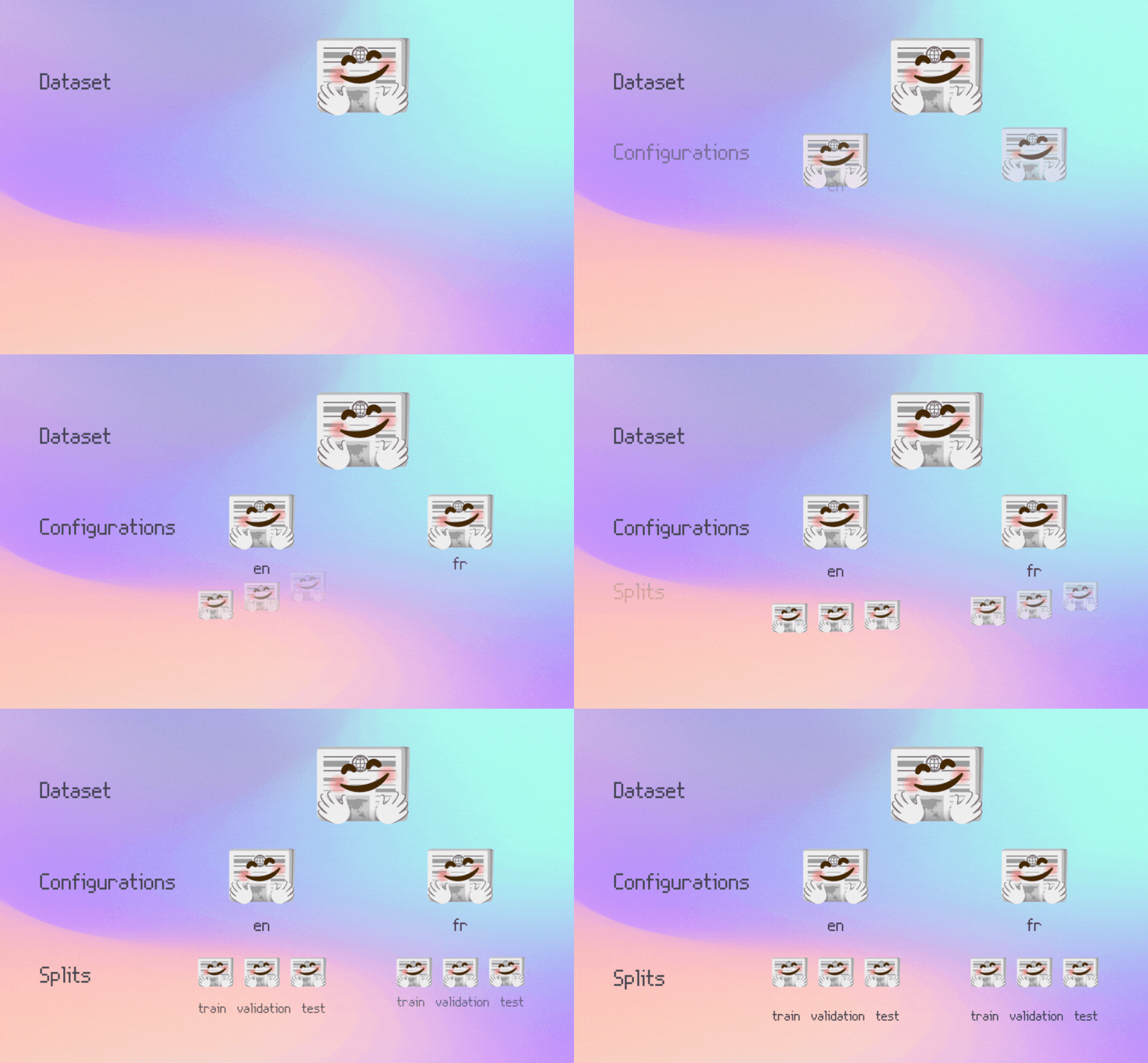
| Machine learning datasets typically have splits and may also have subsets. A dataset is generally made of _splits_ (e.g. `train` and `test`) that are used during different stages of training and evaluating a model. A _subset_ (also called _configuration_) is a sub-dataset contained within a larger dataset. Subsets are especially common in multilingual speech datasets where there may be a different subset for each language. If you're interested in learning more about splits and subsets, check out the [Splits and subsets](/docs/datasets-server/configs_and_splits) guide! | |
|  | |
| ## Automatic splits detection | |
| Splits are automatically detected based on file and directory names. For example, this is a dataset with `train`, `test`, and `validation` splits: | |
| ``` | |
| my_dataset_repository/ | |
| ├── README.md | |
| ├── train.csv | |
| ├── test.csv | |
| └── validation.csv | |
| ``` | |
| To structure your dataset by naming your data files or directories according to their split names, see the [File names and splits](./datasets-file-names-and-splits) documentation and the [companion collection of example datasets](https://huggingface.co/collections/datasets-examples/file-names-and-splits-655e28af4471bd95709eb135). | |
| ## Manual splits and subsets configuration | |
| You can choose the data files to show in the Dataset Viewer for your dataset using YAML. | |
| It is useful if you want to specify which file goes into which split manually. | |
| You can also define multiple subsets for your dataset, and pass dataset building parameters (e.g. the separator to use for CSV files). | |
| Here is an example of a configuration defining a subset called "benchmark" with a `test` split. | |
| ```yaml | |
| configs: | |
| - config_name: benchmark | |
| data_files: | |
| - split: test | |
| path: benchmark.csv | |
| ``` | |
| See the documentation on [Manual configuration](./datasets-manual-configuration) for more information. Look also to the [example datasets](https://huggingface.co/collections/datasets-examples/manual-configuration-655e293cea26da0acab95b87). | |
| ## Supported file formats | |
| See the [File formats](./datasets-adding#file-formats) doc page to find the list of supported formats and recommendations for your dataset. If your dataset uses CSV or TSV files, you can find more information in the [example datasets](https://huggingface.co/collections/datasets-examples/format-csv-and-tsv-655f681cb9673a4249cccb3d). | |
| ### Dataset Viewer size-limit errors (`TooBigContentError`) | |
| If you see `Error code: TooBigContentError`, then the dataset viewer could not read a preview within its limits. Common messages include `Parquet error: Scan size limit exceeded` and `The size of the content of the first rows exceeds the maximum supported size`. | |
| What you can do: | |
| - For Parquet files, use smaller row groups and include a page index (`write_page_index=True`) so the Viewer can read only what it needs. | |
| - Avoid very large values in the first rows (very long strings, large JSON blobs, base64 payloads). Move large payloads to separate files when possible. | |
| - Split very large files into smaller shards or splits, then re-upload. | |
| - If the issue remains, review [Configure the Dataset Viewer](./datasets-viewer-configure) and open a discussion on your dataset page with the full error text. | |
| ## Image, Audio and Video datasets | |
| For image/audio/video classification datasets, you can also use directories to name the image/audio/video classes. | |
| And if your images/audio/video files have metadata (e.g. captions, bounding boxes, transcriptions, etc.), you can have metadata files next to them. | |
| We provide two guides that you can check out: | |
| - [How to create an image dataset](./datasets-image) ([example datasets](https://huggingface.co/collections/datasets-examples/image-dataset-6568e7cf28639db76eb92d65)) | |
| - [How to create an audio dataset](./datasets-audio) ([example datasets](https://huggingface.co/collections/datasets-examples/audio-dataset-66aca0b73e8f69e3d069e607)) | |
| - [How to create a video dataset](./datasets-video) | |
Xet Storage Details
- Size:
- 4.5 kB
- Xet hash:
- 47db16e6ea93bda9bea11a2905b2ab5a6e2d9cba3c0503b73f81695efbb00be5
·
Xet efficiently stores files, intelligently splitting them into unique chunks and accelerating uploads and downloads. More info.