
Buckets:


| # Create your own transcription app | |
| This tutorial will guide you through building a complete transcription application using Hugging Face Inference Endpoints. We'll create an app that can transcribe audio files and generate intelligent summaries with action items - perfect for meeting notes, interviews, or any audio content. | |
| <Tip> | |
| This tutorial uses Python and Gradio, but you can adapt the approach to any language that can make HTTP requests. The models deployed on Inference Endpoints use standard APIs, so you can integrate them into web applications, mobile apps, or any other system. | |
| </Tip> | |
| ## Create your transcription endpoint | |
| First, we need to create an Inference Endpoint for audio transcription. We'll use OpenAI's Whisper model for high-quality speech recognition. | |
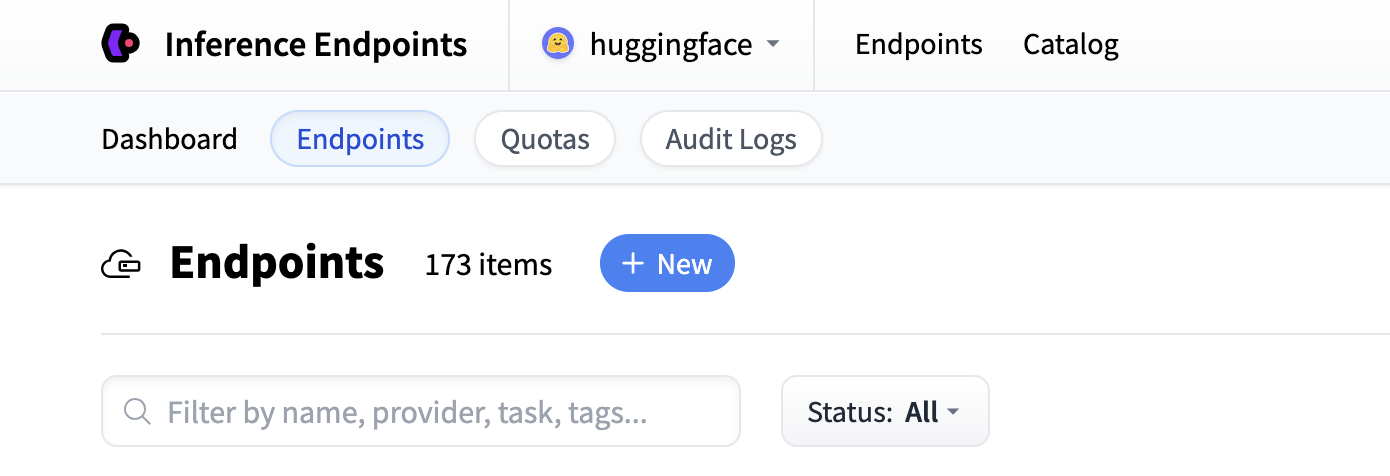
| Start by navigating to the Inference Endpoints UI, and once you have logged in you should see a button for creating a new Inference Endpoint. Click the "New" button. | |
|  | |
| From there you'll be directed to the catalog. The Model Catalog consists of popular models which have tuned configurations to work as one-click deploys. You can filter by name, task, price of the hardware and much more. | |
| 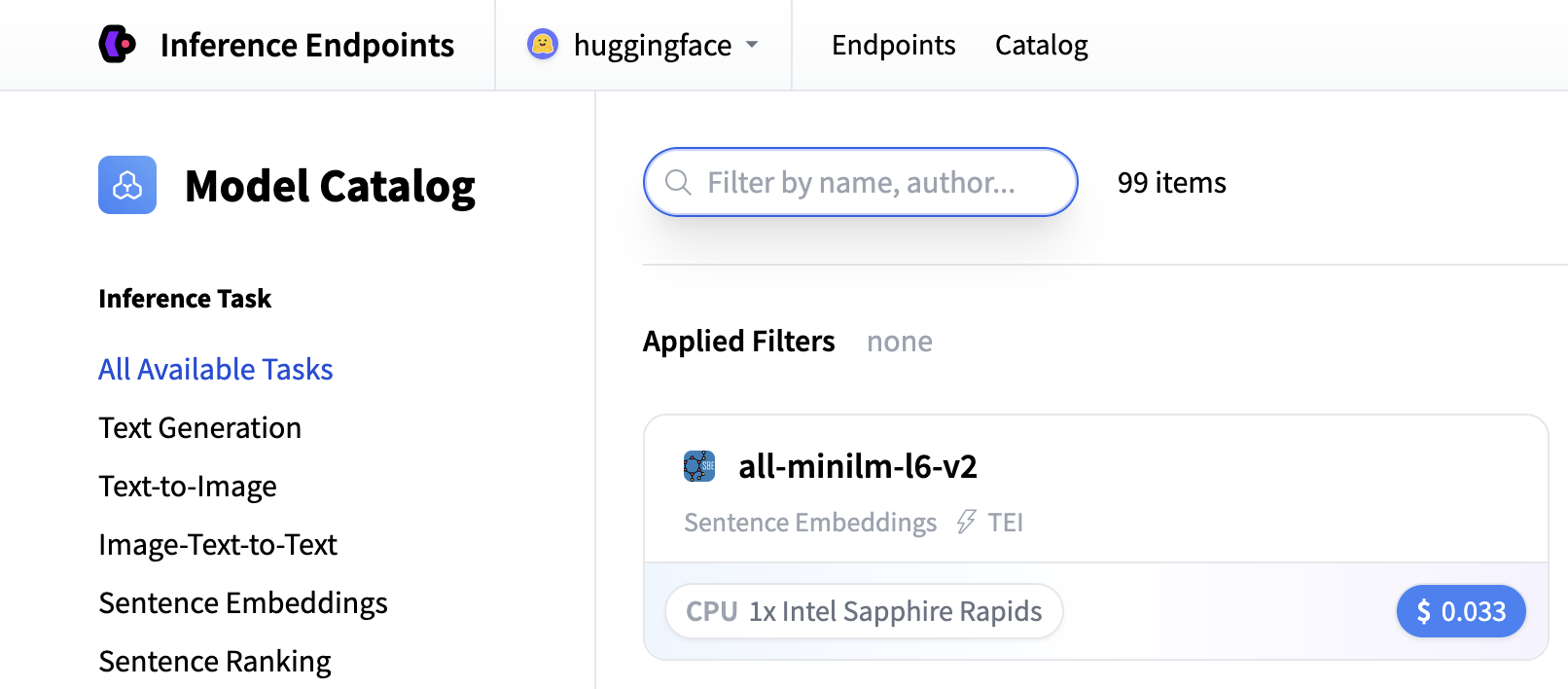 | |
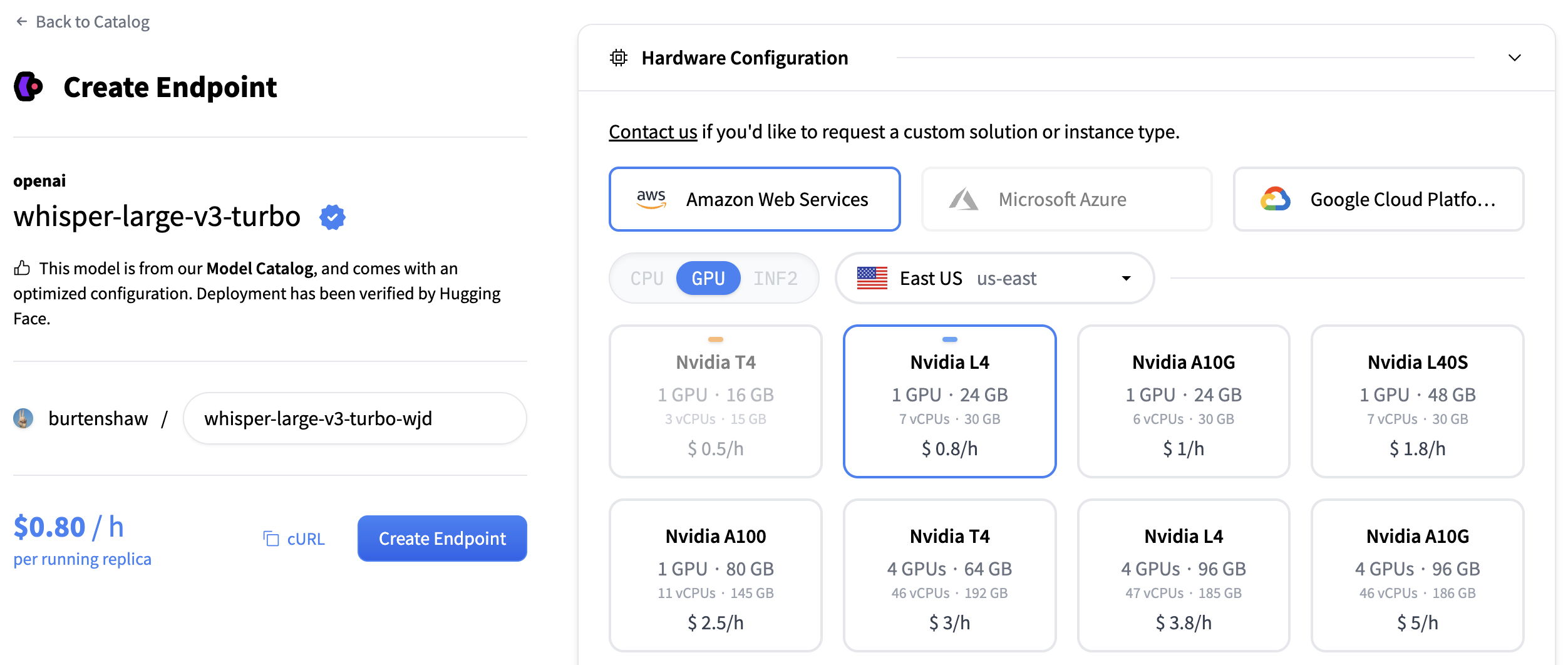
| Search for "whisper" to find transcription models, or you can create a custom endpoint with [openai/whisper-large-v3](https://huggingface.co/openai/whisper-large-v3). This model provides excellent transcription quality for multiple languages and handles various audio formats. | |
| For transcription models, we recommend: | |
| - **GPU**: NVIDIA L4 or A10G for good performance with audio processing | |
| - **Instance Size**: x1 (sufficient for most transcription workloads) | |
| - **Auto-scaling**: Enable scale-to-zero to save costs when not in use | |
| Click "Create Endpoint" to deploy your transcription service. | |
|  | |
| Your endpoint will take about 5 minutes to initialize. Once it's ready, you'll see it in the "Running" state. | |
| ## Create your text generation endpoint | |
| Now let's do the same again but now for a text generation model. For generating summaries and action items, we'll create a second endpoint using the [Qwen/Qwen3-1.7B](https://huggingface.co/Qwen/Qwen3-1.7B) model. | |
| Follow the same process: | |
| 1. Click "New" button in the Inference Endpoints UI | |
| 2. Search for `qwen3 1.7b` in the catalog | |
| 3. The NVIDIA L4 with x1 instance size is recommended for this model | |
| 4. Keep the default settings (scale-to-zero enabled, 1-hour timeout) | |
| 5. Click "Create Endpoint" | |
| This model is optimized for text generation tasks and will provide excellent summarization capabilities. Both endpoints will take about 3-5 minutes to initialize. | |
| ## Test your endpoints | |
| Once your endpoints are running, you can test them in the playground. The transcription endpoint will accept audio files and return text transcripts. | |
| 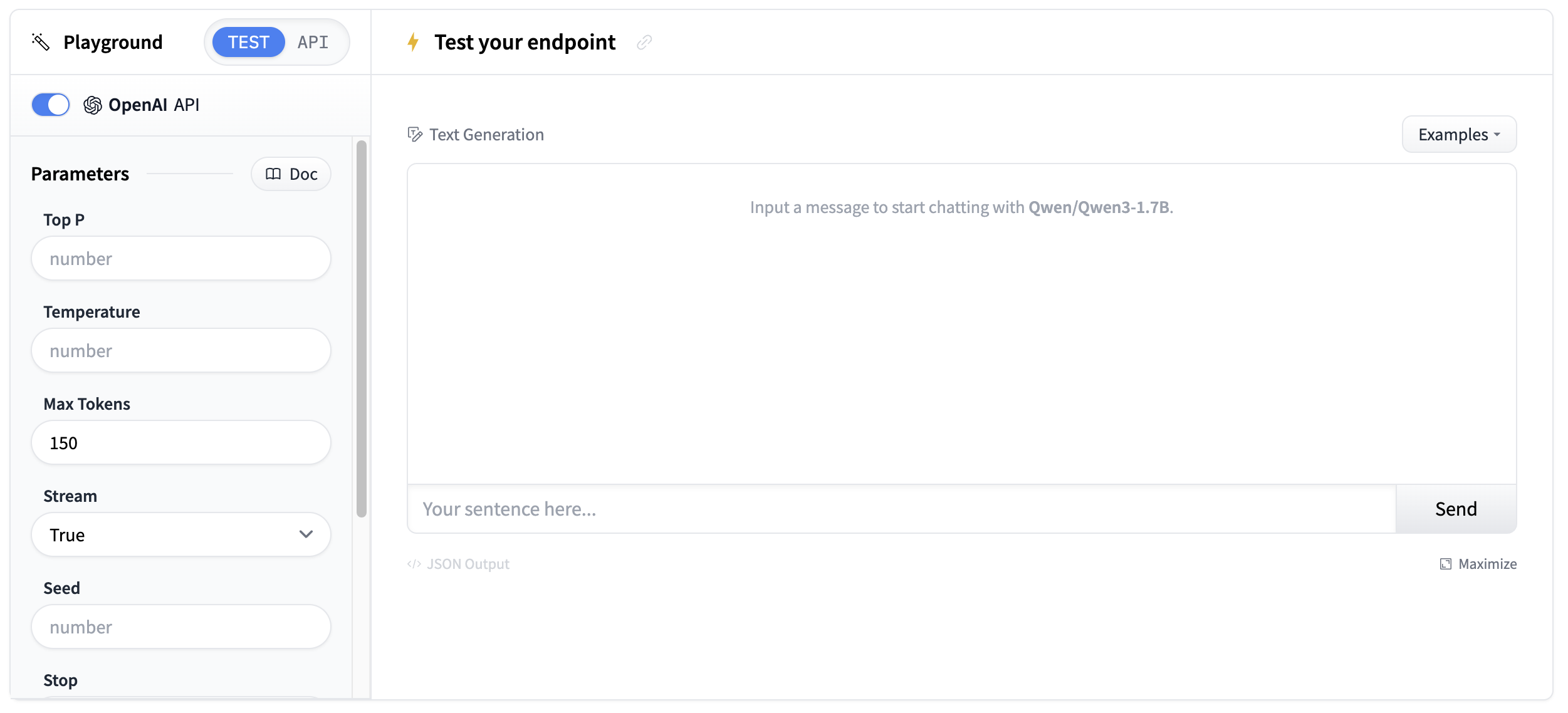 | |
| Test with a short audio sample to verify the transcription quality. | |
| ## Get your endpoint details | |
| You'll need the endpoint details from your [endpoints page](https://endpoints.huggingface.co/): | |
| - **Base URL**: `https://<endpoint-name>.endpoints.huggingface.cloud/v1/` | |
| - **Model name**: The name of your endpoint | |
| - **Token**: Your HF token from [settings](https://huggingface.co/settings/tokens) | |
| 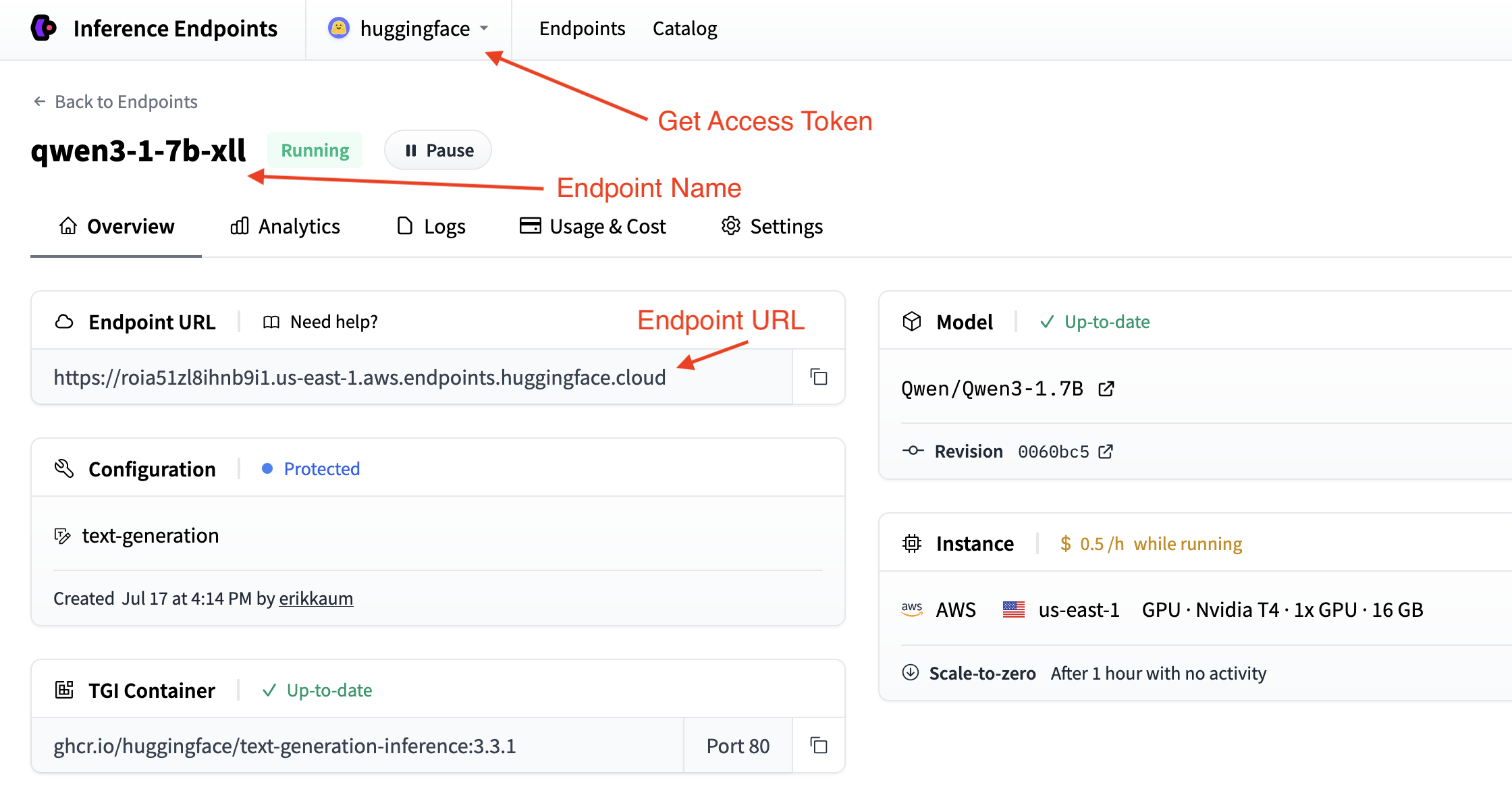 | |
| You can validate your details by testing your endpoint out in the command line with curl. | |
| ```sh | |
| curl "<endpoint-url>" \ | |
| -X POST \ | |
| --data-binary '@<audio-file>' \ | |
| -H "Accept: application/json" \ | |
| -H "Content-Type: audio/flac" \ | |
| ``` | |
| ## Building the transcription app | |
| Now let's build a transcription application step by step. We'll break it down into logical blocks to create a complete solution that can transcribe audio and generate intelligent summaries. | |
| ### Step 1: Set up dependencies and imports | |
| We'll use the `requests` library to connect to both endpoints and `gradio` to create the interface. Let's install the required packages: | |
| ```bash | |
| pip install gradio requests | |
| ``` | |
| Then, set up your imports in a new Python file: | |
| ```python | |
| import os | |
| import gradio as gr | |
| import requests | |
| ``` | |
| ### Step 2: Configure your endpoint connections | |
| Set up the configuration to connect to both your transcription and summarization endpoints based on the details you collected in the previous steps. | |
| ```python | |
| # Configuration for both endpoints | |
| TRANSCRIPTION_ENDPOINT = "https://your-whisper-endpoint.endpoints.huggingface.cloud/api/v1/audio/transcriptions" | |
| SUMMARIZATION_ENDPOINT = "https://your-qwen-endpoint.endpoints.huggingface.cloud/v1/chat/completions" | |
| HF_TOKEN = os.getenv("HF_TOKEN") # Your Hugging Face Hub token | |
| # Headers for authentication | |
| headers = { | |
| "Authorization": f"Bearer {HF_TOKEN}" | |
| } | |
| ``` | |
| Your endpoints are now configured to handle both audio transcription and text summarization. | |
| <Tip> | |
| You might also want to use `os.getenv` for your endpoint details. | |
| </Tip> | |
| ### Step 3: Create the transcription function | |
| Next, we'll create a function to handle audio file uploads and transcription: | |
| ```python | |
| def transcribe_audio(audio_file_path): | |
| """Transcribe audio using direct requests to the endpoint""" | |
| # Read audio file and prepare for upload | |
| with open(audio_file_path, "rb") as audio_file: | |
| # Read the audio file as binary data and represent it as a file object | |
| files = {"file": audio_file.read()} | |
| # Make the request to the transcription endpoint | |
| response = requests.post(TRANSCRIPTION_ENDPOINT, headers=headers, files=files) | |
| # Check if the request was successful | |
| if response.status_code == 200: | |
| result = response.json() | |
| return result.get("text", "No transcription available") | |
| else: | |
| return f"Error: {response.status_code} - {response.text}" | |
| ``` | |
| <Tip> | |
| The transcription endpoint expects a file upload in the `files` parameter. Make sure to read the audio file as binary data and pass it correctly to the API. | |
| </Tip> | |
| ### Step 4: Create the summarization function | |
| Now we'll create a function to generate summaries from the transcribed text. We'll do some simple prompt engineering to get the best results. | |
| ```python | |
| def generate_summary(transcript): | |
| """Generate summary using requests to the chat completions endpoint""" | |
| # define a nice prompt to get the best results for our use case | |
| prompt = f""" | |
| Analyze this meeting transcript and provide: | |
| 1. A concise summary of key points | |
| 2. Action items with responsible parties | |
| 3. Important decisions made | |
| Transcript: {transcript} | |
| Format with clear sections: | |
| ## Summary | |
| ## Action Items | |
| ## Decisions Made | |
| """ | |
| # Prepare the payload using the Messages API format | |
| payload = { | |
| "model": "your-qwen-endpoint-name", # Use the name of your endpoint | |
| "messages": [{"role": "user", "content": prompt}], | |
| "max_tokens": 1000, # we can also set a max_tokens parameter to limit the length of the response | |
| "temperature": 0.7, # we might want to set lower temperature for more deterministic results | |
| "stream": False # we don't need streaming for this use case | |
| } | |
| # Headers for chat completions | |
| chat_headers = { | |
| "Accept": "application/json", | |
| "Content-Type": "application/json", | |
| "Authorization": f"Bearer {HF_TOKEN}" | |
| } | |
| # Make the request | |
| response = requests.post(SUMMARIZATION_ENDPOINT, headers=chat_headers, json=payload) | |
| response.raise_for_status() | |
| # Parse the response | |
| result = response.json() | |
| return result["choices"][0]["message"]["content"] | |
| ``` | |
| ### Step 5: Wrap it all together | |
| Now let's build our Gradio interface. We'll use the `gr.Interface` class to create a simple interface that allows us to upload an audio file and see the transcript and summary. | |
| First, we'll create a main processing function that handles the complete workflow. | |
| ```python | |
| def process_meeting_audio(audio_file): | |
| """Main processing function that handles the complete workflow""" | |
| if audio_file is None: | |
| return "Please upload an audio file.", "" | |
| try: | |
| # Step 1: Transcribe the audio | |
| transcript = transcribe_audio(audio_file) | |
| # Step 2: Generate summary from transcript | |
| summary = generate_summary(transcript) | |
| return transcript, summary | |
| except Exception as e: | |
| return f"Error processing audio: {str(e)}", "" | |
| ``` | |
| Then, we can run that function in a Gradio interface. We'll add some descriptions and a title to make it more user-friendly. | |
| ```python | |
| # Create Gradio interface | |
| app = gr.Interface( | |
| fn=process_meeting_audio, | |
| inputs=gr.Audio(label="Upload Meeting Audio", type="filepath"), | |
| outputs=[ | |
| gr.Textbox(label="Full Transcript", lines=10), | |
| gr.Textbox(label="Meeting Summary", lines=8), | |
| ], | |
| title="🎤 AI Meeting Notes", | |
| description="Upload audio to get instant transcripts and summaries.", | |
| ) | |
| ``` | |
| That's it! You can now run the app locally with `python app.py` and test it out. | |
| <details> | |
| <summary>Click to view the complete script</summary> | |
| ```python | |
| import gradio as gr | |
| import os | |
| import requests | |
| # Configuration for both endpoints | |
| TRANSCRIPTION_ENDPOINT = "https://your-whisper-endpoint.endpoints.huggingface.cloud/api/v1/audio/transcriptions" | |
| SUMMARIZATION_ENDPOINT = "https://your-qwen-endpoint.endpoints.huggingface.cloud/v1/chat/completions" | |
| HF_TOKEN = os.getenv("HF_TOKEN") # Your Hugging Face Hub token | |
| # Headers for authentication | |
| headers = { | |
| "Authorization": f"Bearer {HF_TOKEN}" | |
| } | |
| def transcribe_audio(audio_file_path): | |
| """Transcribe audio using direct requests to the endpoint""" | |
| # Read audio file and prepare for upload | |
| with open(audio_file_path, "rb") as audio_file: | |
| files = {"file": audio_file.read()} | |
| # Make the request to the transcription endpoint | |
| response = requests.post(TRANSCRIPTION_ENDPOINT, headers=headers, files=files) | |
| if response.status_code == 200: | |
| result = response.json() | |
| return result.get("text", "No transcription available") | |
| else: | |
| return f"Error: {response.status_code} - {response.text}" | |
| def generate_summary(transcript): | |
| """Generate summary using requests to the chat completions endpoint""" | |
| prompt = f""" | |
| Analyze this meeting transcript and provide: | |
| 1. A concise summary of key points | |
| 2. Action items with responsible parties | |
| 3. Important decisions made | |
| Transcript: {transcript} | |
| Format with clear sections: | |
| ## Summary | |
| ## Action Items | |
| ## Decisions Made | |
| """ | |
| # Prepare the payload using the Messages API format | |
| payload = { | |
| "model": "your-qwen-endpoint-name", # Use the name of your endpoint | |
| "messages": [{"role": "user", "content": prompt}], | |
| "max_tokens": 1000, | |
| "temperature": 0.7, | |
| "stream": False | |
| } | |
| # Headers for chat completions | |
| chat_headers = { | |
| "Accept": "application/json", | |
| "Content-Type": "application/json", | |
| "Authorization": f"Bearer {HF_TOKEN}" | |
| } | |
| # Make the request | |
| response = requests.post(SUMMARIZATION_ENDPOINT, headers=chat_headers, json=payload) | |
| response.raise_for_status() | |
| # Parse the response | |
| result = response.json() | |
| return result["choices"][0]["message"]["content"] | |
| def process_meeting_audio(audio_file): | |
| """Main processing function that handles the complete workflow""" | |
| if audio_file is None: | |
| return "Please upload an audio file.", "" | |
| try: | |
| # Step 1: Transcribe the audio | |
| transcript = transcribe_audio(audio_file) | |
| # Step 2: Generate summary from transcript | |
| summary = generate_summary(transcript) | |
| return transcript, summary | |
| except Exception as e: | |
| return f"Error processing audio: {str(e)}", "" | |
| # Create Gradio interface | |
| app = gr.Interface( | |
| fn=process_meeting_audio, | |
| inputs=gr.Audio(label="Upload Meeting Audio", type="filepath"), | |
| outputs=[ | |
| gr.Textbox(label="Full Transcript", lines=10), | |
| gr.Textbox(label="Meeting Summary", lines=8), | |
| ], | |
| title="🎤 AI Meeting Notes", | |
| description="Upload audio to get instant transcripts and summaries.", | |
| ) | |
| if __name__ == "__main__": | |
| app.launch() | |
| ``` | |
| </details> | |
|  | |
| ## Deploy your transcription app | |
| Now, let's deploy it to Hugging Face Spaces so everyone can use it! | |
| 1. **Create a new Space**: Go to [huggingface.co/new-space](https://huggingface.co/new-space) | |
| 2. **Choose Gradio SDK** and make it public | |
| 3. **Upload your files**: Upload `app.py` and any requirements | |
| 4. **Add your token**: In Space settings, add `HF_TOKEN` as a secret | |
| 5. **Configure hardware**: Consider GPU for faster processing | |
| 6. **Launch**: Your app will be live at `https://huggingface.co/spaces/your-username/your-space-name` | |
| Your transcription app is now ready to handle meeting notes, interviews, podcasts, and any other audio content that needs to be transcribed and summarized! | |
| ## Next steps | |
| Great work! You've now built a complete transcription application with intelligent summarization. | |
| Here are some ways to extend your transcription app: | |
| - **Multi-language support**: Add language detection and support for multiple languages | |
| - **Speaker identification**: Use a model from the hub with speaker diarization capabilities. | |
| - **Custom prompts**: Allow users to customize the summary format and style | |
| - **Implement Text-to-Speech**: Use a model from the hub to convert your summary to another audio file! | |
| <EditOnGithub source="https://github.com/huggingface/hf-endpoints-documentation/blob/main/docs/source/tutorials/transcription.md" /> |
Xet Storage Details
- Size:
- 14.3 kB
- Xet hash:
- 90484f7a4988a4dc91b594d3de3a51d26efbacae786f7b809ce1e5a25f3f8714
·
Xet efficiently stores files, intelligently splitting them into unique chunks and accelerating uploads and downloads. More info.