
Buckets:


| # Generate images with Diffusion models | |
| ## Stable Diffusion | |
| Stable Diffusion models can also be used when running inference with OpenVINO. When Stable Diffusion models | |
| are exported to the OpenVINO format, they are decomposed into different components that are later combined during inference: | |
| - The text encoder | |
| - The U-NET | |
| - The VAE encoder | |
| - The VAE decoder | |
| | Task | Auto Class | | |
| |--------------------------------------|--------------------------------------| | |
| | `text-to-image` | `OVStableDiffusionPipeline` | | |
| | `image-to-image` | `OVStableDiffusionImg2ImgPipeline` | | |
| | `inpaint` | `OVStableDiffusionInpaintPipeline` | | |
| ### Text-to-Image | |
| Here is an example of how you can load an OpenVINO Stable Diffusion model and run inference using OpenVINO Runtime: | |
| ```python | |
| from optimum.intel import OVStableDiffusionPipeline | |
| model_id = "echarlaix/stable-diffusion-v1-5-openvino" | |
| pipeline = OVStableDiffusionPipeline.from_pretrained(model_id) | |
| prompt = "sailing ship in storm by Rembrandt" | |
| images = pipeline(prompt).images | |
| ``` | |
| To load your PyTorch model and convert it to OpenVINO on the fly, you can set `export=True`. | |
| ```python | |
| model_id = "runwayml/stable-diffusion-v1-5" | |
| pipeline = OVStableDiffusionPipeline.from_pretrained(model_id, export=True) | |
| # Don't forget to save the exported model | |
| pipeline.save_pretrained("openvino-sd-v1-5") | |
| ``` | |
| To further speed up inference, the model can be statically reshaped : | |
| ```python | |
| # Define the shapes related to the inputs and desired outputs | |
| batch_size, num_images, height, width = 1, 1, 512, 512 | |
| # Statically reshape the model | |
| pipeline.reshape(batch_size=batch_size, height=height, width=width, num_images_per_prompt=num_images) | |
| # Compile the model before the first inference | |
| pipeline.compile() | |
| # Run inference | |
| images = pipeline(prompt, height=height, width=width, num_images_per_prompt=num_images).images | |
| ``` | |
| In case you want to change any parameters such as the outputs height or width, you'll need to statically reshape your model once again. | |
| ### Text-to-Image with Textual Inversion | |
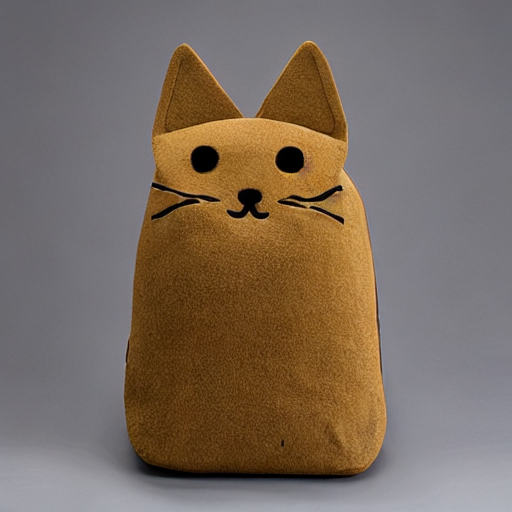
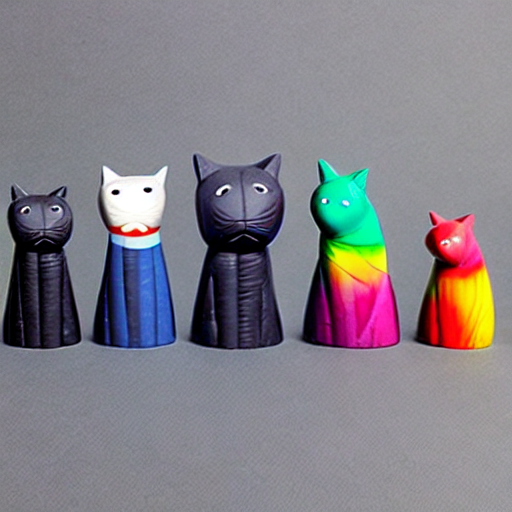
| Here is an example of how you can load an OpenVINO Stable Diffusion model with pre-trained textual inversion embeddings and run inference using OpenVINO Runtime: | |
| First, you can run original pipeline without textual inversion | |
| ```python | |
| from optimum.intel import OVStableDiffusionPipeline | |
| import numpy as np | |
| model_id = "echarlaix/stable-diffusion-v1-5-openvino" | |
| prompt = "A <cat-toy> back-pack" | |
| # Set a random seed for better comparison | |
| np.random.seed(42) | |
| pipeline = OVStableDiffusionPipeline.from_pretrained(model_id, export=False, compile=False) | |
| pipeline.compile() | |
| image1 = pipeline(prompt, num_inference_steps=50).images[0] | |
| image1.save("stable_diffusion_v1_5_without_textual_inversion.png") | |
| ``` | |
| Then, you can load [sd-concepts-library/cat-toy](https://huggingface.co/sd-concepts-library/cat-toy) textual inversion embedding and run pipeline with same prompt again | |
| ```python | |
| # Reset stable diffusion pipeline | |
| pipeline.clear_requests() | |
| # Load textual inversion into stable diffusion pipeline | |
| pipeline.load_textual_inversion("sd-concepts-library/cat-toy", "<cat-toy>") | |
| # Compile the model before the first inference | |
| pipeline.compile() | |
| image2 = pipeline(prompt, num_inference_steps=50).images[0] | |
| image2.save("stable_diffusion_v1_5_with_textual_inversion.png") | |
| ``` | |
| The left image shows the generation result of original stable diffusion v1.5, the right image shows the generation result of stable diffusion v1.5 with textual inversion. | |
| | | | | |
| |---|---| | |
| |  |  | | |
| ### Image-to-Image | |
| ```python | |
| import requests | |
| import torch | |
| from PIL import Image | |
| from io import BytesIO | |
| from optimum.intel import OVStableDiffusionImg2ImgPipeline | |
| model_id = "runwayml/stable-diffusion-v1-5" | |
| pipeline = OVStableDiffusionImg2ImgPipeline.from_pretrained(model_id, export=True) | |
| url = "https://raw.githubusercontent.com/CompVis/stable-diffusion/main/assets/stable-samples/img2img/sketch-mountains-input.jpg" | |
| response = requests.get(url) | |
| init_image = Image.open(BytesIO(response.content)).convert("RGB") | |
| init_image = init_image.resize((768, 512)) | |
| prompt = "A fantasy landscape, trending on artstation" | |
| image = pipeline(prompt=prompt, image=init_image, strength=0.75, guidance_scale=7.5).images[0] | |
| image.save("fantasy_landscape.png") | |
| ``` | |
| ## Stable Diffusion XL | |
| | Task | Auto Class | | |
| |--------------------------------------|--------------------------------------| | |
| | `text-to-image` | `OVStableDiffusionXLPipeline` | | |
| | `image-to-image` | `OVStableDiffusionXLImg2ImgPipeline` | | |
| ### Text-to-Image | |
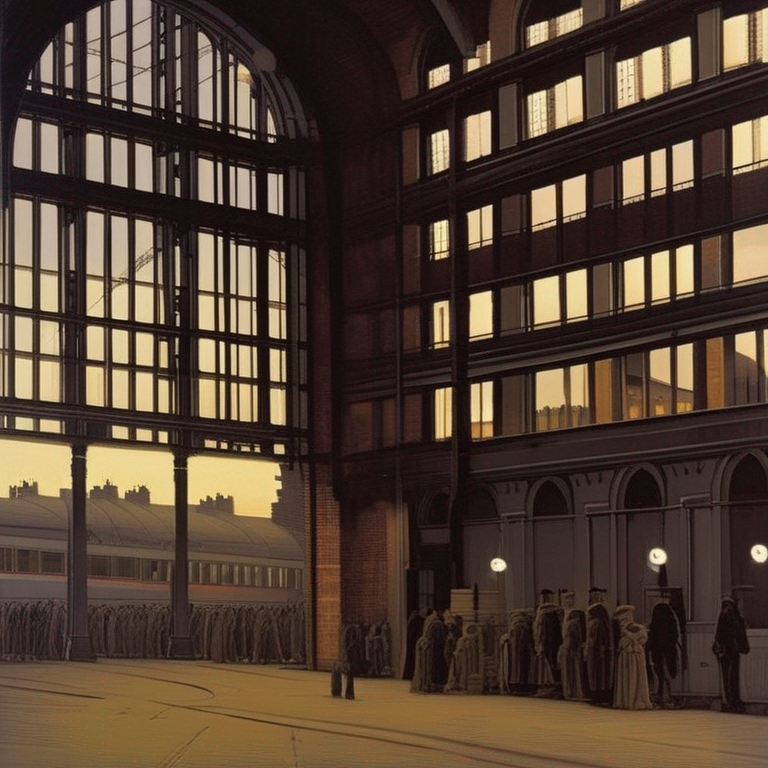
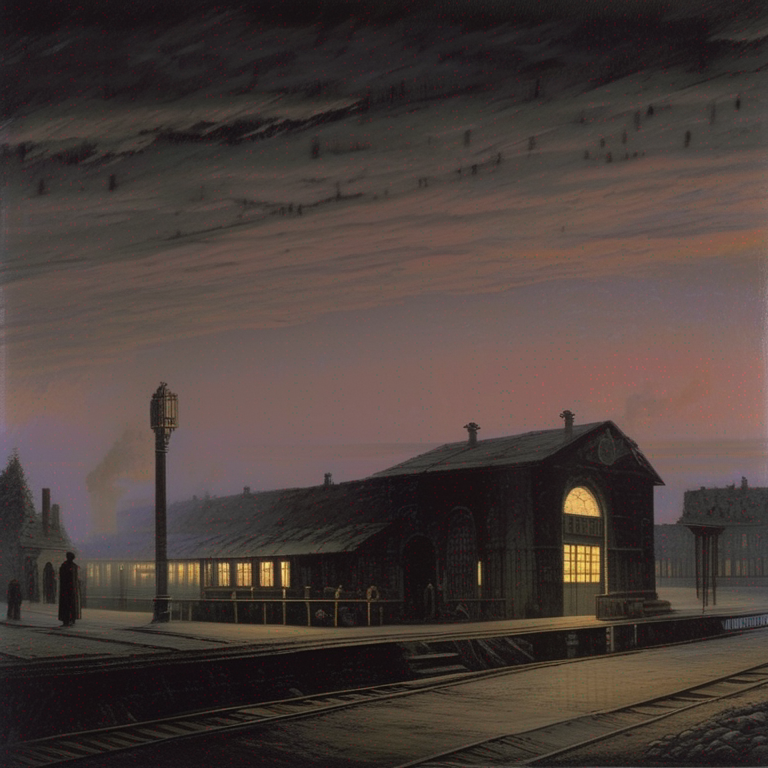
| Here is an example of how you can load a SDXL OpenVINO model from [stabilityai/stable-diffusion-xl-base-1.0](https://huggingface.co/stabilityai/stable-diffusion-xl-base-1.0) and run inference using OpenVINO Runtime: | |
| ```python | |
| from optimum.intel import OVStableDiffusionXLPipeline | |
| model_id = "stabilityai/stable-diffusion-xl-base-1.0" | |
| base = OVStableDiffusionXLPipeline.from_pretrained(model_id) | |
| prompt = "train station by Caspar David Friedrich" | |
| image = base(prompt).images[0] | |
| image.save("train_station.png") | |
| ``` | |
| | | | | |
| |---|---| | |
| |  |  | | |
| ### Text-to-Image with Textual Inversion | |
| Here is an example of how you can load an SDXL OpenVINO model from [stabilityai/stable-diffusion-xl-base-1.0](https://huggingface.co/stabilityai/stable-diffusion-xl-base-1.0) with pre-trained textual inversion embeddings and run inference using OpenVINO Runtime: | |
| First, you can run original pipeline without textual inversion | |
| ```python | |
| from optimum.intel import OVStableDiffusionXLPipeline | |
| import numpy as np | |
| model_id = "stabilityai/stable-diffusion-xl-base-1.0" | |
| prompt = "charturnerv2, multiple views of the same character in the same outfit, a character turnaround wearing a red jacket and black shirt, best quality, intricate details." | |
| # Set a random seed for better comparison | |
| np.random.seed(112) | |
| base = OVStableDiffusionXLPipeline.from_pretrained(model_id, export=False, compile=False) | |
| base.compile() | |
| image1 = base(prompt, num_inference_steps=50).images[0] | |
| image1.save("sdxl_without_textual_inversion.png") | |
| ``` | |
| Then, you can load [charturnerv2](https://civitai.com/models/3036/charturner-character-turnaround-helper-for-15-and-21) textual inversion embedding and run pipeline with same prompt again | |
| ```python | |
| # Reset stable diffusion pipeline | |
| base.clear_requests() | |
| # Load textual inversion into stable diffusion pipeline | |
| base.load_textual_inversion("./charturnerv2.pt", "charturnerv2") | |
| # Compile the model before the first inference | |
| base.compile() | |
| image2 = base(prompt, num_inference_steps=50).images[0] | |
| image2.save("sdxl_with_textual_inversion.png") | |
| ``` | |
| ### Image-to-Image | |
| Here is an example of how you can load a PyTorch SDXL model, convert it to OpenVINO on-the-fly and run inference using OpenVINO Runtime for *image-to-image*: | |
| ```python | |
| from optimum.intel import OVStableDiffusionXLImg2ImgPipeline | |
| from diffusers.utils import load_image | |
| model_id = "stabilityai/stable-diffusion-xl-refiner-1.0" | |
| pipeline = OVStableDiffusionXLImg2ImgPipeline.from_pretrained(model_id, export=True) | |
| url = "https://huggingface.co/datasets/optimum/documentation-images/resolve/main/intel/openvino/sd_xl/castle_friedrich.png" | |
| image = load_image(url).convert("RGB") | |
| prompt = "medieval castle by Caspar David Friedrich" | |
| image = pipeline(prompt, image=image).images[0] | |
| # Don't forget to save your OpenVINO model so that you can load it without exporting it with `export=True` | |
| pipeline.save_pretrained("openvino-sd-xl-refiner-1.0") | |
| ``` | |
| ### Refining the image output | |
| The image can be refined by making use of a model like [stabilityai/stable-diffusion-xl-refiner-1.0](https://huggingface.co/stabilityai/stable-diffusion-xl-refiner-1.0). In this case, you only have to output the latents from the base model. | |
| ```python | |
| from optimum.intel import OVStableDiffusionXLImg2ImgPipeline | |
| model_id = "stabilityai/stable-diffusion-xl-refiner-1.0" | |
| refiner = OVStableDiffusionXLImg2ImgPipeline.from_pretrained(model_id, export=True) | |
| image = base(prompt=prompt, output_type="latent").images[0] | |
| image = refiner(prompt=prompt, image=image[None, :]).images[0] | |
| ``` | |
| ## Latent Consistency Models | |
| | Task | Auto Class | | |
| |--------------------------------------|--------------------------------------| | |
| | `text-to-image` | `OVLatentConsistencyModelPipeline` | | |
| ### Text-to-Image | |
| Here is an example of how you can load a Latent Consistency Model (LCM) from [SimianLuo/LCM_Dreamshaper_v7](https://huggingface.co/SimianLuo/LCM_Dreamshaper_v7) and run inference using OpenVINO : | |
| ```python | |
| from optimum.intel import OVLatentConsistencyModelPipeline | |
| model_id = "SimianLuo/LCM_Dreamshaper_v7" | |
| pipeline = OVLatentConsistencyModelPipeline.from_pretrained(model_id, export=True) | |
| prompt = "sailing ship in storm by Leonardo da Vinci" | |
| images = pipeline(prompt, num_inference_steps=4, guidance_scale=8.0).images | |
| ``` |
Xet Storage Details
- Size:
- 9.69 kB
- Xet hash:
- 138b5d49d13c6851aa602866b4c5b5b9a40af67eaf79f0d98b37fbae453d262e
·
Xet efficiently stores files, intelligently splitting them into unique chunks and accelerating uploads and downloads. More info.