
Buckets:


| # 使用 OpenTelemetry 检查运行记录 | |
| > [!TIP] | |
| > 如果您是初次构建Agent,建议先阅读 [Agent 入门指南](../conceptual_guides/intro_agents) 和 [smolagents 导览](../guided_tour)。 | |
| ## 为什么需要记录Agent运行? | |
| 调试Agent运行过程具有挑战性。 | |
| 验证运行是否正常进行很困难,因为Agent的工作流程本身具有 [设计上的不可预测性](../conceptual_guides/intro_agents)(如果可预测,直接使用传统代码即可)。 | |
| 检查运行记录同样困难:多步骤的Agent往往会快速在控制台生成大量日志,而大多数错误只是"LLM 低级错误"类型的问题,通常LLM会在后续步骤中通过生成更好的代码或工具调用来自我修正。 | |
| 因此,在生产环境中使用监控工具记录Agent运行过程,对于后续检查和分析至关重要! | |
| 我们采用 [OpenTelemetry](https://opentelemetry.io/) 标准来实现Agent运行监控。 | |
| 这意味着您只需添加少量监控代码,即可在正常运行Agent时自动记录所有信息到监控平台。以下是在不同OpenTelemetry后端实现此功能的示例: | |
| 在监控平台上的展示效果如下: | |
| ## 使用 Arize AI Phoenix 配置遥测 | |
| 首先安装必要的软件包。这里我们选择安装 [Arize AI 的 Phoenix](https://github.com/Arize-ai/phoenix) 作为日志收集和检查方案,您也可以使用其他兼容 OpenTelemetry 的平台来完成收集与检查工作。 | |
| ```shell | |
| pip install 'smolagents[telemetry]' | |
| ``` | |
| 接着在后台运行日志收集器: | |
| ```shell | |
| python -m phoenix.server.main serve | |
| ``` | |
| 最后配置 `SmolagentsInstrumentor` 来追踪Agent活动,并将追踪数据发送至 Phoenix 默认端点: | |
| ```python | |
| from phoenix.otel import register | |
| from openinference.instrumentation.smolagents import SmolagentsInstrumentor | |
| register() | |
| SmolagentsInstrumentor().instrument() | |
| ``` | |
| 完成上述配置后,即可正常运行您的Agent! | |
| ```py | |
| from smolagents import ( | |
| CodeAgent, | |
| ToolCallingAgent, | |
| WebSearchTool, | |
| VisitWebpageTool, | |
| InferenceClientModel, | |
| ) | |
| model = InferenceClientModel() | |
| search_agent = ToolCallingAgent( | |
| tools=[WebSearchTool(), VisitWebpageTool()], | |
| model=model, | |
| name="search_agent", | |
| description="This is an agent that can do web search.", | |
| ) | |
| manager_agent = CodeAgent( | |
| tools=[], | |
| model=model, | |
| managed_agents=[search_agent], | |
| ) | |
| manager_agent.run( | |
| "If the US keeps its 2024 growth rate, how many years will it take for the GDP to double?" | |
| ) | |
| ``` | |
| Voilà! | |
| 此时访问 `http://0.0.0.0:6006/projects/` 即可查看运行记录: | |
| 如图所示,CodeAgent 调用了其托管的 ToolCallingAgent(注:托管Agent也可以是另一个 CodeAgent)执行美国2024年经济增长率的网络搜索。托管Agent返回报告后,管理Agent根据结果计算出经济翻倍周期!是不是很智能? | |
| ## 使用 🪢 Langfuse 配置遥测 | |
| 本部分演示如何通过 `SmolagentsInstrumentor` 使用 **Langfuse** 监控和调试 Hugging Face **smolagents**。 | |
| > **Langfuse 是什么?** [Langfuse](https://langfuse.com) 是面向LLM工程的开源平台,提供AI Agent的追踪与监控功能,帮助开发者调试、分析和优化产品。该平台通过原生集成、OpenTelemetry 和 SDKs 与各类工具框架对接。 | |
| ### 步骤 1: 安装依赖 | |
| ```python | |
| %pip install langfuse 'smolagents[telemetry]' openinference-instrumentation-smolagents | |
| ``` | |
| ### 步骤 2: 配置环境变量 | |
| 设置 Langfuse API 密钥,并配置 OpenTelemetry 端点将追踪数据发送至 Langfuse。通过注册 [Langfuse Cloud](https://cloud.langfuse.com) 或 [自托管 Langfuse](https://langfuse.com/self-hosting) 获取 API 密钥。 | |
| 同时需添加 [Hugging Face 令牌](https://huggingface.co/settings/tokens) (`HF_TOKEN`) 作为环境变量: | |
| ```python | |
| import os | |
| # Get keys for your project from the project settings page: https://cloud.langfuse.com | |
| os.environ["LANGFUSE_PUBLIC_KEY"] = "pk-lf-..." | |
| os.environ["LANGFUSE_SECRET_KEY"] = "sk-lf-..." | |
| os.environ["LANGFUSE_HOST"] = "https://cloud.langfuse.com" # 🇪🇺 EU region | |
| # os.environ["LANGFUSE_HOST"] = "https://us.cloud.langfuse.com" # 🇺🇸 US region | |
| # your Hugging Face token | |
| os.environ["HF_TOKEN"] = "hf_..." | |
| ``` | |
| ```python | |
| from langfuse import get_client | |
| langfuse = get_client() | |
| # Verify connection | |
| if langfuse.auth_check(): | |
| print("Langfuse client is authenticated and ready!") | |
| else: | |
| print("Authentication failed. Please check your credentials and host.") | |
| ``` | |
| ### 步骤 3: 初始化 `SmolagentsInstrumentor` | |
| 在应用程序代码执行前初始化 `SmolagentsInstrumentor`。 | |
| ```python | |
| from openinference.instrumentation.smolagents import SmolagentsInstrumentor | |
| SmolagentsInstrumentor().instrument() | |
| ``` | |
| ### 步骤 4: 运行 smolagent | |
| ```python | |
| from smolagents import ( | |
| CodeAgent, | |
| ToolCallingAgent, | |
| WebSearchTool, | |
| VisitWebpageTool, | |
| InferenceClientModel, | |
| ) | |
| model = InferenceClientModel( | |
| model_id="deepseek-ai/DeepSeek-R1-Distill-Qwen-32B" | |
| ) | |
| search_agent = ToolCallingAgent( | |
| tools=[WebSearchTool(), VisitWebpageTool()], | |
| model=model, | |
| name="search_agent", | |
| description="This is an agent that can do web search.", | |
| ) | |
| manager_agent = CodeAgent( | |
| tools=[], | |
| model=model, | |
| managed_agents=[search_agent], | |
| ) | |
| manager_agent.run( | |
| "How can Langfuse be used to monitor and improve the reasoning and decision-making of smolagents when they execute multi-step tasks, like dynamically adjusting a recipe based on user feedback or available ingredients?" | |
| ) | |
| ``` | |
| ### 步骤 5: 在 Langfuse 中查看追踪记录 | |
| 运行Agent后,您可以在 [Langfuse](https://cloud.langfuse.com) 平台查看 smolagents 应用生成的追踪记录。这些记录会详细展示LLM的交互步骤,帮助您调试和优化AI代理。 | |
| 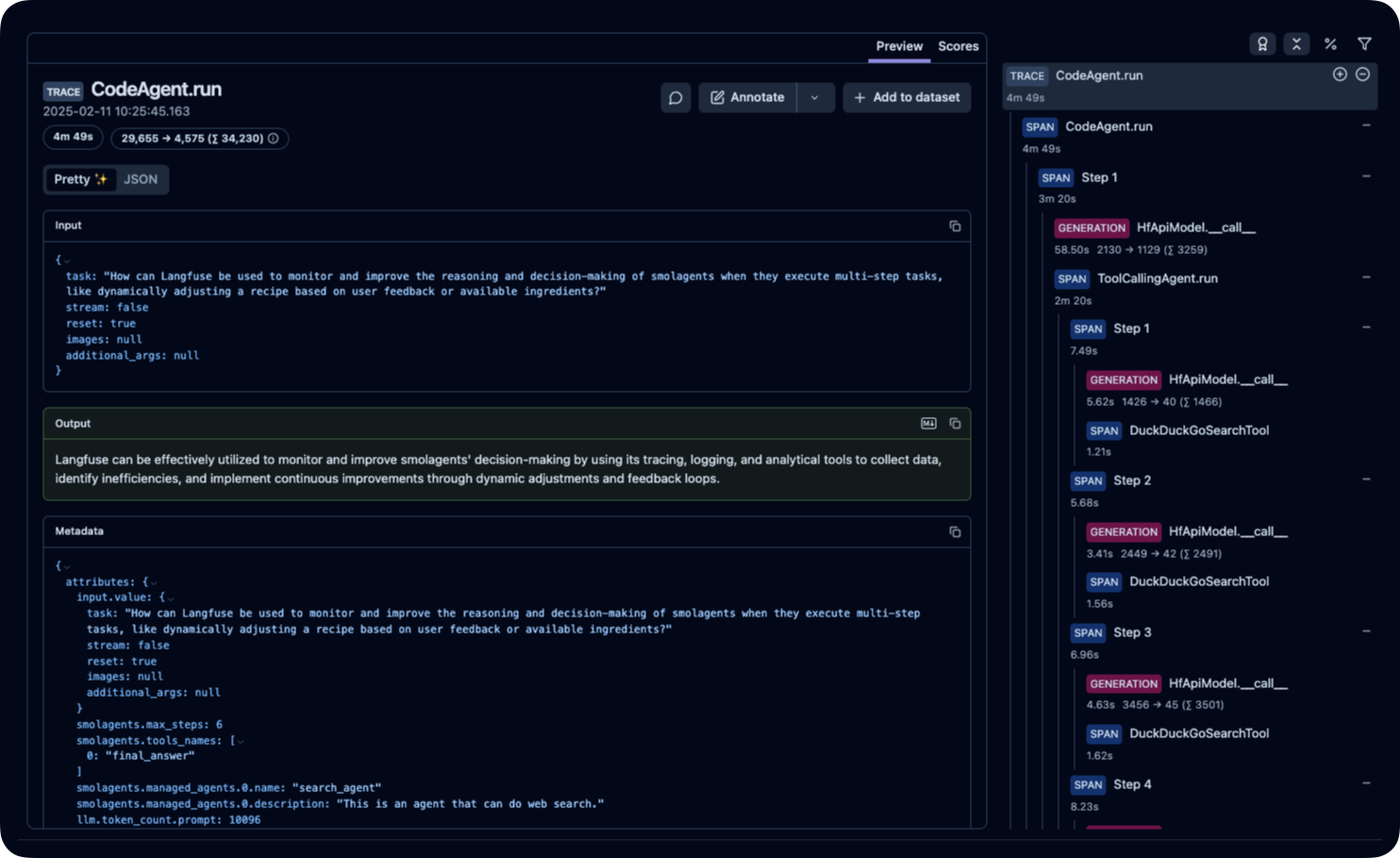 | |
| _[Langfuse 公开示例追踪](https://cloud.langfuse.com/project/cloramnkj0002jz088vzn1ja4/traces/ce5160f9bfd5a6cd63b07d2bfcec6f54?timestamp=2025-02-11T09%3A25%3A45.163Z&display=details)_ | |
Xet Storage Details
- Size:
- 6.13 kB
- Xet hash:
- 85ec3a762cefb872cafadcd534637e89d3a646278fce58075e7553396f42e7a3
·
Xet efficiently stores files, intelligently splitting them into unique chunks and accelerating uploads and downloads. More info.