
Buckets:


| # Building a Next.js application | |
| In this tutorial, we'll build a simple Next.js application that performs sentiment analysis using Transformers.js! | |
| Since Transformers.js can run in the browser or in Node.js, you can choose whether you want to perform inference [client-side](#client-side-inference) or [server-side](#server-side-inference) (we'll show you how to do both). In either case, we will be developing with the new [App Router](https://nextjs.org/docs/app) paradigm. | |
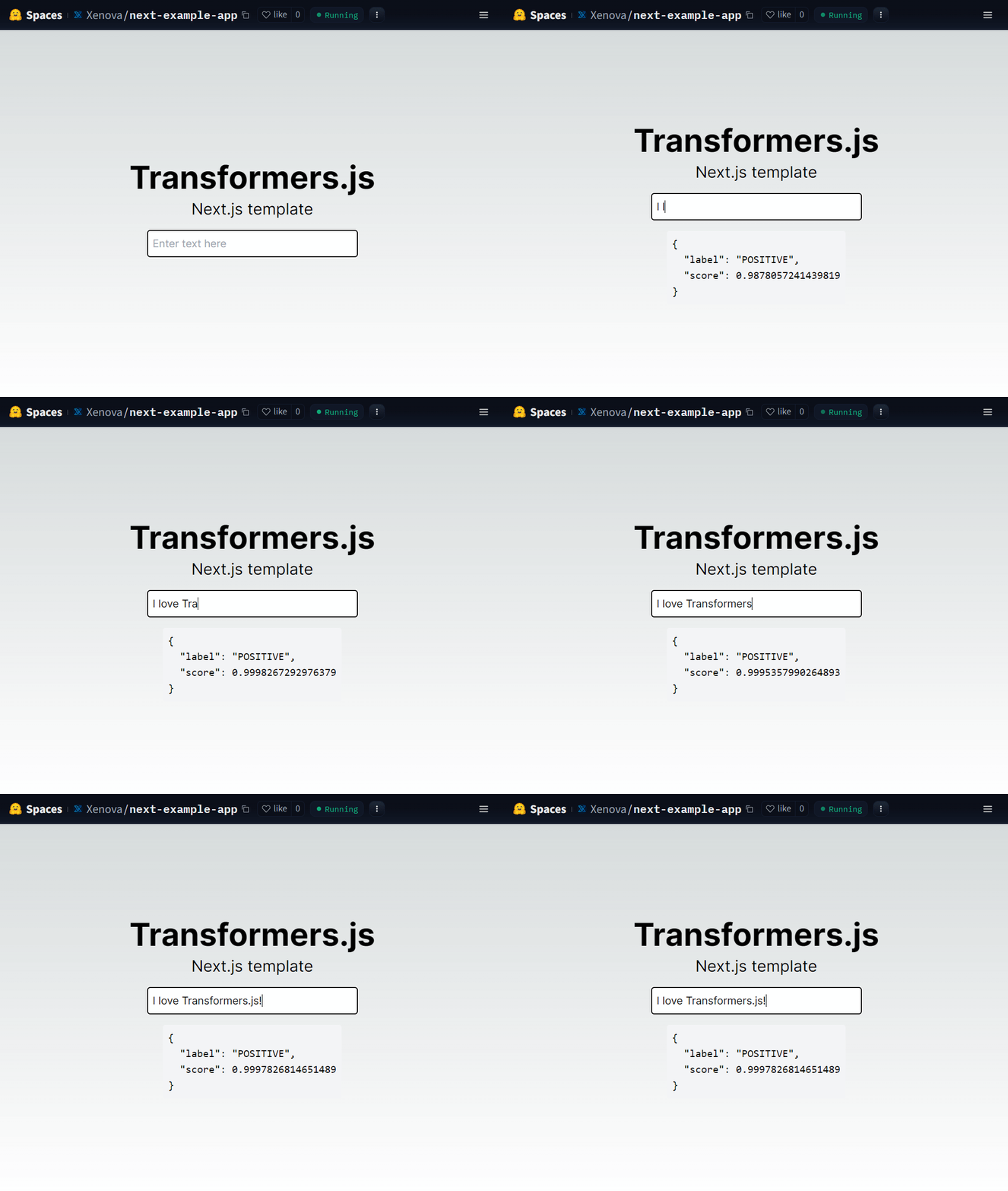
| The final product will look something like this: | |
|  | |
| Useful links: | |
| - Demo site: [client-side](https://huggingface.co/spaces/Xenova/next-example-app) or [server-side](https://huggingface.co/spaces/Xenova/next-server-example-app) | |
| - Source code: [client-side](https://github.com/huggingface/transformers.js/tree/main/examples/next-client) or [server-side](https://github.com/huggingface/transformers.js/tree/main/examples/next-server) | |
| ## Prerequisites | |
| - [Node.js](https://nodejs.org/en/) version 18+ | |
| - [npm](https://www.npmjs.com/) version 9+ | |
| ## Client-side inference | |
| ### Step 1: Initialise the project | |
| Start by creating a new Next.js application using `create-next-app`: | |
| ```bash | |
| npx create-next-app@latest | |
| ``` | |
| On installation, you'll see various prompts. For this demo, we'll be selecting those shown below in bold: | |
| √ What is your project named? ... next | |
| √ Would you like to use TypeScript? ... No / Yes | |
| √ Would you like to use ESLint? ... No / Yes | |
| √ Would you like to use Tailwind CSS? ... No / Yes | |
| √ Would you like to use `src/` directory? ... No / Yes | |
| √ Would you like to use App Router? (recommended) ... No / Yes | |
| √ Would you like to customize the default import alias? ... No / Yes | |
| ### Step 2: Install and configure Transformers.js | |
| You can install Transformers.js from [NPM](https://www.npmjs.com/package/@huggingface/transformers) with the following command: | |
| ```bash | |
| npm i @huggingface/transformers | |
| ``` | |
| We also need to update the `next.config.js` file to ignore node-specific modules when bundling for the browser: | |
| ```js | |
| /** @type {import('next').NextConfig} */ | |
| const nextConfig = { | |
| // (Optional) Export as a static site | |
| // See https://nextjs.org/docs/pages/building-your-application/deploying/static-exports#configuration | |
| output: "export", // Feel free to modify/remove this option | |
| // Override the default webpack configuration | |
| webpack: (config) => { | |
| // See https://webpack.js.org/configuration/resolve/#resolvealias | |
| config.resolve.alias = { | |
| ...config.resolve.alias, | |
| sharp$: false, | |
| "onnxruntime-node$": false, | |
| }; | |
| return config; | |
| }, | |
| }; | |
| module.exports = nextConfig; | |
| ``` | |
| Next, we'll create a new [Web Worker](https://developer.mozilla.org/en-US/docs/Web/API/Web_Workers_API/Using_web_workers) script where we'll place all ML-related code. This is to ensure that the main thread is not blocked while the model is loading and performing inference. For this application, we'll be using [`Xenova/distilbert-base-uncased-finetuned-sst-2-english`](https://huggingface.co/Xenova/distilbert-base-uncased-finetuned-sst-2-english), a ~67M parameter model finetuned on the [Stanford Sentiment Treebank](https://huggingface.co/datasets/sst) dataset. Add the following code to `./src/app/worker.js`: | |
| ```js | |
| import { pipeline, env } from "@huggingface/transformers"; | |
| // Skip local model check | |
| env.allowLocalModels = false; | |
| // Use the Singleton pattern to enable lazy construction of the pipeline. | |
| class PipelineSingleton { | |
| static task = "text-classification"; | |
| static model = "Xenova/distilbert-base-uncased-finetuned-sst-2-english"; | |
| static instance = null; | |
| static async getInstance(progress_callback = null) { | |
| if (this.instance === null) { | |
| this.instance = pipeline(this.task, this.model, { progress_callback }); | |
| } | |
| return this.instance; | |
| } | |
| } | |
| // Listen for messages from the main thread | |
| self.addEventListener("message", async (event) => { | |
| // Retrieve the classification pipeline. When called for the first time, | |
| // this will load the pipeline and save it for future use. | |
| let classifier = await PipelineSingleton.getInstance((x) => { | |
| // We also add a progress callback to the pipeline so that we can | |
| // track model loading. | |
| self.postMessage(x); | |
| }); | |
| // Actually perform the classification | |
| let output = await classifier(event.data.text); | |
| // Send the output back to the main thread | |
| self.postMessage({ | |
| status: "complete", | |
| output: output, | |
| }); | |
| }); | |
| ``` | |
| ### Step 3: Design the user interface | |
| We'll now modify the default `./src/app/page.js` file so that it connects to our worker thread. Since we'll only be performing in-browser inference, we can opt-in to Client components using the [`'use client'` directive](https://nextjs.org/docs/getting-started/react-essentials#the-use-client-directive). | |
| ```jsx | |
| 'use client' | |
| import { useState, useEffect, useRef, useCallback } from 'react' | |
| export default function Home() { | |
| /* TODO: Add state variables */ | |
| // Create a reference to the worker object. | |
| const worker = useRef(null); | |
| // We use the `useEffect` hook to set up the worker as soon as the `App` component is mounted. | |
| useEffect(() => { | |
| if (!worker.current) { | |
| // Create the worker if it does not yet exist. | |
| worker.current = new Worker(new URL('./worker.js', import.meta.url), { | |
| type: 'module' | |
| }); | |
| } | |
| // Create a callback function for messages from the worker thread. | |
| const onMessageReceived = (e) => { /* TODO: See below */}; | |
| // Attach the callback function as an event listener. | |
| worker.current.addEventListener('message', onMessageReceived); | |
| // Define a cleanup function for when the component is unmounted. | |
| return () => worker.current.removeEventListener('message', onMessageReceived); | |
| }); | |
| const classify = useCallback((text) => { | |
| if (worker.current) { | |
| worker.current.postMessage({ text }); | |
| } | |
| }, []); | |
| return ( /* TODO: See below */ ) | |
| } | |
| ``` | |
| Initialise the following state variables at the beginning of the `Home` component: | |
| ```jsx | |
| // Keep track of the classification result and the model loading status. | |
| const [result, setResult] = useState(null); | |
| const [ready, setReady] = useState(null); | |
| ``` | |
| and fill in the `onMessageReceived` function to update these variables when the worker thread sends a message: | |
| ```js | |
| const onMessageReceived = (e) => { | |
| switch (e.data.status) { | |
| case "initiate": | |
| setReady(false); | |
| break; | |
| case "ready": | |
| setReady(true); | |
| break; | |
| case "complete": | |
| setResult(e.data.output[0]); | |
| break; | |
| } | |
| }; | |
| ``` | |
| Finally, we can add a simple UI to the `Home` component, consisting of an input textbox and a preformatted text element to display the classification result: | |
| ```jsx | |
| Transformers.js | |
| Next.js template | |
| { | |
| classify(e.target.value); | |
| }} | |
| /> | |
| {ready !== null && ( | |
| {!ready || !result ? "Loading..." : JSON.stringify(result, null, 2)} | |
| )} | |
| ``` | |
| You can now run your application using the following command: | |
| ```bash | |
| npm run dev | |
| ``` | |
| Visit the URL shown in the terminal (e.g., [http://localhost:3000/](http://localhost:3000/)) to see your application in action! | |
| ### (Optional) Step 4: Build and deploy | |
| To build your application, simply run: | |
| ```bash | |
| npm run build | |
| ``` | |
| This will bundle your application and output the static files to the `out` folder. | |
| For this demo, we will deploy our application as a static [Hugging Face Space](https://huggingface.co/docs/hub/spaces), but you can deploy it anywhere you like! If you haven't already, you can create a free Hugging Face account [here](https://huggingface.co/join). | |
| 1. Visit [https://huggingface.co/new-space](https://huggingface.co/new-space) and fill in the form. Remember to select "Static" as the space type. | |
| 2. Click the "Create space" button at the bottom of the page. | |
| 3. Go to "Files" → "Add file" → "Upload files". Drag the files from the `out` folder into the upload box and click "Upload". After they have uploaded, scroll down to the button and click "Commit changes to main". | |
| **That's it!** Your application should now be live at `https://huggingface.co/spaces//`! | |
| ## Server-side inference | |
| While there are many different ways to perform server-side inference, the simplest (which we will discuss in this tutorial) is using the new [Route Handlers](https://nextjs.org/docs/app/building-your-application/routing/router-handlers) feature. | |
| ### Step 1: Initialise the project | |
| Start by creating a new Next.js application using `create-next-app`: | |
| ```bash | |
| npx create-next-app@latest | |
| ``` | |
| On installation, you'll see various prompts. For this demo, we'll be selecting those shown below in bold: | |
| √ What is your project named? ... next | |
| √ Would you like to use TypeScript? ... No / Yes | |
| √ Would you like to use ESLint? ... No / Yes | |
| √ Would you like to use Tailwind CSS? ... No / Yes | |
| √ Would you like to use `src/` directory? ... No / Yes | |
| √ Would you like to use App Router? (recommended) ... No / Yes | |
| √ Would you like to customize the default import alias? ... No / Yes | |
| ### Step 2: Install and configure Transformers.js | |
| You can install Transformers.js from [NPM](https://www.npmjs.com/package/@huggingface/transformers) with the following command: | |
| ```bash | |
| npm i @huggingface/transformers | |
| ``` | |
| We also need to update the `next.config.js` file to prevent Webpack from bundling certain packages: | |
| ```js | |
| /** @type {import('next').NextConfig} */ | |
| const nextConfig = { | |
| // (Optional) Export as a standalone site | |
| // See https://nextjs.org/docs/pages/api-reference/next-config-js/output#automatically-copying-traced-files | |
| output: "standalone", // Feel free to modify/remove this option | |
| // Indicate that these packages should not be bundled by webpack | |
| experimental: { | |
| serverComponentsExternalPackages: ["sharp", "onnxruntime-node"], | |
| }, | |
| }; | |
| module.exports = nextConfig; | |
| ``` | |
| Next, let's set up our Route Handler. We can do this by creating two files in a new `./src/app/classify/` directory: | |
| 1. `pipeline.js` - to handle the construction of our pipeline. | |
| ```js | |
| import { pipeline } from "@huggingface/transformers"; | |
| // Use the Singleton pattern to enable lazy construction of the pipeline. | |
| // NOTE: We wrap the class in a function to prevent code duplication (see below). | |
| const P = () => | |
| class PipelineSingleton { | |
| static task = "text-classification"; | |
| static model = "Xenova/distilbert-base-uncased-finetuned-sst-2-english"; | |
| static instance = null; | |
| static async getInstance(progress_callback = null) { | |
| if (this.instance === null) { | |
| this.instance = pipeline(this.task, this.model, { | |
| progress_callback, | |
| }); | |
| } | |
| return this.instance; | |
| } | |
| }; | |
| let PipelineSingleton; | |
| if (process.env.NODE_ENV !== "production") { | |
| // When running in development mode, attach the pipeline to the | |
| // global object so that it's preserved between hot reloads. | |
| // For more information, see https://vercel.com/guides/nextjs-prisma-postgres | |
| if (!global.PipelineSingleton) { | |
| global.PipelineSingleton = P(); | |
| } | |
| PipelineSingleton = global.PipelineSingleton; | |
| } else { | |
| PipelineSingleton = P(); | |
| } | |
| export default PipelineSingleton; | |
| ``` | |
| 2. `route.js` - to process requests made to the `/classify` route. | |
| ```js | |
| import { NextResponse } from "next/server"; | |
| import PipelineSingleton from "./pipeline.js"; | |
| export async function GET(request) { | |
| const text = request.nextUrl.searchParams.get("text"); | |
| if (!text) { | |
| return NextResponse.json( | |
| { | |
| error: "Missing text parameter", | |
| }, | |
| { status: 400 }, | |
| ); | |
| } | |
| // Get the classification pipeline. When called for the first time, | |
| // this will load the pipeline and cache it for future use. | |
| const classifier = await PipelineSingleton.getInstance(); | |
| // Actually perform the classification | |
| const result = await classifier(text); | |
| return NextResponse.json(result); | |
| } | |
| ``` | |
| ### Step 3: Design the user interface | |
| We'll now modify the default `./src/app/page.js` file to make requests to our newly-created Route Handler. | |
| ```jsx | |
| "use client"; | |
| import { useState } from "react"; | |
| export default function Home() { | |
| // Keep track of the classification result and the model loading status. | |
| const [result, setResult] = useState(null); | |
| const [ready, setReady] = useState(null); | |
| const classify = async (text) => { | |
| if (!text) return; | |
| if (ready === null) setReady(false); | |
| // Make a request to the /classify route on the server. | |
| const result = await fetch(`/classify?text=${encodeURIComponent(text)}`); | |
| // If this is the first time we've made a request, set the ready flag. | |
| if (!ready) setReady(true); | |
| const json = await result.json(); | |
| setResult(json); | |
| }; | |
| return ( | |
| Transformers.js | |
| Next.js template (server-side) | |
| { | |
| classify(e.target.value); | |
| }} | |
| /> | |
| {ready !== null && ( | |
| {!ready || !result ? "Loading..." : JSON.stringify(result, null, 2)} | |
| )} | |
| ); | |
| } | |
| ``` | |
| You can now run your application using the following command: | |
| ```bash | |
| npm run dev | |
| ``` | |
| Visit the URL shown in the terminal (e.g., [http://localhost:3000/](http://localhost:3000/)) to see your application in action! | |
| ### (Optional) Step 4: Build and deploy | |
| For this demo, we will build and deploy our application to [Hugging Face Spaces](https://huggingface.co/docs/hub/spaces). If you haven't already, you can create a free Hugging Face account [here](https://huggingface.co/join). | |
| 1. Create a new `Dockerfile` in your project's root folder. You can use our [example Dockerfile](https://github.com/huggingface/transformers.js/blob/main/examples/next-server/Dockerfile) as a template. | |
| 2. Visit [https://huggingface.co/new-space](https://huggingface.co/new-space) and fill in the form. Remember to select "Docker" as the space type (you can choose the "Blank" Docker template). | |
| 3. Click the "Create space" button at the bottom of the page. | |
| 4. Go to "Files" → "Add file" → "Upload files". Drag the files from your project folder (excluding `node_modules` and `.next`, if present) into the upload box and click "Upload". After they have uploaded, scroll down to the button and click "Commit changes to main". | |
| 5. Add the following lines to the top of your `README.md`: | |
| ``` | |
| --- | |
| title: Next Server Example App | |
| emoji: 🔥 | |
| colorFrom: yellow | |
| colorTo: red | |
| sdk: docker | |
| pinned: false | |
| app_port: 3000 | |
| --- | |
| ``` | |
| **That's it!** Your application should now be live at `https://huggingface.co/spaces//`! | |
Xet Storage Details
- Size:
- 14.8 kB
- Xet hash:
- 861e06c640c3b7432f08630da301500c7c4c534bf1cbbba6179a25e59256e0bd
·
Xet efficiently stores files, intelligently splitting them into unique chunks and accelerating uploads and downloads. More info.