
Buckets:


ConvNeXT

Overview
The ConvNeXT model was proposed in A ConvNet for the 2020s by Zhuang Liu, Hanzi Mao, Chao-Yuan Wu, Christoph Feichtenhofer, Trevor Darrell, Saining Xie. ConvNeXT is a pure convolutional model (ConvNet), inspired by the design of Vision Transformers, that claims to outperform them.
The abstract from the paper is the following:
The "Roaring 20s" of visual recognition began with the introduction of Vision Transformers (ViTs), which quickly superseded ConvNets as the state-of-the-art image classification model. A vanilla ViT, on the other hand, faces difficulties when applied to general computer vision tasks such as object detection and semantic segmentation. It is the hierarchical Transformers (e.g., Swin Transformers) that reintroduced several ConvNet priors, making Transformers practically viable as a generic vision backbone and demonstrating remarkable performance on a wide variety of vision tasks. However, the effectiveness of such hybrid approaches is still largely credited to the intrinsic superiority of Transformers, rather than the inherent inductive biases of convolutions. In this work, we reexamine the design spaces and test the limits of what a pure ConvNet can achieve. We gradually "modernize" a standard ResNet toward the design of a vision Transformer, and discover several key components that contribute to the performance difference along the way. The outcome of this exploration is a family of pure ConvNet models dubbed ConvNeXt. Constructed entirely from standard ConvNet modules, ConvNeXts compete favorably with Transformers in terms of accuracy and scalability, achieving 87.8% ImageNet top-1 accuracy and outperforming Swin Transformers on COCO detection and ADE20K segmentation, while maintaining the simplicity and efficiency of standard ConvNets.
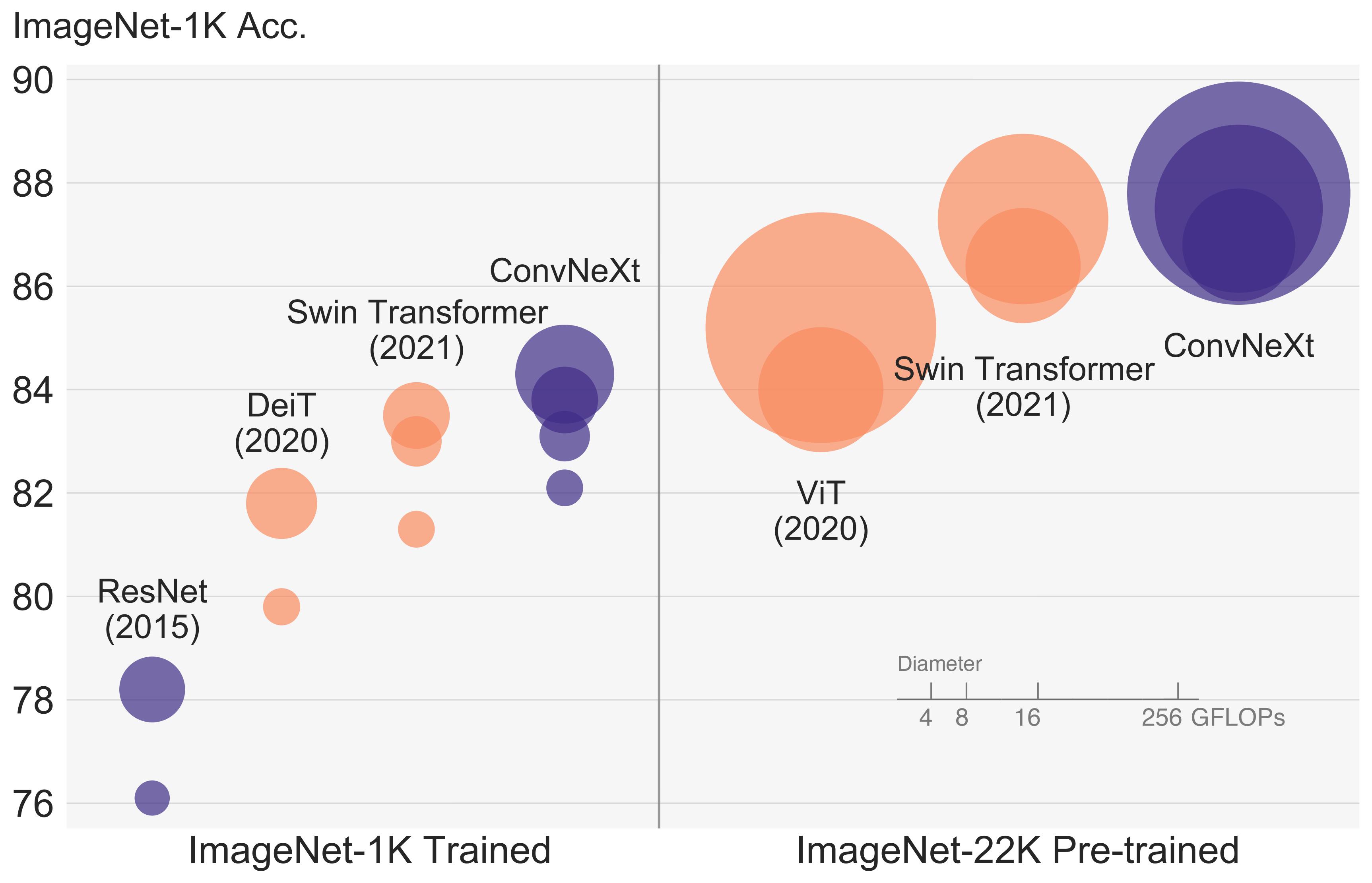
ConvNeXT architecture. Taken from the original paper.
This model was contributed by nielsr. The original code can be found here.
Resources
A list of official Hugging Face and community (indicated by 🌎) resources to help you get started with ConvNeXT.
- ConvNextForImageClassification is supported by this example script and notebook.
- See also: Image classification task guide
If you're interested in submitting a resource to be included here, please feel free to open a Pull Request and we'll review it! The resource should ideally demonstrate something new instead of duplicating an existing resource.
ConvNextConfig[[transformers.ConvNextConfig]]
class transformers.ConvNextConfigtransformers.ConvNextConfigint, optional, defaults to 3) --
The number of input channels.
- patch_size (
int, optional, defaults to 4) -- Patch size to use in the patch embedding layer. - num_stages (
int, optional, defaults to 4) -- The number of stages in the model. - hidden_sizes (
list[int], optional, defaults to [96, 192, 384, 768]) -- Dimensionality (hidden size) at each stage. - depths (
list[int], optional, defaults to [3, 3, 9, 3]) -- Depth (number of blocks) for each stage. - hidden_act (
strorfunction, optional, defaults to"gelu") -- The non-linear activation function (function or string) in each block. If string,"gelu","relu","selu"and"gelu_new"are supported. - initializer_range (
float, optional, defaults to 0.02) -- The standard deviation of the truncated_normal_initializer for initializing all weight matrices. - layer_norm_eps (
float, optional, defaults to 1e-12) -- The epsilon used by the layer normalization layers. - layer_scale_init_value (
float, optional, defaults to 1e-6) -- The initial value for the layer scale. - drop_path_rate (
float, optional, defaults to 0.0) -- The drop rate for stochastic depth. - out_features (
list[str], optional) -- If used as backbone, list of features to output. Can be any of"stem","stage1","stage2", etc. (depending on how many stages the model has). If unset andout_indicesis set, will default to the corresponding stages. If unset andout_indicesis unset, will default to the last stage. Must be in the same order as defined in thestage_namesattribute. - out_indices (
list[int], optional) -- If used as backbone, list of indices of features to output. Can be any of 0, 1, 2, etc. (depending on how many stages the model has). If unset andout_featuresis set, will default to the corresponding stages. If unset andout_featuresis unset, will default to the last stage. Must be in the same order as defined in thestage_namesattribute.0
This is the configuration class to store the configuration of a ConvNextModel. It is used to instantiate an ConvNeXT model according to the specified arguments, defining the model architecture. Instantiating a configuration with the defaults will yield a similar configuration to that of the ConvNeXT facebook/convnext-tiny-224 architecture.
Configuration objects inherit from PreTrainedConfig and can be used to control the model outputs. Read the documentation from PreTrainedConfig for more information.
Example:
>>> from transformers import ConvNextConfig, ConvNextModel

>>> # Initializing a ConvNext convnext-tiny-224 style configuration
>>> configuration = ConvNextConfig()

>>> # Initializing a model (with random weights) from the convnext-tiny-224 style configuration
>>> model = ConvNextModel(configuration)

>>> # Accessing the model configuration
>>> configuration = model.config
ConvNextImageProcessor[[transformers.ConvNextImageProcessor]]
class transformers.ConvNextImageProcessortransformers.ConvNextImageProcessorbool, optional, defaults to True) --
Controls whether to resize the image's (height, width) dimensions to the specified size. Can be overridden
by do_resize in the preprocess method.
- size (
dict[str, int]optional, defaults to{"shortest_edge" -- 384}): Resolution of the output image afterresizeis applied. Ifsize["shortest_edge"]>= 384, the image is resized to(size["shortest_edge"], size["shortest_edge"]). Otherwise, the smaller edge of the image will be matched toint(size["shortest_edge"]/crop_pct), after which the image is cropped to(size["shortest_edge"], size["shortest_edge"]). Only has an effect ifdo_resizeis set toTrue. Can be overridden bysizein thepreprocessmethod. - crop_pct (
floatoptional, defaults to 224 / 256) -- Percentage of the image to crop. Only has an effect ifdo_resizeisTrueand size < 384. Can be overridden bycrop_pctin thepreprocessmethod. - resample (
PILImageResampling, optional, defaults toResampling.BILINEAR) -- Resampling filter to use if resizing the image. Can be overridden byresamplein thepreprocessmethod. - do_rescale (
bool, optional, defaults toTrue) -- Whether to rescale the image by the specified scalerescale_factor. Can be overridden bydo_rescalein thepreprocessmethod. - rescale_factor (
intorfloat, optional, defaults to1/255) -- Scale factor to use if rescaling the image. Can be overridden byrescale_factorin thepreprocessmethod. - do_normalize (
bool, optional, defaults toTrue) -- Whether to normalize the image. Can be overridden by thedo_normalizeparameter in thepreprocessmethod. - image_mean (
floatorlist[float], optional, defaults toIMAGENET_STANDARD_MEAN) -- Mean to use if normalizing the image. This is a float or list of floats the length of the number of channels in the image. Can be overridden by theimage_meanparameter in thepreprocessmethod. - image_std (
floatorlist[float], optional, defaults toIMAGENET_STANDARD_STD) -- Standard deviation to use if normalizing the image. This is a float or list of floats the length of the number of channels in the image. Can be overridden by theimage_stdparameter in thepreprocessmethod.0
Constructs a ConvNeXT image processor.
preprocesstransformers.ConvNextImageProcessor.preprocessImageInput) --
Image to preprocess. Expects a single or batch of images with pixel values ranging from 0 to 255. If
passing in images with pixel values between 0 and 1, set do_rescale=False.
- do_resize (
bool, optional, defaults toself.do_resize) -- Whether to resize the image. - size (
dict[str, int], optional, defaults toself.size) -- Size of the output image afterresizehas been applied. Ifsize["shortest_edge"]>= 384, the image is resized to(size["shortest_edge"], size["shortest_edge"]). Otherwise, the smaller edge of the image will be matched toint(size["shortest_edge"]/ crop_pct), after which the image is cropped to(size["shortest_edge"], size["shortest_edge"]). Only has an effect ifdo_resizeis set toTrue. - crop_pct (
float, optional, defaults toself.crop_pct) -- Percentage of the image to crop if size < 384. - resample (
int, optional, defaults toself.resample) -- Resampling filter to use if resizing the image. This can be one ofPILImageResampling, filters. Only has an effect ifdo_resizeis set toTrue. - do_rescale (
bool, optional, defaults toself.do_rescale) -- Whether to rescale the image values between [0 - 1]. - rescale_factor (
float, optional, defaults toself.rescale_factor) -- Rescale factor to rescale the image by ifdo_rescaleis set toTrue. - do_normalize (
bool, optional, defaults toself.do_normalize) -- Whether to normalize the image. - image_mean (
floatorlist[float], optional, defaults toself.image_mean) -- Image mean. - image_std (
floatorlist[float], optional, defaults toself.image_std) -- Image standard deviation. - return_tensors (
strorTensorType, optional) -- The type of tensors to return. Can be one of:- Unset: Return a list of
np.ndarray. TensorType.PYTORCHor'pt': Return a batch of typetorch.Tensor.TensorType.NUMPYor'np': Return a batch of typenp.ndarray.
- Unset: Return a list of
- data_format (
ChannelDimensionorstr, optional, defaults toChannelDimension.FIRST) -- The channel dimension format for the output image. Can be one of:"channels_first"orChannelDimension.FIRST: image in (num_channels, height, width) format."channels_last"orChannelDimension.LAST: image in (height, width, num_channels) format.- Unset: Use the channel dimension format of the input image.
- input_data_format (
ChannelDimensionorstr, optional) -- The channel dimension format for the input image. If unset, the channel dimension format is inferred from the input image. Can be one of:"channels_first"orChannelDimension.FIRST: image in (num_channels, height, width) format."channels_last"orChannelDimension.LAST: image in (height, width, num_channels) format."none"orChannelDimension.NONE: image in (height, width) format.0
Preprocess an image or batch of images.
ConvNextImageProcessorFast[[transformers.ConvNextImageProcessorFast]]
class transformers.ConvNextImageProcessorFasttransformers.ConvNextImageProcessorFast
Constructs a fast Convnext image processor.
preprocesstransformers.ConvNextImageProcessorFast.preprocessUnion[PIL.Image.Image, numpy.ndarray, torch.Tensor, list['PIL.Image.Image'], list[numpy.ndarray], list['torch.Tensor']]) --
Image to preprocess. Expects a single or batch of images with pixel values ranging from 0 to 255. If
passing in images with pixel values between 0 and 1, set do_rescale=False.
- do_convert_rgb (
bool, optional) -- Whether to convert the image to RGB. - do_resize (
bool, optional) -- Whether to resize the image. - size (
Annotated[Union[int, list[int], tuple[int, ...], dict[str, int], NoneType], None]) -- Describes the maximum input dimensions to the model. - crop_size (
Annotated[Union[int, list[int], tuple[int, ...], dict[str, int], NoneType], None]) -- Size of the output image after applyingcenter_crop. - resample (
Annotated[Union[PILImageResampling, int, NoneType], None]) -- Resampling filter to use if resizing the image. This can be one of the enumPILImageResampling. Only has an effect ifdo_resizeis set toTrue. - do_rescale (
bool, optional) -- Whether to rescale the image. - rescale_factor (
float, optional) -- Rescale factor to rescale the image by ifdo_rescaleis set toTrue. - do_normalize (
bool, optional) -- Whether to normalize the image. - image_mean (
Union[float, list[float], tuple[float, ...], NoneType]) -- Image mean to use for normalization. Only has an effect ifdo_normalizeis set toTrue. - image_std (
Union[float, list[float], tuple[float, ...], NoneType]) -- Image standard deviation to use for normalization. Only has an effect ifdo_normalizeis set toTrue. - do_pad (
bool, optional) -- Whether to pad the image. Padding is done either to the largest size in the batch or to a fixed square size per image. The exact padding strategy depends on the model. - pad_size (
Annotated[Union[int, list[int], tuple[int, ...], dict[str, int], NoneType], None]) -- The size in{"height": int, "width" int}to pad the images to. Must be larger than any image size provided for preprocessing. Ifpad_sizeis not provided, images will be padded to the largest height and width in the batch. Applied only whendo_pad=True. - do_center_crop (
bool, optional) -- Whether to center crop the image. - data_format (
Union[str, ~image_utils.ChannelDimension, NoneType]) -- OnlyChannelDimension.FIRSTis supported. Added for compatibility with slow processors. - input_data_format (
Union[str, ~image_utils.ChannelDimension, NoneType]) -- The channel dimension format for the input image. If unset, the channel dimension format is inferred from the input image. Can be one of:"channels_first"orChannelDimension.FIRST: image in (num_channels, height, width) format."channels_last"orChannelDimension.LAST: image in (height, width, num_channels) format."none"orChannelDimension.NONE: image in (height, width) format.
- device (
Annotated[str, None], optional) -- The device to process the images on. If unset, the device is inferred from the input images. - return_tensors (
Annotated[Union[str, ~utils.generic.TensorType, NoneType], None]) -- Returns stacked tensors if set to `pt, otherwise returns a list of tensors. - disable_grouping (
bool, optional) -- Whether to disable grouping of images by size to process them individually and not in batches. If None, will be set to True if the images are on CPU, and False otherwise. This choice is based on empirical observations, as detailed here: https://github.com/huggingface/transformers/pull/38157 - crop_pct (
float, optional) -- Percentage of the image to crop. Only has an effect if size < 384. Can be overridden bycrop_pctin thepreprocessmethod.0<class 'transformers.image_processing_base.BatchFeature'>- data (dict) -- Dictionary of lists/arrays/tensors returned by the call method ('pixel_values', etc.). - tensor_type (
Union[None, str, TensorType], optional) -- You can give a tensor_type here to convert the lists of integers in PyTorch/Numpy Tensors at initialization.
ConvNextModel[[transformers.ConvNextModel]]
class transformers.ConvNextModeltransformers.ConvNextModel
The bare Convnext Model outputting raw hidden-states without any specific head on top.
This model inherits from PreTrainedModel. Check the superclass documentation for the generic methods the library implements for all its model (such as downloading or saving, resizing the input embeddings, pruning heads etc.)
This model is also a PyTorch torch.nn.Module subclass. Use it as a regular PyTorch Module and refer to the PyTorch documentation for all matter related to general usage and behavior.
forwardtransformers.ConvNextModel.forwardtorch.FloatTensor of shape (batch_size, num_channels, image_size, image_size), optional) --
The tensors corresponding to the input images. Pixel values can be obtained using
ConvNextImageProcessor. See ConvNextImageProcessor.call() for details (processor_class uses
ConvNextImageProcessor for processing images).
output_hidden_states (
bool, optional) -- Whether or not to return the hidden states of all layers. Seehidden_statesunder returned tensors for more detail.0transformers.modeling_outputs.BaseModelOutputWithPoolingAndNoAttentionortuple(torch.FloatTensor)Atransformers.modeling_outputs.BaseModelOutputWithPoolingAndNoAttentionor a tuple oftorch.FloatTensor(ifreturn_dict=Falseis passed or whenconfig.return_dict=False) comprising various elements depending on the configuration (ConvNextConfig) and inputs.last_hidden_state (
torch.FloatTensorof shape(batch_size, num_channels, height, width)) -- Sequence of hidden-states at the output of the last layer of the model.pooler_output (
torch.FloatTensorof shape(batch_size, hidden_size)) -- Last layer hidden-state after a pooling operation on the spatial dimensions.hidden_states (
tuple(torch.FloatTensor), optional, returned whenoutput_hidden_states=Trueis passed or whenconfig.output_hidden_states=True) -- Tuple oftorch.FloatTensor(one for the output of the embeddings, if the model has an embedding layer, + one for the output of each layer) of shape(batch_size, num_channels, height, width).Hidden-states of the model at the output of each layer plus the optional initial embedding outputs.
The ConvNextModel forward method, overrides the __call__ special method.
Although the recipe for forward pass needs to be defined within this function, one should call the Module
instance afterwards instead of this since the former takes care of running the pre and post processing steps while
the latter silently ignores them.
Example:
ConvNextForImageClassification[[transformers.ConvNextForImageClassification]]
class transformers.ConvNextForImageClassificationtransformers.ConvNextForImageClassification
ConvNext Model with an image classification head on top (a linear layer on top of the pooled features), e.g. for ImageNet.
This model inherits from PreTrainedModel. Check the superclass documentation for the generic methods the library implements for all its model (such as downloading or saving, resizing the input embeddings, pruning heads etc.)
This model is also a PyTorch torch.nn.Module subclass. Use it as a regular PyTorch Module and refer to the PyTorch documentation for all matter related to general usage and behavior.
forwardtransformers.ConvNextForImageClassification.forwardtorch.FloatTensor of shape (batch_size, num_channels, image_size, image_size), optional) --
The tensors corresponding to the input images. Pixel values can be obtained using
ConvNextImageProcessor. See ConvNextImageProcessor.call() for details (processor_class uses
ConvNextImageProcessor for processing images).
labels (
torch.LongTensorof shape(batch_size,), optional) -- Labels for computing the image classification/regression loss. Indices should be in[0, ..., config.num_labels - 1]. Ifconfig.num_labels == 1a regression loss is computed (Mean-Square loss), Ifconfig.num_labels > 1a classification loss is computed (Cross-Entropy).0transformers.modeling_outputs.ImageClassifierOutputWithNoAttention ortuple(torch.FloatTensor)A transformers.modeling_outputs.ImageClassifierOutputWithNoAttention or a tuple oftorch.FloatTensor(ifreturn_dict=Falseis passed or whenconfig.return_dict=False) comprising various elements depending on the configuration (ConvNextConfig) and inputs.loss (
torch.FloatTensorof shape(1,), optional, returned whenlabelsis provided) -- Classification (or regression if config.num_labels==1) loss.logits (
torch.FloatTensorof shape(batch_size, config.num_labels)) -- Classification (or regression if config.num_labels==1) scores (before SoftMax).hidden_states (
tuple(torch.FloatTensor), optional, returned whenoutput_hidden_states=Trueis passed or whenconfig.output_hidden_states=True) -- Tuple oftorch.FloatTensor(one for the output of the embeddings, if the model has an embedding layer, + one for the output of each stage) of shape(batch_size, num_channels, height, width). Hidden-states (also called feature maps) of the model at the output of each stage. The ConvNextForImageClassification forward method, overrides the__call__special method.
Although the recipe for forward pass needs to be defined within this function, one should call the Module
instance afterwards instead of this since the former takes care of running the pre and post processing steps while
the latter silently ignores them.
Example:
>>> from transformers import AutoImageProcessor, ConvNextForImageClassification
>>> import torch
>>> from datasets import load_dataset

>>> dataset = load_dataset("huggingface/cats-image")
>>> image = dataset["test"]["image"][0]

>>> image_processor = AutoImageProcessor.from_pretrained("facebook/convnext-tiny-224")
>>> model = ConvNextForImageClassification.from_pretrained("facebook/convnext-tiny-224")

>>> inputs = image_processor(image, return_tensors="pt")

>>> with torch.no_grad():
...     logits = model(**inputs).logits

>>> # model predicts one of the 1000 ImageNet classes
>>> predicted_label = logits.argmax(-1).item()
>>> print(model.config.id2label[predicted_label])
...
Xet Storage Details
- Size:
- 32.7 kB
- Xet hash:
- 85679961fbf24982d66141bca23e1f62465760b7e2361ae2bd5fd30cfde8693a
Xet efficiently stores files, intelligently splitting them into unique chunks and accelerating uploads and downloads. More info.