Instructions to use cgus/Apollo2-7B-iMat-GGUF with libraries, inference providers, notebooks, and local apps. Follow these links to get started.
- Libraries
- llama-cpp-python
How to use cgus/Apollo2-7B-iMat-GGUF with llama-cpp-python:
# !pip install llama-cpp-python from llama_cpp import Llama llm = Llama.from_pretrained( repo_id="cgus/Apollo2-7B-iMat-GGUF", filename="Apollo-7B-IQ4_NL.gguf", )
llm.create_chat_completion( messages = "{\n \"question\": \"What is my name?\",\n \"context\": \"My name is Clara and I live in Berkeley.\"\n}" ) - Notebooks
- Google Colab
- Kaggle
- Local Apps
- llama.cpp
How to use cgus/Apollo2-7B-iMat-GGUF with llama.cpp:
Install from brew
brew install llama.cpp # Start a local OpenAI-compatible server with a web UI: llama-server -hf cgus/Apollo2-7B-iMat-GGUF:Q4_K_M # Run inference directly in the terminal: llama-cli -hf cgus/Apollo2-7B-iMat-GGUF:Q4_K_M
Install from WinGet (Windows)
winget install llama.cpp # Start a local OpenAI-compatible server with a web UI: llama-server -hf cgus/Apollo2-7B-iMat-GGUF:Q4_K_M # Run inference directly in the terminal: llama-cli -hf cgus/Apollo2-7B-iMat-GGUF:Q4_K_M
Use pre-built binary
# Download pre-built binary from: # https://github.com/ggerganov/llama.cpp/releases # Start a local OpenAI-compatible server with a web UI: ./llama-server -hf cgus/Apollo2-7B-iMat-GGUF:Q4_K_M # Run inference directly in the terminal: ./llama-cli -hf cgus/Apollo2-7B-iMat-GGUF:Q4_K_M
Build from source code
git clone https://github.com/ggerganov/llama.cpp.git cd llama.cpp cmake -B build cmake --build build -j --target llama-server llama-cli # Start a local OpenAI-compatible server with a web UI: ./build/bin/llama-server -hf cgus/Apollo2-7B-iMat-GGUF:Q4_K_M # Run inference directly in the terminal: ./build/bin/llama-cli -hf cgus/Apollo2-7B-iMat-GGUF:Q4_K_M
Use Docker
docker model run hf.co/cgus/Apollo2-7B-iMat-GGUF:Q4_K_M
- LM Studio
- Jan
- Ollama
How to use cgus/Apollo2-7B-iMat-GGUF with Ollama:
ollama run hf.co/cgus/Apollo2-7B-iMat-GGUF:Q4_K_M
- Unsloth Studio new
How to use cgus/Apollo2-7B-iMat-GGUF with Unsloth Studio:
Install Unsloth Studio (macOS, Linux, WSL)
curl -fsSL https://unsloth.ai/install.sh | sh # Run unsloth studio unsloth studio -H 0.0.0.0 -p 8888 # Then open http://localhost:8888 in your browser # Search for cgus/Apollo2-7B-iMat-GGUF to start chatting
Install Unsloth Studio (Windows)
irm https://unsloth.ai/install.ps1 | iex # Run unsloth studio unsloth studio -H 0.0.0.0 -p 8888 # Then open http://localhost:8888 in your browser # Search for cgus/Apollo2-7B-iMat-GGUF to start chatting
Using HuggingFace Spaces for Unsloth
# No setup required # Open https://huggingface.co/spaces/unsloth/studio in your browser # Search for cgus/Apollo2-7B-iMat-GGUF to start chatting
- Docker Model Runner
How to use cgus/Apollo2-7B-iMat-GGUF with Docker Model Runner:
docker model run hf.co/cgus/Apollo2-7B-iMat-GGUF:Q4_K_M
- Lemonade
How to use cgus/Apollo2-7B-iMat-GGUF with Lemonade:
Pull the model
# Download Lemonade from https://lemonade-server.ai/ lemonade pull cgus/Apollo2-7B-iMat-GGUF:Q4_K_M
Run and chat with the model
lemonade run user.Apollo2-7B-iMat-GGUF-Q4_K_M
List all available models
lemonade list
Apollo2-7B-GGUF
Original model: Apollo2-7B
Made by: FreedomIntelligence
Quantization notes
Made with llama.cpp-b3938 with imatrix file based on Exllamav2 callibration dataset.
This model is meant to run with llama.cpp-compatible apps such as Text-Generation-WebUI, KoboldCpp, Jan, LM Studio and many many others.
17.12.2024: Readme update. It seems Q4_0_4_4, Q4_0_4_8 and Q4_0_8_8 support was removed in recent llama.cpp. I'll keep them but they might be no longer useful.
03.02.2025: Added Q4_0 and IQ4_NL quants as a substitute for Q4_0_X_Y quants for ARM devices with newer llama.cpp versions.
Original model card
Democratizing Medical LLMs For Much More Languages
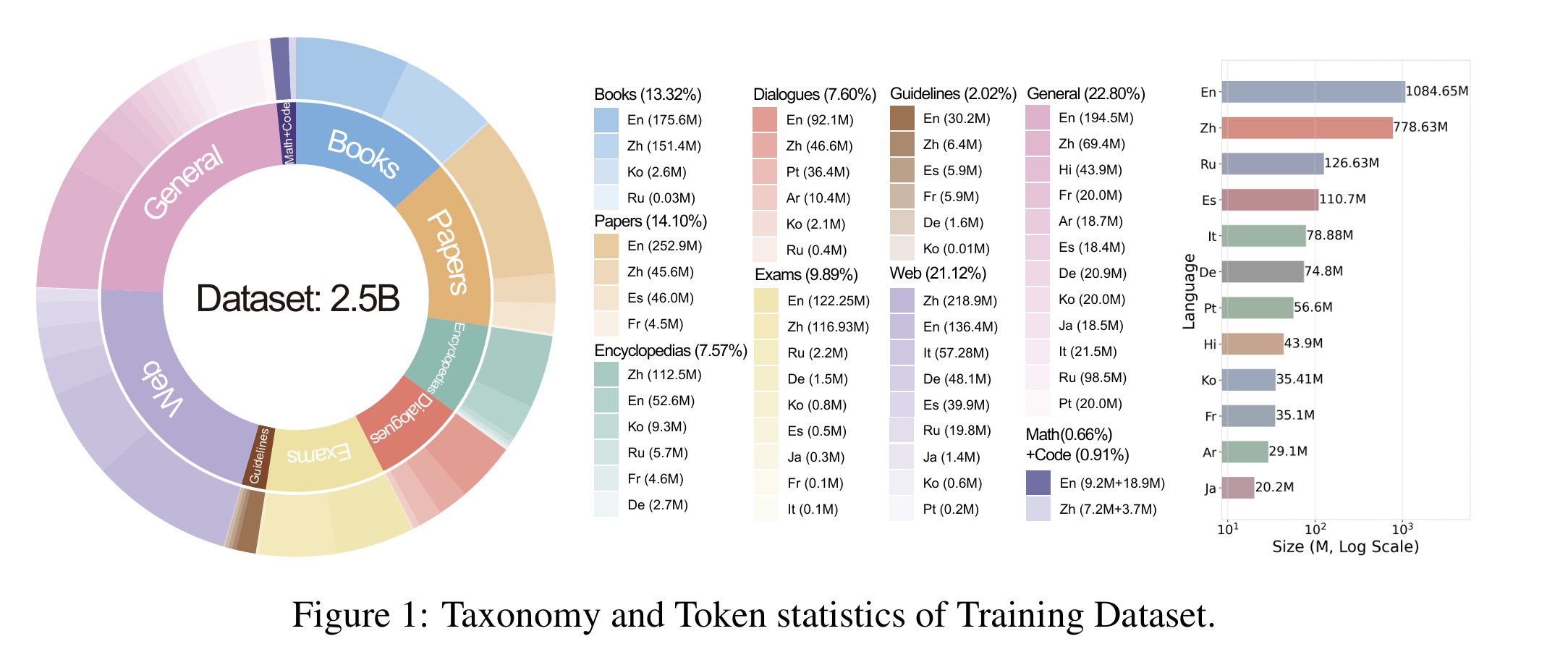
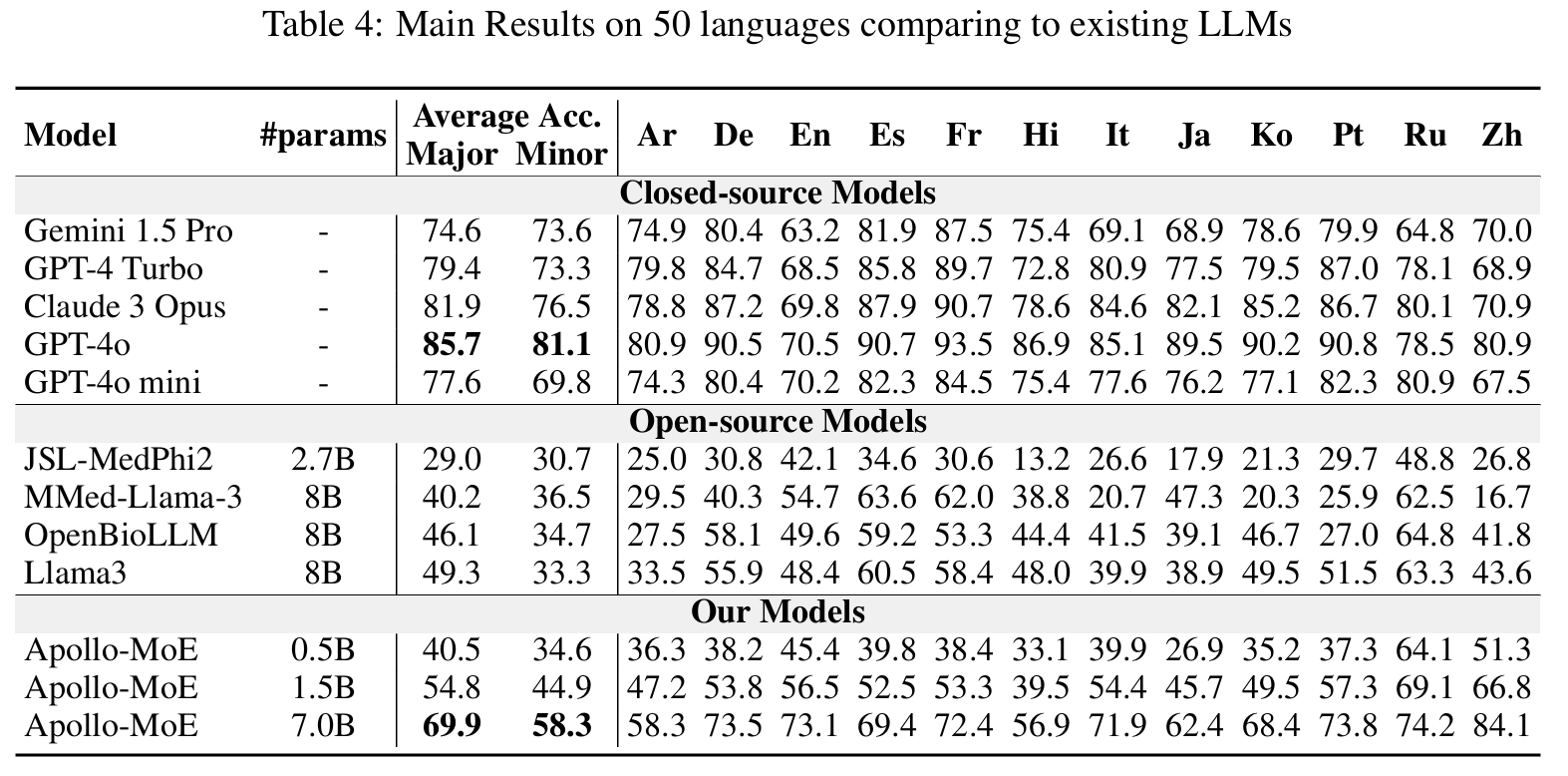
Covering 12 Major Languages including English, Chinese, French, Hindi, Spanish, Arabic, Russian, Japanese, Korean, German, Italian, Portuguese and 38 Minor Languages So far.
📃 Paper • 🌐 Demo • 🤗 ApolloMoEDataset • 🤗 ApolloMoEBench • 🤗 Models •🌐 Apollo • 🌐 ApolloMoE

🌈 Update
- [2024.10.15] ApolloMoE repo is published!🎉
Languages Coverage
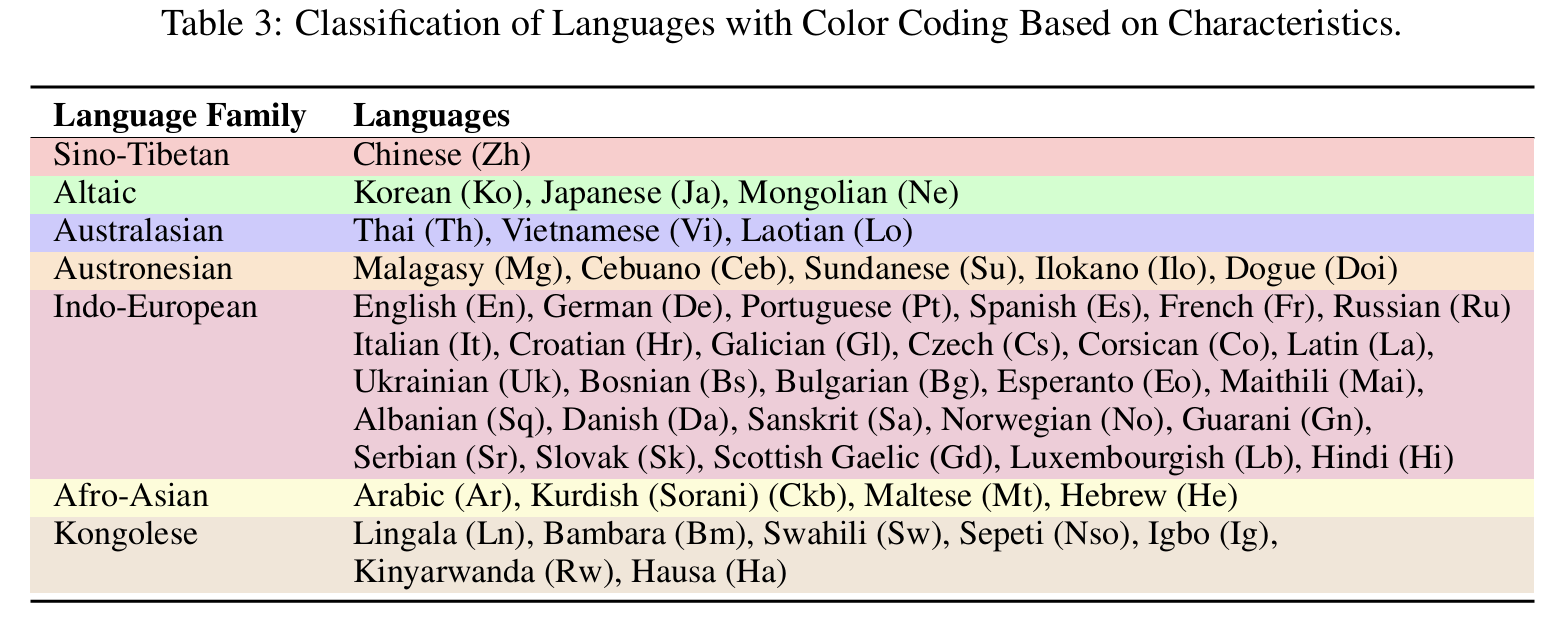
12 Major Languages and 38 Minor Languages
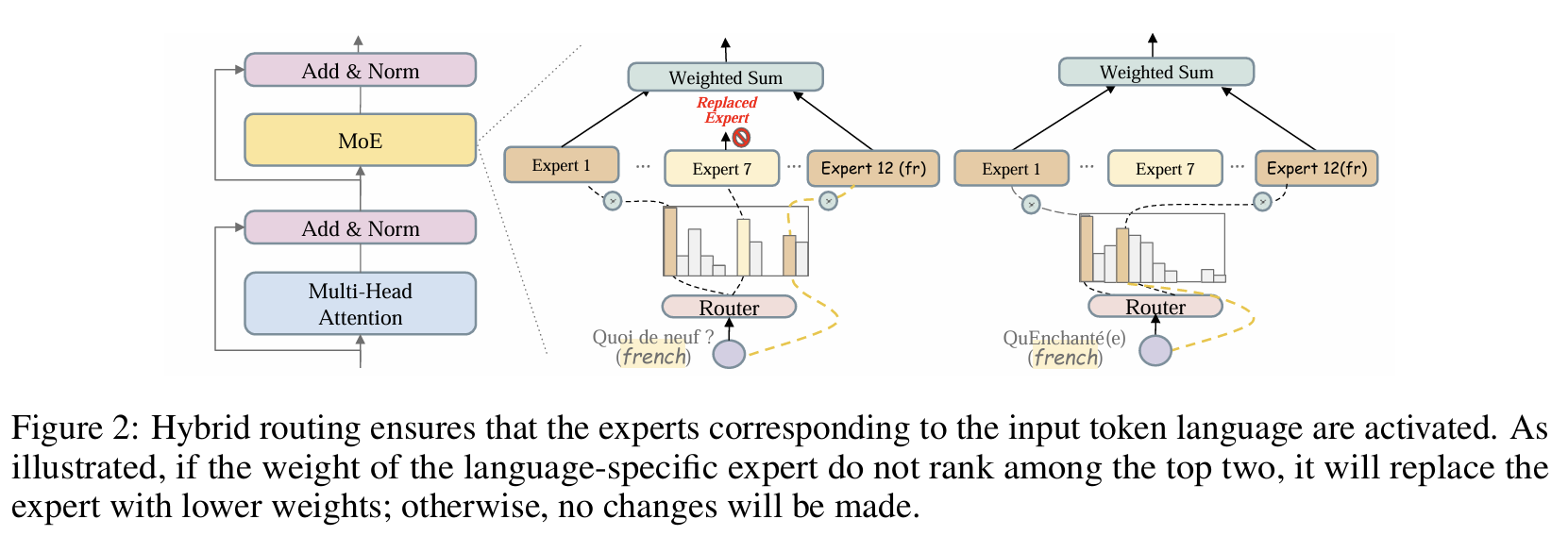
Architecture
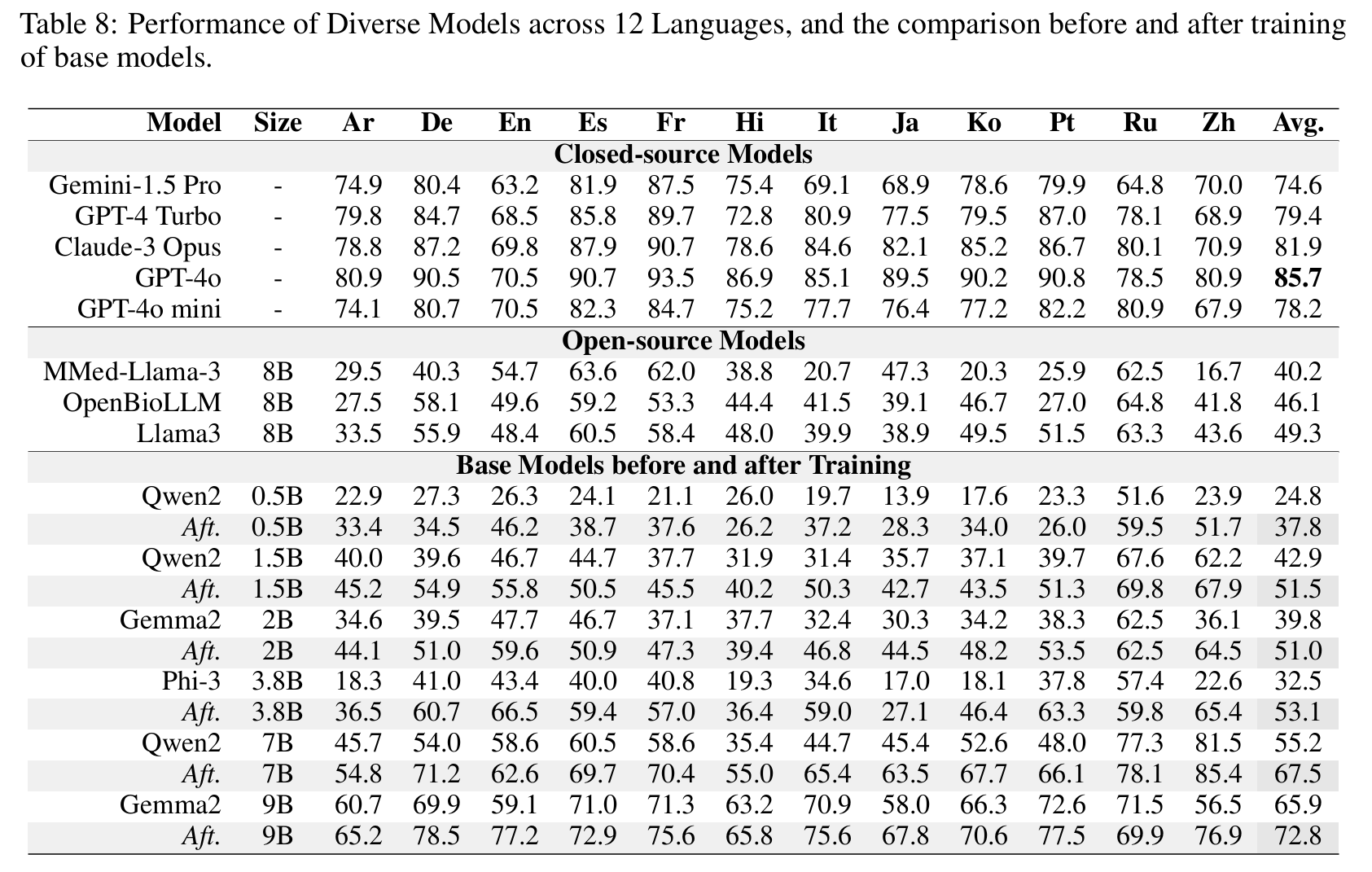
Results
Dense
🤗 Apollo2-0.5B • 🤗 Apollo2-1.5B • 🤗 Apollo2-2B
🤗 Apollo2-3.8B • 🤗 Apollo2-7B • 🤗 Apollo2-9B
Post-MoE
🤗 Apollo-MoE-0.5B • 🤗 Apollo-MoE-1.5B • 🤗 Apollo-MoE-7B
Usage Format
Apollo2
- 0.5B, 1.5B, 7B: User:{query}\nAssistant:{response}<|endoftext|>
- 2B, 9B: User:{query}\nAssistant:{response}<eos>
- 3.8B: <|user|>\n{query}<|end|><|assisitant|>\n{response}<|end|>
Apollo-MoE
- 0.5B, 1.5B, 7B: User:{query}\nAssistant:{response}<|endoftext|>
Dataset & Evaluation
Dataset 🤗 ApolloMoEDataset
Evaluation 🤗 ApolloMoEBench
Click to expand
EN:
- MedQA-USMLE
- MedMCQA
- PubMedQA: Because the results fluctuated too much, they were not used in the paper.
- MMLU-Medical
- Clinical knowledge, Medical genetics, Anatomy, Professional medicine, College biology, College medicine
ZH:
- MedQA-MCMLE
- CMB-single: Not used in the paper
- Randomly sample 2,000 multiple-choice questions with single answer.
- CMMLU-Medical
- Anatomy, Clinical_knowledge, College_medicine, Genetics, Nutrition, Traditional_chinese_medicine, Virology
- CExam: Not used in the paper
- Randomly sample 2,000 multiple-choice questions
ES: Head_qa
FR:
- Frenchmedmcqa
- [MMLU_FR]
- Clinical knowledge, Medical genetics, Anatomy, Professional medicine, College biology, College medicine
HI: MMLU_HI
- Clinical knowledge, Medical genetics, Anatomy, Professional medicine, College biology, College medicine
AR: MMLU_AR
- Clinical knowledge, Medical genetics, Anatomy, Professional medicine, College biology, College medicine
JA: IgakuQA
KO: KorMedMCQA
IT:
- MedExpQA
- [MMLU_IT]
- Clinical knowledge, Medical genetics, Anatomy, Professional medicine, College biology, College medicine
DE: BioInstructQA: German part
PT: BioInstructQA: Portuguese part
RU: RuMedBench
Results reproduction
Click to expand
We take Apollo2-7B or Apollo-MoE-0.5B as example
Download Dataset for project:
bash 0.download_data.shPrepare test and dev data for specific model:
- Create test data for with special token
bash 1.data_process_test&dev.shPrepare train data for specific model (Create tokenized data in advance):
- You can adjust data Training order and Training Epoch in this step
bash 2.data_process_train.shTrain the model
- If you want to train in Multi Nodes please refer to ./src/sft/training_config/zero_multi.yaml
bash 3.single_node_train.shEvaluate your model: Generate score for benchmark
bash 4.eval.sh
Citation
Please use the following citation if you intend to use our dataset for training or evaluation:
@misc{zheng2024efficientlydemocratizingmedicalllms,
title={Efficiently Democratizing Medical LLMs for 50 Languages via a Mixture of Language Family Experts},
author={Guorui Zheng and Xidong Wang and Juhao Liang and Nuo Chen and Yuping Zheng and Benyou Wang},
year={2024},
eprint={2410.10626},
archivePrefix={arXiv},
primaryClass={cs.CL},
url={https://arxiv.org/abs/2410.10626},
}
- Downloads last month
- 31
4-bit
5-bit
6-bit
8-bit