|
|
--- |
|
|
language: |
|
|
- en |
|
|
tags: |
|
|
- comfyui |
|
|
- inpainting |
|
|
- stable-diffusion |
|
|
- image-generation |
|
|
- computer-vision |
|
|
license: gpl-3.0 |
|
|
library_name: comfyui-extension |
|
|
pipeline_tag: image-to-image |
|
|
--- |
|
|
|
|
|
<div align="center"> |
|
|
|
|
|
# LanPaint: Universal Inpainting Sampler with "Think Mode" |
|
|
[](https://arxiv.org/abs/2502.03491) |
|
|
[](https://github.com/scraed/LanPaintBench) |
|
|
[](https://github.com/comfyanonymous/ComfyUI) |
|
|
[](https://scraed.github.io/scraedBlog/) |
|
|
[](https://github.com/scraed/LanPaint/stargazers) |
|
|
</div> |
|
|
|
|
|
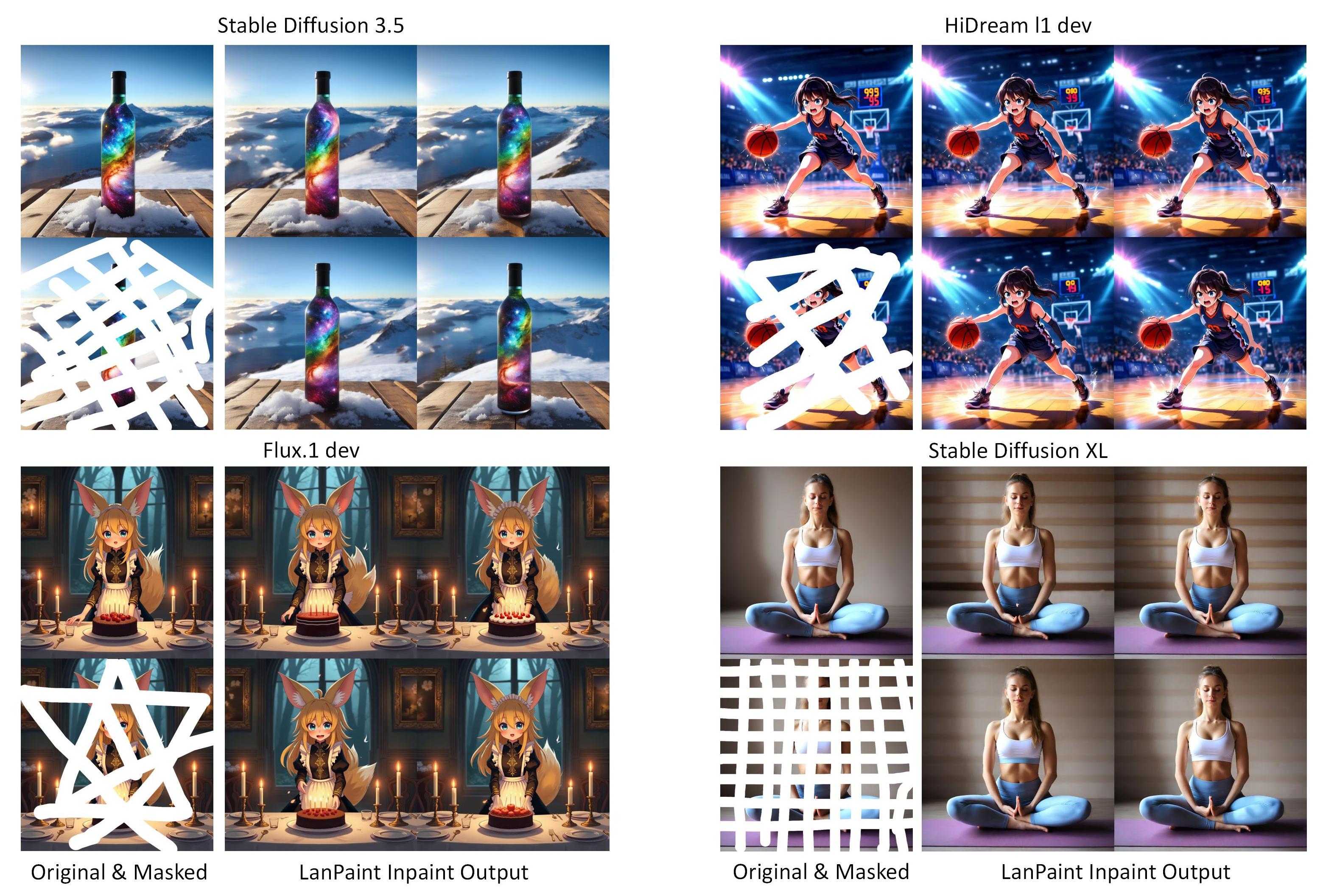
Universally applicable inpainting ability for every model. LanPaint sampler lets the model "think" through multiple iterations before denoising, enabling you to invest more computation time for superior inpainting quality. |
|
|
|
|
|
This is the official implementation of ["Lanpaint: Training-Free Diffusion Inpainting with Exact and Fast Conditional Inference"](https://arxiv.org/abs/2502.03491). The repository is for ComfyUI extension. Local Python benchmark code is published here: [LanPaintBench](https://github.com/scraed/LanPaintBench). |
|
|
|
|
|
 |
|
|
Check [Mased Qwen Edit Workflow](https://github.com/scraed/LanPaint/tree/master/examples/Example_14). You need to follow the ComfyUI version of [Qwen Image Edit workflow](https://docs.comfy.org/tutorials/image/qwen/qwen-image-edit) to download and install the model. |
|
|
|
|
|
 |
|
|
|
|
|
Also check [Qwen Inpaint Workflow](https://github.com/scraed/LanPaint/tree/master/examples/Example_13) and [Qwen Outpaint Workflow](https://github.com/scraed/LanPaint/tree/master/examples/Example_12). You need to follow the ComfyUI version of [Qwen Image workflow](https://docs.comfy.org/tutorials/image/qwen/qwen-image) to download and install the model. |
|
|
|
|
|
## Table of Contents |
|
|
- [Features](#features) |
|
|
- [Quickstart](#quickstart) |
|
|
- [How to Use Examples](#how-to-use-examples) |
|
|
- [Examples](#examples) |
|
|
- [Qwen Image](#example-qwen-image-inpaintlanpaint-k-sampler-5-steps-of-thinking) |
|
|
- [HiDream](#example-hidream-inpaint-lanpaint-k-sampler-5-steps-of-thinking) |
|
|
- [SD 3.5](#example-sd-35-inpaintlanpaint-k-sampler-5-steps-of-thinking) |
|
|
- [Flux](#example-flux-inpaintlanpaint-k-sampler-5-steps-of-thinking) |
|
|
- [SDXL Examples](#example-sdxl-0-character-consistency-side-view-generation-lanpaint-k-sampler-5-steps-of-thinking) |
|
|
- [Usage](#usage) |
|
|
- [Basic Sampler](#basic-sampler) |
|
|
- [Advanced Sampler](#lanpaint-ksampler-advanced) |
|
|
- [Tuning Guide](#lanpaint-ksampler-advanced-tuning-guide) |
|
|
- [Community Showcase](#community-showcase-) |
|
|
- [Updates](#updates) |
|
|
- [ToDo](#todo) |
|
|
- [Citation](#citation) |
|
|
|
|
|
## Features |
|
|
|
|
|
- **Universal Compatibility** – Works instantly with almost any model (**SD 1.5, XL, 3.5, Flux, HiDream, Qwen-Image or custom LoRAs**) and ControlNet. |
|
|
 |
|
|
- **No Training Needed** – Works out of the box with your existing model. |
|
|
- **Easy to Use** – Same workflow as standard ComfyUI KSampler. |
|
|
- **Flexible Masking** – Supports any mask shape, size, or position for inpainting/outpainting. |
|
|
- **No Workarounds** – Generates 100% new content (no blending or smoothing) without relying on partial denoising. |
|
|
- **Beyond Inpainting** – You can even use it as a simple way to generate consistent characters. |
|
|
|
|
|
**Warning**: LanPaint has degraded performance on distillation models, such as Flux.dev, due to a similar [issue with LORA training](https://medium.com/@zhiwangshi28/why-flux-lora-so-hard-to-train-and-how-to-overcome-it-a0c70bc59eaf). Please use low flux guidance (1.0-2.0) to mitigate this [issue](https://github.com/scraed/LanPaint/issues/30). |
|
|
|
|
|
## Quickstart |
|
|
|
|
|
1. **Install ComfyUI**: Follow the official [ComfyUI installation guide](https://docs.comfy.org/get_started) to set up ComfyUI on your system. Or ensure your ComfyUI version > 0.3.11. |
|
|
2. **Install ComfyUI-Manager**: Add the [ComfyUI-Manager](https://github.com/ltdrdata/ComfyUI-Manager) for easy extension management. |
|
|
3. **Install LanPaint Nodes**: |
|
|
- **Via ComfyUI-Manager**: Search for "[LanPaint](https://registry.comfy.org/publishers/scraed/nodes/LanPaint)" in the manager and install it directly. |
|
|
- **Manually**: Click "Install via Git URL" in ComfyUI-Manager and input the GitHub repository link: |
|
|
``` |
|
|
https://github.com/scraed/LanPaint.git |
|
|
``` |
|
|
Alternatively, clone this repository into the `ComfyUI/custom_nodes` folder. |
|
|
4. **Restart ComfyUI**: Restart ComfyUI to load the LanPaint nodes. |
|
|
|
|
|
Once installed, you'll find the LanPaint nodes under the "sampling" category in ComfyUI. Use them just like the default KSampler for high-quality inpainting! |
|
|
|
|
|
|
|
|
## **How to Use Examples:** |
|
|
1. Navigate to the **example** folder (i.e example_1), download all pictures. |
|
|
2. Drag **InPainted_Drag_Me_to_ComfyUI.png** into ComfyUI to load the workflow. |
|
|
3. Download the required model (i.e clicking **Model Used in This Example**). |
|
|
4. Load the model in ComfyUI. |
|
|
5. Upload **Masked_Load_Me_in_Loader.png** to the **"Load image"** node in the **"Mask image for inpainting"** group (second from left), or the **Prepare Image** node. |
|
|
7. Queue the task, you will get inpainted results from LanPaint. Some example also gives you inpainted results from the following methods for comparison: |
|
|
- **[VAE Encode for Inpainting](https://comfyanonymous.github.io/ComfyUI_examples/inpaint/)** |
|
|
- **[Set Latent Noise Mask](https://comfyui-wiki.com/en/tutorial/basic/how-to-inpaint-an-image-in-comfyui)** |
|
|
|
|
|
## Examples |
|
|
|
|
|
### Example Qwen Image: InPaint(LanPaint K Sampler, 5 steps of thinking) |
|
|
We are excited to announce that LanPaint now supports Qwen Image, providing powerful inpainting capabilities for image editing. |
|
|
|
|
|
 |
|
|
[View Workflow & Masks](https://github.com/scraed/LanPaint/tree/master/examples/Example_11) |
|
|
|
|
|
|
|
|
You need to follow the ComfyUI version of [Qwen Image workflow](https://docs.comfy.org/tutorials/image/qwen/qwen-image) to download and install the model. |
|
|
|
|
|
The following examples utilize a random seed of 0 to generate a batch of 4 images for variance demonstration and fair comparison. (Note: Generating 4 images may exceed your GPU memory; please adjust the batch size as necessary.) |
|
|
|
|
|
### Example HiDream: InPaint (LanPaint K Sampler, 5 steps of thinking) |
|
|
 |
|
|
[View Workflow & Masks](https://github.com/scraed/LanPaint/tree/master/examples/Example_8) |
|
|
|
|
|
You need to follow the ComfyUI version of [HiDream workflow](https://docs.comfy.org/tutorials/image/hidream/hidream-i1) to download and install the model. |
|
|
|
|
|
### Example HiDream: OutPaint(LanPaint K Sampler, 5 steps of thinking) |
|
|
.jpg?raw=true) |
|
|
[View Workflow & Masks](https://github.com/scraed/LanPaint/tree/master/examples/Example_10) |
|
|
|
|
|
You need to follow the ComfyUI version of [HiDream workflow](https://docs.comfy.org/tutorials/image/hidream/hidream-i1) to download and install the model. Thanks [Amazon90](https://github.com/Amazon90) for providing this example. |
|
|
|
|
|
### Example SD 3.5: InPaint(LanPaint K Sampler, 5 steps of thinking) |
|
|
 |
|
|
[View Workflow & Masks](https://github.com/scraed/LanPaint/tree/master/examples/Example_9) |
|
|
|
|
|
You need to follow the ComfyUI version of [SD 3.5 workflow](https://comfyui-wiki.com/en/tutorial/advanced/stable-diffusion-3-5-comfyui-workflow) to download and install the model. |
|
|
|
|
|
### Example Flux: InPaint(LanPaint K Sampler, 5 steps of thinking) |
|
|
 |
|
|
[View Workflow & Masks](https://github.com/scraed/LanPaint/tree/master/examples/Example_7) |
|
|
[Model Used in This Example](https://huggingface.co/Comfy-Org/flux1-dev/blob/main/flux1-dev-fp8.safetensors) |
|
|
(Note: Prompt First mode is disabled on Flux. As it does not use CFG guidance.) |
|
|
|
|
|
### Example SDXL 0: Character Consistency (Side View Generation) (LanPaint K Sampler, 5 steps of thinking) |
|
|
 |
|
|
[View Workflow & Masks](https://github.com/scraed/LanPaint/tree/master/examples/Example_6) |
|
|
[Model Used in This Example](https://civitai.com/models/1188071?modelVersionId=1408658) |
|
|
|
|
|
(Tricks 1: You can emphasize the character by copy it's image multiple times with Photoshop. Here I have made one extra copy.) |
|
|
|
|
|
(Tricks 2: Use prompts like multiple views, multiple angles, clone, turnaround. Use LanPaint's Prompt first mode (does not support Flux)) |
|
|
|
|
|
(Tricks 3: Remeber LanPaint can in-paint: Mask non-consistent regions and try again!) |
|
|
|
|
|
|
|
|
### Example SDXL 1: Basket to Basket Ball (LanPaint K Sampler, 2 steps of thinking). |
|
|
 |
|
|
[View Workflow & Masks](https://github.com/scraed/LanPaint/tree/master/examples/Example_1) |
|
|
[Model Used in This Example](https://civitai.com/models/1188071?modelVersionId=1408658) |
|
|
### Example SDXL 2: White Shirt to Blue Shirt (LanPaint K Sampler, 5 steps of thinking) |
|
|
 |
|
|
[View Workflow & Masks](https://github.com/scraed/LanPaint/tree/master/examples/Example_2) |
|
|
[Model Used in This Example](https://civitai.com/models/1188071?modelVersionId=1408658) |
|
|
### Example SDXL 3: Smile to Sad (LanPaint K Sampler, 5 steps of thinking) |
|
|
 |
|
|
[View Workflow & Masks](https://github.com/scraed/LanPaint/tree/master/examples/Example_3) |
|
|
[Model Used in This Example](https://civitai.com/models/133005/juggernaut-xl) |
|
|
### Example SDXL 4: Damage Restoration (LanPaint K Sampler, 5 steps of thinking) |
|
|
 |
|
|
[View Workflow & Masks](https://github.com/scraed/LanPaint/tree/master/examples/Example_4) |
|
|
[Model Used in This Example](https://civitai.com/models/133005/juggernaut-xl) |
|
|
### Example SDXL 5: Huge Damage Restoration (LanPaint K Sampler, 20 steps of thinking) |
|
|
 |
|
|
[View Workflow & Masks](https://github.com/scraed/LanPaint/tree/master/examples/Example_5) |
|
|
[Model Used in This Example](https://civitai.com/models/133005/juggernaut-xl) |
|
|
|
|
|
Check more for use cases like inpaint on [fine tuned models](https://github.com/scraed/LanPaint/issues/12#issuecomment-2938662021) and [face swapping](https://github.com/scraed/LanPaint/issues/12#issuecomment-2938723501), thanks to [Amazon90](https://github.com/Amazon90). |
|
|
|
|
|
|
|
|
## Usage |
|
|
|
|
|
**Workflow Setup** |
|
|
Same as default ComfyUI KSampler - simply replace with LanPaint KSampler nodes. The inpainting workflow is the same as the [SetLatentNoiseMask](https://comfyui-wiki.com/zh/comfyui-nodes/latent/inpaint/set-latent-noise-mask) inpainting workflow. |
|
|
|
|
|
**Note** |
|
|
- LanPaint requires binary masks (values of 0 or 1) without opacity or smoothing. To ensure compatibility, set the mask's **opacity and hardness to maximum** in your mask editor. During inpainting, any mask with smoothing or gradients will automatically be converted to a binary mask. |
|
|
- LanPaint relies heavily on your text prompts to guide inpainting - explicitly describe the content you want generated in the masked area. If results show artifacts or mismatched elements, counteract them with targeted negative prompts. |
|
|
|
|
|
## Basic Sampler |
|
|
 |
|
|
|
|
|
- LanPaint KSampler: The most basic and easy to use sampler for inpainting. |
|
|
- LanPaint KSampler (Advanced): Full control of all parameters. |
|
|
|
|
|
### LanPaint KSampler |
|
|
Simplified interface with recommended defaults: |
|
|
|
|
|
- Steps: 20 - 50. More steps will give more "thinking" and better results. |
|
|
- LanPaint NumSteps: The turns of thinking before denoising. Recommend 5 for most of tasks ( which means 5 times slower than sampling without thinking). Use 10 for more challenging tasks. |
|
|
- LanPaint Prompt mode: Image First mode and Prompt First mode. Image First mode focuses on the image, inpaint based on image context (maybe ignore prompt), while Prompt First mode focuses more on the prompt. Use Prompt First mode for tasks like character consistency. (Technically, it Prompt First mode change CFG scale to negative value in the BIG score to emphasis prompt, which will costs image quality.) |
|
|
|
|
|
### LanPaint KSampler (Advanced) |
|
|
Full parameter control: |
|
|
**Key Parameters** |
|
|
|
|
|
| Parameter | Range | Description | |
|
|
|-----------|-------|-------------| |
|
|
| `Steps` | 0-100 | Total steps of diffusion sampling. Higher means better inpainting. Recommend 20-50. | |
|
|
| `LanPaint_NumSteps` | 0-20 | Reasoning iterations per denoising step ("thinking depth"). Easy task: 2-5. Hard task: 5-10 | |
|
|
| `LanPaint_Lambda` | 0.1-50 | Content alignment strength (higher = stricter). Recommend 4.0 - 10.0 | |
|
|
| `LanPaint_StepSize` | 0.1-1.0 | The StepSize of each thinking step. Recommend 0.1-0.5. | |
|
|
| `LanPaint_Beta` | 0.1-2.0 | The StepSize ratio between masked / unmasked region. Small value can compensate high lambda values. Recommend 1.0 | |
|
|
| `LanPaint_Friction` | 0.0-100.0 | The friction of Langevin dynamics. Higher means more slow but stable, lower means fast but unstable. Recommend 10.0 - 20.0| |
|
|
| `LanPaint_EarlyStop` | 0-10 | Stop LanPaint iteration before the final sampling step. Helps to remove artifacts in some cases. Recommend 1-5| |
|
|
| `LanPaint_PromptMode` | Image First / Prompt First | Image First mode focuses on the image context, maybe ignore prompt. Prompt First mode focuses more on the prompt. | |
|
|
|
|
|
For detailed descriptions of each parameter, simply hover your mouse over the corresponding input field to view tooltips with additional information. |
|
|
|
|
|
### LanPaint Mask Blend |
|
|
This node blends the original image with the inpainted image based on the mask. It is useful if you want the unmasked region to match the original image pixel perfectly. |
|
|
|
|
|
## LanPaint KSampler (Advanced) Tuning Guide |
|
|
For challenging inpainting tasks: |
|
|
|
|
|
1️⃣ **Boost Quality** |
|
|
Increase **total number of sampling steps** (very important!), **LanPaint_NumSteps** (thinking iterations) or **LanPaint_Lambda** if the inpainted result does not meet your expectations. |
|
|
|
|
|
2️⃣ **Boost Speed** |
|
|
Decrease **LanPaint_NumSteps** to accelerate generation! If you want better results but still need fewer steps, consider: |
|
|
- **Increasing LanPaint_StepSize** to speed up the thinking process. |
|
|
- **Decreasing LanPaint_Friction** to make the Langevin dynamics converges more faster. |
|
|
|
|
|
3️⃣ **Fix Unstability**: |
|
|
If you find the results have wired texture, try |
|
|
- Reduce **LanPaint_Friction** to make the Langevin dynamics more stable. |
|
|
- Reduce **LanPaint_StepSize** to use smaller step size. |
|
|
- Reduce **LanPaint_Beta** if you are using a high lambda value. |
|
|
|
|
|
⚠️ **Notes**: |
|
|
- For effective tuning, **fix the seed** and adjust parameters incrementally while observing the results. This helps isolate the impact of each setting. Better to do it with a batche of images to avoid overfitting on a single image. |
|
|
|
|
|
## Community Showcase [](#community-showcase-) |
|
|
|
|
|
Discover how the community is using LanPaint! Here are some user-created tutorials: |
|
|
|
|
|
- [Ai绘画进阶148-三大王炸!庆祝高允贞出道6周年!T8即将直播?当AI绘画学会深度思考?!万能修复神器LanPaint,万物皆可修!-T8 Comfyui教程](https://www.youtube.com/watch?v=Z4DSTv3UPJo) |
|
|
- [Ai绘画进阶151-真相了!T8竟是个AI?!LanPaint进阶(二),人物一致性,多视角实验性测试,新参数讲解,工作流分享-T8 Comfyui教程](https://www.youtube.com/watch?v=landiRhvF3k) |
|
|
- [重绘和三视图角色一致性解决新方案!LanPaint节点尝试](https://www.youtube.com/watch?v=X0WbXdm6FA0) |
|
|
- [ComfyUI: HiDream with Perturbation Upscale, LanPaint Inpainting (Workflow Tutorial)](https://www.youtube.com/watch?v=2-mGe4QVIIw&t=2785s) |
|
|
- [ComfyUI必备LanPaint插件超详细使用教程](https://plugin.aix.ink/archives/lanpaint) |
|
|
|
|
|
Submit a PR to add your tutorial/video here, or open an [Issue](https://github.com/scraed/LanPaint/issues) with details! |
|
|
|
|
|
## Updates |
|
|
- 2025/08/08 |
|
|
- Add Qwen image support |
|
|
- 2025/06/21 |
|
|
- Update the algorithm with enhanced stability and outpaint performance. |
|
|
- Add outpaint example |
|
|
- Supports Sampler Custom (Thanks to [MINENEMA](https://github.com/MINENEMA)) |
|
|
- 2025/06/04 |
|
|
- Add more sampler support. |
|
|
- Add early stopping to advanced sampler. |
|
|
- 2025/05/28 |
|
|
- Major update on the Langevin solver. It is now much faster and more stable. |
|
|
- Greatly simplified the parameters for advanced sampler. |
|
|
- Fix performance issue on Flux and SD 3.5 |
|
|
- 2025/04/16 |
|
|
- Added Primary HiDream support |
|
|
- 2025/03/22 |
|
|
- Added Primary Flux support |
|
|
- Added Tease Mode |
|
|
- 2025/03/10 |
|
|
- LanPaint has received a major update! All examples now use the LanPaint K Sampler, offering a simplified interface with enhanced performance and stability. |
|
|
- 2025/03/06: |
|
|
- Bug Fix for str not callable error and unpack error. Big thanks to [jamesWalker55](https://github.com/jamesWalker55) and [EricBCoding](https://github.com/EricBCoding). |
|
|
|
|
|
## ToDo |
|
|
- Try Implement Detailer |
|
|
- ~~Provide inference code on without GUI.~~ Check our local Python benchmark code [LanPaintBench](https://github.com/scraed/LanPaintBench). |
|
|
|
|
|
## Citation |
|
|
|
|
|
``` |
|
|
@misc{zheng2025lanpainttrainingfreediffusioninpainting, |
|
|
title={Lanpaint: Training-Free Diffusion Inpainting with Exact and Fast Conditional Inference}, |
|
|
author={Candi Zheng and Yuan Lan and Yang Wang}, |
|
|
year={2025}, |
|
|
eprint={2502.03491}, |
|
|
archivePrefix={arXiv}, |
|
|
primaryClass={eess.IV}, |
|
|
url={https://arxiv.org/abs/2502.03491}, |
|
|
} |
|
|
``` |
|
|
|
|
|
|
|
|
|
|
|
|
|
|
|
|
|
|
|
|
|

