| | --- |
| | title: Modal hook 的有趣 BUG |
| | date: 2022-12-21 |
| | author: zombieJ |
| | zhihu_url: https://zhuanlan.zhihu.com/p/639265725 |
| | yuque_url: https://www.yuque.com/ant-design/ant-design/yq0w59gikugthyqz |
| | juejin_url: https://juejin.cn/post/7322306608103686194 |
| | --- |
| | |
| | 最近我们遇到了一个 [issue](https://github.com/ant-design/ant-design/issues/39427),说是 `Modal.useModal` 的 `contextHolder` 在放置不同的位置时,`modal.confirm` 弹出位置会不一样: |
| |
|
| | ```tsx |
| | import React from 'react'; |
| | import { Button, Modal } from 'antd'; |
| | |
| | export default () => { |
| | const [modal, contextHolder] = Modal.useModal(); |
| | |
| | return ( |
| | <div> |
| | <Modal open> |
| | <Button |
| | onClick={() => { |
| | modal.confirm({ title: 'Hello World' }); |
| | }} |
| | > |
| | Confirm |
| | </Button> |
| | |
| | {/* 🚨 BUG when put here */} |
| | {contextHolder} |
| | </Modal> |
| | |
| | {/* ✅ Work as expect when put here */} |
| | {/* {contextHolder} */} |
| | </div> |
| | ); |
| | }; |
| | ``` |
| |
|
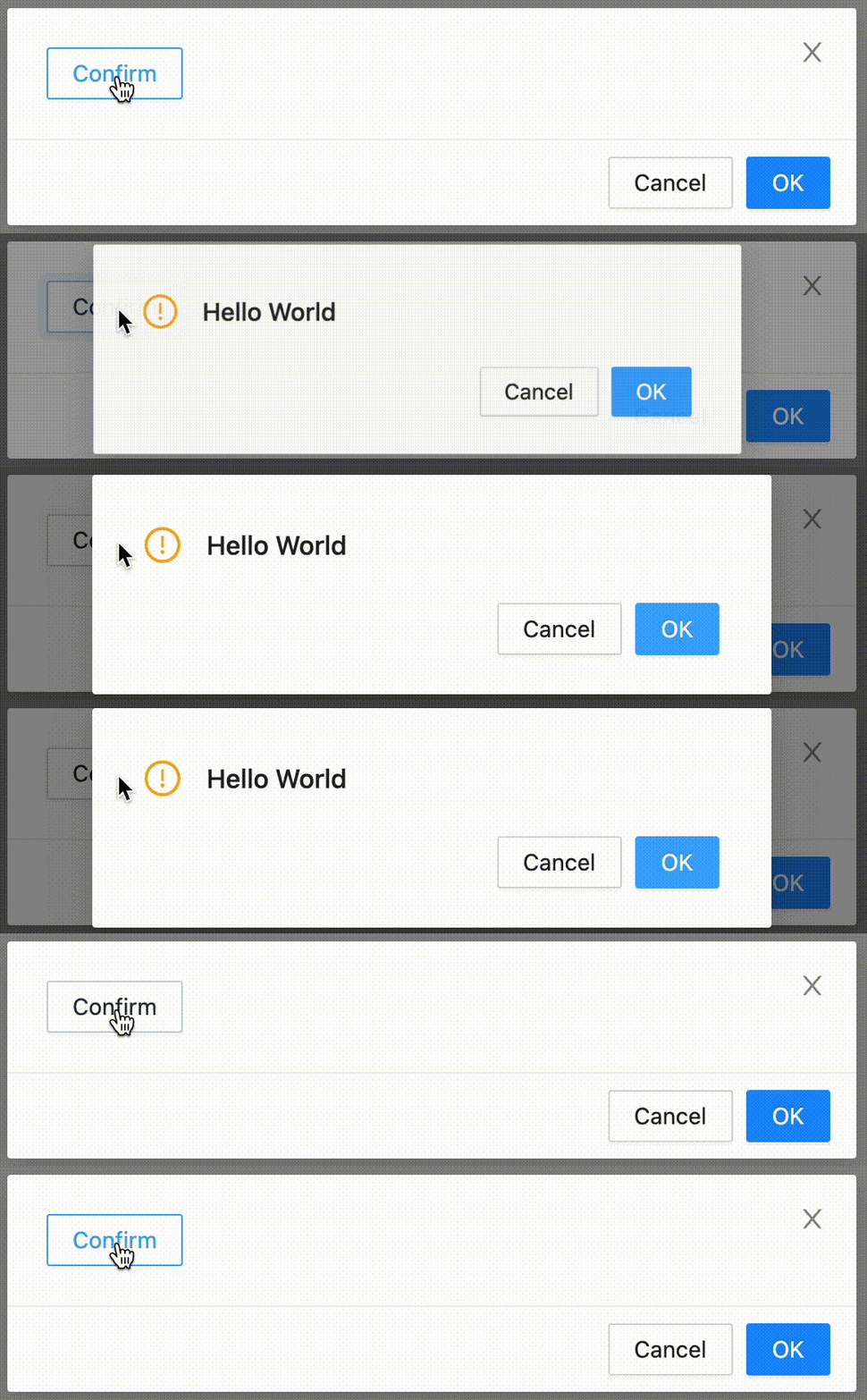
| | 正常版本: |
| |
|
| |  |
| |
|
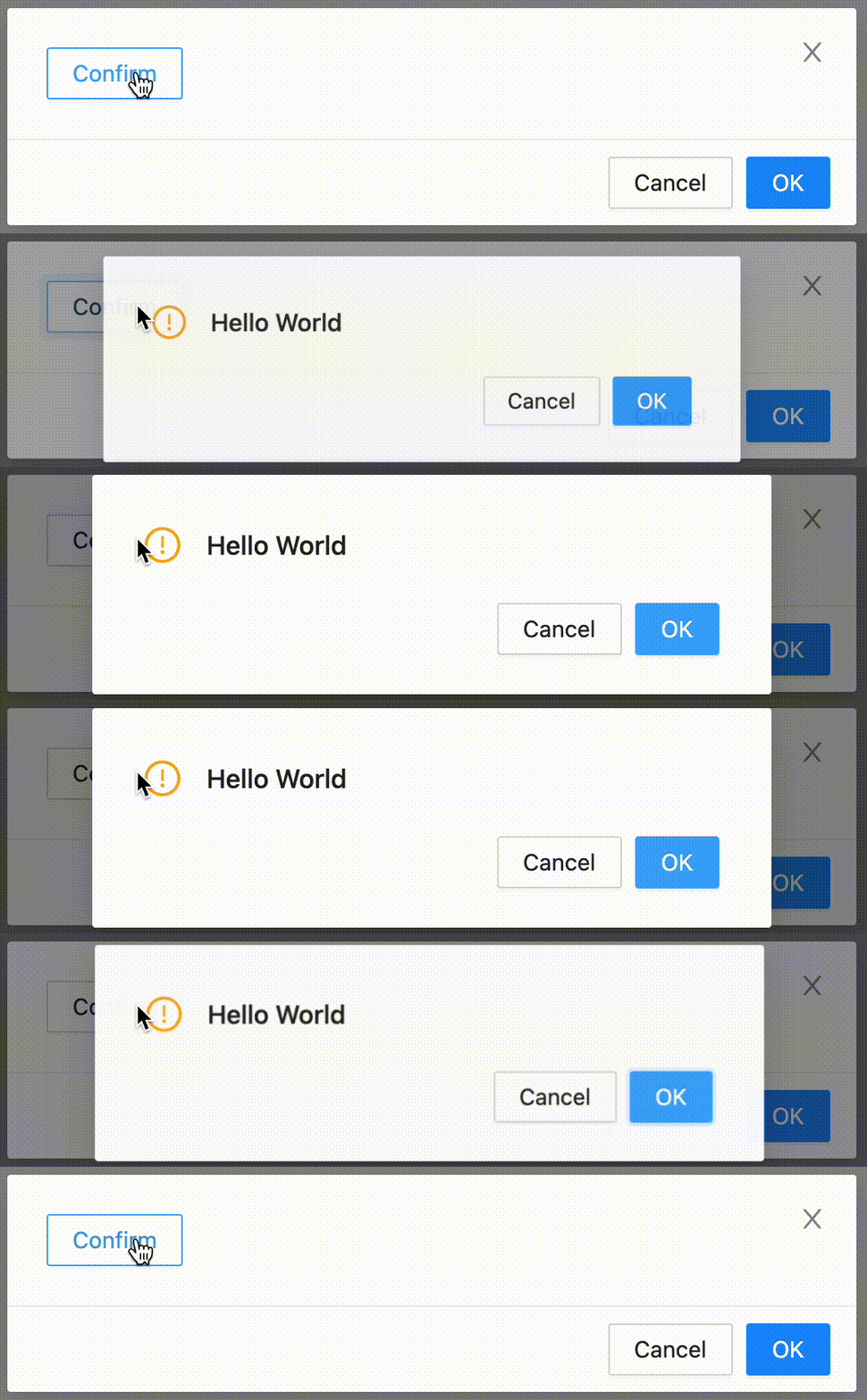
| | 有问题版本: |
| |
|
| |  |
| |
|
| | 从上图可以看到当 `contextHolder` 放在 `Modal` 内部时,hooks 调用的弹出位置不正确了。 |
| |
|
| | ### 思路整理 |
| |
|
| | antd 的 Modal 底层调用的是 `rc-dialog` 组件库,其接受一个 `mousePosition` 属性,用于控制弹出位置([Dialog/Content/index.tsx](https://github.com/react-component/dialog/blob/79649e187ee512be6b3eb3b76e4a6b618b67ebc7/src/Dialog/Content/index.tsx#L43)): |
| |
|
| | ```tsx |
| | // pseudocode |
| | const elementOffset = offset(dialogElement); |
| | const transformOrigin = `${mousePosition.x - elementOffset.left}px ${ |
| | mousePosition.y - elementOffset.top |
| | }px`; |
| | ``` |
| |
|
| | 其中 `offset` 方法用于获取窗体本身的坐标位置([util.ts](https://github.com/react-component/dialog/blob/79649e187ee512be6b3eb3b76e4a6b618b67ebc7/src/util.ts#L28)): |
| |
|
| | ```tsx |
| | // pseudocode |
| | function offset(el: Element) { |
| | const { left, top } = el.getBoundingClientRect(); |
| | return { left, top }; |
| | } |
| | ``` |
| |
|
| | 通过断点调试,我们可以发现 `mousePosition` 的值是正确的,但是 `offset` 中获取的 `rect` 的值是错误的: |
| |
|
| | ```json |
| | { |
| | "left": 0, |
| | "top": 0, |
| | "width": 0, |
| | "height": 0 |
| | } |
| | ``` |
| |
|
| | 这个值很明显代表窗体组件在动画启动节点尚未添加到 DOM 树中,所以我们需要查看一下 Dialog 添加的逻辑。 |
| |
|
| | ### createPortal |
| |
|
| | `rc-dialog` 通过 `rc-portal` 在 document 中创建一个节点,然后通过 `ReactDOM.createPortal` 将组件渲染到这个节点上。对于 `contextHolder` 位置不同而出现表现不同可以推测,一定是在 document 创建节点的时序出现了问题,于是我们可以进一步看一下 `rc-portal` 中默认添加节点的部分([useDom.tsx](https://github.com/react-component/portal/blob/85e6e15ee97c70ec260c5409d9d273d6967e3560/src/useDom.tsx#L55)): |
| |
|
| | ```tsx |
| | // pseudocode |
| | function append() { |
| | // This is not real world code, just for explain |
| | document.body.appendChild(document.createElement('div')); |
| | } |
| | |
| | useLayoutEffect(() => { |
| | if (queueCreate) { |
| | queueCreate(append); |
| | } else { |
| | append(); |
| | } |
| | }, []); |
| | ``` |
| |
|
| | 其中 `queueCreate` 是通过 `context` 获取,目的是为了防止在嵌套层级下,子元素创建先于父元素的情况: |
| |
|
| | ```tsx |
| | <Modal title="Hello 1" open> |
| | <Modal title="Hello 2" open> |
| | <Modal> |
| | <Modal> |
| | ``` |
| |
|
| | ```html |
| | <!-- Child `useLayoutEffect` is run before parent. Which makes inject DOM before parent --> |
| | <div data-title="Hello 2"></div> |
| | <div data-title="Hello 1"></div> |
| | ``` |
| |
|
| | 通过 `queueCreate` 将子元素的 `append` 加入队列,然后再通过 `useLayoutEffect` 执行: |
| |
|
| | ```tsx |
| | // pseudocode |
| | const [queue, setQueue] = useState<VoidFunction[]>([]); |
| | |
| | function queueCreate(appendFn: VoidFunction) { |
| | setQueue((origin) => { |
| | const newQueue = [appendFn, ...origin]; |
| | return newQueue; |
| | }); |
| | } |
| | |
| | useLayoutEffect(() => { |
| | if (queue.length) { |
| | queue.forEach((appendFn) => appendFn()); |
| | setQueue([]); |
| | } |
| | }, [queue]); |
| | ``` |
| |
|
| | ### 问题分析 |
| |
|
| | 由于上述的队列操作,使得 portal 的 DOM 在嵌套下会在下一个 `useLayoutEffect` 触发。这导致添加节点行为后于 `rc-dialog` 启动动画的 `useLayoutEffect` 时机,导致元素不在 document 中而无法获取正确的坐标信息。 |
| |
|
| | 由于 Modal 已经是开启状态,其实不需要通过 `queue` 异步执行,所以我们只需要加一个判断如果是开启状态,直接执行 `append` 即可: |
| |
|
| | ```tsx |
| | // pseudocode |
| | const appendedRef = useRef(false); |
| | |
| | const queueCreate = !appendedRef.current |
| | ? (appendFn: VoidFunction) => { |
| | // same code |
| | } |
| | : undefined; |
| | |
| | function append() { |
| | // This is not real world code, just for explain |
| | document.body.appendChild(document.createElement('div')); |
| | appendedRef.current = true; |
| | } |
| | |
| | // ... |
| | |
| | return <PortalContext value={queueCreate}>{children}</PortalContext>; |
| | ``` |
| |
|
| | 以上。 |
| |
|

