

WP.com block editor
This package provides utilities for the WordPress.com block editor integration.
These utilities are intended to be built and then served from widgets.wp.com, so they can be loaded by a WordPress.com or a Jetpack connected site.
This code is developed in the calypso monorepo at https://github.com/Automattic/wp-calypso/tree/trunk/apps/wpcom-block-editor.
Editors
There is one editor supported:
- WP Admin block editor. The block editor loaded by the WP Admin interface on
https://<SITE_SLUG>/wp-admin/post-new.php.
Features
Skip down to structure if you'd like to know how this relates to the code and directory structure!
The block editor integration provides features for the following combination of sites and editors:
| Feature | Editor | Simple site | Atomic site | Jetpack site |
|---|---|---|---|---|
rich-text:
Extensions for the Rich Text toolbar with the Calypso buttons missing on Core (i.e. underline, justify).
|
WP Admin | ✅ | ✅ | ✅ |
| Calypso | ✅ | ✅ | ✅ | |
deprecate-coblocks-buttons:
Prevents the CoBlocks Buttons block from being insertable.
|
WP Admin | ✅ | ✅ | ❌ |
| Calypso | ✅ | ✅ | ❌ | |
fix-block-invalidation-errors:
Performs block attempt block recovery on editor load if validation errors are detected.
|
WP Admin | ✅ | ✅ | ❌ |
| Calypso | ✅ | ✅ | ❌ | |
fix-coblocks-fonts:
Prevents CoBlocks typography support inserting unnecessary content into saved blocks
|
WP Admin | ✅ | ✅ | ❌ |
| Calypso | ✅ | ✅ | ❌ | |
reorder-block-categories:
Moves Jetpack and CoBlocks Block Categories below Core Categories.
|
WP Admin | ✅ | ✅ | ❌ |
| Calypso | ✅ | ✅ | ❌ | |
tracking:
Adds analytics around specific user actions.
|
WP Admin | ✅ | ✅ | ❌ |
| Calypso | ✅ | ✅ | ❌ |
Structure
Features in the wpcom-block-editor/src folder follow this structure. This roughly corresponds to three main bundles which are created by webpack, and allows us to support (or not support) various features according to the grid above.
.
└── src/
    ├── default ← Always loaded.
    ├── wpcom   ← Only loaded when you access Gutenberg on Simple and Atomic sites.
You can access Gutenberg through wp-admin on any Simple, Atomic, and connected Jetpack site. (Note that Atomic sites are a subset of connected Jetpack sites.) The best way to explain the structure is with an example.
Say you have an Atomic site. In this scenario, the Jetpack plugin code here determines which bundles to load. It will load the default bundle because that is always loaded. It also loads the wpcom directory because it knows this is an Atomic site. As a result, all features are supported in this situation.
If we access Gutenberg on the same Atomic site through wp-admin, the same PHP code will run. It still loads default and wpcom.
Say you have a connected Jetpack site that is non-Atomic. In this scenario, it loads the default directory by default.
Then, each bundle contains features for different types of pages. For example, the editor.js file is in every directory, since the main goal of this app is to provide features for the editor. Additionally, the view.js file exists in the default directory in order to provide some code which is always loaded on the front end.
.
└── $bundle_name/
    ├── features    ← Directory with all features that are bundled under this group.
    ├── editor.js   ← script importing features that will be loaded only in the editor.
    ├── editor.scss ← stylesheet importing styles of features that will be loaded only in the editor.
    ├── view.js     ← script importing features that will be loaded in both editor and front-end.
    └── view.scss   ← stylesheet importing styles of features that will loaded in both editor and front-end.
Build
Dev workflow
The wpcom-block-editor needs an active wpcom sandbox to test.
Ensure that your sandbox is set up, aliased to wpcom-sandbox and currently active
The following will build wpcom-block-editor, and upload the results to the widgets.wp.com/wpcom-block-editor folder on your sandbox.
# Watch for file changes and upload build output to your sandbox
yarn dev --sync
Manual
To manually build the package, execute the command below passing the directory where the distributable files will be generated:
cd apps/wpcom-block-editor

# Watch for changes:
yarn build --watch

# Production build:
yarn build

# Change output directory (default is ./dist)
yarn build --output-path=/path-to-folder
Automatic
The build-wpcom-block-editor CircleCI job automatically generates a build on every Calypso PR.

The build files are stored as artifacts of the job.
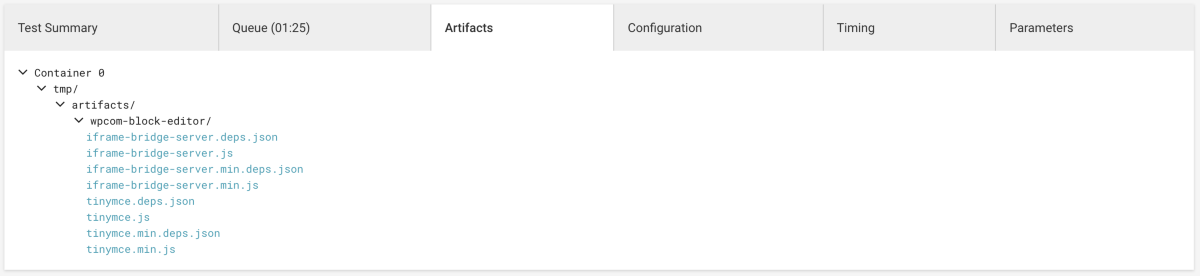
You must be logged in to CircleCI for the Artifacts tab to be displayed.