


| # 《从零开始学扩散模型》 | |
| ## 术语表 | |
| | 词汇 | 翻译 | | |
| | :---------------------- | :--- | | |
| | Corruption Process | 退化过程 | | |
| | Pipeline | 管线 | | |
| | Timestep | 时间步 | | |
| | Scheduler | 调度器 | | |
| | Gradient Accumulation | 梯度累加 | | |
| | Fine-Tuning | 微调 | | |
| | Guidance | 引导 | | |
| # 目录 | |
| ## 第一部分 基础知识 | |
| ### 第一章 扩散模型的原理、发展和应用 | |
| #### 1.1 扩散模型的原理 | |
| #### 1.2 扩散模型的发展 | |
| #### 1.3 扩散模型的应用 | |
| ### 第二章 HuggingFace介绍与环境准备 | |
| #### 2.1 HuggingFace Space | |
| #### 2.2 Transformer 与 diffusers 库 | |
| #### 2.3 环境准备 | |
| ## 第二部分 扩散模型实战 | |
| ### 第三章 从零开始做扩散模型 | |
| #### 3.1 章节概述 | |
| 有时,只考虑一些事务最简单的情况反而会更有助于理解其工作原理。我们将在本章中进行尝试,从一个简单的扩散模型开始,了解不同部分的工作原理,然后再对比它们与更复杂的实现有何不同。 | |
| 首先,我们将学习如下知识点: | |
| - 损坏过程(向数据添加噪声); | |
| - 什么是UNet模型,以及如何从零开始实现一个简单的UNet; | |
| - 扩散模型训练; | |
| - 采样理论。 | |
| 然后,我们将对比我们的版本与使用diffusers库中DDPM实现的区别,知识点如下: | |
| - 对小型UNet模型的改进; | |
| - DDPM噪声计划; | |
| - 训练目标的差异; | |
| - timestep调节; | |
| - 采样方法。 | |
| 值得注意的是,这里的大多数代码都是为了说明与讲解,我不建议直接将其用于自己的工作(除非你只是为了学习而尝试改进本章展示的示例)。 | |
| #### 3.2 环境准备 | |
| #### 3.2.1 环境的创建与导入 | |
| ```python | |
| !pip install -q diffusers | |
| ``` | |
| ```python | |
| import torch | |
| import torchvision | |
| from torch import nn | |
| from torch.nn import functional as F | |
| from torch.utils.data import DataLoader | |
| from diffusers import DDPMScheduler, UNet2DModel | |
| from matplotlib import pyplot as plt | |
| device = torch.device("cuda" if torch.cuda.is_available() else "cpu") | |
| print(f'Using device: {device}') | |
| ``` | |
| #### 3.2.2 数据集测试 | |
| 在这里,我们将使用一个非常小的经典数据集mnist来进行测试。如果您想在不改变任何其他内容的情况下,给模型一个更困难的挑战,请使用torchvision.dataset中FashionMNIST来代替。 | |
| ```python | |
| dataset = torchvision.datasets.MNIST(root="mnist/", train=True, download=True, transform=torchvision.transforms.ToTensor()) | |
| ``` | |
| ```python | |
| train_dataloader = DataLoader(dataset, batch_size=8, shuffle=True) | |
| ``` | |
| ```python | |
| x, y = next(iter(train_dataloader)) | |
| print('Input shape:', x.shape) | |
| print('Labels:', y) | |
| plt.imshow(torchvision.utils.make_grid(x)[0], cmap='Greys'); | |
| ``` | |
| 该数据集中的每张图都是一个阿拉伯数字的28x28像素的灰度图,像素值的范围是从0到1。 | |
| #### 3.3 扩散模型-退化过程 | |
| 假设你没有读过任何扩散模型相关的论文,但你知道在这个过程是在给内容增加噪声。你会怎么做? | |
| 你可能想要一个简单的方法来控制损坏的程度。那么如果需要引入一个参数,用来控制输入的“噪声量”,那么我们会这么做: | |
| `noise = torch.rand_like(x)` | |
| `noisy_x = (1-amount)*x + amount*noise` | |
| 如果 amount = 0,则返回输入而不做任何更改。如果 amount = 1,我们将得到一个纯粹的噪声。通过这种方式将输入内容与噪声混合,再把混合后的结果仍然保持在相同的范围(0 to 1)。 | |
| 我们可以很容易地实现这一点(但是要注意tensor的shape,以防被广播(broadcasting)机制不正确的影响到): | |
| ```python | |
| def corrupt(x, amount): | |
| """Corrupt the input `x` by mixing it with noise according to `amount`""" | |
| noise = torch.rand_like(x) | |
| amount = amount.view(-1, 1, 1, 1) # Sort shape so broadcasting works | |
| return x*(1-amount) + noise*amount | |
| ``` | |
| 我们来可视化一下输出的结果,来看看它是否符合预期: | |
| ```python | |
| # Plotting the input data | |
| fig, axs = plt.subplots(2, 1, figsize=(12, 5)) | |
| axs[0].set_title('Input data') | |
| axs[0].imshow(torchvision.utils.make_grid(x)[0], cmap='Greys') | |
| # Adding noise | |
| amount = torch.linspace(0, 1, x.shape[0]) # Left to right -> more corruption | |
| noised_x = corrupt(x, amount) | |
| # Plottinf the noised version | |
| axs[1].set_title('Corrupted data (-- amount increases -->)') | |
| axs[1].imshow(torchvision.utils.make_grid(noised_x)[0], cmap='Greys'); | |
| ``` | |
| 当噪声量接近1时,我们的数据开始看起来像纯粹的随机噪声。但对于大多数的噪声情况下,您还是可以很好地识别出数字。但这样你认为是最佳的结果吗? | |
| #### 3.4 扩散模型训练 | |
| #### 3.4.1 Unet模型 | |
| 我们想要一个模型,它可以接收28px的噪声图像,并输出相同形状的预测。一个比较流行的选择是一个叫做UNet的架构。[最初被发明用于医学图像中的分割任务](https://arxiv.org/abs/1505.04597),UNet由一个“压缩路径”和一个“扩展路径”组成。“压缩路径”会使通过该路径的数据纬度被压缩,而通过“扩展路径”会将数据扩展回原始维度(类似于自动编码器)。模型中的残差连接也允许信息和梯度在不同层级之间流动。 | |
| 一些UNet的设计在每个阶段都有复杂的blocks,但对于这个玩具demo,我们只会构建一个最简单的示例,它接收一个单通道图像,并通过下行路径的3个卷积层(图和代码中的down_layers)和上行路径的3个卷积层,且在下行和上行层之间有残差连接。我们将使用max pooling进行下采样和`nn.Upsample`用于上采样。某些更复杂的UNets的设计会使用带有可学习参数的上采样和下采样layer。下面的结构图大致展示了每个layer的输出通道数: | |
|  | |
| 代码实现如下: | |
| ```python | |
| class BasicUNet(nn.Module): | |
| """A minimal UNet implementation.""" | |
| def __init__(self, in_channels=1, out_channels=1): | |
| super().__init__() | |
| self.down_layers = torch.nn.ModuleList([ | |
| nn.Conv2d(in_channels, 32, kernel_size=5, padding=2), | |
| nn.Conv2d(32, 64, kernel_size=5, padding=2), | |
| nn.Conv2d(64, 64, kernel_size=5, padding=2), | |
| ]) | |
| self.up_layers = torch.nn.ModuleList([ | |
| nn.Conv2d(64, 64, kernel_size=5, padding=2), | |
| nn.Conv2d(64, 32, kernel_size=5, padding=2), | |
| nn.Conv2d(32, out_channels, kernel_size=5, padding=2), | |
| ]) | |
| self.act = nn.n() # The activation function | |
| self.downscale = nn.MaxPool2d(2) | |
| self.upscale = nn.Upsample(scale_factor=2) | |
| def forward(self, x): | |
| h = [] | |
| for i, l in enumerate(self.down_layers): | |
| x = self.act(l(x)) # Through the layer and the activation function | |
| if i < 2: # For all but the third (final) down layer: | |
| h.append(x) # Storing output for skip connection | |
| x = self.downscale(x) # Downscale ready for the next layer | |
| for i, l in enumerate(self.up_layers): | |
| if i > 0: # For all except the first up layer | |
| x = self.upscale(x) # Upscale | |
| x += h.pop() # Fetching stored output (skip connection) | |
| x = self.act(l(x)) # Through the layer and the activation function | |
| return x | |
| ``` | |
| 我们可以验证输出的shape是否如我们期望的那样是与输入相同的: | |
| ```python | |
| net = BasicUNet() | |
| x = torch.rand(8, 1, 28, 28) | |
| net(x).shape | |
| ``` | |
| torch.Size([8, 1, 28, 28]) | |
| 该网络有30多万个参数: | |
| ```python | |
| sum([p.numel() for p in net.parameters()]) | |
| ``` | |
| 309057 | |
| 您可以尝试更改每个layer中的通道数或直接尝试不同的结构设计。 | |
| #### 3.4.2 开始训练模型 | |
| 那么,扩散模型到底应该做什么呢?对这个问题有各种不同的看法,但对于这个演示,我们来选择一个简单的框架:给定一个带噪的输入noisy_x,模型应该输出它对原本x的最佳预测。我们会通过均方误差将预测与真实值进行比较。 | |
| 我们现在可以尝试来训练网络了。 | |
| - 获取一批数据 | |
| - 添加随机噪声 | |
| - 将数据输入模型 | |
| - 将模型预测与干净图像进行比较,以计算loss | |
| - 更新模型的参数。 | |
| 你可以自由进行修改来看看怎样获得更好的结果! | |
| ```python | |
| # Dataloader (you can mess with batch size) | |
| batch_size = 128 | |
| train_dataloader = DataLoader(dataset, batch_size=batch_size, shuffle=True) | |
| # How many runs through the data should we do? | |
| n_epochs = 3 | |
| # Create the network | |
| net = BasicUNet() | |
| net.to(device) | |
| # Our loss finction | |
| loss_fn = nn.MSELoss() | |
| # The optimizer | |
| opt = torch.optim.Adam(net.parameters(), lr=1e-3) | |
| # Keeping a record of the losses for later viewing | |
| losses = [] | |
| # The training loop | |
| for epoch in range(n_epochs): | |
| for x, y in train_dataloader: | |
| # Get some data and prepare the corrupted version | |
| x = x.to(device) # Data on the GPU | |
| noise_amount = torch.rand(x.shape[0]).to(device) # Pick random noise amounts | |
| noisy_x = corrupt(x, noise_amount) # Create our noisy x | |
| # Get the model prediction | |
| pred = net(noisy_x) | |
| # Calculate the loss | |
| loss = loss_fn(pred, x) # How close is the output to the true 'clean' x? | |
| # Backprop and update the params: | |
| opt.zero_grad() | |
| loss.backward() | |
| opt.step() | |
| # Store the loss for later | |
| losses.append(loss.item()) | |
| # Print our the average of the loss values for this epoch: | |
| avg_loss = sum(losses[-len(train_dataloader):])/len(train_dataloader) | |
| print(f'Finished epoch {epoch}. Average loss for this epoch: {avg_loss:05f}') | |
| # View the loss curve | |
| plt.plot(losses) | |
| plt.ylim(0, 0.1); | |
| ``` | |
| Finished epoch 0. Average loss for this epoch: 0.026736 | |
| Finished epoch 1. Average loss for this epoch: 0.020692 | |
| Finished epoch 2. Average loss for this epoch: 0.018887 | |
|  | |
| 我们可以尝试通过抓取一批数据,拿不同程度的损坏数据,喂进模型获得预测来观察结果: | |
| ```python | |
| #@markdown Visualizing model predictions on noisy inputs: | |
| # Fetch some data | |
| x, y = next(iter(train_dataloader)) | |
| x = x[:8] # Only using the first 8 for easy plotting | |
| # Corrupt with a range of amounts | |
| amount = torch.linspace(0, 1, x.shape[0]) # Left to right -> more corruption | |
| noised_x = corrupt(x, amount) | |
| # Get the model predictions | |
| with torch.no_grad(): | |
| preds = net(noised_x.to(device)).detach().cpu() | |
| # Plot | |
| fig, axs = plt.subplots(3, 1, figsize=(12, 7)) | |
| axs[0].set_title('Input data') | |
| axs[0].imshow(torchvision.utils.make_grid(x)[0].clip(0, 1), cmap='Greys') | |
| axs[1].set_title('Corrupted data') | |
| axs[1].imshow(torchvision.utils.make_grid(noised_x)[0].clip(0, 1), cmap='Greys') | |
| axs[2].set_title('Network Predictions') | |
| axs[2].imshow(torchvision.utils.make_grid(preds)[0].clip(0, 1), cmap='Greys'); | |
| ``` | |
|  | |
| 你可以看到,对于较低噪声量的输入,预测的结果相当不错!但是,当噪声量非常高时,模型能够获得的信息就开始逐渐减少。而当我们达到amount = 1时,模型会输出一个模糊的预测,该预测会很接近数据集的平均值。模型正是通过这样的方式来猜测原始输入。 | |
| #### 3.5 扩散模型-采样(取样)过程 | |
| #### 3.5.1 采样(取样)过程 | |
| 如果我们在高噪声量下的预测结果不是很好,又如何来解决呢? | |
| 如果我们从完全随机的噪声开始,先检查一下模型预测的结果,然后只朝着预测方向移动一小部分,比如说20%。现在我们有一个夹杂很多噪声的图像,其中可能隐藏了一些输入数据结构的提示,我们来把它输入到模型中来获得新的预测。希望这个新的预测比上一步稍微好一点(因为我们这一次的输入稍微减少了一点噪声),所以我们可以再用这个新的,更好一点的预测往前再迈出一小步。 | |
| 如果一切顺利的话,以上过程重复几次以后我们就会得到一个全新的图像!以下图例是迭代了五次以后的结果,左侧是每个阶段的模型输入的可视化,右侧则是预测的去噪图像。要注意即使模型在第一步后就能输出一个去掉一些噪声的图像,但也只是向最终目标前进了一点点。如此重复几次后,图像的结构开始逐渐出现并得到改善,直到获得我们的最终结果为止。 | |
| ```python | |
| #@markdown Sampling strategy: Break the process into 5 steps and move 1/5'th of the way there each time: | |
| n_steps = 5 | |
| x = torch.rand(8, 1, 28, 28).to(device) # Start from random | |
| step_history = [x.detach().cpu()] | |
| pred_output_history = [] | |
| for i in range(n_steps): | |
| with torch.no_grad(): # No need to track gradients during inference | |
| pred = net(x) # Predict the denoised x0 | |
| pred_output_history.append(pred.detach().cpu()) # Store model output for plotting | |
| mix_factor = 1/(n_steps - i) # How much we move towards the prediction | |
| x = x*(1-mix_factor) + pred*mix_factor # Move part of the way there | |
| step_history.append(x.detach().cpu()) # Store step for plotting | |
| fig, axs = plt.subplots(n_steps, 2, figsize=(9, 4), sharex=True) | |
| axs[0,0].set_title('x (model input)') | |
| axs[0,1].set_title('model prediction') | |
| for i in range(n_steps): | |
| axs[i, 0].imshow(torchvision.utils.make_grid(step_history[i])[0].clip(0, 1), cmap='Greys') | |
| axs[i, 1].imshow(torchvision.utils.make_grid(pred_output_history[i])[0].clip(0, 1), cmap='Greys') | |
| ``` | |
|  | |
| 我们可以将流程分成更多步骤,并期望通过这种方式来获得质量更高的图像: | |
| ```python | |
| #@markdown Showing more results, using 40 sampling steps | |
| n_steps = 40 | |
| x = torch.rand(64, 1, 28, 28).to(device) | |
| for i in range(n_steps): | |
| noise_amount = torch.ones((x.shape[0], )).to(device) * (1-(i/n_steps)) # Starting high going low | |
| with torch.no_grad(): | |
| pred = net(x) | |
| mix_factor = 1/(n_steps - i) | |
| x = x*(1-mix_factor) + pred*mix_factor | |
| fig, ax = plt.subplots(1, 1, figsize=(12, 12)) | |
| ax.imshow(torchvision.utils.make_grid(x.detach().cpu(), nrow=8)[0].clip(0, 1), cmap='Greys') | |
| ``` | |
| <matplotlib.image.AxesImage at 0x7f27567d8210> | |
|  | |
| 结果并不是非常好,但是已经有了几个可以被认出来的数字!您可以尝试训练更长时间(例如,10或20个epoch),并调整模型配置、学习率、优化器等。此外,如果您想尝试稍微困难一点的数据集,您可以尝试一下fashionMNIST,只需要调整一行代码来替换就可以了。 | |
| #### 3.5.2 与DDPM的区别 | |
| 在本节中,我们将看看我们的“玩具”实现与其他笔记中使用的基于DDPM论文的方法有何不同([扩散器简介](https://github.com/huggingface/diffusion-models-class/blob/main/unit1/01_introduction_to_diffusers.ipynb))。 | |
| 我们将会看到 | |
| * 模型的表现受限于随迭代周期(timesteps)变化的控制条件,在前向传到中时间步(t)是作为一个参数被传入的 | |
| * 有很多不同的取样策略可选择,可能会比我们上面所使用的最简单的版本更好 | |
| * diffusers`UNet2DModel`比我们的BasicUNet更先进 | |
| * 损坏过程的处理方式不同 | |
| * 训练目标不同,包括预测噪声而不是去噪图像 | |
| * 该模型通过调节timestep来调节噪声水平, 其中t作为一个附加参数传入前向过程中。 | |
| * 有许多不同的采样策略可供选择,它们应该比我们上面简单的版本更有效。 | |
| 自DDPM论文发表以来,已经有人提出了许多改进建议,但这个例子对于不同的设计决策具有指导意义。读完这篇文章后,你可能会想要深入了解这篇论文['Elucidating the Design Space of Diffusion-Based Generative Models'](https://arxiv.org/abs/2206.00364)它对所有这些组件进行了详细的探讨,并就如何获得最佳性能提出了些新的建议。 | |
| 如果你觉得这些内容对你来说过于深奥了,请不要担心!你大可先跳过本笔记的其余部分,或将其保存以需要时再来回顾。 | |
| #### 3.5.3 UNet2DModel模型 | |
| diffusers中的UNet2DModel模型比上述基本UNet模型有许多改进: | |
| * GroupNorm层对每个blocks的输入进行了组标准化(group normalization) | |
| * Dropout层能使训练更平滑 | |
| * 每个块有多个resnet层(如果layers_per_block未设置为1) | |
| * 注意力机制(通常仅用于输入分辨率较低的blocks) | |
| * timestep的调节。 | |
| * 具有可学习参数的下采样和上采样块 | |
| 让我们来创建并仔细研究一下UNet2DModel: | |
| ```python | |
| model = UNet2DModel( | |
| sample_size=28, # the target image resolution | |
| in_channels=1, # the number of input channels, 3 for RGB images | |
| out_channels=1, # the number of output channels | |
| layers_per_block=2, # how many ResNet layers to use per UNet block | |
| block_out_channels=(32, 64, 64), # Roughly matching our basic unet example | |
| down_block_types=( | |
| "DownBlock2D", # a regular ResNet downsampling block | |
| "AttnDownBlock2D", # a ResNet downsampling block with spatial self-attention | |
| "AttnDownBlock2D", | |
| ), | |
| up_block_types=( | |
| "AttnUpBlock2D", | |
| "AttnUpBlock2D", # a ResNet upsampling block with spatial self-attention | |
| "UpBlock2D", # a regular ResNet upsampling block | |
| ), | |
| ) | |
| print(model) | |
| ``` | |
| UNet2DModel( | |
| (conv_in): Conv2d(1, 32, kernel_size=(3, 3), stride=(1, 1), padding=(1, 1)) | |
| (time_proj): Timesteps() | |
| (time_embedding): TimestepEmbedding( | |
| (linear_1): Linear(in_features=32, out_features=128, bias=True) | |
| (act): SiLU() | |
| (linear_2): Linear(in_features=128, out_features=128, bias=True) | |
| ) | |
| (down_blocks): ModuleList( | |
| (0): DownBlock2D( | |
| (resnets): ModuleList( | |
| (0): ResnetBlock2D( | |
| (norm1): GroupNorm(32, 32, eps=1e-05, affine=True) | |
| (conv1): Conv2d(32, 32, kernel_size=(3, 3), stride=(1, 1), padding=(1, 1)) | |
| (time_emb_proj): Linear(in_features=128, out_features=32, bias=True) | |
| (norm2): GroupNorm(32, 32, eps=1e-05, affine=True) | |
| (dropout): Dropout(p=0.0, inplace=False) | |
| (conv2): Conv2d(32, 32, kernel_size=(3, 3), stride=(1, 1), padding=(1, 1)) | |
| (nonlinearity): SiLU() | |
| ) | |
| (1): ResnetBlock2D( | |
| (norm1): GroupNorm(32, 32, eps=1e-05, affine=True) | |
| (conv1): Conv2d(32, 32, kernel_size=(3, 3), stride=(1, 1), padding=(1, 1)) | |
| (time_emb_proj): Linear(in_features=128, out_features=32, bias=True) | |
| (norm2): GroupNorm(32, 32, eps=1e-05, affine=True) | |
| (dropout): Dropout(p=0.0, inplace=False) | |
| (conv2): Conv2d(32, 32, kernel_size=(3, 3), stride=(1, 1), padding=(1, 1)) | |
| (nonlinearity): SiLU() | |
| ) | |
| ) | |
| (downsamplers): ModuleList( | |
| (0): Downsample2D( | |
| (conv): Conv2d(32, 32, kernel_size=(3, 3), stride=(2, 2), padding=(1, 1)) | |
| ) | |
| ) | |
| ) | |
| (1): AttnDownBlock2D( | |
| (attentions): ModuleList( | |
| (0): AttentionBlock( | |
| (group_norm): GroupNorm(32, 64, eps=1e-05, affine=True) | |
| (query): Linear(in_features=64, out_features=64, bias=True) | |
| (key): Linear(in_features=64, out_features=64, bias=True) | |
| (value): Linear(in_features=64, out_features=64, bias=True) | |
| (proj_attn): Linear(in_features=64, out_features=64, bias=True) | |
| ) | |
| (1): AttentionBlock( | |
| (group_norm): GroupNorm(32, 64, eps=1e-05, affine=True) | |
| (query): Linear(in_features=64, out_features=64, bias=True) | |
| (key): Linear(in_features=64, out_features=64, bias=True) | |
| (value): Linear(in_features=64, out_features=64, bias=True) | |
| (proj_attn): Linear(in_features=64, out_features=64, bias=True) | |
| ) | |
| ) | |
| (resnets): ModuleList( | |
| (0): ResnetBlock2D( | |
| (norm1): GroupNorm(32, 32, eps=1e-05, affine=True) | |
| (conv1): Conv2d(32, 64, kernel_size=(3, 3), stride=(1, 1), padding=(1, 1)) | |
| (time_emb_proj): Linear(in_features=128, out_features=64, bias=True) | |
| (norm2): GroupNorm(32, 64, eps=1e-05, affine=True) | |
| (dropout): Dropout(p=0.0, inplace=False) | |
| (conv2): Conv2d(64, 64, kernel_size=(3, 3), stride=(1, 1), padding=(1, 1)) | |
| (nonlinearity): SiLU() | |
| (conv_shortcut): Conv2d(32, 64, kernel_size=(1, 1), stride=(1, 1)) | |
| ) | |
| (1): ResnetBlock2D( | |
| (norm1): GroupNorm(32, 64, eps=1e-05, affine=True) | |
| (conv1): Conv2d(64, 64, kernel_size=(3, 3), stride=(1, 1), padding=(1, 1)) | |
| (time_emb_proj): Linear(in_features=128, out_features=64, bias=True) | |
| (norm2): GroupNorm(32, 64, eps=1e-05, affine=True) | |
| (dropout): Dropout(p=0.0, inplace=False) | |
| (conv2): Conv2d(64, 64, kernel_size=(3, 3), stride=(1, 1), padding=(1, 1)) | |
| (nonlinearity): SiLU() | |
| ) | |
| ) | |
| (downsamplers): ModuleList( | |
| (0): Downsample2D( | |
| (conv): Conv2d(64, 64, kernel_size=(3, 3), stride=(2, 2), padding=(1, 1)) | |
| ) | |
| ) | |
| ) | |
| (2): AttnDownBlock2D( | |
| (attentions): ModuleList( | |
| (0): AttentionBlock( | |
| (group_norm): GroupNorm(32, 64, eps=1e-05, affine=True) | |
| (query): Linear(in_features=64, out_features=64, bias=True) | |
| (key): Linear(in_features=64, out_features=64, bias=True) | |
| (value): Linear(in_features=64, out_features=64, bias=True) | |
| (proj_attn): Linear(in_features=64, out_features=64, bias=True) | |
| ) | |
| (1): AttentionBlock( | |
| (group_norm): GroupNorm(32, 64, eps=1e-05, affine=True) | |
| (query): Linear(in_features=64, out_features=64, bias=True) | |
| (key): Linear(in_features=64, out_features=64, bias=True) | |
| (value): Linear(in_features=64, out_features=64, bias=True) | |
| (proj_attn): Linear(in_features=64, out_features=64, bias=True) | |
| ) | |
| ) | |
| (resnets): ModuleList( | |
| (0): ResnetBlock2D( | |
| (norm1): GroupNorm(32, 64, eps=1e-05, affine=True) | |
| (conv1): Conv2d(64, 64, kernel_size=(3, 3), stride=(1, 1), padding=(1, 1)) | |
| (time_emb_proj): Linear(in_features=128, out_features=64, bias=True) | |
| (norm2): GroupNorm(32, 64, eps=1e-05, affine=True) | |
| (dropout): Dropout(p=0.0, inplace=False) | |
| (conv2): Conv2d(64, 64, kernel_size=(3, 3), stride=(1, 1), padding=(1, 1)) | |
| (nonlinearity): SiLU() | |
| ) | |
| (1): ResnetBlock2D( | |
| (norm1): GroupNorm(32, 64, eps=1e-05, affine=True) | |
| (conv1): Conv2d(64, 64, kernel_size=(3, 3), stride=(1, 1), padding=(1, 1)) | |
| (time_emb_proj): Linear(in_features=128, out_features=64, bias=True) | |
| (norm2): GroupNorm(32, 64, eps=1e-05, affine=True) | |
| (dropout): Dropout(p=0.0, inplace=False) | |
| (conv2): Conv2d(64, 64, kernel_size=(3, 3), stride=(1, 1), padding=(1, 1)) | |
| (nonlinearity): SiLU() | |
| ) | |
| ) | |
| ) | |
| ) | |
| (up_blocks): ModuleList( | |
| (0): AttnUpBlock2D( | |
| (attentions): ModuleList( | |
| (0): AttentionBlock( | |
| (group_norm): GroupNorm(32, 64, eps=1e-05, affine=True) | |
| (query): Linear(in_features=64, out_features=64, bias=True) | |
| (key): Linear(in_features=64, out_features=64, bias=True) | |
| (value): Linear(in_features=64, out_features=64, bias=True) | |
| (proj_attn): Linear(in_features=64, out_features=64, bias=True) | |
| ) | |
| (1): AttentionBlock( | |
| (group_norm): GroupNorm(32, 64, eps=1e-05, affine=True) | |
| (query): Linear(in_features=64, out_features=64, bias=True) | |
| (key): Linear(in_features=64, out_features=64, bias=True) | |
| (value): Linear(in_features=64, out_features=64, bias=True) | |
| (proj_attn): Linear(in_features=64, out_features=64, bias=True) | |
| ) | |
| (2): AttentionBlock( | |
| (group_norm): GroupNorm(32, 64, eps=1e-05, affine=True) | |
| (query): Linear(in_features=64, out_features=64, bias=True) | |
| (key): Linear(in_features=64, out_features=64, bias=True) | |
| (value): Linear(in_features=64, out_features=64, bias=True) | |
| (proj_attn): Linear(in_features=64, out_features=64, bias=True) | |
| ) | |
| ) | |
| (resnets): ModuleList( | |
| (0): ResnetBlock2D( | |
| (norm1): GroupNorm(32, 128, eps=1e-05, affine=True) | |
| (conv1): Conv2d(128, 64, kernel_size=(3, 3), stride=(1, 1), padding=(1, 1)) | |
| (time_emb_proj): Linear(in_features=128, out_features=64, bias=True) | |
| (norm2): GroupNorm(32, 64, eps=1e-05, affine=True) | |
| (dropout): Dropout(p=0.0, inplace=False) | |
| (conv2): Conv2d(64, 64, kernel_size=(3, 3), stride=(1, 1), padding=(1, 1)) | |
| (nonlinearity): SiLU() | |
| (conv_shortcut): Conv2d(128, 64, kernel_size=(1, 1), stride=(1, 1)) | |
| ) | |
| (1): ResnetBlock2D( | |
| (norm1): GroupNorm(32, 128, eps=1e-05, affine=True) | |
| (conv1): Conv2d(128, 64, kernel_size=(3, 3), stride=(1, 1), padding=(1, 1)) | |
| (time_emb_proj): Linear(in_features=128, out_features=64, bias=True) | |
| (norm2): GroupNorm(32, 64, eps=1e-05, affine=True) | |
| (dropout): Dropout(p=0.0, inplace=False) | |
| (conv2): Conv2d(64, 64, kernel_size=(3, 3), stride=(1, 1), padding=(1, 1)) | |
| (nonlinearity): SiLU() | |
| (conv_shortcut): Conv2d(128, 64, kernel_size=(1, 1), stride=(1, 1)) | |
| ) | |
| (2): ResnetBlock2D( | |
| (norm1): GroupNorm(32, 128, eps=1e-05, affine=True) | |
| (conv1): Conv2d(128, 64, kernel_size=(3, 3), stride=(1, 1), padding=(1, 1)) | |
| (time_emb_proj): Linear(in_features=128, out_features=64, bias=True) | |
| (norm2): GroupNorm(32, 64, eps=1e-05, affine=True) | |
| (dropout): Dropout(p=0.0, inplace=False) | |
| (conv2): Conv2d(64, 64, kernel_size=(3, 3), stride=(1, 1), padding=(1, 1)) | |
| (nonlinearity): SiLU() | |
| (conv_shortcut): Conv2d(128, 64, kernel_size=(1, 1), stride=(1, 1)) | |
| ) | |
| ) | |
| (upsamplers): ModuleList( | |
| (0): Upsample2D( | |
| (conv): Conv2d(64, 64, kernel_size=(3, 3), stride=(1, 1), padding=(1, 1)) | |
| ) | |
| ) | |
| ) | |
| (1): AttnUpBlock2D( | |
| (attentions): ModuleList( | |
| (0): AttentionBlock( | |
| (group_norm): GroupNorm(32, 64, eps=1e-05, affine=True) | |
| (query): Linear(in_features=64, out_features=64, bias=True) | |
| (key): Linear(in_features=64, out_features=64, bias=True) | |
| (value): Linear(in_features=64, out_features=64, bias=True) | |
| (proj_attn): Linear(in_features=64, out_features=64, bias=True) | |
| ) | |
| (1): AttentionBlock( | |
| (group_norm): GroupNorm(32, 64, eps=1e-05, affine=True) | |
| (query): Linear(in_features=64, out_features=64, bias=True) | |
| (key): Linear(in_features=64, out_features=64, bias=True) | |
| (value): Linear(in_features=64, out_features=64, bias=True) | |
| (proj_attn): Linear(in_features=64, out_features=64, bias=True) | |
| ) | |
| (2): AttentionBlock( | |
| (group_norm): GroupNorm(32, 64, eps=1e-05, affine=True) | |
| (query): Linear(in_features=64, out_features=64, bias=True) | |
| (key): Linear(in_features=64, out_features=64, bias=True) | |
| (value): Linear(in_features=64, out_features=64, bias=True) | |
| (proj_attn): Linear(in_features=64, out_features=64, bias=True) | |
| ) | |
| ) | |
| (resnets): ModuleList( | |
| (0): ResnetBlock2D( | |
| (norm1): GroupNorm(32, 128, eps=1e-05, affine=True) | |
| (conv1): Conv2d(128, 64, kernel_size=(3, 3), stride=(1, 1), padding=(1, 1)) | |
| (time_emb_proj): Linear(in_features=128, out_features=64, bias=True) | |
| (norm2): GroupNorm(32, 64, eps=1e-05, affine=True) | |
| (dropout): Dropout(p=0.0, inplace=False) | |
| (conv2): Conv2d(64, 64, kernel_size=(3, 3), stride=(1, 1), padding=(1, 1)) | |
| (nonlinearity): SiLU() | |
| (conv_shortcut): Conv2d(128, 64, kernel_size=(1, 1), stride=(1, 1)) | |
| ) | |
| (1): ResnetBlock2D( | |
| (norm1): GroupNorm(32, 128, eps=1e-05, affine=True) | |
| (conv1): Conv2d(128, 64, kernel_size=(3, 3), stride=(1, 1), padding=(1, 1)) | |
| (time_emb_proj): Linear(in_features=128, out_features=64, bias=True) | |
| (norm2): GroupNorm(32, 64, eps=1e-05, affine=True) | |
| (dropout): Dropout(p=0.0, inplace=False) | |
| (conv2): Conv2d(64, 64, kernel_size=(3, 3), stride=(1, 1), padding=(1, 1)) | |
| (nonlinearity): SiLU() | |
| (conv_shortcut): Conv2d(128, 64, kernel_size=(1, 1), stride=(1, 1)) | |
| ) | |
| (2): ResnetBlock2D( | |
| (norm1): GroupNorm(32, 96, eps=1e-05, affine=True) | |
| (conv1): Conv2d(96, 64, kernel_size=(3, 3), stride=(1, 1), padding=(1, 1)) | |
| (time_emb_proj): Linear(in_features=128, out_features=64, bias=True) | |
| (norm2): GroupNorm(32, 64, eps=1e-05, affine=True) | |
| (dropout): Dropout(p=0.0, inplace=False) | |
| (conv2): Conv2d(64, 64, kernel_size=(3, 3), stride=(1, 1), padding=(1, 1)) | |
| (nonlinearity): SiLU() | |
| (conv_shortcut): Conv2d(96, 64, kernel_size=(1, 1), stride=(1, 1)) | |
| ) | |
| ) | |
| (upsamplers): ModuleList( | |
| (0): Upsample2D( | |
| (conv): Conv2d(64, 64, kernel_size=(3, 3), stride=(1, 1), padding=(1, 1)) | |
| ) | |
| ) | |
| ) | |
| (2): UpBlock2D( | |
| (resnets): ModuleList( | |
| (0): ResnetBlock2D( | |
| (norm1): GroupNorm(32, 96, eps=1e-05, affine=True) | |
| (conv1): Conv2d(96, 32, kernel_size=(3, 3), stride=(1, 1), padding=(1, 1)) | |
| (time_emb_proj): Linear(in_features=128, out_features=32, bias=True) | |
| (norm2): GroupNorm(32, 32, eps=1e-05, affine=True) | |
| (dropout): Dropout(p=0.0, inplace=False) | |
| (conv2): Conv2d(32, 32, kernel_size=(3, 3), stride=(1, 1), padding=(1, 1)) | |
| (nonlinearity): SiLU() | |
| (conv_shortcut): Conv2d(96, 32, kernel_size=(1, 1), stride=(1, 1)) | |
| ) | |
| (1): ResnetBlock2D( | |
| (norm1): GroupNorm(32, 64, eps=1e-05, affine=True) | |
| (conv1): Conv2d(64, 32, kernel_size=(3, 3), stride=(1, 1), padding=(1, 1)) | |
| (time_emb_proj): Linear(in_features=128, out_features=32, bias=True) | |
| (norm2): GroupNorm(32, 32, eps=1e-05, affine=True) | |
| (dropout): Dropout(p=0.0, inplace=False) | |
| (conv2): Conv2d(32, 32, kernel_size=(3, 3), stride=(1, 1), padding=(1, 1)) | |
| (nonlinearity): SiLU() | |
| (conv_shortcut): Conv2d(64, 32, kernel_size=(1, 1), stride=(1, 1)) | |
| ) | |
| (2): ResnetBlock2D( | |
| (norm1): GroupNorm(32, 64, eps=1e-05, affine=True) | |
| (conv1): Conv2d(64, 32, kernel_size=(3, 3), stride=(1, 1), padding=(1, 1)) | |
| (time_emb_proj): Linear(in_features=128, out_features=32, bias=True) | |
| (norm2): GroupNorm(32, 32, eps=1e-05, affine=True) | |
| (dropout): Dropout(p=0.0, inplace=False) | |
| (conv2): Conv2d(32, 32, kernel_size=(3, 3), stride=(1, 1), padding=(1, 1)) | |
| (nonlinearity): SiLU() | |
| (conv_shortcut): Conv2d(64, 32, kernel_size=(1, 1), stride=(1, 1)) | |
| ) | |
| ) | |
| ) | |
| ) | |
| (mid_block): UNetMidBlock2D( | |
| (attentions): ModuleList( | |
| (0): AttentionBlock( | |
| (group_norm): GroupNorm(32, 64, eps=1e-05, affine=True) | |
| (query): Linear(in_features=64, out_features=64, bias=True) | |
| (key): Linear(in_features=64, out_features=64, bias=True) | |
| (value): Linear(in_features=64, out_features=64, bias=True) | |
| (proj_attn): Linear(in_features=64, out_features=64, bias=True) | |
| ) | |
| ) | |
| (resnets): ModuleList( | |
| (0): ResnetBlock2D( | |
| (norm1): GroupNorm(32, 64, eps=1e-05, affine=True) | |
| (conv1): Conv2d(64, 64, kernel_size=(3, 3), stride=(1, 1), padding=(1, 1)) | |
| (time_emb_proj): Linear(in_features=128, out_features=64, bias=True) | |
| (norm2): GroupNorm(32, 64, eps=1e-05, affine=True) | |
| (dropout): Dropout(p=0.0, inplace=False) | |
| (conv2): Conv2d(64, 64, kernel_size=(3, 3), stride=(1, 1), padding=(1, 1)) | |
| (nonlinearity): SiLU() | |
| ) | |
| (1): ResnetBlock2D( | |
| (norm1): GroupNorm(32, 64, eps=1e-05, affine=True) | |
| (conv1): Conv2d(64, 64, kernel_size=(3, 3), stride=(1, 1), padding=(1, 1)) | |
| (time_emb_proj): Linear(in_features=128, out_features=64, bias=True) | |
| (norm2): GroupNorm(32, 64, eps=1e-05, affine=True) | |
| (dropout): Dropout(p=0.0, inplace=False) | |
| (conv2): Conv2d(64, 64, kernel_size=(3, 3), stride=(1, 1), padding=(1, 1)) | |
| (nonlinearity): SiLU() | |
| ) | |
| ) | |
| ) | |
| (conv_norm_out): GroupNorm(32, 32, eps=1e-05, affine=True) | |
| (conv_act): SiLU() | |
| (conv_out): Conv2d(32, 1, kernel_size=(3, 3), stride=(1, 1), padding=(1, 1)) | |
| ) | |
| 正如你所看到的,而且!它比我们的BasicUNet有多得多的参数量: | |
| ```python | |
| sum([p.numel() for p in model.parameters()]) # 1.7M vs the ~309k parameters of the BasicUNet | |
| ``` | |
| 1707009 | |
| 我们可以用这个模型来代替之前的模型重复一遍上面展示的训练过程。我们需要将x和timestep传递进去(这里我会传递t = 0,以表明它在没有timestep条件的情况下工作,并保持采样代码足够简单,但您也可以尝试输入 `(amount*1000)`,使timestep与噪声水平相当)。如果要检查代码,更改的行将显示为“`#<<<`。 | |
| ```python | |
| #@markdown Trying UNet2DModel instead of BasicUNet: | |
| # Dataloader (you can mess with batch size) | |
| batch_size = 128 | |
| train_dataloader = DataLoader(dataset, batch_size=batch_size, shuffle=True) | |
| # How many runs through the data should we do? | |
| n_epochs = 3 | |
| # Create the network | |
| net = UNet2DModel( | |
| sample_size=28, # the target image resolution | |
| in_channels=1, # the number of input channels, 3 for RGB images | |
| out_channels=1, # the number of output channels | |
| layers_per_block=2, # how many ResNet layers to use per UNet block | |
| block_out_channels=(32, 64, 64), # Roughly matching our basic unet example | |
| down_block_types=( | |
| "DownBlock2D", # a regular ResNet downsampling block | |
| "AttnDownBlock2D", # a ResNet downsampling block with spatial self-attention | |
| "AttnDownBlock2D", | |
| ), | |
| up_block_types=( | |
| "AttnUpBlock2D", | |
| "AttnUpBlock2D", # a ResNet upsampling block with spatial self-attention | |
| "UpBlock2D", # a regular ResNet upsampling block | |
| ), | |
| ) #<<< | |
| net.to(device) | |
| # Our loss finction | |
| loss_fn = nn.MSELoss() | |
| # The optimizer | |
| opt = torch.optim.Adam(net.parameters(), lr=1e-3) | |
| # Keeping a record of the losses for later viewing | |
| losses = [] | |
| # The training loop | |
| for epoch in range(n_epochs): | |
| for x, y in train_dataloader: | |
| # Get some data and prepare the corrupted version | |
| x = x.to(device) # Data on the GPU | |
| noise_amount = torch.rand(x.shape[0]).to(device) # Pick random noise amounts | |
| noisy_x = corrupt(x, noise_amount) # Create our noisy x | |
| # Get the model prediction | |
| pred = net(noisy_x, 0).sample #<<< Using timestep 0 always, adding .sample | |
| # Calculate the loss | |
| loss = loss_fn(pred, x) # How close is the output to the true 'clean' x? | |
| # Backprop and update the params: | |
| opt.zero_grad() | |
| loss.backward() | |
| opt.step() | |
| # Store the loss for later | |
| losses.append(loss.item()) | |
| # Print our the average of the loss values for this epoch: | |
| avg_loss = sum(losses[-len(train_dataloader):])/len(train_dataloader) | |
| print(f'Finished epoch {epoch}. Average loss for this epoch: {avg_loss:05f}') | |
| # Plot losses and some samples | |
| fig, axs = plt.subplots(1, 2, figsize=(12, 5)) | |
| # Losses | |
| axs[0].plot(losses) | |
| axs[0].set_ylim(0, 0.1) | |
| axs[0].set_title('Loss over time') | |
| # Samples | |
| n_steps = 40 | |
| x = torch.rand(64, 1, 28, 28).to(device) | |
| for i in range(n_steps): | |
| noise_amount = torch.ones((x.shape[0], )).to(device) * (1-(i/n_steps)) # Starting high going low | |
| with torch.no_grad(): | |
| pred = net(x, 0).sample | |
| mix_factor = 1/(n_steps - i) | |
| x = x*(1-mix_factor) + pred*mix_factor | |
| axs[1].imshow(torchvision.utils.make_grid(x.detach().cpu(), nrow=8)[0].clip(0, 1), cmap='Greys') | |
| axs[1].set_title('Generated Samples'); | |
| ``` | |
| Finished epoch 0. Average loss for this epoch: 0.018925 | |
| Finished epoch 1. Average loss for this epoch: 0.012785 | |
| Finished epoch 2. Average loss for this epoch: 0.011694 | |
|  | |
| 这看起来比我们的第一组的结果好多了!您可以尝试调整UNet的配置或更使用长的时间训练,以获得更好的性能。 | |
| #### 3.6 扩散模型-退化过程示例 | |
| #### 3.6.1 退化过程 | |
| DDPM论文描述了一个为每个“timestep”添加少量噪声的损坏过程。 为某些timestep给定 $x_{t-1}$ ,我们可以得到一个噪声稍稍增加的 $x_t$:<br><br> | |
| $q(\mathbf{x}_t \vert \mathbf{x}_{t-1}) = \mathcal{N}(\mathbf{x}_t; \sqrt{1 - \beta_t} \mathbf{x}_{t-1}, \beta_t\mathbf{I}) \quad | |
| q(\mathbf{x}_{1:T} \vert \mathbf{x}_0) = \prod^T_{t=1} q(\mathbf{x}_t \vert \mathbf{x}_{t-1})$<br><br> | |
| 这就是说,我们取 $x_{t-1}$, 给他一个$\sqrt{1 - \beta_t}$ 的系数,然后加上带有 $\beta_t$系数的噪声。 这里 $\beta$ 是根据一些管理器来为每一个t设定的,来决定每一个迭代周期中添加多少噪声。 现在,我们不想把这个推演进行500次来得到 $x_{500}$,所以我们用另一个公式来根据给出的 $x_0$ 计算得到任意t时刻的 $x_t$: <br><br> | |
| $\begin{aligned} | |
| q(\mathbf{x}_t \vert \mathbf{x}_0) &= \mathcal{N}(\mathbf{x}_t; \sqrt{\bar{\alpha}_t} \mathbf{x}_0, \sqrt{(1 - \bar{\alpha}_t)} \mathbf{I}) | |
| \end{aligned}$ where $\bar{\alpha}_t = \prod_{i=1}^T \alpha_i$ and $\alpha_i = 1-\beta_i$<br><br> | |
| 数学符号看起来总是很吓人!幸运的是,调度器为我们处理了所有这些(取消下一个单元格的注释来试试代码)。我们可以画出 $\sqrt{\bar{\alpha}_t}$ (标记为 `sqrt_alpha_prod`) 和 $\sqrt{(1 - \bar{\alpha}_t)}$ (标记为 `sqrt_one_minus_alpha_prod`) 来看一下输入(x)与噪声是如何在不同迭代周期中量化和叠加的: | |
| ```python | |
| #??noise_scheduler.add_noise | |
| ``` | |
| ```python | |
| noise_scheduler = DDPMScheduler(num_train_timesteps=1000) | |
| plt.plot(noise_scheduler.alphas_cumprod.cpu() ** 0.5, label=r"${\sqrt{\bar{\alpha}_t}}$") | |
| plt.plot((1 - noise_scheduler.alphas_cumprod.cpu()) ** 0.5, label=r"$\sqrt{(1 - \bar{\alpha}_t)}$") | |
| plt.legend(fontsize="x-large"); | |
| ``` | |
|  | |
| 一开始, 噪声x里绝大部分都是x自身的值 (sqrt_alpha_prod ~= 1),但是随着时间的推移,x的成分逐渐降低而噪声的成分逐渐增加。与我们根据`amount`对x和噪声进行线性混合不同,这个噪声的增加相对较快。我们可以在一些数据上看到这一点: | |
| ```python | |
| #@markdown visualize the DDPM noising process for different timesteps: | |
| # Noise a batch of images to view the effect | |
| fig, axs = plt.subplots(3, 1, figsize=(16, 10)) | |
| xb, yb = next(iter(train_dataloader)) | |
| xb = xb.to(device)[:8] | |
| xb = xb * 2. - 1. # Map to (-1, 1) | |
| print('X shape', xb.shape) | |
| # Show clean inputs | |
| axs[0].imshow(torchvision.utils.make_grid(xb[:8])[0].detach().cpu(), cmap='Greys') | |
| axs[0].set_title('Clean X') | |
| # Add noise with scheduler | |
| timesteps = torch.linspace(0, 999, 8).long().to(device) | |
| noise = torch.randn_like(xb) # << NB: randn not rand | |
| noisy_xb = noise_scheduler.add_noise(xb, noise, timesteps) | |
| print('Noisy X shape', noisy_xb.shape) | |
| # Show noisy version (with and without clipping) | |
| axs[1].imshow(torchvision.utils.make_grid(noisy_xb[:8])[0].detach().cpu().clip(-1, 1), cmap='Greys') | |
| axs[1].set_title('Noisy X (clipped to (-1, 1)') | |
| axs[2].imshow(torchvision.utils.make_grid(noisy_xb[:8])[0].detach().cpu(), cmap='Greys') | |
| axs[2].set_title('Noisy X'); | |
| ``` | |
| X shape torch.Size([8, 1, 28, 28]) | |
| Noisy X shape torch.Size([8, 1, 28, 28]) | |
|  | |
| 在运行中的另一个变化:在DDPM版本中,加入的噪声是取自一个高斯分布(来自均值0方差1的torch.randn),而不是在我们原始 `corrupt`函数中使用的 0-1之间的均匀分布(torch.rand),当然对训练数据做正则化也可以理解。在另一篇笔记中,你会看到 `Normalize(0.5, 0.5)`函数在变化列表中,它把图片数据从(0, 1) 区间映射到 (-1, 1),对我们的目标来说也‘足够用了’。我们在此篇笔记中没使用这个方法,但在上面的可视化中为了更好的展示添加了这种做法。 | |
| #### 3.6.2 最终的训练目标 | |
| 在我们的玩具示例中,我们让模型尝试预测去噪图像。在DDPM和许多其他扩散模型实现中,模型则会预测损坏过程中使用的噪声(在缩放之前,因此是单位方差噪声)。在代码中,它看起来像使这样: | |
| ```python | |
| noise = torch.randn_like(xb) # << NB: randn not rand | |
| noisy_x = noise_scheduler.add_noise(x, noise, timesteps) | |
| model_prediction = model(noisy_x, timesteps).sample | |
| loss = mse_loss(model_prediction, noise) # noise as the target | |
| ``` | |
| 你可能认为预测噪声(我们可以从中得出去噪图像的样子)等同于直接预测去噪图像。那么,为什么要这么做呢?这仅仅是为了数学上的方便吗? | |
| 这里其实还有另一些精妙之处。我们在训练过程中,会计算不同(随机选择)timestep的loss。这些不同的目标将导致这些loss的不同的“隐含权重”,其中预测噪声会将更多的权重放在较低的噪声水平上。你可以选择更复杂的目标来改变这种“隐性损失权重”。或者,您选择的噪声管理器将在较高的噪声水平下产生更多的示例。也许你让模型设计成预测“velocity”v,我们将其定义为由噪声水平影响的图像和噪声组合(请参阅“扩散模型快速采样的渐进蒸馏”- 'PROGRESSIVE DISTILLATION FOR FAST SAMPLING OF DIFFUSION MODELS')。也许你将模型设计成预测噪声,然后基于某些因子来对loss进行缩放:比如有些理论指出可以参考噪声水平(参见“扩散模型的感知优先训练”-'Perception Prioritized Training of Diffusion Models'),或者基于一些探索模型最佳噪声水平的实验(参见“基于扩散的生成模型的设计空间说明”-'Elucidating the Design Space of Diffusion-Based Generative Models')。 | |
| 一句话解释:选择目标对模型性能有影响,现在有许多研究者正在探索“最佳”选项是什么。 | |
| 目前,预测噪声(epsilon或eps)是最流行的方法,但随着时间的推移,我们很可能会看到库中支持的其他目标,并在不同的情况下使用。 | |
| #### 3.7 拓展知识 | |
| #### 3.7.1 迭代周期(Timestep)的调节 | |
| UNet2DModel以x和timestep为输入。后者被转化为一个嵌入(embedding),并在多个地方被输入到模型中。 | |
| 这背后的理论支持是这样的:通过向模型提供有关噪声量的信息,它可以更好地执行任务。虽然在没有这种timestep条件的情况下也可以训练模型,但在某些情况下,它似乎确实有助于性能,目前来说绝大多数的模型实现都包括了这一输入。 | |
| #### 3.7.2 采样(取样)的关键问题 | |
| 有一个模型可以用来预测在带噪样本中的噪声(或者说能预测其去噪版本),我们怎么用它来生成图像呢? | |
| 我们可以给入纯噪声,然后就希望模型能一步就输出一个不带噪声的好图像。但是,就我们上面所见到的来看,这通常行不通。所以,我们在模型预测的基础上使用足够多的小步,迭代着来每次去除一点点噪声。 | |
| 具体我们怎么走这些小步,取决于使用上面取样方法。我们不会去深入讨论太多的理论细节,但是一些顶层想法是这样: | |
| - 每一步你想走多大?也就是说,你遵循什么样的“噪声计划(噪声管理)”? | |
| - 你只使用模型当前步的预测结果来指导下一步的更新方向吗(像DDPM,DDIM或是其他的什么那样)?你是否要使用模型来多预测几次来估计一个更高阶的梯度来更新一步更大更准确的结果(更高阶的方法和一些离散ODE处理器)?或者保留历史预测值来尝试更好的指导当前步的更新(线性多步或遗传取样器)? | |
| - 你是否会在取样过程中额外再加一些随机噪声,或你完全已知得(deterministic)来添加噪声?许多取样器通过参数(如DDIM中的'eta')来供用户选择。 | |
| 对于扩散模型取样器的研究演进的很快,随之开发出了越来越多可以使用更少步就找到好结果的方法。勇敢和有好奇心的人可能会在浏览diffusers library中不同部署方法时感到非常有意思 [here](https://github.com/huggingface/diffusers/tree/main/src/diffusers/schedulers) 或看看 [docs](https://huggingface.co/docs/diffusers/api/schedulers) 这里经常有一些相关的paper. | |
| #### 3.8 本章小结 | |
| 希望这可以从一些不同的角度来审视扩散模型提供一些帮助。 | |
| 这篇笔记是Jonathan Whitaker为Hugging Face 课程所写的,同时也有 [version included in his own course](https://johnowhitaker.github.io/tglcourse/dm1.html),“风景的生成”- 'The Generative Landscape'。如果你对从噪声和约束分类来生成样本的例子感兴趣。问题与bug可以通过GitHub issues 或 Discord来交流。 也同时欢迎通过Twitter联系 [@johnowhitaker](https://twitter.com/johnowhitaker). | |
| ### 第四章 Diffusers实战 | |
| #### 4.1 章节概述 | |
|  | |
| 在这个 Notebook 中,我们将介绍如何训练你的第一个扩散模型来 **生成美丽的蝴蝶的图片 🦋**。在此过程中,你将了解 🤗 Diffuers 库的相关内容,这将为我们之后课程中介绍的更高级的应用打下坚实的基础 | |
| 让我们开始吧! | |
| 在这个 Notebook 中,你将能够: | |
| - 学习如何使用一个功能强大的自定义扩散模型管线(Pipeline),并了解如何制作一个自己的版本 | |
| - 通过以下方式创建你自己的迷你管线: | |
| - 复习扩散模型的核心概念 | |
| - 从 Hub 中加载数据以进行训练 | |
| - 探索如何使用 scheduler 将噪声添加到你的数据中 | |
| - 创建并训练一个 UNet 模型 | |
| - 将各个模块组合在一起来形成一个工作管线 (working pipelines) | |
| - 编辑并运行一段代码,用于初始化一个较长的训练,该代码将处理以下过程: | |
| - 使用 Accelerate 库来调用多个 GPU 以加速模型的训练过程 | |
| - 记录并查阅实验日志以跟踪关键统计数据 | |
| - 将最终的模型上传到 Hugging Face Hub | |
| #### 4.2 环境准备 | |
| #### 4.2.1 安装Diffusers库 | |
| 运行以下代码来安装包括 diffusers 在内的第三方库: | |
| ```python | |
| %pip install -qq -U diffusers datasets transformers accelerate ftfy pyarrow | |
| ``` | |
| 然后请前往 https://huggingface.co/settings/tokens 创建具有写权限的访问令牌: | |
|  | |
| 你可以使用命令行来通过此令牌进行登录 (`huggingface-cli login`) ,也可以通过运行以下单元来登录: | |
| ```python | |
| from huggingface_hub import notebook_login | |
| notebook_login() | |
| ``` | |
| Login successful | |
| Your token has been saved to /root/.huggingface/token | |
| 接下来你需要安装 Git LFS 来上传模型检查点: | |
| ```python | |
| %%capture | |
| !sudo apt -qq install git-lfs | |
| !git config --global credential.helper store | |
| ``` | |
| 最后让我们导入将要使用的库,并定义一些简单的支持函数,稍后我们将会在 Notebook 中使用这些函数: | |
| ```python | |
| import numpy as np | |
| import torch | |
| import torch.nn.functional as F | |
| from matplotlib import pyplot as plt | |
| from PIL import Image | |
| def show_images(x): | |
| """Given a batch of images x, make a grid and convert to PIL""" | |
| x = x * 0.5 + 0.5 # Map from (-1, 1) back to (0, 1) | |
| grid = torchvision.utils.make_grid(x) | |
| grid_im = grid.detach().cpu().permute(1, 2, 0).clip(0, 1) * 255 | |
| grid_im = Image.fromarray(np.array(grid_im).astype(np.uint8)) | |
| return grid_im | |
| def make_grid(images, size=64): | |
| """Given a list of PIL images, stack them together into a line for easy viewing""" | |
| output_im = Image.new("RGB", (size * len(images), size)) | |
| for i, im in enumerate(images): | |
| output_im.paste(im.resize((size, size)), (i * size, 0)) | |
| return output_im | |
| # Mac users may need device = 'mps' (untested) | |
| device = torch.device("cuda" if torch.cuda.is_available() else "cpu") | |
| ``` | |
| 好了,万事俱备,只欠东风! | |
| #### 4.2.2 Dreambooth-全新的扩散模型 | |
| 在过去的几个月中,如果你关注过人工智能相关的社交媒体,你就会听说过 Stable Diffusion 模型。这是一个功能强大的文图生成模型,但它有一个缺点:除非我们足够出名以至于互联网上经常出现我们的照片,它无法知道你或我长什么样 | |
| Dreambooth 方法允许我们自己微调 Stable Diffusion 模型,引入对特定的面部、对象或样式的额外知识。Corridor Crew 制作了一段出色的视频,说明如何用一致的人物形象来讲故事,很好的说明了这种技术的能力: | |
| ```python | |
| from IPython.display import YouTubeVideo | |
| YouTubeVideo("W4Mcuh38wyM") | |
| ``` | |
| <iframe | |
| width="400" | |
| height="300" | |
| src="https://www.youtube.com/embed/W4Mcuh38wyM" | |
| frameborder="0" | |
| allowfullscreen | |
| ></iframe> | |
| 这是一个使用了 [这个模型](https://huggingface.co/sd-dreambooth-library/mr-potato-head) 的例子。该模型的训练仅仅使用了 5 张著名的儿童玩具 "Mr Potato Head"的照片。 | |
| 首先让我们来加载这个管道。这些代码会自动从 Hub 下载模型权重等需要的文件。这个 demo 需要下载数 GB 的数据,所以如果你不想等待也可以跳过此单元格,只需欣赏样例输出即可! | |
| ```python | |
| from diffusers import StableDiffusionPipeline | |
| # Check out https://huggingface.co/sd-dreambooth-library for loads of models from the community | |
| model_id = "sd-dreambooth-library/mr-potato-head" | |
| # Load the pipeline | |
| pipe = StableDiffusionPipeline.from_pretrained(model_id, torch_dtype=torch.float16).to( | |
| device | |
| ) | |
| ``` | |
| Fetching 15 files: 0%| | 0/15 [00:00<?, ?it/s] | |
| 管道加载完成后,我们可以使用以下代码生成图像: | |
| ```python | |
| prompt = "an abstract oil painting of sks mr potato head by picasso" | |
| image = pipe(prompt, num_inference_steps=50, guidance_scale=7.5).images[0] | |
| image | |
| ``` | |
| 0%| | 0/51 [00:00<?, ?it/s] | |
|  | |
| **练习:** 你可以使用不同的提示 (prompt) 自行进行尝试。在这个 demo 中,`sks`是一个新概念的唯一标识符 (UID) - 那么如果把它留空的话会发生什么事呢?你还可以尝试改变`num_inference_steps`和`guidance_scale`。这两个参数分别代表了采样步骤的数量(试试最多可以设为多低?)和模型的输出与提示的匹配程度。 | |
| 有许多复杂而又神奇的事情发生在这条管线之中!在我们的课程结束之后,你就会清晰的了解这一切是如何运作的。现在,让我们先看看如何从头开始训练扩散模型。 | |
| #### 4.2.3 Diffusers核心API | |
| 🤗 Diffusers 的核心 API 被分为三个主要部分: | |
| 1. **管线**: 从高层出发设计的多种类函数,旨在以易部署的方式,能够做到快速通过主流预训练好的扩散模型来生成样本。 | |
| 2. **模型**: 训练新的扩散模型时用到的主流网络架构,*e.g.* [UNet](https://arxiv.org/abs/1505.04597). | |
| 3. **管理器 (or 调度器)**: 在 *推理* 中使用多种不同的技巧来从噪声中生成图像,同时也可以生成在 *训练* 中所需的带噪图像。 | |
| 管线对于终端使用者来说已经非常棒,但你既然已经参加了这门课程,我们就假定你想了解更多其中的机制!在此篇笔记结束之后,我们会来构建属于你自己的、能够生成小蝴蝶图片的管线。下面这里会是最终的结果: | |
| ```python | |
| from diffusers import DDPMPipeline | |
| # Load the butterfly pipeline | |
| butterfly_pipeline = DDPMPipeline.from_pretrained( | |
| "johnowhitaker/ddpm-butterflies-32px" | |
| ).to(device) | |
| # Create 8 images | |
| images = butterfly_pipeline(batch_size=8).images | |
| # View the result | |
| make_grid(images) | |
| ``` | |
| Fetching 4 files: 0%| | 0/4 [00:00<?, ?it/s] | |
| 0%| | 0/1000 [00:00<?, ?it/s] | |
|  | |
| 也许这里看起来还不如 DreamBooth 所展示的样例那样惊艳,但要知道我们在训练这些图画时只用了不到训练稳定扩散模型用到数据的 0.0001%。 | |
| 到目前为止,训练一个扩散模型的流程看起来像是这样: | |
| 1. 从训练集中加载一些图像 | |
| 2. 加入各种不同级别的噪声 | |
| 3. 将已经被引入了不同级别噪声的数据输入模型中 | |
| 4. 评估模型在对这些数据做增强去噪时的表现 | |
| 5. 使用这个信息来更新模型权重,然后重复此步骤 | |
| 我们会在接下来几节中逐一实现这些步骤,直至训练循环可以完整的运行,在这之后我们会来探索如何使用训练好的模型来生成样本,还有如何封装模型到管道中,从而可以轻松的分享给别人。下面让我我们先从从数据开始入手吧。 | |
| #### 4.3 实战:生成美丽的蝴蝶图片 | |
| #### 4.3.1 下载蝴蝶图像集 | |
| 在这个例子中,我们会用到一个来自 Hugging Face Hub 的图像集。具体来说,[是个 1000 张蝴蝶图像收藏集](https://huggingface.co/datasets/huggan/smithsonian_butterflies_subset). 请注意,这是个非常小的数据集。我们在下面的单元格中中注释掉的几行指向了一些规模更大的数据集。你也可以使用这里被注释掉的示例代码,从一个指定的路径来装载图片,从而使用你自己收藏的图像数据。 | |
| ```python | |
| import torchvision | |
| from datasets import load_dataset | |
| from torchvision import transforms | |
| dataset = load_dataset("huggan/smithsonian_butterflies_subset", split="train") | |
| # Or load images from a local folder | |
| # dataset = load_dataset("imagefolder", data_dir="path/to/folder") | |
| # We'll train on 32-pixel square images, but you can try larger sizes too | |
| image_size = 32 | |
| # You can lower your batch size if you're running out of GPU memory | |
| batch_size = 64 | |
| # Define data augmentations | |
| preprocess = transforms.Compose( | |
| [ | |
| transforms.Resize((image_size, image_size)), # Resize | |
| transforms.RandomHorizontalFlip(), # Randomly flip (data augmentation) | |
| transforms.ToTensor(), # Convert to tensor (0, 1) | |
| transforms.Normalize([0.5], [0.5]), # Map to (-1, 1) | |
| ] | |
| ) | |
| def transform(examples): | |
| images = [preprocess(image.convert("RGB")) for image in examples["image"]] | |
| return {"images": images} | |
| dataset.set_transform(transform) | |
| # Create a dataloader from the dataset to serve up the transformed images in batches | |
| train_dataloader = torch.utils.data.DataLoader( | |
| dataset, batch_size=batch_size, shuffle=True | |
| ) | |
| ``` | |
| 我们可以从中取出一批图像数据来做一下可视化: | |
| ```python | |
| xb = next(iter(train_dataloader))["images"].to(device)[:8] | |
| print("X shape:", xb.shape) | |
| show_images(xb).resize((8 * 64, 64), resample=Image.NEAREST) | |
| ``` | |
| X shape: torch.Size ([8, 3, 32, 32]) | |
| /tmp/ipykernel_4278/3975082613.py:3: DeprecationWarning: NEAREST is deprecated and will be removed in Pillow 10 (2023-07-01). Use Resampling.NEAREST or Dither.NONE instead. | |
| show_images (xb).resize ((8 * 64, 64), resample=Image.NEAREST) | |
|  | |
| 在这篇笔记中,我们使用的是一个图像尺寸为 32 像素的小数据集,从而保证训练时长在可接受的范围内。 | |
| #### 4.3.2 扩散模型-调度器 | |
| 我们计划取出这些输入图片然后对它们增添噪声,然后把带噪的图像送入模型。在推理阶段,我们将用模型的预测结果来不断迭代的去除这些噪声。在`diffusers`中,这两个步骤都是由 **调度器(scheduler)** 来处理的。 | |
| 噪声管理器决定在不同的迭代周期时分别加入多少噪声。下面是我们如何使用 'DDPM' 训练和采样的默认设置创建调度程序。 (基于此篇论文 ["Denoising Diffusion Probabalistic Models"](https://arxiv.org/abs/2006.11239): | |
| ```python | |
| from diffusers import DDPMScheduler | |
| noise_scheduler = DDPMScheduler(num_train_timesteps=1000) | |
| ``` | |
| DDPM论文描述了一个为每个”时间步“添加少量噪音的退化过程。假设在某个迭代周期,带噪的图像数据为 $x_{t-1}$, 我们可以通过以下方式获得 $x_t$ (比之前更多一点点噪声):<br><br> | |
| $q (\mathbf {x}_t \vert \mathbf {x}_{t-1}) = \mathcal {N}(\mathbf {x}_t; \sqrt {1 - \beta_t} \mathbf {x}_{t-1}, \beta_t\mathbf {I}) \quad | |
| q (\mathbf {x}_{1:T} \vert \mathbf {x}_0) = \prod^T_{t=1} q (\mathbf {x}_t \vert \mathbf {x}_{t-1})$<br><br> | |
| 这就是说,我们取 $x_{t-1}$, 给他一个 $\sqrt {1 - \beta_t}$ 的系数,然后加上带有 $\beta_t$ 系数的噪声。 这里 $\beta$ 是根据一些管理器来为每一个 t 设定的,来决定每一个迭代周期中添加多少噪声。 现在,我们不想把这个推演进行 500 次来得到 $x_{500}$,所以我们用另一个公式来根据给出的 $x_0$ 计算得到任意 t 时刻的 $x_t$: <br><br> | |
| $\begin {aligned} | |
| q (\mathbf {x}_t \vert \mathbf {x}_0) &= \mathcal {N}(\mathbf {x}_t; \sqrt {\bar {\alpha}_t} \mathbf {x}_0, {(1 - \bar {\alpha}_t)} \mathbf {I}) | |
| \end {aligned}$ where $\bar {\alpha}_t = \prod_{i=1}^T \alpha_i$ and $\alpha_i = 1-\beta_i$<br><br> | |
| 这些数学过程看起来真是可怕!好在有调度器来为我们完成这些运算。我们可以画出 $\sqrt {\bar {\alpha}_t}$ (标记为`sqrt_alpha_prod`) 和 $\sqrt {(1 - \bar {\alpha}_t)}$ (标记为`sqrt_one_minus_alpha_prod`) 来看一下输入 (x) 与噪声是如何在不同迭代周期中量化和叠加的: | |
| ```python | |
| plt.plot(noise_scheduler.alphas_cumprod.cpu() ** 0.5, label=r"${\sqrt{\bar{\alpha}_t}}$") | |
| plt.plot((1 - noise_scheduler.alphas_cumprod.cpu()) ** 0.5, label=r"$\sqrt{(1 - \bar{\alpha}_t)}$") | |
| plt.legend(fontsize="x-large"); | |
| ``` | |
| **练习:** 你可以探索一下使用不同的 beta_start 时曲线是如何变化的,beta_end 与 beta_schedule 可以通过以下被注释掉的内容来修改: | |
| ```python | |
| # One with too little noise added: | |
| # noise_scheduler = DDPMScheduler(num_train_timesteps=1000, beta_start=0.001, beta_end=0.004) | |
| # The 'cosine' schedule, which may be better for small image sizes: | |
| # noise_scheduler = DDPMScheduler(num_train_timesteps=1000, beta_schedule='squaredcos_cap_v2') | |
| ``` | |
| 不论你选择了哪一个调度器,我们现在都可以使用 `noise_scheduler.add_noise` 功能来添加不同程度的噪声,就像这样: | |
| ```python | |
| timesteps = torch.linspace(0, 999, 8).long().to(device) | |
| noise = torch.randn_like(xb) | |
| noisy_xb = noise_scheduler.add_noise(xb, noise, timesteps) | |
| print("Noisy X shape", noisy_xb.shape) | |
| show_images(noisy_xb).resize((8 * 64, 64), resample=Image.NEAREST) | |
| ``` | |
| Noisy X shape torch.Size ([8, 3, 32, 32]) | |
|  | |
| 你可以在这里反复探索使用不同噪声调度器和预设参数带来的效果。 [这个视频](https://www.youtube.com/watch?v=fbLgFrlTnGU) 很好的解释了一些上述数学运算的细节,同时也是对此类概念的一个很好引入介绍。 | |
| #### 4.3.3 定义扩散模型 | |
| 现在我们来到了本章节的核心部分:模型。 | |
| 大多数扩散模型使用的模型结构都是一些 [U-net] 的变种 (https://arxiv.org/abs/1505.04597) 也是我们在这里会用到的结构。 | |
| 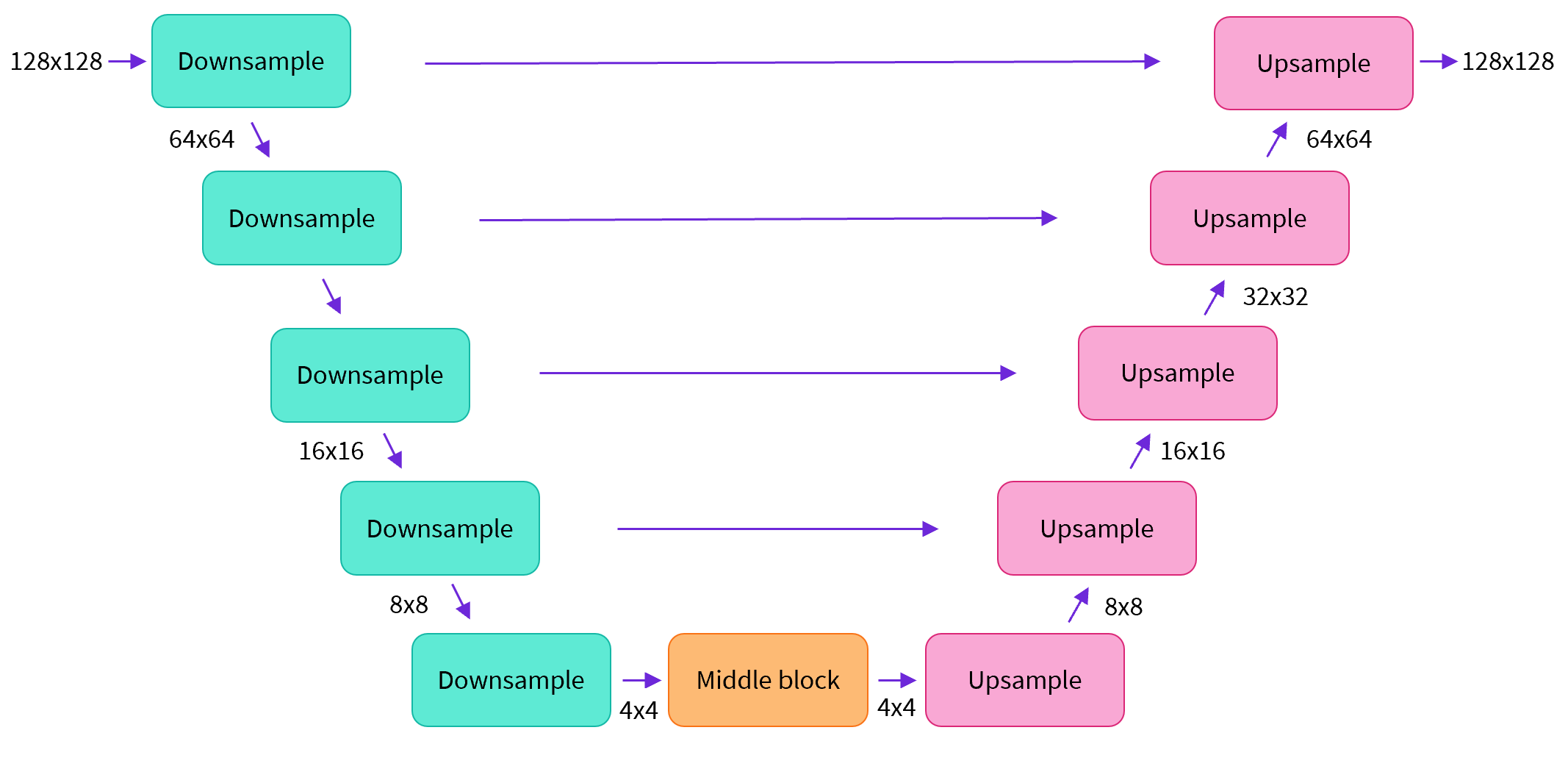 | |
| 简单来说,一个U-net模型大致会有以下三个特征: | |
| - 输入模型中的图片会经过几个由 ResNetLayer 构成的层,其中每层都使图片的尺寸减半。 | |
| - 在这之后,同样数量的上采样层会将图片的尺寸恢复到原始规模。 | |
| - 残差连接模块会将特征图分辨率相同的上采样层和下采样层连接起来。 | |
| U-net模型一个关键特征是输出图片的尺寸与输入图片相同,而这正是我们在扩散模型中所需要的。 | |
| Diffusers 为我们提供了一个易用的`UNet2DModel`类,用来在 PyTorch 中创建我们所需要的结构。 | |
| 我们来使用 U-net 为我们生成目标大小的图片吧。 | |
| 注意这里 `down_block_types` 对应下采样模块 (上图中绿色部分), 而 `up_block_types` 对应上采样模块 (上图中红色部分): | |
| ```python | |
| from diffusers import UNet2DModel | |
| # Create a model | |
| model = UNet2DModel( | |
| sample_size=image_size, # the target image resolution | |
| in_channels=3, # the number of input channels, 3 for RGB images | |
| out_channels=3, # the number of output channels | |
| layers_per_block=2, # how many ResNet layers to use per UNet block | |
| block_out_channels=(64, 128, 128, 256), # More channels -> more parameters | |
| down_block_types=( | |
| "DownBlock2D", # a regular ResNet downsampling block | |
| "DownBlock2D", | |
| "AttnDownBlock2D", # a ResNet downsampling block with spatial self-attention | |
| "AttnDownBlock2D", | |
| ), | |
| up_block_types=( | |
| "AttnUpBlock2D", | |
| "AttnUpBlock2D", # a ResNet upsampling block with spatial self-attention | |
| "UpBlock2D", | |
| "UpBlock2D", # a regular ResNet upsampling block | |
| ), | |
| ) | |
| model.to(device); | |
| ``` | |
| 当我们在处理更高分辨率的图像时,你可能会想尝试使用更多的下、上采样模块,并只在分辨率最低的(最底)层处保留注意力模块,从而降低内存负担。我们会在这之后讨论如何通过实验来找到最适合数据场景的配置方法。 | |
| 我们可以通过输入一批数据和随机的迭代周期数来看看输出是否与输入尺寸相同: | |
| ```python | |
| with torch.no_grad(): | |
| model_prediction = model(noisy_xb, timesteps).sample | |
| model_prediction.shape | |
| ``` | |
| torch.Size ([8, 3, 32, 32]) | |
| 接下来让我们来看看如何训练这个模型。 | |
| #### 4.3.4 创建扩散模型训练循环 | |
| 做完了准备工作以后,我们终于可以开始训练了!下面是PyTorch中的一个典型的迭代优化循环过程的步骤,我们在其中逐批(batch)的输入数据,并使用优化器一步步更新模型的参数 - 在这个样例中我们使用学习率为 0.0004 的 AdamW 优化器。 | |
| 对于每一批的数据,我们会: | |
| - 随机取样几个迭代周期 | |
| - 对数据进行相应的噪声处理 | |
| - 把带噪数据输入模型 | |
| - 使用 MSE 作为损失函数来比较目标结果与模型预测结果,在这个样例中,即是比较真实噪声和模型预测的噪声之间的差距。 | |
| - 通过`loss.backward ()`与`optimizer.step ()`来更新模型参数 | |
| 在这个过程中我们需要记录下每一步中的损失函数的值,用来后续绘制损失的曲线图。 | |
| NB: 这段代码大概需要十分钟左右来运行 - 如果你想节省时间,你也可以跳过以下两块操作直接使用预训练好的模型。或者,您可以探索如何通过上面的模型定义来减少每一层中的通道数量,从而加快训练速度。 | |
| 官方的扩散器训练示例 [official diffusers training example](https://colab.research.google.com/github/huggingface/notebooks/blob/main/diffusers/training_example.ipynb) 以更高的分辨率在这个数据集上训练一个更大的模型,方便大家了解一个不那么小的训练过程是什么样子: | |
| ```python | |
| # Set the noise scheduler | |
| noise_scheduler = DDPMScheduler( | |
| num_train_timesteps=1000, beta_schedule="squaredcos_cap_v2" | |
| ) | |
| # Training loop | |
| optimizer = torch.optim.AdamW(model.parameters(), lr=4e-4) | |
| losses = [] | |
| for epoch in range(30): | |
| for step, batch in enumerate(train_dataloader): | |
| clean_images = batch["images"].to(device) | |
| # Sample noise to add to the images | |
| noise = torch.randn(clean_images.shape).to(clean_images.device) | |
| bs = clean_images.shape[0] | |
| # Sample a random timestep for each image | |
| timesteps = torch.randint( | |
| 0, noise_scheduler.num_train_timesteps, (bs,), device=clean_images.device | |
| ).long() | |
| # Add noise to the clean images according to the noise magnitude at each timestep | |
| noisy_images = noise_scheduler.add_noise(clean_images, noise, timesteps) | |
| # Get the model prediction | |
| noise_pred = model(noisy_images, timesteps, return_dict=False)[0] | |
| # Calculate the loss | |
| loss = F.mse_loss(noise_pred, noise) | |
| loss.backward(loss) | |
| losses.append(loss.item()) | |
| # Update the model parameters with the optimizer | |
| optimizer.step() | |
| optimizer.zero_grad() | |
| if (epoch + 1) % 5 == 0: | |
| loss_last_epoch = sum(losses[-len(train_dataloader) :]) / len(train_dataloader) | |
| print(f"Epoch:{epoch+1}, loss: {loss_last_epoch}") | |
| ``` | |
| Epoch:5, loss: 0.16273280512541533 | |
| Epoch:10, loss: 0.11161588924005628 | |
| Epoch:15, loss: 0.10206522420048714 | |
| Epoch:20, loss: 0.08302505919709802 | |
| Epoch:25, loss: 0.07805309211835265 | |
| Epoch:30, loss: 0.07474562455900013 | |
| 上面就是绘制出来的损失函数的曲线,我们能看到模型在一开始快速的收敛,接下来以一个较慢的速度持续优化(我们用右边 log 坐标轴的视图可以看的更清楚): | |
| ```python | |
| fig, axs = plt.subplots(1, 2, figsize=(12, 4)) | |
| axs[0].plot(losses) | |
| axs[1].plot(np.log(losses)) | |
| plt.show() | |
| ``` | |
| [<matplotlib.lines.Line2D at 0x7f40fc40b7c0>] | |
|  | |
| 作为运行上述训练代码的替代方案,你可以像这样使用管道中的模型: | |
| ```python | |
| # Uncomment to instead load the model I trained earlier: | |
| # model = butterfly_pipeline.unet | |
| ``` | |
| #### 4.3.5 图像的生成 | |
| 接下来的问题是,我们怎么通过这个模型生成图像呢? | |
| ##### 方法 1:建立一个管道: | |
| ```python | |
| from diffusers import DDPMPipeline | |
| image_pipe = DDPMPipeline(unet=model, scheduler=noise_scheduler) | |
| ``` | |
| ```python | |
| pipeline_output = image_pipe() | |
| pipeline_output.images[0] | |
| ``` | |
| 0%| | 0/1000 [00:00<?, ?it/s] | |
|  | |
| 我们可以像这样将管线保存到本地文件夹: | |
| ```python | |
| image_pipe.save_pretrained("my_pipeline") | |
| ``` | |
| 检查文件夹的内容: | |
| ```python | |
| !ls my_pipeline/ | |
| ``` | |
| model_index.json scheduler unet | |
| 这里`scheduler`与`unet`子文件夹中包含了生成图像所需的全部组件。比如,在`unet`文件中能看到模型参数 (`diffusion_pytorch_model.bin`) 与描述模型结构的配置文件。 | |
| ```python | |
| !ls my_pipeline/unet/ | |
| ``` | |
| config.json diffusion_pytorch_model.bin | |
| 这些文件包含了重新创建管线所需的所有内容。您可以手动将它们上传到 Hub 以与其他人共享管线,或者在下一节中通过 API 检查代码来完成此操作。 | |
| ##### 方法 2:写一个取样循环 | |
| 如果你观察了管道中的 forward 方法,你可以看到在运行`image_pipe ()`时发生了什么: | |
| ```python | |
| # ??image_pipe.forward | |
| ``` | |
| 我们从完全随机的噪声图像开始,从最大噪声往最小噪声方向运行调度器,根据模型的预测每一步去除少量噪声: | |
| ```python | |
| # Random starting point (8 random images): | |
| sample = torch.randn(8, 3, 32, 32).to(device) | |
| for i, t in enumerate(noise_scheduler.timesteps): | |
| # Get model pred | |
| with torch.no_grad(): | |
| residual = model(sample, t).sample | |
| # Update sample with step | |
| sample = noise_scheduler.step(residual, t, sample).prev_sample | |
| show_images(sample) | |
| ``` | |
|  | |
| `noise_scheduler.step ()` 执行更新”样本“所需的数学运算。事实上有很多种不同的采样方法 - 在下一单元中,我们将看到如何通过使用不同的采样器,来加速现有模型中的图像生成过程,并更多地讨论从扩散模型中采样背后的理论。 | |
| #### 4.4 拓展知识 | |
| #### 4.4.1 将模型上传到Hub上 | |
| 在上面的例子中,我们将管道保存到本地文件夹中。为了将模型推送到 Hub,我们需要将文件推送到模型存储库中。我们根据你的选择(模型 ID)来决定仓库的名字(您可以随意替换 model_name;它只需要包含您的用户名,而这就是函数get_full_repo_name()所做的): | |
| ```python | |
| from huggingface_hub import get_full_repo_name | |
| model_name = "sd-class-butterflies-32" | |
| hub_model_id = get_full_repo_name(model_name) | |
| hub_model_id | |
| ``` | |
| 'lewtun/sd-class-butterflies-32' | |
| 接下来,在 🤗 Hub 上创建模型仓库并 push 它吧: | |
| ```python | |
| from huggingface_hub import HfApi, create_repo | |
| create_repo(hub_model_id) | |
| api = HfApi() | |
| api.upload_folder( | |
| folder_path="my_pipeline/scheduler", path_in_repo="", repo_id=hub_model_id | |
| ) | |
| api.upload_folder(folder_path="my_pipeline/unet", path_in_repo="", repo_id=hub_model_id) | |
| api.upload_file( | |
| path_or_fileobj="my_pipeline/model_index.json", | |
| path_in_repo="model_index.json", | |
| repo_id=hub_model_id, | |
| ) | |
| ``` | |
| 'https://huggingface.co/lewtun/sd-class-butterflies-32/blob/main/model_index.json' | |
| 最后一件事是创建一个超棒的模型卡,如此,我们的蝴蝶生成器就可以轻松的在 Hub 上被找到(请在描述中随意发挥!): | |
| ```python | |
| from huggingface_hub import ModelCard | |
| content = f""" | |
| --- | |
| license: mit | |
| tags: | |
| - pytorch | |
| - diffusers | |
| - unconditional-image-generation | |
| - diffusion-models-class | |
| --- | |
| # Model Card for Unit 1 of the [Diffusion Models Class 🧨](https://github.com/huggingface/diffusion-models-class) | |
| This model is a diffusion model for unconditional image generation of cute 🦋. | |
| ## Usage | |
| ```python | |
| from diffusers import DDPMPipeline | |
| pipeline = DDPMPipeline.from_pretrained('{hub_model_id}') | |
| image = pipeline().images[0] | |
| image | |
| ``` | |
| """ | |
| card = ModelCard(content) | |
| card.push_to_hub(hub_model_id) | |
| ``` | |
| 现在模型已经在 Hub 上了,你可以这样从任何地方使用 `DDPMPipeline` 的 `from_pretrained ()` 方法来下载它: | |
| ```python | |
| from diffusers import DDPMPipeline | |
| image_pipe = DDPMPipeline.from_pretrained(hub_model_id) | |
| pipeline_output = image_pipe() | |
| pipeline_output.images[0] | |
| ``` | |
| Fetching 4 files: 0%| | 0/4 [00:00<?, ?it/s] | |
| 0%| | 0/1000 [00:00<?, ?it/s] | |
|  | |
| 太棒了,我们成功了! | |
| #### 4.4.2 扩大训练模型的规模 | |
| 这个笔记本是为了学习而制作的,因此我尽量保持代码的简洁。正因如此,我们省略了一些能让你在更多数据上训练更大模型的内容,比如多gpu支持、进度记录和示例图像、支持更大批量的梯度检查点、自动上传模型等等。好在这些特性在示例训练代码中都有。 [here](https://github.com/huggingface/diffusers/raw/main/examples/unconditional_image_generation/train_unconditional.py). | |
| 你可以这样下载该文件: | |
| ```python | |
| !wget https://github.com/huggingface/diffusers/raw/main/examples/unconditional_image_generation/train_unconditional.py | |
| ``` | |
| 打开文件,你就可以看到模型是怎么定义的,以及有哪些可选的配置参数。我使用如下命令运行了该代码: | |
| ```python | |
| # Let's give our new model a name for the Hub | |
| model_name = "sd-class-butterflies-64" | |
| hub_model_id = get_full_repo_name(model_name) | |
| hub_model_id | |
| ``` | |
| 'lewtun/sd-class-butterflies-64' | |
| ```python | |
| !accelerate launch train_unconditional.py \ | |
| --dataset_name="huggan/smithsonian_butterflies_subset" \ | |
| --resolution=64 \ | |
| --output_dir={model_name} \ | |
| --train_batch_size=32 \ | |
| --num_epochs=50 \ | |
| --gradient_accumulation_steps=1 \ | |
| --learning_rate=1e-4 \ | |
| --lr_warmup_steps=500 \ | |
| --mixed_precision="no" | |
| ``` | |
| 如之前一样,把模型 push 到 hub,并且创建一个超酷的模型卡(请按你的想法随意填写!): | |
| ```python | |
| create_repo(hub_model_id) | |
| api = HfApi() | |
| api.upload_folder( | |
| folder_path=f"{model_name}/scheduler", path_in_repo="", repo_id=hub_model_id | |
| ) | |
| api.upload_folder( | |
| folder_path=f"{model_name}/unet", path_in_repo="", repo_id=hub_model_id | |
| ) | |
| api.upload_file( | |
| path_or_fileobj=f"{model_name}/model_index.json", | |
| path_in_repo="model_index.json", | |
| repo_id=hub_model_id, | |
| ) | |
| content = f""" | |
| --- | |
| license: mit | |
| tags: | |
| - pytorch | |
| - diffusers | |
| - unconditional-image-generation | |
| - diffusion-models-class | |
| --- | |
| # Model Card for Unit 1 of the [Diffusion Models Class 🧨](https://github.com/huggingface/diffusion-models-class) | |
| This model is a diffusion model for unconditional image generation of cute 🦋. | |
| ## Usage | |
| ```python | |
| from diffusers import DDPMPipeline | |
| pipeline = DDPMPipeline.from_pretrained('{hub_model_id}') | |
| image = pipeline().images[0] | |
| image | |
| ``` | |
| """ | |
| card = ModelCard(content) | |
| card.push_to_hub(hub_model_id) | |
| ``` | |
| 'https://huggingface.co/lewtun/sd-class-butterflies-64/blob/main/README.md' | |
| 大概 45 分钟之后,我们将得到这样的结果: | |
| ```python | |
| pipeline = DDPMPipeline.from_pretrained(hub_model_id).to(device) | |
| images = pipeline(batch_size=8).images | |
| make_grid(images) | |
| ``` | |
| 0%| | 0/1000 [00:00<?, ?it/s] | |
|  | |
| **练习:** 看看你是否能在尽可能短的时间内找到优秀好用的训练/模型设置,并与社区分享你的发现。请尝试阅读一下这些脚本,看看你能不能读懂它们。如果遇到任何难以理解的地方,你可以通过向大家提问来寻求解答。 | |
| #### 4.5 本章小结 | |
| 希望这些能够让你初步了解如何使用 🤗 Diffusers library !这里有一些你接下来可以尝试的东西: | |
| - 尝试在新的数据集上训练一个无条件扩散模型 - 如果你能直接自己完成那就太好了 [create one yourself](https://huggingface.co/docs/datasets/image_dataset). 你可以在 Hub 这里找到一些能完成这个任务的超棒图像数据集 [HugGan organization](https://huggingface.co/huggan). 如果你不想等待模型训练太久的话,一定记得对图片做下采样! | |
| - 试试用 DreamBooth 来创建你自己定制的扩散模型管线,看看 [这个 Space](https://huggingface.co/spaces/multimodalart/dreambooth-training) 或者 [这个 notebook](https://colab.research.google.com/github/huggingface/notebooks/blob/main/diffusers/sd_dreambooth_training.ipynb) | |
| - 修改训练脚本来探索不同的 UNet 超参数(例如层数、深度或者通道数),不同的噪声管理器等等。 | |
| - 来瞧瞧 [Diffusion Models from Scratch](https://github.com/huggingface/diffusion-models-class/blob/main/unit1/02_diffusion_models_from_scratch.ipynb) 在本单元的核心思想之上的一些不同看法。 | |
| ### 第五章 微调和引导 | |
| #### 5.1 章节概述 | |
| #### 5.2 环境准备 | |
| #### 5.3 载入一个预训练过的管线 | |
| #### 5.4 DDIM-更快的采样过程 | |
| #### 5.5 扩散模型-微调 | |
| #### 5.5.1 实战:微调 | |
| #### 5.5.2 使用最小化样例脚本微调模型 | |
| #### 5.5.3 保存和载入微调过的管线 | |
| #### 5.6 扩散模型-引导 | |
| #### 5.6.1 实战:引导 | |
| #### 5.6.2 CLIP 引导 | |
| #### 5.7 分享你的自定义采样训练 | |
| #### 5.7.1 环境准备 | |
| #### 5.7.2 创建一个以类别为条件的UNet | |
| #### 5.7.3 训练与采样 | |
| #### 5.8 本章小结 | |
| #### 5.9 实战:创建一个类别条件扩散模型 | |
| ### 第六章 Stable Diffusion | |
| #### 6.1 章节概述 | |
| #### 6.2 环境准备 | |
| #### 6.3 从文本生成图像 | |
| #### 6.4 Stable Diffusion Pipeline | |
| #### 6.4.1 可变分自编码器(VAE) | |
| #### 6.4.2 分词器(Tokenizer)和文本编码器(Text Encoder) | |
| #### 6.4.3 UNet | |
| #### 6.4.4 调度器(Scheduler) | |
| #### 6.4.5 DIY一个采样循环 | |
| #### 6.5 其他管线介绍 | |
| #### 6.5.1 Img2Img | |
| #### 6.5.2 In-Painting | |
| #### 6.5.3 Depth2Image | |
| #### 6.5.4 拓展:管理你的模型缓存 | |
| #### 6.6 本章小结 | |
| ### 第七章 DDIM反转 | |
| #### 7.1 本章概述 | |
| #### 7.2 实战:反转 | |
| #### 7.2.1 设置 | |
| #### 7.2.2 加载一个已训练的管道 | |
| #### 7.2.3 DDIM采样 | |
| #### 7.2.4 反转 | |
| #### 7.3 组合封装 | |
| #### 7.4 本章小结 | |
| ### 第八章 音频扩散模型 | |
| #### 8.1 本章概述 | |
| #### 8.2 实战:音频扩散模型 | |
| #### 8.2.1 设置与导入 | |
| #### 8.2.2 从预先训练的音频管道采样 | |
| #### 8.2.3 从音频到频谱的转换 | |
| #### 8.2.4 微调管道 | |
| #### 8.2.5 循环训练 | |
| #### 8.3 将模型上传到Hub上 | |
| #### 8.4 本章小结 | |
| ### 第九章 ControlNet和LoRa | |
| #### 9.1 ControlNet | |
| #### 9.2 LoRa | |
| ## 附录 精美图像集展示 |