
id stringlengths 20 30 | source stringclasses 1
value | chunk_index int64 0 520k | token_count int32 154 512 | content stringlengths 185 57.5k |
|---|---|---|---|---|
rust_dataset_chunk_510000 | rust_dataset.txt | 510,000 | 512 | |
| `remoteHost` | Host of the remote connection, if any |
| `appName` | Zed release channel name (e.g. `Zed`, `Zed Nightly`) |
| `branch` | Git branch checked out in the active repository |
| `separator` | Separator string, omitted when neighbors are empty |
```json [setting... |
rust_dataset_chunk_510001 | rust_dataset.txt | 510,001 | 512 | `"normal"` or `"insert"`.
`show_edit_predictions_in_normal_mode` enables predictions in normal mode in addition to insert and replace modes.
Each `cursor_shape` accepts `"block"`, `"bar"`, `"underline"`, or `"hollow"`; insert mode also accepts `"inherit"` to use the editor's `cursor_shape`.
See [Changing Vim Mode Sett... |
rust_dataset_chunk_510002 | rust_dataset.txt | 510,002 | 512 | es": {
"show": "always"
},
"sort_mode": "directories_first",
"sort_order": "default",
"hide_gitignore": false,
"title_tooltip_delay": "default",
"diagnostic_badges": false,
"git_status_indicator": false,
"hide_root": false,
"hide_hidden": false,
"starts_open": true,
"au... |
rust_dataset_chunk_510003 | rust_dataset.txt | 510,003 | 512 | "project_panel": {
"git_status": true
}
}
```
2. Default disable git status
```json [settings]
{
"project_panel": {
"git_status": false
}
}
```
### Default Width
- Description: Customize default width taken by project panel
- Setting: `default_width`
- Default: `240`
**Options**
`float` values
##... |
rust_dataset_chunk_510004 | rust_dataset.txt | 510,004 | 512 | guides in the project panel
```json [settings]
{
"project_panel": {
"indent_guides": {
"show": "always"
}
}
}
```
2. Hide indent guides in the project panel
```json [settings]
{
"project_panel": {
"indent_guides": {
"show": "never"
}
}
}
```
### Scrollbar
- Description: Scrollb... |
rust_dataset_chunk_510005 | rust_dataset.txt | 510,005 | 512 | project_panel": {
"sort_order": "default"
}
}
```
2. Uppercase names are grouped before lowercase names, with case-insensitive natural sort within each group. Dot-prefixed names (e.g., `.gitignore`) sort before both groups. Accented uppercase letters like `É` are treated as uppercase.
```json [settings]
{
"pr... |
rust_dataset_chunk_510006 | rust_dataset.txt | 510,006 | 512 | the AI section to learn more about AI setup.
These settings belong inside the `agent` object.
See [Agent Panel](#agent-panel) for width, flexible sizing, and Threads Sidebar settings.
| Setting | Default | Description ... |
rust_dataset_chunk_510007 | rust_dataset.txt | 510,007 | 512 | ize earlier messages automatically at the configured context threshold. |
| `auto_compact.threshold` | `"90%"` | Percentage of context capacity, positive tokens-used count, or negative tokens-remaining count. |
| `enable_feedback` ... |
rust_dataset_chunk_510008 | rust_dataset.txt | 510,008 | 512 | Permissions](../ai/tool-permissions.md#configuration), [Notifications](../ai/agent-panel.md#get-notified), and [Terminal Thread Initialization](../ai/terminal-threads.md#terminal-thread-init-command).
### Prevent Idle Sleep
- Description: Whether to keep the system from idle-sleeping while an agent thread is running... |
rust_dataset_chunk_510009 | rust_dataset.txt | 510,009 | 512 | ID.
- Setting: `agent_servers`
- Default: `{}`
Adding a custom agent from the **External Agents** page in Agent Settings writes an entry here.
A custom agent runs a command that speaks the Agent Client Protocol (ACP):
```json [settings]
{
"agent_servers": {
"my-agent": {
"type": "custom",
"command"... |
rust_dataset_chunk_510010 | rust_dataset.txt | 510,010 | 512 | launches it, as described in [Customizing Debug Adapters](../debugger.md#customizing-debug-adapters).
## Debugger
- Description: Configuration for debugger panel and settings
- Setting: `debugger`
- Default:
```json [settings]
{
"debugger": {
"stepping_granularity": "line",
"save_breakpoints": true,
"... |
rust_dataset_chunk_510011 | rust_dataset.txt | 510,011 | 512 | vron`, or `both`
- `fallback_branch_name`: What branch name to use if `init.defaultBranch` is not set
- `sort_by`: How to sort entries in the git panel. Can be `path` or `name`
- `group_by`: How to group entries in the git panel. Can be `none` or `status`
- `collapse_untracked_diff`: Whether to collapse untracked files... |
rust_dataset_chunk_510012 | rust_dataset.txt | 510,012 | 512 | instances so commit hashes, issue references, and permalinks resolve to the right host.
- Setting: `git_hosting_providers`
- Default: `[]`
**Options**
Each entry accepts:
- `provider`: One of `github`, `gitlab`, or `bitbucket`
- `name`: Display name for the instance
- `base_url`: Base URL, e.g. `https://git.example... |
rust_dataset_chunk_510013 | rust_dataset.txt | 510,013 | 512 | customized by using theme overrides.
## Unnecessary Code Fade
- Description: How much to fade out unused code.
- Setting: `unnecessary_code_fade`
- Default: `0.3`
**Options**
Float values between `0.0` and `0.9`, where:
- `0.0` means no fading (unused code looks the same as used code)
- `0.9` means maximum fading... |
rust_dataset_chunk_510014 | rust_dataset.txt | 510,014 | 512 | in the UI.
- Setting: `ui_font_size`
- Default: `16`
**Options**
`integer` values from `6` to `100` pixels (inclusive)
## UI Font Weight
- Description: The default font weight for text in the UI.
- Setting: `ui_font_weight`
- Default: `400`
**Options**
`integer` values between `100` and `900`
## Settings Profil... |
rust_dataset_chunk_510015 | rust_dataset.txt | 510,015 | 512 | .
When the same setting is set in several places, Zed applies them in this order, with later layers taking precedence:
1. Top-level user settings
2. The block for the current release channel
3. The block for the current operating system
For example, this uses One Light on Preview and disables middle-click paste on L... |
rust_dataset_chunk_510016 | rust_dataset.txt | 510,016 | 512 | OPTIONS] [PATHS]...
```
## Opening Files and Directories
Open a file:
```sh
zed myfile.txt
```
Open a directory as a workspace:
```sh
zed ~/projects/myproject
```
Open multiple files or directories:
```sh
zed file1.txt file2.txt ~/projects/myproject
```
Open a file at a specific line and column:
```sh
zed myfi... |
rust_dataset_chunk_510017 | rust_dataset.txt | 510,017 | 512 | for debugging:
```sh
zed --foreground
```
### `--user-data-dir <DIR>`
Use a custom directory for all user data (database, extensions, logs) instead of the default location:
```sh
zed --user-data-dir ~/.zed-custom
```
Default locations:
- **macOS:** `~/Library/Application Support/Zed`
- **Linux:** `$XDG_DATA_HOME... |
rust_dataset_chunk_510018 | rust_dataset.txt | 510,018 | 512 | zed -
cat myfile.txt | zed -
ps aux | zed -
```
This creates a temporary file with the stdin content and opens it in Zed.
## URL Handling
The CLI can open `zed://`, `file://`, and `ssh://` URLs:
```sh
zed zed://settings
zed file:///Users/whatever/.zshrc
zed ssh://me@example.com/abs/path
zed ssh://me@example.com:/a... |
rust_dataset_chunk_510019 | rust_dataset.txt | 510,019 | 512 | machine that runs the Zed UI and the remote server which runs a Zed headless server. The two communicate over SSH, so you will need to be able to SSH from your local machine into the remote server to use this feature.
 or later (Intel or Apple Silicon)
- Linux (x86_64 or arm64, we do not yet support... |
rust_dataset_chunk_510021 | rust_dataset.txt | 510,021 | 512 | to help distinguish multiple hosts.
"nickname": "lil-linux"
}
]
}
```
If you use the command line to open a connection to a host by doing `zed ssh://192.168.1.10/~/.vimrc`, then extra options are read from your settings file by finding the first connection that matches the host/username/port of the URL on... |
rust_dataset_chunk_510022 | rust_dataset.txt | 510,022 | 512 | the remote machine's port 80. Under the hood this uses the `-L` argument to ssh.
By default these ports are bound to localhost, so other computers in the same network as your development machine cannot access them. You can set the local_host to bind to a different interface, for example, 0.0.0.0 will bind to all loca... |
rust_dataset_chunk_510023 | rust_dataset.txt | 510,023 | 512 | , proxy settings, etc.
- Local settings should be used for things that affect the UI: font size, etc.
In addition any extensions you have installed locally will be propagated to the remote server. This means that language servers, etc. will run correctly.
## Proxy Configuration
The remote server will not use your lo... |
rust_dataset_chunk_510024 | rust_dataset.txt | 510,024 | 512 | ](https://zed.dev/docs/development):
```bash
cargo build --release --package remote_server
llvm-objcopy --strip-debug target/release/remote-server
```
Stripping debug symbols matches the packaging step in [`script/bundle-linux`](https://github.com/zed-industries/zed/blob/main/script/bundle-linux) and keeps the binary... |
rust_dataset_chunk_510025 | rust_dataset.txt | 510,025 | 512 | -industries/zed/issues/new) or reach out in the #support forums on [Discord](https://zed.dev/community-links).
## Supported SSH Options
Under the hood, Zed shells out to the `ssh` binary to connect to the remote server. We create one SSH control master per project, and then use that to multiplex SSH connections for t... |
rust_dataset_chunk_510026 | rust_dataset.txt | 510,026 | 512 | [Remote Development on zed.dev](https://zed.dev/remote-development): Product
overview and release updates.
--- FILE: zed/docs/src/repl.md ---
---
title: REPL - Jupyter Kernels in Zed
description: Run code interactively in Zed with built-in Jupyter kernel support. Execute Python, TypeScript, R, and more inline.
---... |
rust_dataset_chunk_510027 | rust_dataset.txt | 510,027 | 512 | ), and the result will be displayed below the selection.
Outputs can be cleared with the {#action repl::ClearOutputs} command, or from the REPL menu in the toolbar.
### Cell mode
Zed supports [notebooks as scripts](https://jupytext.readthedocs.io/en/latest/formats-scripts.html) using the `# %%` cell separator in Pyt... |
rust_dataset_chunk_510028 | rust_dataset.txt | 510,028 | 512 | ) {#r-xeus}
- Install [Xeus-R](https://github.com/jupyter-xeus/xeus-r)
- Install the R Extension for Zed (search for `R` in Zed Extensions)
<!--
TBD: Improve R REPL (Ark Kernel) instructions
-->
### TypeScript: Deno {#typescript-deno}
- [Install Deno](https://docs.deno.com/runtime/manual/getting_started/installatio... |
rust_dataset_chunk_510029 | rust_dataset.txt | 510,029 | 512 | Python env**: Otherwise, the first Python environment with ipykernel
3. **Language-based fallback**: If no Python envs are ready, Zed picks a Jupyter kernel matching the code block's language
You can override this by explicitly selecting a kernel from the picker.
### Setting Default Kernels
To configure a different... |
rust_dataset_chunk_510030 | rust_dataset.txt | 510,030 | 512 | title: Roles - Zed
description: Understand Zed's organization roles and what each role can access, manage, and configure.
---
# Roles
Every member of a Zed organization is assigned a role that determines what they
can access and configure.
## Role Types {#roles}
Every member of an organization is assigned one of fo... |
rust_dataset_chunk_510031 | rust_dataset.txt | 510,031 | 512 | models or Edit Predictions through the Business subscription.
Billing Managers cannot invite or remove members, change member roles, configure
organization settings or data controls, cancel the subscription, or transfer
ownership.
### Member {#role-member}
Members have standard access to Zed through the Business sub... |
rust_dataset_chunk_510032 | rust_dataset.txt | 510,032 | 512 | Python, TypeScript (Deno), R, Julia, and other supported languages.
## Quick start
**Open a terminal**: Press `` Ctrl+` `` to toggle the terminal panel, or `Ctrl+~` to open a new terminal.
**Run a command**: Press `Cmd+Shift+R` (macOS) or `Ctrl+Shift+R` (Linux/Windows) to open the task picker, then type any shell c... |
rust_dataset_chunk_510033 | rust_dataset.txt | 510,033 | 512 | ::RestartLanguageServer} command from the command palette if highlighting doesn't update immediately.
## Customizing Token Colors
Semantic tokens are styled using rules that map LSP token types and modifiers to theme styles or custom colors. Zed provides sensible defaults, but you can customize these in your settings... |
rust_dataset_chunk_510034 | rust_dataset.txt | 510,034 | 512 | }
]
}
}
```
### Example: Using Theme Styles
Instead of hardcoding colors, reference styles from your theme:
```json [settings]
{
"global_lsp_settings": {
"semantic_token_rules": [
{
"token_type": "variable",
"token_modifiers": ["mutable"],
"style": ["variable.mutable",... |
rust_dataset_chunk_510035 | rust_dataset.txt | 510,035 | 512 | string` | String literals |
| `number` | Numeric literals |
| `operator` | Operators |
Common modifiers include: `declaration`, `definition`, `readonly`, `static`, `deprecated`, `async`, `documentation`, `defaultLibrary`, and language-spe... |
rust_dataset_chunk_510036 | rust_dataset.txt | 510,036 | 512 | like $1, $2 or ${1:defaultValue} to define tab stops.
// The $0 determines the final cursor position.
// Placeholders with the same value are linked.
// If the snippet contains the $ symbol outside of a placeholder, it must be escaped with two slashes (e.g. \\$var).
"Log to console": {
"prefix": "log",
... |
rust_dataset_chunk_510037 | rust_dataset.txt | 510,037 | 512 | [Finding & Navigating](./finding-navigating.md)
- [Command Palette](./command-palette.md)
- [Outline Panel](./outline-panel.md)
- [Project Panel](./project-panel.md)
- [Tab Switcher](./tab-switcher.md)
- [Running & Testing](./running-testing.md)
- [Terminal](./terminal.md)
- [Tasks](./tasks.md)
- [Debugg... |
rust_dataset_chunk_510038 | rust_dataset.txt | 510,038 | 512 | .md)
- [Edit Prediction](./ai/edit-prediction.md)
- [AI Privacy](./ai/privacy-and-security.md)
- [Feedback and Training Data](./ai/ai-improvement.md)
# Account & Billing
- [Authenticate](./authentication.md)
- [Plans & Pricing](./account/plans-and-pricing.md)
- [Zed-Hosted Models](./account/zed-hosted-models.md)
- ... |
rust_dataset_chunk_510039 | rust_dataset.txt | 510,039 | 512 | [Docker](./languages/docker.md)
- [Elixir](./languages/elixir.md)
- [Elm](./languages/elm.md)
- [Emmet](./languages/emmet.md)
- [Env](./languages/env.md)
- [Erlang](./languages/erlang.md)
- [Fish](./languages/fish.md)
- [GDScript](./languages/gdscript.md)
- [Gleam](./languages/gleam.md)
- [GLSL](./languages/glsl.md)
-... |
rust_dataset_chunk_510040 | rust_dataset.txt | 510,040 | 512 | )
- [Tailwind CSS](./languages/tailwindcss.md)
- [Terraform](./languages/terraform.md)
- [TOML](./languages/toml.md)
- [TypeScript](./languages/typescript.md)
- [Uiua](./languages/uiua.md)
- [Vue](./languages/vue.md)
- [XML](./languages/xml.md)
- [YAML](./languages/yaml.md)
- [YARA](./languages/yara.md)
- [Yarn](./lang... |
rust_dataset_chunk_510041 | rust_dataset.txt | 510,041 | 512 | - [Windows](./development/windows.md)
- [FreeBSD](./development/freebsd.md)
- [Using Debuggers](./development/debuggers.md)
- [Performance](./performance.md)
- [UI/UX Checklist](./development/ui-checklist.md)
- [Glossary](./development/glossary.md)
- [Release Notes](./development/release-notes.md)
- [Debuggi... |
rust_dataset_chunk_510042 | rust_dataset.txt | 510,042 | 512 | the switcher and return to the original tab from which
the switcher was opened
- Press {#kb tab_switcher::CloseSelectedItem} to close the currently selected tab
As you navigate through the list, Zed will update the pane's active item to
match the selected tab.
## Action Reference
| Action ... |
rust_dataset_chunk_510043 | rust_dataset.txt | 510,043 | 512 | ` — do not alter focus, but still add/reuse the task's tab in its pane
"reveal": "always",
// What to do with the terminal pane and tab, after the command has finished:
// * `never` — Do nothing when the command finishes (default)
// * `always` — always hide the terminal tab, hide the pane also if it wa... |
rust_dataset_chunk_510044 | rust_dataset.txt | 510,044 | 512 | the `"allow_concurrent_runs": false` default).
Keep `"use_new_terminal": false` and set `"allow_concurrent_runs": true` to allow cancelling previous tasks on rerun.
## Task templates
Tasks can be defined:
- in the global `tasks.json` file; such tasks are available in all Zed projects you work on. This file is usua... |
rust_dataset_chunk_510045 | rust_dataset.txt | 510,045 | 512 | Python`, `Shell Script`)
- `ZED_WORKTREE_ROOT`: absolute path to the root of the current worktree. (e.g. `/Users/my-user/path/to/project`)
- `ZED_MAIN_GIT_WORKTREE`: absolute path to the main git worktree's working directory. For normal checkouts this equals `ZED_WORKTREE_ROOT`; for linked git worktrees this is the ori... |
rust_dataset_chunk_510046 | rust_dataset.txt | 510,046 | 512 | command inside the modal text field, and use `opt-enter` to spawn it.
The task modal persists these ad-hoc commands for the duration of the session, {#action task::Rerun} will also rerun such tasks if they were the last ones spawned.
You can also adjust the currently selected task in a modal (`tab` is the default ke... |
rust_dataset_chunk_510047 | rust_dataset.txt | 510,047 | 512 | "Workspace",
"bindings": {
"alt-g": [
"task::Spawn",
{ "task_name": "start lazygit", "reveal_target": "center" }
]
}
}
```
## Hooks
In addition to being spawned manually, tasks can be configured to run automatically in response to certain Zed events by adding a hook to the `hooks` field on a ... |
rust_dataset_chunk_510048 | rust_dataset.txt | 510,048 | 512 | -specific context menu, where the task is additionally resolved against the clicked ref via `ZED_GIT_REF`.
Git Graph command tasks support the Git-specific task variables below.
These variables are provided only when resolving Git Graph command tasks.
Other task variables, such as `ZED_FILE`, `ZED_SELECTED_TEXT`, `ZED... |
rust_dataset_chunk_510049 | rust_dataset.txt | 510,049 | 512 | as "npm: start" and "cargo build --release". You can override the generated label by providing an explicit `label` field.
## Binding runnable tags to task templates
Zed supports overriding the default action for inline runnable indicators via workspace-local and global `tasks.json` file with the following precedence... |
rust_dataset_chunk_510050 | rust_dataset.txt | 510,050 | 512 | environment variables, aliases, and PATH modifications you've configured in your shell profile. If a task fails to find a command that works in your terminal, verify your shell configuration files are properly set up.
To override the shell used for tasks, configure the `terminal.shell` setting:
```json
{
"terminal... |
rust_dataset_chunk_510051 | rust_dataset.txt | 510,051 | 512 | .com/zed-industries/zed/blob/main/crates/crashes/src/crashes.rs). See also: [Debugging Crashes](./development/debugging-crashes.md).
### Client-Side Metrics
Client-side telemetry includes:
- File extensions of opened files
- Features and tools used within the editor
- Project statistics (e.g., number of files)
- Fra... |
rust_dataset_chunk_510052 | rust_dataset.txt | 510,052 | 512 | ed includes a built-in terminal emulator that supports multiple terminal instances, custom shells, and deep integration with the editor.
## Opening Terminals
| Action | macOS | Linux/Windows |
| ----------------------- | --------------- | --------------- |
| Toggle terminal panel | `` C... |
rust_dataset_chunk_510053 | rust_dataset.txt | 510,053 | 512 | directory": "~/projects" } }` | Always starts in a specific directory |
```json [settings]
{
"terminal": {
"working_directory": "first_project_directory"
}
}
```
## Environment Variables
Add environment variables to all terminal sess... |
rust_dataset_chunk_510054 | rust_dataset.txt | 510,054 | 512 | `0` to disable contrast adjustment and use exact theme colors:
```json [settings]
{
"terminal": {
"minimum_contrast": 0
}
}
```
## Scrolling
Navigate terminal history with these keybindings:
| Action | macOS | Linux/Windows |
| ---------------- | ----------------------... |
rust_dataset_chunk_510055 | rust_dataset.txt | 510,055 | 512 | ]
{
"terminal": {
"option_as_meta": true
}
}
```
This reinterprets the Option key as Meta, allowing sequences like `Alt+X` to work correctly.
## Alternate Scroll Mode
When enabled, mouse scroll events are converted to arrow key presses in applications like `vim` or `less`:
```json [settings]
{
"terminal":... |
rust_dataset_chunk_510056 | rust_dataset.txt | 510,056 | 512 | a task, it executes in the terminal. Rerun the last task from a terminal with:
- macOS: `Cmd+Alt+R`
- Linux/Windows: `Ctrl+Shift+R` or `Alt+T`
## AI Assistance
Get help with terminal commands using the [Inline Assistant](./ai/inline-assistant.md):
- macOS: `Ctrl+Enter`
- Linux/Windows: `Ctrl+Enter` or `Ctrl+I`
Th... |
rust_dataset_chunk_510057 | rust_dataset.txt | 510,057 | 512 | ported to Zed, and if you're struggling to choose one, visit [zed-themes.com](https://zed-themes.com), a third-party gallery with visible previews for many of them.
## Build Your Theme
You can use [Zed's Theme Builder](https://zed.dev/theme-builder) to design your own custom theme based on an existing one.
This too... |
rust_dataset_chunk_510058 | rust_dataset.txt | 510,058 | 512 | rides": {
"One Dark": {
"editor.background": "#333",
"syntax": {
"comment": {
"font_style": "italic"
},
"comment.doc": {
"font_style": "italic"
}
},
"accents": [
"#ff0000",
"#ff7f00",
"#ffff00",
"#00ff00",
... |
rust_dataset_chunk_510059 | rust_dataset.txt | 510,059 | 512 | overview.md), the toolchain selector is not available to guests.
## Why do we need toolchains?
The active toolchain is used when launching language servers. Without the correct toolchain, language servers may fail to resolve dependencies, and features like "Go to Definition" or "Code Completions" may not work.
The a... |
rust_dataset_chunk_510060 | rust_dataset.txt | 510,060 | 512 | help, it's useful to know your Zed version and system specifications. You can retrieve this information using the following actions from the command palette:
- {#action zed::About}: Find your Zed version number
- {#action zed::CopySystemSpecsIntoClipboard}: Populate your clipboard with Zed version number, operating s... |
rust_dataset_chunk_510061 | rust_dataset.txt | 510,061 | 512 | . Select `Time Profiler` as the profiling template
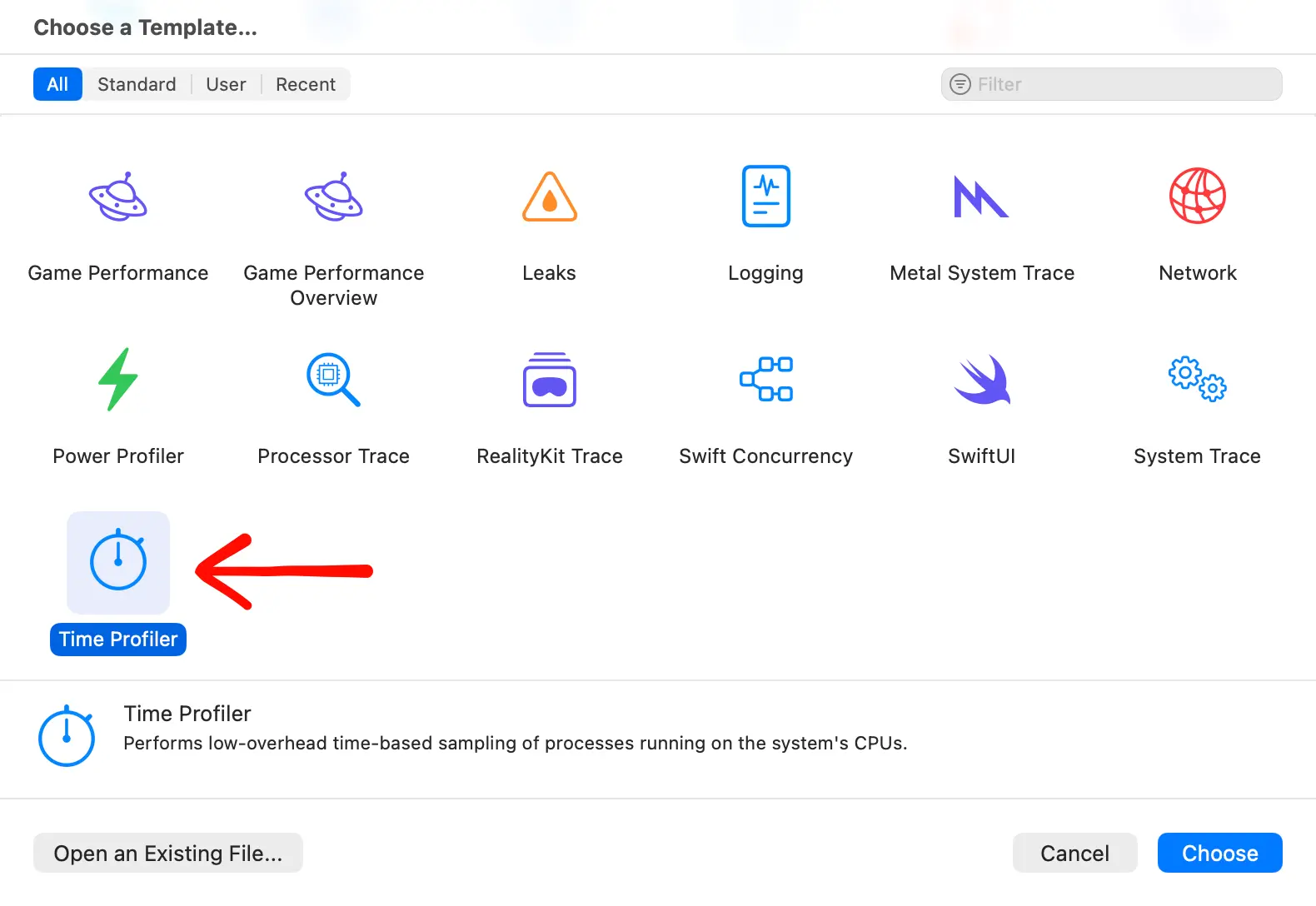
1. In the `Time Profiler` configuration, set the target to the running Zed process
1. Start recording
.
--- FILE: zed/docs/src/update.md ---
---
title: Update Zed
description: "Zed is designed to keep itself up to date automatically. You can always update this behavior in your settings."
---
# Update Zed
Zed is designed to keep itself up to da... |
rust_dataset_chunk_510065 | rust_dataset.txt | 510,065 | 512 | with `%` works with the pipe character `|`. In JavaScript, `w` considers `$` to be a word character.
2. **Visual block selections**: vim mode uses Zed's multiple cursor to emulate visual block selections, making block selections a lot more flexible. For example, anything you insert after a block selection updates on e... |
rust_dataset_chunk_510066 | rust_dataset.txt | 510,066 | 512 | ` |
| Go to All references to the current word | `g A` |
| Find symbol in current file | `g s` |
| Find symbol in entire project | `g S` |
| Go to next diagnostic | `g ]` or `] d` |
| Go to previous diagnostic | `g [... |
rust_dataset_chunk_510067 | rust_dataset.txt | 510,067 | 512 | | `i a` |
| An argument, or list item, etc. (including trailing comma) | `a a` |
| Around an HTML-like tag | `a t` |
| Inside an HTML-like tag | `i t` |
| The current indent leve... |
rust_dataset_chunk_510068 | rust_dataset.txt | 510,068 | 512 | | Go to type definition in a split | `<ctrl-w> g D` |
### In insert mode
The following commands help you bring up Zed's completion menu, request a suggestion from GitHub Copilot, or open the inline AI assistant without leaving insert mode.
| Command ... |
rust_dataset_chunk_510069 | rust_dataset.txt | 510,069 | 512 | /readmes/mini-ai.md) Neovim plugin. These text objects are not bound by default; see the [Any Bracket Functionality](#any-bracket-functionality) section below for how to configure them.
### Any Bracket Functionality
Zed offers two different strategies for selecting text surrounded by any quote, or any bracket. These ... |
rust_dataset_chunk_510070 | rust_dataset.txt | 510,070 | 512 | context-aware selections using Tree-sitter
- Prefer current-line priority when searching
#### Example Configuration
To use these text objects, you need to add bindings to your keymap. Here's an example configuration that makes them available when using text object operators (`i` and `a`) or change-surrounds (`cs`)... |
rust_dataset_chunk_510071 | rust_dataset.txt | 510,071 | 512 | |
| `:wqa[ll][!]` | Save all open files and close all buffers |
| `:qa[ll][!]` | Close all buffers |
| `:[e]x[it][!]` | Close the buffer |
| `:up[date]` | Save the current file ... |
rust_dataset_chunk_510072 | rust_dataset.txt | 510,072 | 512 | ating diagnostics
These commands navigate diagnostics.
| Command | Description |
| ------------------------ | ----------------------------- |
| `:cn[ext]` or `:ln[ext]` | Go to the next diagnostic |
| `:cp[rev]` or `:lp[rev]` | Go to the previous diagnostic |
| `:cc` or `:ll` ... |
rust_dataset_chunk_510073 | rust_dataset.txt | 510,073 | 512 | Lines longer than the width of the window will wrap and displaying continues on the next line |
| `:se[t] [no]nu[mber]` | Print the line number in front of each line |
| `:se[t] [no]r[elative]nu[mber]` | Changes the displayed number to be relative to the curs... |
rust_dataset_chunk_510074 | rust_dataset.txt | 510,074 | 512 | you're editing a file:
```json [keymap]
{
"context": "Editor",
"bindings": {
"ctrl-s": "workspace::Save"
}
}
```
Contexts are nested, so when you're editing a file, the context is the `"Editor"` context, which is inside the `"Pane"` context, which is inside the `"Workspace"` context. That's why any key bin... |
rust_dataset_chunk_510075 | rust_dataset.txt | 510,075 | 512 | Contexts are matched only on one level at a time. So it is possible to use the expression `"Editor && vim_mode == normal"`, but `"Workspace && vim_mode == normal"` will never match because we set the vim context at the `"Editor"` level.
### Useful contexts for vim mode key bindings
Here's a template with useful vim ... |
rust_dataset_chunk_510076 | rust_dataset.txt | 510,076 | 512 | Up",
"ctrl-w j": "workspace::ActivatePaneDown"
// ... or other keybindings
}
}
```
Subword motion, which allows you to navigate and select individual words in `camelCase` or `snake_case`, is not enabled by default. To enable it, add these bindings to your keymap.
```json [keymap]
{
"context": "VimControl ... |
rust_dataset_chunk_510077 | rust_dataset.txt | 510,077 | 512 | is mapped to `vim::Substitute`. Adding these bindings will override that behavior, so ensure this change aligns with your workflow preferences.
```json [keymap]
{
"context": "vim_mode == normal || vim_mode == visual",
"bindings": {
"s": "vim::PushSneak",
"shift-s": "vim::PushSneakBackward"
}
}
```
The ... |
rust_dataset_chunk_510078 | rust_dataset.txt | 510,078 | 512 | ": "project_symbols::Toggle", // vim default: go to older tag
"ctrl-o": "workspace::Open", // vim default: go back
"ctrl-s": "workspace::Save", // vim default: show signature
"ctrl-b": "workspace::ToggleLeftDock" // vim default: down
}
},
```
## Changing vim mode settings
You ... |
rust_dataset_chunk_510079 | rust_dataset.txt | 510,079 | 512 | "fz": "🧟♀️"
}
}
}
```
Here's an example of these settings changed:
```json [settings]
{
"vim": {
"default_mode": "insert",
"use_system_clipboard": "never",
"use_smartcase_find": true,
"use_regex_search": true,
"gdefault": true,
"toggle_relative_line_numbers": true,
"highlig... |
rust_dataset_chunk_510080 | rust_dataset.txt | 510,080 | 512 | bar": { "show": "never" },
// Prevent the buffer from scrolling beyond the last line
"scroll_beyond_last_line": "off",
// Allow the cursor to reach the edges of the screen
"vertical_scroll_margin": 0,
"gutter": {
// Disable line numbers completely
"line_numbers": false
},
"command_aliases": {
... |
rust_dataset_chunk_510081 | rust_dataset.txt | 510,081 | 512 | and a replacement of "$1".
For the full syntax supported by Zed's regex engine [see the regex crate documentation](https://docs.rs/regex/latest/regex/#syntax).
--- FILE: zed/docs/src/visual-customization.md ---
---
title: Visual Customization
description: "Various aspects of Zed's visual layout can be configured in... |
rust_dataset_chunk_510082 | rust_dataset.txt | 510,082 | 512 | editor buffers
// use ".ZedMono" for the bundled default monospace (currently Lilex)
"buffer_font_family": "Berkeley Mono", // Font name for editor buffers
"buffer_font_size": 15, // Font size for editor buffers
"buffer_font_weight": 400, // Font weight in CSS units [100-900]
// ... |
rust_dataset_chunk_510083 | rust_dataset.txt | 510,083 | 512 | .
"heading_font_weight": 600
}
```
### Font ligatures
By default Zed enables font ligatures which will visually combine certain adjacent characters.
For example `=>` will be displayed as `→` and `!=` will be `≠`.
This is purely cosmetic and the individual characters remain unchanged.
To disable this behavior ... |
rust_dataset_chunk_510084 | rust_dataset.txt | 510,084 | 512 | ed build in path prompts (file and directory pickers)
// instead of OS native pickers (false).
"use_system_path_prompts": true,
// Force usage of Zed built in confirmation prompts ("Do you want to save?")
// instead of OS native prompts (false). On linux this is ignored (always false).
"use_system_prompts": t... |
rust_dataset_chunk_510085 | rust_dataset.txt | 510,085 | 512 | "space": "•",
"tab": "⟶" // use "→", for a shorter arrow
},
"unnecessary_code_fade": 0.3, // How much to fade out unused code.
// Hide the values of in variables from visual display in private files
"redact_private_values": false,
// Soft-wrap and rulers
"soft_wrap": "none", // non... |
rust_dataset_chunk_510086 | rust_dataset.txt | 510,086 | 512 | inline blame (em)
"show_commit_summary": false // Show/hide commit summary
},
"hunk_style": "staged_hollow" // staged_hollow, unstaged_hollow
}
```
### Editor Toolbar
```json [settings]
// Editor toolbar related settings
"toolbar": {
"breadcrumbs": true, // Whether to show breadcrumbs.
"... |
rust_dataset_chunk_510087 | rust_dataset.txt | 510,087 | 512 | // Lines to keep above/below the cursor when scrolling with the keyboard
"vertical_scroll_margin": 3,
// The number of characters to keep on either side when scrolling with the mouse
"horizontal_scroll_margin": 5,
// Scroll sensitivity multiplier
"scroll_sensitivity": 1.0,
// Scroll sensitivity multiplier... |
rust_dataset_chunk_510088 | rust_dataset.txt | 510,088 | 512 | an indicator while multi-stroke input is pending.
// If the input has a timeout, a countdown is shown and hovering pauses it.
// Unless the which-key menu is enabled, hovering also lists the bindings
// that could still match.
// Defaults to true.
"pending_keystrokes_indicator": true
},
"global... |
rust_dataset_chunk_510089 | rust_dataset.txt | 510,089 | 512 | method, variable, etc.)
// of each entry in the completions menu. "symbol" shows a syntax-colored
// single-letter badge.
"completion_menu_item_kind": "off", // off, symbol
// Turn on colorization of brackets in editors (configurable per language)
"colorize_brackets": true,
```
### Edit Predictions {#editor... |
rust_dataset_chunk_510090 | rust_dataset.txt | 510,090 | 512 | _panel": {
"button": true, // Show/hide button in the status bar
"default_width": 240, // Default panel width
"dock": "right", // Position of the dock (left, right)
"entry_spacing": "comfortable", // Vertical spacing (comfortable, standard)
"file_icons": true... |
rust_dataset_chunk_510091 | rust_dataset.txt | 510,091 | 512 | _hidden": false
}
```
## Agent Panel
```json [settings]
{
"agent": {
"enabled": true, // Enable/disable the agent
"button": true, // Show/hide the icon in the status bar
"dock": "right", // Where to dock: left, right, bottom
"flexible": true, // Use proportional sizing (left/right docked)
"def... |
rust_dataset_chunk_510092 | rust_dataset.txt | 510,092 | 512 | , always, never)
},
// Terminal Font Settings
"font_family": "Fira Code",
"font_size": 15,
"font_weight": 400,
// Terminal line height: comfortable (1.618), standard(1.3) or `{ "custom": 2 }`
"line_height": "comfortable",
"max_scroll_history_lines": 10000, // Scrollback history (0=dis... |
rust_dataset_chunk_510093 | rust_dataset.txt | 510,093 | 512 | // Project panel scrollbar settings
"show": null // Show/hide: (auto, system, always, never)
},
"multi_buffer_hide_symbols": false // Hide symbols in multi-buffer views (show only files)
}
```
## Collaboration Panels
```json [settings]
{
// Collaboration Panel
"collaboration_panel... |
rust_dataset_chunk_510094 | rust_dataset.txt | 510,094 | 512 | (splits, tabs) is preserved per project
Think of projects in the threads sidebar like browser tabs, but for repositories.
## Opening in a New Window
Sometimes you want a completely separate window. Here's how:
### From Open Recent
When using File > Open Recent ({#kb projects::OpenRecent}):
- **Enter** or **click... |
rust_dataset_chunk_510095 | rust_dataset.txt | 510,095 | 512 | folder to your current project (not as a separate project in the threads sidebar), you have several options:
- **File menu**: File > Add Folder to Project
- **[Project panel](./project-panel.md)**: Right-click in the project panel and choose "Add Folders to Project"
- **Open Recent**: Select a recent project and clic... |
rust_dataset_chunk_510096 | rust_dataset.txt | 510,096 | 512 | leshooting
### Zed fails to start or shows a blank window
- Check that your hardware and operating system version are compatible with Zed. See our [installation guide](./installation.md) for more information.
- Update your GPU drivers from your GPU vendor (Intel/AMD/NVIDIA/Qualcomm).
- Ensure hardware acceleration is... |
rust_dataset_chunk_510097 | rust_dataset.txt | 510,097 | 512 | . Restricted Mode prevents downloading and running related items from `.zed/settings.json`. Until a worktree is trusted, Zed does not run related untrusted actions and waits for user confirmation. This gives users a chance to review project settings, MCP servers, and language servers.
Zed still trusts tools it install... |
rust_dataset_chunk_510098 | rust_dataset.txt | 510,098 | 512 | `trust_all_worktrees`.
## Trust hierarchy
These are mostly internal details and may change, but they help explain how multiple trust requests can be approved at once.
Zed has multiple layers of trust, based on the requests, from the least to most trusted level:
- "single file worktree"
After opening an empty Zed w... |
rust_dataset_chunk_510099 | rust_dataset.txt | 510,099 | 512 | opt interactive_comments && echo "setopt interactive_comments" >> ~/.zshrc`
1. Create a clean clone the zed repository, delete tags and delete branches.
```sh
LANGNAME=your_language_name_here
rm -rf $LANGNAME
git clone --single-branch --no-tags git@github.com:zed-industries/zed.git $LANGNAME
cd $LANGNAME
```
2. Cre... |
Subsets and Splits
No community queries yet
The top public SQL queries from the community will appear here once available.