text
stringlengths 119
10.1k
| source
stringclasses 1
value | metadata
dict |
|---|---|---|
**Title:** Extra Ordinance
**Description:**
**Details:**
## EXTRA ORDINANCE
You have several weapons to choose from. You can dig through the earth. **So can *they*.**
Automatic 200mm tank cannons, full auto grenade launching shotguns, mining lasers and antimaterial rifles are all standard issue. Tear them up and hold out until extraction!

Remember to open the inventory. That's where all the loadouts, difficulty settings, credits, controls and so on are.
This is a top down shooter, using the destruction possible in Luanti as a core mechanic. The name says a lot; you're a walking tank made of gratuitous amounts of explosives and weaponry, against a swarm of carnivorous, car-sized bugs.
This game is singleplayer focused; you *can* play it multiplayer, but latency is the enemy. Much of the game is serverside including movement because of engine limitations, and so if you have more than about 50ms latency you're basically out of luck. If you happen to live 30min walk away from the server on the other hand, you're good to go.
It is truly a miracle that it got finished in time.
**Tags:** custom_mapgen, jam_game_2024, pve, shooter, singleplayer
**Repository:** https://codeberg.org/SumianVoice/ExtraOrdinance.git
**License:** MIT
|
Luanti ContentDB
|
{
"commercial_friendly": true,
"downloads": 27252,
"license": "MIT",
"package_id": "Sumianvoice/extra_ordinance",
"repo": "https://codeberg.org/SumianVoice/ExtraOrdinance.git",
"tags": [
"custom_mapgen",
"jam_game_2024",
"pve",
"shooter",
"singleplayer"
],
"type": "game",
"website": null
}
|
**Title:** Automobiles Pack
**Description:**
**Details:**
# automobiles
Modpack to add automobiles to minetest
depends:
biofuel,mobkit
The main goal of this modpack is the detection of slopes and elevations by the vehicles, so the expected is for the vehicle to follow them.
The collision will still be improved as the engine is also improved, so don't demand so much.
For the vehicle operation, fuel is needed, although it will always start with some. You can install the Lokrate's Biofuel mod to make some fuel. Or at last instance, install Airutils mod to have a fuel distiler used by the airplanes.
When playing "Drift Game", the cars don't use any fuel, and some cars are inserted into player's inventory automatically.
Now with inventory
W: Forward
S: Brake
A: Left
D: Right
E: Horn
Shift: Reverse (or goes down on Delorean Time Machine when flying)
E + right click (from outside): car inventory
Space (Jump): Delorean Time Machine goes up
When the box "Drive with mouse" is turned on, the driver can drive it with mouse movements.
It can be painted by punching dye on it. Or the painter.
And fueled by punching biofuel
**Special Privs:**
valet_parking
- Gives a valet parking priv for a player
**Chat Commands:**
/transfer_vehicle player_name
- Transfer the ownership of the vehicle. You must be on the vehicle to perform the command
**SettingTypes:**
collect_automobiles true/false
- The vehicles can be collected again after its destruction
noob_mode false/true
- Enable an ease mode for vehicle usage, the vehicle will climb entire blocks
PS: The Time Machine version of the Delorean does not have recipe.
PS2: To disable character animation while riding motorcycles, use the option "motorcycle_anim_mode = false". The animations only works correctly on Luanti versions equal or above 5.11. Using the option will solve older versions strange positions.
**Tags:** transport
**Repository:** https://github.com/APercy/automobiles_pck
**License:** MIT
|
Luanti ContentDB
|
{
"commercial_friendly": true,
"downloads": 75604,
"license": "MIT",
"package_id": "apercy/automobiles_pck",
"repo": "https://github.com/APercy/automobiles_pck",
"tags": [
"transport"
],
"type": "mod",
"website": null
}
|
**Title:** Placement Preview
**Description:**
**Details:**
----
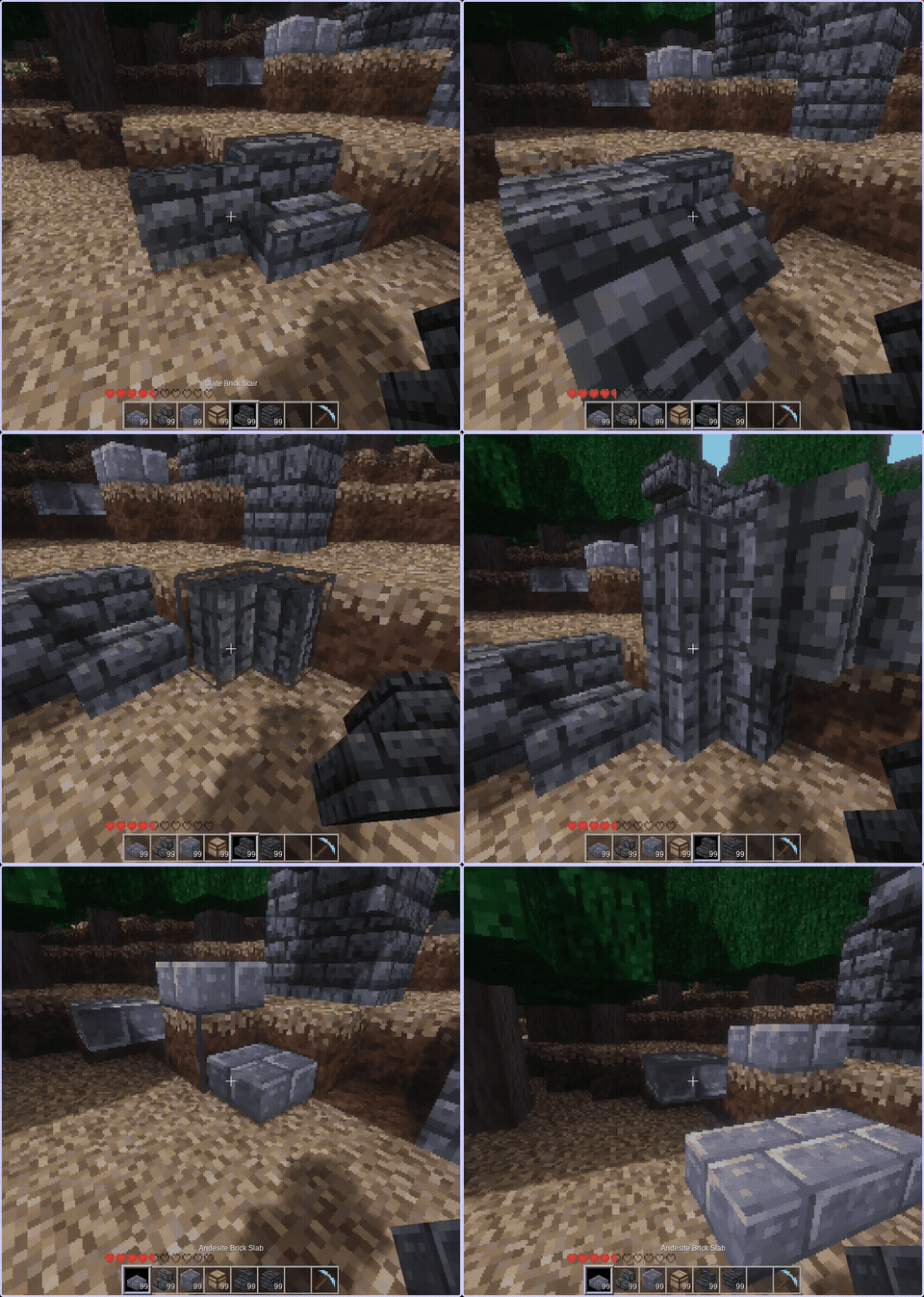
Shows a in world placement preview of the item held in hand and a few other features, life convert a stair to it's corner varient.
_Hold `sneak` for more orientations_
player commands/settings: _/placement_preview_ **help**
settings include:
* smooth movement
* only preview stairs and slabs
* pulse animation toggle
* disable/enable preview
**Tags:** building_mechanics
**Repository:** https://github.com/KingTheGuy/placement_preview
**License:** MIT
|
Luanti ContentDB
|
{
"commercial_friendly": true,
"downloads": 8729,
"license": "MIT",
"package_id": "SURV/placement_preview",
"repo": "https://github.com/KingTheGuy/placement_preview",
"tags": [
"building_mechanics"
],
"type": "mod",
"website": null
}
|
**Title:** Backrooms Test
**Description:**
**Details:**
# Backroom Test
A game about exploring uncanny, vaguely unsettling, liminal spaces. The goal is to explore, be lost, wander. Can you find all the levels?
### For changelog, see bottom of this page
Known to work for 5.6.1, and 5.4 other versions unknown.
For manual install, place in your .minetest/games/ folder (inside a folder called "backroomtest" or something)
Keep in mind, this isn't a game in the usual sense, as there isn't much in the way of progression, you can't build, mine, collect items, or anything else you would normally do and this is intentional. It's meant to mimic some of the backrooms found footage videos and other stories various people have created, and so typical game features like digging and building wouldn't work at all. The player needs to be helpless and lost.
Basically, what would it be like if you no-clipped into the backrooms? What would your journey be like?
There's also a discord server here: https://discord.gg/KGZJBKkcFm
## Mission statement
To create liminal spaces that are familiar yet disconcerting for the player to be trapped in and explore.
Although inspiration is taken from various stories others have created, it isn't based on any particular canon, and so levels and features present on whatever wiki / video / etc can be added or not freely. It is its own canon.
## Planned features
- several more levels
- more reason to explore
- more sounds, triggers, biomes
## What it isn't
- a horror game
- a survival game
- a simulation
## Features it will never have
- survival mechanics, hunger, thirst, etc (would be in a separate mod for this game)
- entities or mobs (separate mod)
- a way "out" obviously
## Rough idea of the "canon"
- similar to the original concept, some of Kane Pixels's work, some of various wikis but not the cringe/SCP stuff.
## Cheatsheet (SPOILERS)
- grey portal doors move you around the level randomly
- red ones take you to a random level; could be level 0 or 99 who knows
- purple doors take you to the sequentially next level (level 0, 1, 2 etc)
- there are no entities or mobs of any kind
- yes you did hear something following you :)
- use /level to get a list of levels, and (cheats) you can also put a number /level 1 to go to that level
## Changelog
### b19
- allow for damage to be turned on
- disable falldamage through br_player_info/damage.lua
- fix possible light issue
**Tags:** oneofakind__original
**Repository:** https://codeberg.org/SumianVoice/backroomtest.git
**License:** MIT
|
Luanti ContentDB
|
{
"commercial_friendly": true,
"downloads": 183763,
"license": "MIT",
"package_id": "Sumianvoice/backroomtest",
"repo": "https://codeberg.org/SumianVoice/backroomtest.git",
"tags": [
"oneofakind__original"
],
"type": "game",
"website": null
}
|
**Title:** Animalia
**Description:**
**Details:**
**WARNING: If you have any version below 0.2 installed, you'll need to manually uninstall before updating.**
**Animalia** adds over a dozen new Animals, each having it's own unique aspects.
**Exploration:** Animalia encourages you to explore and document your world's creatures with the Libri Animalia, a journal that can logs the Animals you've met and gives helpful information. You can even duplicate the information from one libri to an empty one by putting both the crafting area.
**Farming:** Animalia brings multiple livestock creatures, including Cows, Sheep, and Chickens. These mobs can all be lead around using their favorite food or the Lasso, and can also be bred if you have a male and female. Some Animals have visual differences to tell males from females, such as udders on female Cows, Tail feathers on Roosters, and Tusks on male Pigs. You can also use the Animal Net to catch Animals and check their gender, and how much they trust you (if applicable)
**Companionship:** Animalia also adds multiple Pets with different taming methods and uses. Wolves are simple to tame and will protect you and your livestock. Horses require you to break them and saddle them, and can traverse great distances. Cats are annoying, but cute and a fun companion to keep around your house, keep your glass vessels in a safe area and be sure to play with them regularly to build trust.
**Depth:** A multitude of ambient Animals add a bit of depth to your world. Chirping Bats in caves that swarm when approached. Singing Birds that sick near their nests in trees and fly in beautiful flocks. Chirping Frogs in Swamps that use their long tongues to eat bugs.
This mod will be updated in themed phases. Currently, there is the initial Livestock update, The Domestication update, and the Ambience update. Sometimes, Animals that fit into a prior role will be added outside of a major update, such as Turkeys and Reindeer.
Many future updates are planned, and I gladly take suggestions.
**Tags:** mobs, plants_and_farming, survival
**Repository:** https://github.com/ElCeejo/animalia
**License:** MIT
|
Luanti ContentDB
|
{
"commercial_friendly": true,
"downloads": 169258,
"license": "MIT",
"package_id": "ElCeejo/animalia",
"repo": "https://github.com/ElCeejo/animalia",
"tags": [
"mobs",
"plants_and_farming",
"survival"
],
"type": "mod",
"website": null
}
|
**Title:** i3
**Description:**
**Details:**

#### A next-generation inventory
This mod features a modern, powerful inventory menu with a good user experience.
**`i3`** provides a rich [**API**](https://github.com/mt-historical/i3/blob/main/API.md) for mod developers who want to extend it.
##### List of features:
- Crafting Guide (survival mode only)
- Progressive Mode¹
- Quick Crafting
- 3D Player Model Real-Time Preview
- Isometric Map Preview
- Inventory Sorting (+ options: compression, reverse mode, automation, etc.)
- Item List Compression (**`moreblocks`** is supported)
- Item Bookmarks
- Waypoints
- Bags
- Home
**¹** *This mode is a Terraria-like system that shows recipes you can craft from items you ever had in your inventory.
To enable it: `i3_progressive_mode = true` in `minetest.conf`.*
##### This mod officially supports the following mods:
- [**`3d_armor`**](https://content.luanti.org/packages/stu/3d_armor/)
- [**`skinsdb`**](https://content.luanti.org/packages/bell07/skinsdb/)
- [**`awards`**](https://content.luanti.org/packages/rubenwardy/awards/)
##### Recommendations
To use this mod in the best conditions:
- Use LuaJIT
- Use the default Freetype font style
##### Troubleshooting
If the inventory's font size is too big on certain setups (namely Windows 10/11 or 144 DPI display), you should lower the
value of the setting `display_density_factor` in your `minetest.conf`. Note that the change is applied after restart.
You can also use the font size slider in the inventory, settings window.
##### Notes
`i3` uses a larger inventory than the usual inventories in Minetest games. Thus, most chests will be unadapted to this inventory size. The `i3` inventory is 9 slots wide by default, such as Minecraft.
Report bugs on the [**Bug Tracker**](https://github.com/mt-historical/i3/issues).
**Tags:** crafting, creative, gui, inventory, library, storage, survival, tools
**Repository:** https://github.com/mt-historical/i3
**License:** MIT
|
Luanti ContentDB
|
{
"commercial_friendly": true,
"downloads": 196350,
"license": "MIT",
"package_id": "mt-mods/i3",
"repo": "https://github.com/mt-historical/i3",
"tags": [
"crafting",
"creative",
"gui",
"inventory",
"library",
"storage",
"survival",
"tools"
],
"type": "mod",
"website": null
}
|
**Title:** Draconis
**Description:**
**Details:**
Adds massive, terrifying Dragons and powerful endgame equipment.
**Dragons** are massive flying beasts with powerful breath, capable of laying waste to almost anything.
**Dragon Eggs** are a rare and valuable drop from older Dragons. When put on a 3x3 nest of Bone Piles, the Egg will "awaken" and allow you to set it alight or drown it to begin hatching.
**Draconic Steel** can be crafted in to tools and armor (if stu's 3d armor mod is enabled) that far exceed the capabilities of diamond. Draconic Steel is costly, time-consuming, and unstackable. Each ingot is directly tied to the Dragon that forged it, and ingots forged by different individual Dragons cannot be crafted together. Draconic Steel tools gain power from their linked Dragon, with attack strength and speed increasing the closer the tool is. Inversely, if the Dragon dies the tool will shatter upon use.
**More in-depth information can be found in the Libri Draconis item.**
**Tags:** adventure__rpg, environment, mapgen, mobs, pvp, survival, tools, transport
**Repository:** https://github.com/ElCeejo/draconis
**License:** MIT
|
Luanti ContentDB
|
{
"commercial_friendly": true,
"downloads": 134011,
"license": "MIT",
"package_id": "ElCeejo/draconis",
"repo": "https://github.com/ElCeejo/draconis",
"tags": [
"adventure__rpg",
"environment",
"mapgen",
"mobs",
"pvp",
"survival",
"tools",
"transport"
],
"type": "mod",
"website": null
}
|
**Title:** NodeCore
**Description:**
**Details:**
**A surreal dream-world where everything is possible but nothing is easy.** Peaceful and Zen. Brutally obstinate. *Prepare to unlearn everything you thought you knew about voxel sandbox games.*
#### Features:
- A complete game, deep and complex, with mods available but not required.
- An immersive 3D world, with no pop-ups and minimal HUDs between you and the world.
- Paragon of the "voxel" concept, with virtually every in-world thing on the voxel grid.
- In-world crafting systems with unique recipes.
- Rich emergent mechanics, customizable machines built of discrete and fungible parts.
- Complex in-game technology: optical logic circuits, hinged/rotary machinery, automated crafting.
- Subtle dynamics: material angle of repose, fuel and soil quality, conservation and decay.
- Exercise critical thinking and logical reasoning, and learn through experimentation.
- Built-in new player guide, discovery system ensuring players don't miss possibilities.
- Playable and consistent across all platforms, single or multi-player. Mobile-friendly, gamepad-friendly.
- Eggcorns! Pumwater!
#### Warnings:
- **NodeCore is a *different kind* of difficult.** Advancement is tied to innovation and discovery, rather than honing skills, and is likely difficult, complex, and unforgiving. If you want to unlock most of the content, expect it to require both creativity and patience.
- Only *very* basic, minimal-spoiler guidance is included in the game. Figuring things out yourself is part of the default experience. If you need more guidance, **Join the Community** (below).
- Do not expect intuition you have built up from other games, including other voxel sandbox or puzzle games, to apply here. This game has its own logic and learning it is part of the full experience.
#### Recent Breaking Changes:
N.B. this is only for changes that remove some old way of doing something (i.e. not new features or new alternative routes) and are old enough that many players are expected to rely on them. It also does not include most bugfixes.
- `02637775-9407dc65`: Optic beam transparency logic makes a lot of formerly-transperent items opaque. This should make detection easier in general, but may necessitate redesigning some machines.
- `01683215-4c09d412`: Recipes for rakes have been changed based on the "intuitive" shapes new players were observed trying. It uses one fewer adze than the old recipe, and is overall less expensive.
- `01671185-4304c47c`: Recipes for storage boxes (shelves, cases/tanks, and crates) have changed. Instead of 3x3 recipes, they are based on placing things into forms, and forms are made from frames. This includes a change in the overall cost of storage units.
- `01643785-c34bc395`: Leaching soils now requires raked soils. It now requires much more human intervention than before.
#### Editions:
*This package is the **stable** release of NodeCore.* It's ideal for streamers, offline players, or others who can't afford to deal with bugs, but new features may be delayed.
Alternatively, check out [NodeCore ALPHA](/packages/Warr1024/nodecore_alpha/) for the cutting-edge unstable version.
#### Join the Community:
- Discord: <https://discord.gg/NNYeF6f>
- Matrix: [#+nodecore:matrix.org](https://matrix.to/#/#+nodecore:matrix.org)
- IRC: **#nodecore** on [irc.libera.chat](https://libera.chat/)
- Semi-Unofficial Wiki: [nodecore.mine.nu](https://nodecore.mine.nu/)
#### Translation:
Help translate NodeCore to your language on [Weblate](https://hosted.weblate.org/projects/minetest/nodecore/)!
[Brezhoneg](https://hosted.weblate.org/projects/minetest/nodecore/br/)(3%) — [Chinese (Literary)](https://hosted.weblate.org/projects/minetest/nodecore/zh/)(0%) — [Chinese (Simplified)](https://hosted.weblate.org/projects/minetest/nodecore/zh_CN/)(10%) — [Chinese (Traditional)](https://hosted.weblate.org/projects/minetest/nodecore/zh_TW/)(96%) — [Deutsch](https://hosted.weblate.org/projects/minetest/nodecore/de/)(98%) — [Español](https://hosted.weblate.org/projects/minetest/nodecore/es/)(70%) — [Esperanto](https://hosted.weblate.org/projects/minetest/nodecore/eo/)(12%) — [Français](https://hosted.weblate.org/projects/minetest/nodecore/fr/)(99%) — [Indonesia](https://hosted.weblate.org/projects/minetest/nodecore/id/)✔ — [Italiano](https://hosted.weblate.org/projects/minetest/nodecore/it/)(99%) — [Lojban](https://hosted.weblate.org/projects/minetest/nodecore/jbo/)(1%) — [Magyar](https://hosted.weblate.org/projects/minetest/nodecore/hu/)(3%) — [Norwegian Bokmål](https://hosted.weblate.org/projects/minetest/nodecore/nb_NO/)(0%) — [Portuguese (Brazil)](https://hosted.weblate.org/projects/minetest/nodecore/pt_BR/)(42%) — [Português](https://hosted.weblate.org/projects/minetest/nodecore/pt/)(28%) — [Slovenčina](https://hosted.weblate.org/projects/minetest/nodecore/sk/)✔ — [Spanish (American)](https://hosted.weblate.org/projects/minetest/nodecore/es_US/)(63%) — [Toki Pona](https://hosted.weblate.org/projects/minetest/nodecore/tok/)(4%) — [interlingua](https://hosted.weblate.org/projects/minetest/nodecore/ia/)(0%) — [polski](https://hosted.weblate.org/projects/minetest/nodecore/pl/)(1%) — [slovenščina](https://hosted.weblate.org/projects/minetest/nodecore/sl/)(0%) — [Čeština](https://hosted.weblate.org/projects/minetest/nodecore/cs/)✔ — [Ελληνικά](https://hosted.weblate.org/projects/minetest/nodecore/el/)(1%) — [Русский](https://hosted.weblate.org/projects/minetest/nodecore/ru/)✔ — [українська](https://hosted.weblate.org/projects/minetest/nodecore/uk/)✔ — [فارسی](https://hosted.weblate.org/projects/minetest/nodecore/fa/)(15%) — [தமிழ்](https://hosted.weblate.org/projects/minetest/nodecore/ta/)✔ — [한국어](https://hosted.weblate.org/projects/minetest/nodecore/ko/)✔
**Tags:** building, crafting, education, environment, inventory, oneofakind__original, player_effects, puzzle, pve, technology
**Repository:** https://gitlab.com/sztest/nodecore
**License:** MIT
|
Luanti ContentDB
|
{
"commercial_friendly": true,
"downloads": 148943,
"license": "MIT",
"package_id": "Warr1024/nodecore",
"repo": "https://gitlab.com/sztest/nodecore",
"tags": [
"building",
"crafting",
"education",
"environment",
"inventory",
"oneofakind__original",
"player_effects",
"puzzle",
"pve",
"technology"
],
"type": "game",
"website": "https://nc.mine.nu"
}
|
**Title:** Ethereal NG
**Description:**
**Details:**
Ethereal adds many new biomes, plants, food items and tweaks to your world that makes for an interesting adventure :)
Here are some of the new additions:
Biomes: glacier, bamboo, mesa, alpine, healing, snowy, frost, grassy, caves, grayness, grassytwo, prairie, jumble, junglee, desert, grove, mushroom, sandstone, quicksand, plains, savannah, fiery, sandclay, swamp, reefs, sakura, tundra, mediterranean, mangrove.
Trees: willow, healing, big, banana, frost, mushroom, palm, redwood, orange, birch, sakura, lemon, olive, mangrove.
Food: wild onion, strawberry, lemon, olives, many fish, banana, pine nuts, coconut, golden apple, hearty stew, mushroom soup, firethorn jelly, sushi, teriyaki.
Special items and features: potion of flight, crystal tools, staff of light, gilly staff, a working fishing rod, cold blocks freeze water, hot blocks melt snow and ice, torch drops near water, falling leaf particles.
**Tags:** mapgen, plants_and_farming, tools
**Repository:** https://codeberg.org/tenplus1/ethereal
**License:** MIT
|
Luanti ContentDB
|
{
"commercial_friendly": true,
"downloads": 113763,
"license": "MIT",
"package_id": "TenPlus1/ethereal",
"repo": "https://codeberg.org/tenplus1/ethereal",
"tags": [
"mapgen",
"plants_and_farming",
"tools"
],
"type": "mod",
"website": null
}
|
**Title:** Mobs Monster
**Description:**
**Tags:** mobs
**Repository:** https://codeberg.org/tenplus1/mobs_monster
**License:** MIT
|
Luanti ContentDB
|
{
"commercial_friendly": true,
"downloads": 154331,
"license": "MIT",
"package_id": "TenPlus1/mobs_monster",
"repo": "https://codeberg.org/tenplus1/mobs_monster",
"tags": [
"mobs"
],
"type": "mod",
"website": null
}
|
**Title:** X-Decor-libre
**Description:**
**Details:**
This mod adds a bunch of decorative cubes, various mechanisms and stuff for cutting, enchanting, cooking, etc.
This is a libre version (free software, free media) of the X-Decor mod.
It is the same as X-Decor, except with all the non-free files replaced and bugfixes.
### New blocks
This mod adds many decoration blocks: Flower pot, weathervane, radio, speaker, wooden tile, new bricks, lamps, candles, new doors, packed ice, and more.
This mod also adds 7 new block shapes for many Minetest Game blocks. They can be created by using the workbench. This includes panels, mini blocks and flat stairs.
### Special blocks
There are also many special blocks with special features:
* Workbench: Storage, crafting, cutting and repairing
* Storage: 16 item slots for item storage
* Craft: 3×3 crafting grid
* Cut: Put a full cube-shaped block to create new shapes
* Repair: Put a damaged tool and a hammer and wait for it to be repaired
* Enchanting table: Upgrade your tools with mese crystals
* Ender Chest: Interdimensional inventory that is the same no matter where you put the ender chest
* Mailbox: Lets you receive items from other players
* Item Frame: You can place an item into it to show it off
* Cushion: Reduces fall damage
* Cushion Block: Reduces fall damage even more
* Trampoline: Jump on it to bounce off. Very low fall damage
* Cauldron: For storing water and cooking soups
* Recipe: Pour water in, light a fire below it and throw in some food items. Collect the soup with a bowl
* Lever: Pull the lever to activate doors next to it
* Pressure Plate: Step on it to activate doors next to it
* Chessboard: Play Chess against another player or against the computer
### Background
The original X-Decor is a popular mod but it is (as the time of writing this text) non-free software, there are various files under proprietary licenses.
The purpose of X-Decor-libre is to provide the community a fully-free fork of X-Decor with clearly documented licenses. Additional, a lot of bugs compared to the original versions were fixed.
### More info
Fore more information (especially a list of changes compared to the original non-free X-Decor and a list of replaced media files), see: https://codeberg.org/Wuzzy/xdecor-libre/src/branch/master/README.md
**Tags:** building, decorative, magic, tools
**Repository:** https://codeberg.org/Wuzzy/xdecor-libre
**License:** BSD-3-Clause
|
Luanti ContentDB
|
{
"commercial_friendly": false,
"downloads": 32466,
"license": "BSD-3-Clause",
"package_id": "Wuzzy/xdecor",
"repo": "https://codeberg.org/Wuzzy/xdecor-libre",
"tags": [
"building",
"decorative",
"magic",
"tools"
],
"type": "mod",
"website": null
}
|
**Title:** Edit Skin
**Description:**
**Details:**
# Edit Skin Mod
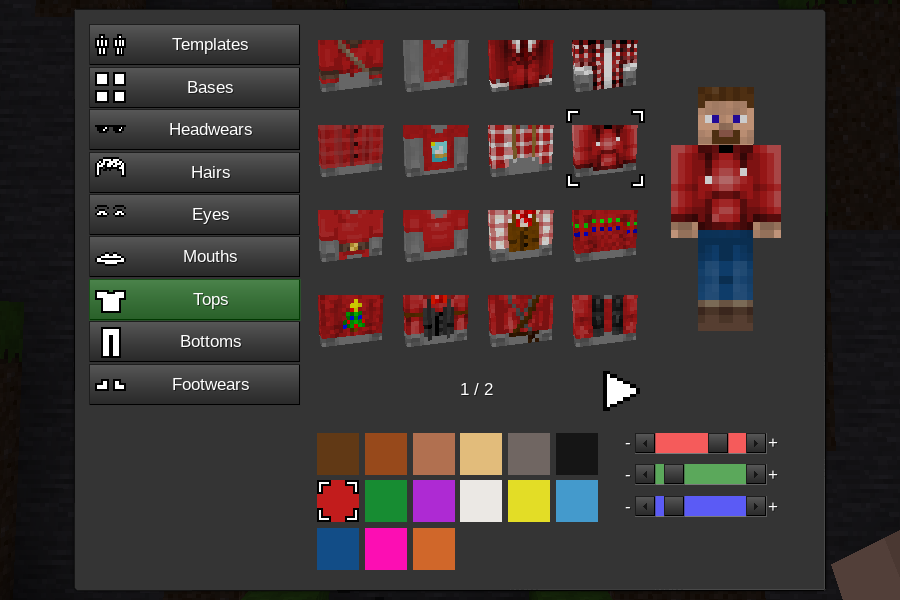
This mod allows advanced skin customization.
New players get a randomly selected male or female skin.
It is compatible with sfinv, sfinv_buttons, i3, unified_inventory, inventory_plus, smart_inventory, and 3d_armor.
Use the /skin command to open the skin configuration screen.
This mod requires Minetest 5.5+
This mod was originally made for MineClone 5.
## License
Code under MIT license
Author: MrRar
See media_credits.txt for media licensing.
## API
### `edit_skin.register_item(item)`
Register a skin item. `item` is a table with item properties listed below.
### Item properties
`type`
Set the item type. Valid values are: "base", "footwear", "eye", "mouth", "bottom", "top", "hair", "headwear"
`texture`
Set to the image file that will be used. Transparent or semitransparnt parts of the texture can be colored by the `mask` texture. If this property is omitted "blank.png" is used.
`mask`
Set the color mask texture. Coloring is only applied to non transparent areas of the texture.
Coloring only works for "base", "bottom, "top", and "hair".
`preview_rotation`
A table containing properties `x` and `y`. `x` and `y` represent the x and y rotation of the item preview.
`alex`
If set to true the item will be default for female character.
`steve`
If set to true the item will be default for male character.
`restricted_to_admin`
This item can only be selected by players with `edit_skin_admin` privilege.
`for_player`
This property is used to restrict the item to a specific player or players. If set to a string, the string is a player name. If set to a table, the table is an array of player names.
`rank`
This property is used to change the application order of the skin item when applied to a player.
The default ranks for each item type are:
base: 10
footwear: 20
eye: 30
mouth: 40
bottom: 50
top: 60
hair: 70
headwear: 80
Lower ranks are applied to the player first and can thus be covered by higher rank items.
### `edit_skin.show_formspec(player)`
Show the skin configuration screen.
`player` is a player ObjectRef.
### `edit_skin.register_on_set_skin(func)`
Register a function to be called whenever a player skin changes.
The function will be given a player ObjectRef as a parameter.
### `edit_skin.save(player)`
Save player skin. `player` is a player ObjectRef.
### `edit_skin.update_player_skin(player)`
Update a player based on skin data in edit_skin.players.
`player` is a player ObjectRef.
### `edit_skin.base_color`
A table of ColorSpec integers that the player can select to color the base item.
These colors are separate from `edit_skin.color` because this mod registers a mesh hand node for each base and base color combination. The number of junk mesh hand nodes should be kept to a minimum.
### `edit_skin.color`
A table of ColorSpec integers that the player can select to color colorable skin items.
### `edit_skin.players`
A table mapped by player ObjectRef containing tables holding the player's selected skin items and colors.
Only stores skin information for logged in players.
### `edit_skin.player_formspecs`
A table mapped by player ObjectRef containing tables holding player formspec state. The tables have the following properties:
`active_tab`
Set to the name of the current active tab.
`page_num`
Set to the current formspec page number.
### `edit_skin.compile_skin(skin)`
`skin` is a table with skin item properties.
Returns an image string.
**Tags:** multiplayer, skins
**Repository:** https://github.com/MrRar/edit_skin
**License:** MIT
|
Luanti ContentDB
|
{
"commercial_friendly": true,
"downloads": 46637,
"license": "MIT",
"package_id": "Mr. Rar/edit_skin",
"repo": "https://github.com/MrRar/edit_skin",
"tags": [
"multiplayer",
"skins"
],
"type": "mod",
"website": null
}
|
**Title:** Farming Redo
**Description:**
**Details:**
Farming Redo uses a new realistic way of growing crops so that players can wander the map and have their farms grow in the background, or if you want some fast food you can use the Bonemeal mod to help speed things up.
New foods need only be planted directly onto tilled soil as no seeds are required. Previous seed-based crops like Wheat, Cotton, Barley, Oats and Rice still have seeds that can be found inside certain grass types.
The built-in API lets you add your own crop mods and food recipes using the {food_} groups.
You can also use this mod with MineClone.
**Tags:** food, plants_and_farming, survival
**Repository:** https://codeberg.org/tenplus1/farming
**License:** MIT
|
Luanti ContentDB
|
{
"commercial_friendly": true,
"downloads": 173408,
"license": "MIT",
"package_id": "TenPlus1/farming",
"repo": "https://codeberg.org/tenplus1/farming",
"tags": [
"food",
"plants_and_farming",
"survival"
],
"type": "mod",
"website": null
}
|
**Title:** Mobs Redo API
**Description:**
**Details:**
# You need to install some other mods!
This mod contains the API to add mobs into the world using one of the mods below:
- [Mobs Animal](https://content.luanti.org/packages/TenPlus1/mobs_animal/)
- [Mobs Monster](https://content.luanti.org/packages/TenPlus1/mobs_monster/)
- [Mobs NPC](https://content.luanti.org/packages/TenPlus1/mobs_npc/)
- [Mob Horse](https://content.luanti.org/packages/TenPlus1/mob_horse/)
- [Mobs Water](https://content.luanti.org/packages/TenPlus1/mobs_water/)
- [Mese Monster Classic](https://content.luanti.org/packages/TenPlus1/mob_mese_monster_classic)
- [Not So Simple Mobs](https://content.luanti.org/packages/TenPlus1/nssm/)
- [Not So Simple Mobs Extra](https://content.luanti.org/packages/TenPlus1/nssm_extra)
- [DMobs](https://content.luanti.org/packages/TenPlus1/dmobs/)
- [Slimes Redo](https://content.luanti.org/packages/TenPlus1/mobs_slimes)
- [Goblins](https://content.luanti.org/packages/FreeLikeGNU/goblins)
- [Balrog](https://content.luanti.org/packages/rheo/mobs_balrog)
- [Wilhelmines Animal World](https://content.luanti.org/packages/Liil/animalworld)
- [Wilhelmines Marinara Mobs](https://content.luanti.org/packages/Liil/marinaramobs)
- [Wilhelmines Living Caves](https://content.luanti.org/packages/Liil/livingcavesmobs)
- [Wilhelmines Living Nether](https://content.luanti.org/packages/Liil/livingnether)
- [Wilhelmines Living Jungle](https://content.luanti.org/packages/Liil/livingjungle)
- [Wilhelmines Living Floatlands](https://content.luanti.org/packages/Liil/livingfloatlands)
- [Wilhelmines Living Desert](https://content.luanti.org/packages/Liil/livingdesert)
- [Flower Cow](https://content.luanti.org/packages/DrPlamsa/flower_cow)
- [MC Mobs](https://codeberg.org/tenplus1/mobs_mc)
- [Forgotten Monsters](https://content.luanti.org/packages/pixelzone/forgotten_monsters)
- [Ethereal Bosses](https://content.luanti.org/packages/pixelzone/ethereal_bosses)
- [Hardcoreti Mobs](https://content.luanti.org/packages/SamBas700/mobs_hardcoreti)
**Tags:** library, mobs
**Repository:** https://codeberg.org/tenplus1/mobs_redo
**License:** MIT
|
Luanti ContentDB
|
{
"commercial_friendly": true,
"downloads": 357887,
"license": "MIT",
"package_id": "TenPlus1/mobs",
"repo": "https://codeberg.org/tenplus1/mobs_redo",
"tags": [
"library",
"mobs"
],
"type": "mod",
"website": null
}
|
**Title:** Mobs Animal
**Description:**
**Tags:** mobs
**Repository:** https://codeberg.org/tenplus1/mobs_animal
**License:** MIT
|
Luanti ContentDB
|
{
"commercial_friendly": true,
"downloads": 173360,
"license": "MIT",
"package_id": "TenPlus1/mobs_animal",
"repo": "https://codeberg.org/tenplus1/mobs_animal",
"tags": [
"mobs"
],
"type": "mod",
"website": null
}
|
**Title:** Steampunk Blimp
**Description:**
**Details:**
Luanti 5.9 mod: Steampunk Blimp
========================================
Note: update the **airutils** lib first
Note 2: not designed for potato server
Note 2023/12/21: Now the logo formspec let the player use any texture loaded in the game
This mod implements a fantasy steampunk blimp for Luanti.
The mod was made for fun, but tries to provide an immersion on it's operation.
It can carry 7 players.
To fly it, it is necessary to provide some items, such as fuel to be burned and
water for the boiler. The fuel can be coal, coal block and wood. To supply it,
be on board and punch the necessary items on the airship. There is another way to
load water to the boiler: if it is landed on water, it can load it through the
menu. But the current pressure will be lost.
Activate the furnace in the first option of the menu. Take control by activating
the option "Take the Control".
The information panel will be on the left and bottom of the screen. Wait for the
boiler to reach the proper pressure for operation (green) before operating the power lever.
To go up, press Jump (space). Note that it takes some pressure from the boiler. To go down,
hold sneak (shift).
Forward increases the propeller power, Backward reduces. To go reverse, hold aux (E key)
and backward together. There is a power mode. When the lever reaches the up limit, hold E
and forward to increase the acceleration. But note that the boiler will lose pressure.
The blimp inventory can be accessed by Aux (E) + rightclick.
**Shared owners:**
* This vehicle was made to be shared with a team. So the owner can set more users to operate it. Inside the blimp, just use the command /blimp_share <name>
* To remove someone from the sharing, /blimp_remove <name>
* To list the owners, /blimp_list
* Is possible to lock the blimp access, so only the owners can enter: /blimp_lock true
* To let anyone enter, /blimp_lock false
* All shared owners can access the blimp inventory
**Painting:**
* As the planes, punch a dye against the hull, so the primary color will change
* To change the secondary color, punch a dye, but holding Aux (E) key.
* It is possible to set a logo on your blimp, so enter inside it and type the command /blimp_logo
* Only the original owner can do the paintings
* To paint it on Repixture game, the owner have to use the command /blimp_paint
**Shortcuts:**
* right click to enter and access menu
* punch with dye to paint
* forward and backward while in drive position: controls the power lever
* left and right while in drive position: controls the direction
* jump and sneak: controls the up and down movement
* E + right click while inside: acess inventory
* E + backward while in drive position: the machine does backward
* E + foward while in drive position: extra power
* E + left while in drive position: shot left cannon *
* E + right while in drive position: shot right cannon *
* E + space while in drive position: shot both cannons *
(* the cannons must be loaded and unlocked before the shot)
(* the ammo for the cannons must be at the bottom line of blimp inventory)
**Damages and Reapirs:**
* Now impacts and shots will damage the airship. But the damage is limited until hp reaches the value of 10
* The damaged blimp wont fly and will fall after losing it's pressure
* To repair the damaged airship, punch gold ingots into it
**Tip:**
* Drive it gently.
* The captain can leave the drive position to walk too
* If a player goes timeout or logoff in flight, the blimp will "rescue" him if no other player enter the blimp, so is a good idea wait the friend at a secure place far from anyone who wants to enter the blimp.
* To bring it again into your inventory, right click with the Repair Tool or the Skeleton Key. But remember: you will lost the inventory, so clean it first
**Know issues:**
* The walk movement inside the ship is affected by server lag, because the lack of an interpolation method on attach function.
* Rubber-band bug is from luanti nature, just close and reopen luanti to solve.
* Some old versions of minetest can have an strange issue, the camera is set to the map center. So if it happens, just type /blimp_eject to be free again.
License of source code:
MIT (see file LICENSE)
License of media (textures and sounds):
---------------------------------------
collision.ogg by APercy, CC0
Blimp model and textures by APercy. CC BY-SA 3.0
**Tags:** transport
**Repository:** https://github.com/APercy/steampunk_blimp
**License:** MIT
|
Luanti ContentDB
|
{
"commercial_friendly": true,
"downloads": 26274,
"license": "MIT",
"package_id": "apercy/steampunk_blimp",
"repo": "https://github.com/APercy/steampunk_blimp",
"tags": [
"transport"
],
"type": "mod",
"website": null
}
|
**Title:** I Have Hands
**Description:**
**Details:**

____
Carry a storage block/node without breaking it.
you can carry a chest, a barrel.. just about anything that has an inventory.
**how?**
_Hold `sneak` then `right_click(place button)` with an `empty_hand` to pickup/place down the storage containers_
____
**Tags:** building_mechanics, inventory, storage
**Repository:** https://github.com/KingTheGuy/i_have_hands
**License:** MIT
|
Luanti ContentDB
|
{
"commercial_friendly": true,
"downloads": 7784,
"license": "MIT",
"package_id": "SURV/i_have_hands",
"repo": "https://github.com/KingTheGuy/i_have_hands",
"tags": [
"building_mechanics",
"inventory",
"storage"
],
"type": "mod",
"website": null
}
|
**Title:** Schematic Editor
**Description:**
**Details:**
This tool allows you to create, edit and save schematics.
A schematic is a data structure in Luanti which contains data to place a pre-defined structure in the world, like trees or buildings.
This mod also supports the advanced schematic features such as per-node probabilities, force-placed nodes, and Y slice probabilities.
Server commands: `placeschem` (place schematic), `mts2lua` (convert .mts to .lua file).
This mod is for modders and advanced users, the goal of this mod is to become the #1 schematic editing tool. If you don't understand anything of this, you should read the Luanti Lua API documentation on schematics.
To learn how to use this mod, see the [README.md](https://codeberg.org/Wuzzy/minetest_schemedit/src/branch/master/README.md) file.
**Tags:** developer_tools
**Repository:** https://codeberg.org/Wuzzy/minetest_schemedit
**License:** MIT
|
Luanti ContentDB
|
{
"commercial_friendly": true,
"downloads": 12748,
"license": "MIT",
"package_id": "Wuzzy/schemedit",
"repo": "https://codeberg.org/Wuzzy/minetest_schemedit",
"tags": [
"developer_tools"
],
"type": "mod",
"website": null
}
|
**Title:** Wilhelmines Animal World
**Description:**
**Details:**
Note: To see the models of the mobs correctly you have to activate Shaders in the Main Menu. Without Shaders they will appear not fully textured.
This mod for Mobs Redo adds various animals to your Minetest world and makes it harder to survive, because of dangerous and strong beasts.
Supports Mineclone 2 + Mineclonia.
Current available animals:
* Ant
* Anteater
* Bat
* Bear
* Beaver
* Beluga Whale
* Blackbird
* Black Grouse
* Boar
* Camel
* Carp
* Clamydosaurus
* Cobra
* Cockatoo
* Cockroach
* Crab
* Crocodile
* Diving Beetle
* Dragonfly
* Echidna
* Elephant
* Frog
* Giraffe
* Gnu
* Goby
* Golden Mole
* Goose
* Hare
* Hermitcrab
* Hippo
* Hyena
* Ibex
* Iguana
* Indian Rhino
* Kangaroo
* Koala
* Leopard Seal
* Lobster
* Locust
* Manatee
* Marmot
* Monitor Lizard
* Monkey
* Moose
* Mosquito
* Muskox
* Nandu
* Notoptera
* Olm
* Orang Utan
* Oryx
* Otter
* Owl
* Panda
* Parrot
* Polar Bear
* Polar Fox
* Puffin
* Rat
* Reindeer
* Roadrunner
* Robin
* Scorpion
* Seahorse
* Seal
* Shark
* Snail
* Snow Leopard
* Spiders
* Squid
* Stellers Sea Eagle
* Stingray
* Tapir
* Termite
* Tiger
* Tortoise
* Toucan
* Tree Lobster
* Trout
* Wasp
* Wild Boar
* Wolf
* Wolverine
* Viper
* Vulture
* Yak
* Zebra
**Tags:** mobs, survival
**Repository:** https://github.com/Skandarella/Animal-World.git
**License:** MIT
|
Luanti ContentDB
|
{
"commercial_friendly": true,
"downloads": 33115,
"license": "MIT",
"package_id": "Liil/animalworld",
"repo": "https://github.com/Skandarella/Animal-World.git",
"tags": [
"mobs",
"survival"
],
"type": "mod",
"website": null
}
|
**Title:** Nether
**Description:**
**Details:**
Adds a deep underground realm with different mapgen that you can reach with obsidian portals.
Rare passageways can be found through the netherrack to a great magma ocean.
A Nether portal is built as a rectangular vertical frame of obsidian, 4 blocks wide and 5 blocks high. Once constructed, a Mese crystal fragment can be right-click/used on the frame to activate it.
**Tags:** mapgen, survival, transport
**Repository:** https://github.com/minetest-mods/nether
**License:** ISC
|
Luanti ContentDB
|
{
"commercial_friendly": true,
"downloads": 148380,
"license": "ISC",
"package_id": "PilzAdam/nether",
"repo": "https://github.com/minetest-mods/nether",
"tags": [
"mapgen",
"survival",
"transport"
],
"type": "mod",
"website": null
}
|
**Title:** Digtron
**Description:**
**Details:**
# Modular Tunnel Boring Machine
## aka The Almighty Digtron
This mod contains a set of blocks that can be used to construct highly customizable and modular tunnel-boring machines, bridge-builders, road-pavers, wall-o-matics, and other such construction/destruction contraptions.
A digging machine's components must be connected to the control block via a path leading through the faces of the blocks - diagonal connections across edges and corners don't count.
The basic block types that can be assembled into a functioning digging machine are:
* Digger heads, which excavate material in front of them when the machine is triggered
* Builder heads, which build a user-configured node in the direction they're facing
* Inventory modules, which hold material produced by the digger and provide material to the builders
* Fuel modules, which holds flammable materials to feed the beast
* Control block, used to trigger the machine and move it in a particular direction.
Diggers mine out blocks and shunt them into the Digtron's inventory, or drop them on the ground if there isn't room in the inventory to store them.
Builder heads can be used to lay down a solid surface as the Digtron moves, useful for situations where a tunnel-borer intersects a cavern. Builder heads can be set to construct their target block "intermittently", allowing for regularly-spaced structures to be constructed. Common uses include building support arches at regular intervals in a tunnel, adding a torch on the wall at regular intervals, laying rails with regularly-spaced powered rails interspersed, and adding stairs to vertical shafts.
The auto-controller block is able to trigger automatically for a user-selected number of cycles. A player can ride their Digtron as it goes.
Other specialized Digtron blocks include:
* An "axle" block that allows an assembled Digtron to be rotated into new orientations without needing to be rebuilt block-by-block
* A crate that can store an assembled Digtron and allow the player to transport it to a new location
* A duplicator that can create a copy of an existing Digtron (if provided with enough spare parts)
* An item ejector to clear Digtron's inventory of excavated materials and inject it into pipeworks tubes if that mod is installed.
* A light that can be mounted on a Digtron to illuminate the workspace as it moves
* Structural components to make it look cool
The Digtron mod only depends on the default mod, but includes optional support for several other mods.
**Tags:** building_mechanics, tools, transport
**Repository:** https://github.com/FaceDeer/digtron
**License:** MIT
|
Luanti ContentDB
|
{
"commercial_friendly": true,
"downloads": 28061,
"license": "MIT",
"package_id": "FaceDeer/digtron",
"repo": "https://github.com/FaceDeer/digtron",
"tags": [
"building_mechanics",
"tools",
"transport"
],
"type": "mod",
"website": null
}
|
**Title:** Storage Drawers
**Description:**
**Details:**
This mod adds simple item storages showing the item's inventory image in the front. By left- or right-clicking the image you can take or add stacks. If you also hold the shift-key only a single item will be removed/added.
There's also a 'Drawer Controller' which can insert items automatically into a network of drawers. Just place the drawers next to each other, so they are connected and the drawer controller will sort the items automatically. If you want to connect drawers, but you don't want to place another drawer, just use the 'Drawer Trim'.
Do you have too many cobblestones for one drawer? No problem, just add some drawer upgrades to your drawer! They are available in different sizes and are crafted by steel, gold, obsidian, diamonds or mithril.
### Quotes
* __*Looks like IKEA*__
— [firefox](https://forum.minetest.net/viewtopic.php?p=261150#p261150)
* __*Awesome.*__
— [burli](https://forum.minetest.net/viewtopic.php?p=261389#p261389)
### Credits
I thank the following, very good-looking persons:
Justin Aquadro ([@jaquadro](http://github.com/jaquadro)), developer of the original Minecraft Mod (also licensed under MIT) — Textures and Ideas
Mango Tango ([@mtango688](http://github.com/mtango688)), creator of the Minetest Mod ["Caches"](https://github.com/mtango688/caches/) — I could reuse some code by you. :)
**Tags:** storage
**Repository:** https://github.com/minetest-mods/drawers
**License:** MIT
|
Luanti ContentDB
|
{
"commercial_friendly": true,
"downloads": 30748,
"license": "MIT",
"package_id": "LNJ/drawers",
"repo": "https://github.com/minetest-mods/drawers",
"tags": [
"storage"
],
"type": "mod",
"website": null
}
|
**Title:** More Blocks
**Description:**
**Details:**
A mod that adds more various miscellaneous blocks, along with more shapes of existing blocks.
**Tags:** building
**Repository:** https://github.com/minetest-mods/moreblocks
**License:** Zlib
|
Luanti ContentDB
|
{
"commercial_friendly": true,
"downloads": 88228,
"license": "Zlib",
"package_id": "Calinou/moreblocks",
"repo": "https://github.com/minetest-mods/moreblocks",
"tags": [
"building"
],
"type": "mod",
"website": null
}
|
**Title:** The Library
**Description:**
**Details:**
# The Library
Regulus' Submission to the 2024 Minetest/Luanti Game Jam.

>Darkness has come upon the world. Can you find the spell to banish it?
# License
Code is licensed under the MIT License, a copy of which is included in the file `LICENSE`.
Media is licensed under CC0, a copy of which is included in the file `CC0`.
Note: I used the Fluid R3 GM sounfont to create the music, but I believe it is under CC0 and would count as transformative content either way. I also used three default drum samples (kick04.ogg, clap01.ogg, and shaker01.ogg) from LMMS. I have heard rumours that the origins of these samples are unknown, and that the licensing is questionable, but since I am simply using them as minor percussive elements in my music, I believe it should count as transformative use.
## Credits
- Code, textures, music, and dialogue by **Regulus**.
- Beta testing (and one of the village buildings) by **Dalgamer**
**Tags:** adventure__rpg, custom_mapgen, jam_game_2024, puzzle
**Repository:** https://github.com/regulus79/regulus_mtgj2024
**License:** MIT
|
Luanti ContentDB
|
{
"commercial_friendly": true,
"downloads": 7464,
"license": "MIT",
"package_id": "regulus/regulus_mtgj2024",
"repo": "https://github.com/regulus79/regulus_mtgj2024",
"tags": [
"adventure__rpg",
"custom_mapgen",
"jam_game_2024",
"puzzle"
],
"type": "game",
"website": null
}
|
**Title:** Age of Mending
**Description:**
**Details:**
# Age of Mending
*Formerly Parity of the Minor Bearing*
A game about worldbuilding, homeliness and exploration.

## Warning!
This game is **in development**. Expect **sporadic** and occasionally **breaking updates** to happen, even possibly causing world corruption or loss of items. The entire design and structure of the game may change between updates without notice.
*Known* **breaking changes** are listed in the short description, but there is no guarantee this covers all possible breaking changes. If you are on version 20 and the description says the last breaking update was 21, you can be sure that updating to 21 or higher will break at least *something*.
Changelog:
https://codeberg.org/Age_of_Mending/Age_of_Mending/releases
## Quick Overview
- has a lot of graphical effects that make it **not a potato compatible game**
- is not "survival voxel game" in the *traditional* sense; no tool durability, **no grinding, no progression tree** or dopamine tredmill
- **somewhat stable**, but **not reliable**; things might be jank but probably won't crash at least in singleplayer
- a **fair amount of content**, but **not a lot of gameplay** aside from the core premise of building a world for yourself
- art and "creative potential" focused, meaning it cares more about enabling player creativity than about balance or "things to do"
## About Alpha
As stated in the warning at the top of the page, the game is not in a "stable release" state. Instead, I make rapid changes to the game on a "when I feel like it" basis. This will be the case until beta when it will move to a more stable and "careful" state. Until then, this is a kind of "preview of development" first, and a playable game second. You can readily assume any individual part of the game is a **placeholder** and many things will be unpolished or jank. See the issues on the repo for more info.
The game's design direction may also shift, and with this some feature might be removed. That's the price to pay for a game in alpha. There will be no expectation that the design will continue on the same path.
My approach to development is this: I want to make a cool game. If you want to play it, here it is. The social contract I'm offering is "you're free to play this thing I made" and nothing more.
## Q and A
### ⠀What kind of game is it?
It is a sandbox, mechanics-over-content world building game. The style or setting is early gunpowder era with low fantasy elements (think LoTR level magic at most). The focus is on the player **building**, exploring and defending their own **home and world**. **World building** and creating a place for yourself is what it should be best at. It is not about mining for materials or grinding for better gear, it is about constructing an immersive and meaningful place in a world.
##### ⠀**Is this server-ready?**
No, but you're welcome to try, just post your crash reports in the issue tracker.
##### ⠀**Is it ever going to be finished?**
Yesn't.
##### ⠀**Is it actually playable as a game?**
Yes, but it's missing a lot of gameplay since it's not as progression focused as a lot of games.
##### ⠀**How buggy is it?**
Crashes are somewhat rare usually, and things mostly work, but the problems are less crashes and more "why are all the caves so cramped" or "why can I sneak on ladders" or "why am I inside the ground now" and so on. Not catastrophic, but certainly very jank.
##### ⠀**Is it stable?**
No. It is **not stable.** Fundamental concepts like tool durability, inventories, tool tiers, and more are all *completely up in the air* and may be removed at any time. **I can't and won't be nice about back compatability**, and I won't compromise on that since it would grind development to *even more of a halt than my procrastination does*.
##### ⠀**Is development active?**
You should assume not. I go through periods obsessively working 12 hours on it per day and then go months without even looking at it. Hey, don't judge me like that.
##### ⠀**Why post it now?**
People ask about it a fair bit, and so I figured I would just throw it on here and forget about it. This package will likely be replaced when entering stable / beta, and this will become the continuing unstable version. Then there would be a new package and new page for the stable version.
##### ⠀**It looks good, but does all that fancy make it laggy?**
Eh, sort of. In terms of FPS, it's slower than opaque leaves, but substantially faster than fancy alpha all faces leaves. For mapgen, it's slow. Yes. It's slow. That's something to work on during beta or later alpha though as this game isn't even finished conceptually yet. For server step, it's going to be slower than Minetest Game, but it's probably on par with MCL variants. Most parts of the game use timers and node updates instead of ABMs and globalsteps, so it mostly only runs code when it actually kind of needs to. Again something to improve across beta. **It is worth noting that this is not only a pretty game with very little in the way of compromises on art, but it is also not a well optimised game, and will not run on a potato.**
I get about 30-40fps with high shadows and a 300 or so view distance in dense forest areas, and about 40-50 with no shaders, using a GTX 1660ti mobile GPU (6gb, 1.4MHz). For comparison, in Mineclonia this same sort of test with no shaders is about 28-35fps in less forested areas and about 25fps with shaders. This is planned to be improved as well.
## What would it look like when 'complete'?
This is all *unlikely to be achieved any time soon or possibly at all*, but it's the direction the game is heading in. This is the design doc, since it won't fit into CDB: https://docs.google.com/document/d/144b6nOspRn9LL5kVwgvZWrFiqJ4iEi5Qh7tU-OElwHo
## World and lore
In the world there will be a few main types of creatures:
* dwarves and humans
* spirits
* animals
* demonkin
* half-demon half-animal magic beings
There is some lore to the world (secret), but no story or purpose beyond just "play the game and do what you want". There is no end or completion.
## Cheatsheet
This obviously contains spoilers. Read at your own risk:
https://docs.google.com/document/d/1AnVzK9VIWa0uqQ6E9vq5Cc85B_E154CC_ZFP-NS9qOw/
### Compatible with mte 5.6+. Other versions unknown. Definitely doesn't work on 4.x
Always using the newest version, assume no backwards compatibility.
## Features missing as of version a24
These are some things you might assume to be part of a game like this, but are not implemented yet!
* a complete combat system (blocking and etc are in, but some sounds and telegraphed attacks are not)
* any actual crafting guide to tell you how to play the game - instead it has a Terraria-like crafting system, but you're still a bit blind as to what *can* be made if you got more materials
* structures - there are small schematic structures and ruins, but not any dungeons and villages etc
* spawn setting, spawning in wide areas instead of one point, PVP settings (on by default)
* several biomes not present, such as beaches, tundra mountains, arctic oceans / rivers
You can also see the issues tracker for more info on what to expect.
## What *does* it have then?
* mapgen and biomes
* Terraria-like crafting system
* some mobs (deer, kelar, goblins, stone elementals)
* mob spawn inhibitors so you can have a safe home and peaceful builds
* ores, tools, and ore processing
* status effects for regen, featherfalling, poison etc
* crops and food
* cooking, furnaces, ovens
* pipes for item transport
* teleporters (hard to get for now)
* warpberries allowing the player to move between two locations easily
* bows, swords, spears
* wings and gliding, flight
* treefelling with axes
* ropes for climbing, ladders
* many many many building materials, types of bricks, shapes, colored terracotta, etc
* wrench which can bulk-build in a cube / wall / line etc
* the underworld, with its associated bricks and items
* a floating island defense gamemode (?windmills join) ... which may or may not work in multiplayer
* glowing mushroom biome (currently useless, but pretty)
* a basic airship
* a ship you can pilot and walk around on while it's moving
* lanterns, glow status effect for "dynamic" wearable lights, and a special item that allows for even better illumination ;)
* lots of bugs and I don't mean fireflies
The game is coded pretty much from the ground up, partially because there is the stipulation that it remains MIT licensed and avoids restrictive licensing, but also because of my predisposition to just make the thing rather than learn someone else's API. As a result, you can fully expect that just about no mods will work with it unless they've been very carefully and deliberately made to work agnostically.
**Tags:** adventure__rpg
**Repository:** https://codeberg.org/Age_of_Mending/Age_of_Mending.git
**License:** MIT
|
Luanti ContentDB
|
{
"commercial_friendly": true,
"downloads": 12240,
"license": "MIT",
"package_id": "Sumianvoice/pmb_core",
"repo": "https://codeberg.org/Age_of_Mending/Age_of_Mending.git",
"tags": [
"adventure__rpg"
],
"type": "game",
"website": null
}
|
**Title:** Citadel
**Description:**
**Details:**
The locals say the ruins are cursed -- but you've also heard they hold an artifact that can make one immortal...
---
# Citadel
A time-traveling puzzle game; find unexpected routes around obsticles as you traverse a ruinious landscape. Use both growth and decay to your advantage. Strategically position foliage in the past. Winner of the 2023 game jam.
### Tips
* Try to get to sparkly things!
* When you first enter the ruins, walk towards the center, follow a path of black blocks, climb up a vine, walk along a wall, a drop onto a black, central pillar.
* **There are 4 magic stones: You will need to find all of them to complete the game.**
* There's something waiting at the top of the ruins...
* Right click on the ghost to talk to it
* There are 4 plants that grow in the ruins... perhaps you can use them?
* There are 7 ancient artifacts in the ruins. Some of them are very difficult to get. They are simply collectables and not nessicary to complete the game.
* Plants that have rubble fall on them are unlikely to grow
* You can't time travel into a wall!
### Want to get involved?
Join the [discord server](https://discord.gg/HQpacNUvDJ) or [matrix space](https://matrix.to/#/#citadel-minetest:matrix.org).
**Tags:** jam_game_2023, puzzle, singleplayer
**Repository:** https://github.com/Irevol/minetest-citadel.git
**License:** MIT
|
Luanti ContentDB
|
{
"commercial_friendly": true,
"downloads": 87884,
"license": "MIT",
"package_id": "_Irevol_/citadel",
"repo": "https://github.com/Irevol/minetest-citadel.git",
"tags": [
"jam_game_2023",
"puzzle",
"singleplayer"
],
"type": "game",
"website": null
}
|
**Title:** Klots
**Description:**
**Details:**
# Klots
Solve spatial logic puzzles in outer space.
## Playing the Game
Singleplayer or cooperative team play over LAN (or very low-latency internet) is recommended. Running a general public multiplayer server is not currently recommended.
Gameplay instructions should not be necessary. The game has very simple controls. Explore and learn the mechanics as you go.
### Tips
- You can turn off music with `/set -n klots_music_volume 0` (or set it to any other ratio, default 1.0)
- If you believe you are softlocked and cannot reach a reset button, use the emergency `/kill` command. This is considered a *bug*, so please report it!
- If you think you're an expert, try the `/speedrun` command and shoot for the best time.
### Engine Bug Warning
If you try this using Minetest engine versions from 5.6 to 5.7-dev before [#12906](https://github.com/minetest/minetest/pull/12906) was merged, make sure you have shaders *enabled*. There is an engine bug in this version range (either [#12853](https://github.com/minetest/minetest/issues/12853) or [#12944](https://github.com/minetest/minetest/issues/12944)) that causes key components to be *invisible* in some levels. This will be fixed in 5.7.
## Additional Resources
**Community**
- [Klots Discord](https://discord.gg/KMbCjAHBTs)
**Contributing**
- [Level Editing and Design Guide](https://gitlab.com/sztest/klots/-/blob/master/docs/level-editing.md)
- [Contribution Requirements](https://gitlab.com/sztest/klots/-/blob/master/CONTRIBUTING)
**Licensing**
- [Detailed Credits](https://gitlab.com/sztest/klots/-/blob/master/docs/credits.md)
- [Full License](https://gitlab.com/sztest/klots/-/blob/master/LICENSE)
**Tags:** jam_game_2022, mapgen, oneofakind__original, player_effects, puzzle, singleplayer
**Repository:** https://gitlab.com/sztest/klots
**License:** MIT
|
Luanti ContentDB
|
{
"commercial_friendly": true,
"downloads": 12510,
"license": "MIT",
"package_id": "Warr1024/klots",
"repo": "https://gitlab.com/sztest/klots",
"tags": [
"jam_game_2022",
"mapgen",
"oneofakind__original",
"player_effects",
"puzzle",
"singleplayer"
],
"type": "game",
"website": null
}
|
**Title:** Bonemeal
**Description:**
**Details:**
Adds bone and bonemeal giving the ability to quickly grow plants and saplings.
**Tags:** plants_and_farming
**Repository:** https://codeberg.org/tenplus1/bonemeal
**License:** MIT
|
Luanti ContentDB
|
{
"commercial_friendly": true,
"downloads": 70682,
"license": "MIT",
"package_id": "TenPlus1/bonemeal",
"repo": "https://codeberg.org/tenplus1/bonemeal",
"tags": [
"plants_and_farming"
],
"type": "mod",
"website": null
}
|
**Title:** Labyrinth
**Description:**
**Details:**
# Labyrinth
## An aMAZEing Minetest game
## 5 Unique styles! Music! Creativity!
Just escape the maze to "win" and you'll be greeted with the main menu to try a different style!
## More Info
The five styles are:
- classic
- grassy _ Fun music and fun gameplay
- glass _ challenging, puzzling
- cave _ Adventure Filled and Unique
- club _ Like having a party
To quit a level or restart in-game, press "i" or the inventory button.
You always start in the middle of a maze and try to escape through any edge.
The limit on maze size is ~200 by 200.
## You can add your own styles and maze generation!
Just have a read through the included [API.md](https://github.com/ExeVirus/Labyrinth/blob/main/API.md) to learn more
# License
Most everything here is either CC-BY-SA-4.0 or MIT license, see the License file in the game folder.
## You really gotta try the "cave" and "club" styles, they're neat!
If you like the rocks, you can find them and more in my [rocks mod](https://content.luanti.org/packages/Just_Visiting/rocks/):)
Be sure to check out my other stuff too: [Just_Visiting's Mods and Games](https://content.luanti.org/users/Just_Visiting/)
**Tags:** singleplayer
**Repository:** https://github.com/ExeVirus/Labyrinth
**License:** MIT
|
Luanti ContentDB
|
{
"commercial_friendly": true,
"downloads": 40805,
"license": "MIT",
"package_id": "Just_Visiting/labyrinth",
"repo": "https://github.com/ExeVirus/Labyrinth",
"tags": [
"singleplayer"
],
"type": "game",
"website": null
}
|
**Title:** Leads
**Description:**
**Details:**
This mod adds leads which can be used for moving animals or
for tethering animals to fence posts.
Leads can also be attached between two fence posts for decoration.
Consider installing [Object UUIDs] to prevent leads from disconnecting from mobs when unloaded.
Instructions
------------
Right-click on an animal with a lead to attach it.
When you're finished, punch the lead to release the animal.
You can tether a leashed animal by right-clicking a fence post.
Punch the knot to take the lead back, or shift-punch to break it.
By default, leads can be used on animals, monsters, NPCs, players, and boats.
You can customise this in the settings.
Compatibility
-------------
This mod supports Mobs Redo, Creatura, VoxeLibre, Mineclonia, Repixture, and Exile.
Other games and mob frameworks may also work.
Luanti 5.5.0+ server required, Luanti 5.7.0+ client recommended.
If you want to support older clients, disable ‘Long selection box’ in the settings.
[Object UUIDs]: https://content.luanti.org/packages/SilverSandstone/objectuuids/ "Object UUIDs on Luanti ContentDB"
**Tags:** decorative, mobs
**Repository:** https://codeberg.org/SilverSandstone/leads
**License:** MIT
|
Luanti ContentDB
|
{
"commercial_friendly": true,
"downloads": 16101,
"license": "MIT",
"package_id": "SilverSandstone/leads",
"repo": "https://codeberg.org/SilverSandstone/leads",
"tags": [
"decorative",
"mobs"
],
"type": "mod",
"website": null
}
|
**Title:** Edit
**Description:**
**Details:**
## Overview
This mod named `edit` allows copying, pasting, filling, deleting, opening and saving 3D areas.
Schematics are loaded and saved from .mts files located in the world sub folder `schems`.
This mod was inspired by the Fill Start and Fill End blocks in Manic Digger.

## Items
| Name | Item ID | Image |
| ----------- | ---------------- | ---------------------------------- |
| Copy | edit:copy |  |
| Paste | edit:paste |  |
| Fill | edit:fill |  |
| Replace | edit:replace |  |
| Open | edit:open |  |
| Save | edit:save |  |
| Undo | edit:undo |  |
| Circle | edit:circle |  |
| Mirror | edit:mirror |  |
| Screwdriver | edit:screwdriver |  |
| Polygon | edit:polygon |  |
| Bag | edit:bag |  |
## Dependencies
None
## Usage
### Copy Tool
When the copy tool is placed at opposite corners of an area, the area is copied. When the copy tool is placed for the first time, a marker entity is placed. To cancel the copy operation, punch the marker. When a copy tool is placed a second time, the selected area is copied and the markers are removed.
### Paste Tool
The paste tool is used for pasting the area copied by the copy tool or a schematic loaded with the open tool. When a paste tool is placed, the copied area or schematic is placed at the corner of the paste tool. The copied area can be rotated by punching while holding the paste tool.
### Fill Tool
The fill tool is used to fill a 3D area with a certain item. Start by placing the fill tool two times at opposite corners of the desired area.
Once a second fill marker is placed, a dialog appears listing all items in the players inventory. A search field is also available to search all items. Clicking an item will cause it to be used used for filling the selected area. Clicking on a blank inventory slot will cause the selected area to be filled with air. To cancel the fill, press the "X".
### Replace Tool
The replace tool is used to replace certain nodes in a 3D area with a selected item. Start by placing the replace tool two times at opposite corners of the desired area.
Once a second replace marker is placed, a dialog appears listing all node types in the selected area. Check the nodes that should be replaced and then press the "OK" button to proceed with the next step. Next a dialog will pop up showing all the items in the players inventory. A search field is also available to search all items. Clicking an item will cause it to be used used to replace the nodes that were checked earlier. Clicking on a blank inventory slot will cause the checked nodes to be replaced with air. To cancel the replace, press the "X".
### Open Tool
Right click with this tool to load .we or .mts schematics from the world subfolder `schems` for pasting.
Large .we files may fail to load.
### Save Tool
Right click with this tool to save copied area as a .we or .mts schematic in the the world subfolder `schems`.
.mts is the native schematic for Minetest. However it does not support node meta data so some nodes will not be properly saved.
For example, the contents of a chest will be missing.
.we is the WorldEdit format. It supports node meta data but it produces much larger files than .mts.
Large .we files may fail to load.
### Undo Tool
Right click with this tool to undo a world modification like filling or pasting.
Use a second time to redo the undo.
Only the most resent edit operation can be undone.
### Circle Tool
This tool is used to create round structures. Place the tool to activate circle mode. A center point marker is placed wherever the circle tool is placed. In circle mode, any node that is placed will be repeated in a circle around the center point. Node digging is also repeated in the same way. To place or dig a node without it repeating it in a circle, press the aux1 key (E) while placing or digging. To exit circle mode, punch the circle center marker.
### Mirror Tool
This tool is used to mirror the placement or digging of nodes. Place the tool to activate mirror mode. A center point marker is placed wherever the mirror tool is placed. In mirror mode all placed or dig nodes are mirrored. To place or dig a node without mirroring, press the aux1 key (E) while placing or digging. The mirror tool supports four modes, X, Z, X and Z, and eighths. To switch modes, right click the center marker. To exit mirror mode, punch the center marker.
### Screwdriver
This tool is used for rotating nodes that support rotation. Right clicking a node with the screwdriver rotates the node around the X or Z axis depending on the player's position. Left clicking a node with the screwdriver rotates the node clockwise around the Y axis. Param2 types `wallmounted`, `facedir`, and `degrotate` are supported. The node is rotated 90 degrees for all param2 types except `degrotate` where the node is rotated by either 1.5 or 15 degrees. If the aux1 key (E) is held while rotating a `degrotate` node, the rotation angle will be increased by 4x.
### Polygon Tool
This tool is used to create non-concave polygons in 3D space. Place the polygon tool to create markers. Each marker will create a triangle between itself, the last marker placed, and the first marker placed. The first marker placed will be green. To finish the polygon, place a marker on top of the green marker. After doing so, a dialog will appear to select a node or item to fill the polygon.
### Bag
The bag tool is used to place random items from a list of items. Dig (left click) with the bag to open the bag's inventory. Any item from the player inventory can be moved into the bag. The bag has 16 item slots. When placing the bag an item from the bag is randomly chosen to be placed. If a stack of several items is present in the bag, the item will be more likely to be placed than a single item. The probability of being placed is proportional to the item's count divided by the total count of items in the bag. For example, the probability of getting wood would be 75% for a bag with 3 wood and 1 dirt. Bags can be combined with other edit tools, for example, to fill an area with random kinds of dirt.
## Settings
### edit_paste_preview_max_entities
If the copied area has a larger number of nodes, some nodes will be randomly excluded from the preview.
### edit_max_operation_volume
The maximum volume of any edit operation. Increase to allow larger operations.
### edit_fast_node_fill_threshold
When the fill operation has a larger volume then the specified number, fast node fill will be used. To disable fast node placement, set the threshold to be equal to the max operation volume. To disable slow node placement, set the threshold to 0. With fast node placement, callbacks are not called so some nodes might be broken.
### edit_polygon_preview_wire_frame_threshold
If one side of the polygon preview is greater than this setting, a wire frame is used instead of the full preview. The full preview fills the entire polygon with preview entites. If the polygon gets big, the full preview will quickly crash a server. The wire frame preview outlines the triangle componants of the polygon. This setting only affects the preview. The polygon is always completely filled regardless of this setting.
## Privileges
Edit tools and nodes can only be used by players with `edit` privilege.
## License
MIT by MrRar check [License](https://raw.githubusercontent.com/minetest-mods/edit/master/LICENSE.txt) file, this mod was started by MrRar,
minetest-mods community.
**Tags:** building_mechanics, creative, world_tools
**Repository:** https://github.com/minetest-mods/edit
**License:** MIT
|
Luanti ContentDB
|
{
"commercial_friendly": true,
"downloads": 11934,
"license": "MIT",
"package_id": "Mr. Rar/edit",
"repo": "https://github.com/minetest-mods/edit",
"tags": [
"building_mechanics",
"creative",
"world_tools"
],
"type": "mod",
"website": null
}
|
**Title:** Motorboat
**Description:**
**Details:**
Minetest 5.4 mod: Motorboat
========================================
This mod creates a motorboat.
It's water dynamics comes from Sailing Kit (by TheTermos). So it depends on mobkit. And It dependes on the biofuel mod for fuel making.
It starts anchored, so press sneak key to remove anchor. With keyboard you can move the boat. When you press E key, it starts the engine and you can navigate fast, but it consumes fuel. When the engine is started, using W and S you can control the engine power. With engine off you use paddles instead. You can refuel only with the engine turned off. And you can set anchor by pressing sneak, but it only works when the boat is near completely stopped (when the anchor is sucessfull, you receive a message on chat).
It can be painted using dye of any color you want, you must punch the seat with the dye.
**Setting Types:**
motorboat_enable_particles - default: false
Enables the particles effect
-----------------------
It uses some code from Sailing Kit (by TheTermos)
License of source code:
MIT (see file LICENSE)
License of media (textures and sounds):
---------------------------------------
engine.ogg, collision.ogg and textures by APercy. See License file
Boat model by APercy. See License file
**Tags:** transport
**Repository:** https://github.com/APercy/motorboat
**License:** MIT
|
Luanti ContentDB
|
{
"commercial_friendly": true,
"downloads": 48862,
"license": "MIT",
"package_id": "apercy/motorboat",
"repo": "https://github.com/APercy/motorboat",
"tags": [
"transport"
],
"type": "mod",
"website": null
}
|
**Title:** Hand Painted Pack
**Description:**
**Details:**
This is a 128 x 128 hand painted style texture pack. It is intended for vanilla Minetest. I rather focused on making quality textures than covering a large number of mods. You are welcome to expand this pack.
**Tags:** 128px
**Repository:** https://gitlab.com/drummyfish/minetest-texturepack
**License:** CC0-1.0
|
Luanti ContentDB
|
{
"commercial_friendly": true,
"downloads": 34709,
"license": "CC0-1.0",
"package_id": "drummyfish/drummyfish",
"repo": "https://gitlab.com/drummyfish/minetest-texturepack",
"tags": [
"128px"
],
"type": "txp",
"website": null
}
|
**Title:** Super sam
**Description:**
**Details:**
Super sam adventures


[](license.txt)

[](https://content.luanti.org/packages/BuckarooBanzay/super_sam)
State: **Playable prototype**
Guide sam through the various levels and score points
Built with [mapsync](https://github.com/BuckarooBanzay/mapsync)
Official discord server: https://discord.gg/JcyaETW3zz
Minetest server on the serverlist: `supersam.minetest.ch:30002`
# Commands
* `/ambience [on|off]` enable or disable ambient sounds
* `/mode [edit|play]` switch between play- and edit-mode (to edit the map)
# Map editing / contributing
Contact me on IRC (*BuckarooBanzai*) or discord (*BuckarooBanzai#6742*)
# License
* Code: MIT
* Textures: (unless otherwise noted) CC-BY SA 4.0
* `menu/icon.png` CC-BY SA 4.0 https://opengameart.org/content/mario-like-stuff
* Others: see the `readme.md` or `license.txt` files in the various `mods/*` folders
**Tags:** adventure__rpg, oneofakind__original
**Repository:** https://github.com/BuckarooBanzay/super_sam/
**License:** MIT
|
Luanti ContentDB
|
{
"commercial_friendly": true,
"downloads": 26345,
"license": "MIT",
"package_id": "BuckarooBanzay/super_sam",
"repo": "https://github.com/BuckarooBanzay/super_sam/",
"tags": [
"adventure__rpg",
"oneofakind__original"
],
"type": "game",
"website": null
}
|
**Title:** Little Lady
**Description:**
**Details:**
# Little Lady
### A Little Ladybug in a Big World
#### You are a young ladybug, learning your way in the world.
#### *Hint:* Play with sound on
----------------------------------------
### What was made for the Jam, and what was prior?
All 3d models were already built either prior to the compo, or used other CC-BY models from online. Some of their associated textures are their own. See licenses for those.
The rest of the content was made during the competition timeframe
- Levels
- Story (ha)
- Music
- Colors
- Menu
- Code itself
- Collision Box data
The following mods are considered third party for the compeition:
- moreblocks
- autobox
- rocks
- markdown2formspec
**Tags:** jam_game_2021, oneofakind__original, singleplayer, sound_music
**Repository:** https://github.com/ExeVirus/littlelady
**License:** MIT
|
Luanti ContentDB
|
{
"commercial_friendly": true,
"downloads": 25369,
"license": "MIT",
"package_id": "Just_Visiting/littlelady",
"repo": "https://github.com/ExeVirus/littlelady",
"tags": [
"jam_game_2021",
"oneofakind__original",
"singleplayer",
"sound_music"
],
"type": "game",
"website": null
}
|
**Title:** Artelhum
**Description:**
**Details:**
# Let the adventure begin
**Artelhum** is a cartoon-style texture pack, with support for a large variety of mods. ( 2216 textures at the moment )
Some of you will remember the Minetoon texture pack from Gambit, from a while ago!
At the time I liked it, so I started adding support for the mods of the server I played on, Steinheim NodesNation. After all this time, and also thanks to the quarantine, I was able to support a great variety of mods!
**Have fun!**
**Tags:** 128px
**Repository:** https://github.com/AndrOn25022012/Artelhum.git
**License:** MIT
|
Luanti ContentDB
|
{
"commercial_friendly": true,
"downloads": 26954,
"license": "MIT",
"package_id": "AndrOn/artelhum",
"repo": "https://github.com/AndrOn25022012/Artelhum.git",
"tags": [
"128px"
],
"type": "txp",
"website": null
}
|
**Title:** More Ores
**Description:**
**Details:**
Adds new ores, along with tools and building blocks.
**Tags:** mapgen
**Repository:** https://github.com/minetest-mods/moreores
**License:** Zlib
|
Luanti ContentDB
|
{
"commercial_friendly": true,
"downloads": 93607,
"license": "Zlib",
"package_id": "Calinou/moreores",
"repo": "https://github.com/minetest-mods/moreores",
"tags": [
"mapgen"
],
"type": "mod",
"website": null
}
|
**Title:** Character Animations
**Description:**
**Details:**
Animates the character. Resembles [`playeranim`](https://github.com/minetest-mods/playeranim) and [`headanim`](https://github.com/LoneWolfHT/headanim).
## Features
* Animates head, right arm & body
* Also provides support for arbitrary player models, as long as `Head`, `Arm_Right` & `Body` bones exist
* Advantages over `playeranim`:
* Extracts exact animations and bone positions from b3d models at runtime (no complex installation)
* Also animates attached players (with restrictions on angles)
* Advantages over `headanim`:
* Provides compatibility back until Minetest 0.4.x (as opposed to `headanim` supporting only 5.3+)
* Head angles are clamped, head can tilt sideways
* Animates right arm & body as well
## Configuration
<!--modlib:conf:2-->
### `default`
#### `arm_right`
##### `radius`
Right arm spin radius
* Type: number
* Default: `10`
* >= `-180`
* <= `180`
##### `speed`
Right arm spin speed
* Type: number
* Default: `1000`
* > `0`
* <= `10000`
##### `yaw`
###### `max`
Right arm yaw (max)
* Type: number
* Default: `160`
* >= `-180`
* <= `180`
###### `min`
Right arm yaw (min)
* Type: number
* Default: `-30`
* >= `-180`
* <= `180`
#### `body`
##### `turn_speed`
Body turn speed
* Type: number
* Default: `0.2`
* > `0`
* <= `1000`
#### `head`
##### `pitch`
###### `max`
Head pitch (max)
* Type: number
* Default: `80`
* >= `-180`
* <= `180`
###### `min`
Head pitch (min)
* Type: number
* Default: `-60`
* >= `-180`
* <= `180`
##### `yaw`
###### `max`
Head yaw (max)
* Type: number
* Default: `90`
* >= `-180`
* <= `180`
###### `min`
Head yaw (min)
* Type: number
* Default: `-90`
* >= `-180`
* <= `180`
##### `yaw_restricted`
###### `max`
Head yaw restricted (max)
* Type: number
* Default: `45`
* >= `-180`
* <= `180`
###### `min`
Head yaw restricted (min)
* Type: number
* Default: `0`
* >= `-180`
* <= `180`
##### `yaw_restriction`
Head yaw restriction
* Type: number
* Default: `60`
* >= `-180`
* <= `180`
### `models`
Other models, same format as `default` model
<!--modlib:conf-->
## API
Minetest's `player:set_bone_position` is overridden so that it still works as expected.
### `character_anim.set_bone_override(player, bonename, position, rotation)`
The signature resembles that of `set_bone_position`. `bonename` must be a string. The following additional features are provided:
* Using it like `set_bone_position` by setting `rotation` and `position` to non-`nil` values and using `""` to set the root bone
* *Setting only the bone position* by setting `rotation` to `nil` - bone rotation will then be model-animation-determined
* *Setting only the bone rotation* by setting `position` to `nil` - bone position will then be model-animation-determined
* *Clearing the override* by setting both `rotation` and `position` to `nil` ("unset_bone_position")
**Tags:** skins
**Repository:** https://github.com/appgurueu/character_anim
**License:** MIT
|
Luanti ContentDB
|
{
"commercial_friendly": true,
"downloads": 48687,
"license": "MIT",
"package_id": "LMD/character_anim",
"repo": "https://github.com/appgurueu/character_anim",
"tags": [
"skins"
],
"type": "mod",
"website": null
}
|
**Title:** Legboat
**Description:**
**Details:**
# Legboat
Land transportation for a civilized age.
Uses procedurally animated raycast legs, may be buggy.
Punch to mount, sneak to dismount. Can be spawned with a legboat egg.
Note: The boat model (boats_boat.obj) and wood texture (default_wood.png) are provided by dependencies, and are copyright of their respective authors. Dependencies may be subject to different licensing terms.
## Changelog
### 2023-01-31
Spawning/riding legboats is now done with right click.
Footstep sounds are now produced
Selecting the legboat should now be more accurate
**Tags:** april_fools, transport
**Repository:** https://codeberg.org/ekl/legboat
**License:** MIT
|
Luanti ContentDB
|
{
"commercial_friendly": true,
"downloads": 5800,
"license": "MIT",
"package_id": "ekl/legboat",
"repo": "https://codeberg.org/ekl/legboat",
"tags": [
"april_fools",
"transport"
],
"type": "mod",
"website": null
}
|
**Title:** Bike
**Description:**
**Tags:** sports, transport
**Repository:** https://gitlab.com/h2mm/bike/
**License:** MIT
|
Luanti ContentDB
|
{
"commercial_friendly": true,
"downloads": 37497,
"license": "MIT",
"package_id": "Hume2/bike",
"repo": "https://gitlab.com/h2mm/bike/",
"tags": [
"sports",
"transport"
],
"type": "mod",
"website": null
}
|
**Title:** HUD Bars
**Description:**
**Details:**
This mod replaces the builtin health and breath indicators by nice little “progress bars” which show an icon, a label and a numerical value plus maximum.
There are many settings to customize them.
**Tags:** hud, player_effects, survival
**Repository:** https://codeberg.org/Wuzzy/minetest_hudbars
**License:** MIT
|
Luanti ContentDB
|
{
"commercial_friendly": true,
"downloads": 40908,
"license": "MIT",
"package_id": "Wuzzy/hudbars",
"repo": "https://codeberg.org/Wuzzy/minetest_hudbars",
"tags": [
"hud",
"player_effects",
"survival"
],
"type": "mod",
"website": null
}
|
**Title:** Dwarf Fortress style caverns
**Description:**
**Details:**
Inspired by the world of Dwarf Fortress, this mod adds a series of vast cavern layers to the depths of Minetest with a variety of biomes that are populated with the flora of Dwarf Fortress.
## Cavern Layers
The underground is divided into a number of cavern "layers" with a variety of biomes and other features distributed throughout. As one goes deeper one will find increasingly bizzare flora and exotic environments that provide new challenges and opportunities for players.
The uppermost layer is home to relatively conventional tree-like fungal growths of Fungiwood and Tower-Cap mushrooms. These provide a source of underground wood. Also found in this region are plump helmets (an edible farmable mushroom), and cave wheat (a pale grass-like growth whose seeds can be ground for flour).
The next layer down has more exotic growths. Here you can find Goblin Cap mushrooms, the squatter cousins of the Tower Caps. Spore Trees sprout in the warmer and wetter corners of the caverns, raising a climbable three-dimensional mesh or hyphyae above the ground that emits a gentle rain of spore powder. Tunnel Tubes grow in the hottest regions - tall, curved stalks with fruiting bodies at the tips that burst violently when ripe. Smaller growths found here include plump helmets, cave wheat, pig tails (a fibrous fungus that can be grown and harvested for thread) and sweet pods (whose fruiting bodies can be milled for sugar or processed into syrup).
In the third cavern layer yet stranger forms of life flourish in the hostile conditions. The coal-black caverns of the Black Cap forests, rich with carbonaceous deposits that have accumulated over millions of years and lit by smouldering Torchspines, are found here. The frigid Nethercaps, blue-tinted mushrooms leaching heat out of their environment in ways that shouldn't be thermodynamically possible, fill their caverns with ice and snow. In the hotter areas the vicious Bloodthorn grows, with wicked spines that suck moisture from anything they can pierce. In caves too dry to support biological life enormous glowing crystals grow instead. Smaller plants that can be found here include quarry bushes (farmable for their spicy leaves) and dimple cups (whose eponymous parts can be ground to produce a brilliant blue dye).
After the third layer are the shores of the Sunless Sea, the ultimate destination of all water that flows downward through the twisty caves of Minetest. Familiar growths crowd its fertile shores, with Tower Cap, Goblin Cap, Fungiwood and Spore Trees able to take root in this relatively hospitable zone. The caverns of the Sunless Sea are vast in extent but are mostly flooded with water, and below the surface grows treacherous Snareweed and underwater citadels of softly-glowing Cave Coral. Twisting rivers connect the various caverns of the Sunless Sea.
Below the Sunless Sea are seas of a more dangerous sort: lakes of oil and the magma ocean. These caverns are filled with dangerous substances, though there are riches to be had as well; mineral growths fed by the heat and pressure and bountiful fuel sources.
At the very foundation of the world lies an ancient impenetrable realm. There are signs that life once existed here but it is now long gone. Its dead hollows rest on a layer of Slade, a dense material impervious to conventional mining efforts.
Unconventional methods of penetrating the Slade do exist, however. And should it be breached, the exotic Primordial cavern layer can be found beneath.
## Other Features
The giant caverns generated by this mod differ slightly from the default giant caverns found in some mapgens, they use an additional source of noise to generate more ledges and horizontal floors. They also contain stalactites and stalagmites of various sizes - from single-node spikes decorating the default twisty tunnels to mountainous behemoths in the main caverns that can reach tens of meters in diameter and hundreds of meters in height.
The trees and plants mentioned above are all farmable, but in contrast to the usual farmable plants and trees they only grow in the *absence* of bright light. Attempting to plant them in sunlight will kill them. A set of recipes is added for cooking the edible ones into a variety of biscuits, stews, and roasts, and sweet pods can be refined into syrup.
Some of the other cave decorations provide dim bioluminescent lighting in some caverns. Cave moss and hanging glow-worms are most common. There is also non-glowing floor fungus found coating the stone in less hospitable biomes, capable of spreading to adjacent cobblestone structures like a slow-creeping infection.
[A more comprehensive guide can be found here.](https://github.com/FaceDeer/dfcaverns/blob/master/guide.md)
## Synergies with other mods
"[dynamic liquid](https://github.com/minetest-mods/dynamic_liquid)" is recommended to provide Dwarf Fortress-like fluid dynamics and to deal with water that might spill into caverns.
"[magma conduits](https://github.com/FaceDeer/magma_conduits/)" is recommended for a Dwarf Fortress like magmatic landscape. If not magma conduits, it is at least recommended that mapgen magma be disabled on whatever mapgen you're adding this mod to; mapgen magma is difficult for lua mapgens like this to tidy up and it will often spill into caverns setting large swaths of fungal forests on fire. Depending on the mapgen you're using this mod with you could do this by setting ``mgv5_lava_depth, mgv7_lava_depth``, ``mgcarpathian_lava_depth``, ``mgflat_lava_depth``, ``mgfractal_lava_depth``, or ``mgvalleys_lava_depth`` to -2800 (near the default depth of the magma sea).
The "[doc](https://forum.minetest.net/viewtopic.php?f=9&t=15912&p=240152)" mod is supported to provide in-game documentation for all of the new items and nodes this mod adds.
"[ropes](https://github.com/minetest-mods/ropes)" are very useful for navigating some of the large open spaces this mod provides.
"[radiant damage](https://github.com/FaceDeer/radiant_damage)" greatly increases the danger of the Magma Sea if heat radiance is enabled, as well as several of the rare crystals in the deeper layers that emit Mese radiation if that damage type is enabled.
Adding "[named_waypoints](https://github.com/FaceDeer/named_waypoints)" and "[namegen](https://github.com/FaceDeer/namegen)" will provide some landmarks in the Underworld that a player can use to navigate by.
**Tags:** mapgen
**Repository:** https://github.com/FaceDeer/dfcaverns
**License:** MIT
|
Luanti ContentDB
|
{
"commercial_friendly": true,
"downloads": 27514,
"license": "MIT",
"package_id": "FaceDeer/dfcaverns",
"repo": "https://github.com/FaceDeer/dfcaverns",
"tags": [
"mapgen"
],
"type": "mod",
"website": null
}
|
**Title:** Headanim
**Description:**
**Details:**
## Similar mods
* <https://content.luanti.org/packages/Rui/playeranim/>: A lot more complex (and probably slower) than Headanim but looks nicer
**Tags:** player_effects
**Repository:** https://github.com/LoneWolfHT/headanim/
**License:** MIT
|
Luanti ContentDB
|
{
"commercial_friendly": true,
"downloads": 29190,
"license": "MIT",
"package_id": "Lone_Wolf/headanim",
"repo": "https://github.com/LoneWolfHT/headanim/",
"tags": [
"player_effects"
],
"type": "mod",
"website": null
}
|
**Title:** The Velvet Crystal
**Description:**
**Details:**

# The Velvet Crystal
Regulus's submission to the 2023 Minetest Game Jam
> Recover the lost crystal and bring the light back into the world.
## Note
The parkour in the most recent version has been made easier; this was due to the many comments about how the parkour was way too hard.
## Licensing
This game code is licensed under the MIT license, a copy of which is contained in the file named LICENSE.
The textures, sounds, and any other media other than the code are licensed under the CC0 license, a copy of which is contained in the file named CC0.
### Credits
All of the original code, textures, and sounds from the jam version are authored by me.
Dalgamer also contributed suggestions regarding plot and level design.
After the game jam, Warr1024 and luatic contributed some code.
Additionally, Warr1024 contributed his voice acting skills to make the game fully-voiced.
### Beta-testers:
* Dalgamer -- Lead Beta-tester
* Josiah VanderZee
* Archfan
* Maple8
**Tags:** jam_game_2023, singleplayer
**Repository:** https://github.com/regulus79/regulus_mtgamejam_2023.git
**License:** MIT
|
Luanti ContentDB
|
{
"commercial_friendly": true,
"downloads": 109975,
"license": "MIT",
"package_id": "regulus/regulus_mtgamejam_2023",
"repo": "https://github.com/regulus79/regulus_mtgamejam_2023.git",
"tags": [
"jam_game_2023",
"singleplayer"
],
"type": "game",
"website": null
}
|
**Title:** Item Physics
**Description:**
**Details:**
# item_physics
Makes items not spin when they are on the floor.
Tools and non-node items will lay flat, nodes will just stay in their default orientation.
Items spinning is still implemented for nodes that are moving or falling.
## Compatibility
This mod will likely work for any game that doesn't heavily modify the physics of the item entity. It will still probably not crash the game, but it might have visual glitches or cause items to move in strange ways. Mineclone variants are in this category; to make it function perfectly with MCL would mean making it not work for other games, so it is left with some glitches present. It will work, but not 100% as intended.
**Tags:** decorative
**Repository:** https://codeberg.org/SumianVoice/item_physics
**License:** 0BSD
|
Luanti ContentDB
|
{
"commercial_friendly": false,
"downloads": 7595,
"license": "0BSD",
"package_id": "Sumianvoice/item_physics",
"repo": "https://codeberg.org/SumianVoice/item_physics",
"tags": [
"decorative"
],
"type": "mod",
"website": null
}
|
**Title:** Protector Redo
**Description:**
**Details:**
Lets players craft special blocks to protect their builds or disable PVP in areas.
These include protection blocks, chests, doors, trapdoors and placement tool.
Also has admin commands to manage protected areas.
Has Player_factions support included.
**Tags:** building, multiplayer, pvp, server_tools, world_tools
**Repository:** https://codeberg.org/tenplus1/protector
**License:** MIT
|
Luanti ContentDB
|
{
"commercial_friendly": true,
"downloads": 35018,
"license": "MIT",
"package_id": "TenPlus1/protector",
"repo": "https://codeberg.org/tenplus1/protector",
"tags": [
"building",
"multiplayer",
"pvp",
"server_tools",
"world_tools"
],
"type": "mod",
"website": null
}
|
**Title:** Solar Plains: Invector
**Description:**
**Details:**
# Solar Plains: Invector
Mario Kart with a twist of Psygnosis' Wipeout.
### Please note, due to a lack of time, the ability to detect track progress and basic multiplayer has been disabled.
Due to the aforementioned issues, the game is currently as of GameJam endless and is a tech demo with a somewhat functional game element. Please note that a second client will be instantly kicked on join due to incomplete multiplayer support.
## Starting your game:
| Game Mode | Effect |
| -------- | -------- |
| Survival | Regular Race |
| Creative | Track Editor |
## Controls:
| Key | Result |
| -------- | -------- |
| W | Drive Forwards |
| A | Turn/Drift Left |
| S | Brake/Reverse |
| D | Turn/Drift Right |
| E/Aux1/Fast | Exit Testing Kart in Creative Mode |
| Sneak/Shift | Freely Rotating Camera |
| Dig/Left Mouse | Fire/Use Carried Weapon |
| Place/Right Mouse | Fire/Use Carried Weapon Alternative Mode |
**Tags:** jam_game_2021, oneofakind__original, transport
**Repository:** https://github.com/Dumpster-Studios/Invector.git
**License:** MIT
|
Luanti ContentDB
|
{
"commercial_friendly": true,
"downloads": 15650,
"license": "MIT",
"package_id": "Jordach/invector",
"repo": "https://github.com/Dumpster-Studios/Invector.git",
"tags": [
"jam_game_2021",
"oneofakind__original",
"transport"
],
"type": "game",
"website": null
}
|
**Title:** Blockbomber
**Description:**
**Details:**
**Please note: this is a multiplayer-only game. You can run it on a local server or play on an online server**
You can make your own arenas now. Use: https://content.luanti.org/packages/MisterE/blockbomber_editor/
Arenas are distributed as mods. Once you have made arenas, contact me to include them on my server and maybe in the main Blockbomber game release.
Made by: threehymns and MisterE
# **Controls**
Move with your arrow keys.
Drop a bomb with Sneak (Shift).
Throw a bomb that you are standing in with space (if you have "spring").
Punch a bomb with LMB (if you have "fist").
# **Goal**
The goal is to be the last player standing. Accomplish that by collecting the good items to increase your abilities, avoiding the bad ones, placing bombs strategically at the right place at the right time, and not falling.
BTW, falling is based on center, not on hitbox. Watch out!
You can move through other players, but you cannot move through bombs.
# **Powerups**
**GOOD**
stackable:
Bomb: the more bombs you have, the more you can place at once!
Tnt: The more tnts you have, the larger your bombs' blasts will be!
Shoes: You start out a bit slow. Get shoes to get faster, but take care you dont get too fast and fall off!
Permanent:
Spring: allows you to throw bombs that you have just placed or are standing in with the jump key
Fist: Allows you to punch bombs that you are standing next to (but not *in*)
Temporary:
Compass: Makes your explosions go in diagonal directions as well as orthagonal.
Heart: Gives you one extra life, against bomb blasts only! One at a time!
Other:
Pheonix: Ressurects any players who have died already.
**Bad** (Maluses)
*all bad powerups are temporary and can be removed by getting another powerup or waiting for them to expire
Confused Frog: Switches your direction when you try to move
Snail: Makes you super slow
Coffee: Makes you *too* fast
X-bomb: You cant place bombs til its gone!
Party: Bomb fest!
# **Floor Blocks:**
Floor: a regular block you can stand on
Ice: a block where it is hard to change velocity
Arrow: Pushes bombs in that direction
Mortar: throws bombs to a random location on the board
Air: You can fall thru holes if you're not careful!
# **Wall blocks**
Crate: always drops an item when blasted
Brick: is removable with a blast; has a chance to drop an item
Wall: can never be broken; an imovable wall
**Tags:** jam_game_2021, multiplayer, player_effects, pvp, sports
**Repository:** https://gitlab.com/blocknerd-games/blockbomber
**License:** MIT
|
Luanti ContentDB
|
{
"commercial_friendly": true,
"downloads": 20387,
"license": "MIT",
"package_id": "MisterE/blockbomber",
"repo": "https://gitlab.com/blocknerd-games/blockbomber",
"tags": [
"jam_game_2021",
"multiplayer",
"player_effects",
"pvp",
"sports"
],
"type": "game",
"website": "https://www.blockbomber.org"
}
|
**Title:** Pizzaria
**Description:**
**Details:**
# Pizzaria
Minetest Pizzaria mod that adds advanced pizza baking as a late-game food source
**"Why the name?" you may ask.
I made this mod as a birthday present to my good friend Jely, so the whole mod is in his honour!**
Due to MTG's lack of animals and certain plants I've added the rather silly "Mese Mutation Crystal" to turn other items into the ones needed.
### - Mutations:
- Mutating an apple gives a tomato
- Mutating an apple with two pine leaves gives pineapple
- Mutating a player's bones gives 9 Meat
- Mutating blueberries gives olives
And probably the wackiest of all:
- Mutating Gold fives cheese
### - Curing:
Pepperoni has to be cured, craft your pepperoni then hang it from your ceiling until it's fully cured.
### - Pizza prep
1. Craft a bucket of water with flour to make 2x Pizza dough
2. Place the pizza dough then punch it with a rolling pin until it breaks and is rolled out into a pizza base
3. Place on your cheese, and tomato sauce
4. Add whatever 1-2 toppings your heart desires
5. Place your pizza into your pizza oven and stoke the fire with tree logs
6. Ignite your fire with a torch by punching it
7. Wait until your pizza is done, be careful not to burn it!
8. Finally remove your pizza and place it down in a pizza box or on your table
9. Cut it up and enjoy!
And somewhere deep in the dungeons of this world, you may find a slice of the coveted "Heart attack in a circle" Pizza. Said to be crafted by Jely Himself.
**Tags:** decorative, food
**Repository:** https://github.com/Extex101/jelys_pizzaria
**License:** MIT
|
Luanti ContentDB
|
{
"commercial_friendly": true,
"downloads": 10203,
"license": "MIT",
"package_id": "Extex/jelys_pizzaria",
"repo": "https://github.com/Extex101/jelys_pizzaria",
"tags": [
"decorative",
"food"
],
"type": "mod",
"website": null
}
|
**Title:** Dungeon Soup
**Description:**
**Details:**
A texture pack that started off based on the textures that were created for Dungeon Crawl Stone Soup and then added to over time.
Version 1 - Broth Soup covers the below mods almost 100% and includes around 1400 images, I will keep working but it wont be a fast process.
| | | | | |
| -------- | -------- | -------- |-------- |-------- |
| 3d_armor | 3d_armor_shields | awards | basic_materials | bedrock |
| bedrock2 | beds_bed | binoculars | boats | bonemeal |
| bones | buckets | butterflies | carts | creative |
| default | doors | dye | ethereal | farming |
| farming_redo | fire | fireflies | flowers | itemframes |
| keys | map | menu | minimap | mobs_animal |
| mobs_redo | moreblocks | moreores | nextgen_bedrock | pbj_pup |
| pigiron | player_api | protector | screwdriver | stairs |
| sun_moon | tnt | vessels | wool | worldedit |
| xpanes | | | | |
**Notes **
* awards is covered although I supplied those textures to the awards mod directly long ago, I do need to make some new ones to cover new awards.
* 3d_armor, curently missing nether armor and re-inforced shields
**Tags:** 32px
**Repository:** https://github.com/sirrobzeroone/DungeonSoup
**License:** CC0-1.0
|
Luanti ContentDB
|
{
"commercial_friendly": true,
"downloads": 6415,
"license": "CC0-1.0",
"package_id": "sirrobzeroone/dungeonsoup",
"repo": "https://github.com/sirrobzeroone/DungeonSoup",
"tags": [
"32px"
],
"type": "txp",
"website": null
}
|
**Title:** Void - An empty game
**Description:**
**Details:**
This game for Luanti was reduced to the bare minimum of files and configuration. It contains quite literally “nothing”. It registers no more items than the essentially needed nodes and the hand.
The game is not meant for playing (well, of course you can but there is nothing fun to do except digging the three essential nodes and placing them again). The purpose of this game is to test mods in an absolutely “clean” environment with absolutely no “3rd-party” mods or APIs provided by such mods.
## Contents
### Game Files
Some necessary game files are used.
* `game.conf` – Sets the human-readable name of the game as per Luanti API
* `README.md` – This document
* `LICENSE.txt` – Licensing information for the whole game including all the mods
* `mods/void_essential` – This mod adds essential things for properly running a map generator
* `mods/void_hand` – This mod registers the “hand” tool for proper interaction with nodes (i.e. node breaking)
### Void Essential Mod
The `void_essential` mod contains all that is needed for the map generator to create a usable world for testing mods. The following items and nodes are registered by that mod.
* `void_essential:stone` aliased to `mapgen_stone` – This is an essential node used by map generators to generate the terrain. Without that node you would fall all the way down to the bottom of the world and could not place anything on ground, because there literally is no ground
* `void_essential:water_source` aliased to `mapgen_water_source` – Same as with the stone node the water source is one of the essential nodes that are used by map generators to generate the terrain. Without this node, all bodies of water would not be existent. The registered node does not have ANY water properties. It does not spread out, you cannot swim in it, you cannot see through it. IT basically is just a node named “water”
* `void_essential:river_water_source` aliased to `mapgen_river_water_source` – This is exactly the same as with the other water source node and is also one of the essential map generator nodes that need to be registered in order to have proper terrain generation.
All nodes have the only group `oddly_breakable_by_hand = 3` set. The nodes also have `is_ground_content = true` set so the map generator can carve through them when generating caves, etc.
The mod also provides three simple textures.
* `void_essential_stone.png` for the essential stone node
* `void_essential_water_source.png` for the essential water source node
* `void_essential_river_water_source.png` for the essential river water source node
This mod uses the bare minimum that is needed for mods.
### Void Hand Mod
`void_hand` registers the hand tool is not technically needed to generate terrain and entering a world but not having it testing would become unnecessary complicated because the unconfigured hand does not even allow to break nodes that are configured to be *breakable by hand*.
* `:` – The “hand tool” registration. Tool capabilities are identical to the capabilities used by *Minetest Game* because it was seen as default since most of the time. The `wield_scale` was slightly changed (`{x = 0.5, y = 1, z = 4}` instead of `{x = 1, y = 1, z = 2.5}`) which only results in visual changes.
This mod also adds a simple texture.
* `void_hand_hand.png` for the registered “hand tool”
This mod also uses the bare minimum that is needed for mods.
## Usage
To use this game simply switch to the game in the client and create a new world. You can use all standards compliant map generators with all of the settings. Except the three essential nodes (stone, water, river water) and the “hand tool” nothing is registered or loaded, or provided. You’ll have a pure, absolutely independent, bare minimum version of a game.
In order to test your mods simply configure the created world and add the mods as needed for testing. Then start the world and see what’s happening. Since there is no creative inventory turning on creative mode does not change the Luanti-provided default inventory. You need a mod for that or use the `/giveme` command.
## Inventory
Due to the fact that Luanti on it’s own only provides a minimalistic, non-creative inventory, testing multiple nodes could be very cumbersome because you might need to constantly give yourself stuff using the chat command. You also cannot change the node or item meta data (in case your mod handles that).
For circumventing this, you could add [Void Inventory][vi] which not only implements a non-invasive (no additional permissions, no interception of default APi functionality when it comes to placing or picking up things) interface to all registered nodes and common Luanti engine functionality, but also a way to easily modify a node’s or item’s meta data.
[vi]: /packages/Linuxdirk/void_inventory/
**Tags:** developer_tools
**Repository:** https://git.0x7be.net/dirk/void
**License:** MIT
|
Luanti ContentDB
|
{
"commercial_friendly": true,
"downloads": 13394,
"license": "MIT",
"package_id": "Linuxdirk/void",
"repo": "https://git.0x7be.net/dirk/void",
"tags": [
"developer_tools"
],
"type": "game",
"website": null
}
|
**Title:** PRANG!
**Description:**
**Details:**
# PRANG!
An unofficial port of
[PRANG!](https://atomicshrimp.com/post/2020/01/10/Play-PRANG!) to Minetest.
There are instructions on how to play inside the game. In short, you have to
collect food/potions and avoid enemies. You can get a powerup (umbrella) to be
able to destroy enemies, however obstacles are deadly while you have the
powerup.
Requires 5.4.0+ servers, however it should work with clients down to 5.0.0 (although it will send more HUD updates to clients older than 5.2.0).
On MT 5.6.1 and older, you may need to zoom out to be able to see the entire game on smaller displays.
## Public server
If you don't want to download PRANG!, Edgy1 hosts a public server on `prang.edgy1.net` port `30003`. Note that movement processing and rendering is done server-side so there may be lag and/or glitching if you are far away from the server (which is currently in Germany) or have a poor internet connection.
## License
### Code
`formspec_ast`, `fs51`, `hud_fs`, and `prang` are all MIT.
### Media
The textures are CC BY-SA 4.0
[Atomic Shrimp(?)](https://atomicshrimp.com/post/2020/01/10/Play-PRANG%21), and
the music is CC BY-SA 3.0
[Ozzed](https://ozzed.net/music/dunes-at-night.shtml).
See [the LICENSE.md file](https://gitlab.com/luk3yx/minetest-prang/-/blob/main/mods/prang/LICENSE.md) for more information.

**Tags:** oneofakind__original, singleplayer
**Repository:** https://gitlab.com/luk3yx/minetest-prang.git
**License:** MIT
|
Luanti ContentDB
|
{
"commercial_friendly": true,
"downloads": 12610,
"license": "MIT",
"package_id": "luk3yx/prang",
"repo": "https://gitlab.com/luk3yx/minetest-prang.git",
"tags": [
"oneofakind__original",
"singleplayer"
],
"type": "game",
"website": null
}
|
**Title:** Mobs NPC
**Description:**
**Details:**
Adds a simple NPC and Trader into your worlds with a bonus Igor character with halloween skins.
- Custom Traders can be created using api commands.
- Right-click NPC or Igor with stick for control menu.
- Quick trade with NPC or Igor by right-clicking with gold.
- Right-click for random chatter.
- Supports Simple Dialog and NPC Talk mods for interactive chatting.
- Supports MineClone2 items when trading.
**Tags:** mobs
**Repository:** https://codeberg.org/tenplus1/mobs_npc
**License:** MIT
|
Luanti ContentDB
|
{
"commercial_friendly": true,
"downloads": 74119,
"license": "MIT",
"package_id": "TenPlus1/mobs_npc",
"repo": "https://codeberg.org/tenplus1/mobs_npc",
"tags": [
"mobs"
],
"type": "mod",
"website": null
}
|
**Title:** Realtime Elevator
**Description:**
**Details:**
This mod provides stable entity-based elevators for fast vertical travel without teleportation.
Supports several mods and games, including Technic, Minetest Game and Mineclone2.
**Tags:** transport
**Repository:** https://github.com/tigris-mt/elevator
**License:** ISC
|
Luanti ContentDB
|
{
"commercial_friendly": true,
"downloads": 19120,
"license": "ISC",
"package_id": "shacknetisp/elevator",
"repo": "https://github.com/tigris-mt/elevator",
"tags": [
"transport"
],
"type": "mod",
"website": null
}
|
**Title:** Islands
**Description:**
**Details:**
**Usage: This mod has to be enabled before the world is entered for the first time, otherwise there are going to be terrain generation errors**
A lua mapgen featuring tropical islands and lots of water. Best used with [sailing kit](https://content.luanti.org/packages/Termos/sailing_kit/)
Recommended settings:
- **Tone mapping - off** - Important!<br>
- Mip mapping - on<br>
- Texture filtering - off <br>
Update 210315: restore previous light curve settings on shutdown </br>
Update 210301: improved compatibility with other mods dependent on default ([water_life](https://content.luanti.org/packages/Gundul/water_life/), farming). MT 5.4.0 compatibility </br>
Update 210205: Fixed: The previous release used an old version.
**Tags:** custom_mapgen
**Repository:** https://github.com/TheTermos/islands
**License:** MIT
|
Luanti ContentDB
|
{
"commercial_friendly": true,
"downloads": 11652,
"license": "MIT",
"package_id": "Termos/islands",
"repo": "https://github.com/TheTermos/islands",
"tags": [
"custom_mapgen"
],
"type": "mod",
"website": null
}
|
**Title:** Creatura
**Description:**
**Details:**
Creatura aims to be a Animal focused API, with features to make advanced mobs without extra effort.
**Notable Features:**
```
- A* and Theta* Pathfinding
- Performant simple physics
- Multiple useful entity methods
- Simple built-in mob registration
```
**Planned Features:**
```
- Sight API
- Improved Tracking API
- Improved Terrain Traversal API
```
***Documentation is not currently finished.***
**Tags:** library, mobs
**Repository:** https://github.com/ElCeejo/creatura
**License:** MIT
|
Luanti ContentDB
|
{
"commercial_friendly": true,
"downloads": 183812,
"license": "MIT",
"package_id": "ElCeejo/creatura",
"repo": "https://github.com/ElCeejo/creatura",
"tags": [
"library",
"mobs"
],
"type": "mod",
"website": null
}
|
**Title:** Waffles
**Description:**
**Details:**
# Waffles
_"And in the mornin', I'm makin' waffles!" - Donkey, Shrek 2001_
### _Waffles for Dummies:_
1. Obtain a waffle maker.
2. Place the waffle maker.
3. Obtain batter.
4. Open the waffle maker.
5. Place some batter in the waffle maker.
6. Close the waffle maker.
7. Wait for the waffle maker to open.
8. Take the cooked waffle.
9. Consume the cooked waffle.
10. Repeat from step 5.
### Recipes
_All listed items are configurable. See [Configuration](#configuration)_.
`waffles:waffle_maker`:
```
C = casing (default:tin_ingot)
W = wiring (default:steel_ingot)
H = heating (default:copper_ingot)
+-+-+-+
|C|C|C|
+-+-+-+
|W| |W|
+-+-+-+
|C|H|C|
+-+-+-+
```
`waffles:waffle_batter_3`:
```
(Shapeless)
farming:flour, farming:flour, bucket:bucket_water
This recipe is completely configurable.
```
`waffles:waffle_stack`: 8 `waffles:waffle` (Shapeless)
`waffles:waffle_stack_short`: 4 `waffles:waffle` (Shapeless)
### Configuration
* `waffles.craftitem_maker_casing`: Waffle maker casing craftitem.
* `waffles.craftitem_maker_wiring`: Waffle maker wiring craftitem.
* `waffles.craftitem_maker_heating`: Waffle maker heating craftitem.
* `waffles.waffle_batter_recipe`: Waffle batter recipe craftitems. See `settingtypes.txt`.
**Tags:** food
**Repository:** https://github.com/GreenXenith/waffles
**License:** MIT
|
Luanti ContentDB
|
{
"commercial_friendly": true,
"downloads": 19998,
"license": "MIT",
"package_id": "GreenXenith/waffles",
"repo": "https://github.com/GreenXenith/waffles",
"tags": [
"food"
],
"type": "mod",
"website": null
}
|
**Title:** Nextgen Fungi
**Description:**
**Details:**
This mod replaces the mushrooms from the flowers mod with new 3d ones
Author of source code
----------------------
StarNinjas - CC0
Author of media (textures)
---------------------------
StarNinjas (CC BY-SA 3.0):
**Tags:** mtg, plants_and_farming
**Repository:** https://github.com/starninjas/nextgen_fungi
**License:** CC0-1.0
|
Luanti ContentDB
|
{
"commercial_friendly": true,
"downloads": 9945,
"license": "CC0-1.0",
"package_id": "StarNinjas/nextgen_fungi",
"repo": "https://github.com/starninjas/nextgen_fungi",
"tags": [
"mtg",
"plants_and_farming"
],
"type": "mod",
"website": null
}
|
**Title:** SlideSpace
**Description:**
**Details:**
An object in motion remains in motion unless acted upon by an outside force. In this simple puzzle game, choose your direction by the direction you look, and then press space to go. Climb through the void to your ship by solving each puzzle.
Use `/go <level_number>` to teleport to levels you have already unlocked.
Use `[E]` to restart a level.
I saw this idea for a game ... somewhere
**Tags:** jam_game_2022, puzzle, singleplayer
**Repository:** https://gitlab.com/mistere123.coding/slide_space
**License:** MIT
|
Luanti ContentDB
|
{
"commercial_friendly": true,
"downloads": 8266,
"license": "MIT",
"package_id": "MisterE/slide_space",
"repo": "https://gitlab.com/mistere123.coding/slide_space",
"tags": [
"jam_game_2022",
"puzzle",
"singleplayer"
],
"type": "game",
"website": null
}
|
**Title:** Realistic Delta Hang Glider
**Description:**
**Details:**
Have you ever wanted to glide through the mountains and feel the wind rushing by you?
Well now, you can!
This [deltaglider] mod adds two items: the glider itself, and a rocket used to boost your speed.
Punch while holding the glider to take off and soar.
The glider will close when you hit something or when you punch with the glider again.
**Tags:** transport
**Repository:** https://github.com/CBugDCoder/deltaglider
**License:** MIT
|
Luanti ContentDB
|
{
"commercial_friendly": true,
"downloads": 4836,
"license": "MIT",
"package_id": "CBugDCoder/deltaglider",
"repo": "https://github.com/CBugDCoder/deltaglider",
"tags": [
"transport"
],
"type": "mod",
"website": null
}
|
**Title:** sokoblox
**Description:**
**Details:**
A rolling block puzzle game for the Luanti Game Engine.
Developed for the Luanti Game Jam 2024.
**Tags:** jam_game_2024
**Repository:** https://github.com/jgordon510/luanti_sokoblox
**License:** CC0-1.0
|
Luanti ContentDB
|
{
"commercial_friendly": true,
"downloads": 1209,
"license": "CC0-1.0",
"package_id": "jgordon510/sokoblox_game",
"repo": "https://github.com/jgordon510/luanti_sokoblox",
"tags": [
"jam_game_2024"
],
"type": "game",
"website": null
}
|
**Title:** Woolen Mesh Creator
**Description:**
**Details:**
- cubic canvases of sizes 2, 4, 8, 16, 32 and 64 which you can use to capture builds
- according to the nodenames > colors pairings, generate OBJ meshes and use them in the game as miniatures of 1 node of size
- capture and reconstruct builds straight away, with any rotation
- you can rebuild with wool nodes or with the original nodes
- option to rebuild using specific nodes instead of the original ones
- option to rebuild in negative mode
More details in the [Github repo](https://github.com/entuland/wesh)
**Tags:** building, creative, decorative, developer_tools
**Repository:** https://github.com/entuland/wesh
**License:** MIT
|
Luanti ContentDB
|
{
"commercial_friendly": true,
"downloads": 6413,
"license": "MIT",
"package_id": "entuland/wesh",
"repo": "https://github.com/entuland/wesh",
"tags": [
"building",
"creative",
"decorative",
"developer_tools"
],
"type": "mod",
"website": null
}
|
**Title:** LuaJIT Profiler
**Description:**
**Details:**
This Minetest mod lets you use LuaJIT's builtin profiler. This profiler is good
for pinpointing expensive parts of mod code.
## How to Use
- Add the mod to the `secure.trusted_mods` list.
- Enable the mod.
- In-game start the profiler with `/jitprofiler_start 1 <filename>`. The
profiling data will be written to `<worldpath>/jitprofiles/<filename>`.
- Collect data for a while.
- Stop profiling with `/jitprofiler_stop` or by exiting the world.
- Download FlameGraph if you haven't done so.
- Create a flame graph SVG with
`./flamegraph.pl <worldpath>/jitprofiles/<filename> > graph.svg`.
- Open the SVG with your browser or another viewing program.
- The top level of each stack snapshot will be "C", "G", "I", "J", or "N", representing C code, garbage collection, interpreter, JIT compilation, or compiled code, respectively.
## Issues
- This mod can cause the game to hang somehow. Most of the profiling data collected before the hang is saved.
- Sometimes a lot of C code execution is reported in suspicious places. I think this represents time taken by the Minetest engine, but I don't know why the profiler thinks the code is executed inside a Lua function.
- Using this mod with Mesecons luacontrollers can cause crashes for some reason.
**Tags:** complex_installation, developer_tools
**Repository:** https://github.com/TurkeyMcMac/jitprofiler
**License:** MIT
|
Luanti ContentDB
|
{
"commercial_friendly": true,
"downloads": 1120,
"license": "MIT",
"package_id": "jwmhjwmh/jitprofiler",
"repo": "https://github.com/TurkeyMcMac/jitprofiler",
"tags": [
"complex_installation",
"developer_tools"
],
"type": "mod",
"website": null
}
|
**Title:** Piranesi Restoration Project
**Description:**
**Details:**
### *Explore the space-bending house and learn its secrets.*
A challenging, Myst-like adventure/puzzle game set in a unique and mysterious mansion. Read the clues, find key items, solve puzzles, unlock new areas, learn the story of the labyrinth, and ultimately find your escape.
---
This is a polished and well-maintained recreation and continuation of the 2022 Game Jam silver medalist game, **Piranesi** by **[iarbat](https://content.minetest.net/users/cool_beans/)**. Created using [Minetest Definition Ripper](https://content.minetest.net/packages/Warr1024/defripper/), and new original code.
## Features
- Complete game end to end, without the major bugs that plagued the original.
- Clean and simplified UI, dynamically expanding hotbar inventory, on-screen compass.
- Improved visual and sound effects, music.
- Improve accessibility, HUD tips for colorblind or low vision players.
### Translations
[Chinese (Traditional)](https://hosted.weblate.org/projects/minetest/game-piranesi-redo/zh_Hant/)(36%) — [Deutsch](https://hosted.weblate.org/projects/minetest/game-piranesi-redo/de/)✔ — [Español](https://hosted.weblate.org/projects/minetest/game-piranesi-redo/es/)(99%) — [Français](https://hosted.weblate.org/projects/minetest/game-piranesi-redo/fr/)(99%) — [Indonesia](https://hosted.weblate.org/projects/minetest/game-piranesi-redo/id/)✔ — [Magyar](https://hosted.weblate.org/projects/minetest/game-piranesi-redo/hu/)(12%) — [Norwegian Bokmål](https://hosted.weblate.org/projects/minetest/game-piranesi-redo/nb_NO/)(26%) — [Slovenčina](https://hosted.weblate.org/projects/minetest/game-piranesi-redo/sk/)(20%) — [Spanish (American)](https://hosted.weblate.org/projects/minetest/game-piranesi-redo/es_US/)(93%) — [Русский](https://hosted.weblate.org/projects/minetest/game-piranesi-redo/ru/)✔ — [українська](https://hosted.weblate.org/projects/minetest/game-piranesi-redo/uk/)(99%)
… and more on [Weblate](https://hosted.weblate.org/projects/minetest/game-piranesi-redo/)
**Tags:** jam_game_2022, oneofakind__original, puzzle, singleplayer
**Repository:** https://gitlab.com/sztest/piranesi_redo
**License:** MIT
|
Luanti ContentDB
|
{
"commercial_friendly": true,
"downloads": 12288,
"license": "MIT",
"package_id": "Warr1024/piranesi_redo",
"repo": "https://gitlab.com/sztest/piranesi_redo",
"tags": [
"jam_game_2022",
"oneofakind__original",
"puzzle",
"singleplayer"
],
"type": "game",
"website": null
}
|
**Title:** TNT Revamped
**Description:**
**Details:**
# TNT
Fork of [TNT](https://github.com/minetest/minetest_game/tree/master/mods/tnt) mod
This mod will also override the default TNT mod.
water flow code copied from TenPlus1's builtin_item mod [builtin_item](https://notabug.org/TenPlus1/builtin_item)
# Features
1. TNT is always entity on ignite.
2. Ignited TNT entities flow in water.
3. TNT jumps on ignite.
4. It is possible to make minecraft style TNT cannons with this mod.
5. TNT does not damage nodes if it blows up in water. (This can be changed in config)
6. TNT does not damage players or entities if it blows up in water. (This can be changed in config)
# api
``` lua
tnt.register_tnt({
-- Mod name : TNT name
name = "tnt:tnt",
-- Description of TNT node
description = "TNT",
-- TNT Blast radius.
radius = tnt_radius,
-- Strength of blast (explosions mod only).
strength = 1000,
-- explosion delay in seconds.
time = 4,
-- On ignite the TNT will jump upwards based on the jump value.
jump = 3,
-- Ignite sound effect.
ignite_sound = {name = "tnt_ignite"},
-- The explosion sound effect.
boom_sound = {name = "tnt_explode", def = {gain = 2.5, max_hear_distance = 128}}
})
```
# Config
The size of the default tnt blast.
``` lua
tnt_radius = 3
```
The number to multiply how much knock back on another TNT entity.
``` lua
tnt_revamped.tnt_entity_velocity_mul = 2
```
The number to multiply how much knock back on a player.
``` lua
tnt_revamped.player_velocity_mul = 10
```
The number to multiply how much knock back on a entity.
``` lua
tnt_revamped.entity_velocity_mul = 10
```
The explosion api to use.
Use default for the built-in explosions.
Use explosions for ryvnf's explosions mod.
``` lua
tnt_revamped.explosion = "default"
```
**In Water**
If true TNT blast will be able to damage nodes even if its in water.
``` lua
tnt_revamped.damage_nodes = false
```
If true TNT blast will be able to damage entities even if its in water.
``` lua
tnt_revamped.damage_entities = false
```
**Tags:** tools
**Repository:** https://gitlab.com/Coder12a/tnt_revamped
**License:** MIT
|
Luanti ContentDB
|
{
"commercial_friendly": true,
"downloads": 22184,
"license": "MIT",
"package_id": "Coder12/tnt_revamped",
"repo": "https://gitlab.com/Coder12a/tnt_revamped",
"tags": [
"tools"
],
"type": "mod",
"website": null
}
|
**Title:** Find Biome
**Description:**
**Details:**
This is a mod to help with mod/game development for Luanti. It adds a command (“`findbiome`”) to find a biome nearby and teleport you to it and another command (“`listbiomes`”) to list biomes.
The biome finding functionality is also available to mod developers (see the readme file).
Note: To find biomes in v6 mapgen, you need to activate the `biomeinfo` mod as well.
**Tags:** chat, developer_tools, library
**Repository:** https://codeberg.org/Wuzzy/minetest_findbiome
**License:** MIT
|
Luanti ContentDB
|
{
"commercial_friendly": true,
"downloads": 8248,
"license": "MIT",
"package_id": "Wuzzy/findbiome",
"repo": "https://codeberg.org/Wuzzy/minetest_findbiome",
"tags": [
"chat",
"developer_tools",
"library"
],
"type": "mod",
"website": null
}
|
**Title:** The secret story of spacetravel
**Description:**
**Details:**
You awake in a seemingly deserted spaceship. What happened to the crew, and what will happen to you, explore the ship and find out.
**Tags:** adventure__rpg, jam_game_2022
**Repository:** https://notabug.org/NathanS21/Secret_Story_of_Space
**License:** MIT
|
Luanti ContentDB
|
{
"commercial_friendly": true,
"downloads": 9490,
"license": "MIT",
"package_id": "Nathan.S/sss",
"repo": "https://notabug.org/NathanS21/Secret_Story_of_Space",
"tags": [
"adventure__rpg",
"jam_game_2022"
],
"type": "game",
"website": null
}
|
**Title:** Caverealms Lite
**Description:**
**Details:**
A mod for Minetest to add underground realms.
**Tags:** building, environment, mapgen, plants_and_farming, tools
**Repository:** https://github.com/Ezhh/caverealms_lite
**License:** BSD-2-Clause-FreeBSD
|
Luanti ContentDB
|
{
"commercial_friendly": false,
"downloads": 13582,
"license": "BSD-2-Clause-FreeBSD",
"package_id": "Shara/caverealms",
"repo": "https://github.com/Ezhh/caverealms_lite",
"tags": [
"building",
"environment",
"mapgen",
"plants_and_farming",
"tools"
],
"type": "mod",
"website": null
}
|
**Title:** Simple Woodcutter
**Description:**
**Details:**
# Simple Woodcutter
This mod chops the whole tree if you are holding an axe.
The chopping process stops if:
- You are too far away from the target (40 blocks by default)
- You take the axe out of your hand
- Your axe is destroyed
- You are dead
- You are out of the game
- You are holding `ctrl` or `shift` key down (this behavior can be reversed in
settings)
## Features
- Super simple (~50 lines of code with extra features, translations and settings, but core functionality is just 10-15 lines).
- Compatible with any game or mod
- Works fine with huge trees
- Recognizes trees and tools by their group, so it does not require any
configuration
- If you don't have the `lumberjack` permission (in multiplayer game), trees will
be cut 100 times slower (you can change the default `delay` in settings)
## Latest update notes
Since version `1.2.0`, chopping trees is performed with a new, more accurate
algorithm that handles trees of all sizes and shapes! 🎉
---
This mod was created in [Rustroot Forge].
All my mods uses [Luanti LSP-API] annotations, [StyLua] and [Luacheck].
[Rustroot Forge]: https://notabug.org/rr
[Luanti LSP-API]: https://notabug.org/rr/luanti_lsp_api
[StyLua]: https://github.com/JohnnyMorganz/StyLua
[Luacheck]: https://github.com/mpeterv/luacheck
**Tags:** survival
**Repository:** https://notabug.org/rr/simple_woodcutter
**License:** MIT
|
Luanti ContentDB
|
{
"commercial_friendly": true,
"downloads": 6760,
"license": "MIT",
"package_id": "luarocks/simple_woodcutter",
"repo": "https://notabug.org/rr/simple_woodcutter",
"tags": [
"survival"
],
"type": "mod",
"website": "https://notabug.org/rr/simple_woodcutter"
}
|
**Title:** Wield3D
**Description:**
**Tags:** multiplayer
**Repository:** https://github.com/minetest-mods/wield3d
**License:** MIT
|
Luanti ContentDB
|
{
"commercial_friendly": true,
"downloads": 18836,
"license": "MIT",
"package_id": "stu/wield3d",
"repo": "https://github.com/minetest-mods/wield3d",
"tags": [
"multiplayer"
],
"type": "mod",
"website": null
}
|
**Title:** Mobkit
**Description:**
**Details:**
LUA API simplifying the process of creating complex entities, mobs and NPC's.
See mobkit_api.txt inside the package for details.
See this mod: https://content.luanti.org/packages/Termos/wildlife/ for usage example.
**Tags:** library, mobs
**Repository:** https://github.com/mt-mods/mobkit
**License:** MIT
|
Luanti ContentDB
|
{
"commercial_friendly": true,
"downloads": 119178,
"license": "MIT",
"package_id": "mt-mods/mobkit",
"repo": "https://github.com/mt-mods/mobkit",
"tags": [
"library",
"mobs"
],
"type": "mod",
"website": null
}
|
**Title:** Motorbike
**Description:**
**Details:**
##Motorbikes
######[motorbike]
Adds various multi-coloured motorbikes
Smooth ride across your world
Controls:
1. Press to W move forward.
3. Shift to activate cruise control (no speed increase or decrease while pressed).
4. Jump to do a wheelie (Depends on speed).
5. There is a secret trick (But you'll have to figure that out :)..
I hope you enjoy!!
**Tags:** transport
**Repository:** https://github.com/Extex101/motorbike
**License:** MIT
|
Luanti ContentDB
|
{
"commercial_friendly": true,
"downloads": 17193,
"license": "MIT",
"package_id": "Extex/motorbike",
"repo": "https://github.com/Extex101/motorbike",
"tags": [
"transport"
],
"type": "mod",
"website": null
}
|
**Title:** Item Frames and Pedestals
**Description:**
**Details:**
Adds item frames and pedestals that you can craft and place to showcase items inside, frames may also be rotated and any bright items will glow. This specific mod uses protected areas instead of owned frames.
Can be used with VoxelLibre and MineClonia as well as Default games :)
**Tags:** decorative
**Repository:** https://codeberg.org/tenplus1/itemframes
**License:** MIT
|
Luanti ContentDB
|
{
"commercial_friendly": true,
"downloads": 15943,
"license": "MIT",
"package_id": "TenPlus1/itemframes",
"repo": "https://codeberg.org/tenplus1/itemframes",
"tags": [
"decorative"
],
"type": "mod",
"website": null
}
|
**Title:** Multidecor
**Description:**
**Details:**
# MultiDecor 1.3.6. Modpack For Minetest.

## Description
This modpack adds various detailed furniture components, decorations and exterior stuff with various designs and styles of each epoch. Inspired by Homedecor and based on my abandoned Luxury Decor. Currently it contains the decor stuff only of "modern" style. A simple cheap style without any quaintness and luxury. In future there will be added still few sorts of that: baroque, high-tech, classic and royal.
Currently it contains following furniture components:
* Modern kitchen garniture (with granite and marble tabletops).
* Modern bathroom furniture with six sorts of tiles (bathtubs, wall sets with mirror, washbasins and wall shelves).
* Two bathroom taps and shower heads.
* Six sorts of chairs (one armchair, four chairs and one stool).
* Six sorts of tables (including one desk).
* Nine sorts of lightings (brass candlestick, copper wall sconce, two desk lamps, three chandeliers and two ceiling lamps).
* Plinths from various wood (aspen, pine, apple and redwood).
* Four sorts of wallpapers.
* Stairs (simple/ledged/spiral) from granite/stone/marble.
* Plank stairs (simple/spiral) from redwood/plastic/metal.
* Windows and window doors.
* Louvers.
* Books and books stack.
* Alarm clock.
* Floor clock.
* Tableware.
* Three sorts of pots and also one vase.
* Toilet paper with reel.
* Bathroom rug.
* Bathroom mirror.
* Bathroom slatted ceiling.
* Bathroom shower base.
* Bathroom underwear.
* Toilet.
* Bathroom curtain and cornice.
* Dresser with mirror.
* Seventeen paintings (including one with physical world map).
* Plenty of doors (simple/patterned/locked/with glass, regular or sliding) including two gates, one-block and two-block sizes.
* Three sorts of fences (all with one-block and two-block variations).
* Two types of beds.
* Six sorts of floor tiles and three sorts of wall tiles and tiles blocks.
* Six sorts of bathroom tiles and tiles blocks.
* Bedside table.
* Wardrobe.
* Shelves with various types of wood (apple, pine, aspen), with and without backs, with books and without books, corner.
* Sofa.
* Three-level rack.
## Changelog List
### [20.04.25] Release 1.3.6.
### [10.01.25] Release 1.3.5.
### [14.12.24] Release 1.3.4.
### [08.12.24] Release 1.3.3.
### [27.06.24] Release 1.3.2.
### [10.06.24] Release 1.3.1.
### [30.03.24] Release 1.3.0.
### [07.11.23] Release 1.2.5.
### [26.10.23] Release 1.2.4.
### [08.10.23] Release 1.2.3.
### [24.09.23] Release 1.2.2.
### [09.09.23] Release 1.2.1.
### [28.08.23] Release 1.2.0.
### [20.08.23] Release 1.1.3.
### [17.08.23] Release 1.1.2.
### [16.08.23] Release 1.1.1.
### [09.03.23] Release 1.1.0.
### [22.01.23] Release 1.0.5.
### [13.12.22] Release 1.0.4.
### [30.08.22] Release 1.0.3.
### [28.08.22] Release 1.0.2.
### [22.08.22] Release 1.0.1.
### [20.08.22] Release 1.0.0.
### [20.08.22] 1.0.0-beta.
### [10.01.22] The mod is born.
License (code & media): MIT.
Dependencies: default, wool, dye, xpanes, beds, flowers, moreores.
Minimal MT version supported: 5.5.0.
**Tags:** building, decorative
**Repository:** https://github.com/Andrey2470T/multidecor
**License:** MIT
|
Luanti ContentDB
|
{
"commercial_friendly": true,
"downloads": 37710,
"license": "MIT",
"package_id": "Andrey01/multidecor",
"repo": "https://github.com/Andrey2470T/multidecor",
"tags": [
"building",
"decorative"
],
"type": "mod",
"website": null
}
|
**Title:** Goblins
**Description:**
**Details:**
# Goblins
This mod adds several Goblins (and Goblin Dogs) to several Minetest games that will spawn near ore deposits or lairs underground.
## Compatibility
* Minetest Game (requires [Mobs Redo](https://content.luanti.org/packages/TenPlus1/mobs/))
* [VoxeLibre / MineClone 2](https://content.luanti.org/packages/Wuzzy/mineclone2/)
* [Mineclonia](https://content.luanti.org/packages/ryvnf/mineclonia/)
* [Hades Revisited](https://forum.minetest.net/viewtopic.php?t=19121)
* [Repixture](https://content.luanti.org/packages/Wuzzy/repixture/) (requires [Mobs Redo](https://content.luanti.org/packages/TenPlus1/mobs/))
* [Asuna](https://content.luanti.org/packages/EmptyStar/asuna/) (requires [Mobs Redo](https://content.luanti.org/packages/TenPlus1/mobs/))
## Features
* NEW: Support for [Hades Revisited](https://forum.minetest.net/viewtopic.php?t=19121)
and [Repixture](https://content.luanti.org/packages/Wuzzy/repixture/)
* NEW: Goblin lairs are created when dungeons are enabled with a games map generator!
* Goblins can learn what food is available from players from any food mod for MTG or MCx games.
* Some Goblins have loot filled chests nearby! Can you befriend or defeat these goblins?
* Goblins dig caves, destroy torches, create lairs, set traps, cultivate mushrooms and some are aggressive.
* Gobdogs will roam caves, bury bones and other items in soft terrain, eat meats. Some Gobdogs are aggressive!
* Basic trading with Goblins - the more you trade with a goblin, the more likely you will get things in return!
* Goblins have a territorial framework for location based interactions, if you trade with more Goblins of a territory
your trades will be easier!
* Harming goblins will negatively affect your trade with all gobins in a territory!
* If you brandish weapons (including axes) around a goblin it may decide to attack!
* Goblins and Gobdogs will defend each other. You can have them defend other mobs by simply
adding to:
`on_spawn = function(self)`
the following:
`self.groups = {"goblin_friend", "gobdog_friend"}`
in your own mobs definition!
* There are many settings now accessible from the minetest menu -> "settings" tab -> "all settings" -> "mods" -> "goblins" list!
these can also be defined in the settingtypes.txt
* Goblin and Gobdog spawning is now configured from goblins_spawning.lua (at least until there is a way to easily change these with the setting menu :P )
* Goblin related follow and drop items now moved to mod_storage
* Goblin spawning parameters moved to mod_storage
* A basic and optional (enabled in minetest setting menu) HUD is available
* tested with Minetest 5.4 and 5.70(dev)
## Required Mods (only if using Minetest Game or Repixture):
* [Mobs Redo](https://content.luanti.org/packages/TenPlus1/mobs/) by TenPlus1 API as of version 20200516: to run.
## Optional Mods:
* [Ambience Lite](https://content.luanti.org/packages/TenPlus1/ambience/) by TenPlus1 API
* [https://content.luanti.org/packages/Linuxdirk/hunger_ng/](https://content.luanti.org/packages/Linuxdirk/hunger_ng/)Hunger NG by Linuxdirk
* [Bonemeal](https://content.luanti.org/packages/TenPlus1/bonemeal/) by TenPlus1
## Licenses of Source Media Files:
* goblins_goblin.b3d and goblins_goblin.blend
* Copyright 2015 by Francisco "FreeLikeGNU" Athens Creative Commons Attribution-ShareAlike 3.0 Unported (CC BY-SA 3.0)
* http://creativecommons.org/licenses/by-sa/3.0/
* above meshes based on character from minetest_game
* by MirceaKitsune (WTFPL)
* https://github.com/minetest/minetest_game/blob/master/mods/default/README.txt#L71
* goblins_goblins*.png files and goblins_goblin.xcf files
* Copyright 2015,2020 by Francisco "FreeLikeGNU" Athens Creative Commons Attribution-ShareAlike 3.0 Unported (CC BY-SA 3.0)
* http://creativecommons.org/licenses/by-sa/3.0/
* goblins_goblin_dog.b3d and goblins_goblin_dog*.blend
* Copyright 2016,2020 by Francisco "FreeLikeGNU" Athens Creative Commons Attribution-ShareAlike 3.0 Unported (CC BY-SA 3.0)
* http://creativecommons.org/licenses/by-sa/3.0/
* goblins_goblin_dog*.png files and goblins_goblin_dog*_.xcf files
* Copyright 2015 by Francisco "FreeLikeGNU" Athens Creative Commons Attribution-ShareAlike 3.0 Unported (CC BY-SA 3.0)
* http://creativecommons.org/licenses/by-sa/3.0/
## Additional source and content credits:
* goblin mushrooms from "flowers" mod source code:
* Originally by Ironzorg (MIT) and VanessaE (MIT)
* Various Minetest developers and contributors (MIT)
* mushrooms.xcf Copyright Francisco Athens (CC BY-SA 3.0) 2020
* goblins_mushroom_brown.png, goblins_mushroom_brown2.png goblins_mushroom_brown3.png goblins_mushroom_brown4.png Copyright Francisco Athens (CC BY-SA 3.0) 2020
## Sound files by:
* artisticdude http://opengameart.org/content/goblins-sound-pack (CC0-license)
* Ogrebane http://opengameart.org/content/monster-sound-pack-volume-1 (CC0-license)
* goblins_ambient_underground: 232685__julius-galla__atmosphere-cave-loop (CC-BY-SA)
* https://freesound.org/people/julius_galla/sounds/232685/
* goblins_goblin_trap: LittleRobotSoundFactory (CC-BY-SA)
* https://freesound.org/people/LittleRobotSoundFactory/
* goblins_goblin_breathing: spookymodem
* https://freesound.org/people/spookymodem/ (CC-0)
* goblins_goblin_dog_ sounds:
delphidebrain Jazz the Dog Howl & Bark (CC-BY-SA)
* https://freesound.org/people/delphidebrain/sounds/236027/
* Glitchedtones Dog Shih Tzu Growling 06.wav (CC-BY-SA)
* https://freesound.org/people/Glitchedtones/sounds/372533/
* Super thanks to duane-r for his work on nasty traps and tunneling https://github.com/duane-r
* Thanks to Napiophelios for the goblin king skin
* https://forum.minetest.net/viewtopic.php?f=9&t=13004#p186921
* goblins_goblin_king.png
* License: Creative Commons (CC-BY-SA-3.0 SummerFeilds TP
* Thanks to orbea for adding Hunger NG and Bonemeal mod support and bugfixes!
* https://github.com/orbea
* Thanks to TenPlus1 for keeping the Mobs_Redo going!
* Thanks to rubenwardy for awesome help and the Minetest ContentDB
* Thanks to everyone in the Minetest forums and IRC for just being great!
* Thanks to kristovish for testing and providing crash reports from their live populated server!
**Tags:** mobs
**Repository:** https://gitlab.com/freelikegnu/goblins
**License:** MIT
|
Luanti ContentDB
|
{
"commercial_friendly": true,
"downloads": 18621,
"license": "MIT",
"package_id": "FreeLikeGNU/goblins",
"repo": "https://gitlab.com/freelikegnu/goblins",
"tags": [
"mobs"
],
"type": "mod",
"website": null
}
|
**Title:** Wilhelmines Living Nether
**Description:**
**Details:**
Note: To see the models of the mobs correctly you have to activate Shaders in the Main Menu. Without Shaders they will appear not fully textured.
This mod for Mobs Redo adds various creatures to the Nether Mod by PilzAdam.
After activating this Mod, the Nether will be a High-End-Zone for advanced and well armored/weaponized players!
Available creatures:
* Cyst
* Flying Rods
* Lava Walker
* Razorback
* Secret Boss
* Soka Archer
* Soka Meele
* Tardigrade
* Flesh Whip
**Tags:** mobs, survival
**Repository:** https://github.com/Skandarella/Living-Nether.git
**License:** MIT
|
Luanti ContentDB
|
{
"commercial_friendly": true,
"downloads": 14331,
"license": "MIT",
"package_id": "Liil/livingnether",
"repo": "https://github.com/Skandarella/Living-Nether.git",
"tags": [
"mobs",
"survival"
],
"type": "mod",
"website": null
}
|
**Title:** Zoonami
**Description:**
**Details:**
# Zoonami
Are you ready for an adventure? Zoonami adds over 50 monsters to your Luanti world that you can collect, train, and battle. Explore the world to find new monsters, villages, and resources. Battle against wild monsters, NPCs, or even your friends using an interface that looks like a real 2D RPG.
To get started, every player is given a Zoonami Guide Book. The guide book contains all the information you'll need to succeed. Players who are unfamiliar with Zoonami should start by reading the "Introduction" section. This will teach you how to choose a starter monster, heal monsters, and battle wild monsters.
*Disclaimer: Some of the screenshots depict the Zoonami 3D Mobs mod. More info about that mod is listed below in the optional mods section. Additionally, ContentDB requires listing a license for code and media. If multiple licenses are used, the strictest license is listed. Please refer to the licensing section below for details on exact licenses used.*
## Main Features
* **Exploration** - Incentivizes players to explore the world. Monsters can be found in different places depending on the time of day, light level, and surrounding environment. Villages can help players resupply when out adventuring. Berry bushes, excavation sites, and other resources can be found throughout the world.
* **Building** - Players can build their own villages to attract NPCs.
* **Multiplayer** - Makes playing with friends even more fun. Players can battle other players, trade monsters, and create shops for other players to purchase items.
* **Documentation** - Everything players need to know is accessible in the game via the guide book, monster journal, and move journal.
* **Gameplay** - Similar to other monster catching games, but not an exact clone. Players already familiar with the genre should find new game mechanics to learn and discover.
* **Efficiency** - Mob AI is kept simple to fulfill the need for many mobs to be around players while keeping the CPU usage low.
* **Customization** - Offers many settings to tweak the gameplay experience.
## Updates
Even though Zoonami has reached an official stable release, future updates might not be compatible with existing worlds. Always read the [CHANGELOG.md](https://codeberg.org/isaiah658/zoonami/src/branch/master/CHANGELOG.md) file to verify that it is ok to update the mod. It's highly recommended to make a backup of the world before updating as well. The version numbers, such as 1.0.0, represent major, minor, and revision updates. Major updates include one or more changes that significantly alter the gameplay experience. Minor updates include smaller content updates. Revision updates include small changes and bug fixes.
## Compatibility
Zoonami is compatible with most games, mods, and mapgen. However, some of these might make progression in Zoonami difficult or impossible. Minetest Game, Mineclonia, and other games based on these two games are the "safest" options when it comes to a balanced gameplay experience. A more detailed explanation is provided in the [COMPATIBILITY.md](https://codeberg.org/isaiah658/zoonami/src/branch/master/COMPATIBILITY.md) file.
## Requirements
* Minetest/Luanti 5.4.0 or newer
* [FSC mod](https://content.luanti.org/packages/sofar/fsc/)
## Optional Mods
* The [Zoonami 3D Mobs mod](https://content.luanti.org/packages/isaiah658/zoonami_3d_mobs/) changes the 2D monster mobs roaming the world into 3D when installed.
* The optional default and mcl_sounds mods are only to use sounds from those mods if they are installed; they provide no new content in Zoonami.
## Licensing
Licensing can be found in the [LICENSE.txt](https://codeberg.org/isaiah658/zoonami/src/branch/master/LICENSE.txt) file.
**Tags:** adventure__rpg, mobs, oneofakind__original, pve, pvp, survival
**Repository:** https://codeberg.org/isaiah658/zoonami
**License:** MIT
|
Luanti ContentDB
|
{
"commercial_friendly": true,
"downloads": 4778,
"license": "MIT",
"package_id": "isaiah658/zoonami",
"repo": "https://codeberg.org/isaiah658/zoonami",
"tags": [
"adventure__rpg",
"mobs",
"oneofakind__original",
"pve",
"pvp",
"survival"
],
"type": "mod",
"website": null
}
|
**Title:** Build'N'Buy
**Description:**
**Details:**
# Build'N'Buy
A game inspired by Minecraft Championship(MCC)'s Build Mart, where you have to replicate mini build and to get the materials for them, you have to go 'shopping'.<br>
Initially made for 2021 Minetest game jam.<br>
Version: 1.2<br>
The license and origin of all media can be found in the README.md file in the folder that the media is in.<br>
<br>
Screenshot License: CC-BY-SA 4.0 (made by me, j45)<br>
## Warnings
MIRRORS NOW ALLOWED!<br>
If you dont like the music, there is a mute button in minetest for a reason.<br>
You have the fly priveledge so it is easier for you to build, use it!<br>
If you accidentally misplace a block in the building area(the only location you can place blocks), click on the block and you will get it back in your inventory.<br>
Making more than one trip to the shop for a build is ok.<br>
**Tags:** jam_game_2021, mini-game, oneofakind__original, singleplayer
**Repository:** https://github.com/Minetest-j45/build-n-buy
**License:** MIT
|
Luanti ContentDB
|
{
"commercial_friendly": true,
"downloads": 11795,
"license": "MIT",
"package_id": "j45/build_n_buy",
"repo": "https://github.com/Minetest-j45/build-n-buy",
"tags": [
"jam_game_2021",
"mini-game",
"oneofakind__original",
"singleplayer"
],
"type": "game",
"website": null
}
|
**Title:** Better Screwdriver
**Description:**
**Details:**
Requires Minetest version 5.0.0 or newer.
**Tags:** building_mechanics, tools
**Repository:** https://github.com/12Me21/screwdriver2
**License:** WTFPL
|
Luanti ContentDB
|
{
"commercial_friendly": true,
"downloads": 13379,
"license": "WTFPL",
"package_id": "12Me21/screwdriver2",
"repo": "https://github.com/12Me21/screwdriver2",
"tags": [
"building_mechanics",
"tools"
],
"type": "mod",
"website": null
}
|
**Title:** Mob Horse
**Description:**
**Details:**
Adds a rideable horse into game with horse shoe upgrades.
**Tags:** mobs
**Repository:** https://codeberg.org/tenplus1/mob_horse
**License:** MIT
|
Luanti ContentDB
|
{
"commercial_friendly": true,
"downloads": 46619,
"license": "MIT",
"package_id": "TenPlus1/mob_horse",
"repo": "https://codeberg.org/tenplus1/mob_horse",
"tags": [
"mobs"
],
"type": "mod",
"website": null
}
|
**Title:** Formspec Editor
**Description:**
**Details:**
# Formspec Editor
## REALTIME formspec viewer/editor "game" for minetest
## Getting Started
This mod needs access to an insecure environment in order to work.
Add `formspec_edit` to `secure.trusted_mods` in your `minetest.conf` file.
The file *formspec.spec* in your:
```minetest_folder/games/formspec_editor/mods/formspec_edit```
contains a formspec you can edit and see updates of in real time. (You can also specify a file location with the `formspec_editor.file_path` setting.)
Simply add the game to MT, load up a level of *Formspec Editor*, and you will be greeted with the formspec.
- To make edits, open the file in your editor of choice and make changes as you see fit. When you hit save, the formspec will auto-update. Best when used side by side.
- To exit just hit <escape> or use a button_exit[] button. Both send the
fields.quit message.
- You can test with images if you want, adding a "textures" folder to the
formspec_edit gamemod folder, otherwise images will default to random colors.
- You can show the formspec with builtin, minetest_game or mineclone2 styling (see the `formspec_editor.style` setting)
- You can change the refresh rate by changing the `formspec_editor.update_time` setting
**Tags:** developer_tools, gui
**Repository:** https://github.com/ExeVirus/formspec_editor
**License:** MIT
|
Luanti ContentDB
|
{
"commercial_friendly": true,
"downloads": 6566,
"license": "MIT",
"package_id": "Just_Visiting/formspec_editor",
"repo": "https://github.com/ExeVirus/formspec_editor",
"tags": [
"developer_tools",
"gui"
],
"type": "game",
"website": null
}
|
**Title:** Melterns
**Description:**
**Details:**
Melterns is an in-development mod for **Luanti 5.6.0+** that adds molten metals, melting, casting and creating tools.
This mod is inspired by the Tinkers Construct mod for Minecraft, however it's a bit less-featured due to technical limitations and general lack of polish. None of the code or assets used in this mod have been taken from TC - everything is my original creation.
* Combine different materials to make unique tools using the Pattern Table, Part Builder and Tool Station.
* Melt down your raw ores and get double the ingots using the Multifurnace!
* ..or use your molten metals to cast better tool parts.
Check out [the wiki](https://github.com/LunaSquee/melterns/wiki/How-to-use-the-mod) to learn how to use the features of this mod in detail.
**Tags:** building, library, mapgen, technology, tools
**Repository:** https://github.com/LunaSquee/melterns.git
**License:** MIT
|
Luanti ContentDB
|
{
"commercial_friendly": true,
"downloads": 6180,
"license": "MIT",
"package_id": "IcyDiamond/melterns",
"repo": "https://github.com/LunaSquee/melterns.git",
"tags": [
"building",
"library",
"mapgen",
"technology",
"tools"
],
"type": "mod",
"website": "https://github.com/LunaSquee/melterns/wiki/How-to-use-the-mod"
}
|
**Title:** Artifact
**Description:**
**Details:**
Artifact is a simple adventure game created for the 2024 Minetest (Luanti) game jam.
The player takes the part of an adventurer named Key, who is on a mission to find and destroy a rumored source of evil at the bottom of a cave. Little does he understand the forces and factors at play.
Because Artifact was made in 3 weeks and I let several days get away from me, puzzles are minimal and the latter cutscenes have very poor quality, for which I apologize in advance.
**Tags:** adventure__rpg, jam_game_2024, puzzle, singleplayer
**Repository:** https://github.com/bench245/Artifact
**License:** CC0-1.0
|
Luanti ContentDB
|
{
"commercial_friendly": true,
"downloads": 4331,
"license": "CC0-1.0",
"package_id": "Signal_/artifact",
"repo": "https://github.com/bench245/Artifact",
"tags": [
"adventure__rpg",
"jam_game_2024",
"puzzle",
"singleplayer"
],
"type": "game",
"website": null
}
|
**Title:** SimplePixel
**Description:**
**Details:**
Hello everyone!
Introducing **SimplePixel**!
*SimplePixel (SP) is a texturepack, inspired by on Minecraft Promo Art/Barebones Texturepack.
This texturepack is simple, yet elegant.*
Recommended with tone mapping and dynamic shadows!
I will slowly be adding more support for mods, and if you'd like to contribute textures, feel free! I will check the PR you make, and add them if it fits in!
Enjoy!
**SUPPORTS**
* Minetest Game - UNFINISHED
* Animalia - UNFINISHED
* Mobs Monster - UNFINISHED
* Moreores - UNFINISHED
* NextGen Fungus
* Stanima
* XCopper
* XDecor
**Tags:** 16px
**Repository:** https://github.com/starninjas/SimplePixel
**License:** CC0-1.0
|
Luanti ContentDB
|
{
"commercial_friendly": true,
"downloads": 6539,
"license": "CC0-1.0",
"package_id": "StarNinjas/simplepixel",
"repo": "https://github.com/starninjas/SimplePixel",
"tags": [
"16px"
],
"type": "txp",
"website": null
}
|
**Title:** 8x TP
**Description:**
**Details:**
This is a 8x8 texture pack for MT.
**Tags:** less_than_px
**Repository:** https://github.com/Gerold55/8x
**License:** MIT
|
Luanti ContentDB
|
{
"commercial_friendly": true,
"downloads": 5616,
"license": "MIT",
"package_id": "GamingAssociation39/8x_tp",
"repo": "https://github.com/Gerold55/8x",
"tags": [
"less_than_px"
],
"type": "txp",
"website": null
}
|
**Title:** Modgen
**Description:**
**Details:**
modgen mod for minetest
# Overview
Allows you to export a part of the map as a standalone mod which can be used as a mapgen
Api docs: https://buckaroobanzay.github.io/modgen/
Manual: https://github.com/BuckarooBanzay/modgen
**Note**: if you want better separation of code (mod) and data (world-data) you might want to use the [mapsync](https://content.luanti.org/packages/BuckarooBanzay/mapsync/) mod instead.
# Commands
* `/pos1`, `/pos2` Set opposite corners of the export map
* `/export [fast]` Exports the map as a standalone mod into `${worldfolder}/modgen_mod_export`
* `/autosave [on|off]` enables autosave feature
# In-place saving
After an initial mod-export the resulting mod can be edited live and in-place
if the `modgen` mod is also present (optional).
To enable the saving directly into the exported mod you have to add it to the "trusted_mods" setting:
```
secure.trusted_mods = modgen
```
Afterwards if you mark a region and execute `/export` the mapblocks are written to the exported mod itself
# License
MIT
**Tags:** developer_tools, mapgen, storage, world_tools
**Repository:** https://github.com/BuckarooBanzay/modgen
**License:** MIT
|
Luanti ContentDB
|
{
"commercial_friendly": true,
"downloads": 3223,
"license": "MIT",
"package_id": "BuckarooBanzay/modgen",
"repo": "https://github.com/BuckarooBanzay/modgen",
"tags": [
"developer_tools",
"mapgen",
"storage",
"world_tools"
],
"type": "mod",
"website": null
}
|
**Title:** OwOspeak
**Description:**
**Details:**
Minetest mod that converts all messages sent in chat into OwOspeak.
**Tags:** april_fools, chat
**Repository:** https://github.com/rollerozxa/owospeak
**License:** MIT
|
Luanti ContentDB
|
{
"commercial_friendly": true,
"downloads": 1197,
"license": "MIT",
"package_id": "ROllerozxa/owospeak",
"repo": "https://github.com/rollerozxa/owospeak",
"tags": [
"april_fools",
"chat"
],
"type": "mod",
"website": null
}
|
**Title:** celevator
**Description:**
**Details:**
If you read nothing else in this description: the manual is [here](https://cheapiesystems.com/git/celevator/plain/docs/celevator_controller_manual.pdf).
Adds fully functional, realistic elevators capable of moving players between multiple floors in a building.
Features include:
* 2 to 100 floors with customizable names
* Travel speed adjustable for each elevator independently, up to 20m/s (more than 7.5m/s not recommended in multiplayer)
* Can travel through loaded or unloaded mapblocks
* Full selective-collective operation
* Group dispatching with up to 16 cars in a group and true ETA dispatching
* Optional destination-based dispatching
* Swing car operation
* Animated doors, hoist machine, and tapehead
* Controller interface with diagnostic LEDs, display, and GUI configuration
* Optional car call security settings (require area access to place a car call, or disallow car calls to a specific floor entirely)
* Functional independent service and fire service phase I and II (approximately following ASME A17.1 codes) modes
* Car top and machine room inspection operation with adjustable speed
* Adjustable door dwell and nudging timers
* mView remote monitoring software (optional, available if "laptop" mod is installed)
* Mesecons input and output modules (optional, available if "mesecons" mod is installed)
* Communication with Luacontrollers via digilines input/output modules (optional, available if "digilines" mod is installed)
**Tags:** creative, simulation, technology, transport
**Repository:** https://cheapiesystems.com/git/celevator/
**License:** The Unlicense
|
Luanti ContentDB
|
{
"commercial_friendly": false,
"downloads": 3644,
"license": "The Unlicense",
"package_id": "cheapie/celevator",
"repo": "https://cheapiesystems.com/git/celevator/",
"tags": [
"creative",
"simulation",
"technology",
"transport"
],
"type": "mod",
"website": null
}
|
**Title:** Gun pack 1 - Western weapons
**Description:**
**Details:**
## ATTENTION: DISABLE VIEW BOBBING FOR BEST EXPERIENCE
# Adds four unique weapons!
This mod is meant to add a variety of weapons from western nations, it will be one of several gun packs adding various weapons
* M4 rifle with multiple firemodes (burst and semi)
* bolt action AWM sniper rifle fully equiped with animations for reloading and rechambering
* Semi automatic M1014 shotgun, reloading incrementally (incredibly satisfying)
* Glock21 pistol
For bug reports and additional information on features and controls, see https://content.luanti.org/packages/fatalerror420/guns4d/
**Tags:** tools
**Repository:** https://github.com/FatalistError/guns4d_pack_1
**License:** MIT
|
Luanti ContentDB
|
{
"commercial_friendly": true,
"downloads": 10585,
"license": "MIT",
"package_id": "fatalerror420/guns4d_pack_1",
"repo": "https://github.com/FatalistError/guns4d_pack_1",
"tags": [
"tools"
],
"type": "mod",
"website": null
}
|
**Title:** Cave Game
**Description:**
**Details:**
This is a game for the [Luanti engine](<https://www.luanti.org/>), which can be downloaded at that link. Cave Game can be [installed from the Content tab](<https://content.luanti.org/help/installing/>) in the main menu. Check out [other Luanti games & mods](<https://content.luanti.org/>) while you're here!
## Features
- Stone and grass nodes.
- Place & destroy them.
- That's it.
## Notes
Whilst looking like cobble, stone is infact `minecraft:stone`.
Block's ID are aliased to their "modern" Minecraft name.
Select mapgen `singlenode` for a truly flat world.
Mapgen v6 unsupported.
If you want Cave Game's flipped mouse buttons,
change the following in your `minetest.conf`:
```
keymap_dig = KEY_RBUTTON
keymap_place = KEY_LBUTTON
```
##
Game by olive - ISC
[Textures by ROllerozxa], based upon [REFI] - CC-BY-SA 4.0
[REFI]: https://content.luanti.org/packages/MysticTempest/refi_textures/
[Textures by Rollerozxa]: https://github.com/rollerozxa/minecraftnt-classic/
**Tags:** creative
**Repository:** https://git.minetest.land/olive/cavegame
**License:** ISC
|
Luanti ContentDB
|
{
"commercial_friendly": true,
"downloads": 31865,
"license": "ISC",
"package_id": "GoodClover/cavegame",
"repo": "https://git.minetest.land/olive/cavegame",
"tags": [
"creative"
],
"type": "game",
"website": null
}
|
**Title:** Chat Command Builder
**Description:**
**Details:**
# API
## Installing
As a mod developer, you can:
1. Depend on [lib_chatcmdbuilder](https://content.luanti.org/packages/rubenwardy/lib_chatcmdbuilder/)
mod and let the Minetest dependency system install it for you.
2. OR include the `chatcmdbuilder.lua` file in your mod, and then `dofile` it like so:
```lua
local chatcmdbuilder = dofile("chatcmdbuilder.lua")
```
It's important that you keep this as a local, to avoid conflict with the
mod version if installed.
## Registering Chat Commands
`chatcmdbuilder.register(name, def)` registers a new chat command called `name`. It returns an object to register subcommands.
Here is an example:
```lua
local cmd = chatcmdbuilder.register("admin", {
description = "Admin tools",
privs = {
kick = true,
ban = true
}
})
cmd:sub("kill :target", function(name, target)
local player = minetest.get_player_by_name(target)
if player then
player:set_hp(0)
return true, "Killed " .. target
else
return false, "Unable to find " .. target
end
end)
cmd:sub("move :target to :pos:pos", {
privs = {
teleport = true
}
func = function(name, target, pos)
local player = minetest.get_player_by_name(target)
if player then
player:setpos(pos)
return true, "Moved " .. target .. " to " .. minetest.pos_to_string(pos)
else
return false, "Unable to find " .. target
end
end,
})
```
A player could then do `/admin kill player1` to kill player1,
or `/admin move player1 to 0,0,0` to teleport a user.
## Introduction to Routing
A route is a string. Let's look at `move :target to :pos:pos`:
* `move` and `to` are terminals. They need to be there in order to match.
* `:target` and `:pos:pos` are variables. They're passed to the function.
* The second `pos` in `:pos:pos` after `:` is the param type. `:target` has an implicit
type of `word`.
### Param Types
* `word`: default. Any string without spaces
* `number`: Any number, including decimals
* `int`: Any integer, no decimals
* `text`: Any string
* `pos`: 1,2,3 or 1.1,2,3.4567 or (1,2,3) or 1.2, 2 ,3.2
* `modname`: a mod name
* `alpha`: upper or lower alphabetic characters (A-Za-z)
* `alphascore`: above, but with underscores
* `alphanumeric`: upper or lower alphabetic characters and numbers (A-Za-z0-9)
* `username`: a username
* `itemname`: an item name
### Registering new Param Types
```lua
-- Simple type for lowercase text
-- eg: `:param:lower`
chatcmdbuilder.register_type("lower", "([a-z]+)", function(pop)
return tonumber(pop())
end)
-- Position type
-- eg: `:param:pos`
chatcmdbuilder.register_type("pos", "%(? *(%-?[%d.]+) *, *(%-?[%d.]+) *, *(%-?[%d.]+) *%)?", function(pop)
return {
x = tonumber(pop()),
y = tonumber(pop()),
z = tonumber(pop())
}
end)
```
## Reference
### Functions
* `chatcmdbuilder.register(name, def)`: registers a chat command
* Returns a `chatcmdbuilder.Builder` instance
* `name`: chat command name.
* `def`: chat command def, can contain everything in `register_chatcommand`, except for `func`.
* `chatcmdbuilder.register_type(name, pattern, converter)`: register a param type
* `name`: type name, used in routes
* `pattern`: A Lua pattern
* `converter(pop)`: Optional, a function to convert text into the type
* `pop`: function to return the next matched group.
* returns the converted value.
### class chatcmdbuilder.Builder
This is the class returned by `chatcmdbuilder.register`.
Constructor:
* `chatcmdbuilder.Builder:new()`: returns new instance
Methods:
* `sub(path, func_or_def)`
* `path`: a route
* `func_or_def`: either a function or a def table containing:
* `func`: function
* `privs`: a list of required privs
* `run(name, params)`: Execute chat command
* Returns same as `func`: `boolean, message`.
* Doesn't check chat command privs, but will check subcommand privs.
**Tags:** library
**Repository:** https://github.com/rubenwardy/ChatCmdBuilder
**License:** MIT
|
Luanti ContentDB
|
{
"commercial_friendly": true,
"downloads": 9788,
"license": "MIT",
"package_id": "rubenwardy/lib_chatcmdbuilder",
"repo": "https://github.com/rubenwardy/ChatCmdBuilder",
"tags": [
"library"
],
"type": "mod",
"website": null
}
|
**Title:** Kart Car
**Description:**
**Details:**
Minetest 5.2 mod: Kart Car
========================================
This is a kart car, a mod that provides a little race car.
It can be painted using dye of any color you want, you must punch the seat with the dye.
Your kart starts with fuel.
To refuel you need stop, turn the engine off and punch a biofuel vial or gallon against the kart.
- arrows to control acceleration, brake, direction.
- shift to go backwards
- E key to turn the engine on
The kart runs better on solid blocks like stones, clay, etc. If you try to run over grass, snow or permafrost, the speed will be severely reduced.
-----------------------
It uses some code from Sailing Kit (by TheTermos)
License of source code:
MIT (see file LICENSE)
License of media (textures and sounds):
---------------------------------------
engine.ogg, drift.ogg and collision.ogg by APercy. See License file
Kart model by APercy. See License file
**Tags:** sports, transport
**Repository:** https://github.com/APercy/minekart
**License:** MIT
|
Luanti ContentDB
|
{
"commercial_friendly": true,
"downloads": 17123,
"license": "MIT",
"package_id": "apercy/kartcar",
"repo": "https://github.com/APercy/minekart",
"tags": [
"sports",
"transport"
],
"type": "mod",
"website": null
}
|
**Title:** Pie
**Description:**
**Details:**
Add cakes to Minetest, eat them in slices or quarters, or pick them back up with crystal shovel.
**Tags:** food
**Repository:** https://codeberg.org/tenplus1/pie
**License:** MIT
|
Luanti ContentDB
|
{
"commercial_friendly": true,
"downloads": 14578,
"license": "MIT",
"package_id": "TenPlus1/pie",
"repo": "https://codeberg.org/tenplus1/pie",
"tags": [
"food"
],
"type": "mod",
"website": null
}
|
**Title:** Koboldkrieg (Goblin Warfare)
**Description:**
**Details:**
Koboldkrieg (German for Goblin Warfare) is a Tower Defense/Real-time Strategy hybrid. You are the overseer of a new colony settling in an unexplored land. Challenges and trials await you, but it's nothing your loyal band can't overcome. Gather resources, research, build, fight off endless hordes of goblins and become a world power.
**Tags:** adventure__rpg, jam_game_2024, simulation
**Repository:** https://notabug.org/NathanS21/Koboldkrieg
**License:** MIT
|
Luanti ContentDB
|
{
"commercial_friendly": true,
"downloads": 2428,
"license": "MIT",
"package_id": "Nathan.S/kobo",
"repo": "https://notabug.org/NathanS21/Koboldkrieg",
"tags": [
"adventure__rpg",
"jam_game_2024",
"simulation"
],
"type": "game",
"website": null
}
|
**Title:** What is This? UwU
**Description:**
**Details:**
This mod says at the top of your screen what you're looking at in real time, it also says which mod it belongs to.
# What is this? UwU
A mod that says at the top of your screen what you're looking at.
## Chatcommands
To unshow the pop-up, typed this in console:
```
/wituwu
```
And typed again to show.
## For Servers
See [what_is_this_owo](https://github.com/Rotfuchs-von-Vulpes/what_is_this_owo-minetest) for optimized version
Enjoy! 🦊
**Tags:** hud
**Repository:** https://github.com/Rotfuchs-von-Vulpes/what_is_this_uwu-minetest/
**License:** MIT
|
Luanti ContentDB
|
{
"commercial_friendly": true,
"downloads": 10660,
"license": "MIT",
"package_id": "Rotfuchs-von-Vulpes/what_is_this_uwu",
"repo": "https://github.com/Rotfuchs-von-Vulpes/what_is_this_uwu-minetest/",
"tags": [
"hud"
],
"type": "mod",
"website": null
}
|
**Title:** Lucky Block
**Description:**
**Details:**
Craft and break lucky blocks to give something good, bad or painful :)
Works with most minetest games including MineClone.
Has API available to add lucky blocks to your own mods.
**Tags:** player_effects
**Repository:** https://codeberg.org/tenplus1/lucky_block
**License:** MIT
|
Luanti ContentDB
|
{
"commercial_friendly": true,
"downloads": 32776,
"license": "MIT",
"package_id": "TenPlus1/lucky_block",
"repo": "https://codeberg.org/tenplus1/lucky_block",
"tags": [
"player_effects"
],
"type": "mod",
"website": null
}
|
**Title:** Lava Stuff
**Description:**
**Details:**
# Lavastuff
Adds lava armor, tools, and blocks
## **API**
* **lavastuff.burn_drops("tool:itemstring")** - Cooks all of the nodes that **tool:itemstring** digs
* **lavastuff.enable_tool_fire** - Enable/Disable the lava tool fire feature
* **lavastuff.blacklisted_items** - Prevent lava tools from smelting certain nodes. See code for how to add an item to the list
* **lavastuff.cook_limit** - Prevent lava tools from smelting dug nodes if cooktime is too high
* **lavastuff.tool_fire_func** - The function used by lavastuff tools to place fire
## **Game support**
* **Minetest Game** - 100% support
* **MineClone2** - (Some features are lost)
## **Language support**
* **Spanish** - (Thanks to **runs** & **xenonca**)
* **French** - (Thanks to **Brian Gaucher** and **louisroyer**)
* **German** - (Thanks to **xenonca**)
* **Italian** - (Thanks to **xenonca**)
## **Special Features**
* **Tool Fire** - Lights flammable nodes on fire when rightclicked. If node has set on_ignite then that function will be run instead of the fire being placed
* **Autosmelt** - All nodes dug with a lava tool will be automatically smelted before being added to your inventory
* **Buurn** - If the fire_plus mod is enabled players will catch on fire when hit with a lava tool
Most features can be disabled. If I don't have a setting to disable something you want to disable: Just ask!
**Tags:** building, tools
**Repository:** https://github.com/minetest-mods/lavastuff
**License:** MIT
|
Luanti ContentDB
|
{
"commercial_friendly": true,
"downloads": 20252,
"license": "MIT",
"package_id": "Lone_Wolf/lavastuff",
"repo": "https://github.com/minetest-mods/lavastuff",
"tags": [
"building",
"tools"
],
"type": "mod",
"website": null
}
|
**Title:** Dungeons Plus
**Description:**
**Details:**
Dungeons Plus
=============
Add interesting features to discover in your world's dungeons with Dungeons Plus! Simply install this mod and your otherwise empty dungeons will instead be well-lit and filled with a dazzling array of features:
- Alchemy Lab
- Storeroom
- Forge
- Garden
- Jail
- Library
- Pool
Supported Mods
--------------
Dungeons Plus only supports Minetest Game and its derivatives (Asuna, MeseCraft, et. al.). It also supports a handful of secondary mods that can add to the items that you find in your dungeons:
- [Filled Bottles](https://content.luanti.org/packages/EmptyStar/bottles/)
- [Too Many Stones](https://content.luanti.org/packages/JoeEnderman/too_many_stones/)
- [Bonemeal](https://content.luanti.org/packages/TenPlus1/bonemeal/)
Caveats
-------
- Dungeons Plus does not add dungeons to your world; it only decorates dungeons that would otherwise be empty
- Only dungeons that are generated after this mod is installed will be decorated; existing dungeons in existing worlds will remain as they were at the time they were generated
**Tags:** mapgen
**Repository:** https://github.com/EmptyStar/dungeonsplus
**License:** MIT
|
Luanti ContentDB
|
{
"commercial_friendly": true,
"downloads": 801,
"license": "MIT",
"package_id": "EmptyStar/dungeonsplus",
"repo": "https://github.com/EmptyStar/dungeonsplus",
"tags": [
"mapgen"
],
"type": "mod",
"website": null
}
|
**Title:** Cblocks
**Description:**
**Details:**
Adds coloured wood, glass and stone blocks.
**Tags:** building, decorative
**Repository:** https://codeberg.org/tenplus1/cblocks
**License:** MIT
|
Luanti ContentDB
|
{
"commercial_friendly": true,
"downloads": 12744,
"license": "MIT",
"package_id": "TenPlus1/cblocks",
"repo": "https://codeberg.org/tenplus1/cblocks",
"tags": [
"building",
"decorative"
],
"type": "mod",
"website": null
}
|
**Title:** Wilhelmines Living Jungle
**Description:**
**Details:**
Note: For a working leaf decay (Disappearing of leaves after a trees trunk is chopped) I recommend to use this mod: https://content.luanti.org/packages/Liil/winuserleafdecay/
This mod adds a new jungle biome to the minetest game world, including new plants, trees and building materials. Mangroves will spawn near the coast of this biome.
The biome is resource intensive and can cause lags on low hardware combined with high graphic settings.
**Tags:** building, mapgen, survival
**Repository:** https://github.com/Skandarella/livingjungle.git
**License:** MIT
|
Luanti ContentDB
|
{
"commercial_friendly": true,
"downloads": 7137,
"license": "MIT",
"package_id": "Liil/livingjungle",
"repo": "https://github.com/Skandarella/livingjungle.git",
"tags": [
"building",
"mapgen",
"survival"
],
"type": "mod",
"website": null
}
|
End of preview. Expand
in Data Studio
Commercial-Safe Luanti Package Dataset
Description
Commercial-Safe Luanti Package Dataset for Luanti (Minetest) expertise fine-tuning.
Dataset Information
- Size: 1,387 entries
- Format: Harmony format for LLM fine-tuning
- Source: Luanti ContentDB package collection
- Quality: Filtered and validated Luanti package metadata
Usage
from datasets import load_dataset
dataset = load_dataset("ToddLLM/luanti-commercial-dataset")
print(dataset)
Schema
Each entry contains:
text: Package information in structured formatsource: "Luanti ContentDB"metadata: Additional structured information
License
Apache 2.0 - Safe for commercial and research use.
Generated as part of the Luanti Fine-tuning Project.
- Downloads last month
- 20
