
id stringlengths 16 145 | text stringlengths 1 179k | title stringclasses 1
value |
|---|---|---|
selenium_locating_strategies_basics/seleniumwebdriver_143_0.txt | Yes No | |
selenium_locating_strategies_basics/acompletelistofselen_469_0.txt |  | |
selenium_locating_strategies_basics/seleniumwebdriver_25_0.txt | [ See all products ](/products) | |
selenium_locating_strategies_basics/basics_1_1.txt | tps://www.geeksforgeeks.org/python-programming-examples/?ref=outind)
* [ Python Practice Questions ](https://www.geeksforgeeks.org/python-exercises-practice-questions-and-solutions/?ref=outind)
* Java __
* Java Programming Language __
* [ Java Tutorial ](https://www.geeksforgeeks.org/java/?r... | |
selenium_locating_strategies_basics/acompletelistofselen_207_0.txt | You can obtain the name of the current window by using this command as it will
return the alphanumeric name of the current window. | |
selenium_locating_strategies_basics/acompletelistofselen_142_0.txt |
##### isDisplayed() | |
selenium_locating_strategies_basics/locating_strategies_2_26.txt | * [ Data Science With Python ](https://www.geeksforgeeks.org/data-science-tutorial/?ref=outindfooter)
* [ Data Science For Beginner ](https://www.geeksforgeeks.org/data-science-for-beginners/?ref=outindfooter)
* [ Machine Learning Tutorial ](https://www.geeksforgeeks.org/machine-learning/?ref=outindfooter)
* [ M... | |
selenium_locating_strategies_basics/locating_strategies_3_27.txt | eeks.org/kubernetes-tutorial/?ref=outindfooter)
* [ Azure ](https://www.geeksforgeeks.org/microsoft-azure/?ref=outindfooter)
* [ GCP ](https://www.geeksforgeeks.org/google-cloud-platform-tutorial/?ref=outindfooter)
* [ DevOps Roadmap ](https://www.google.com/url?q=https://www.geeksforgeeks.org/devops-roadmap/&sa=... | |
selenium_locating_strategies_basics/firstwebdriverscript_52_0.txt | System.exit(0); | |
selenium_locating_strategies_basics/basics_2_21.txt | delete_cookie driver method - Selenium Python ](https://www.geeksforgeeks.org/delete_cookie-driver-method-selenium-python/?ref=lbp)
* [ execute_async_script driver method - Selenium Python ](https://www.geeksforgeeks.org/execute_async_script-driver-method-selenium-python/?ref=lbp)
* [ execute_script driver met... | |
selenium_locating_strategies_basics/locating_strategies_2_13.txt | oding for Everyone ](https://www.geeksforgeeks.org/courses/coding-for-everyone?itm_source=geeksforgeeks&itm_medium=main_header&itm_campaign=courses)
* [ DSA to Development ](https://www.geeksforgeeks.org/courses/dsa-to-development-coding-guide?itm_source=geeksforgeeks&itm_medium=main_header&itm_campaign=courses)
... | |
selenium_locating_strategies_basics/locating_strategies_6_25.txt | forgeeks.org/) [
](https://www.instagram.com/geeks_for_geeks/) [
](https://in.linkedin.com/company/geeksforgeeks) [
](https://twitter.com/geeksforgeeks) [
](https://www.youtube.com/geeksforgeeksvideos)
[  ](https://geeksfor... | |
selenium_locating_strategies_basics/firstwebdriverscript_69_0.txt | **By.linkText** | finds a link element by the exact text it displays |
findElement(By.linkText(“REGISTRATION”)) | |
selenium_locating_strategies_basics/acompletelistofselen_193_0.txt | **Syntax:** | |
selenium_locating_strategies_basics/acompletelistofselen_116_0.txt | If you’re in need of retrieving the height and width (i.e) the dimensions of
an object, you can use the above command. | |
selenium_locating_strategies_basics/acompletelistofselen_369_0.txt | * * * | |
selenium_locating_strategies_basics/acompletelistofselen_425_0.txt | * * * | |
selenium_locating_strategies_basics/seleniumwebdriver_3_0.txt | * Featured Products | |
selenium_locating_strategies_basics/acompletelistofselen_326_0.txt | Actions builder = new Actions(driver);
builder.moveToElement(knownElement, 10, 25).click().build().perform(); | |
selenium_locating_strategies_basics/locating_strategies_5_29.txt | hank you for your valuable feedback!
Suggest changes
Please go through our recently updated [ Improvement Guidelines
](https://write.geeksforgeeks.org/how-to-improve) before submitting any
improvements.
Suggest Changes
Help us improve. Share your suggestions to enhance the article. Contribute
your expertise and mak... | |
selenium_locating_strategies_basics/firstwebdriverscript_102_0.txt |
**getText()** | |
selenium_locating_strategies_basics/locating_strategies_3_26.txt | )
* [ Top 100 DSA Interview Problems ](https://www.geeksforgeeks.org/top-100-data-structure-and-algorithms-dsa-interview-questions-topic-wise/?ref=outindfooter)
* [ DSA Roadmap by Sandeep Jain ](https://www.geeksforgeeks.org/dsa-roadmap-for-beginner-to-advanced-by-sandeep-jain/?ref=outindfooter)
* [ All Cheat She... | |
selenium_locating_strategies_basics/basics_0_27.txt | erview Questions ](https://www.geeksforgeeks.org/most-commonly-asked-system-design-interview-problems-questions/?ref=outindfooter)
* [ JavaScript ](https://www.geeksforgeeks.org/javascript/?ref=outindfooter)
* [ JavaScript Examples ](https://www.geeksforgeeks.org/javascript-examples/?ref=outindfooter)
* [ TypeSc... | |
selenium_locating_strategies_basics/firstwebdriverscript_71_0.txt | **By.partialLinkText** | locates elements that contain the given link text |
findElement(By.partialLinkText(“REG”)) | |
selenium_locating_strategies_basics/firstwebdriverscript_42_0.txt | The WebDriver class has the **getTitle()** method that is always used to
obtain the page title of the currently loaded page. | |
selenium_locating_strategies_basics/acompletelistofselen_263_0.txt |
##### Iframe | |
selenium_locating_strategies_basics/firstwebdriverscript_203_0.txt | **You Might Like:** | |
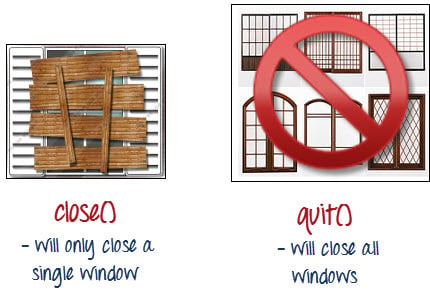
selenium_locating_strategies_basics/firstwebdriverscript_131_0.txt | But if you use quit(), all windows will be closed – not just the parent one.
Try running the code below and you will notice that the two pop-ups above will
automatically be closed as well. | |
selenium_locating_strategies_basics/basics_2_17.txt | chains-in-selenium-python/?ref=lbp)
* [ move_by_offset - Action Chains in Selenium Python ](https://www.geeksforgeeks.org/move_by_offset-action-chains-in-selenium-python/?ref=lbp)
* [ move_to_element method - Action Chains in Selenium Python ](https://www.geeksforgeeks.org/move_to_element-method-action-chains-i... | |
selenium_locating_strategies_basics/seleniumwebdriver_58_0.txt | * [ Quickstart ](https://docs.digitalocean.com/products/getting-started)
* [ Compute ](https://docs.digitalocean.com/products/compute)
* [ Storage ](https://docs.digitalocean.com/products/storage)
* [ Managed Databases ](https://docs.digitalocean.com/products/databases)
* [ Containers ](https://docs.digitalocean.com/pr... | |
selenium_locating_strategies_basics/seleniumcodesnippets_74_0.txt | \-- | |
selenium_locating_strategies_basics/firstwebdriverscript_133_0.txt | public class PG3 {
public static void main(String[] args) {
System.setProperty("webdriver.gecko.driver","C:\\geckodriver.exe");
WebDriver driver = new FirefoxDriver();
driver.get("http://www.popuptest.com/popuptest2.html");
driver.quit(); // using QUIT all windows will close
}
} | |
selenium_locating_strategies_basics/locating_strategies_0_3.txt | tind)
* [ Spring MVC Interview Questions ](https://www.geeksforgeeks.org/spring-mvc-interview-questions/?ref=outind)
* [ Hibernate Tutorial ](https://www.geeksforgeeks.org/hibernate-tutorial/?ref=outind)
* [ Hibernate Interview Questions ](https://www.geeksforgeeks.org/hibernate-interview-questi... | |
selenium_locating_strategies_basics/seleniumwebdriver_85_0.txt | ## What is Selenium WebDriver Interface? | |
selenium_locating_strategies_basics/seleniumcodesnippets_8_0.txt |  | |
selenium_locating_strategies_basics/seleniumcodesnippets_51_0.txt | ## 26\. [ Key Presses ](https://the-internet.herokuapp.com/key_presses) | |
selenium_locating_strategies_basics/acompletelistofselen_54_0.txt |
##### getClass() | |
selenium_locating_strategies_basics/firstwebdriverscript_172_0.txt | Use myWaitVar with ExpectedConditions on portions where you need the explicit
wait to occur. In this case, we will use explicit wait on the “username”
(Mercury Tours HomePage) input before we type the text “tutorial” onto it. | |
selenium_locating_strategies_basics/acompletelistofselen_39_0.txt |
##### getCurrentUrl() | |
selenium_locating_strategies_basics/firstwebdriverscript_207_0.txt | [ Previous Prev ](https://www.guru99.com/installing-selenium-webdriver.html) | |
selenium_locating_strategies_basics/seleniumcodesnippets_19_0.txt | Share | |
selenium_locating_strategies_basics/acompletelistofselen_63_0.txt | driver.navigate().to(“http://google.com”); | |
selenium_locating_strategies_basics/acompletelistofselen_338_0.txt | We’re almost done with all the respective Selenium commands that one will need
to complete their automation. Imagine an action such as a page reloads or a
form was submitted, the script would have to wait for a certain amount of time
to ensure the action has been completed. That is where the Selenium commands
for Synch... | |
selenium_locating_strategies_basics/basics_4_22.txt | um-python/?ref=lbp)
* [ get_property() element method - Selenium Python ](https://www.geeksforgeeks.org/get_property-element-method-selenium-python/?ref=lbp)
* [ get_attribute() element method - Selenium Python ](https://www.geeksforgeeks.org/get_attribute-element-method-selenium-python/?ref=lbp)
* [ send_k... | |
selenium_locating_strategies_basics/seleniumcodesnippets_11_0.txt | [ Madhan K ](/@madhankumaravelu93?source=post_page-----
f7fbc692c2b6--------------------------------) | |
selenium_locating_strategies_basics/firstwebdriverscript_238_0.txt | * [ Artificial Intelligence ](https://www.guru99.com/ai-tutorial.html)
* [ PyTorch ](https://www.guru99.com/pytorch-tutorial.html)
* [ Data Science ](https://www.guru99.com/data-science-tutorial-for-beginners.html)
* [ R Programming ](https://www.guru99.com/r-tutorial.html)
* [ Keras ](https://www.guru99.com/keras-tuto... | |
selenium_locating_strategies_basics/basics_4_18.txt | ?ref=lbp)
* [ quit driver method - Selenium Python ](https://www.geeksforgeeks.org/quit-driver-method-selenium-python/?ref=lbp)
* [ refresh driver method - Selenium Python ](https://www.geeksforgeeks.org/refresh-driver-method-selenium-python/?ref=lbp)
* [ set_page_load_timeout driver method - Selenium Pytho... | |
selenium_locating_strategies_basics/acompletelistofselen_249_0.txt | As the name suggests, you can use the above command to switch to another
frame. | |
selenium_locating_strategies_basics/acompletelistofselen_222_0.txt | The above command can be used to switch to the alert window. | |
selenium_locating_strategies_basics/acompletelistofselen_486_0.txt | We use cookies to ensure your best experience. For more information read our [
Privacy Policy ](/privacy-policy-page) | |
selenium_locating_strategies_basics/acompletelistofselen_237_0.txt | You can even retrieve the string content of the alert by using the above
Selenium command. | |
selenium_locating_strategies_basics/acompletelistofselen_97_0.txt |
##### sendKeys() | |
selenium_locating_strategies_basics/firstwebdriverscript_121_0.txt | Sample usage: | |
selenium_locating_strategies_basics/firstwebdriverscript_231_0.txt | * [ Home ](/)
* [ Testing ](/software-testing.html) Toggle child menu Expand | |
selenium_locating_strategies_basics/basics_1_2.txt | ollections ](https://www.geeksforgeeks.org/collections-in-java-2/?ref=outind)
* [ Collection Class ](https://www.geeksforgeeks.org/collections-class-in-java/?ref=outind)
* [ List Interface ](https://www.geeksforgeeks.org/list-interface-java-examples/?ref=outind)
* [ ArrayList ](https://www.geeks... | |
selenium_locating_strategies_basics/firstwebdriverscript_76_0.txt | [ 

](https://www.guru99.com/images/image014\(2\).png) | |
selenium_locating_strategies_basics/locating_strategies_0_14.txt | [ R Tutorial ](https://www.geeksforgeeks.org/r-tutorial/?ref=ghm)
* [ Golang ](https://www.geeksforgeeks.org/golang/?ref=ghm)
## Interview Corner
* [ Company Interview Corner ](https://www.geeksforgeeks.org/company-interview-corner/?ref=ghm)
* [ Experienced Interviews ](https://www.geeksforgeeks.org/exp... | |
selenium_locating_strategies_basics/acompletelistofselen_256_0.txt | * * * | |
selenium_locating_strategies_basics/firstwebdriverscript_126_0.txt | [ 
](https://www.guru99.com/images/image029.jpg) | |
selenium_locating_strategies_basics/basics_3_19.txt | using-selenium/?ref=lbp)
* [ Facebook Login using Python ](https://www.geeksforgeeks.org/facebook-login-using-python/?ref=lbp)
* [ Python | Automating Happy Birthday post on Facebook using Selenium ](https://www.geeksforgeeks.org/python-automating-happy-birthday-post-on-facebook-using-selenium/?ref=lbp)
* [... | |
selenium_locating_strategies_basics/locating_strategies_5_23.txt | chElementException will be raised.
****Syntax:** **
driver.find_element(By.ID, "id_of_element")
****Example:** **
For instance, consider this page source:
## html
__
__
__
__
__
__
__
` < ` ` html ` ` > ` ` ` ` < ` ` body ` ` > ` ` ` ` < ` ` form ` `
id="loginForm"> ` ` ` ` < ` ` i... | |
selenium_locating_strategies_basics/seleniumcodesnippets_38_0.txt | ## 13\. [ Exit Intent ](https://the-internet.herokuapp.com/exit_intent) | |
selenium_locating_strategies_basics/firstwebdriverscript_90_0.txt | Commands | Usage
---|---
**get()** | |
selenium_locating_strategies_basics/firstwebdriverscript_43_0.txt | actualTitle = driver.getTitle(); | |
selenium_locating_strategies_basics/seleniumwebdriver_76_0.txt | * Log in
* Log in to:
* [ Community ](https://www.digitalocean.com/api/dynamic-content/v1/login?success_redirect=https%3A%2F%2Fwww.digitalocean.com&error_redirect=https%3A%2F%2Fwww.digitalocean.com%2Fauth-error&type=login&site=community)
* [ DigitalOcean ](https://cloud.digitalocean.com)
* Sign up
* Sign up for:
* [ Co... | |
selenium_locating_strategies_basics/firstwebdriverscript_26_0.txt | //close Fire fox
driver.close();
} | |
selenium_locating_strategies_basics/basics_1_22.txt | bled-element-method-selenium-python/?ref=lbp)
* [ get_property() element method - Selenium Python ](https://www.geeksforgeeks.org/get_property-element-method-selenium-python/?ref=lbp)
* [ get_attribute() element method - Selenium Python ](https://www.geeksforgeeks.org/get_attribute-element-method-selenium-pytho... | |
selenium_locating_strategies_basics/locating_strategies_1_23.txt | # html
__
__
__
__
__
__
__
` < ` ` html ` ` > ` ` ` ` < ` ` body ` ` > ` ` ` ` < ` ` form ` ` id ` ` = `
` "loginForm" ` ` > ` ` ` ` < ` ` input ` ` name ` ` = ` ` "username" ` ` type
` ` = ` ` "text" ` ` /> ` ` ` ` < ` ` input ` ` name ` ` = ` ` "password" ` `
type ` ` = ` ` "password" ` ` /> ` ` ` ` < ` ... | |
selenium_locating_strategies_basics/acompletelistofselen_395_0.txt | #### Relative Locators | |
selenium_locating_strategies_basics/seleniumwebdriver_108_0.txt | ## What is Selenium WebDriver Interface? | |
selenium_locating_strategies_basics/firstwebdriverscript_27_0.txt | Note: Starting Firefox 35, you need to use gecko driver created by Mozilla to
use Web Driver. Selenium 3.0, gecko and firefox has compatibility issues and
setting them correctly could become an uphill task. If the code does not work,
downgrade to Firefox version 47 or below. Alternatively, you can run your
scripts on C... | |
selenium_locating_strategies_basics/firstwebdriverscript_122_0.txt | * Needs no parameters
* It closes only the browser window that WebDriver is currently controlling. | |
selenium_locating_strategies_basics/acompletelistofselen_473_0.txt | * [ Automation Testing ](/testing-services/automation-testing-services/)
* [ Agile Testing ](/testing-services/agile-testing/)
* [ Performance Testing ](/testing-services/performance-testing-services/)
* [ Data Analytics Testing ](/testing-services/data-analytics-testing-services/)
* [ Regression Testing ](/testing-ser... | |
selenium_locating_strategies_basics/firstwebdriverscript_75_0.txt | ` By.cssSelector() ` does not support the “contains” feature. Consider the
Selenium IDE code below – | |
selenium_locating_strategies_basics/firstwebdriverscript_170_0.txt | [ 

](https://www.guru99.com/images/image041\(1\).png) | |
selenium_locating_strategies_basics/firstwebdriverscript_195_0.txt | If you use explicit waits, the type of exception that you should catch is the
“TimeoutException”. | |
selenium_locating_strategies_basics/acompletelistofselen_466_0.txt |  | |
selenium_locating_strategies_basics/acompletelistofselen_158_0.txt | * * * | |
selenium_locating_strategies_basics/acompletelistofselen_431_0.txt | #### Comments (0) | |
selenium_locating_strategies_basics/seleniumwebdriver_92_0.txt | ](/community/tutorials/selenium-webdriver#list-of-classes-implementing-
webdriver) | |
selenium_locating_strategies_basics/seleniumcodesnippets_40_0.txt | ## 15\. [ File Upload ](https://the-internet.herokuapp.com/upload) | |
selenium_locating_strategies_basics/acompletelistofselen_399_0.txt | **Syntax:** | |
selenium_locating_strategies_basics/acompletelistofselen_36_0.txt | **Syntax:** | |
selenium_locating_strategies_basics/acompletelistofselen_454_0.txt | Sign up for our newsletter to never miss out on our latest blogs. | |
selenium_locating_strategies_basics/locating_strategies_3_5.txt | figuration-trouble-shooting-commands-linux/?ref=outind)
* [ Linux Firewall ](https://www.geeksforgeeks.org/linux-firewall/?ref=outind)
* [ Linux Interview Questions ](https://www.geeksforgeeks.org/linux-interview-questions/?ref=outind)
* Software Testing __
* Software Testing Tutorial __
... | |
selenium_locating_strategies_basics/locating_strategies_7_6.txt | * Interview Questions __
* [ Software Testing Interview Questions ](https://www.geeksforgeeks.org/software-testing-interview-questions/?ref=outind)
* [ Automation Testing Interview Questions ](https://www.geeksforgeeks.org/automation-testing-interview-questions/?ref=outind)
* [ Manual Testi... | |
selenium_locating_strategies_basics/acompletelistofselen_317_0.txt |
##### moveToElement(WebElement toElement) | |
selenium_locating_strategies_basics/locating_strategies_2_4.txt | esign Interview Questions and Answers ](https://www.geeksforgeeks.org/top-10-system-design-interview-questions-and-answers/?ref=outind)
* Interview Corner __
* [ Company Preparation ](https://www.geeksforgeeks.org/company-preparation/?ref=outind)
* [ Top Topics ](https://www.geeksforgeeks.org/interview... | |
selenium_locating_strategies_basics/seleniumcodesnippets_75_0.txt | [
](/m/signin?actionUrl=https%3A%2F%2Fmedium.com%2F_%2Fbookmark%2Fp%2Ff7fbc692c2b6&operation=register&redirect=https%3A%2F%2Fmedium.com%2F%40madhankumaravelu93%2Fselenium-
code-snippets-a-curated-list-of-the-working-code-
example-f7fbc692c2b6&source=--------------------------bookmark_footer-----------) | |
selenium_locating_strategies_basics/seleniumwebdriver_22_0.txt | * [ Paperspace ](/products/paperspace) | |
selenium_locating_strategies_basics/locating_strategies_3_8.txt | tind)
* [ Linked List Tutorial ](https://www.geeksforgeeks.org/introduction-to-linked-list-data-structure-and-algorithm-tutorial/?ref=outind)
* [ Stack ](https://www.geeksforgeeks.org/introduction-to-stack-data-structure-and-algorithm-tutorials/?ref=outind)
* [ Queue ](https://www.geeksforgeeks.org/... | |
selenium_locating_strategies_basics/acompletelistofselen_72_0.txt | * * * | |
selenium_locating_strategies_basics/acompletelistofselen_415_0.txt | * * * | |
selenium_locating_strategies_basics/firstwebdriverscript_107_0.txt | **navigate().to()** | |
selenium_locating_strategies_basics/locating_strategies_7_20.txt | ksforgeeks.org/find_elements_by_xpath-driver-method-selenium-python/?ref=lbp)
* [ find_elements_by_link_text() driver method - Selenium Python ](https://www.geeksforgeeks.org/find_elements_by_link_text-driver-method-selenium-python/?ref=lbp)
* [ find_elements_by_partial_link_text() driver method - Selenium Pyth... | |
selenium_locating_strategies_basics/firstwebdriverscript_192_0.txt | When using isEnabled(), isDisplayed(), and isSelected(), WebDriver assumes
that the element already exists on the page. Otherwise, it will throw a
**NoSuchElementException** . To avoid this, we should use a try-catch block so
that the program will not be interrupted. | |
selenium_locating_strategies_basics/seleniumwebdriver_99_0.txt | #### Tutorial | |
selenium_locating_strategies_basics/acompletelistofselen_12_0.txt | Selenium is a free and open-source testing tool that automates website
testing. It is not a single tool, but rather a set of four components known as
Selenium IDE, Selenium RC, Selenium WebDriver, and Selenium Grid. Selenium
offers a number of features to testers as it provides support for multiple
browsers, parallel t... | |
selenium_locating_strategies_basics/basics_1_26.txt | ink/gfg-app) [  ](https://geeksforgeeksapp.page.link/gfg-app)
* Company
* [ About Us ](https://www.geeksforgeeks.org/about/?ref=outindfooter)
* [ Legal ](https://www.geeksforgeeks.org/legal/?ref=outindfooter)
* [ Care... | |
selenium_locating_strategies_basics/firstwebdriverscript_177_0.txt | [ 

](https://www.guru99.com/images/image043\(1\).png) |
Subsets and Splits
No community queries yet
The top public SQL queries from the community will appear here once available.