

| # DeepSpeed | |
| [DeepSpeed](https://github.com/microsoft/DeepSpeed) implements everything described in the [ZeRO paper](https://arxiv.org/abs/1910.02054). Some of the salient optimizations are: | |
| 1. Optimizer state partitioning (ZeRO stage 1) | |
| 2. Gradient partitioning (ZeRO stage 2) | |
| 3. Parameter partitioning (ZeRO stage 3) | |
| 4. Custom mixed precision training handling | |
| 5. A range of fast CUDA-extension-based optimizers | |
| 6. ZeRO-Offload to CPU and Disk/NVMe | |
| 7. Heirarchical partitioning of model parameters (ZeRO++) | |
| ZeRO-Offload has its own dedicated paper: [ZeRO-Offload: Democratizing Billion-Scale Model Training](https://arxiv.org/abs/2101.06840). And NVMe-support is described in the paper [ZeRO-Infinity: Breaking the GPU | |
| Memory Wall for Extreme Scale Deep Learning](https://arxiv.org/abs/2104.07857). | |
| DeepSpeed ZeRO-2 is primarily used only for training, as its features are of no use to inference. | |
| DeepSpeed ZeRO-3 can be used for inference as well since it allows huge models to be loaded on multiple GPUs, which | |
| won't be possible on a single GPU. | |
| 🤗 Accelerate integrates [DeepSpeed](https://github.com/microsoft/DeepSpeed) via 2 options: | |
| 1. Integration of the DeepSpeed features via `deepspeed config file` specification in `accelerate config` . You just supply your custom config file or use our template. Most of | |
| this document is focused on this feature. This supports all the core features of DeepSpeed and gives user a lot of flexibility. | |
| User may have to change a few lines of code depending on the config. | |
| 2. Integration via `deepspeed_plugin`.This supports subset of the DeepSpeed features and uses default options for the rest of the configurations. | |
| User need not change any code and is good for those who are fine with most of the default settings of DeepSpeed. | |
| ## What is integrated? | |
| Training: | |
| 1. 🤗 Accelerate integrates all features of DeepSpeed ZeRO. This includes all the ZeRO stages 1, 2 and 3 as well as ZeRO-Offload, ZeRO-Infinity (which can offload to disk/NVMe) and ZeRO++. | |
| Below is a short description of Data Parallelism using ZeRO - Zero Redundancy Optimizer along with diagram from this [blog post](https://www.microsoft.com/en-us/research/blog/zero-deepspeed-new-system-optimizations-enable-training-models-with-over-100-billion-parameters/) | |
| 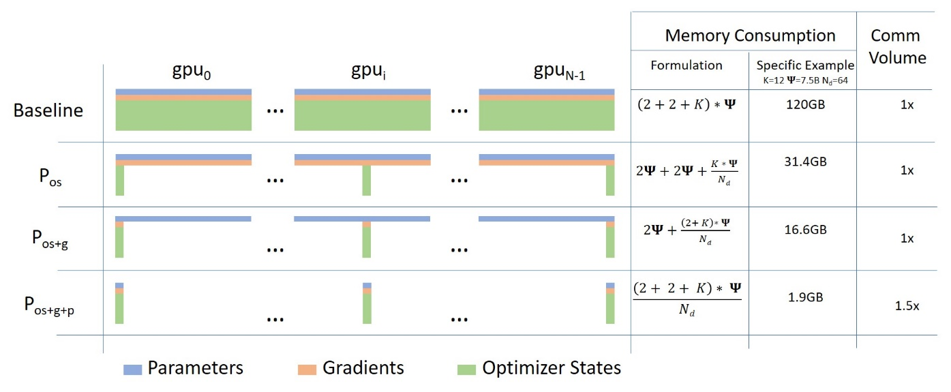 | |
| (Source: [link](https://www.microsoft.com/en-us/research/blog/zero-deepspeed-new-system-optimizations-enable-training-models-with-over-100-billion-parameters/)) | |
| a. **Stage 1** : Shards optimizer states across data parallel workers/GPUs | |
| b. **Stage 2** : Shards optimizer states + gradients across data parallel workers/GPUs | |
| c. **Stage 3**: Shards optimizer states + gradients + model parameters across data parallel workers/GPUs | |
| d. **Optimizer Offload**: Offloads the gradients + optimizer states to CPU/Disk building on top of ZERO Stage 2 | |
| e. **Param Offload**: Offloads the model parameters to CPU/Disk building on top of ZERO Stage 3 | |
| f. **Heirarchical Paritioning**: Enables efficient multi-node training with data-parallel training across nodes and ZeRO-3 sharding within a node, built on top of ZeRO Stage 3. | |
| <u>Note</u>: With respect to Disk Offload, the disk should be an NVME for decent speed but it technically works on any Disk | |
| Inference: | |
| 1. DeepSpeed ZeRO Inference supports ZeRO stage 3 with ZeRO-Infinity. It uses the same ZeRO protocol as training, but | |
| it doesn't use an optimizer and a lr scheduler and only stage 3 is relevant. For more details see: | |
| [deepspeed-zero-inference](#deepspeed-zero-inference). | |
| ## How it works? | |
| **Pre-Requisites**: Install DeepSpeed version >=0.6.5. Please refer to the [DeepSpeed Installation details](https://github.com/microsoft/DeepSpeed#installation) | |
| for more information. | |
| We will first look at easy to use integration via `accelerate config`. | |
| Followed by more flexible and feature rich `deepspeed config file` integration. | |
| ### Accelerate DeepSpeed Plugin | |
| On your machine(s) just run: | |
| ```bash | |
| accelerate config | |
| ``` | |
| and answer the questions asked. It will ask whether you want to use a config file for DeepSpeed to which you should answer no. Then answer the following questions to generate a basic DeepSpeed config. | |
| This will generate a config file that will be used automatically to properly set the | |
| default options when doing | |
| ```bash | |
| accelerate launch my_script.py --args_to_my_script | |
| ``` | |
| For instance, here is how you would run the NLP example `examples/nlp_example.py` (from the root of the repo) with DeepSpeed Plugin: | |
| **ZeRO Stage-2 DeepSpeed Plugin Example** | |
| ```bash | |
| compute_environment: LOCAL_MACHINE | |
| deepspeed_config: | |
| gradient_accumulation_steps: 1 | |
| gradient_clipping: 1.0 | |
| offload_optimizer_device: none | |
| offload_param_device: none | |
| zero3_init_flag: true | |
| zero_stage: 2 | |
| distributed_type: DEEPSPEED | |
| fsdp_config: {} | |
| machine_rank: 0 | |
| main_process_ip: null | |
| main_process_port: null | |
| main_training_function: main | |
| mixed_precision: fp16 | |
| num_machines: 1 | |
| num_processes: 2 | |
| use_cpu: false | |
| ``` | |
| ```bash | |
| accelerate launch examples/nlp_example.py --mixed_precision fp16 | |
| ``` | |
| **ZeRO Stage-3 with CPU Offload DeepSpeed Plugin Example** | |
| ```bash | |
| compute_environment: LOCAL_MACHINE | |
| deepspeed_config: | |
| gradient_accumulation_steps: 1 | |
| gradient_clipping: 1.0 | |
| offload_optimizer_device: cpu | |
| offload_param_device: cpu | |
| zero3_init_flag: true | |
| zero3_save_16bit_model: true | |
| zero_stage: 3 | |
| distributed_type: DEEPSPEED | |
| fsdp_config: {} | |
| machine_rank: 0 | |
| main_process_ip: null | |
| main_process_port: null | |
| main_training_function: main | |
| mixed_precision: fp16 | |
| num_machines: 1 | |
| num_processes: 2 | |
| use_cpu: false | |
| ``` | |
| ```bash | |
| accelerate launch examples/nlp_example.py --mixed_precision fp16 | |
| ``` | |
| Currently, `Accelerate` supports following config through the CLI: | |
| ```bash | |
| `zero_stage`: [0] Disabled, [1] optimizer state partitioning, [2] optimizer+gradient state partitioning and [3] optimizer+gradient+parameter partitioning | |
| `gradient_accumulation_steps`: Number of training steps to accumulate gradients before averaging and applying them. | |
| `gradient_clipping`: Enable gradient clipping with value. | |
| `offload_optimizer_device`: [none] Disable optimizer offloading, [cpu] offload optimizer to CPU, [nvme] offload optimizer to NVMe SSD. Only applicable with ZeRO >= Stage-2. | |
| `offload_param_device`: [none] Disable parameter offloading, [cpu] offload parameters to CPU, [nvme] offload parameters to NVMe SSD. Only applicable with ZeRO Stage-3. | |
| `zero3_init_flag`: Decides whether to enable `deepspeed.zero.Init` for constructing massive models. Only applicable with ZeRO Stage-3. | |
| `zero3_save_16bit_model`: Decides whether to save 16-bit model weights when using ZeRO Stage-3. | |
| `mixed_precision`: `no` for FP32 training, `fp16` for FP16 mixed-precision training and `bf16` for BF16 mixed-precision training. | |
| ``` | |
| To be able to tweak more options, you will need to use a DeepSpeed config file. | |
| ### DeepSpeed Config File | |
| On your machine(s) just run: | |
| ```bash | |
| accelerate config | |
| ``` | |
| and answer the questions asked. It will ask whether you want to use a config file for deepspeed to which you answer yes | |
| and provide the path to the deepspeed config file. | |
| This will generate a config file that will be used automatically to properly set the | |
| default options when doing | |
| ```bash | |
| accelerate launch my_script.py --args_to_my_script | |
| ``` | |
| For instance, here is how you would run the NLP example `examples/by_feature/deepspeed_with_config_support.py` (from the root of the repo) with DeepSpeed Config File: | |
| **ZeRO Stage-2 DeepSpeed Config File Example** | |
| ```bash | |
| compute_environment: LOCAL_MACHINE | |
| deepspeed_config: | |
| deepspeed_config_file: /home/ubuntu/accelerate/examples/configs/deepspeed_config_templates/zero_stage2_config.json | |
| zero3_init_flag: true | |
| distributed_type: DEEPSPEED | |
| fsdp_config: {} | |
| machine_rank: 0 | |
| main_process_ip: null | |
| main_process_port: null | |
| main_training_function: main | |
| mixed_precision: fp16 | |
| num_machines: 1 | |
| num_processes: 2 | |
| use_cpu: false | |
| ``` | |
| with the contents of `zero_stage2_config.json` being: | |
| ```json | |
| { | |
| "fp16": { | |
| "enabled": true, | |
| "loss_scale": 0, | |
| "loss_scale_window": 1000, | |
| "initial_scale_power": 16, | |
| "hysteresis": 2, | |
| "min_loss_scale": 1 | |
| }, | |
| "optimizer": { | |
| "type": "AdamW", | |
| "params": { | |
| "lr": "auto", | |
| "weight_decay": "auto", | |
| "torch_adam": true, | |
| "adam_w_mode": true | |
| } | |
| }, | |
| "scheduler": { | |
| "type": "WarmupDecayLR", | |
| "params": { | |
| "warmup_min_lr": "auto", | |
| "warmup_max_lr": "auto", | |
| "warmup_num_steps": "auto", | |
| "total_num_steps": "auto" | |
| } | |
| }, | |
| "zero_optimization": { | |
| "stage": 2, | |
| "allgather_partitions": true, | |
| "allgather_bucket_size": 2e8, | |
| "overlap_comm": true, | |
| "reduce_scatter": true, | |
| "reduce_bucket_size": "auto", | |
| "contiguous_gradients": true | |
| }, | |
| "gradient_accumulation_steps": 1, | |
| "gradient_clipping": "auto", | |
| "steps_per_print": 2000, | |
| "train_batch_size": "auto", | |
| "train_micro_batch_size_per_gpu": "auto", | |
| "wall_clock_breakdown": false | |
| } | |
| ``` | |
| ```bash | |
| accelerate launch examples/by_feature/deepspeed_with_config_support.py \ | |
| --config_name "gpt2-large" \ | |
| --tokenizer_name "gpt2-large" \ | |
| --dataset_name "wikitext" \ | |
| --dataset_config_name "wikitext-2-raw-v1" \ | |
| --block_size 128 \ | |
| --output_dir "./clm/clm_deepspeed_stage2_accelerate" \ | |
| --learning_rate 5e-4 \ | |
| --per_device_train_batch_size 24 \ | |
| --per_device_eval_batch_size 24 \ | |
| --num_train_epochs 3 \ | |
| --with_tracking \ | |
| --report_to "wandb"\ | |
| ``` | |
| **ZeRO Stage-3 with CPU offload DeepSpeed Config File Example** | |
| ```bash | |
| compute_environment: LOCAL_MACHINE | |
| deepspeed_config: | |
| deepspeed_config_file: /home/ubuntu/accelerate/examples/configs/deepspeed_config_templates/zero_stage3_offload_config.json | |
| zero3_init_flag: true | |
| distributed_type: DEEPSPEED | |
| fsdp_config: {} | |
| machine_rank: 0 | |
| main_process_ip: null | |
| main_process_port: null | |
| main_training_function: main | |
| mixed_precision: fp16 | |
| num_machines: 1 | |
| num_processes: 2 | |
| use_cpu: false | |
| ``` | |
| with the contents of `zero_stage3_offload_config.json` being: | |
| ```json | |
| { | |
| "fp16": { | |
| "enabled": true, | |
| "loss_scale": 0, | |
| "loss_scale_window": 1000, | |
| "initial_scale_power": 16, | |
| "hysteresis": 2, | |
| "min_loss_scale": 1 | |
| }, | |
| "optimizer": { | |
| "type": "AdamW", | |
| "params": { | |
| "lr": "auto", | |
| "weight_decay": "auto" | |
| } | |
| }, | |
| "scheduler": { | |
| "type": "WarmupDecayLR", | |
| "params": { | |
| "warmup_min_lr": "auto", | |
| "warmup_max_lr": "auto", | |
| "warmup_num_steps": "auto", | |
| "total_num_steps": "auto" | |
| } | |
| }, | |
| "zero_optimization": { | |
| "stage": 3, | |
| "offload_optimizer": { | |
| "device": "cpu", | |
| "pin_memory": true | |
| }, | |
| "offload_param": { | |
| "device": "cpu", | |
| "pin_memory": true | |
| }, | |
| "overlap_comm": true, | |
| "contiguous_gradients": true, | |
| "reduce_bucket_size": "auto", | |
| "stage3_prefetch_bucket_size": "auto", | |
| "stage3_param_persistence_threshold": "auto", | |
| "sub_group_size": 1e9, | |
| "stage3_max_live_parameters": 1e9, | |
| "stage3_max_reuse_distance": 1e9, | |
| "stage3_gather_16bit_weights_on_model_save": "auto" | |
| }, | |
| "gradient_accumulation_steps": 1, | |
| "gradient_clipping": "auto", | |
| "steps_per_print": 2000, | |
| "train_batch_size": "auto", | |
| "train_micro_batch_size_per_gpu": "auto", | |
| "wall_clock_breakdown": false | |
| } | |
| ``` | |
| ```bash | |
| accelerate launch examples/by_feature/deepspeed_with_config_support.py \ | |
| --config_name "gpt2-large" \ | |
| --tokenizer_name "gpt2-large" \ | |
| --dataset_name "wikitext" \ | |
| --dataset_config_name "wikitext-2-raw-v1" \ | |
| --block_size 128 \ | |
| --output_dir "./clm/clm_deepspeed_stage3_offload_accelerate" \ | |
| --learning_rate 5e-4 \ | |
| --per_device_train_batch_size 32 \ | |
| --per_device_eval_batch_size 32 \ | |
| --num_train_epochs 3 \ | |
| --with_tracking \ | |
| --report_to "wandb"\ | |
| ``` | |
| **ZeRO++ Config Example** | |
| You can use the the features of ZeRO++ by using the appropriate config parameters. Note that ZeRO++ is an extension for ZeRO Stage 3. Here is how the config file can be modified, from [DeepSpeed's ZeRO++ tutorial](https://www.deepspeed.ai/tutorials/zeropp/): | |
| ```json | |
| { | |
| "zero_optimization": { | |
| "stage": 3, | |
| "reduce_bucket_size": "auto", | |
| "zero_quantized_weights": true, | |
| "zero_hpz_partition_size": 8, | |
| "zero_quantized_gradients": true, | |
| "contiguous_gradients": true, | |
| "overlap_comm": true | |
| } | |
| } | |
| ``` | |
| For heirarchical partitioning, the partition size `zero_hpz_partition_size` should ideally be set to the number of GPUs per node. (For example, the above config file assumes 8 GPUs per node) | |
| **Important code changes when using DeepSpeed Config File** | |
| 1. DeepSpeed Optimizers and Schedulers. For more information on these, | |
| see the [DeepSpeed Optimizers](https://deepspeed.readthedocs.io/en/latest/optimizers.html) and [DeepSpeed Schedulers](https://deepspeed.readthedocs.io/en/latest/schedulers.html) documentation. | |
| We will look at the changes needed in the code when using these. | |
| a. DS Optim + DS Scheduler: The case when both `optimizer` and `scheduler` keys are present in the DeepSpeed config file. | |
| In this situation, those will be used and the user has to use `accelerate.utils.DummyOptim` and `accelerate.utils.DummyScheduler` to replace the PyTorch/Custom optimizers and schedulers in their code. | |
| Below is the snippet from `examples/by_feature/deepspeed_with_config_support.py` showing this: | |
| ```python | |
| # Creates Dummy Optimizer if `optimizer` was spcified in the config file else creates Adam Optimizer | |
| optimizer_cls = ( | |
| torch.optim.AdamW | |
| if accelerator.state.deepspeed_plugin is None | |
| or "optimizer" not in accelerator.state.deepspeed_plugin.deepspeed_config | |
| else DummyOptim | |
| ) | |
| optimizer = optimizer_cls(optimizer_grouped_parameters, lr=args.learning_rate) | |
| # Creates Dummy Scheduler if `scheduler` was spcified in the config file else creates `args.lr_scheduler_type` Scheduler | |
| if ( | |
| accelerator.state.deepspeed_plugin is None | |
| or "scheduler" not in accelerator.state.deepspeed_plugin.deepspeed_config | |
| ): | |
| lr_scheduler = get_scheduler( | |
| name=args.lr_scheduler_type, | |
| optimizer=optimizer, | |
| num_warmup_steps=args.num_warmup_steps, | |
| num_training_steps=args.max_train_steps, | |
| ) | |
| else: | |
| lr_scheduler = DummyScheduler( | |
| optimizer, total_num_steps=args.max_train_steps, warmup_num_steps=args.num_warmup_steps | |
| ) | |
| ``` | |
| b. Custom Optim + Custom Scheduler: The case when both `optimizer` and `scheduler` keys are absent in the DeepSpeed config file. | |
| In this situation, no code changes are needed from the user and this is the case when using integration via DeepSpeed Plugin. | |
| In the above example we can see that the code remains unchanged if the `optimizer` and `scheduler` keys are absent in the DeepSpeed config file. | |
| c. Custom Optim + DS Scheduler: The case when only `scheduler` key is present in the DeepSpeed config file. | |
| In this situation, the user has to use `accelerate.utils.DummyScheduler` to replace the PyTorch/Custom scheduler in their code. | |
| d. DS Optim + Custom Scheduler: The case when only `optimizer` key is present in the DeepSpeed config file. | |
| This will result in an error because you can only use DS Scheduler when using DS Optim. | |
| 2. Notice the `auto` values in the above example DeepSpeed config files. These are automatically handled by `prepare` method | |
| based on model, dataloaders, dummy optimizer and dummy schedulers provided to `prepare` method. | |
| Only the `auto` fields specified in above examples are handled by `prepare` method and the rest have to be explicitly specified by the user. | |
| The `auto` values are calculated as: | |
| - `reduce_bucket_size`: `hidden_size*hidden_size` | |
| - `stage3_prefetch_bucket_size`: `0.9 * hidden_size * hidden_size` | |
| - `stage3_param_persistence_threshold`: `10 * hidden_size` | |
| **Things to note when using DeepSpeed Config File** | |
| Below is a sample script using `deepspeed_config_file` in different scenarios. | |
| Code `test.py`: | |
| ```python | |
| from accelerate import Accelerator | |
| from accelerate.state import AcceleratorState | |
| def main(): | |
| accelerator = Accelerator() | |
| accelerator.print(f"{AcceleratorState()}") | |
| if __name__ == "__main__": | |
| main() | |
| ``` | |
| **Scenario 1**: Manually tampered accelerate config file having `deepspeed_config_file` along with other entries. | |
| 1. Content of the `accelerate` config: | |
| ```yaml | |
| command_file: null | |
| commands: null | |
| compute_environment: LOCAL_MACHINE | |
| deepspeed_config: | |
| gradient_accumulation_steps: 1 | |
| gradient_clipping: 1.0 | |
| offload_optimizer_device: 'cpu' | |
| offload_param_device: 'cpu' | |
| zero3_init_flag: true | |
| zero3_save_16bit_model: true | |
| zero_stage: 3 | |
| deepspeed_config_file: 'ds_config.json' | |
| distributed_type: DEEPSPEED | |
| downcast_bf16: 'no' | |
| dynamo_backend: 'NO' | |
| fsdp_config: {} | |
| gpu_ids: null | |
| machine_rank: 0 | |
| main_process_ip: null | |
| main_process_port: null | |
| main_training_function: main | |
| megatron_lm_config: {} | |
| num_machines: 1 | |
| num_processes: 2 | |
| rdzv_backend: static | |
| same_network: true | |
| tpu_name: null | |
| tpu_zone: null | |
| use_cpu: false | |
| ``` | |
| 2. `ds_config.json`: | |
| ```json | |
| { | |
| "bf16": { | |
| "enabled": true | |
| }, | |
| "zero_optimization": { | |
| "stage": 3, | |
| "stage3_gather_16bit_weights_on_model_save": false, | |
| "offload_optimizer": { | |
| "device": "none" | |
| }, | |
| "offload_param": { | |
| "device": "none" | |
| } | |
| }, | |
| "gradient_clipping": 1.0, | |
| "train_batch_size": "auto", | |
| "train_micro_batch_size_per_gpu": "auto", | |
| "gradient_accumulation_steps": 10, | |
| "steps_per_print": 2000000 | |
| } | |
| ``` | |
| 3. Output of `accelerate launch test.py`: | |
| ```bash | |
| ValueError: When using `deepspeed_config_file`, the following accelerate config variables will be ignored: | |
| ['gradient_accumulation_steps', 'gradient_clipping', 'zero_stage', 'offload_optimizer_device', 'offload_param_device', | |
| 'zero3_save_16bit_model', 'mixed_precision']. | |
| Please specify them appropriately in the DeepSpeed config file. | |
| If you are using an accelerate config file, remove others config variables mentioned in the above specified list. | |
| The easiest method is to create a new config following the questionnaire via `accelerate config`. | |
| It will only ask for the necessary config variables when using `deepspeed_config_file`. | |
| ``` | |
| **Scenario 2**: Use the solution of the error to create new accelerate config and check that no ambiguity error is now thrown. | |
| 1. Run `accelerate config`: | |
| ```bash | |
| $ accelerate config | |
| ------------------------------------------------------------------------------------------------------------------------------- | |
| In which compute environment are you running? | |
| This machine | |
| ------------------------------------------------------------------------------------------------------------------------------- | |
| Which type of machine are you using? | |
| multi-GPU | |
| How many different machines will you use (use more than 1 for multi-node training)? [1]: | |
| Do you wish to optimize your script with torch dynamo?[yes/NO]: | |
| Do you want to use DeepSpeed? [yes/NO]: yes | |
| Do you want to specify a json file to a DeepSpeed config? [yes/NO]: yes | |
| Please enter the path to the json DeepSpeed config file: ds_config.json | |
| Do you want to enable `deepspeed.zero.Init` when using ZeRO Stage-3 for constructing massive models? [yes/NO]: yes | |
| How many GPU(s) should be used for distributed training? [1]:4 | |
| accelerate configuration saved at ds_config_sample.yaml | |
| ``` | |
| 2. Content of the `accelerate` config: | |
| ```yaml | |
| compute_environment: LOCAL_MACHINE | |
| deepspeed_config: | |
| deepspeed_config_file: ds_config.json | |
| zero3_init_flag: true | |
| distributed_type: DEEPSPEED | |
| downcast_bf16: 'no' | |
| dynamo_backend: 'NO' | |
| fsdp_config: {} | |
| machine_rank: 0 | |
| main_training_function: main | |
| megatron_lm_config: {} | |
| num_machines: 1 | |
| num_processes: 4 | |
| rdzv_backend: static | |
| same_network: true | |
| use_cpu: false | |
| ``` | |
| 3. Output of `accelerate launch test.py`: | |
| ```bash | |
| Distributed environment: DEEPSPEED Backend: nccl | |
| Num processes: 4 | |
| Process index: 0 | |
| Local process index: 0 | |
| Device: cuda:0 | |
| Mixed precision type: bf16 | |
| ds_config: {'bf16': {'enabled': True}, 'zero_optimization': {'stage': 3, 'stage3_gather_16bit_weights_on_model_save': False, 'offload_optimizer': {'device': 'none'}, 'offload_param': {'device': 'none'}}, 'gradient_clipping': 1.0, 'train_batch_size': 'auto', 'train_micro_batch_size_per_gpu': 'auto', 'gradient_accumulation_steps': 10, 'steps_per_print': inf, 'fp16': {'enabled': False}} | |
| ``` | |
| **Scenario 3**: Setting the `accelerate launch` command arguments related to DeepSpeed as `"auto"` in the DeepSpeed` configuration file and check that things work as expected. | |
| 1. New `ds_config.json` with `"auto"` for the `accelerate launch` DeepSpeed command arguments: | |
| ```json | |
| { | |
| "bf16": { | |
| "enabled": "auto" | |
| }, | |
| "zero_optimization": { | |
| "stage": "auto", | |
| "stage3_gather_16bit_weights_on_model_save": "auto", | |
| "offload_optimizer": { | |
| "device": "auto" | |
| }, | |
| "offload_param": { | |
| "device": "auto" | |
| } | |
| }, | |
| "gradient_clipping": "auto", | |
| "train_batch_size": "auto", | |
| "train_micro_batch_size_per_gpu": "auto", | |
| "gradient_accumulation_steps": "auto", | |
| "steps_per_print": 2000000 | |
| } | |
| ``` | |
| 2. Output of `accelerate launch --mixed_precision="fp16" --zero_stage=3 --gradient_accumulation_steps=5 --gradient_clipping=1.0 --offload_param_device="cpu" --offload_optimizer_device="nvme" --zero3_save_16bit_model="true" test.py`: | |
| ```bash | |
| Distributed environment: DEEPSPEED Backend: nccl | |
| Num processes: 4 | |
| Process index: 0 | |
| Local process index: 0 | |
| Device: cuda:0 | |
| Mixed precision type: fp16 | |
| ds_config: {'bf16': {'enabled': False}, 'zero_optimization': {'stage': 3, 'stage3_gather_16bit_weights_on_model_save': True, 'offload_optimizer': {'device': 'nvme'}, 'offload_param': {'device': 'cpu'}}, 'gradient_clipping': 1.0, 'train_batch_size': 'auto', 'train_micro_batch_size_per_gpu': 'auto', 'gradient_accumulation_steps': 5, 'steps_per_print': inf, 'fp16': {'enabled': True, 'auto_cast': True}} | |
| ``` | |
| **Note**: | |
| 1. Remaining `"auto"` values are handled in `accelerator.prepare()` call as explained in point 2 of | |
| `Important code changes when using DeepSpeed Config File`. | |
| 2. Only when `gradient_accumulation_steps` is `auto`, the value passed while creating `Accelerator` object via `Accelerator(gradient_accumulation_steps=k)` will be used. When using DeepSpeed Plugin, the value from it will be used and it will overwrite the value passed while creating Accelerator object. | |
| ## Saving and loading | |
| 1. Saving and loading of models is unchanged for ZeRO Stage-1 and Stage-2. | |
| 2. under ZeRO Stage-3, `state_dict` contains just the placeholders since the model weights are partitioned across multiple GPUs. | |
| ZeRO Stage-3 has 2 options: | |
| a. Saving the entire 16bit model weights to directly load later on using `model.load_state_dict(torch.load(pytorch_model.bin))`. | |
| For this, either set `zero_optimization.stage3_gather_16bit_weights_on_model_save` to True in DeepSpeed Config file or set | |
| `zero3_save_16bit_model` to True in DeepSpeed Plugin. | |
| **Note that this option requires consolidation of the weights on one GPU it can be slow and memory demanding, so only use this feature when needed.** | |
| Below is the snippet from `examples/by_feature/deepspeed_with_config_support.py` showing this: | |
| ```python | |
| unwrapped_model = accelerator.unwrap_model(model) | |
| # New Code # | |
| # Saves the whole/unpartitioned fp16 model when in ZeRO Stage-3 to the output directory if | |
| # `stage3_gather_16bit_weights_on_model_save` is True in DeepSpeed Config file or | |
| # `zero3_save_16bit_model` is True in DeepSpeed Plugin. | |
| # For Zero Stages 1 and 2, models are saved as usual in the output directory. | |
| # The model name saved is `pytorch_model.bin` | |
| unwrapped_model.save_pretrained( | |
| args.output_dir, | |
| is_main_process=accelerator.is_main_process, | |
| save_function=accelerator.save, | |
| state_dict=accelerator.get_state_dict(model), | |
| ) | |
| ``` | |
| b. To get 32bit weights, first save the model using `model.save_checkpoint()`. | |
| Below is the snippet from `examples/by_feature/deepspeed_with_config_support.py` showing this: | |
| ```python | |
| success = model.save_checkpoint(PATH, ckpt_id, checkpoint_state_dict) | |
| status_msg = "checkpointing: PATH={}, ckpt_id={}".format(PATH, ckpt_id) | |
| if success: | |
| logging.info(f"Success {status_msg}") | |
| else: | |
| logging.warning(f"Failure {status_msg}") | |
| ``` | |
| This will create ZeRO model and optimizer partitions along with `zero_to_fp32.py` script in checkpoint directory. | |
| You can use this script to do offline consolidation. | |
| It requires no configuration files or GPUs. Here is an example of its usage: | |
| ```bash | |
| $ cd /path/to/checkpoint_dir | |
| $ ./zero_to_fp32.py . pytorch_model.bin | |
| Processing zero checkpoint at global_step1 | |
| Detected checkpoint of type zero stage 3, world_size: 2 | |
| Saving fp32 state dict to pytorch_model.bin (total_numel=60506624) | |
| ``` | |
| To get 32bit model for saving/inference, you can perform: | |
| ```python | |
| from deepspeed.utils.zero_to_fp32 import load_state_dict_from_zero_checkpoint | |
| unwrapped_model = accelerator.unwrap_model(model) | |
| fp32_model = load_state_dict_from_zero_checkpoint(unwrapped_model, checkpoint_dir) | |
| ``` | |
| If you are only interested in the `state_dict`, you can do the following: | |
| ```python | |
| from deepspeed.utils.zero_to_fp32 import get_fp32_state_dict_from_zero_checkpoint | |
| state_dict = get_fp32_state_dict_from_zero_checkpoint(checkpoint_dir) | |
| ``` | |
| Note that all these functions require ~2x memory (general RAM) of the size of the final checkpoint. | |
| ## ZeRO Inference | |
| DeepSpeed ZeRO Inference supports ZeRO stage 3 with ZeRO-Infinity. | |
| It uses the same ZeRO protocol as training, but it doesn't use an optimizer and a lr scheduler and only stage 3 is relevant. | |
| With accelerate integration, you just need to prepare the model and dataloader as shown below: | |
| ```python | |
| model, eval_dataloader = accelerator.prepare(model, eval_dataloader) | |
| ``` | |
| ## Few caveats to be aware of | |
| 1. Current integration doesn’t support Pipeline Parallelism of DeepSpeed. | |
| 2. Current integration doesn’t support `mpu`, limiting the tensor parallelism which is supported in Megatron-LM. | |
| 3. Current integration doesn’t support multiple models. | |
| ## DeepSpeed Resources | |
| The documentation for the internals related to deepspeed can be found [here](../package_reference/deepspeed). | |
| - [Project's github](https://github.com/microsoft/deepspeed) | |
| - [Usage docs](https://www.deepspeed.ai/getting-started/) | |
| - [API docs](https://deepspeed.readthedocs.io/en/latest/index.html) | |
| - [Blog posts](https://www.microsoft.com/en-us/research/search/?q=deepspeed) | |
| Papers: | |
| - [ZeRO: Memory Optimizations Toward Training Trillion Parameter Models](https://arxiv.org/abs/1910.02054) | |
| - [ZeRO-Offload: Democratizing Billion-Scale Model Training](https://arxiv.org/abs/2101.06840) | |
| - [ZeRO-Infinity: Breaking the GPU Memory Wall for Extreme Scale Deep Learning](https://arxiv.org/abs/2104.07857) | |
| - [ZeRO++: Extremely Efficient Collective Communication for Giant Model Training](https://arxiv.org/abs/2306.10209) | |
| Finally, please, remember that 🤗 `Accelerate` only integrates DeepSpeed, therefore if you | |
| have any problems or questions with regards to DeepSpeed usage, please, file an issue with [DeepSpeed GitHub](https://github.com/microsoft/DeepSpeed/issues). | |