


language:
  - en
license: mit
task_categories:
  - visual-question-answering
  - image-text-to-text
tags:
  - retrieval-augmented-generation
  - multimodal
  - benchmark
M2RAG: Benchmarking Retrieval-Augmented Generation in Multi-Modal Contexts
Click the links below to view our paper and Github project.


If you find this work useful, please cite our paper and give us a shining star 🌟 in Github
@misc{liu2025benchmarkingretrievalaugmentedgenerationmultimodal,
      title={Benchmarking Retrieval-Augmented Generation in Multi-Modal Contexts},
      author={Zhenghao Liu and Xingsheng Zhu and Tianshuo Zhou and Xinyi Zhang and Xiaoyuan Yi and Yukun Yan and Yu Gu and Ge Yu and Maosong Sun},
      year={2025},
      eprint={2502.17297},
      archivePrefix={arXiv},
      primaryClass={cs.AI},
      url={https://arxiv.org/abs/2502.17297},
}
🎃 Overview
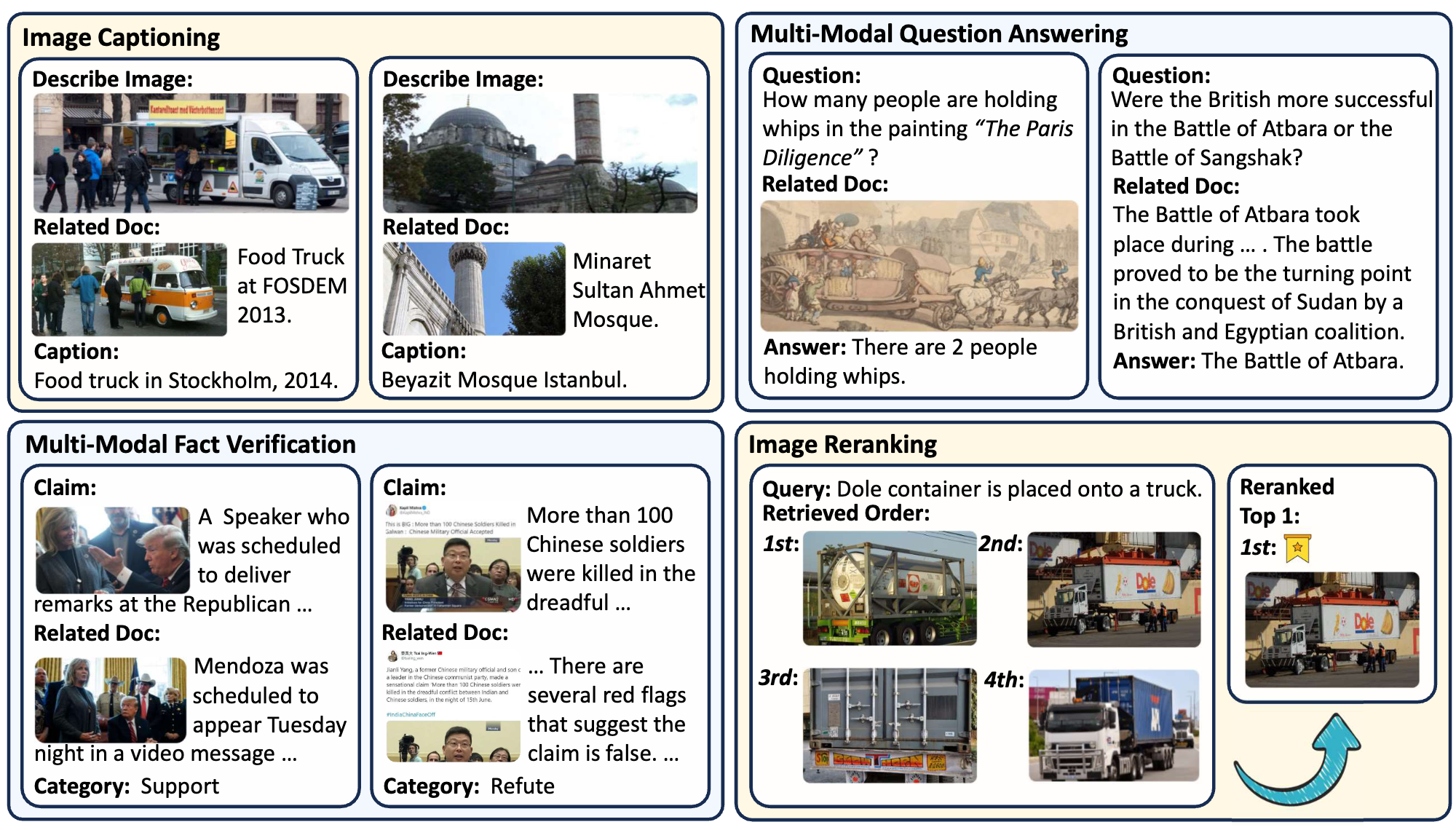
The M²RAG benchmark evaluates Multi-modal Large Language Models (MLLMs) by using multi-modal retrieved documents to answer questions. It includes four tasks: image captioning, multi-modal QA, fact verification, and image reranking, assessing MLLMs’ ability to leverage knowledge from multi-modal contexts.
The Multi-Modal Retrieval Augmented Instruction Tuning (MM-RAIT) method further adapts MLLMs to multi-modal in-context learning, enhancing their effectiveness in utilizing knowledge from these retrieval documents.
🎃 Data Storage Structure
The data storage structure of M2RAG is as follows:
M2RAG/
    ├──fact_verify/
    ├──image_cap/
    ├──image_rerank/
    ├──mmqa/
    ├──imgs.lineidx.new
    └──imgs.tsv
❗️Note:
If you encounter difficulties when downloading the images directly, please download and use the pre-packaged image file
M2RAG_Images.zipinstead.To obtain the
imgs.tsv, you can follow the instructions in the WebQA project. Specifically, you need to first download all the data from the folder WebQA_imgs_7z_chunks, and then run the command7z x imgs.7z.001to unzip and merge all chunks to get the imgs.tsv.
🎃 Sample Usage
🌵 Requirements
To use this dataset and reproduce results, install the following packages using Pip or Conda:
Python==3.10
Pytorch
transformers==4.44.2 (4.46.1 for finetune qwen2-vl)
clip
faiss==1.9.0
tqdm
numpy
base64
diffusers
flash-attn
xformers
llamafactory
accelerate
nltk
rouge_score
sklearn
We provide the version file requirements.txt of all our used packages in the GitHub repository for environment configuration.
You will also need pretrained models: MiniCPM-V 2.6, Qwen2-VL, and VISTA (used for multi-modal document retrieval).
🌵 Reproduce MM-RAIT
Download Code & Dataset
First, clone the project from GitHub:
git clone https://github.com/NEUIR/M2RAG
cd M2RAG
Second, you can either directly download and use M2RAG, or follow the instructions in 'data/data_preprocess' to build it step by step. Please place the downloaded dataset in the data folder as shown in the data structure above.
(❗️Note: For the imgs.tsv, you need to download the data from this link and run 7z x imgs.7z.001).
data/
└──m2rag/
    ├──fact_verify/
    ├──image_cap/
    ├──image_rerank/
    ├──mmqa/
    ├──imgs.lineidx.new
    └──imgs.tsv
Inference for Zero-Shot setting
Once the dataset and vanilla models are ready, you can follow the instructions below to reproduce our zero-shot results.
- Step 1: Encode the queries from the test set and the multi-modal corpus for each task.
cd script
bash get_embed_test.sh
- Step 2: Retrieve the topN most relevant multi-modal documents for each query.
bash retrieval_test.sh
- Step 3: Use the retrieved documents for vanilla RAG inference.
bash inference_cpmv.sh # or bash inference_qwen.sh
For Image Reranking task, please use:
bash compute_ppl_minicpmv.sh # or bash compute_ppl_qwen2vl.sh
Train MM-RAIT
Using the MiniCPM-V 2.6 models as an example, I will show you how to reproduce the results in this paper. The same is true for the Qwen2-VL. Also, we provide fine-tuned checkpoints. You can skip this step and proceed directly to inference.
- First step: Prepare the training data.
bash get_embed_train.sh
bash retrieval_train.sh
cd ../data/
bash finetune/construct_finetune_data.sh
- Second step: Fine-tune the MiniCPM-V model using LoRA.
cd ../script
bash finetune_cpmv.sh
- Final step: Use the fine-tuned model for inference.
bash inference_cpmv.sh
For Image Reranking task, please use:
bash compute_ppl_minicpmv.sh
🌵 Evaluate Generation Effectiveness
Go to the src/evaluation folder and evaluate model performance as follows:
- For Image Captioning and Multi-modal QA tasks, please use:
python generation.py --reference_file path_to_reference_data --candidate_file path_to_generation_data
- For Multi-Modal Fact Verification task, please use:
python classification.py --true_file path_to_reference_data --pred_file path_to_generation_data
- For Image Reranking task, please use:
python -m pytorch_fid path/to/reference_images path/to/rerank_images
🎃 Contact
If you have questions, suggestions, and bug reports, please email:
zhuxingsheng@stumail.neu.edu.cn zhoutianshuo@stumail.neu.edu.cn